



Choosing the right project management software isn’t just about finding the platform with the longest list of features. It’s about finding a solution that fits the way your team plans, collaborates and delivers work.
In this 2026 buyer’s guide, we’ll compare the best project management software on the market, explain their key features and help you determine which option is the best fit for your business.
What Features and Tools Should You Look for in Project Management Software?
Whether you’re managing a small team or a large portfolio of projects, the best project management software should include the core features and tools below to help you plan, organize and track work more effectively.
| Feature | How does It Work? | Key Tools to Look For |
| Project planning | Helps you define your project’s goals, scope, budget, milestones and deliverables before work begins. | Gantt charts, project roadmaps, milestone charts, project templates |
| Project scheduling | Lets you build project timelines, schedule tasks and organize work in the right order to keep projects moving forward. | Gantt charts, project calendars, task dependencies, critical path analysis |
| Resource management | Helps you assign people, equipment, materials and other resources so they stay productive. | Resource planners, workload charts, resource calendars, capacity planning tools |
| Time tracking | Tracks work hours, making it easier to manage productivity, bill clients and control labor costs. | Timesheets, time trackers, billable hours tracker, attendance logs |
| Project reporting | Turns project data into easy-to-read reports and dashboards so you can quickly monitor project health. | Dashboards, status reports, project reports, analytics and reporting tools |
| Cost management | Helps you create budgets, track expenses and monitor project costs so you can protect your profit margins. | Budget trackers, cost management dashboards, earned value analysis, cost forecasting tools |
| Project tracking | Shows how your project is performing compared to the original plan, helping you catch delays and budget issues. | Progress trackers, project dashboards, variance reports, performance indicators |
| Task management | Keeps tasks organized by assigning work, setting priorities and tracking progress. | Task lists, Kanban boards, task cards, to-do lists, priority queues |
Now that we know about the features you should look out for when choosing project management software, let’s take a look at the top 14 project management software solutions for 2026.
2026 Best Project Management Software Rankings
Many project management tools on the market sell themselves as the go-to solution. But how do they measure up to the task? We’ve thoroughly reviewed different types of software for project management, including:
- Agile project management software
- Construction project management software
- Project planning software
- Project scheduling software
- Project tracking software
- Project portfolio management software
- Best open-source project management software
We’ve reviewed the best—here are our top picks.
1. ProjectManager
ProjectManager is an award-winning project management software that organizes teams and projects from initiation to closure. It helps plan, schedule, execute, monitor, balance resources and workload, track and report on projects in real time.
Since the tool is cloud-based, all of the features are accessible anywhere there’s an internet connection. Teams can collaborate by sitting next to one another, or on opposite sides of the globe. Automated email notifications and in-app alerts notify other team members when there’s a new task comment or update. There’s even a free trial so you try it for yourself.
Plan with Gantt Charts
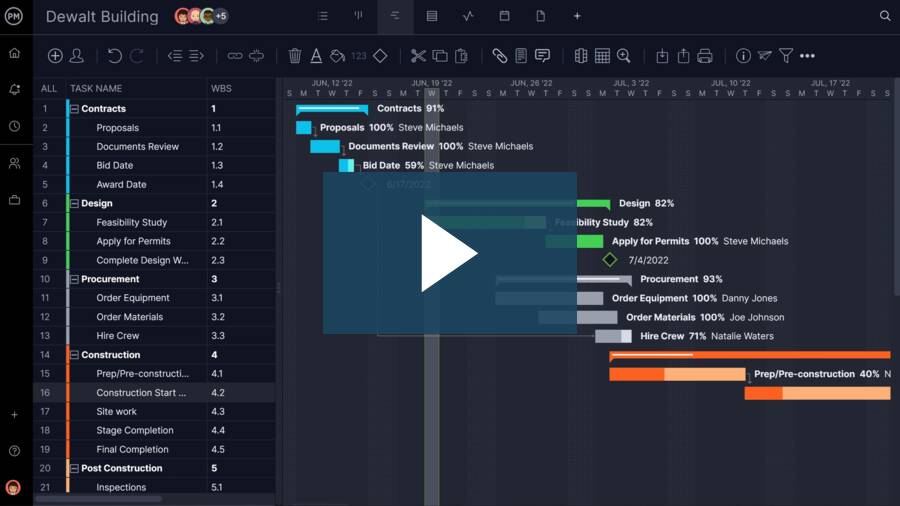
No project management software worth the investment lacks the workhorse of traditional project management, the Gantt chart. ProjectManager has taken the Gantt chart into the new century, allowing teams to build, edit and share project plans. The Gantt acts as a visual project timeline while linking dependencies, creating milestones and even filtering for the critical path. Users can manage resource costs and other budget components. When a plan is finalized, setting a baseline means that project managers can track project variance in real time to keep their project on schedule and within budget.
Automate Workflows Over Multiple Views
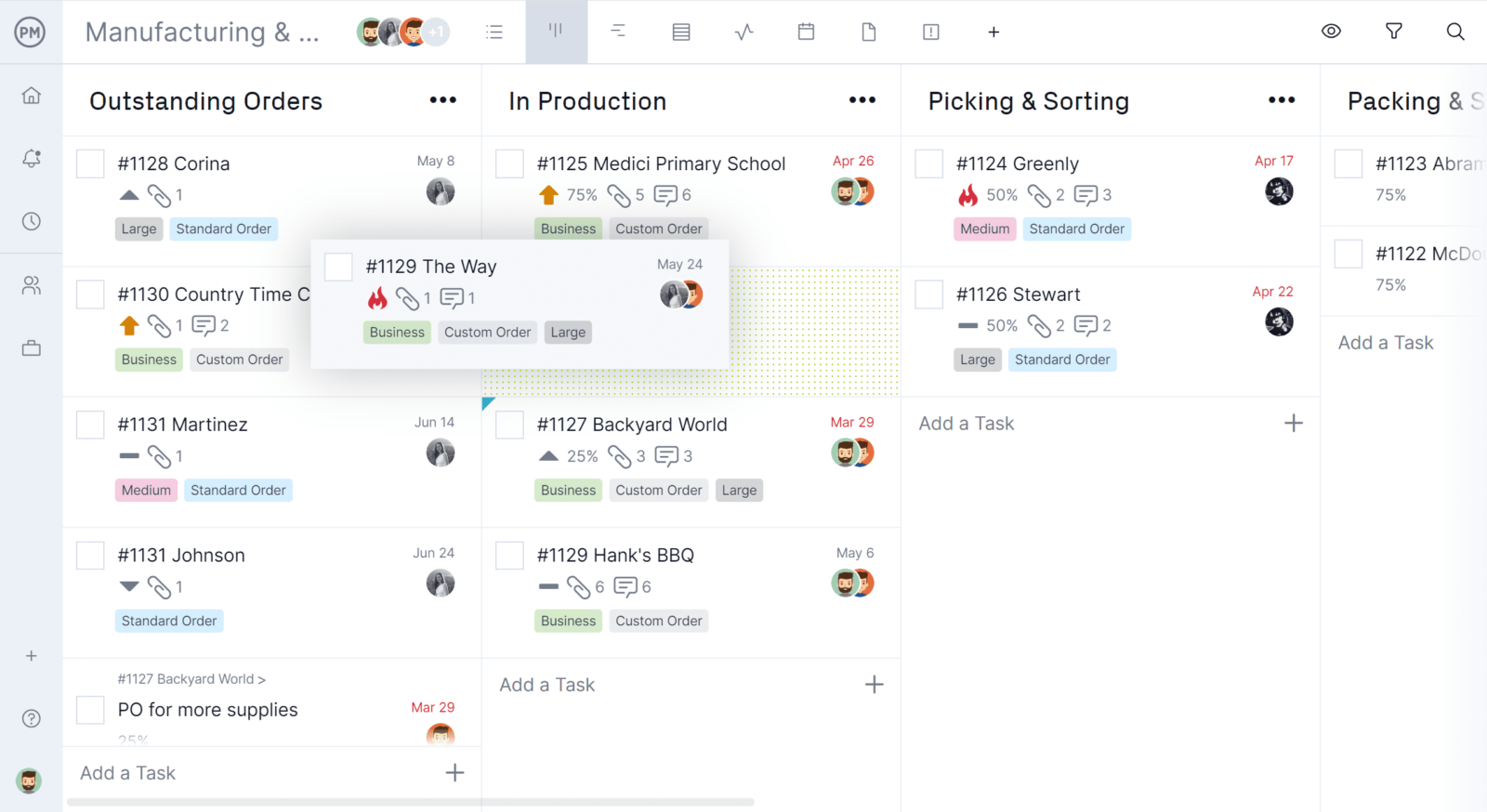
Another reason that ProjectManager tops our list of best project management software is that it automated workflows to streamline business processes. By setting up triggers that automate actions, teams are free to focus on more important work. There’s even a task approval setting to ensure that work never fails to meet quality expectations. The automated workflow is available on all project views, from Gantt charts and sheets to kanban, list and calendar views. This is important as project managers, designers, account executives, customer service, stakeholders, et al., use different tools. With ProjectManager, they can work how they want and stay connected to everyone in the project to work better together. This flexibility allows for unrivaled productivity.
Track & Report with Dashboards
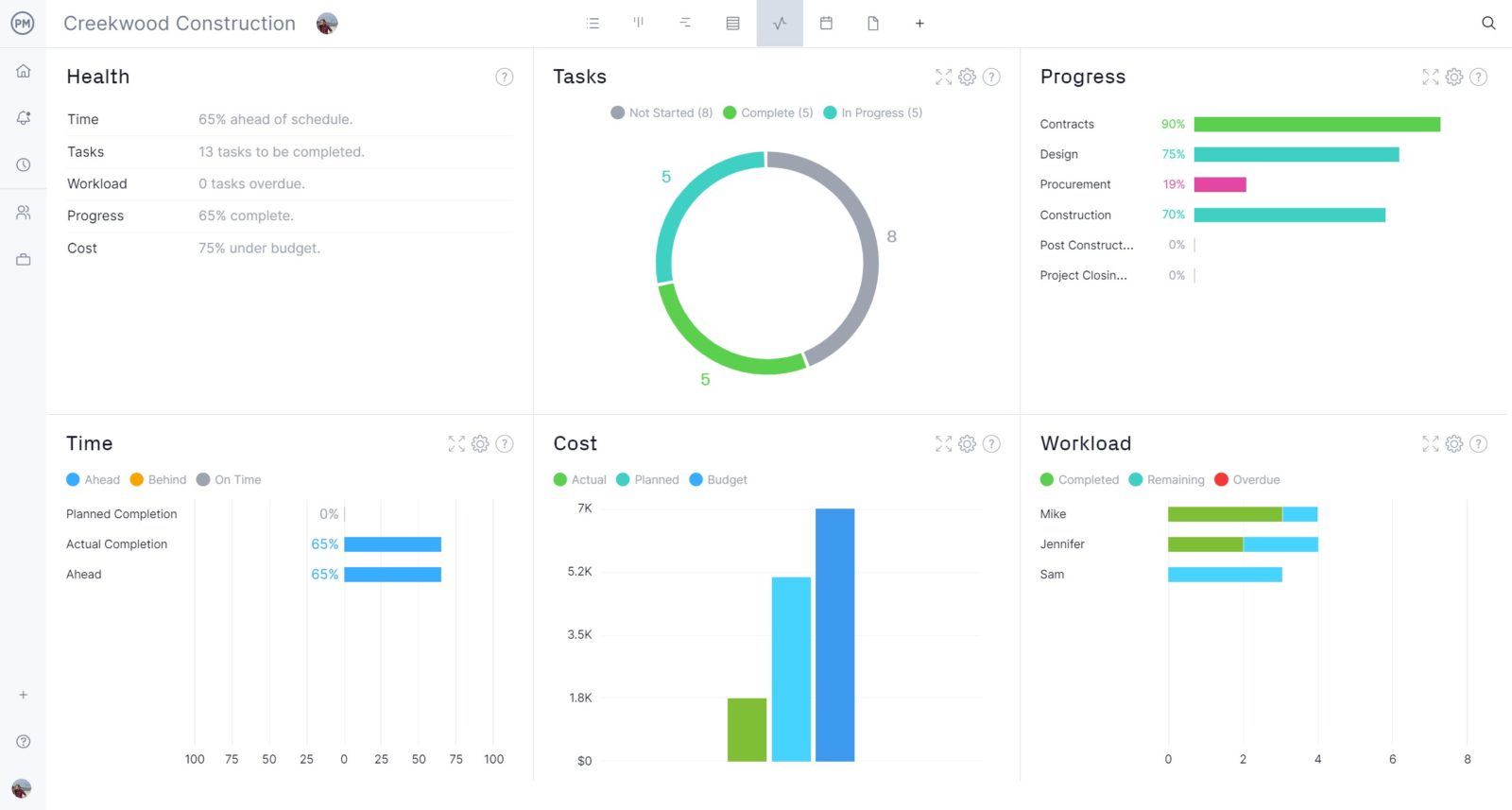
Of course, without a way to monitor the project, all of the automation and project views in the world won’t deliver success. But ProjectManager is project management software that has multiple windows into project progress and performance all in real time. A live dashboard captures project data, calculates it and displays six metrics including time, task, workload, costs, etc. Unlike other project management software, there’s no setup required to get a high-level view of the project whenever you want.
Create Reports in Minutes
Reporting is another integral facet of project management software. Reports can provide valuable real-time data to help managers make better decisions and they’re key to staying on schedule and managing stakeholder expectations. ProjectManager has customizable reports for project and portfolio status, tasks, timesheets and more. They can be filtered to show details for project managers or a more general overview for stakeholders. Plus, it’s easy to share reports in a number of formats.
Track Costs & Resources with Timesheets
Don’t overlook the importance of resource management tools that balance team workload to keep them working at capacity. ProjectManager has secure timesheets to track time on tasks, streamline payroll and tools to see team availability when making assignments. There’s an online file storage and global search that turns project management software into the project hub. With so many noteworthy features, those looking for software that meets their project needs should get started with ProjectManager for free.
ProjectManager Pros
- Complete project planning, scheduling and tracking in one integrated platform.
- Built-in resource management with workload charts and capacity planning.
- Native time tracking and timesheets simplify labor management and billing.
- Real-time dashboards and customizable reports provide instant project visibility.
- Budget tracking and cost management help control project spending from start to finish.
ProjectManager Cons
- Lacks dedicated creative proofing and approval workflows for design teams.
- Doesn’t focus on no-code app building or highly customized business workflows.
- CRM functionality isn’t designed to replace dedicated customer relationship management software.
- Advanced financial accounting requires integration with external accounting platforms.
ProjectManager Pricing
- For accurate pricing information, visit ProjectManager’s pricing page by clicking here.
ProjectManager Reviews
- G2 reviews: 4.4/5
- Capterra reviews: 4.1/5
Highlighted User Reviews
- “ProjectManager works very well with both large and small-scale projects. Being able to use this with anything from a project involving only two members of staff, to hundreds, has been invaluable.” Peter W – from Capterra
- “We used to manage our projects, resources, and reporting in different systems. Enter ProjectManager. We have consolidated systems and work more efficiently.” Jeffrey M – from Capterra
- “Having the full scope of activities and who is responsible to do it, plus the time tracking is excellent.” Flavio M – from G2
- “It has an excellent accounting system capable of calculating the time that a person has used to develop a task that was assigned to him, I like being able to collaborate with all my colleagues in the Finance sector through ProjectManager.” Jesus C – from G2
- “The UI of the application is user-friendly, and it helps to identify what we are looking for with minimal effort.” Pavan H – from G2
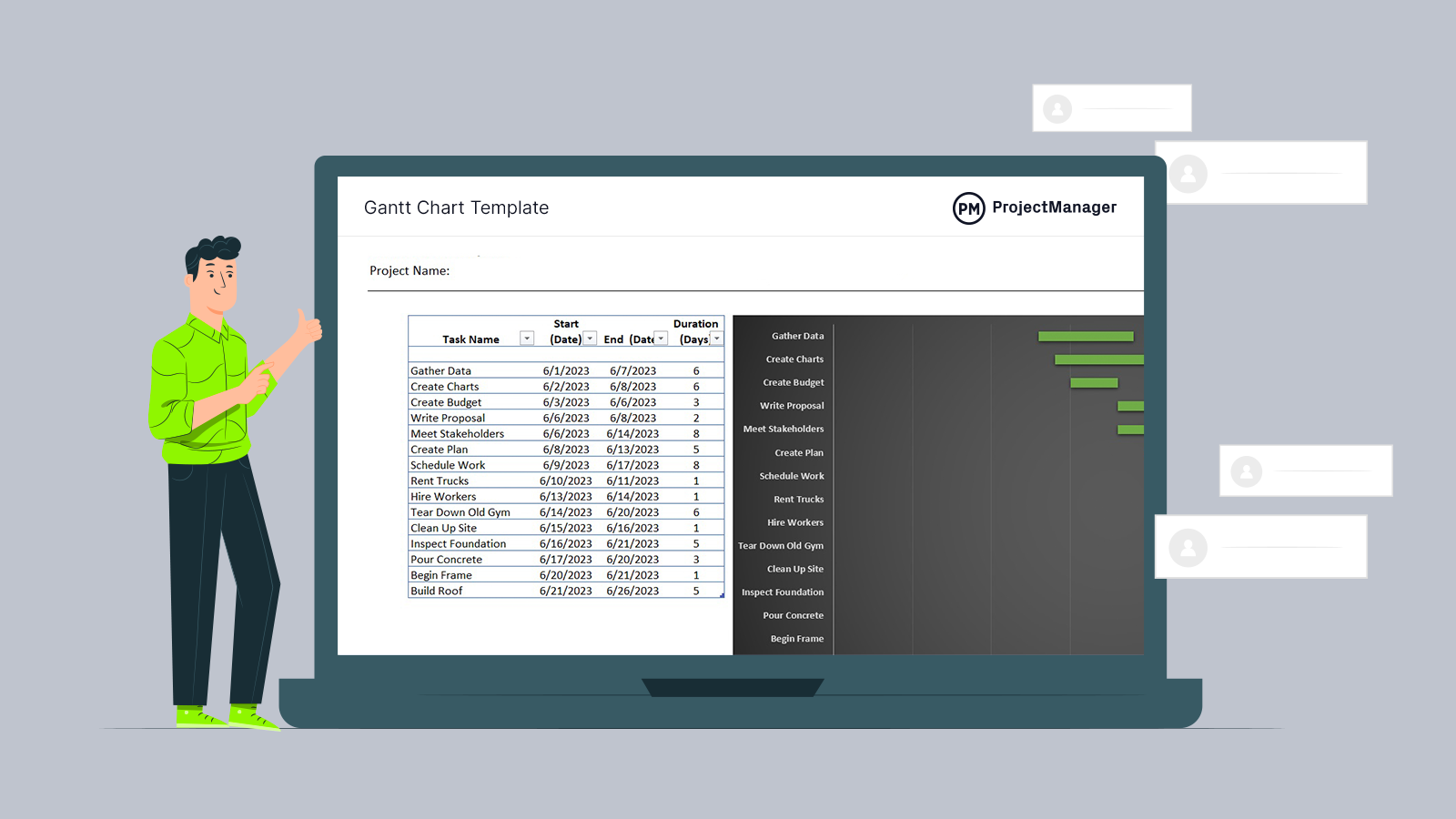
Get your free
Gantt Chart Template
Use this free Gantt Chart Template to manage your projects better.
Get the Template
2. Smartsheet

Smartsheet is a popular project management tool that bills itself as a productivity booster. It’s easy to use and flexible enough to manage projects of different sizes. It features a Gantt chart and kanban boards as well as a dashboard to get a big-picture view.
Related: Free & Paid Smartsheet Alternatives Ranked
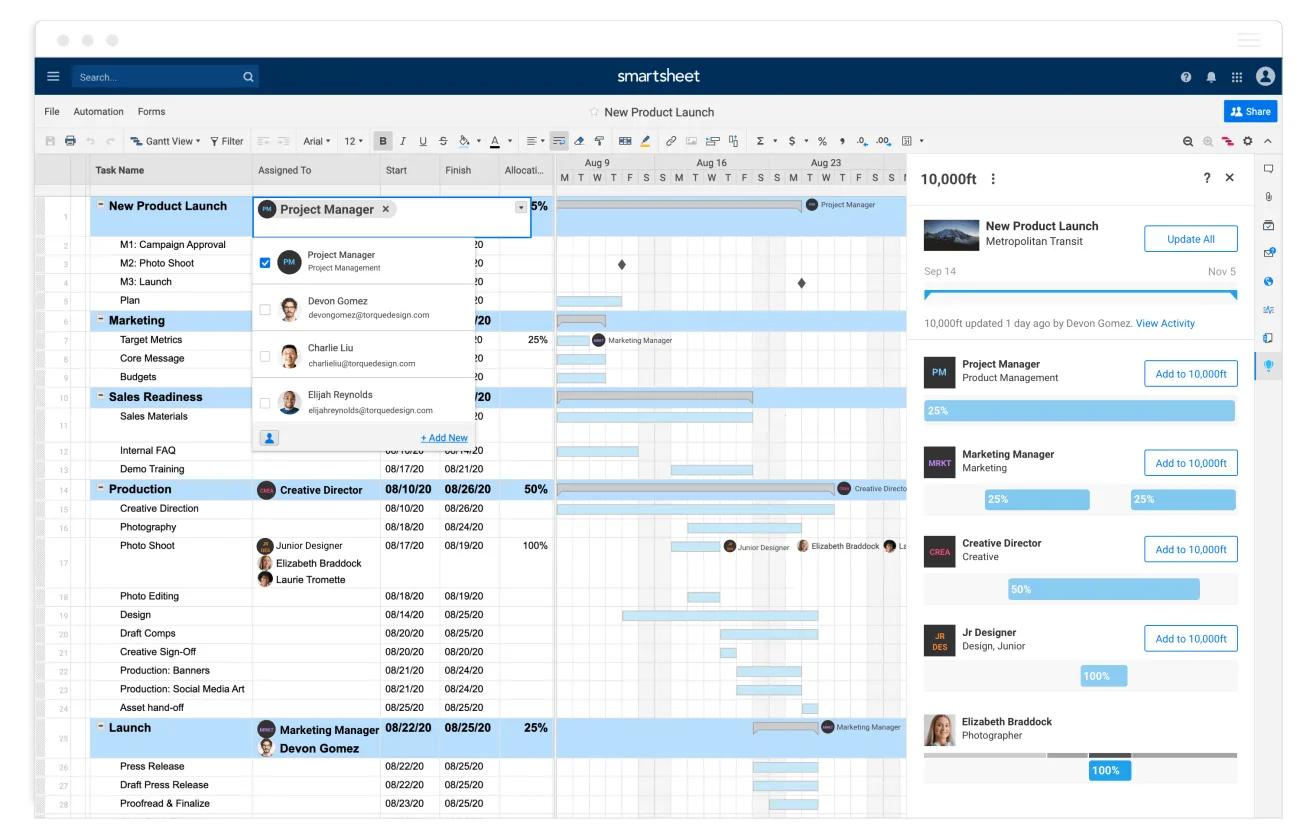
Like most project management software tools, Smartsheet fosters collaboration, but it comes with a high price tag. Some features are missing, even though it’s an otherwise thorough tool. Native time tracking isn’t part of the core Smartsheet workspace so users must look for add-ons and integrations.
Smartsheet Pros
- Familiar spreadsheet interface makes adoption easier for Excel users.
- Strong project scheduling with Gantt charts, dependencies and calendars.
- Smartsheet Resource Management, a Smartsheet add-on supports workload balancing and capacity planning.
- Dashboards and reports provide real-time project insights.
- Automations reduce repetitive administrative work across projects.
Smartsheet Cons
- Native time tracking relies on the separate Resource Management product.
- Cost management is less comprehensive than dedicated project financial management platforms.
- Doesn’t offer built-in earned value management capabilities.
- Resource planning requires additional products for advanced workforce management.
- Interface can become complex as sheets and automations grow.
Smartsheet Pricing
- For accurate pricing information, visit Smartsheet’s pricing page by clicking here.
Smartsheet Reviews
- G2 reviews: 4.4/5
- Capterra reviews: 4.5/5
Highlighted User Reviews
- “Smartsheet is a great platform for data visualization and project management.” Pathan I – from Capterra
- “Easily allows a sharable document that concurrent users can view and make live changes to.” Steven K – from G2
3. Wrike

Wrike positions itself as an agile project management software. It organizes tasks, facilitates collaboration with file sharing and keeps track of progress. They have Gantt charts, reporting and security features. What distinguishes the tool is its three-pane view, which shows a dashboard, an individual or new task and all tasks and subtasks.
Related: Free & Paid Wrike Alternatives Ranked
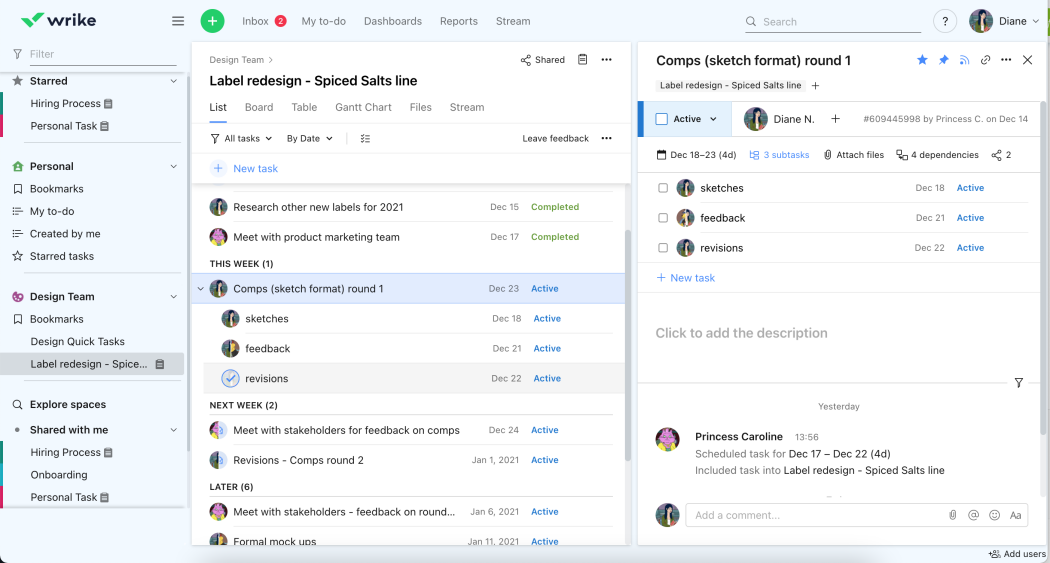
That three-pane view can be a deficit, though, as it can be hard to navigate and onboard teams. Its project tracking is limited, which can be frustrating when trying to keep to your schedule and budget. Like many of the more commercially branded products, Wrike can be expensive.
Wrike Pros
- Strong task management with customizable workflows and automation.
- Built-in time tracking records hours for better productivity reporting.
- Resource planning helps balance workloads across project teams.
- Interactive dashboards and reports provide real-time project visibility.
- Gantt charts simplify project scheduling and dependency management.
Wrike Cons
- Budget and cost management aren’t a primary focus of the platform.
- Advanced resource planning is limited to higher-tier plans.
- Financial forecasting requires integrations with external accounting systems.
- Doesn’t include built-in project accounting features.
- Some advanced capabilities are only available in premium plans.
Wrike Pricing
- For accurate pricing information, visit Wrike’s pricing page by clicking here.
Wrike Reviews
- G2 reviews: 4.4/5
- Capterra reviews: 4.1/5
Highlighted User Reviews
- “Wrike has become essential in my day and keeps me organized and on top of my tasks.” Paige T – from G2
- “Productivity has been enhanced by removing essential but repetitive chores.” Denise S – from G2
4. Monday

Monday is a tool that connects teams so that they can execute their tasks more efficiently. It helps teams plan, manage and track tasks on a visual interface, allowing for the creation of visual workflows. The tool can execute projects no matter their size or complexity, helping teams stay organized and productive.
Related: Free & Paid Monday Alternatives Ranked
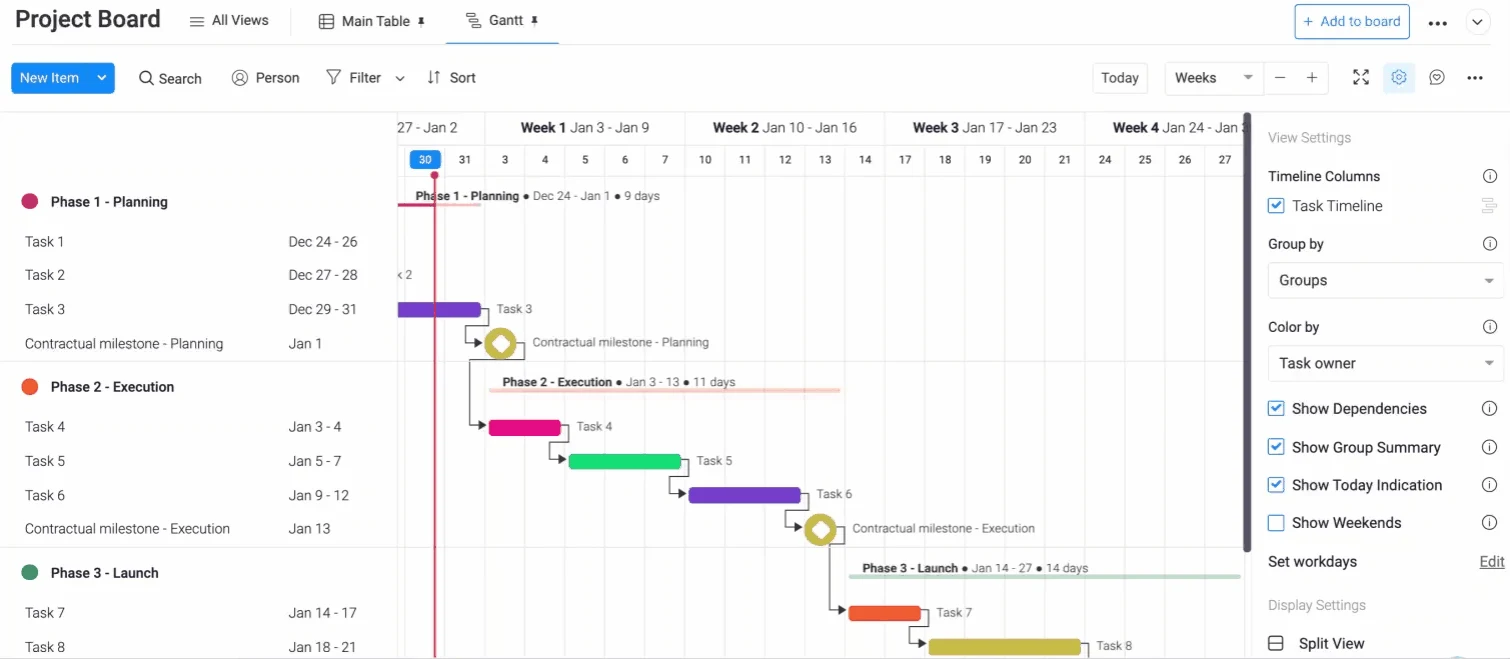
Oddly, as it targets task management, Monday makes it difficult to track time and expenses related to tasks. The biggest omission, however, is the lack of a fully-featured Gantt chart, which is considered the standard tool when planning and scheduling tasks for teams. If you’re interested in using this software with other applications, the integration is limited. There are many apps that work with Monday, but many popular ones don’t, which has led to the development of Monday alternatives.
Monday.com Pros
- Highly visual interface makes project and task management easy to learn.
- Multiple project views support planning, scheduling and collaboration.
- Custom dashboards provide real-time project reporting.
- Workflow automations reduce repetitive manual tasks.
- Flexible templates help teams get projects started quickly.
Monday.com Cons
- Advanced resource management requires higher-tier plans or additional products.
- Time tracking isn’t available on every pricing plan.
- Cost management features are less comprehensive than dedicated project management platforms.
- Doesn’t provide native earned value management capabilities.
- Project accounting depends on third-party integrations.
Monday.com Pricing
- For accurate pricing information, visit Monday.com’s pricing page by clicking here.
Monday.com Reviews
- G2 reviews: 4.4/5
- Capterra reviews: 4.5/5
Highlighted User Reviews
- “I truly recommend using Monday.com to small to medium scale enterprises because of its ease of use.” Vikas G – from G2
- “I really like the Monday.com work management interface.” Luiz Fernando J – from G2
5. Asana

Asana has a large user base which is a testament to its ability to manage tasks. This large user base might be due to Asana’s integrations with other apps, likely a selling point for many. It also has a full slate of features, from Gantt charts to kanban boards, though some of its features are in-app and others require plug-ins.
Related: Free & Paid Asana Alternatives Ranked

One of the main setbacks of Asana as a task management tool is the fact that tasks can only be assigned to one person. If you have a team working together on executing a task, there’s no way to assign it to multiple people. Time tracking is available, but may not cover every team’s scheduling and budget-tracking needs.. Asana is a popular tool but has tracking drawbacks that leave many looking for an alternative.
Asana Pros
- Multiple project views simplify planning, scheduling and task organization.
- Built-in time tracking compares estimated and actual work hours.
- Resource and budget tracking improve project planning and forecasting.
- Real-time dashboards and reporting provide clear project visibility.
- Workflow automation reduces repetitive work and increases team productivity.
Asana Cons
- Doesn’t include built-in project accounting or financial management tools.
- Advanced resource management is limited to higher-tier plans.
- Earned value management isn’t part of the native feature set.
- No dedicated workload planning for equipment or material resources.
- Construction-specific scheduling tools aren’t available natively.
Asana Pricing
- For accurate pricing information, visit Asana’s pricing page by clicking here.
Asana Reviews
- G2 reviews: 4.4/5
- Capterra reviews: 4.5/5
Highlighted User Reviews
- “I can create tasks, set their dates, routines, collaborate with my teammates, see their tasks, private my tasks, and so much more.” Shivam K – from G2
- “The dashboard view is the main benefit; it helped me organize the work into stages and gave me a clear picture of how far along the team was.” Carrie C – from G2
6. Trello

Trello is a collaborative software tool that uses kanban boards, lists and cards to help teams organize and prioritize their work. It’s a highly visual tool that provides users with three tiers of information with drag-and-drop editing. It has real-time updates and is easy to onboard teams who will find its graphic interface intuitive.
Related: Best Free & Paid Trello Alternatives Ranked
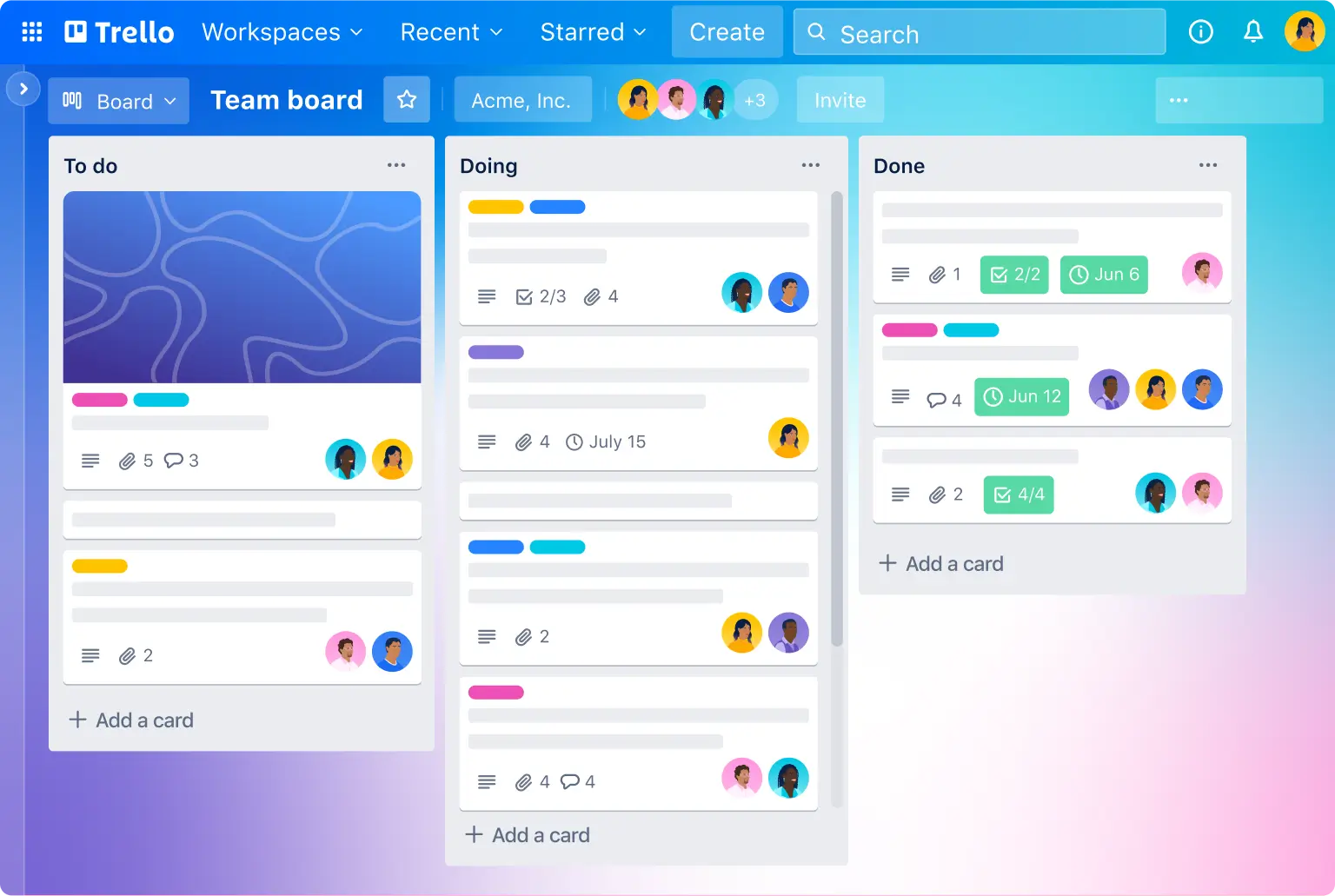
But Trello is a bit of a one-trick pony. While it does that one trick well, there are no Gantt charts in Trello, which limits users’ ability to plan their projects or set task dependencies. Even the kanban is limited in that it can only use one board or project. Additionally, there are no customized tags and it has little email integration. Trello isn’t a great fit for larger teams or larger projects, but luckily there are numerous Trello alternatives that not only offer kanban boards but a whole set of project management features.
Trello Pros
- Simple Kanban boards make task management intuitive and easy to learn.
- Built-in automation helps streamline repetitive project workflows.
- Calendar and timeline views improve project scheduling.
- Flexible boards adapt to many project types and team workflows.
- Extensive Power-Ups expand functionality through third-party integrations.
Trello Cons
- No native resource management for balancing team workloads.
- Built-in cost management features aren’t included.
- Advanced project reporting is relatively limited.
- Time tracking depends on Power-Ups or external integrations.
- Complex project planning requires additional tools or integrations.
Trello Pricing
- For accurate pricing information, visit Trello’s pricing page by clicking here.
Trello Reviews
- G2 reviews: 4.4/5
- Capterra reviews: 4.5/5
Highlighted User Reviews
- “It allows me to add collaborators, sort my boards, add due dates, notes for each item and assign labels (plus more). All in all, it’s a very useful tool for organization and communication on collaborative tasks with your team.” – Sarah E, from G2
- “The fact that the price is worth it, makes it great. It is also so easy to use and manage. I love it.” – Zoe S. from Capterra
7. Microsoft Project

Microsoft Project is a favorite for organizations to manage large and complicated projects. Because it’s Microsoft, the tool integrates easily with the full suite of MS software solutions. Besides MS Office 365, there are communication platforms such as Skype and Teams. It also offers a full range of project management tools, from Gantts to dashboards, to help better manage projects.
Related: Free & Paid Microsoft Project Alternatives Ranked
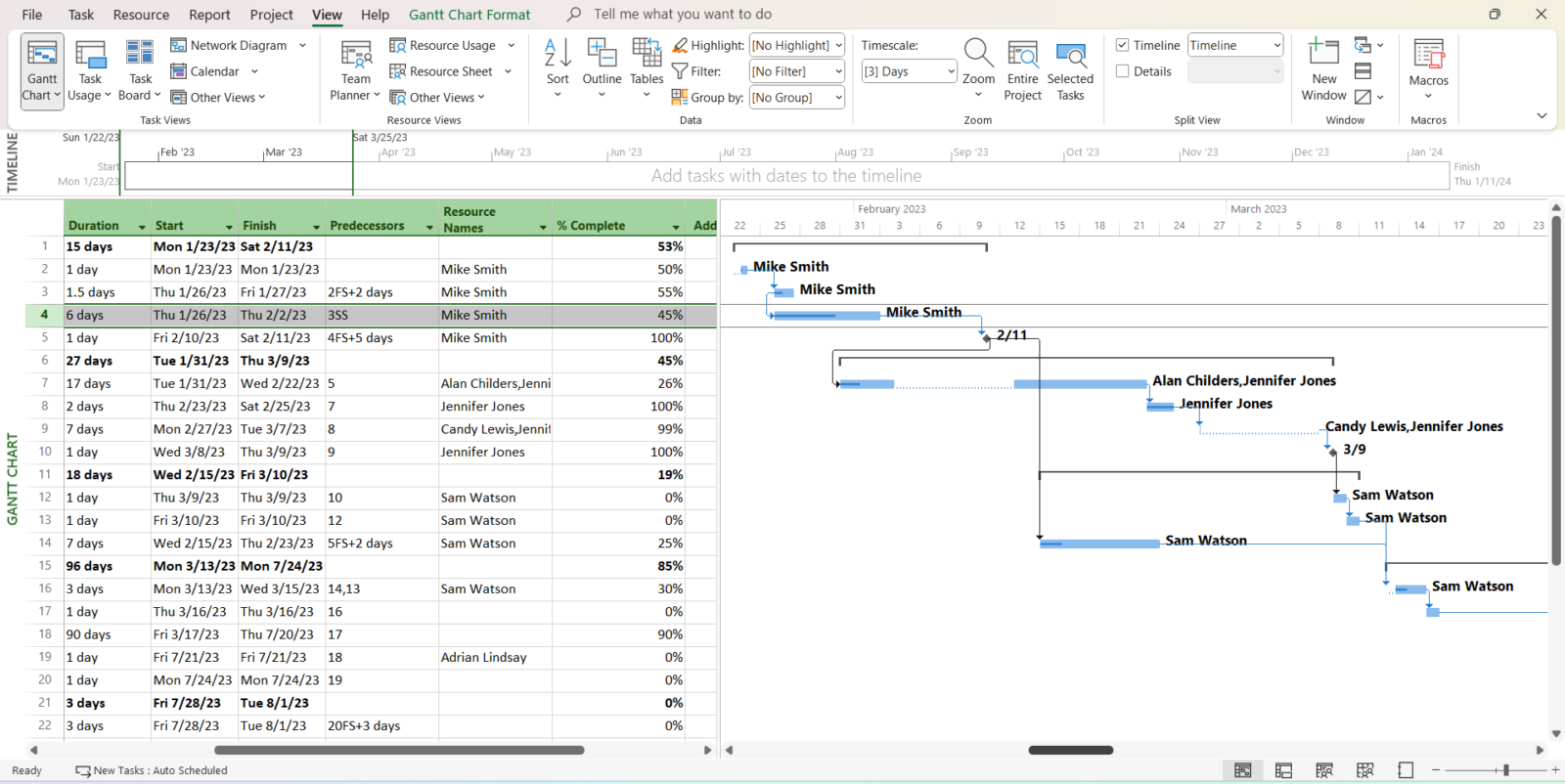
Because it offers so much, MS Project can be difficult for users to get a handle on. There’s a steep learning curve that often requires a lot of training to get users equipped. It’s also expensive and that price increases when licensing the product to everyone on the team. But most irritating is how poorly it works at connecting teams. There are no real-time updates without integration and it doesn’t work on Apple products; if the team uses that operating system, they’ll be locked out. However, Mac users don’t need to panic as there are many similar project planning apps or Mac that can work as an MS Project replacement.
Related: Best Project Management Software for Mac
For these and other reasons, Microsoft Project’s popularity has decreased over time. It used to be a common choice for many project managers, but now there are many different Microsoft Project alternatives that might be a better fit for your organization.
Microsoft Project Pros
- Powerful scheduling tools support complex project timelines and dependencies.
- Comprehensive resource management helps balance workloads across teams.
- Built-in budgeting supports project cost planning and tracking.
- Portfolio management helps prioritize and oversee multiple projects.
- Detailed reporting provides insights into project performance and progress.
Microsoft Project Cons
- No built-in Kanban-first experience for lightweight task management.
- Collaboration features are less central than planning capabilities.
- Native time tracking isn’t a primary platform feature.
- Learning curve can be steep for new project managers.
- Creative workflow management isn’t a core focus.
Microsoft Project Pricing
- For accurate pricing information, visit Microsoft Project’s pricing page by clicking here.
Microsoft Project Reviews
- G2 reviews: 4/5
- Capterra reviews: 4.4/5
Highlighted User Reviews
- “It’s a powerful tool for managing complex projects, offering detailed features like task scheduling, resource allocation, and progress tracking.” Mazhar A – from Capterra
- “The quality of MS Project output is often sufficient for the requirement of most projects.” Paul B – from Capterra
8. Primavera P6

Primavera is Oracle’s pony in the project management race. It’s a cloud-based tool that addresses the needs of project portfolio management. It’s used mostly by the construction and engineering industries and has a slew of features including Gantt charts, risk management tools, real-time reporting, graphical workflow modeling and progress tracking. There are also collaborative tools to connect teams on their preferred device.
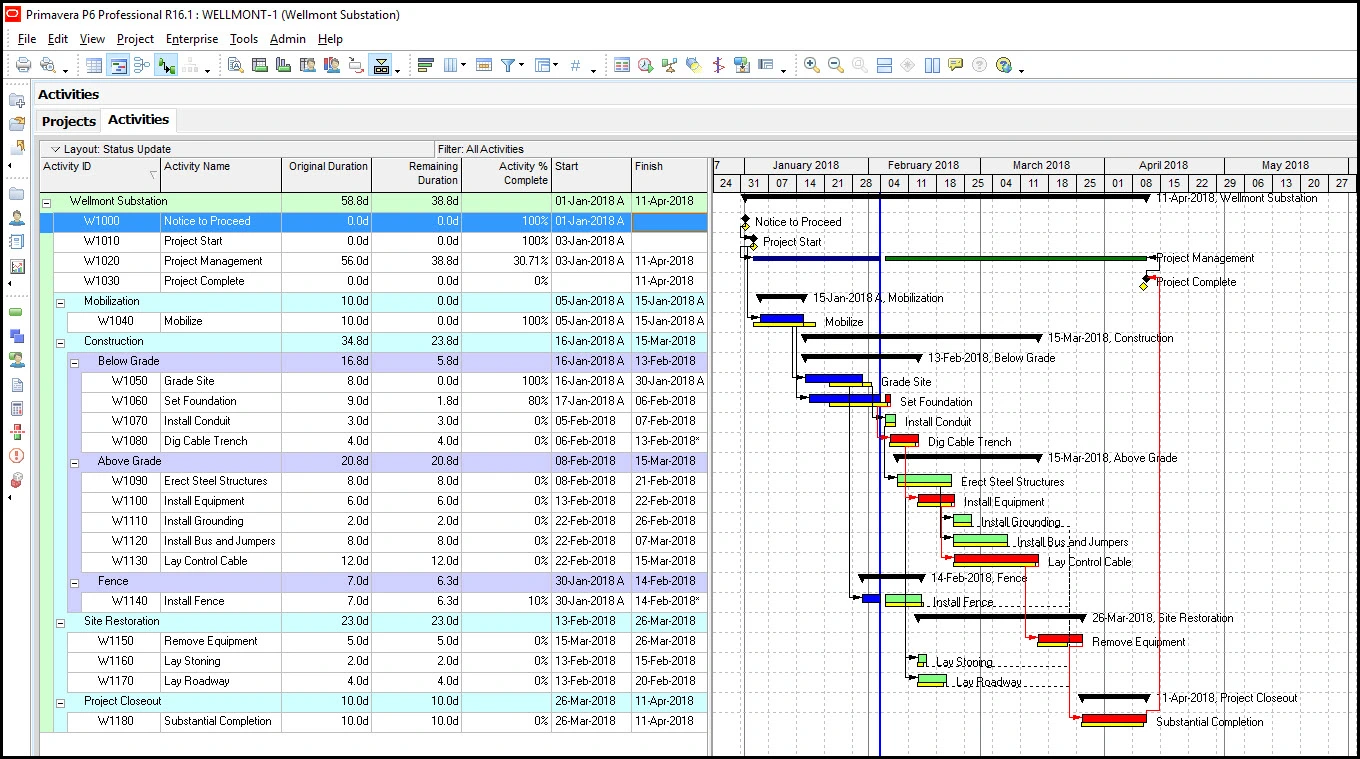
As might be expected, the software isn’t the most user-friendly and can take a beginner some time to get comfortable with the tool. Like Microsoft, it’s not cheap, which might explain why it’s marketed to larger companies with the funds to invest in its product. There have also been a lot of user complaints about poor customer service, which is a shame as many new users will require some handholding to get used to working with the otherwise robust tool. Check our blog to learn more about Primavera P6.
Primavera P6 Pros
- Advanced scheduling tools support large, highly complex projects.
- Powerful resource management optimizes labor and equipment allocation.
- Robust cost management helps monitor budgets throughout project lifecycles.
- Detailed reporting improves visibility across portfolios and programs.
- Critical path analysis supports accurate schedule planning and forecasting.
Primavera P6 Cons
- Interface prioritizes enterprise planning over everyday team collaboration.
- Task management isn’t as intuitive as modern work management platforms.
- No native Kanban boards for visual workflow management.
- Learning curve can be significant for smaller organizations.
- May provide more functionality than small teams require.
Primavera P6 Pricing
- For accurate pricing information, visit Primavera P6’s pricing page by clicking here.
Primavera P6 Reviews
- G2 reviews: 4.4/5
- Capterra reviews: 4.4/5
Highlighted User Reviews
- “Oracle Primavera Cloud is very user-friendly, has amazing management and scheduling tools which allows good coordination between the team and also saves money and time.” Bruno L. – from Capterra
- “Accurate calculation and output data is perfect” Sameh H. – from Capterra
9. ClickUp

ClickUp says it’s the only project management tool you’ll need. It does a lot: tasks, documents, chat, setting goals and more. The project management software lets one manage work and collaborate by creating groups, assigning comments for action items and linking tasks. It tracks progress in real time and has list, board and calendar views.
Related: Free & Paid ClickUp Alternatives Ranked
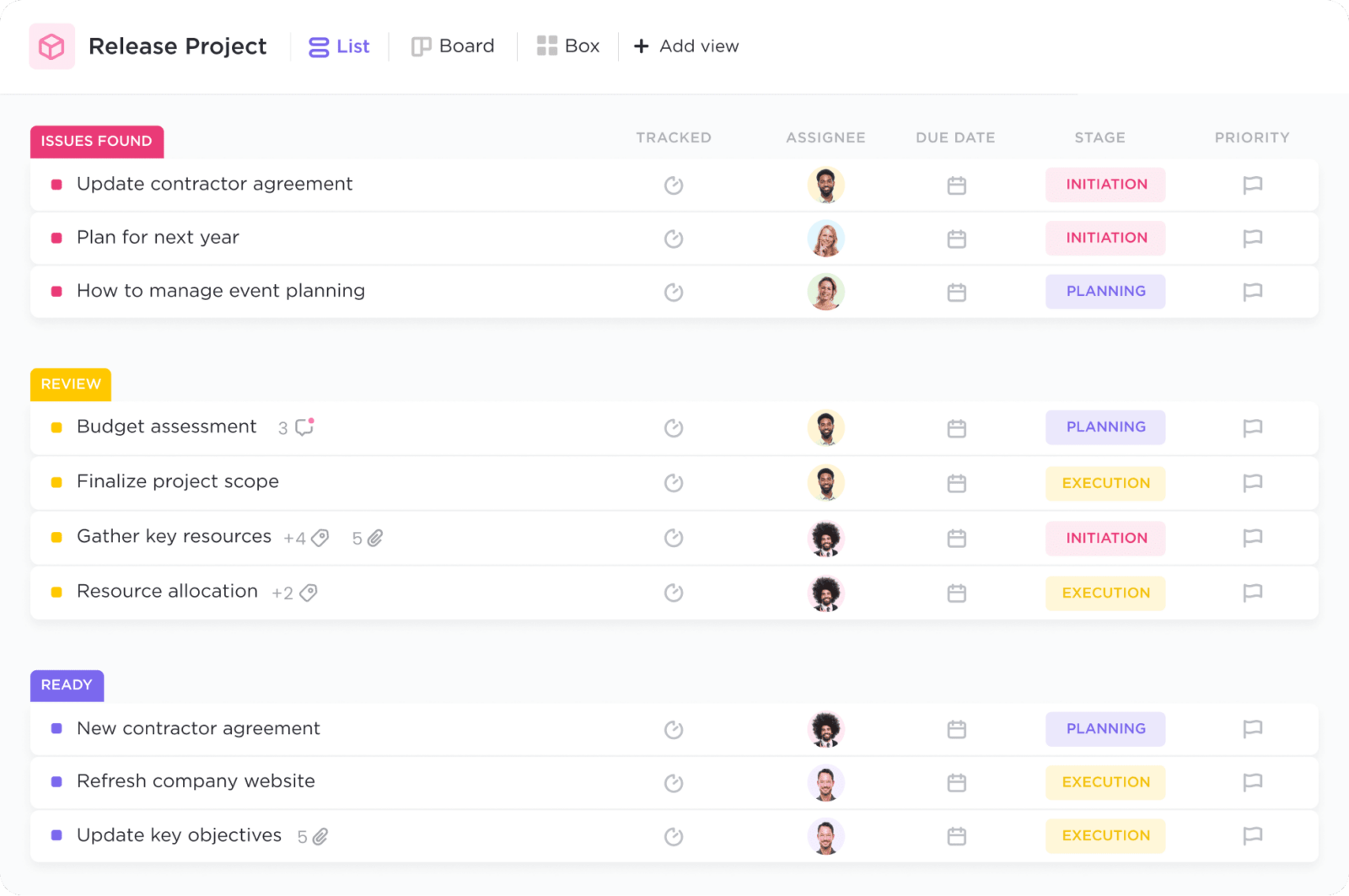
But there’s a lot of heavy lifting required of users to get what they want in addition to several UI issues. For example, there’s a Gantt chart builder whereas other project management software has a Gantt chart already seamlessly incorporated into the tool. The whole point of project management software is to make work more efficient. While ClickUp might be a good fit for some teams, it certainly doesn’t work for every team.
ClickUp Pros
- Combines planning, task management and documentation in one workspace.
- Multiple project views support different planning and scheduling styles.
- Built-in time tracking simplifies productivity and workload monitoring.
- Dashboards provide customizable reporting across projects and teams.
- Automations reduce repetitive work and improve workflow efficiency.
ClickUp Cons
- Advanced cost management isn’t a primary platform capability.
- Project accounting requires integration with external financial software.
- Earned value management isn’t available natively.
- Construction-specific scheduling tools aren’t included.
- Feature-rich interface may overwhelm first-time users.
ClickUp Pricing
- For accurate pricing information, visit ClickUp’s pricing page by clicking here.
ClickUp Reviews
- G2 reviews: 4.7/5
- Capterra reviews: 4.6/5
Highlighted User Reviews
- “Good for operational tasks and customer support.” Hovhannes G – from G2
- “ClickUp sits right in the middle between typical task management tools and business platforms.” Pawel M – from Capterra
10. Basecamp

Basecamp is a project management software that organizes projects and teams by giving users visibility into what everyone is working on. This fosters collaboration and keeps everyone productive. Basecamp is pushing itself as the remote project management tool that helps teams work together anytime and anywhere.
Related: Free & Paid Basecamp Alternatives Ranked
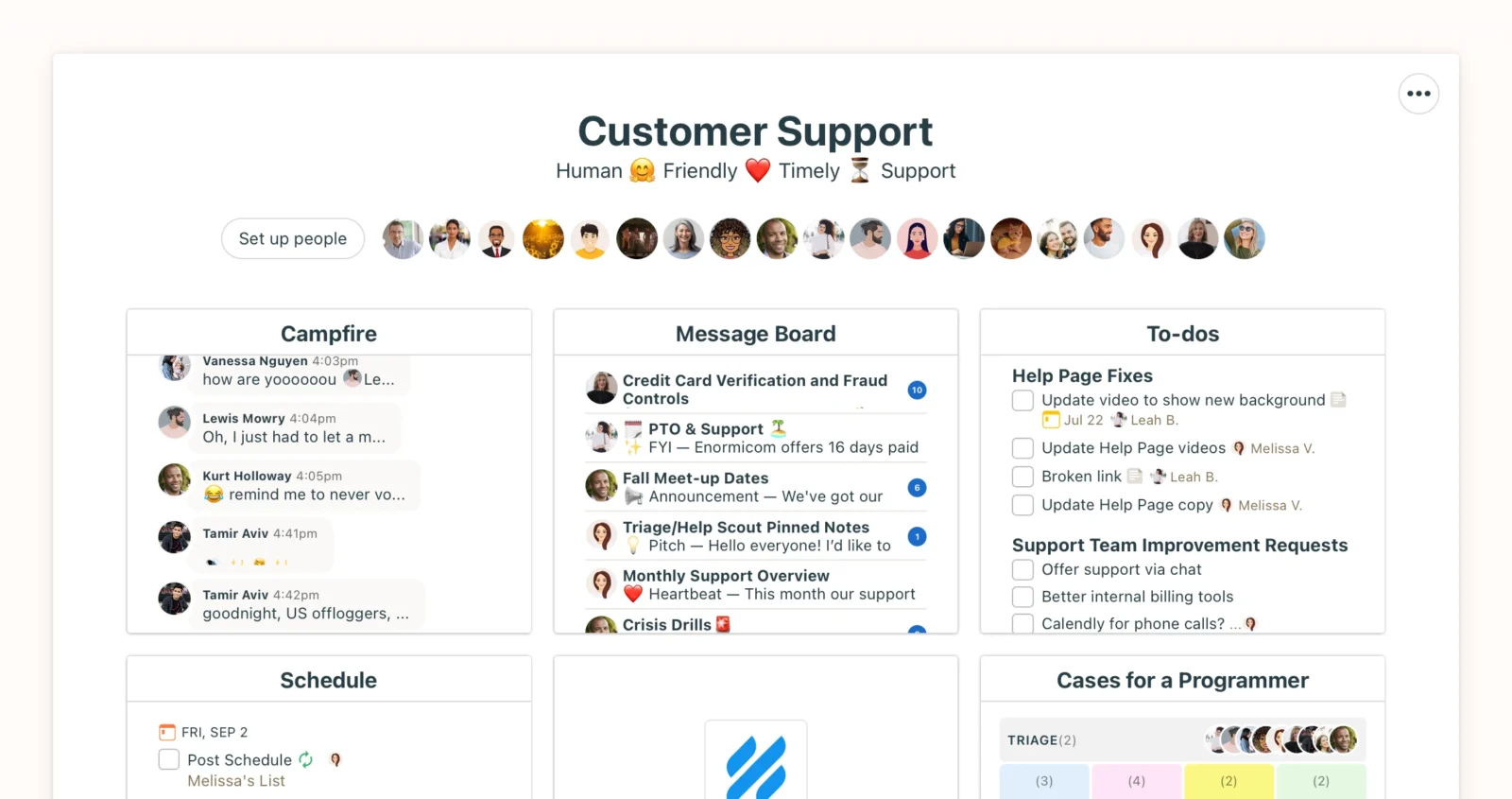
As with any other project management software, there are advantages and disadvantages when it comes to using Basecamp to manage projects. One thing that might get in the way of that organization is a lack of tags and labels to quickly identify tasks. More problematic is that the project management software has no time tracking. Even though it can bring remote workers together, there aren’t any advanced features that can help them, such as analytic tools for insights into the project. Even chat functionality, which is a benefit, is poorly thought out. Topics and conversations can’t be archived, which is frustrating.
Basecamp Pros
- Simple interface makes project planning and collaboration easy for any team.
- Built-in message boards keep project communication organized in one place.
- To-do lists help teams assign, organize and track everyday tasks.
- Hill Charts provide a unique way to visualize project progress.
- Includes file sharing, scheduling and team collaboration without unnecessary complexity.
Basecamp Cons
- No native Gantt charts for detailed project scheduling.
- Resource management tools aren’t included.
- Built-in time tracking isn’t available without the separate Timesheets add-on.
- Cost management and budgeting features aren’t part of the platform.
- Advanced reporting capabilities are relatively limited.
Basecamp Pricing
- For accurate pricing information, visit Basecamp’s pricing page by clicking here.
Basecamp Reviews
- G2 reviews: 4.1/5
- Capterra reviews: 4.3/5
Highlighted User Reviews
- “As a company, it allows us to flawlessly track all of our conversations, planning, tasks, and project progress.” Özgür K – from G2
- “The interface transforms complex functionalities into an intuitive experience for all users.” Tom G – from G2
11. Jira

Jira, which is a product of Atlassian, started as a tracking tool for software developers. It has grown since then and has great features for tracking all types of issues, tasks and work items. This project management software helps to plan and track projects, generate reports and automate processes. It has enterprise-grade security and the Atlassian Marketplace is rich with plugins to further the tools’ reach.
Related: How to Make Gantt Charts Using Jira
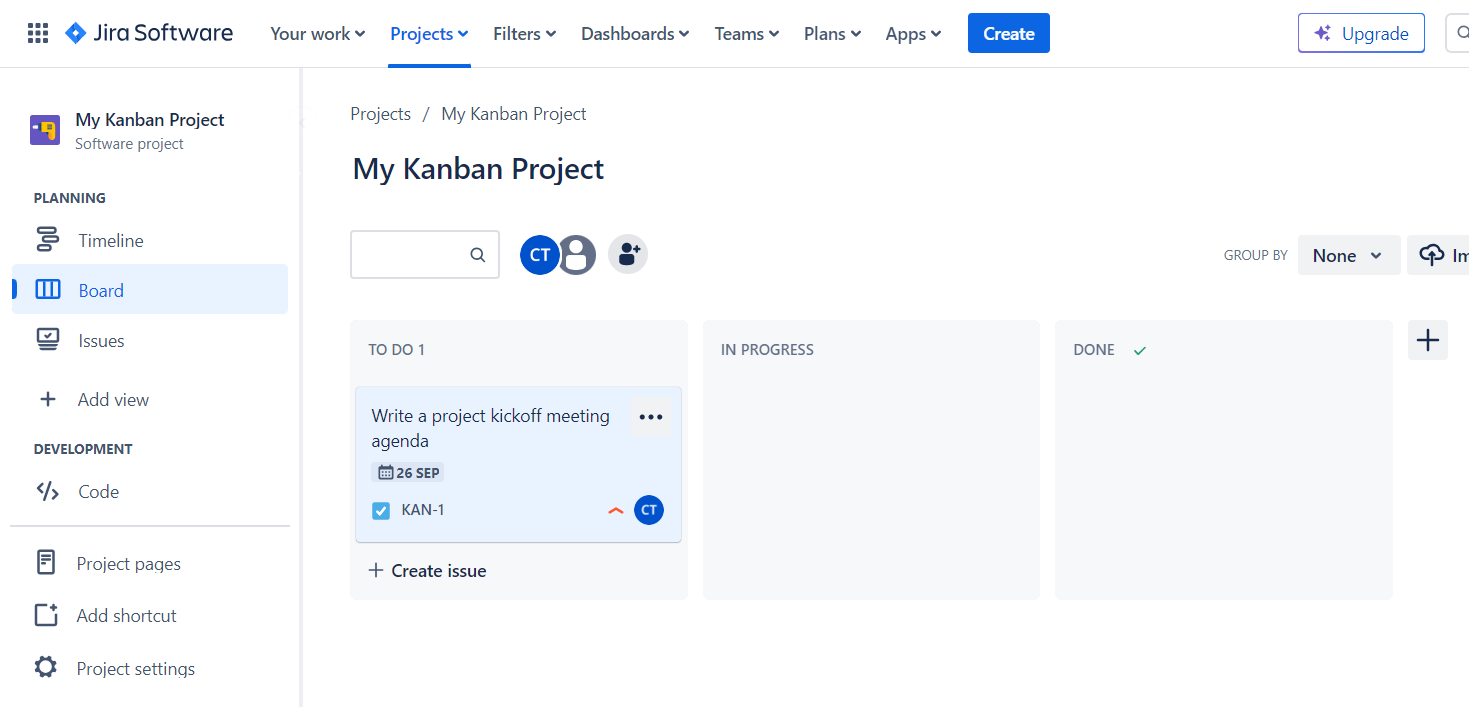
With a product that grew out of software development, the setup is challenging for first-time users. There’s a steep learning curve and so many configuration options as to make one feel dizzy. While there are email notifications, there’s no messaging in the tool. Although it can use integrations for notifications, this just adds a layer of complexity to an already complex project management tool. The biggest complaint is that this is more a tracking tool than a full-service project management software. There’s no way to manage costs or assess risks. Plus, it’s not ideal for any methodology outside of Agile.
Jira Pros
- Excellent task tracking supports Agile, Scrum and Kanban project management.
- Roadmaps help teams plan and schedule work across multiple projects.
- Dashboards and reports provide detailed project tracking and insights.
- Workflow automation streamlines repetitive project management tasks.
- Resource planning integrates with Atlassian’s broader project management ecosystem.
Jira Cons
- Built-in cost management isn’t a primary platform capability.
- Native project accounting features aren’t included.
- Time tracking is relatively basic without marketplace apps.
- Interface can feel overwhelming for non-technical teams.
- Not primarily designed for traditional waterfall project management.
Jira Pricing
- For accurate pricing information, visit Jira’s pricing page by clicking here.
Jira Reviews
- G2 reviews: 4.3/5
- Capterra reviews: 4.4/5
Highlighted User Reviews
- “In my office we use jira for task management and time management, which helps us for team projects with multiple moving parts.” Saili K – from G2
- “Once we got past the learning phase, Jira significantly improved our project efficiency and collaboration.” Abu R – from Capterra
12. Zoho Projects
Zoho Projects is online project management software that does the expected, helping teams to plan, track work and improve collaboration. One advantage users will immediately notice is the price as it’s certainly competitive. The billing and time tracking features are also going to make users take a second look. There are task and project tracking features that add up to an attractive package.
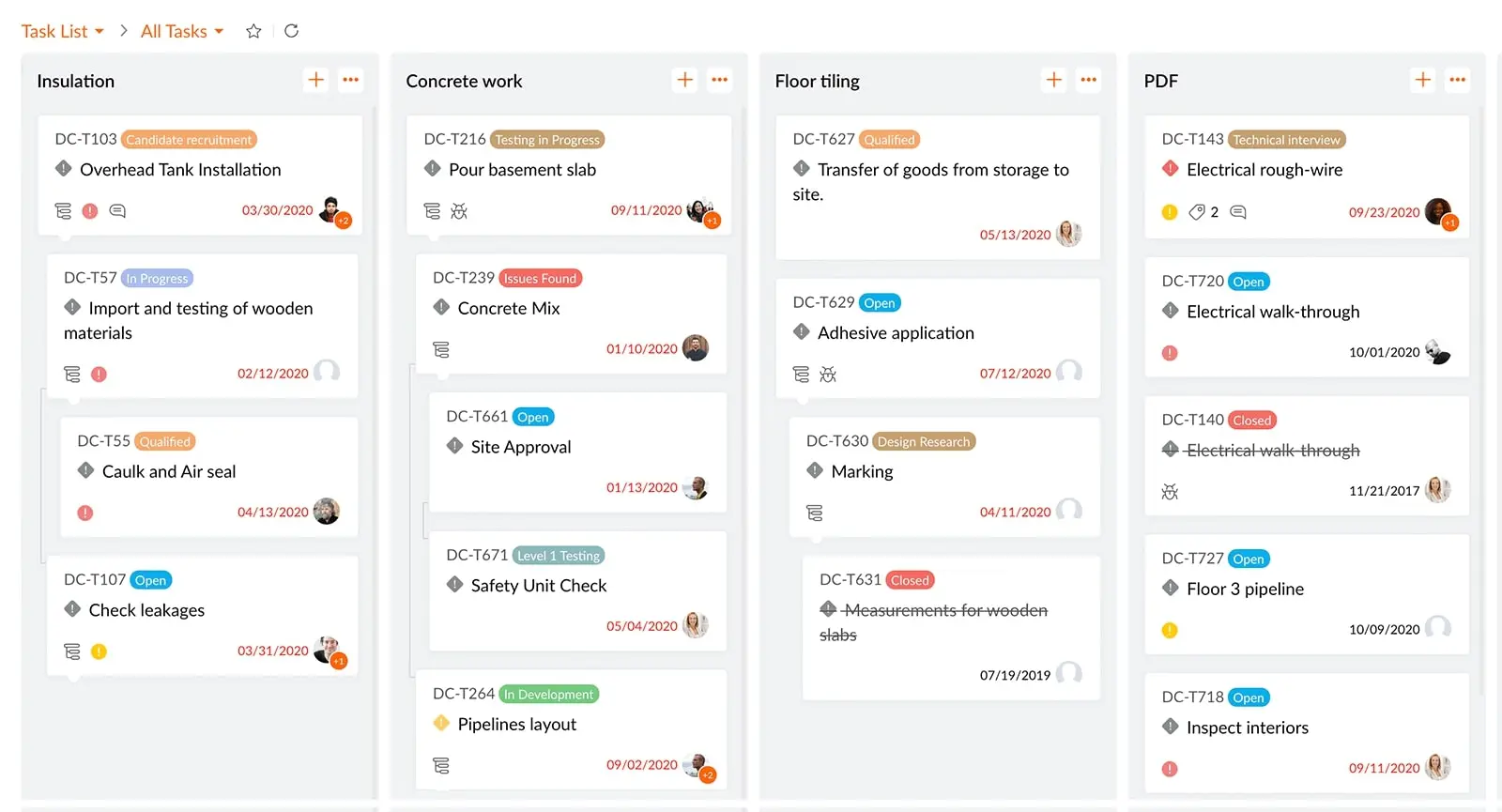
Before putting all of the work into this project management software, though, one should know that the search function is limited to only tasks in a project. There’s no global search. There is, however, a dashboard, but its functionality could use improvement. Besides the features, the whole tool will take a lot of time and effort to set up and use with any level of skill and comfort.
Zoho Projects Pros
- Comprehensive project planning with Gantt charts, milestones and task dependencies.
- Built-in time tracking simplifies timesheets and billable hour management.
- Resource utilization reports help balance workloads across project teams.
- Budget tracking improves project cost monitoring and financial visibility.
- Custom dashboards and reports simplify project tracking and performance analysis.
Zoho Projects Cons
- Advanced financial management requires other Zoho business applications.
- Earned value management isn’t part of the native feature set.
- Portfolio management capabilities are relatively limited.
- Construction-specific scheduling tools aren’t available.
- Some advanced features are only available in higher-tier plans.
Zoho Projects Pricing
- For accurate pricing information, visit Zoho’s pricing page by clicking here.
Zoho Projects Reviews
- G2 reviews: 4.3/5
- Capterra reviews: 4.5/5
Highlighted User Reviews
- “What I like most is how it integrates perfectly with the entire Zoho ecosystem.” Emy L – from G2
- “While the UI and the setup were slightly complicated, Zoho Projects helps you track your projects efficiently.” Shria G – from Capterra
13. ProofHub
ProofHub sells itself as collaborative project management software, controlling teams and projects to improve timely delivery. Like many others on this list, they have various project tools, such as kanban boards and Gantt charts in addition to custom workflows. Unlike others, they have proofing and markup tools as well as chat for collaboration. There are resource and workload reports and timesheets, too.
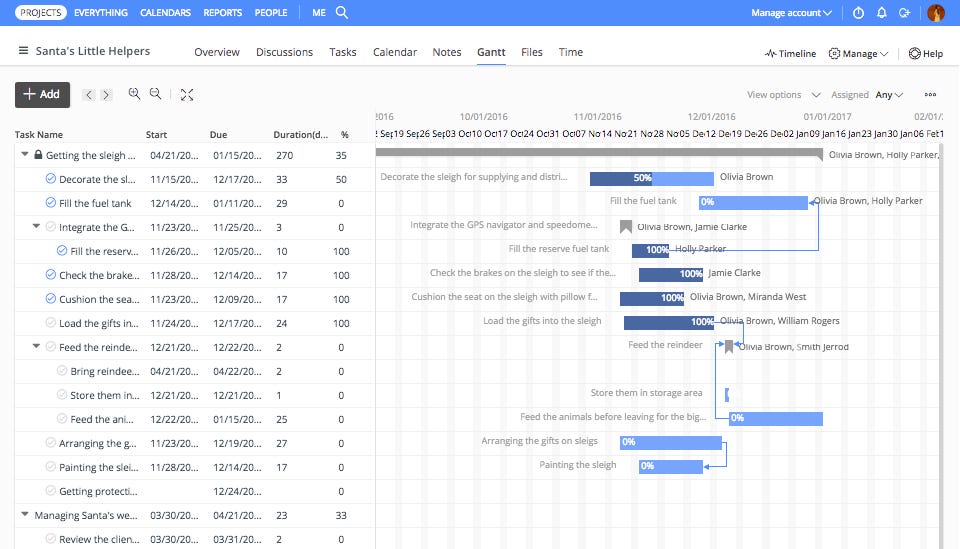
While this might seem like a fully loaded project management software, it isn’t. There’s no budgeting function for one, which is a glaring omission. There’s no way to set up budget or tracking requirements during project execution. Less annoying but still a problem is the lack of recurring tasks, which would make work more efficient.
ProofHub Pros
- Combines task management, discussions and file sharing in one platform.
- Gantt charts and Kanban boards support flexible project scheduling.
- Built-in time tracking helps monitor team productivity.
- Online proofing streamlines creative reviews and approvals.
- Custom reports improve project tracking and team visibility.
ProofHub Cons
- Resource management tools are relatively limited.
- Cost management isn’t a primary platform capability.
- Project accounting requires third-party integrations.
- Earned value management isn’t available natively.
- Advanced portfolio management features are limited.
ProofHub Pricing
- For accurate pricing information, visit ProofHub’s pricing page by clicking here.
ProofHub Reviews
- G2 reviews: 4.5/5
- Capterra reviews: 4.5/5
Highlighted User Reviews
- “The best thing I like about ProofHub is the way it organizes tasks and the detailed information each task captures.” Jagadeep S – from G2
- “There are areas that need to be improved and more user customization would benefit this platform greatly.” David F – from Capterra
14. Adobe Workfront

Adobe Workfront is work management software that focuses on enterprise businesses. This project management software helps teams connect and collaborate on workflows. It streamlines intake, automates workflows and creates custom forms to help enterprises execute strategy. The tool has resource management, configurable dashboards and integrations to help with planning. Some features measure progress and productivity.
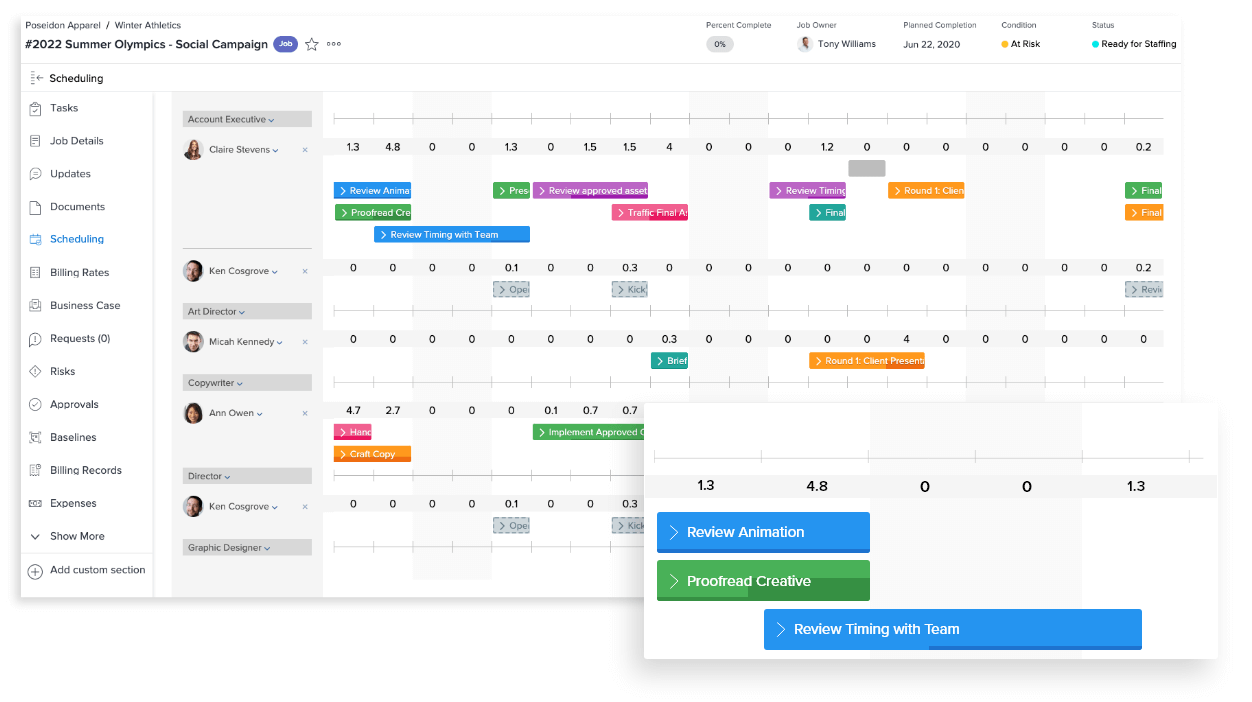
This might sound ideal until you try and unravel its complicated pricing structure. It’s certainly not going to attract smaller businesses, and even enterprise customers might find it hard to understand the price structure of the tool. While this is project management software, it looks more like Excel. It’s not the easiest tool to use, which leaves many project managers and team members looking for a Workfront alternative.
Adobe Workfront Pros
- Strong project planning supports enterprise work and marketing operations.
- Resource management helps optimize team capacity and workloads.
- Custom dashboards provide detailed project tracking and reporting.
- Proofing and approval tools simplify creative review workflows.
- Workflow automation improves efficiency across complex business processes.
Adobe Workfront Cons
- Built-in time tracking isn’t a primary platform focus.
- Cost management features are less comprehensive than dedicated financial platforms.
- Construction-specific scheduling capabilities aren’t included.
- Earned value management isn’t part of the native feature set.
- May offer more functionality than smaller teams require.
Adobe Workfront Pricing
- For accurate pricing information, visit Adobe Workfront’s pricing page by clicking here.
Adobe Workfront Reviews
- G2 reviews: 4.1 / 5
- Capterra reviews: 4.4 / 5
Highlighted User Reviews
- “What I liked most about Workfront is the ability to centralize projects tasks in one workplace. it is much easier to track progress and collaborate with cross- functional teams and ensure accountability. Visibility provided both at team and executive levels helped with decision-making and prioritization.” Loreta A., – from G2
- “Workfront’s extensive toolset is fantastic. As a result, we are able to keep track of projects and documents in one easily accessible spot, perfect for audits and other record-keeping needs.” – Maddie B., from Capterra
Related Content
There are many things to consider when deciding which is the best project management software for your team. Here are some related blogs that can help you make an informed decision and pick the best choice for your projects.
- 10 Mejores software de gestión de proyectos
- Best Project Planning Software
- Best Task Management Software
- Best Work Management Software
- Best Resource Management Software
- Best To-do List Apps
- Best Kanban Software
- Monday.com vs. ProjectManager: Which Is Best for Project Management?
- Smartsheet vs. ProjectManager: Which Is the Better Project Management Software?
ProjectManager is award-winning software that organizes teams, projects and portfolios. Plan with Gantt charts, portfolio roadmaps and kanban boards to visualize your team’s workflows. It’s the ideal solution for teams, no matter where they work. See why over 10,000 teams have chosen ProjectManager by taking this free 30-day trial today.
