



Selecting the right construction technology can have a direct impact on project schedules, costs, communication and profitability. This guide explores the most common types of construction software used across the industry so buyers can compare their options, understand which tools solve specific challenges and choose the software that best aligns with their projects, teams and business goals.
Before we get started with the analysis of each type of construction software, here’s a quick comparison table to help you better understand how the 10 software categories covered in this guide compare to one another.
| Construction Software Type | Primary Purpose | Main Users | Typical Project Phase |
| Construction Project Management Software | Plan, schedule, track and control construction projects | Project managers, superintendents, contractors | Entire project lifecycle |
| Construction Management Software | Manage project delivery, collaboration, contracts and project controls | Owners, construction managers, general contractors | Entire project lifecycle |
| Construction Accounting Software | Track project finances, job costs and profitability | Accountants, controllers, finance teams | Execution and closeout |
| Construction Scheduling Software | Create and maintain construction schedules | Schedulers, project managers, planners | Planning and execution |
| Construction Estimating Software | Calculate project costs and prepare bids | Estimators, preconstruction teams | Preconstruction |
| Construction Takeoff Software | Measure quantities from drawings and blueprints | Estimators, quantity surveyors | Preconstruction |
| Construction ERP Software | Integrate accounting, operations, payroll and project data | Executives, operations managers, finance leaders | Entire business lifecycle |
| Construction Payroll Software | Process payroll and labor compliance requirements | Payroll administrators, HR teams | Execution |
| Construction Bidding Software | Solicit, manage and evaluate subcontractor bids | Estimators, procurement teams, general contractors | Preconstruction |
| Construction Safety Software | Manage safety inspections, incidents and compliance | Safety managers, superintendents, contractors | Execution |
1. Construction Project Management Software
Construction project management software is a category of software used to plan, schedule, track and control construction projects from start to finish. At its core, construction project management software serves as the operational hub for a construction project. Teams use it to create schedules, allocate resources, track budgets, manage project documentation, coordinate subcontractors, monitor field progress and communicate with stakeholders.
By bringing project data into a single system, it becomes easier to identify risks early, respond to changes quickly and maintain control over cost, schedule and quality throughout the project lifecycle.
5 Examples of Construction Project Management Software
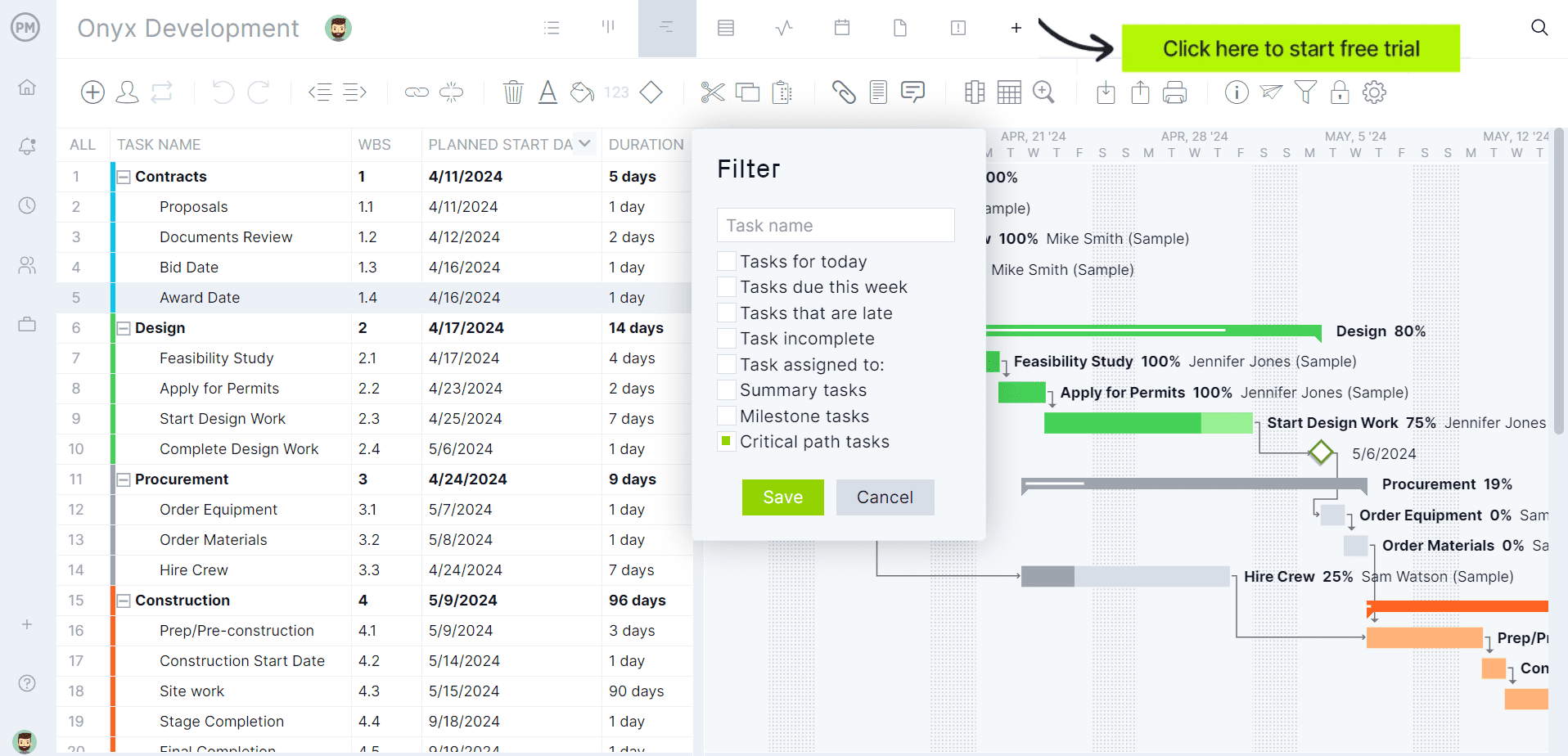
If you’re looking for software to plan, schedule and track construction projects from start to finish, try ProjectManager instead. ProjectManager is award-winning construction project management software that gives construction companies tools to ensure projects are completed on time, within budget and within scope. It allows project managers to create detailed construction schedules, estimate costs, allocate resources, set budgets, track progress and compare estimated versus actual project outcomes using real-time dashboards and reports to quickly identify delays or cost overruns. Get started with ProjectManager for free today.
Key Tools and Features of Construction Project Management Software
- Gantt Charts: Gantt charts are one of the most important construction project management features as they are used to make construction schedules. Ideally, they should support critical path method (CPM) analysis, task dependencies, milestone tracking, baseline comparisons, look-ahead planning, resource allocation and real-time schedule updates that keep office and field teams aligned.
- Budget and Cost Management Tools: Financial tools should track project budgets, actual costs, committed costs, forecasts, change orders, labor expenses, purchase orders and cost variances while providing real-time visibility into project profitability.
- Document Management Tools: A centralized document repository should provide version control, drawing management, specification tracking, approval workflows, audit trails, permission controls and instant access to the latest project information.
- Risk Management Tools: Construction project management software should help teams identify, assess, prioritize and mitigate project risks through risk registers, impact and probability assessments, risk response plans, issue tracking, automated alerts and real-time visibility into threats that could affect project scope, schedule, cost or quality.
- Time Tracking Tools: Labor management tools should include features such as workload charts and timesheets to capture employee and subcontractor work hours, track labor costs against budgets, support mobile time entry, automate approvals, integrate with payroll systems and provide real-time visibility into workforce productivity.
- Project Reporting Tools: Construction project management software should provide customizable project reports such as project status reports, cost variance reports, schedule variance reports, resource utilization reports, budget reports, workload reports and earned value reports to help stakeholders monitor project performance and make informed decisions.
- Resource Management: Resource planning capabilities should help allocate labor, subcontractors, equipment and materials across projects while identifying conflicts, capacity constraints, utilization rates and upcoming resource shortages.
- Project Dashboards: Executive dashboards should consolidate schedule performance, budget health, productivity metrics, project risks, earned value data, forecasted outcomes and portfolio-level insights into actionable reports.
Who Is This of Type Construction Software for?
Organizations managing multiple moving parts across one or more construction projects typically gain the most value from construction project management software. The software is especially useful when project schedules, budgets, subcontractors, documents and field activities must be coordinated simultaneously. As project complexity increases, these platforms provide greater visibility, accountability and control over project delivery, helping teams reduce delays, cost overruns and communication gaps.
- General contractors managing commercial construction projects
- Construction management firms coordinating owners, designers and subcontractors
- Residential home builders managing custom home construction
- Design-build firms handling projects from planning through construction
- Heavy civil contractors delivering infrastructure and transportation projects
- Real estate developers overseeing portfolios of construction projects
- Owner representatives responsible for project controls and reporting
- Specialty contractors coordinating crews, schedules and field operations
2. Construction Management Software
Construction management software is a category of software used to manage construction processes, project information, financial controls and collaboration across the entire project lifecycle. Unlike construction project management software, which primarily focuses on planning and executing individual projects, construction management software provides broader oversight of construction operations. Organizations use it to manage documents, contracts, costs, quality, safety, field activities, procurement workflows and communication between owners, contractors, consultants and subcontractors. Many platforms also support portfolio management, capital program management and asset handover processes.
5 Examples of Construction Management Software
Key Tools and Features of Construction Management Software
- Document Control Systems: Construction management software should provide centralized document repositories, version control, drawing management, specification tracking, approval workflows, audit trails and automated distribution of updated project information.
- Cost Control Tools: Financial management capabilities should track budgets, commitments, invoices, forecasts, change orders, funding sources, payment applications and cost performance across projects and portfolios.
- Contract Management: Contract administration tools should support vendor agreements, subcontract management, contract revisions, compliance documentation, payment tracking and change management throughout the project lifecycle.
- Bid Management: Procurement features should help teams distribute bid packages, collect proposals, evaluate vendors, compare bids, manage tender processes and maintain procurement records.
- Quality and Safety Management: Quality control tools should support inspections, punch lists, issue tracking, safety observations, incident reporting, corrective actions and compliance monitoring from any jobsite.
- Construction Collaboration Tools: Collaboration features should connect owners, contractors, consultants and subcontractors through shared workflows, communication records, document sharing and real-time project updates.
- Portfolio and Program Management: Organizations managing multiple projects should have access to portfolio dashboards, capital planning tools, milestone tracking, project hierarchy management and cross-project reporting capabilities.
Who Is This of Type Construction Software for?
Construction management software is typically used by organizations that need oversight beyond a single project. The greatest value comes when multiple stakeholders, contracts, budgets and project teams must be coordinated across large capital projects or entire project portfolios. Owners, program managers and enterprise contractors often rely on these platforms to standardize processes, improve governance, strengthen compliance and maintain visibility across multiple projects simultaneously.
- Project owners managing large capital construction programs
- Government agencies overseeing public infrastructure and facilities projects
- Construction management firms coordinating multiple stakeholders across complex projects
- Real estate developers managing portfolios of commercial and residential developments
- Engineering, procurement and construction (EPC) firms delivering large-scale industrial projects
- General contractors managing multiple projects, contracts and subcontractor relationships simultaneously
3. Construction Accounting Software
Construction accounting software is a category of software used to manage the financial operations of construction businesses. Unlike general accounting software, construction accounting software is designed to handle the unique financial requirements of construction projects. Contractors use it to track job costs, manage payroll, process invoices, monitor cash flow, handle accounts payable and receivable, manage retainage and analyze project profitability. In most cases, construction accounting software integrates with estimating, project management and scheduling systems to provide accurate financial visibility across active projects.
5 Examples of Construction Accounting Software
- Sage 300 Construction and Real Estate
- Foundation Software
- Viewpoint Vista
- Jonas Construction Software
- Quickbooks Enterprise Construction
Key Tools and Features of Construction Accounting Software
- Job Costing: Job costing tools should track labor, materials, equipment, subcontractor expenses, committed costs, change orders and budget variances while providing real-time visibility into project profitability.
- Accounts Payable: Accounts payable features should manage vendor invoices, subcontractor payments, purchase orders, retainage, recurring expenses, approval workflows and payment schedules across multiple projects.
- Accounts Receivable: Billing tools should support progress billing, AIA billing, time and materials billing, retainage tracking, customer invoicing, collections management and cash receipt reporting.
- Construction Payroll: Payroll systems should support certified payroll, prevailing wage requirements, union payroll, multi-state payroll processing, tax compliance and labor cost allocation to individual projects.
- Work-in-Progress (WIP) Reporting: WIP reporting tools should track overbilling, underbilling, earned revenue, project completion percentages, forecasted profitability and cash flow performance across active jobs.
- General Ledger: Financial management capabilities should provide construction-specific chart of accounts structures, automated journal entries, financial statements, audit trails and project-level financial reporting.
- Cash Flow Management: Cash flow tools should forecast incoming and outgoing funds, monitor payment schedules, track outstanding receivables, analyze liquidity and support financial planning decisions.
Who Is This of Type Construction Software for?
Construction accounting software is primarily designed for contractors that need tighter control over project finances, labor costs and profitability. The software becomes increasingly valuable as businesses manage more projects, employees, subcontractors and vendor relationships. Companies that rely on job costing, progress billing, payroll compliance and detailed financial reporting often use these platforms to improve financial accuracy and support long-term growth.
- General contractors managing project budgets across multiple active jobs
- Residential home builders tracking construction costs and customer billings
- Commercial construction firms requiring detailed job costing and profitability analysis
- Specialty contractors managing labor-intensive trades such as electrical, plumbing and HVAC
- Construction companies employing union workers and certified payroll requirements
- Design-build firms integrating project delivery with financial management processes
4. Construction Scheduling Software
Construction scheduling software is a category of software used to create, manage and optimize construction project schedules. While construction project management software oversees many aspects of project delivery, construction scheduling software focuses specifically on planning work sequences, coordinating activities and maintaining project timelines.
Related: 20 Best Construction Scheduling Software for 2026 (Free & Paid)
Contractors use these platforms to build CPM schedules, manage task dependencies, allocate resources, analyze schedule risks, create look-ahead plans and monitor project progress. The primary goal is to keep projects on schedule while minimizing delays, resource conflicts and productivity disruptions.
5 Examples of Construction Scheduling Software
- ProjectManager
- Oracle Primavera P6
- Oracle Primavera Cloud
- Microsoft Project
- Alice Technologies
Key Tools and Features of Construction Scheduling Software
- CPM Scheduling: Critical path method scheduling tools should calculate project logic, identify critical activities, analyze float, support schedule constraints and automatically recalculate project completion dates as schedules change.
- Gantt Charts: Interactive Gantt charts should visualize activities, milestones, dependencies, progress updates, baseline comparisons and schedule variances while allowing teams to quickly adjust timelines.
- Task Dependencies: Scheduling engines should support all four types of task dependencies in a construction schedule, whic hare finish-to-start (FS), start-to-start (SS), finish-to-finish (FF) and start-to-finish (SF) relationships, along with lag times, lead times and dependency analysis.
- Resource Planning: Resource management tools should allocate labor, equipment and subcontractors across activities while identifying overallocations, bottlenecks, resource shortages and utilization trends.
- Look-Ahead Planning: Field planning capabilities should generate short-term schedules, weekly work plans and crew assignments that remain connected to the master schedule.
- Schedule Risk Analysis: Risk management features should identify schedule compression, critical path changes, potential delays, resource conflicts and other threats that could impact project completion dates.
- Schedule Dashboards: Reporting tools should provide visibility into project progress, milestone performance, schedule health, earned value metrics, percent complete and forecasted completion dates.
Who Is This of Type Construction Software for?
Construction scheduling software is primarily used by organizations where project timelines directly impact profitability, resource utilization and contractual obligations. It is especially valuable for teams managing complex schedules, multiple subcontractors and interdependent activities across active projects. Companies that rely heavily on CPM scheduling, resource planning and schedule forecasting often use these tools to improve coordination and reduce project delays.
- General contractors managing large commercial construction schedules
- Construction schedulers responsible for CPM schedule development and maintenance
- Project managers tracking critical milestones and project completion dates
- Superintendents coordinating field activities, subcontractors and daily work plans
- Owners requiring detailed schedule reporting and milestone performance tracking
- Residential builders managing multiple crews, trades and project timelines simultaneously
5. Construction Estimating Software
Construction estimating software is a category of software used to calculate the projected costs of construction projects before work begins. During preconstruction, estimators use these platforms to quantify materials, labor, equipment, subcontractor costs and overhead expenses. The software helps contractors create more accurate bids, develop cost estimates faster and improve profitability by reducing manual calculations and estimating errors. Many modern solutions also include digital takeoff tools, cost databases, bid management capabilities and proposal generation features.
5 Examples of Construction Estimating Software
- Sage Estimating
- Autodesk ProEst
- Buildxact
- PlanSwift
- Trimble Quest
Key Tools and Features of Construction Estimating Software
- Digital Takeoff Tools: Estimators should be able to measure lengths, areas, counts, volumes and quantities directly from digital plans while automatically calculating material requirements and reducing manual takeoff errors.
- Cost Databases: Estimating systems should provide labor rates, material pricing, equipment costs, production rates and historical cost data that can be customized to match company estimating practices.
- Assemblies and Templates: Pre-built assemblies should automatically combine materials, labor, equipment, waste factors and production rates to accelerate estimate creation and improve consistency.
- Bid Management: Bid management tools should organize estimates, subcontractor quotes, bid comparisons, bid leveling activities and proposal tracking throughout the bidding process.
- Proposal Generation: Estimators should be able to generate professional proposals, bid packages, scope summaries, cost breakdowns and client-facing estimate documents with minimal manual formatting.
- Estimate Reporting: Reporting features should provide detailed cost breakdowns, estimate summaries, profitability analysis, pricing assumptions and benchmarking against historical projects.
- Estimate-to-Budget Integration: Construction estimating software should connect estimates with project budgets, accounting systems and project management platforms to improve cost control after project award.
Who Is This of Type Construction Software for?
Construction estimating software is primarily used by contractors that regularly prepare bids, proposals and cost estimates for upcoming projects. The software is especially valuable for organizations that must estimate labor, materials, equipment and subcontractor costs with precision before committing to a contract. Companies pursuing competitive bids often use these platforms to improve estimating speed, accuracy and profitability.
- Subcontractors competing for work through public and private bidding processes
- Residential home builders preparing budgets and proposals for custom homes
- Specialty contractors such as electrical, plumbing, roofing and HVAC companies
- Preconstruction departments responsible for bid preparation and cost analysis
- Construction estimators developing detailed project cost projections
- Design-build firms creating conceptual and detailed construction budgets
6. Construction Takeoff Software
Construction takeoff software is a category of software used to measure and quantify materials, labor and equipment requirements directly from construction blueprints, architectural drawings and floor plans.
Before an estimate can be created, contractors must determine the quantities required to complete the work. Construction takeoff software streamlines this process by allowing estimators to measure lengths, areas, counts, volumes and other quantities from digital blueprints. Compared to manual takeoffs performed with paper plans and scale rulers, these tools improve accuracy, reduce estimating time and help contractors produce more reliable bids.
5 Examples of Construction Takeoff Software
- PlanSwift
- STACK
- ConstructConnect Takeoff
- On-Screen Takeoff
- Bluebeam Revu
Key Tools and Features of Construction Takeoff Software
- Digital Measurement Tools: Takeoff software should provide area, linear, count, volume, perimeter, arc and pitched measurements that allow estimators to quantify project requirements directly from digital plans.
- Automated Counting: Automated count tools should identify and quantify repetitive symbols such as fixtures, doors, windows, outlets and equipment to reduce manual effort and improve accuracy.
- Plan Scaling: Estimators should be able to calibrate drawing scales quickly across entire plan sets to ensure all measurements are accurate and consistent.
- Plan Overlay and Revision Tracking: The software should compare drawing revisions, identify changes between plan versions and help estimators understand how addenda affect project quantities.
- Assemblies and Material Libraries: Preconfigured assemblies should automatically associate measured quantities with material, labor, waste and equipment requirements to accelerate preconstruction workflows.
- Markup and Annotation Tools: Teams should be able to highlight plans, add notes, create labels, organize quantities by trade and document assumptions used during the takeoff process.
- Takeoff Export and Estimating Integration: Construction takeoff software should transfer quantities directly into estimating systems, spreadsheets and bidding platforms to eliminate duplicate data entry.
Who Is This of Type Construction Software for?
Construction takeoff software is primarily used by contractors and estimators that regularly measure project quantities during the bidding and preconstruction phases. The software delivers the greatest value when projects contain large numbers of materials, fixtures or building components that would be time-consuming to quantify manually. Organizations seeking faster bids and more accurate quantity calculations often rely on these platforms.
- Construction estimators responsible for quantity surveys and bid preparation
- General contractors measuring materials and scope requirements before submitting bids
- Electrical contractors counting fixtures, devices, conduit runs and wiring requirements
- Plumbing contractors measuring piping systems, fixtures and material quantities
- HVAC contractors quantifying ductwork, equipment and mechanical system components
- Roofing contractors calculating roof areas, materials and installation requirements
- Concrete contractors measuring slabs, footings, walls and foundation quantities
7. Construction ERP Software
Construction ERP software is a category of software used to integrate and manage the core business processes of a construction company within a single system.
Rather than relying on separate applications for accounting, payroll, project management, procurement and human resources, construction ERP software centralizes operational and financial data across the organization. Contractors use these platforms to improve visibility, automate workflows, standardize processes and create a single source of truth for office and field teams. As businesses grow, ERP systems help eliminate data silos and improve decision-making across departments.
5 Examples of Construction ERP Software
- Viewpoint Vista
- Viewpoint Spectrum
- Acumatica Construction Edition
- Sage Intacct Construction
- CMiC
Key Tools and Features of Construction ERP Software
- Financial Management: ERP platforms should centralize general ledger, accounts payable, accounts receivable, cash flow management, billing, budgeting and financial reporting within a single system.
- Job Cost Accounting: Contractors should be able to track labor, materials, equipment, subcontractor expenses, committed costs and project profitability in real time across all active projects.
- Payroll and Human Resources: Construction ERP software should support payroll processing, certified payroll reporting, employee records, onboarding, compliance tracking, benefits administration and workforce management.
- Procurement and Inventory Management: Procurement tools should manage purchase orders, inventory levels, vendor relationships, material tracking and procurement workflows from purchasing through project delivery.
- Project Management Integration: ERP systems should connect project schedules, budgets, contracts, change orders, document management and field operations with back-office financial processes.
- Equipment Management: Equipment management features should track asset utilization, maintenance schedules, operating costs, equipment availability and replacement planning decisions.
- Business Intelligence and Reporting: Dashboards and reporting tools should provide executives with real-time visibility into financial performance, project health, workforce utilization, cash flow and operational trends.
Who Is This of Type Construction Software for?
Construction ERP software is best suited for organizations that need to manage multiple business functions across departments, projects and locations. As construction companies grow, disconnected systems often create reporting delays, duplicate data entry and operational inefficiencies. ERP platforms help larger contractors centralize information, standardize workflows and gain real-time visibility into both project performance and overall business operations.
- Mid-sized and large general contractors managing multiple departments and projects
- Heavy civil contractors overseeing complex financial and operational workflows
- Industrial contractors managing labor, equipment, procurement and project costs at scale
- Commercial contractors operating across multiple offices or geographic regions
- Engineering, procurement and construction (EPC) firms managing enterprise-level operations
- Construction companies with dedicated accounting, payroll, HR and procurement departments
8. Construction Payroll Software
Construction payroll software is a category of software used to calculate, process and manage payroll for construction employees.
Payroll in the construction industry is significantly more complex than in many other industries due to certified payroll requirements, prevailing wage regulations, union agreements, multi-state taxation and employees working across multiple jobs. Construction payroll software automates these processes while helping contractors maintain compliance, accurately allocate labor costs and reduce administrative workloads.
5 Examples of Construction Payroll Software
- Payroll4Construction
- Foundation Payroll
- Sage Construction Payroll
- ADP Workforce Now for Construction
- Acumatica Construction Edition
Key Tools and Features of Construction Payroll Software
- Payroll Processing: Payroll systems should automate wage calculations, overtime, deductions, taxes, direct deposits, pay schedules and payroll reporting while minimizing manual data entry.
- Certified Payroll Reporting: Contractors working on public projects should be able to generate certified payroll reports that comply with federal, state and local reporting requirements.
- Prevailing Wage Management: Construction payroll software should automatically apply prevailing wage rates, fringe benefits and labor classifications required for government-funded projects.
- Union Payroll Management: Payroll tools should support union rates, benefit calculations, collective bargaining agreements, union deductions and union-specific reporting requirements.
- Time Tracking Integration: Labor hours should flow directly from timesheets and time-tracking systems into payroll processing to reduce errors and improve labor cost accuracy.
- Job Cost Labor Allocation: Payroll systems should allocate labor costs to specific projects, phases, cost codes and work activities to support job costing and profitability analysis.
- Compliance Reporting: Reporting capabilities should help contractors manage tax filings, workers’ compensation reporting, EEO reports, new hire reporting and other regulatory requirements.
Who Is This of Type Construction Software for?
Construction payroll software is most valuable for contractors that employ field workers across multiple projects, pay structures and jurisdictions. The software becomes increasingly important when labor compliance requirements introduce additional administrative complexity. Companies managing certified payroll, union employees, prevailing wages or detailed job cost tracking often use these platforms to improve accuracy, reduce compliance risks and streamline payroll operations.
- General contractors managing payroll across multiple active construction projects
- Commercial contractors employing large field workforces and subcontractor coordination teams
- Heavy civil contractors working on government-funded infrastructure projects
- Specialty contractors with labor-intensive operations such as electrical, plumbing and HVAC trades
- Union contractors managing collective bargaining agreements and union benefit reporting
9. Construction Bidding Software
Construction bidding software is a category of software used to manage the process of soliciting, receiving, evaluating and awarding construction bids. General contractors, owners and construction managers use these platforms during preconstruction to distribute bid packages, invite subcontractors, collect proposals and compare competing bids.
Rather than relying on emails, spreadsheets and manual follow-ups, construction bidding software centralizes communication and provides greater visibility into bid coverage, subcontractor participation and procurement decisions.
5 Examples of Construction Bidding Software
- Autodesk BuildingConnected
- SmartBid
- ConstructConnect Bid Management
- Procore Bid Management
- PlanHub
Key Tools and Features of Construction Bidding Software
- Bid Package Management: Construction bidding software should allow users to create bid packages, organize project information, distribute bid documents and manage invitations from a centralized platform.
- Subcontractor Database Management: Teams should be able to maintain subcontractor contact databases, organize vendors by trade, location and qualifications, and quickly identify bidders for future projects.
- Invitation to Bid (ITB) Tools: ITB functionality should streamline the creation, distribution and tracking of bid invitations, addenda and bid communications throughout the solicitation process.
- Bid Comparison and Leveling: Estimators should be able to compare subcontractor proposals side by side, identify pricing gaps, analyze scope differences and evaluate competing bids consistently.
- Subcontractor Prequalification: Prequalification tools should assess subcontractor financial strength, safety records, licensing, insurance coverage, experience and compliance documentation before bid award decisions.
- Bid Coverage Tracking: Construction bidding software should monitor trade coverage, bidder engagement, proposal submissions and participation levels to reduce procurement risks.
- Bid Analytics and Reporting: Reporting tools should provide insights into bid response rates, subcontractor activity, bid competitiveness, procurement performance and historical bidding trends.
Who Is This of Type Construction Software for?
Construction bidding software is primarily used by organizations that regularly solicit bids from subcontractors, suppliers and trade partners before the construction process begins. The software becomes increasingly valuable as project size, bidder volume and procurement complexity grow. Companies seeking broader bid coverage, improved subcontractor participation and more efficient procurement workflows often rely on these platforms to streamline preconstruction activities.
- General contractors soliciting bids from multiple subcontractors and suppliers
- Commercial contractors managing large subcontractor networks across multiple trades
- Design-build firms coordinating procurement activities during preconstruction planning
- Owners and developers seeking competitive pricing for construction projects
- Public agencies managing formal bidding requirements for government-funded projects
- Preconstruction teams responsible for subcontractor outreach and bid solicitation
- Procurement departments managing vendor relationships and qualification processes
10. Construction Safety Software
Construction safety software is a category of software used to identify, track, manage and reduce safety risks on construction projects. Construction companies use these platforms to digitize safety inspections, incident reporting, hazard observations, toolbox talks and compliance documentation.
By replacing paper-based processes with real-time safety management tools, organizations can improve jobsite safety performance, strengthen regulatory compliance and gain visibility into safety trends across projects, crews and locations.
5 Examples of Construction Safety Software
- Procore Quality & Safety
- SafetyCulture
- Raken
- KPA Flex
- Miter Safety
Key Tools and Features of Construction Safety Software
- Safety Inspections: Construction safety software should provide customizable inspection checklists, mobile inspections, corrective action tracking, compliance reporting and real-time visibility into jobsite safety conditions.
- Incident Reporting: Teams should be able to document accidents, injuries, illnesses, property damage, environmental incidents and near misses while automatically notifying stakeholders and maintaining complete incident records.
- Hazard Observations: Workers should be able to quickly report hazards, unsafe conditions, unsafe behaviors and safety concerns using mobile devices, photos, videos and voice notes.
- Toolbox Talks: Safety management platforms should support toolbox talks, safety meetings, attendance tracking, digital signatures and documentation of safety communications across projects.
- Corrective Action Management: The software should assign corrective actions, track completion status, monitor deadlines and ensure identified safety issues are resolved promptly.
- Compliance Management: Compliance tools should help contractors manage OSHA requirements, safety audits, certifications, training records, regulatory reporting and documentation retention.
- Safety Dashboards and Analytics: Reporting capabilities should track incident rates, safety trends, inspection results, corrective actions, leading indicators and company-wide safety performance metrics.
Who Is This of Type Construction Software for?
Construction safety software is designed for organizations that prioritize worker safety, regulatory compliance and risk management across their projects. The software becomes increasingly valuable as workforce size, project complexity and safety obligations grow. Companies seeking to reduce incidents, standardize safety processes and improve visibility into jobsite risks often adopt these platforms as part of their safety programs.
- Construction managers overseeing safety compliance for owners and stakeholders
- Construction companies with dedicated environmental health and safety (EHS) teams
- Organizations required to maintain OSHA compliance and regulatory reporting programs
- Employers seeking to improve hazard reporting and incident prevention efforts
- Large contractors managing safety performance across multiple jobsites and regions
ProjectManager Is the Best Construction Project Management Solution
ProjectManager offers a comprehensive construction project management software with advanced Gantt charts, critical path tracking, workload management, resource scheduling, portfolio roadmaps, real-time dashboards, kanban boards, timesheets and automated reports in a single platform. In addition to traditional construction scheduling capabilities, ProjectManager includes AI-powered project insights, workflow automation and live performance tracking that help teams identify delays, manage risks and improve decision-making.
The platform also supports an open API and more than 1,000 integrations with tools like Acumatica, QuickBooks, Microsoft Project, Slack and Google Workspace, allowing construction companies to connect operational and project data across their existing systems.
Watch the video below to learn more!
ProjectManager is online construction project management software that empowers teams to plan, manage and track their projects in real time. We connect architects and engineers in the office with your work crew on the job site so they can share files and comments to foster better collaboration. Get started with ProjectManager today for free.
