



Construction projects are notoriously difficult. They involve multiple teams, suppliers and more when building a structure. Ensuring the schedule is realistic and the project can be delivered on time requires techniques such as CPM construction.
What is CPM construction? It stands for the critical path method in construction. What is critical path construction? That’s what we’ll learn, including how to make a CPM construction schedule and why general contractors want to use it. We’ll even throw in a free critical path template.
What Is the Critical Path Method (CPM) in Construction?
As noted above, CPM construction stands for the critical path method. It’s a project management technique used to make a construction schedule, determine the longest sequence of dependent tasks and identify the shortest possible duration for completing the project.
Using CPM in construction helps project managers prioritize tasks, allocate resources effectively and identify potential delays. This is crucial for keeping projects on schedule, optimizing resource allocation and minimizing delays or cost overruns.
Two key elements of CPM construction are the critical path diagram and the critical path algorithm. They help visualize and calculate the project schedule. Let’s look at both of these elements to better understand them.
- Critical Path Diagram: This visually represents the project’s activities, dependencies and the sequence in which tasks must be completed. It helps identify the project’s critical path.
- Critical Path Algorithm: This is used to calculate the critical path and project schedule. It is typically performed using one of two methods: forward pass and backward pass. The algorithm helps determine the project’s duration, identify critical tasks and calculate float or slack time (the amount of time a specific task or activity can be delayed without negatively impacting the project’s schedule).
We’ll show how to create a CPM construction schedule by hand, but who has time for that? When managing a construction project, general contractors and their teams need to be more efficient, which is why they use construction project management software.
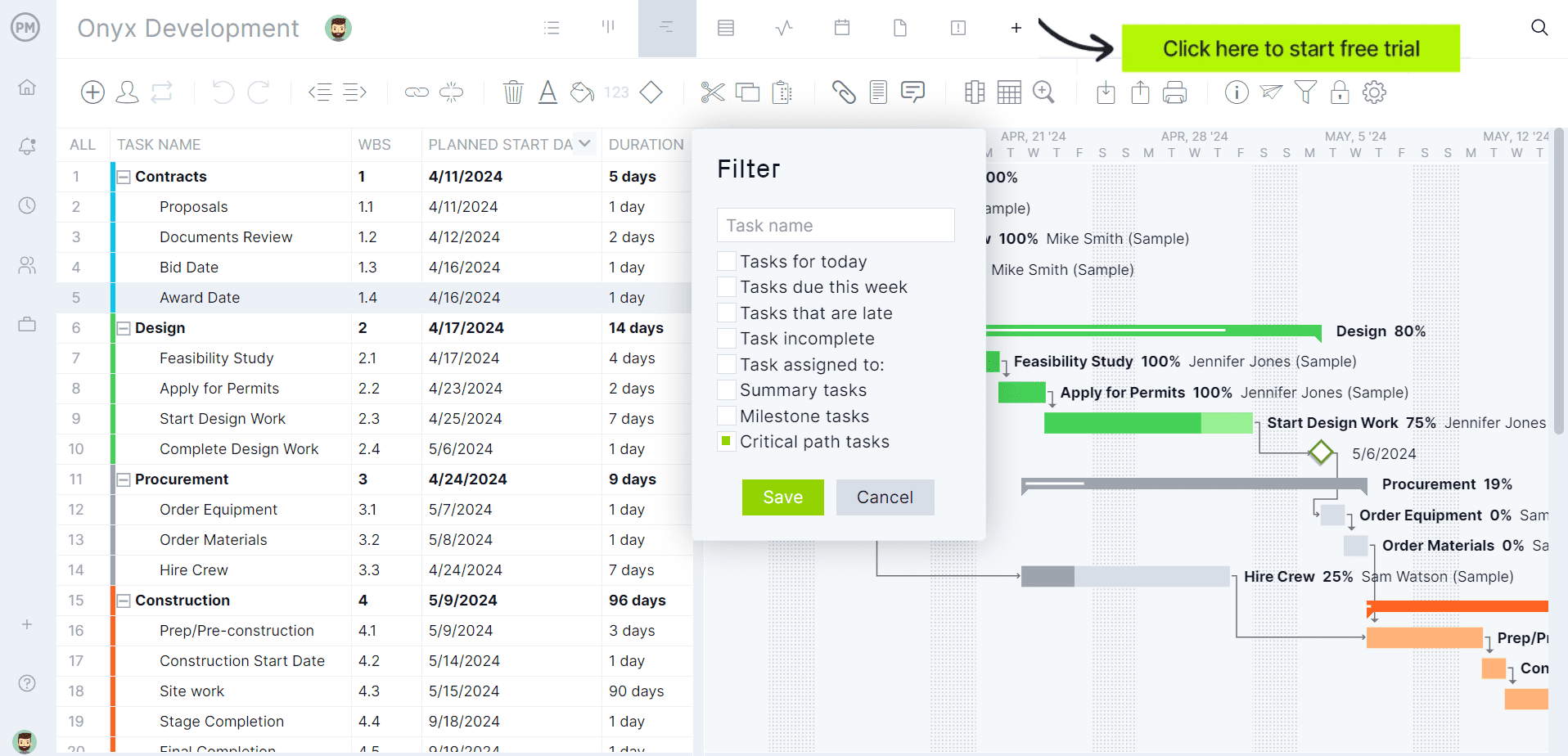
ProjectManager is award-winning construction project and portfolio management software with robust Gantt charts to create schedules and identify the critical path. Like any Gantt chart, ours can organize tasks and allocate resources and costs. But we go beyond that to link all four types of task dependencies to avoid delays and cost overruns and can set a baseline to track progress in real time. There’s also a filter to identify the critical path, without having to pick up pen and paper or engage in complex calculations. Get started with ProjectManager today for free.
What Is the Critical Path of a Construction Project?
The critical path of a construction project is the series of tasks that determine the earliest possible completion date for the project. As noted above, it’s the longest sequence of dependent activities, meaning these tasks are directly connected. Any delay in one of them will result in a delay in the project’s overall completion.
In simpler terms, the critical path represents the chain of activities that have no slack time. In other words, there is no room for delay in these tasks without pushing back the final project deadline. Knowing this is critical for project planning and monitoring. It helps project managers focus on the most important tasks that could impact the project’s success. By identifying the critical path, construction crews can allocate resources more effectively and complete tasks on schedule.
Get your free
Critical Path Template
Use this free Critical Path Template to manage your projects better.
Get the Template
How to Make a CPM Construction Schedule
Creating a critical path method construction schedule involves several steps. Note, this is how one would make the CPM construction schedule with a pen and paper. The following is a detailed guide on how to do it manually.
1. Create a List of Tasks
Start by creating a comprehensive list of all tasks involved in the project. These tasks should represent the activities that need to be completed during the construction process. It’s ideal to use a work breakdown structure (WBS). This hierarchical diagram captures all the deliverables in the project and the tasks or activities needed to complete them.
2. Estimate the Duration of Tasks
For each task, estimate the duration. There are several ways to help make a more accurate forecast. For example, there’s historical data from past, similar projects. Also, seek out experts for their judgment.
3. Identify Task Dependencies
At this point, the general contractor or whoever is building the construction schedule has to determine the tasks that are dependent on other tasks. This means that one task can’t start or end until another dependent task has been started or completed.
4. Draw a Critical Path Diagram
Now, use a piece of paper to visually represent the tasks and their dependencies in a network diagram. This is typically done using nodes, a circle to represent tasks, and arrows to show dependencies.
5. Calculate the Critical Path of the Project
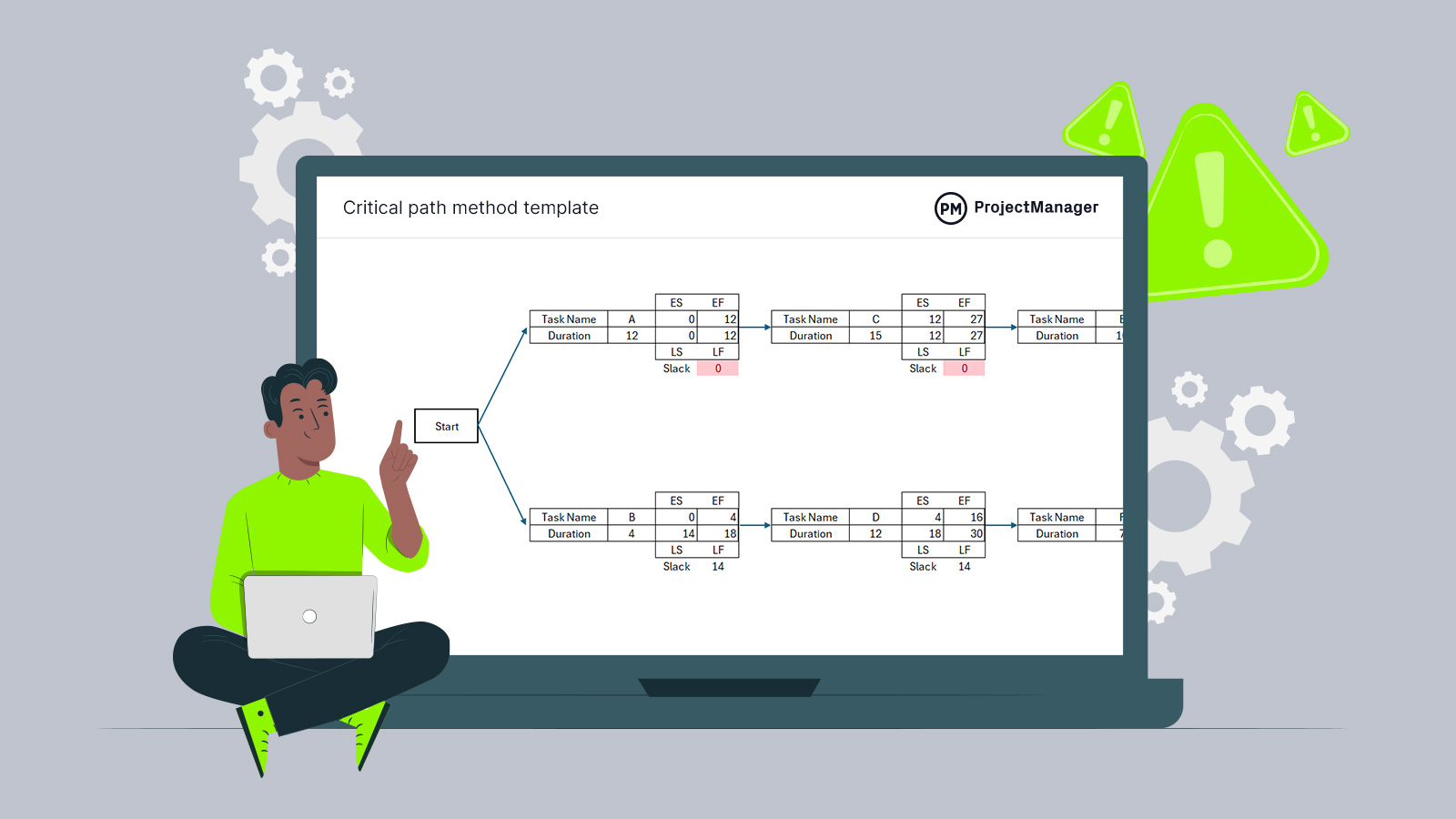
To calculate the critical path and determine the longest path through the network’s diagram, one must calculate the earliest start time (ES) and earliest finish time (EF) for each task, as well as the latest start time (LS) and latest finish time (LF). Any tasks with zero float (the difference between the earliest and latest times) are on the critical path.
How to Find the Critical Path in ProjectManager
To find the critical path in ProjectManager, link your tasks with dependencies, add lag for waits like inspections and cure time, then apply the critical path filter on the Gantt chart. When a task slips, ProjectManager recalculates the path automatically.
The steps below walk through the full setup for a construction schedule.
1. Create the project and set working days
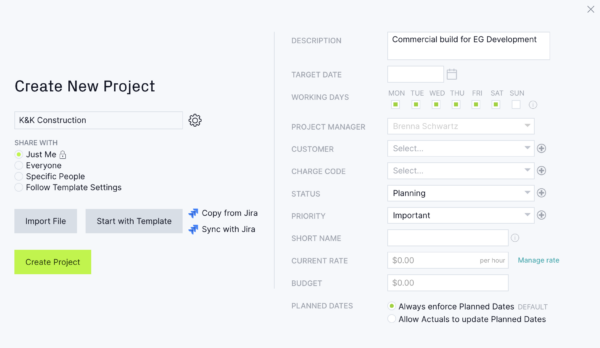
Click the + button in the bottom left and choose Project. Before you save, click the gear icon next to the project name and choose your working days. For example, add Saturday if your crews work six-day weeks. ProjectManager only schedules tasks on working days, so this setting affects every date the critical path produces. Set it now, because it’s hard to change once the project has started.
2. Build or import your schedule
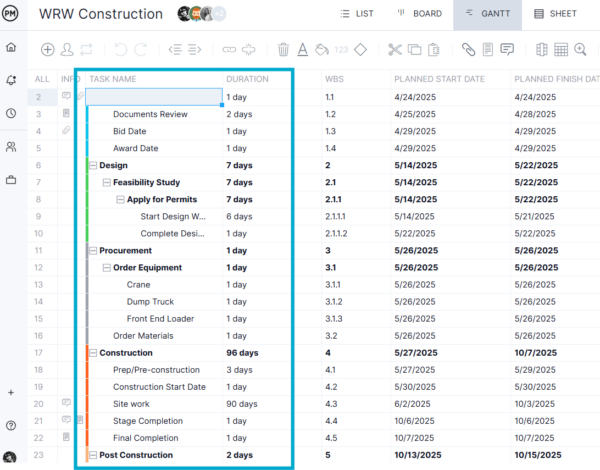
Open the Gantt view. Type each task into the task name column and press Enter to add the next one. List tasks roughly in the order they’ll happen, such as mobilization, excavation, footings, foundation walls and framing. If you already have a schedule, click Import on the Gantt ribbon to bring in a Microsoft Project (MPP), XML, Excel or CSV file.
3. Group tasks into phases with summary tasks
Add a row for each phase, such as Sitework, Foundation, Structure, MEP Rough-In and Finishes. Then select the tasks under it and click Indent. The phase becomes a summary task, and its dates and duration roll up from the tasks beneath it.
4. Enter task durations
Type each duration into the Duration column, or drag the end of a task bar on the timeline.
5. Add milestones for key dates
Select a task and click Milestone to turn its bar into a diamond. In construction, milestones usually mark permit approval, foundation inspection, dry-in, substantial completion and owner walkthrough. Milestones linked into the schedule can sit on the critical path, so you’ll see right away when a delay threatens a key date.
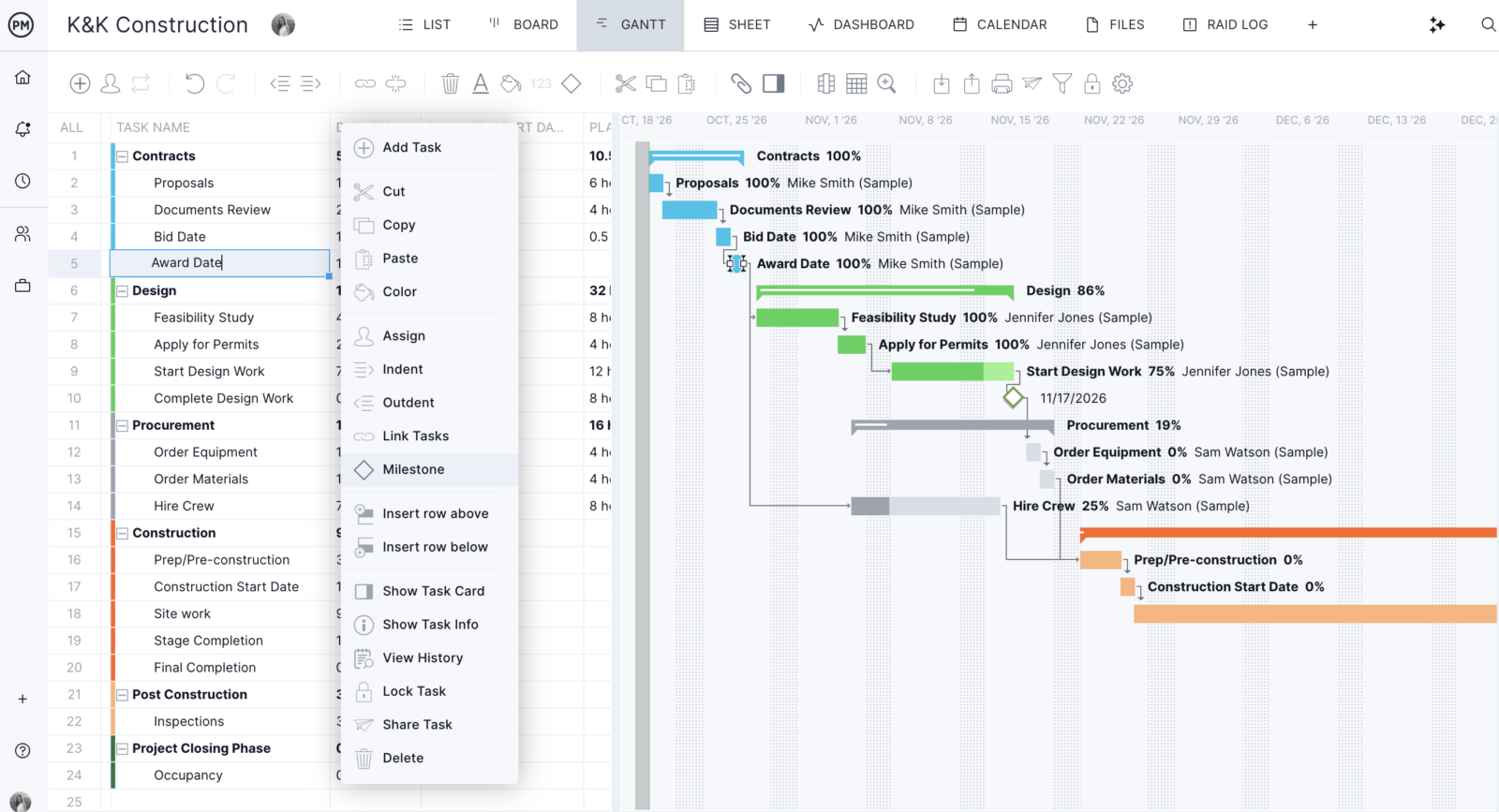
6. Link tasks with dependencies
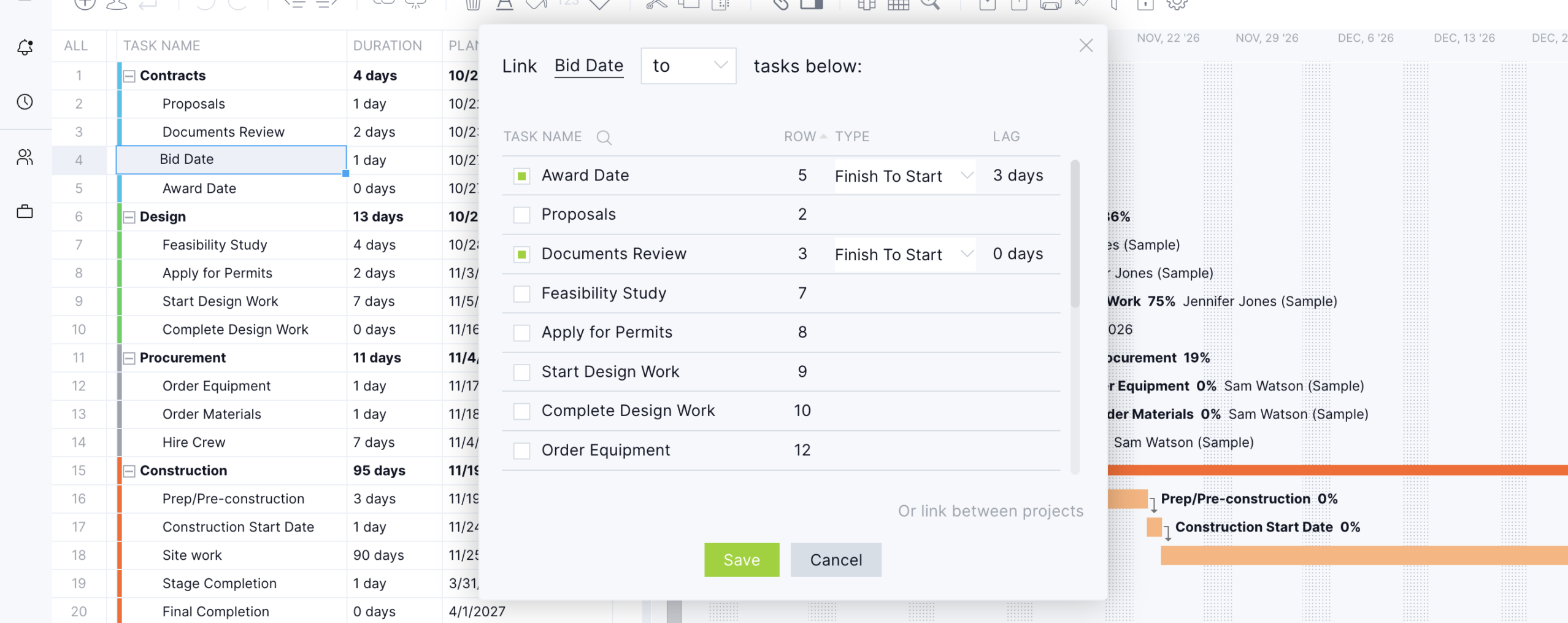
Select a task and click Link on the ribbon, or drag from one task bar to another on the timeline. The Link Task window offers all four dependency types:
- Finish-to-start: Framing can’t start until the foundation is complete.
- Start-to-start: Electrical rough-in can start once plumbing rough-in has started.
- Finish-to-finish: Landscaping can’t finish until final grading finishes.
- Start-to-finish: Temporary power can’t end until permanent power is energized.
When a linked task’s dates or duration change, ProjectManager moves the planned dates of the tasks that depend on it automatically. ProjectManager can only put linked tasks on the critical path, so connect every task to the work it depends on.
7. Add lag for built-in waits
In the Link Task window, enter the wait time in the Lag column for that dependency. For example, add three days of lag between pouring the foundation and stripping the forms to allow for cure time. Lag also covers the gap between requesting an inspection and the inspector arriving. Adding lag keeps those waits in the schedule without creating placeholder tasks.
8. Filter for the critical path
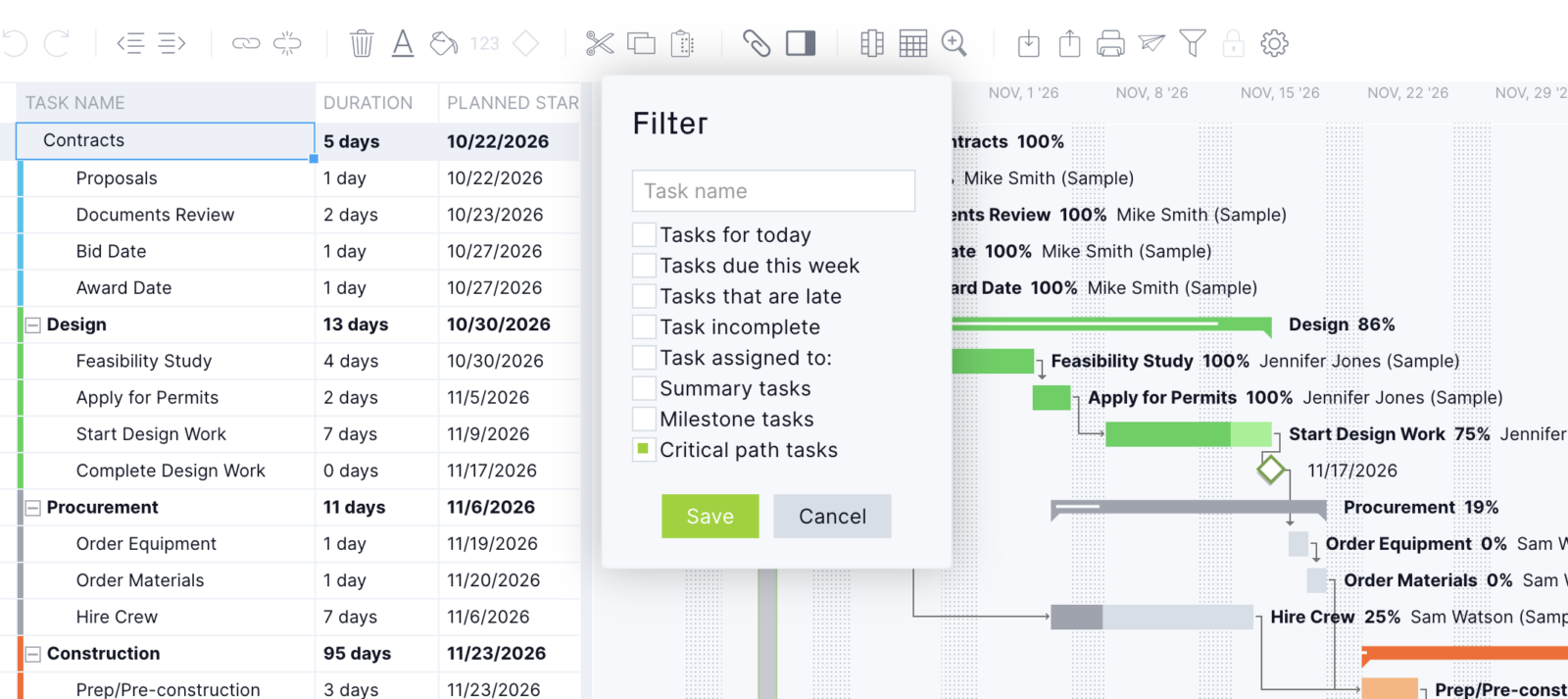
Click Filter on the Gantt ribbon, select the critical path filter and save. The task list and the timeline both update to show only the critical path. These are the longest chain of linked tasks, and every one of them has zero float. A green filter icon with a dot appears in the top menu bar while the filter is on. Click it to go back to the full schedule.
9. Set a baseline
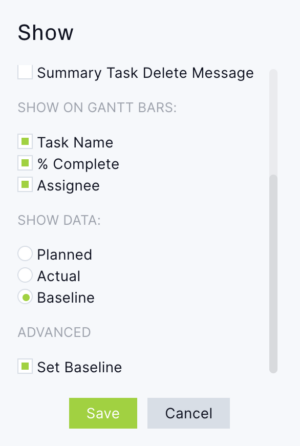
Once the schedule is final, open Gantt Settings and set a baseline under advanced settings. ProjectManager saves your planned dates in the Baseline Start and Baseline Finish columns. Do this before work begins, because setting a new baseline replaces the old one.
10. Track progress and watch the critical path change
As work happens, update the Percent complete column, or drag the progress bar on the timeline. When a critical task slips, the tasks linked after it move too. The critical path filter then shows the new path, which may now run through tasks that had float before. Use Lock Task on any date that can’t move, such as a crane rental or a utility shutoff. To see how far the schedule has drifted, run a variance report to compare actual dates with the baseline.
When the schedule is ready to share with owners or subcontractors, export it as an MPP, Excel or CSV file, or print it to PDF.
Not ready for project management software? Download the free critical path template below and work through the manual steps in Excel.
Critical Path Template
Finding the critical path on paper is one way to help when scheduling a CPM construction project. However, there are more efficient ways. The best is the use of construction project management software, but for those who aren’t ready to upgrade, download this free critical path template for Excel.
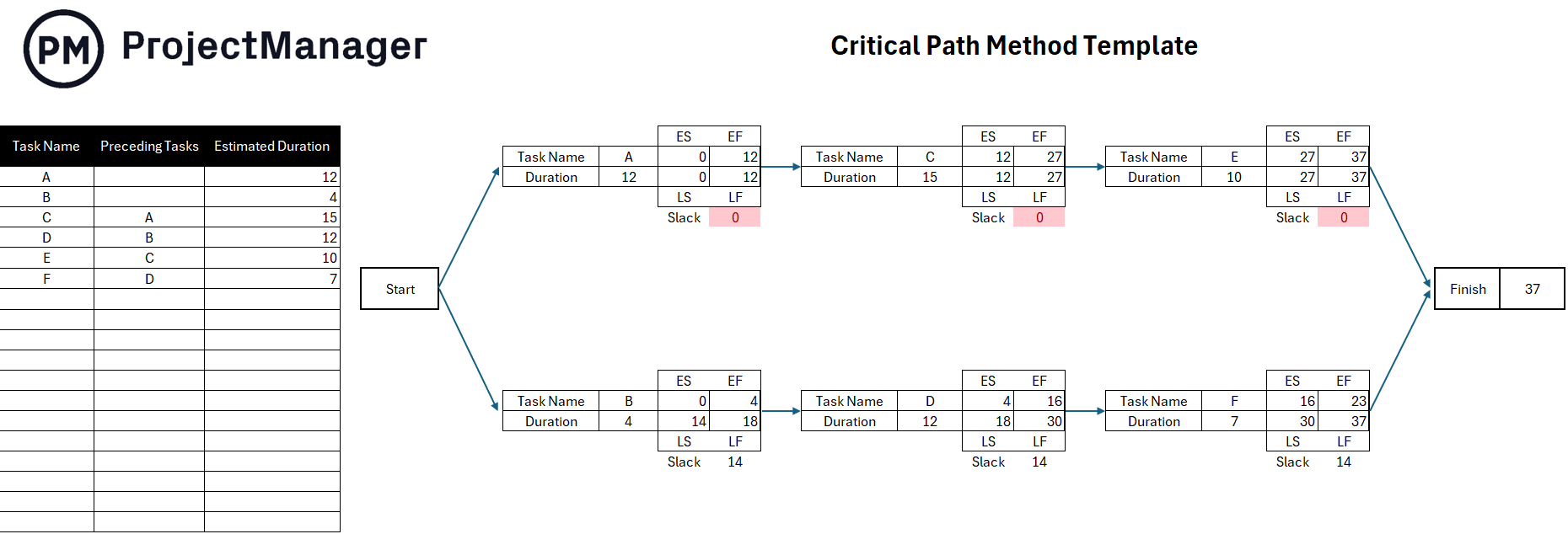
Use this free template during the planning phase of a CPM construction project. It helps determine a more realistic schedule that can be followed to deliver the project on time. Instead of creating a CPM construction schedule from scratch, this free template lays it all out, from ES, EF, LS, LF and slack.
Benefits of Implementing CPM in Construction Projects
Using CPM in construction projects offers several significant benefits. These advantages help improve project planning, execution and control. They help projects deliver on time and within budget. Here are a few key benefits.
Prioritizes the Allocation of Resources for Critical Tasks
One key benefit of CPM construction is that it helps project managers identify which tasks are on the critical path, meaning these tasks directly impact the project’s overall completion time. These tasks are the most important to complete on time and any delay in them will cause a delay in the entire project. The critical path does this by focusing on those critical tasks, optimizing resource use, helping with resource-leveling to balance resources across tasks, managing dependencies and minimizing delays.
Facilitates Project Task Sequencing and Workflow Management
One primary goal of CPM construction is to help project managers plan and coordinate all tasks involved in the construction process, ensuring they are completed in the right order with minimal delays. It assists in task sequencing by defining task dependencies, establishing the critical path and defining task duration.
In terms of workflow management, CPM in construction visualizes task dependencies and scheduling to see the flow of tasks and their dependencies, which makes managing the workflow easier. It minimizes downtime by making sure when one task is done, the next can start. It also optimizes resources across tasks.
Helps Accurately Track Project Progress
CPM construction is also an excellent way to accurately track project progress. It helps project managers continuously monitor the status of tasks, identify potential bottlenecks and ensure the project stays on track. Monitoring critical tasks in real time is essential for regular updates, as well as tracking milestones and identifying delays and taking corrective action. It also tracks float and slack time and can forecast project completion, which keeps stakeholders informed.
ProjectManager Is CPM Scheduling Software for Construction
All of those advantages can be achieved. Project managers might reap the benefits by creating a CPM construction schedule on paper or even the free template we offer. However, the point of using the critical path in construction scheduling is to work more efficiently. This requires investing in construction project management software. But not all software is equal. ProjectManager is award-winning construction project and portfolio management software with powerful Gantt charts that can make construction schedules that identify the critical path. This forecasts projects more accurately and provides tools to track project progress in real time.
Related CPM Construction Content
Critical path construction is important. For those who want to delve into the critical path, there’s more to learn. Below are a handful of recent articles we’ve published on CPM with Gantt charts, how to use PERT with CPM and much more.
- Critical Path Method (CPM) in Project Management
- Uso del método de ruta crítica en construcción: Guía rápida
- Displaying the Critical Path on a Gantt Chart
- Critical Path Template for Excel (Free Download)
- How to Make a CPM Schedule: CPM Scheduling Basics
- PERT and CPM: Their Differences and How to Use Them Together
ProjectManager is online construction project and portfolio management software that connects teams, whether they’re in the office or on the job site. They can share files, comment at the task level and stay updated with email and in-app notifications. Get started with ProjectManager today for free.
