



Construction projects can be big, complex and often unruly, with regulatory issues, safety concerns, equipment rentals, multiple teams and more. If you want to keep a construction project on track and meet your deadlines, you need construction scheduling software that’s robust and dynamic.
What Is Construction Scheduling Software?
Construction scheduling software describes digital solutions that help teams create and manage construction schedules using tools like Gantt charts, project calendars, task lists and dashboards. The right platform lets you assign tasks, track progress, manage resources and flag delays — all in one place.
What Features Make the Best Construction Scheduling Software?
Before getting into the best construction scheduling software for 2026, our team tested these tools against real-world criteria, evaluating how well each handles planning, scheduling, tracking and collaboration. The features below are the standards we used to compare and rank each tool.
- Gantt charts: Gantt charts map tasks, dependencies and milestones to plan schedules, coordinate trades and track progress.
- Critical path analysis: The critical path identifies schedule-driving tasks to prioritize work and avoid delays.
- Task dependency mapping: Set task sequencing to avoid conflicts, reduce delays and keep crews, materials and inspections aligned.
- Work breakdown structure: A WBS breaks scope into manageable tasks for better planning and control.
- Project variance tracking: Compare planned vs actual dates and costs to detect delays early and adjust schedules.
- Resource management tools: Allocate labor, materials and equipment while tracking availability and utilization.
- Cost management tools: Track costs with timesheets, dashboards and baselines to control budgets.
- Mobile app: Update tasks and log hours directly from the job site.
2026 Best Construction Scheduling Software Rankings
1. ProjectManager

ProjectManager is award-winning online project management software built for teams that need to plan, schedule, and track work in real time. Construction teams use it to manage everything from crew assignments and task dependencies to resource allocation and cost tracking — all from a single platform accessible anywhere. Plus, ProjectManager offers a free 30-day trial so you can see for yourself.
ProjectManager’s online Gantt chart is the heart of its construction scheduling capability. Tasks are mapped to a visual timeline with start dates, end dates and durations that can be adjusted by dragging and dropping. You can link dependent tasks to prevent bottlenecks, set milestones to mark key phases, and enable automatic critical path detection so you always know which activities drive the schedule.
Beyond scheduling, ProjectManager handles the resource side of construction too. The resource management tools let you chart crew availability, assign labor and equipment to tasks, and balance workloads to prevent over-allocation before it becomes a problem.
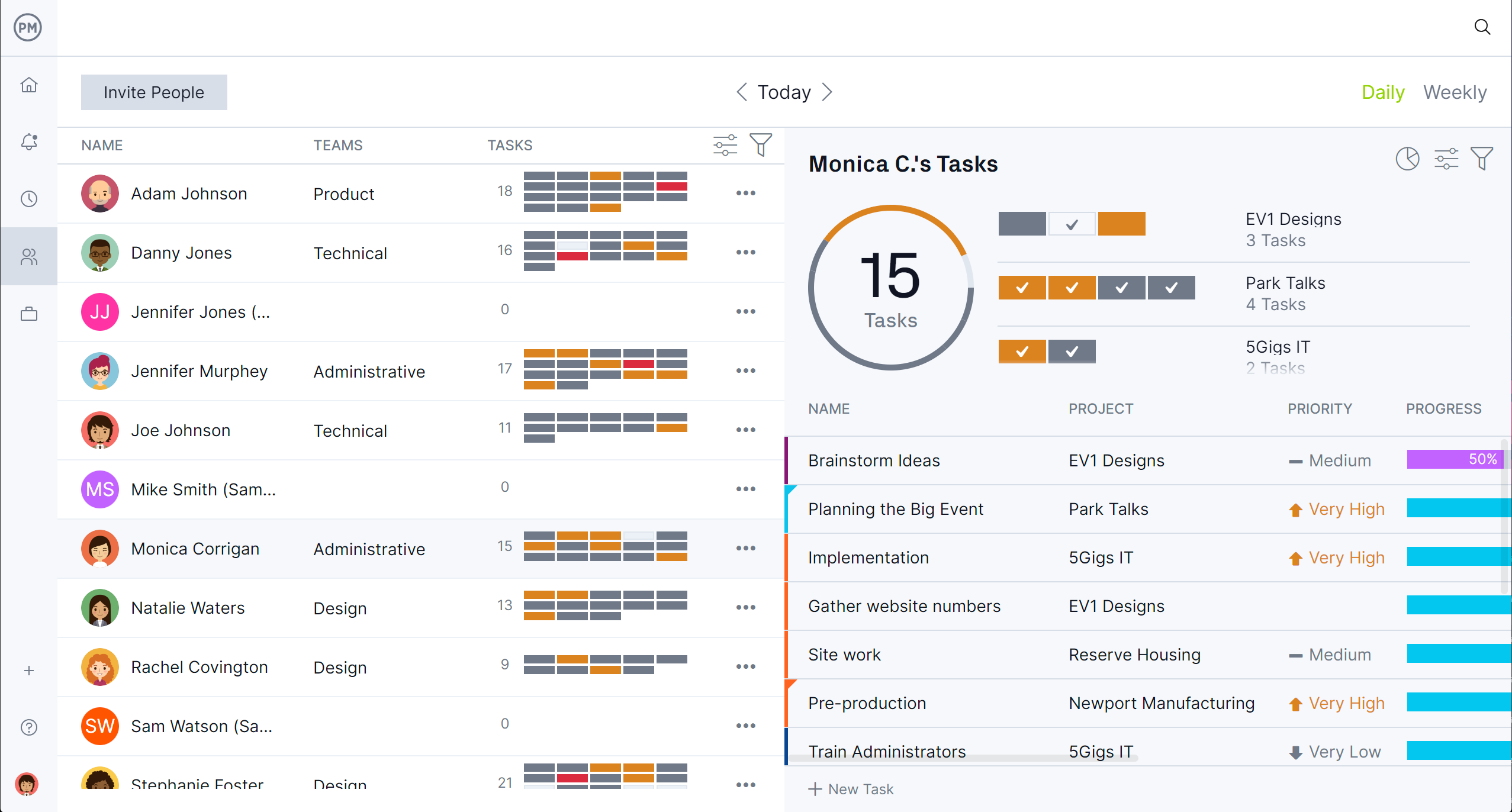
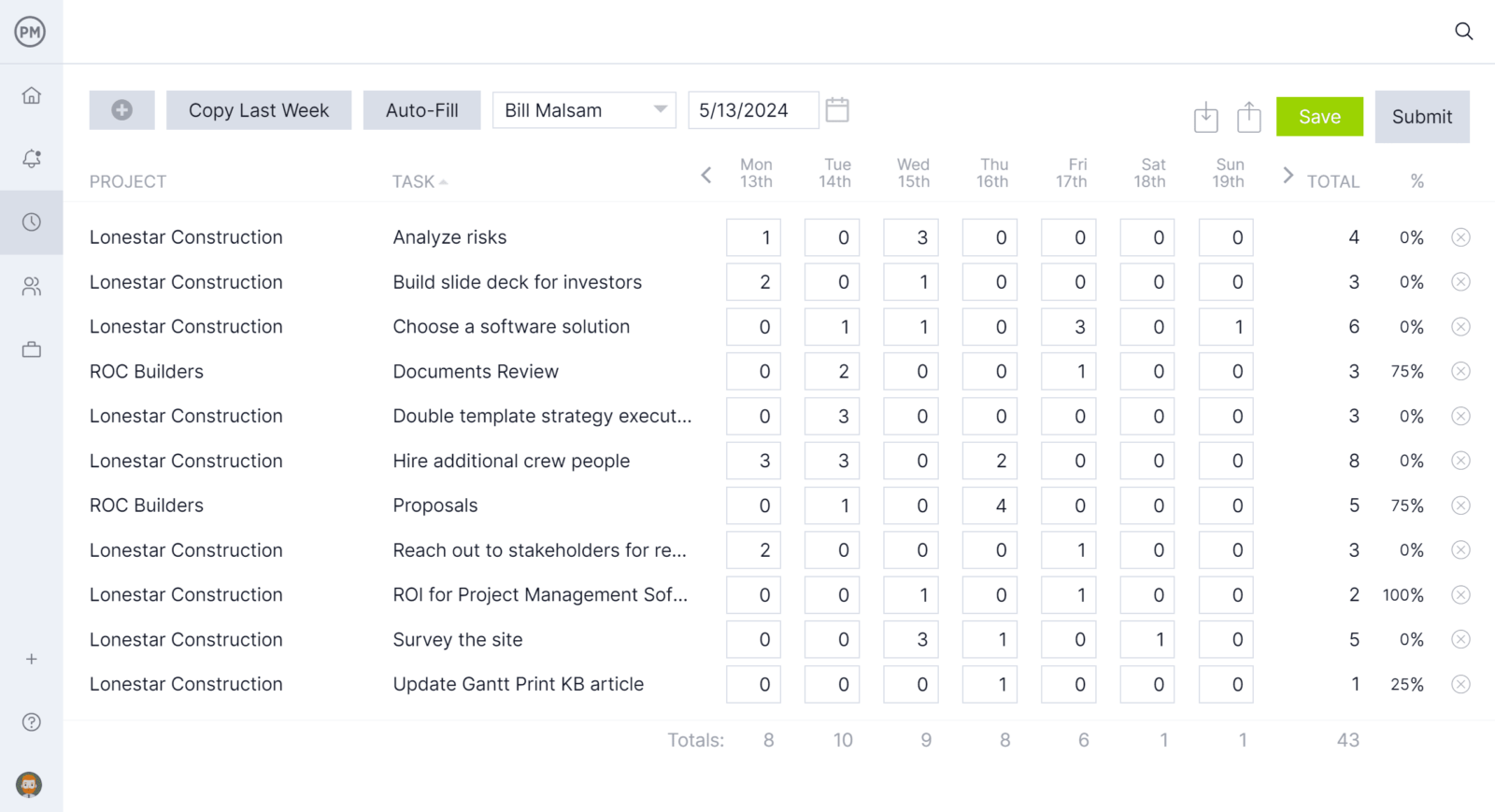
Once the schedule is built, you can track your crew’s hours with timesheets that update from the field and feed directly into project cost tracking. Real-time dashboards give managers a live view of schedule performance, cost variance and progress against baseline — no manual reporting needed.
ProjectManager Pros & Key Features as Construction Scheduling Software
- Automatic critical path detection
- Cost tracking built into Gantt charts
- Resource scheduling for labor, materials and equipment
- Baseline tracking for planned vs actual comparison
- Real-time project dashboards
- Workload balancing to prevent crew over-allocation
- Multiple views: Gantt, task list, calendar, dashboard
- WBS built into the Gantt chart
- All four task dependency types (FS, SS, FF, SF)
- Mobile app for Android and iOS
- Free 30-day trial available
ProjectManager Cons & Limitations as Construction Scheduling Software
- Not a construction-specific platform
- No claims management or contract administration
- No construction bidding tools
- No built-in RFIs or submittals
- No payment or invoicing tools
- Limited offline functionality
- No free plan
ProjectManager Pricing
- Team: $15.00 user/month
- Business: $28.00 user/month
- Enterprise: contact sales for a custom quote
ProjectManager Reviews
- G2 review: 4.4 / 5
- Capterra review: 4.1 / 5
Highlighted User Reviews
- “ProjectManager works very well with both large and small-scale projects. Being able to use this with anything from a project involving only two members of staff, to hundreds, has been invaluable.” Peter W – from Capterra
- “We used to manage our projects, resources, and reporting in different systems. Enter ProjectManager. We have consolidated systems and work more efficiently.” Jeffrey M – from Capterra
- “Having the full scope of activities and who is responsible to do it, plus the time tracking is excellent.” Flavio M – from G2
- “The UI of the application is user-friendly, and it helps to identify what we are looking for with minimal effort.” Pavan H – from G2
ProjectManager – Verdict: Best Construction Scheduling Software for Real-Time Project Tracking
2. Procore

Procore is one of the most widely used construction management platforms in the industry, trusted by large general contractors to manage the full project lifecycle — from pre-bid through close-out. It centralizes project controls, documentation, field workflows, budgets, RFIs, submittals and scheduling in a single cloud-based platform.
As a construction scheduling tool, Procore provides basic to intermediate scheduling through Gantt charts, calendar views and real-time task updates. Its scheduling capabilities are functional for most general contractors but fall short of dedicated CPM tools — advanced resource leveling, variance analysis and critical path depth require importing from Microsoft Project or Primavera P6. Still, for large teams that want one platform for everything, Procore is the most complete option on the market.
Related: Best Procore Alternatives: Paid & Free Options Ranked
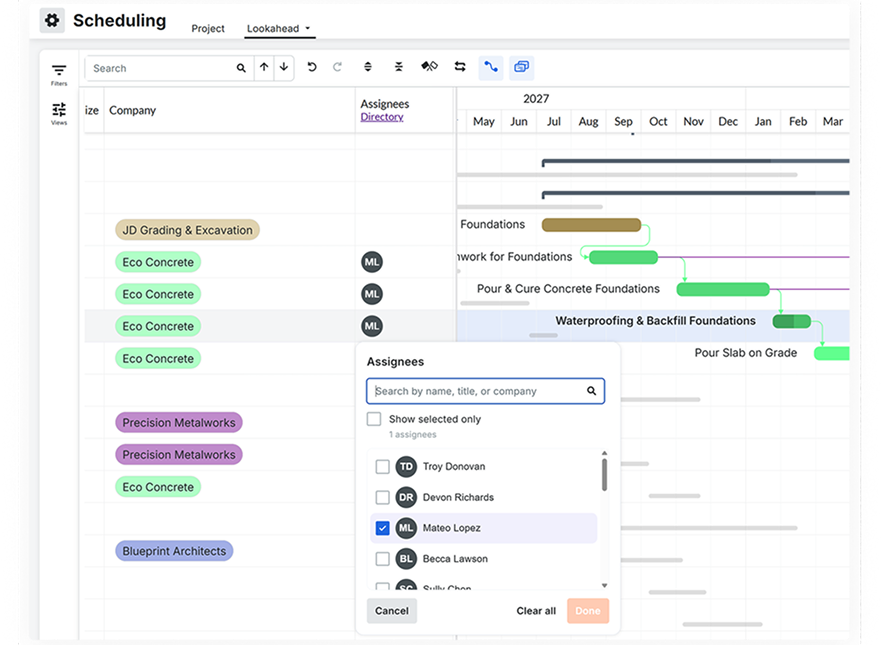
Users consistently rate Procore highly for its breadth, though many note a steep learning curve and high cost — pricing is custom and based on annual construction volume, making it expensive for smaller firms. We’ve also reviewed the best Procore alternatives in case you’d like to explore other options.
Procore Pros & Key Features as Construction Scheduling Software
- Comprehensive document management for construction
- Built-in cost tracking and budgeting
- Time tracking for site teams
- Integrates with Microsoft Project and Primavera P6
- Mobile app for iOS and Android
- Gantt chart with % complete and critical path
- Real-time updates across office and field
Procore Cons & Limitations as Construction Scheduling Software
- Only two schedule views: Gantt and calendar
- Steep learning curve
- Weak resource planning tools
- Gantt charts don’t show task costs
- Baseline and variance tracking are basic
- Limited CPM compared to dedicated tools
- Weak dependency controls
- No free trial
- No free plan
Procore Pricing
- Custom pricing based on annual construction volume — contact sales for a quote
Procore Reviews
- G2 review: 4.6 / 5
- Capterra review: 4.5 / 5
Highlighted User Reviews
- “Procore is the king of remote working especially for administrative tasks.” Andy G – from Capterra
- “User friendly and easy to navigate with little to no training.” Sienna W – from Capterra
- “I enjoy the Procore Learning Center, which helps me when I am unsure of how to start or edit a task in Procore.” Olivia E – from G2
- “We use Procore daily and it makes management of a project so much easier.” Lise B – from G2
Procore – Verdict: Best Construction Scheduling Software for Large Construction Teams
3. Autodesk Construction Cloud

Autodesk Construction Cloud (ACC) is a cloud-based platform that connects design, coordination, document management, field execution and cost controls across the construction lifecycle. It’s widely adopted by general contractors, owners and design-build teams who want a single environment for managing construction data from preconstruction through closeout.
As a construction scheduling software, ACC provides coordination-focused task management rather than a full scheduling engine. It lacks native CPM logic, deep Gantt functionality, baselines and resource-driven scheduling — teams needing serious CPM planning typically pair it with Primavera P6 or Microsoft Project. That said, for large organizations already invested in the Autodesk ecosystem, ACC is a powerful hub for tying design and field execution together.
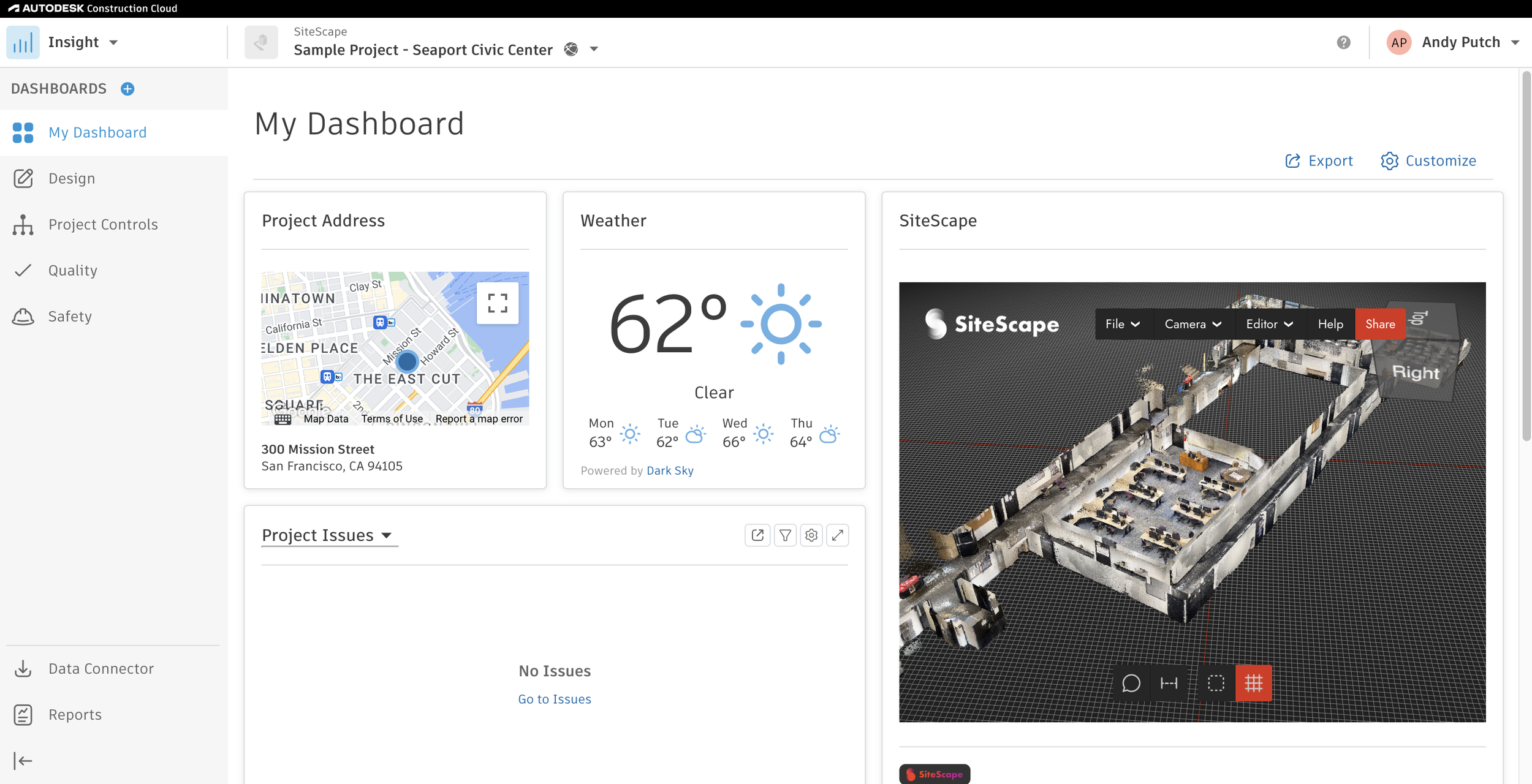
Users frequently cite a steep learning curve, complex navigation and high cost. It’s best suited for large organizations, and smaller teams often find it overwhelming.
Autodesk Construction Cloud Pros & Key Features as Construction Scheduling Software
- Connects office and field teams in real time
- Part of a broader Autodesk construction ecosystem
- Gantt-style view for basic task tracking
- Role-based access and file sharing
- Field apps for updates and issue tracking
- Handles large, multi-project environments
- Mobile app for Android and iOS
- Free trial available
Autodesk Construction Cloud Cons & Limitations as Construction Scheduling Software
- No native CPM scheduling or critical path
- No resource allocation tools
- No baselines or planned vs actual tracking
- Limited Gantt functionality and no milestones
- No full task dependencies (FS, SS, FF, SF)
- No import/export with MS Project, P6 or XER/XML
- Autodesk Build sold separately from full suite
- Flat pricing for unlimited users, but expensive
- No free plan
Autodesk Construction Cloud Pricing
- Contact sales for a custom quote
Autodesk Construction Cloud Reviews
- G2 review: 4.4 / 5
- Capterra review: 4.3 / 5
Highlighted User Reviews
- “Great. The app is extremely intuitive so the learning curve is reduced and simple. Just looks more complicated than it really is.” Mathew H – from Capterra
- “Overall it was okay. The implementation team could have been better, but the product itself was overall good.” David S – from Capterra
- “I find the submittals section very helpful and intuitive when sending in shop drawings.” Carl T – from G2
- “ACC has been phenomenal for working remotely. It’s also been great for sharing content with external partners.” Jeff B – from G2
Autodesk Construction Cloud – Verdict: Best Construction Scheduling Software for Design-Build Projects
4. Microsoft Project
Microsoft Project is a professional project management and scheduling tool used to build detailed schedules, manage tasks, resources and costs, and apply CPM-based planning. It has been the industry standard for formal project scheduling for decades and remains widely used across construction, engineering and infrastructure.
Related: 20 Best Microsoft Project Alternatives: Free and Paid Options
As a construction scheduling software, Microsoft Project is strong in traditional CPM scheduling — it supports dependencies, baselines, progress tracking and resource management. Its limitations are its general-purpose design, dated interface and lack of construction-specific field integration. For teams that need rigorous CPM without paying for enterprise tools, it remains one of the most capable options available.
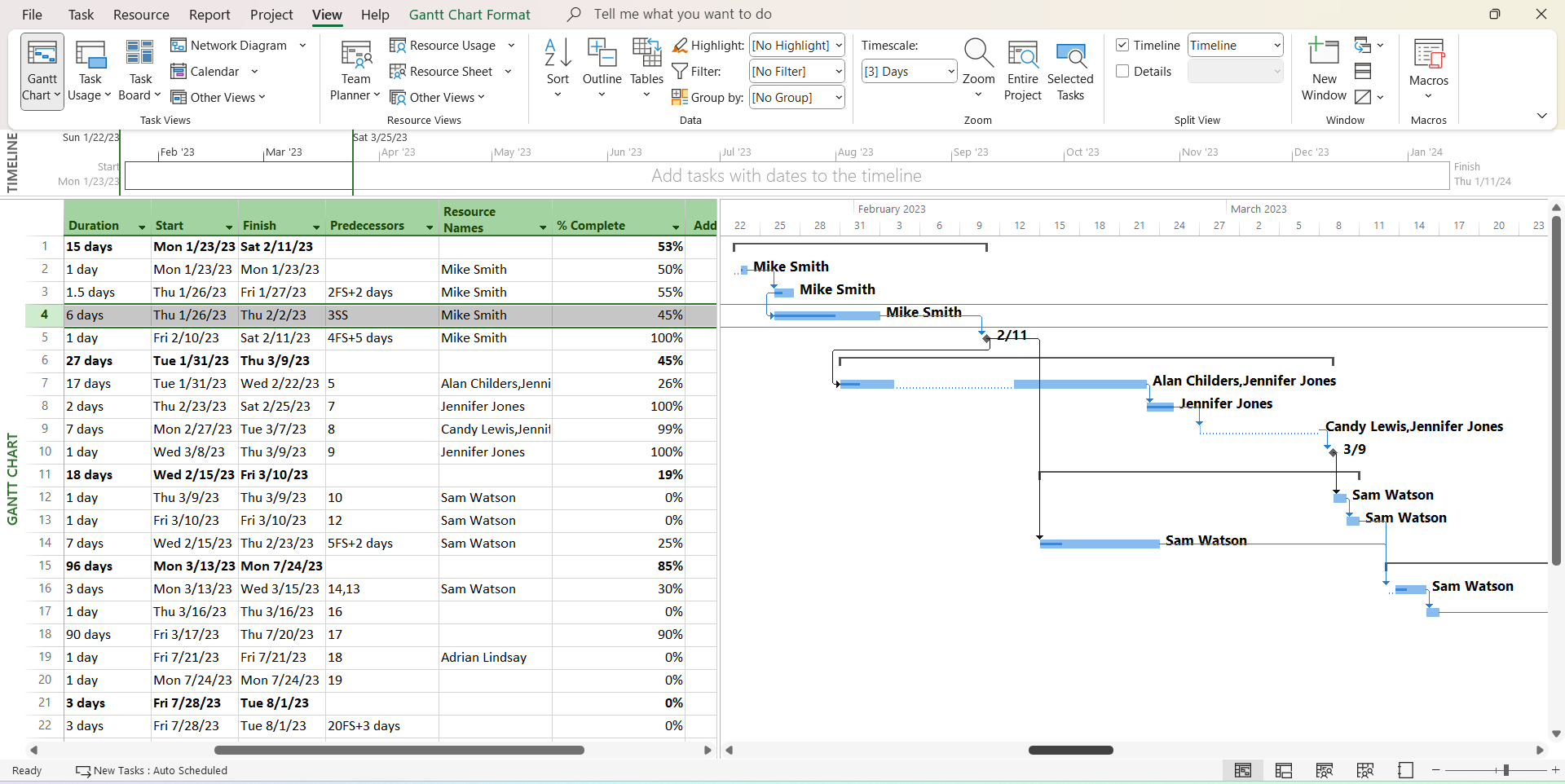
Common user feedback highlights a steep learning curve, a dated desktop interface and limited collaboration for field teams. Microsoft Project is powerful but can feel rigid and disconnected from construction workflows.
Microsoft Project Pros & Key Features as Construction Scheduling Software
- Automatic critical path calculation
- Supports all dependency types (FS, SS, FF, SF)
- Gantt charts with milestones and dependencies
- WBS via hierarchical tasks and phases
- Baselines with planned vs actual comparison
- Tracks schedule, cost and progress variance
- Resource assignments, calendars and over-allocation alerts
- Mobile app for Android and iOS
- Free trial available
Microsoft Project Cons & Limitations as Construction Scheduling Software
- No clear float visualization without setup
- Dated interface and Gantt charts
- No construction-specific workflows
- Limited mobile scheduling for field teams
- Complex resource management for beginners
- No field data capture or mobile-first updates
- Multi-project features require extra tools
- Limited compatibility with P6, no XER support
- Collaboration requires other Microsoft tools
- No free plan
Microsoft Project Pricing
- Project Online Essentials: $7.00 user/month
- Project Online Professional: $30.00 user/month
- Project Online Premium: $55.00 user/month
- Project Standard 2024: $679.99 one-time license
- Project Professional 2024: $1,129.99 one-time license
Microsoft Project Reviews
- G2 review: 4.0 / 5
- Capterra review: 4.5 / 5
Highlighted User Reviews
- “It’s a powerful tool for managing complex projects, offering detailed features like task scheduling, resource allocation, and progress tracking.” Mazhar A – from Capterra
- “The quality of MS Project output is often sufficient for the requirement of most projects.” Paul B – from Capterra
- “I love the automatically generated Gantt charts and the timeline feature.” Eric B – from G2
- “It is easy to set up a project plan using templates provided in MS Project.” Alex N – from G2
Microsoft Project – Verdict: Best Construction Scheduling Software for Advanced Scheduling Control
5. Primavera P6

Primavera P6 is an enterprise-grade scheduling and portfolio management tool widely used in construction, engineering and infrastructure. It’s built for CPM-driven planning, complex schedule modeling and large-scale, multi-project program control — and is considered the gold standard for professional construction schedulers.
As a construction scheduling software, Primavera P6 excels in CPM logic, dependencies, baselines and portfolio scheduling. Its strengths come with trade-offs: high complexity, a steep learning curve, weak usability and heavy reliance on trained schedulers. For large infrastructure, oil and gas, or capital projects where scheduling precision is critical, it’s hard to match. For most contractors, it’s overkill.
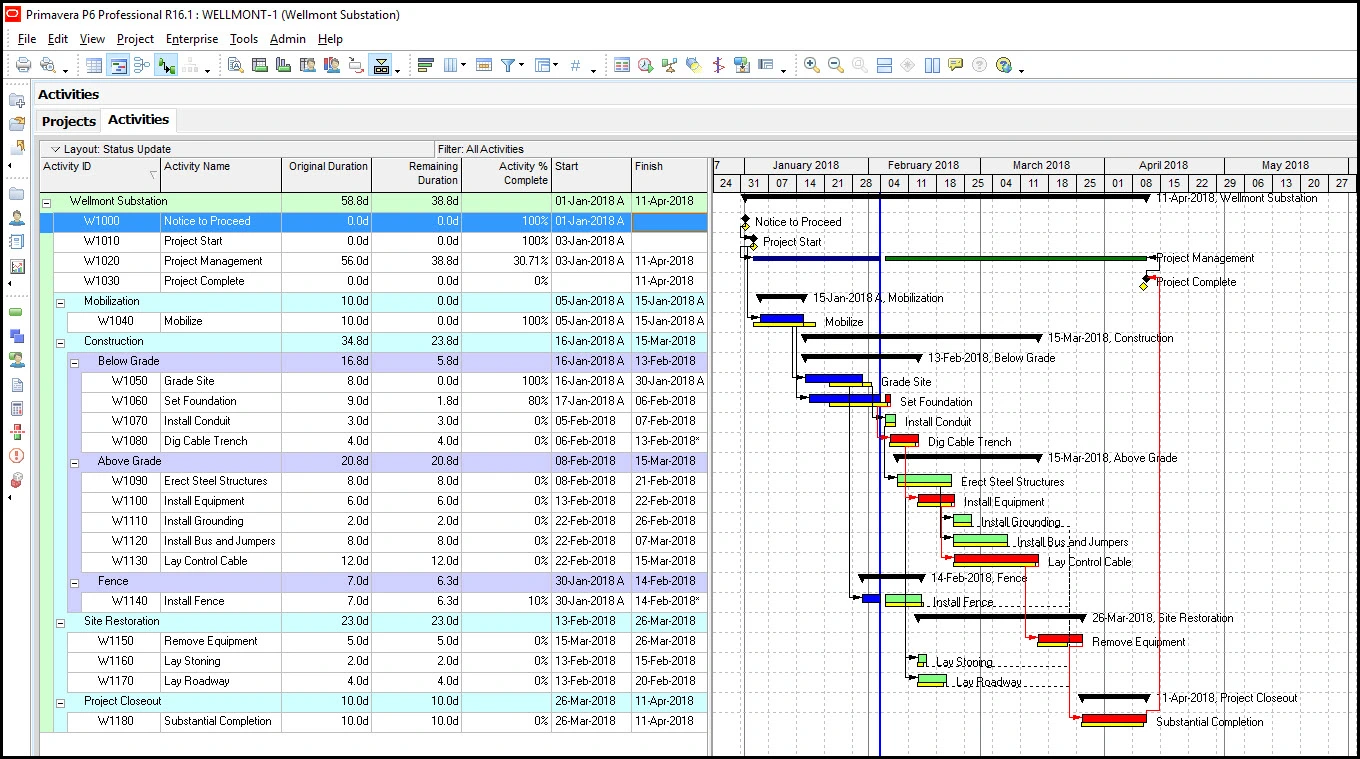
Users frequently cite Primavera P6 as difficult to use and expensive. The interface feels outdated, training requirements are high, and productivity suffers without a dedicated scheduling team.
Primavera P6 Pros & Key Features as Construction Scheduling Software
- Advanced CPM with critical path and float analysis
- Supports all dependency types (FS, SS, FF, SF)
- Multiple views: Gantt, WBS and network diagrams
- Strong baselines, variance tracking and portfolio scheduling
- Mobile app for Android and iOS
- Free trial available
Primavera P6 Cons & Limitations as Construction Scheduling Software
- Very steep learning curve
- Expensive and resource-heavy
- Dated Gantt chart interface
- Cost and resource tools are complex to configure
- Weak field integration and mobile updates
- Collaboration is rigid, not real-time
- No built-in timesheets
- Can slow down on large projects
- No free plan
Primavera P6 Pricing
- Primavera P6 Professional: approx. $1,300.00 per user/year
- Primavera P6 Enterprise: approx. $2,750.00 per user/year (plus annual support fees)
- Contact Oracle sales for current pricing
Primavera P6 Reviews
- G2 review: 4.4 / 5
- Capterra review: 4.5 / 5
Highlighted User Reviews
- “The schedule is very easy to observe. Easy to operate. I use it frequently.” Srinidhi S – from G2
- “I call it the best project control and scheduling app for construction projects.” Amirshahab S – from Capterra
- “Comprehensive set of tools for managing projects, from planning and scheduling to execution and monitoring.” Muzammil H – from G2
- “Oracle Primavera Cloud provides a comprehensive project management solution for projects of any size and complexity.” Coraly C – from Capterra
Primavera P6 – Verdict: Best Construction Scheduling Software for Complex Construction Schedules
6. Buildertrend
Buildertrend is the leading cloud-based construction management platform for home builders, remodelers and specialty contractors. Trusted by more than 20,000 contractors and used on over half of all new home builds in the U.S., it combines scheduling, financials, client communication, daily logs and project documentation in one platform.
Related: Best Buildertrend Alternatives: Free & Paid Options Ranked
As a construction scheduling tool, Buildertrend delivers basic to intermediate schedule management with task dependencies, critical path visualization, templates and multi-view (Gantt/Calendar) functions. It lacks advanced CPM capabilities like full dependency types, deep variance analytics, multi-project resource visibility and robust baseline tracking — but for residential construction teams, it covers the essentials well.
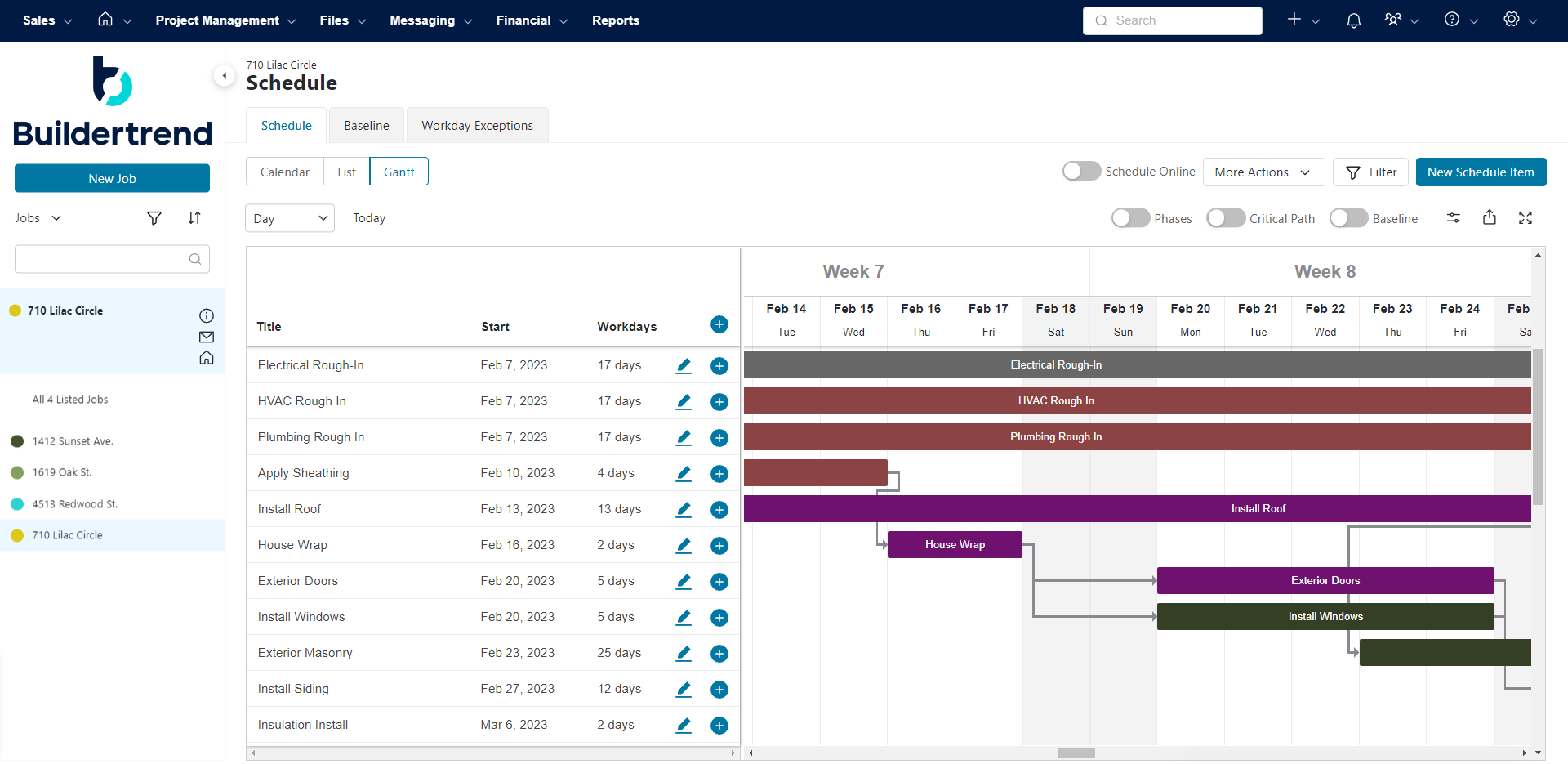
Users frequently praise Buildertrend’s breadth and customer support, though some note a complex interface, manual input requirements and high cost for smaller contractors.
Buildertrend Pros & Key Features as Construction Scheduling Software
- Responsive customer support
- Built-in CRM tools
- Simple scheduling: Gantt, calendar, to-do lists
- Critical path and task linking included
- Schedule templates and multiple views
- Links schedules with client updates and reminders
- Mobile app for iOS and Android
Buildertrend Cons & Limitations as Construction Scheduling Software
- Gantt charts lack cost and resource tracking
- Light on advanced construction PM features
- Expensive for smaller contractors
- Only basic task dependencies
- No native P6/XER support
- Weak multi-project visibility and analytics
- Basic baseline and variance tracking
- No real resource scheduling or alerts
- No free trial
- No free plan
Buildertrend Pricing
- Contact sales for a custom quote
Buildertrend Reviews
- G2 review: 4.3 / 5
- Capterra review: 4.5 / 5
Highlighted User Reviews
- “Buildertrend has been a very helpful solution for our construction business.” Janelle B – from Capterra
- “Very easy to keep track of various different elements throughout construction.” Brandi G – from Capterra
- “I love that Buildertrend is a one stop shop for everything building related.” Paige M – from G2
- “What I love most about Buildertrend is how user-friendly it is.” Antonio C – from G2
Buildertrend – Verdict: Best Construction Scheduling Software for Home Builders
7. Monday.com

Monday.com is one of the most popular work management platforms in the world, used by teams across industries to plan projects, assign tasks, track progress and automate workflows. With a dedicated construction use case, pre-built templates and highly customizable project boards, it has become a go-to option for construction teams looking for flexibility without the complexity of traditional scheduling tools.
As a construction scheduling software, Monday.com offers Gantt-style timelines with drag-and-drop scheduling, task dependencies, critical path visualization and baseline comparisons. It’s not a dedicated CPM tool — it lacks float analysis, cost-loaded scheduling and advanced resource management — but for teams that prioritize ease of use and collaboration, it delivers a strong, intuitive scheduling experience backed by one of the largest and most supported platforms in the industry.
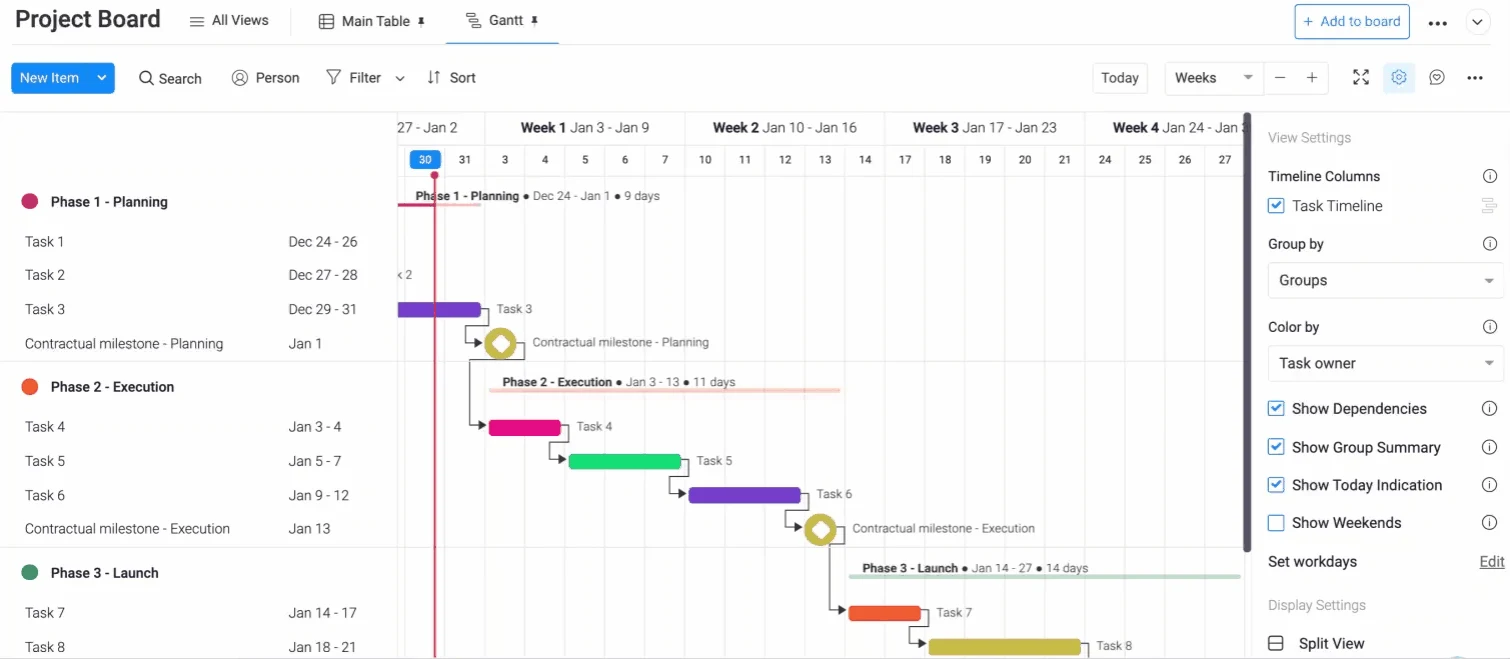
Users consistently praise Monday.com for its clean interface, fast onboarding and flexibility. Common limitations cited include performance lag on large boards and key features being locked behind higher-tier plans.
Monday.com Pros & Key Features as Construction Scheduling Software
- Highly customizable project boards and views
- Gantt timeline with drag-and-drop scheduling
- Task dependencies and critical path visualization
- Baseline snapshots for planned vs actual comparison
- Construction-specific templates included
- Automation tools to reduce manual scheduling tasks
- Real-time dashboards for cross-team visibility
- Mobile app for Android and iOS
- Free trial available
- Free plan available (limited to 2 seats and basic boards)
Monday.com Cons & Limitations as Construction Scheduling Software
- Not a construction-specific platform
- No CPM features like float or advanced critical path
- No advanced dependency types (FS, SS, FF, SF)
- No resource scheduling or workload balancing
- No cost-loaded scheduling or budget tracking
- No P6/XER import or export support
- Key features locked behind higher-tier plans
- Performance lag on large project boards
- Free plan too limited for any real construction scheduling use
Monday.com Pricing
- Basic: $9.00 user/month, billed annually
- Standard: $12.00 user/month, billed annually
- Pro: $19.00 user/month, billed annually
- Enterprise: contact sales for a custom quote
Monday.com Reviews
- G2 review: 4.7 / 5
- Capterra review: 4.6 / 5
Highlighted User Reviews
- “We transformed from a clunky old Gantt chart to a comprehensive CRM, project tracking, communication and scheduling system.” Managing Director – from G2
- “We highly recommend monday.com for its high and interactive management quality. Thanks to it we can make Gantt diagrams easily, and its kanban boards are more practical than in other project management tools.” – from G2
- “Productivity has significantly improved since switching — task assignments are clear, timelines are visual and our team actually uses the tool every day.” – from Capterra
- “The automation features alone save us hours each week on follow-ups and status updates.” – from Capterra
Monday.com – Verdict: Best Construction Scheduling Software for Flexible Team Collaboration
8. Smartsheet

Smartsheet is a cloud-based work management platform trusted by over 85% of Fortune 500 companies. Spreadsheet-inspired but far more powerful, it’s used by construction, operations and IT teams to plan projects, track tasks, report progress and automate workflows — including scheduling, budgeting, punch lists and RFP management.
As a construction scheduling software, Smartsheet offers intermediate, spreadsheet-driven scheduling with Gantt charts, dependencies and baselines. It falls short of professional CPM tools — no float visualization, no advanced resource scheduling and limited construction-specific cost integration — but for teams migrating off Excel or needing flexible project tracking, it offers a clean entry point with strong automation and collaboration.
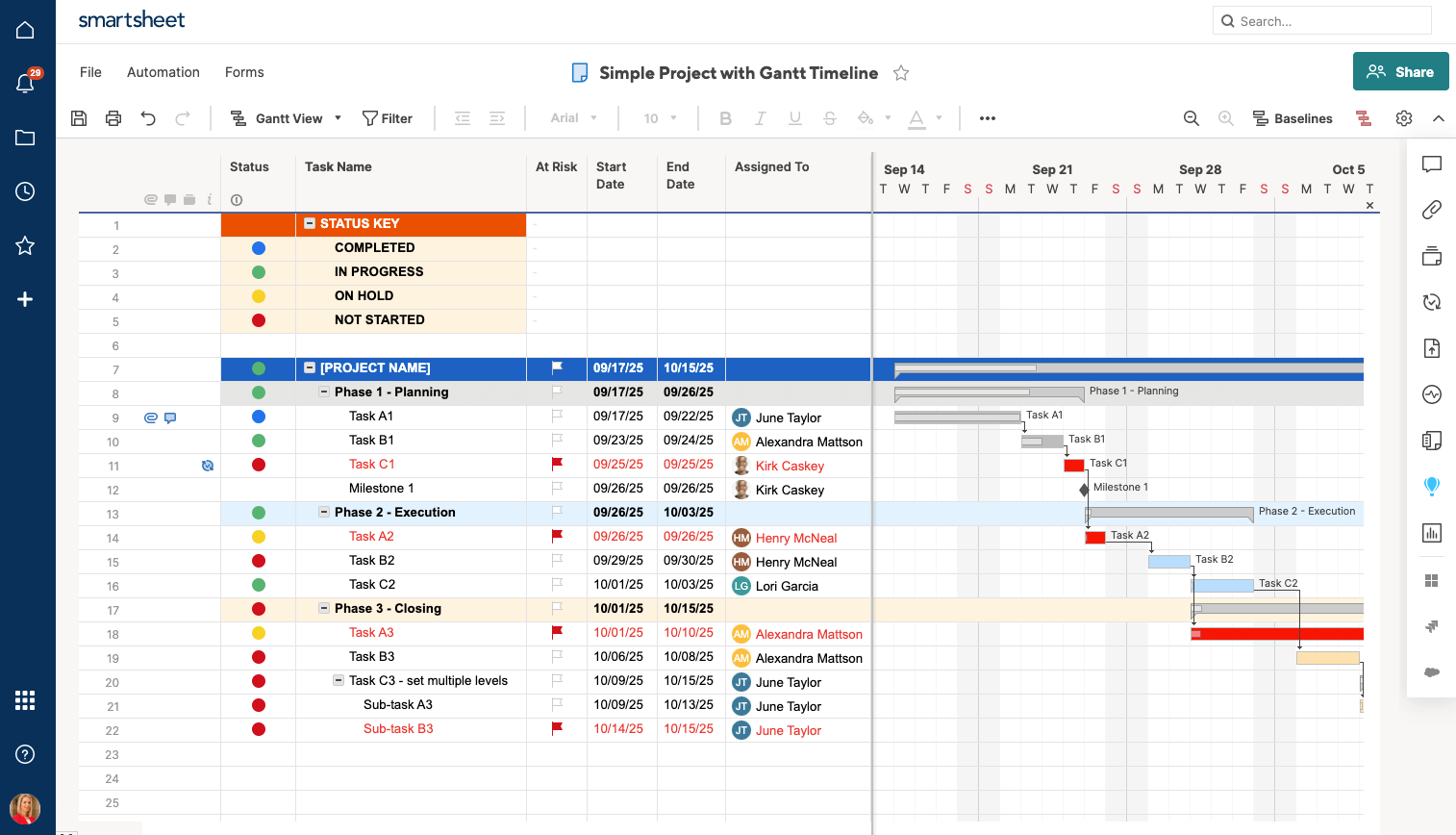
Users frequently cite a steep learning curve for advanced features, performance slowdowns on large sheets and complex licensing. Smartsheet integrates with Procore, DocuSign, Google Workspace and Microsoft 365.
Smartsheet Pros & Key Features as Construction Scheduling Software
- Solid workflow and automation tools
- Useful resource management features
- Good for teams moving off spreadsheets
- Cost management and budgeting support
- Gantt chart with task dependencies and milestones
- Integrates with Procore, DocuSign and Microsoft 365
- Mobile app for iOS and Android
- Free trial available
Smartsheet Cons & Limitations as Construction Scheduling Software
- Limited construction scheduling depth
- Rigid, spreadsheet-style interface
- Steep learning curve for advanced features
- Doesn’t support all task dependency types
- No real CPM or automatic float analysis
- No P6/XER compatibility
- Resource scheduling needs add-ons or workarounds
- No cost-loaded scheduling or variance analysis
- No free plan
Smartsheet Pricing
- Pro: $9.00 user/month, billed annually
- Business: $19.00 user/month, billed annually
- Enterprise: contact sales for a custom quote
Smartsheet Reviews
- G2 review: 4.4 / 5
- Capterra review: 4.5 / 5
Highlighted User Reviews
- “Smartsheet is a great platform for data visualization and project management.” Pathan I – from Capterra
- “Good for tracking projects but takes some time to learn all of the features.” Marissa P – from Capterra
- “Automation can save hours of time by automatically sending emails and reminders to ensure we meet our deadlines.” Amy S – from G2
- “Easily allows a shareable document that concurrent users can view and make live changes to.” Steven K – from G2
Smartsheet – Verdict: Best Construction Scheduling Software for Spreadsheet-Based Scheduling
9. Fieldwire

Fieldwire, now part of Hilti, is a construction field management platform used primarily for task coordination, plan viewing, inspections and punch lists. It’s designed to help field teams collaborate around drawings, issues and daily work execution — and it does that exceptionally well.
As a construction scheduling software, Fieldwire is not a true scheduling tool. It supports task assignment and due dates but lacks CPM logic, Gantt charts, baselines, dependency management and schedule analytics. Scheduling in Fieldwire is task-centric and operational — excellent for field coordination but not for building or managing a formal construction schedule. Most teams use it alongside a dedicated scheduling tool.
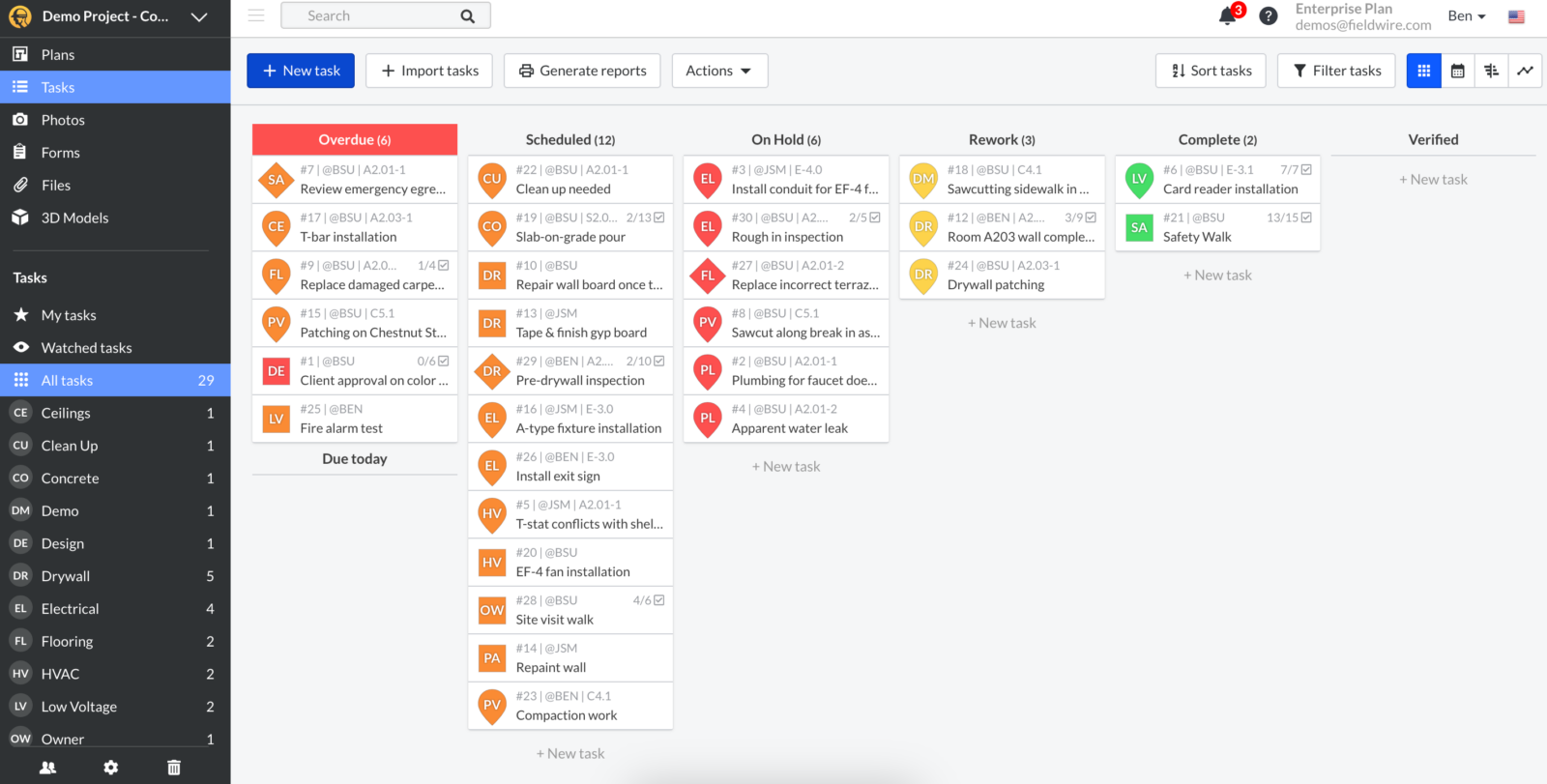
Users consistently rate Fieldwire highly for its plan viewing, real-time markup collaboration and ease of onboarding. Common concerns are per-user costs beyond five or six people and limited reporting depth.
Fieldwire Pros & Key Features as Construction Scheduling Software
- Plan viewing with real-time markup collaboration
- Task-to-drawing linkage for field teams
- Create and track punch lists on mobile
- Share site photos tied to tasks and inspections
- Multi-project visibility via dashboards
- Mobile app for Android and iOS
- Free plan available
Fieldwire Cons & Limitations as Construction Scheduling Software
- No CPM features like critical path or float
- No Gantt charts, milestones or WBS
- No task dependencies (FS, SS, FF, SF)
- No baselines or planned vs actual tracking
- No resource scheduling or workload tools
- No cost tracking or timesheets
- Per-user costs can add up quickly
- No free trial
Fieldwire Pricing
- Basic: $0.00 user/month
- Pro: $39.00 user/month, billed annually
- Business: $64.00 user/month, billed annually
- Business Plus: $89.00 user/month, billed annually
Fieldwire Reviews
- G2 review: 4.5 / 5
- Capterra review: 4.6 / 5
Highlighted User Reviews
- “Overall I’ve been very satisfied with using Fieldwire as a field report and punch list tool.” Patrick B – from Capterra
- “Information at our fingertips is essential, and Fieldwire readily enables us to access information easily and quickly on the job site.” Corey K – from Capterra
- “Exporting and sharing plans with others is super easy and means you’ll never need a file sharing service to send plans.” Mike P – from G2
- “We are able to keep track of progress, materials and scheduling easily.” Shannen H – from G2
Fieldwire – Verdict: Best Construction Scheduling Software for On-Site Coordination
10. Workyard
Workyard is a construction workforce management platform focused on scheduling crews, tracking labor hours via GPS and capturing job cost data. Used by contractors to assign work, monitor crew locations in real time and connect field time and cost data back to the office, it’s built for the day-to-day operational side of running a crew.
As a construction scheduling software, Workyard provides basic scheduling tools focused on crew assignment and workforce dispatch. It lacks formal CPM logic, Gantt visualization, baselines and portfolio scheduling. Its scheduling is limited to field crew planning and calendar views — not formal project schedule development. For contractors who need precise labor cost tracking and GPS accountability, it fills a real gap, but it’s not a replacement for a full scheduling tool.
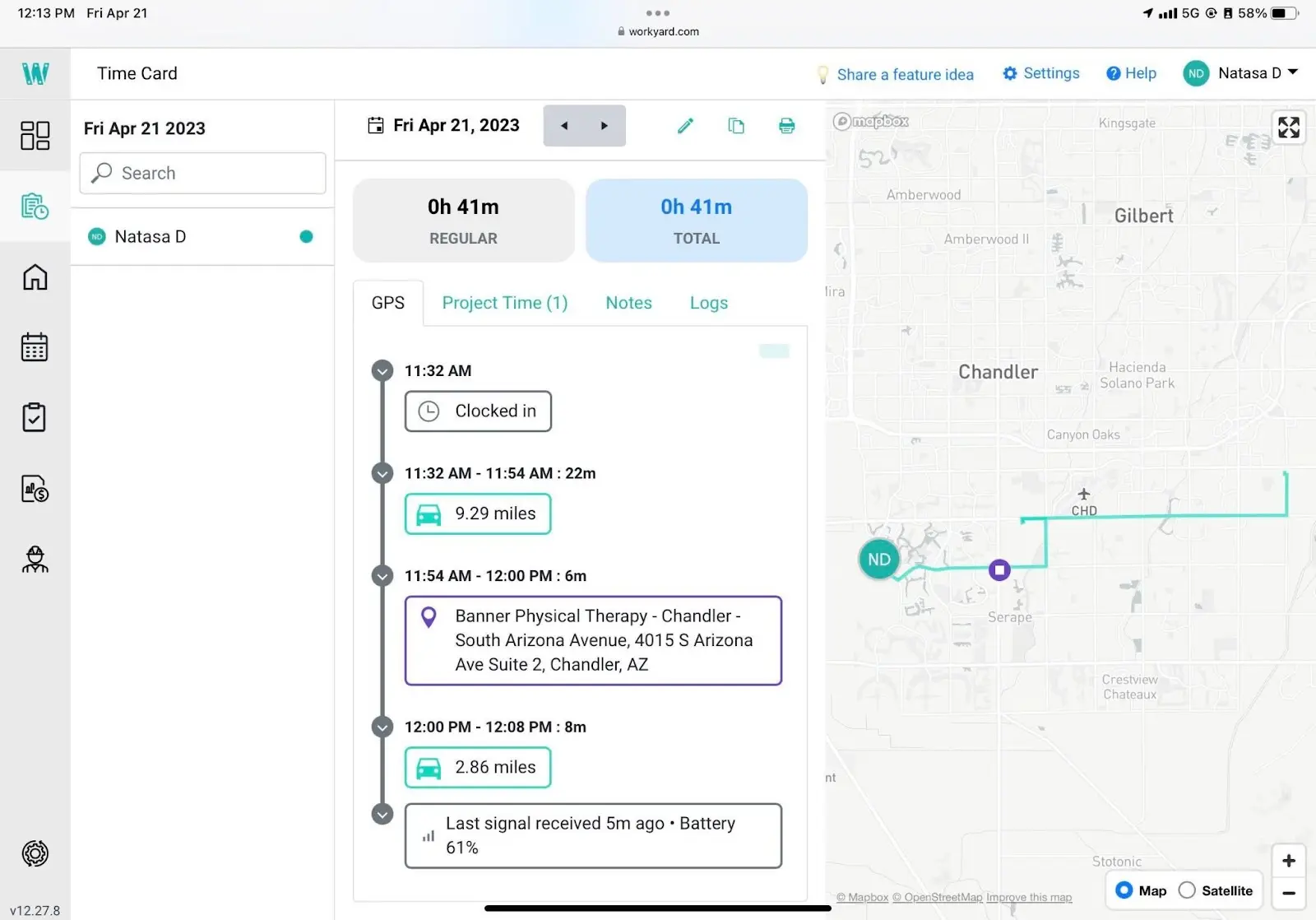
Users praise Workyard for GPS accuracy, time tracking and ease of use. Some note GPS glitches, limited feature depth beyond labor tracking and that scheduling functions focus on crew dispatch rather than detailed project planning.
Workyard Pros & Key Features as Construction Scheduling Software
- Easy drag-and-drop calendar scheduling
- Quickly assign crews to jobs and locations
- Accurate GPS-based time tracking
- Real-time schedule updates on mobile
- Overtime alerts and break reminders
- Links scheduling with cost and labor tracking
- Mobile app for iOS and Android
- Free trial available
Workyard Cons & Limitations as Construction Scheduling Software
- No CPM features (no critical path or float)
- No Gantt chart for visual scheduling
- No task dependencies (FS, SS, FF, SF)
- No project baseline or planned vs actual tracking
- No workload or resource balancing tools
- No built-in CRM integrations
- GPS tracking may raise privacy concerns
- No free plan
Workyard Pricing
- Starter: $6.00 user/month (plus $50.00/month company base fee)
- Pro: $13.00 user/month (plus $50.00/month company base fee)
- Enterprise: contact sales for a custom quote
Workyard Reviews
- G2 review: 4.8 / 5
- Capterra review: 4.8 / 5
Highlighted User Reviews
- “My experience has been fine although I wish it was a bit more hands off.” Patrick D – from Capterra
- “We have loved getting onto digital timecards, and have found the direct export from Workyard to our payroll company to greatly reduce payroll errors and delays.” Sam D – from Capterra
- “GPS tracking, Geotag and Timesheet. Very basic and easy to use.” Isaac K – from G2
- “Helpful, very helpful and user-friendly.” Ankita B – from G2
Workyard – Verdict: Best Construction Scheduling Software for Labor Tracking
11. InEight

InEight is an enterprise construction project controls platform trusted by 850+ companies to manage over $1 trillion in projects worldwide. Built primarily for large contractors in infrastructure, transportation, power, nuclear, oil and gas, it focuses on capital planning, cost management, estimating, scheduling integration, risk and performance controls.
As a construction scheduling software, InEight is controls-centric rather than scheduling-centric. It integrates imported schedules for forecasting, risk and performance analysis, but does not function as a standalone CPM scheduling engine. It lacks native advanced Gantt modeling, full CPM authoring and hands-on schedule creation workflows. Teams that need InEight for cost controls will typically still use Primavera P6 or Microsoft Project for scheduling.
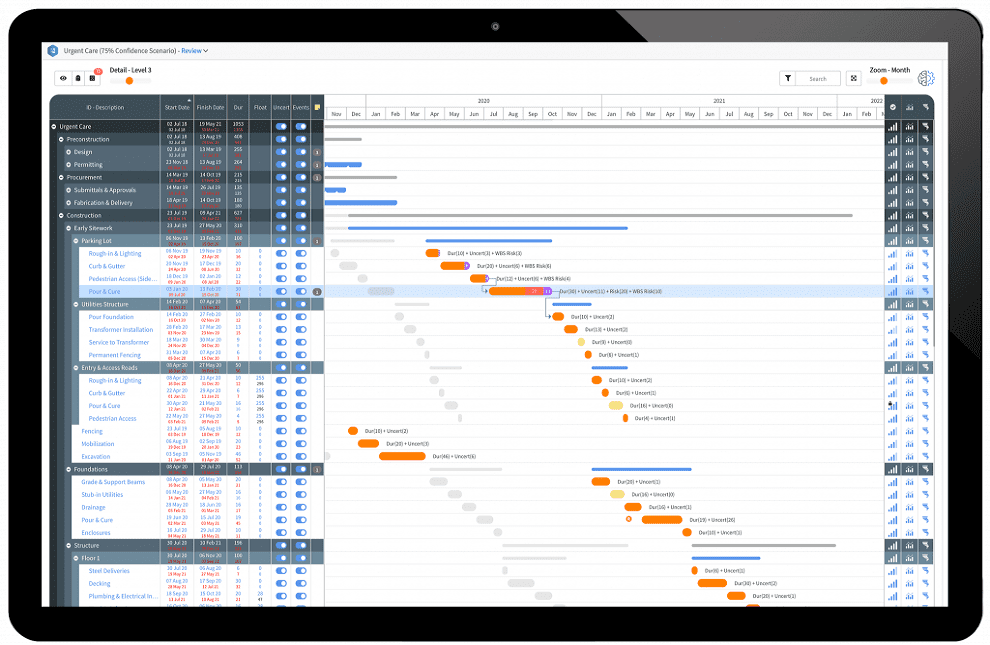
Common feedback highlights high cost, long implementation cycles and a steep learning curve. InEight is built for large enterprises — smaller teams often find it overkill when scheduling is their primary need.
InEight Pros & Key Features as Construction Scheduling Software
- Handles change orders and contract management
- Strong construction document management
- Cost estimating and forecasting
- Uses imported schedules for forecasting and risk
- Multi-project and portfolio visibility
- Strong governance, audit trails and version control
InEight Cons & Limitations as Construction Scheduling Software
- No native CPM scheduling
- Limited Gantt scheduling capabilities
- No advanced Gantt or dependency modeling
- No resource scheduling tools
- Baselines rely on imported schedules
- Dependencies require external tools (P6, MS Project)
- Outdated, clunky interface
- No free trial
- No free plan
InEight Pricing
- Schedule module: from $150.00 user/month, billed annually
- Enterprise solutions: contact sales for a custom quote
InEight Reviews
- G2 review: 4.1 / 5
- Capterra review: 4.4 / 5
Highlighted User Reviews
- “The software works great for large complicated projects.” Chad O – from Capterra
- “One source of truth for a large scale project instead of multiple side lists/sheets/data that need to be compiled together.” Deniel A – from Capterra
- “InEight brings everything the site team needs — it has all kinds of different modules that are suited to all stages of the project.” Abdallah A – from G2
- “Powerful tool for cost estimating projects.” Kyle H – from Capterra
InEight – Verdict: Best Construction Scheduling Software for Enterprise Construction Projects
12. Jobber

Jobber is a field service management platform used by more than 250,000 service businesses including plumbers, electricians, landscapers and small construction contractors. It centralizes client communication, quoting, invoicing, scheduling and basic work planning — making it one of the most efficient tools available for trade and service businesses that need to manage recurring jobs.
As a construction scheduling tool, Jobber is not designed for advanced project schedule management. Its schedule module focuses on calendar views and appointment management rather than Gantt charts, critical path analysis, baselines or resource-heavy scheduling. For simple job assignments and crew dispatch, it works well. For complex multi-week construction project schedules, it falls short.
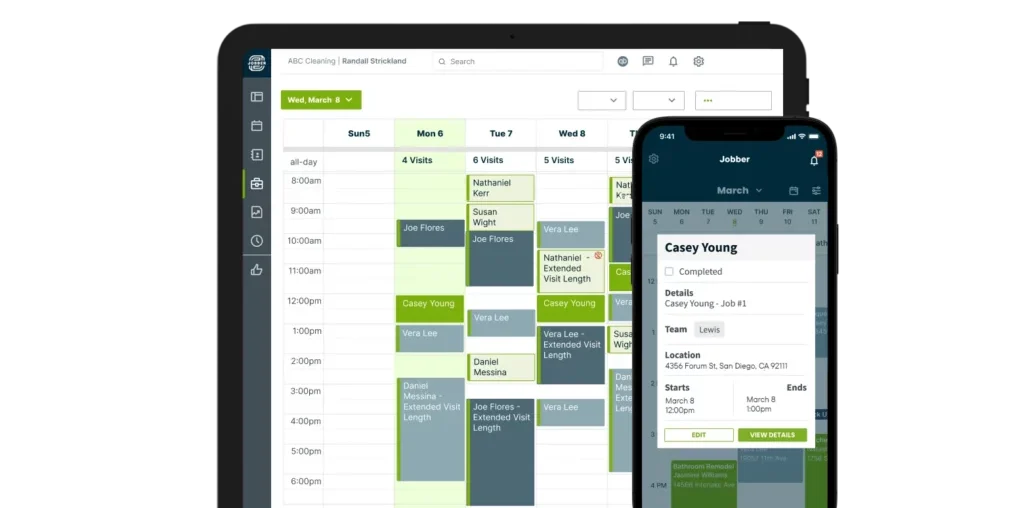
Users rate Jobber highly for ease of use, client communication and quoting. Common limitations include scaling issues as businesses grow and limited advanced features for complex projects.
Jobber Pros & Key Features as Construction Scheduling Software
- Calendar-based scheduling for crews and jobs
- Links scheduling with client data and communication
- Built-in quoting, invoicing and payment processing
- Job costing and work orders
- Client Hub self-service portal
- Simple, easy project tracking
- Mobile app for iOS and Android
- Free trial available
Jobber Cons & Limitations as Construction Scheduling Software
- Not built for large or complex projects
- No Gantt chart, milestones or WBS
- No CPM features (no critical path or float)
- No task dependencies (FS, SS, FF, SF)
- No baseline or planned vs actual tracking
- Limited resource scheduling tools
- No support for MS Project, P6 or XER/XML
- Scaling limitations for larger teams
- No free plan
Jobber Pricing
- Core: $29.00/month (1 user)
- Connect: $99.00/month (up to 5 users)
- Grow: $149.00/month (up to 5 users)
- Plus: $299.00/month (up to 10 users)
Jobber Reviews
- G2 review: 4.6 / 5
- Capterra review: 4.6 / 5
Highlighted User Reviews
- “I like it better than other CRMs because I do everything on my phone really.” Nick G – from Capterra
- “It is fine for doing exactly what the designers of the software want it to do. It’s simple to use.” Heather K – from Capterra
- “I use Jobber everyday, to keep my scheduled route the most efficient and to know where my crew will be.” Kristi S – from G2
- “It helps me keep track of client requests, send out quotes that get approved quickly, and invoice clients easily.” Eliseo M – from G2
Jobber – Verdict: Best Construction Scheduling Software for Field Service Contractors
13. Contractor Foreman

Contractor Foreman is an affordable, all-in-one construction management platform for small to mid-sized contractors. Starting at $49/month for the whole company, it combines scheduling, estimating, job costing, time tracking, documents and client communication — replacing multiple disconnected apps with a single platform.
As a construction scheduling software, Contractor Foreman delivers basic to intermediate scheduling with Gantt charts, task dependencies, milestones and progress tracking. It lacks the depth of advanced CPM tools — no float visualization, robust baselines or portfolio-level scheduling — but for smaller contractors who need reliable everyday scheduling without enterprise pricing, it punches above its weight.
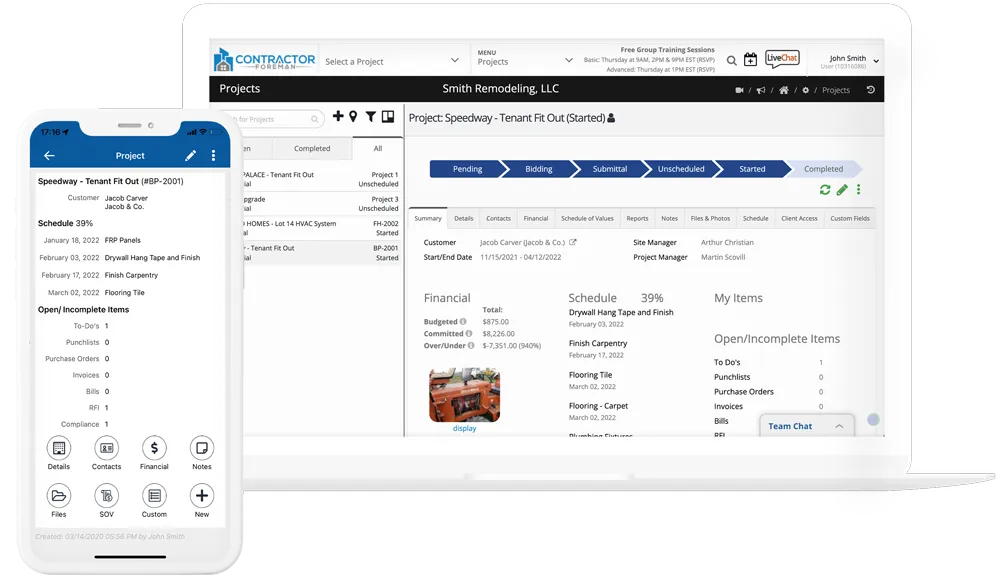
Users consistently rate Contractor Foreman highly for value, with Capterra and G2 both at 4.5/5. Common feedback notes a busy interface, a learning curve and performance slowdowns on larger projects.
Contractor Foreman Pros & Key Features as Construction Scheduling Software
- Flat monthly fee with unlimited users
- Gantt chart with milestones, dependencies and % complete
- Kanban boards, task lists and daily logs
- Job costing and work orders
- Daily logs for materials, equipment and time cards
- Mobile app for iOS and Android
- Free trial available
Contractor Foreman Cons & Limitations as Construction Scheduling Software
- Lightweight advanced construction PM features
- Weak CPM (no float or advanced analysis)
- Limited resource planning tools
- Doesn’t support all task dependency types
- Limited multi-project visibility
- Basic baseline vs actual tracking
- No free plan
Contractor Foreman Pricing
- Basic: $49.00/month (whole company)
- Standard: $105.00/month (up to 3 users)
- Plus: $166.00/month (up to 8 users)
- Pro: $221.00/month (up to 15 users)
- Unlimited: $332.00/month (unlimited users)
Contractor Foreman Reviews
- G2 review: 4.5 / 5
- Capterra review: 4.5 / 5
Highlighted User Reviews
- “I like the interface, the ability to customize and integrate.” Jessi J – from Capterra
- “My experience has been very positive. I appreciate the live chat function that is available during business hours.” Rafael V – from Capterra
- “It has made it possible to organize all processes efficiently, and the information is always up-to-date and verified.” Loyda V – from G2
- “I enjoy that it can house everything I need for my projects and has a client portal.” Kristin B – from G2
Contractor Foreman – Verdict: Best Construction Scheduling Software for Small Contractors
14. Microsoft Planner

Microsoft Planner is a lightweight task management tool included with Microsoft 365 subscriptions. It’s primarily used for team task tracking, to-do lists and simple work planning using boards, buckets and due dates rather than formal project schedules. Its tight integration with Teams and Outlook makes it a natural first tool for Microsoft-heavy organizations.
As a construction scheduling software, Microsoft Planner is far below professional scheduling standards. It lacks CPM logic, Gantt charts, baselines, dependencies and resource scheduling. For construction teams, it functions only as a task list and light collaboration aid — not a tool for building, analyzing or managing construction schedules. That said, for very small teams using Microsoft 365 who need basic task tracking, the zero added cost is hard to argue with.
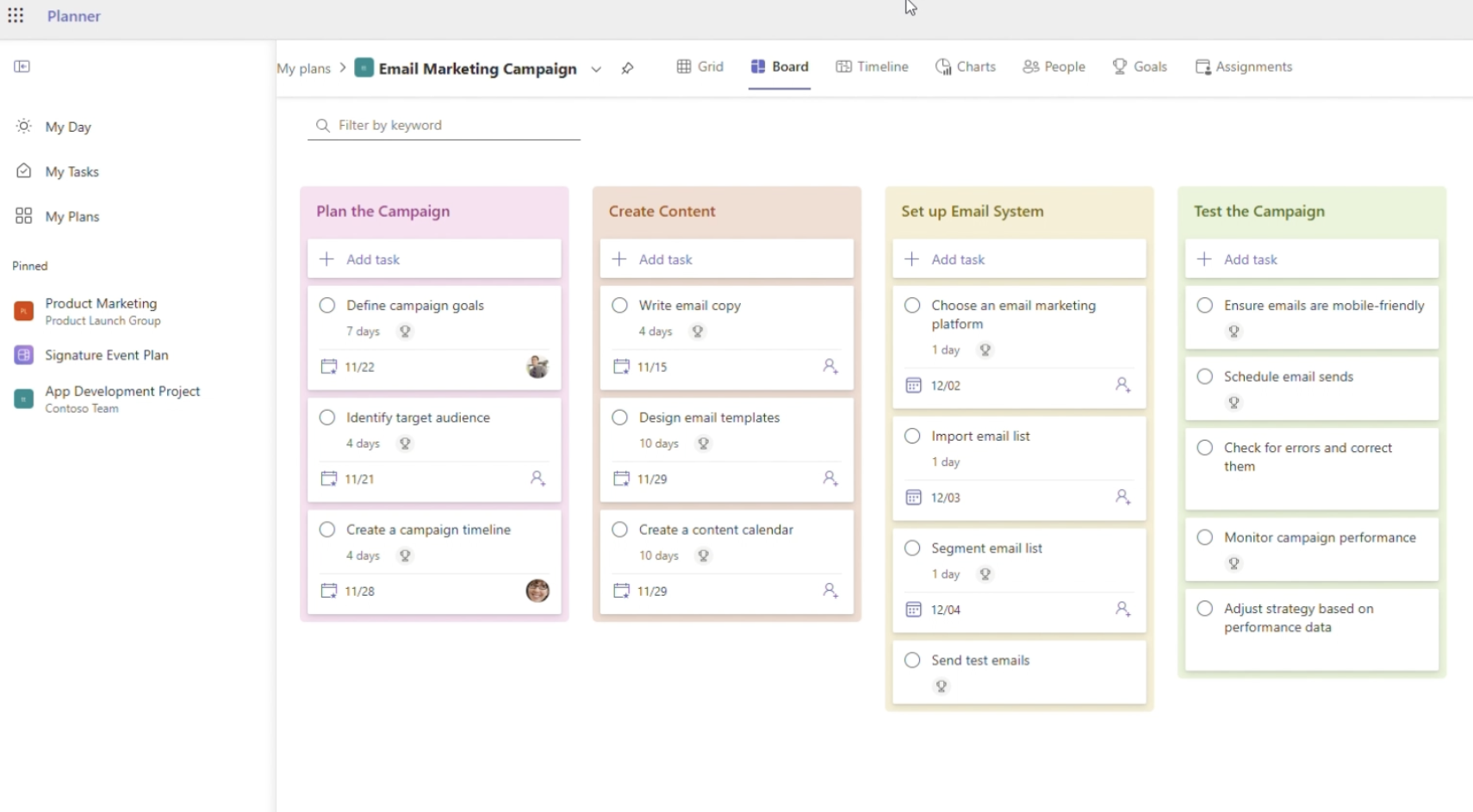
Users describe Microsoft Planner as simple, clean and easy for lightweight collaboration. Common complaints are limited customization, no reporting depth and that it quickly becomes restrictive as project complexity grows.
Microsoft Planner Pros & Key Features as Construction Scheduling Software
- Visual task boards for construction teams
- Integrates tightly with Microsoft 365, Teams and Outlook
- Cloud-based with real-time updates
- Simple task assignment and due dates
- Mobile app for Android and iOS
- Included with most Microsoft 365 subscriptions
Microsoft Planner Cons & Limitations as Construction Scheduling Software
- No CPM features (no critical path or float)
- No Gantt charts, milestones or WBS
- No task dependencies
- No baselines or planned vs actual tracking
- No resource, cost or portfolio scheduling
- Limited reporting and customization
- Requires Microsoft 365 subscription
Microsoft Planner Pricing
- Planner Basic: included with Microsoft 365 plans (from $6.00 user/month)
- Planner Plan 1: $10.00 user/month, billed annually
- Planner and Project Plan 3: $30.00 user/month, billed annually
- Planner and Project Plan 5: $55.00 user/month, billed annually
Microsoft Planner Reviews
- G2 review: 4.2 / 5
- Capterra review: 4.3 / 5
Highlighted User Reviews
- “Overall, my experience with Microsoft Planner has been very positive, as it has helped my team share tasks and establish procedures to follow.” Alvaro G – from Capterra
- “User Interface and its simplicity to manage tasks and allocate to agents.” Hitesh A – from G2
- “Microsoft Planner is great because it’s part of the Microsoft 365 family. It works really well with other Microsoft apps like Teams and Outlook.” Anand G – from G2
- “Easy to use and setup. I can easily assign tasks, and it’s very cost effective.” Haley B – from Capterra
Microsoft Planner – Verdict: Best Construction Scheduling Software for Simple Task Planning
15. Wrike

Wrike is a cloud-based work management and collaboration platform used across industries to plan projects, manage tasks, track progress and automate workflows. With a strong feature set including Gantt charts, dependencies, baselines and resource management, it’s popular with marketing, operations and professional services teams — and can be adapted for construction scheduling with the right setup.
As a construction scheduling software, Wrike offers general-purpose scheduling rather than construction-grade CPM. While it includes Gantt charts, dependencies and baselines, it lacks CPM rigor, float visualization, advanced resource scheduling and construction-specific cost integration. For cross-functional construction teams that need robust project tracking and reporting without a steep learning curve, Wrike is a solid option — but dedicated schedulers will find its CPM capabilities too light.
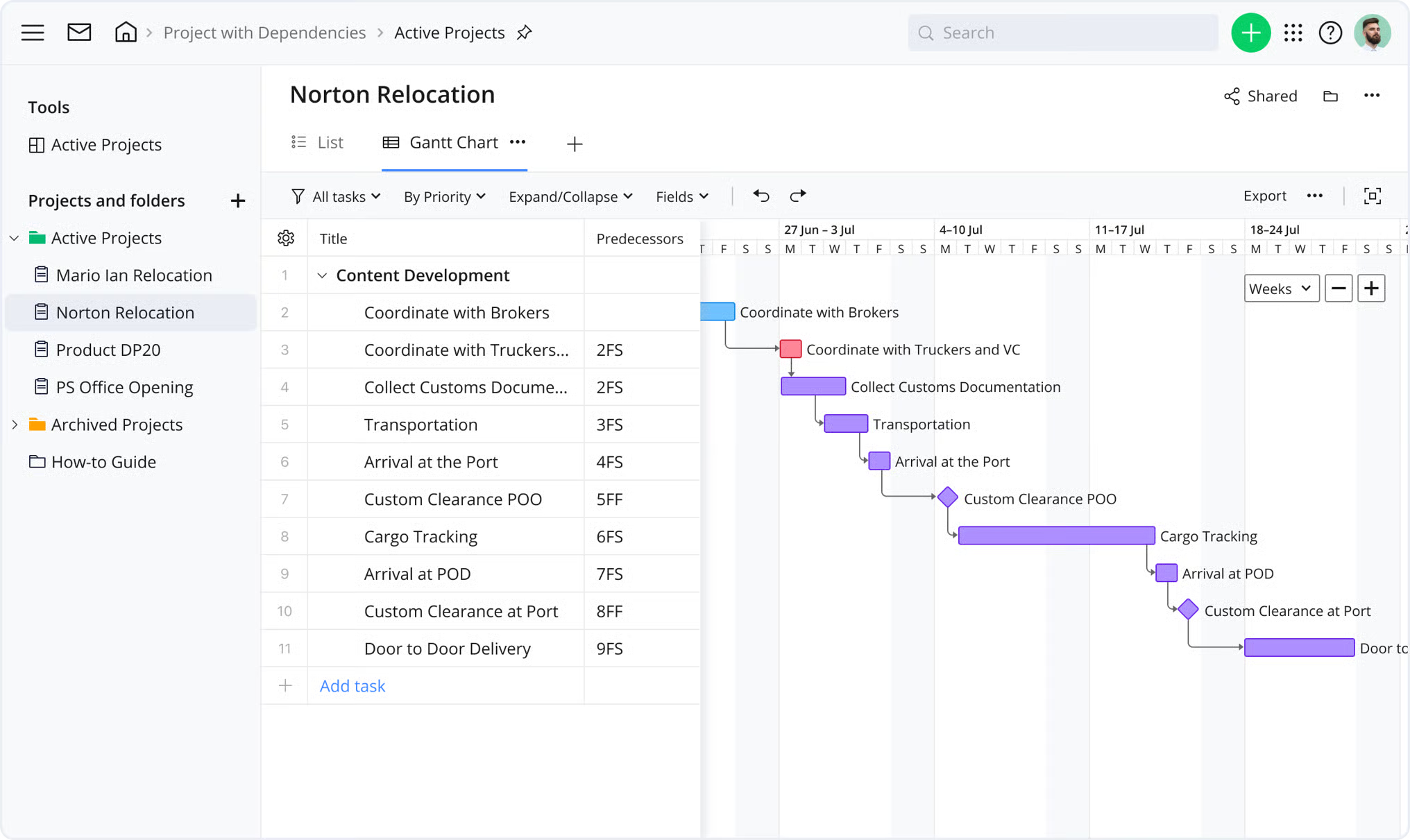
Users frequently mention complex configuration, notification overload and a pricing model that scales quickly. Wrike is consistently well-rated on G2 (4.2/5) and Capterra (4.4/5) for mid-market and enterprise project management.
Wrike Pros & Key Features as Construction Scheduling Software
- Custom workflows and request forms
- Real-time collaboration and communication
- Time tracking for contractor hours
- Workload charts for resource planning
- Automation to reduce manual work
- Scales well for teams of any size
- Integrates with other apps
- Free plan available
Wrike Cons & Limitations as Construction Scheduling Software
- No true CPM features (no critical path or float)
- Limited task dependency logic for complex schedules
- No cost-loaded scheduling or cost variance tracking
- Lightweight resource scheduling
- No P6/XER interoperability
- Steep learning curve for advanced features
- Pricing scales quickly with team size
- Can slow down with large datasets
Wrike Pricing
- Free: $0.00 user/month
- Team: $10.00 user/month
- Business: $25.00 user/month
- Enterprise: contact sales for a custom quote
- Pinnacle: contact sales for a custom quote
Wrike Reviews
- G2 review: 4.2 / 5
- Capterra review: 4.4 / 5
Highlighted User Reviews
- “Wrike has become essential in my day and keeps me organized and on top of my tasks.” Paige T – from G2
- “Wrike is a user-friendly tool — users need relatively little time to start using it and it’s also easy to set up.” Sabrina C – from G2
- “Productivity has been enhanced by removing essential but repetitive chores.” Denise S – from G2
- “It has improved the overall completion of our time critical tasks, works well with collaboration and has no reliability issues.” Christian S – from Capterra
Wrike – Verdict: Best Construction Scheduling Software for Cross-Functional Teams
Types of Construction Scheduling Software
Construction scheduling software comes in different types depending on project size, complexity and who’s using it. Choosing the right type depends on your workflows, team structure, reporting needs and how detailed your schedules need to be.
- Residential construction scheduling software: Designed for homebuilders and small contractors, these tools focus on simple timelines, client communication and basic task tracking without complex scheduling logic.
- Commercial construction scheduling software: Built for mid-to-large projects, these tools support detailed timelines, multiple stakeholders and coordination across trades, often with stronger reporting and tracking features.
- Enterprise construction scheduling software: Used for large, complex projects or portfolios, these platforms offer advanced CPM scheduling, resource planning, baselines and multi-project visibility across entire organizations.
- Contractor-focused scheduling software: Tailored for subcontractors and field teams, these tools prioritize mobility, task updates, punch lists and coordination with general contractors.
- General project management software with scheduling features: Flexible tools that include basic scheduling alongside collaboration, task management and reporting, but may lack advanced construction-specific capabilities.
- CPM-based scheduling software: Advanced tools built around critical path methodology, enabling detailed dependency logic, float analysis and precise control over complex construction schedules.
How to Choose the Right Construction Scheduling Software
Choosing the right construction scheduling software is a subjective decision. There’s no single best tool for everyone. To make the right choice, start by assessing your organization’s real project scheduling needs before comparing features or vendors.
In terms of construction scheduling tools and features, you should consider the following:
- How complex your construction schedules are (basic timelines vs. CPM-based scheduling)
- Whether you require full task dependency logic and critical path analysis
- How important baselines and variance tracking are to your controls
- If you need to manage schedules at a portfolio or program level
- Whether schedules must integrate with cost data and budgets
- If field teams need mobile access to update progress
- How easy the software is to learn and use for both planners and field teams
- Whether the pricing model aligns with your budget, team size and project volume
FAQs About Construction Scheduling Software
Choosing software for scheduling your construction projects is an important decision, which is why we’ve gathered the most frequently asked questions about construction project scheduling software.
What Is the Best Construction Scheduling Software?
ProjectManager is the best construction project scheduling software. It offers the most complete set of scheduling, resource and cost tracking tools for construction teams — and backs it up with a free 30-day trial so you can see for yourself.
How Much Does Construction Scheduling Software Cost?
Construction scheduling software pricing varies widely. Entry-level tools or task managers may be free or cost under $20 per user per month. Mid-range platforms with Gantt charts, collaboration and basic scheduling typically range from $9 to $30 per user per month. Advanced construction scheduling software with CPM, portfolio management and enterprise controls is usually priced through custom quotes and can cost thousands annually depending on users, modules and project volume.
How Does Construction Scheduling Software Work?
Construction project scheduling software works by organizing project activities into a structured timeline that shows task sequences, durations and dependencies. Teams create schedules using Gantt charts, calendars or task lists, then assign labor, equipment and costs to each activity. As work progresses, updates from the field adjust timelines in real time. More advanced tools calculate critical paths, track variances against baselines and provide dashboards so managers can forecast delays, coordinate trades and keep stakeholders aligned.
Related Construction Software Content
- Best Construction Software for Mac
- Best Construction Management Software for a Small Business
- Best Construction Estimating Software
- Making a Construction Schedule: Construction Scheduling Basics
- 24 Construction Documents (Templates Included)
- The 5 Construction Phases (Templates Included)
- Mejores Software de Programación de Construcción
- Meilleurs logiciels de planification de la construction
- Beste Software für Bauzeitplanung
- Melhores Softwares de Cronograma de Obras
Construction project management is a big field that requires robust and dynamic project management software to handle all its moving parts. ProjectManager is construction project management software that has the tools to plan, monitor and report on every phase of the project’s life cycle. It’s uniquely equipped for construction with visual workflow features like kanban boards and online Gantt charts that schedule and help teams collaborate. See for yourself by taking this free 30-day trial.
