



Construction document management is critical to keeping complex building projects organized, compliant and on schedule. With multiple stakeholders, evolving plans and strict regulatory requirements, construction teams need a reliable way to store, track and share documents in real time. Effective construction document control ensures that the right stakeholders are working from the latest versions, reducing errors, delays and costly rework while improving collaboration across the project lifecycle.
What Is Construction Document Management?
Construction document management is the process of organizing, storing and controlling all digital and physical construction documents throughout a project lifecycle. Effective construction document management enables construction companies and project managers to maintain a single source of truth, ensure real-time access to information and track changes across drawings, contracts and work orders. Using document management software and cloud-based construction software, teams improve compliance, streamline decision-making and reduce time spent on data entry and version control.
Why Is Construction Document Management Important?
Keeping construction documents organized and accessible is essential for ensuring projects stay on schedule and within budget. A strong document control system gives project managers and team members real-time access to digital documents, tracks changes and maintains a clear history for compliance audits. Centralizing documents in a cloud-based system helps construction companies reduce errors, prevent cost overruns and make informed decisions throughout the project lifecycle.
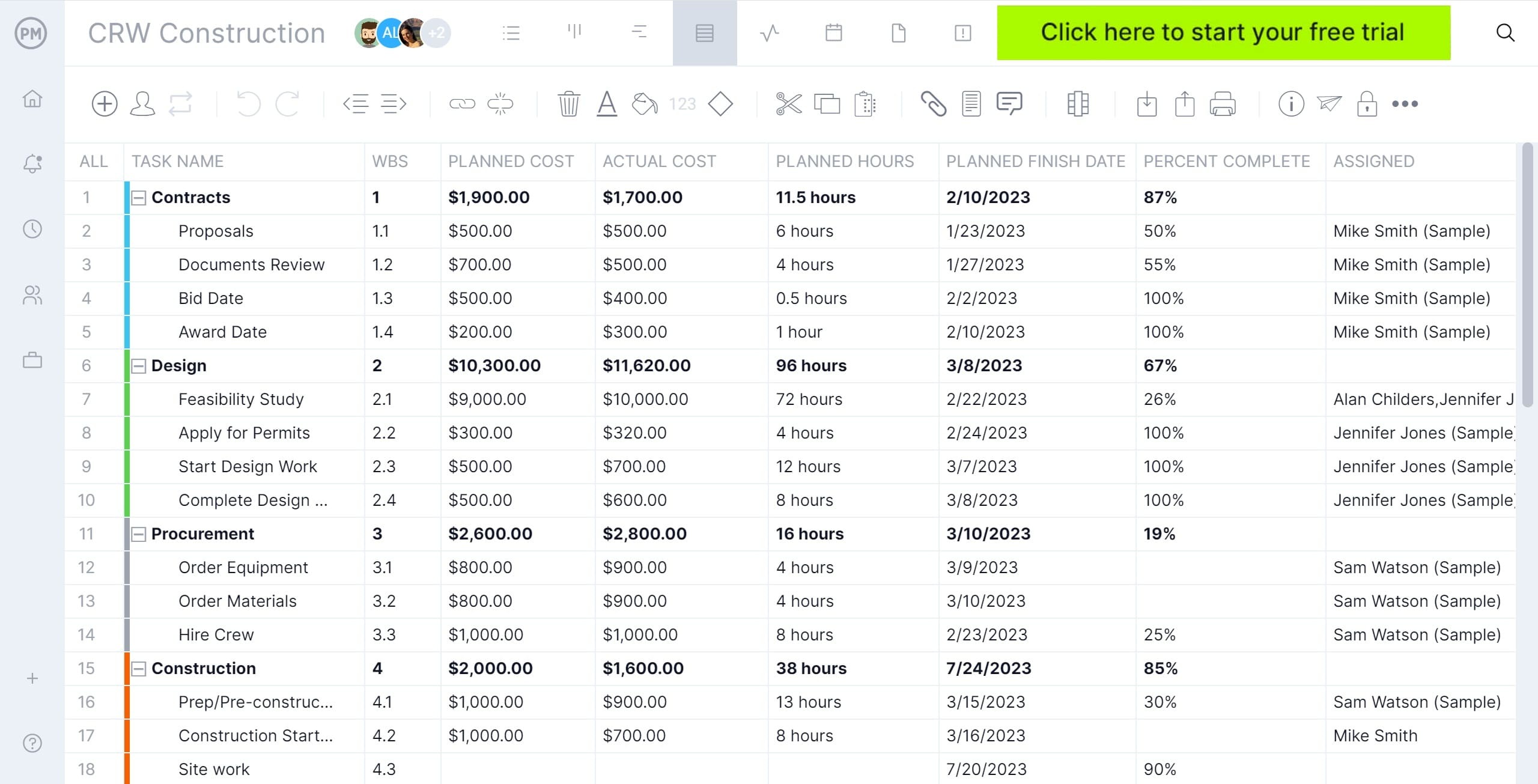
Managing construction documents in ProjectManager is easy. Leverage the sheet view to see all tasks, documents, attachments and status in one sortable grid. You can link files to specific tasks, track document updates and monitor completion alongside progress. Centralized access to all construction documents makes it simple for construction teams to manage documentation efficiently. Sign up for a free 30-day trial, no credit card required.
Construction Document Management Process
Now that we know more about the definition and importance of construction document management, let’s explore the steps.
1. Document Creation & Intake
Project documents are created or received from internal teams, designers, contractors or authorities. This includes drawings, specifications, contracts, RFIs, submittals, permits and reports. Each document is logged, named consistently and assigned basic metadata (project, discipline, date, version).
2. Classification & Organization
Documents are categorized by type, phase and discipline (e.g., design, procurement, construction, closeout). Folder structures or document registers are applied to ensure files are easy to locate and consistently stored across the project lifecycle.
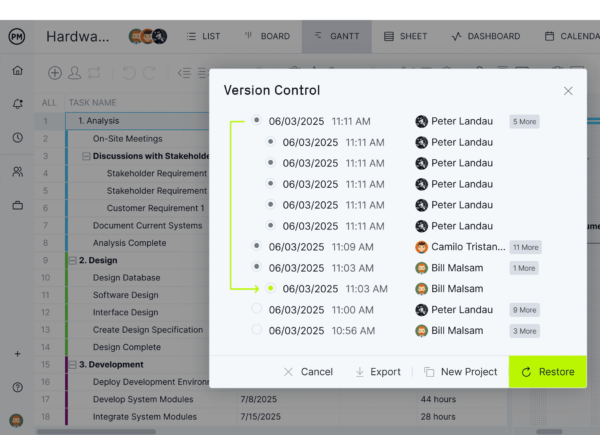
3. Version Control & Change Tracking
Revisions are managed to ensure only the latest approved versions are used on site. Superseded documents are archived, version histories are maintained and changes are clearly tracked to prevent rework, errors or disputes.
4. Review, Approval & Distribution
Documents requiring review follow defined workflows for checking, approval or rejection. Once approved, documents are formally issued to relevant stakeholders, ensuring the right people are working from the correct information.
5. Access Control & Security
User permissions are assigned based on roles and responsibilities. Sensitive documents such as contracts or financial records are restricted, while construction drawings and schedules are shared with broader project teams as needed.
6. Ongoing Updates & Coordination
As the project progresses, documents are continuously updated to reflect design changes, site conditions and decisions. Coordination between teams ensures document updates align with schedules, procurement and field activities.
7. Audit Trail & Compliance Management
All document actions—uploads, revisions, approvals and distributions—are logged to create a clear audit trail. This supports contractual compliance, regulatory requirements and dispute resolution if issues arise.
8. Archiving & Project Closeout
At project completion, final versions are compiled and archived. As-built drawings, warranties, operation manuals and closeout documents are organized for handover to owners and facility management teams.
Important Documents for the Construction Document Process
Managing construction documents effectively requires knowing which files are most critical to your project’s success. From contracts to change orders, understanding the key documents in the construction document process helps teams stay organized, maintain compliance and ensure smooth project execution.
Construction Drawings
At the heart of every construction project are the drawings—detailed visual guides showing architectural, structural and mechanical designs. Proper document management ensures that all team members work from the latest version. Cloud-based systems and document control make it easy to share, update and track drawings throughout the project lifecycle.
Construction Specifications
Specifications define the materials, quality standards and workmanship required for construction. Rather than just a checklist, they guide daily decisions on the job site. Centralized document management allows construction managers and team members to quickly access specs, monitor updates and maintain a clear history for compliance and quality assurance.
Construction Contracts
Construction contracts formalize agreements between owners, contractors and subcontractors, covering responsibilities, timelines and payment terms. Storing these documents in a document management system reduces risks, provides easy version tracking and ensures that project managers can reference obligations or resolve disputes efficiently.
Related: 14 Types of Construction Contracts: Pros, Cons & Best Practices
Construction Submittals
Submittals, including shop drawings and product samples, require approval before installation. A structured construction document management system ensures timely review, prevents delays and keeps all stakeholders informed. With real-time access, project managers can track status, ensure proper approvals and avoid mistakes during execution.
Construction Requests (RFP, RFQ, RFI)
Requests for proposals, quotations or information are critical communication tools during a project. By managing these requests within a document control system, teams maintain visibility, ensure accountability and preserve a complete record. This process simplifies decision-making and keeps all project participants aligned.
Construction Project Management Plan
The project management plan serves as a roadmap, detailing objectives, risk strategies, schedules and resource allocation. Document management software ensures this plan is accessible to all team members, maintaining version control and real-time updates. Centralizing the plan supports informed decisions and keeps the project aligned with its goals.
Construction Statement of Work
A statement of work (SOW) clearly defines the project scope, deliverables and responsibilities. Integrating the SOW into a document management system ensures stakeholders have one source of truth. This transparency prevents scope creep and supports efficient project execution by providing a reference point for all decisions.
Construction Budget
Construction budgets detail expected costs for labor, materials and contingencies. Keeping the budget in a cloud-based document management system enables project managers to compare planned versus actual spending. This real-time visibility reduces cost overruns, ensures compliance and provides a historical record for future construction projects.
Related: 18 Budget Templates for Business & Project Budgeting
Construction Schedule
The construction schedule coordinates tasks, dependencies and milestones. When integrated into a document management system, schedules become dynamic tools. Project managers and team members can access updates in real time, track progress, adjust resources and maintain accountability, ensuring that deadlines are met across the project lifecycle.
Free Construction Documents Templates
We’ve made several free Excel construction templates designed to improve project outcomes. We’ve highlighted only a few that we encourage you to explore.
Construction Management Plan Template
This ready-to-use template helps construction project managers outline objectives, tasks, schedules, budget and responsibilities in one organized document. By centralizing your plan, you can improve collaboration, maintain clear document control and keep your construction projects on track from start to finish.
Construction Scope of Work Template
This template helps construction project managers clearly define project deliverables, timelines and responsibilities, ensuring all stakeholders are aligned. By documenting the scope in one centralized location, teams can prevent misunderstandings, maintain proper construction document control and streamline project execution from planning through completion.
Construction Budget Template
Designed for construction project managers, this template makes it easy to plan, track and control costs for labor, materials, equipment and contingencies. With centralized budget data, teams can reduce the risk of cost overruns, support better decision-making and keep financials aligned with project schedules throughout the construction lifecycle.
Construction Document Management Participants
Successful construction document management relies on the collaboration of multiple participants. Understanding the roles and responsibilities of each team member ensures documents are organized, controlled and accessible, helping projects run smoothly and stay on schedule.
Project Owner/Client
Provides project requirements, approves key documents and ultimately receives final deliverables at closeout. The owner relies on accurate document control to make decisions, manage risk and support operations after handover.
Project Manager
Oversees document workflows and ensures documents align with scope, schedule and cost. The project manager coordinates reviews, tracks approvals and makes sure teams are working from the latest authorized information.
Construction Document Control Team
Manages day-to-day document handling. The construction document control team is responsible for filing, version control, naming conventions, distribution, access permissions and maintaining audit trails throughout the project lifecycle.
Architects & Design Consultants
Produce and revise design documents such as drawings, specifications and reports. They respond to RFIs, issue design updates and ensure design documentation remains coordinated and compliant.
Related: 10 Free Construction Scheduling Templates for Excel, Word & Google Sheets
Engineers (Structural, MEP, Civil, etc.)
Develop discipline-specific documents and calculations. Engineers submit revisions, respond to technical queries and support design changes during construction.
General Contractor/Construction manager
Consumes design documents, submits RFIs, submittals and change documentation and distributes approved documents to site teams. They rely heavily on controlled documents to execute the work accurately.
Subcontractors & Supplier
Submit shop drawings, material submittals, product data and certifications. They must follow document control procedures to ensure their work complies with approved designs and specifications.
ProjectManager Is Powerful Construction Document Management Software
ProjectManager provides construction teams with a centralized, online platform to manage documents and ensure construction document control throughout the entire project lifecycle. Construction project managers and team members can store, organize and control drawings, contracts, change orders and work orders in one secure location.
Collaborate Across Project Views
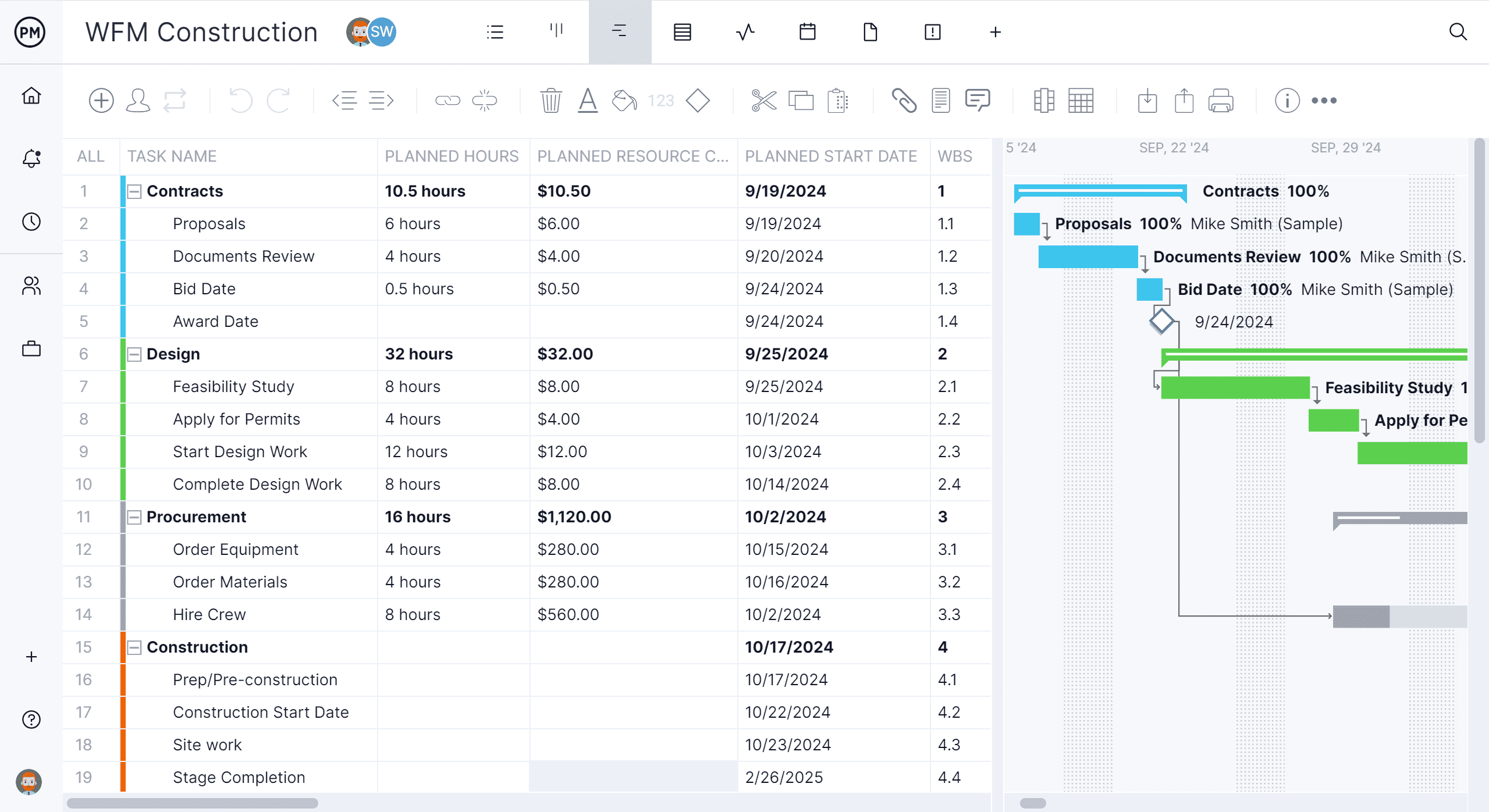
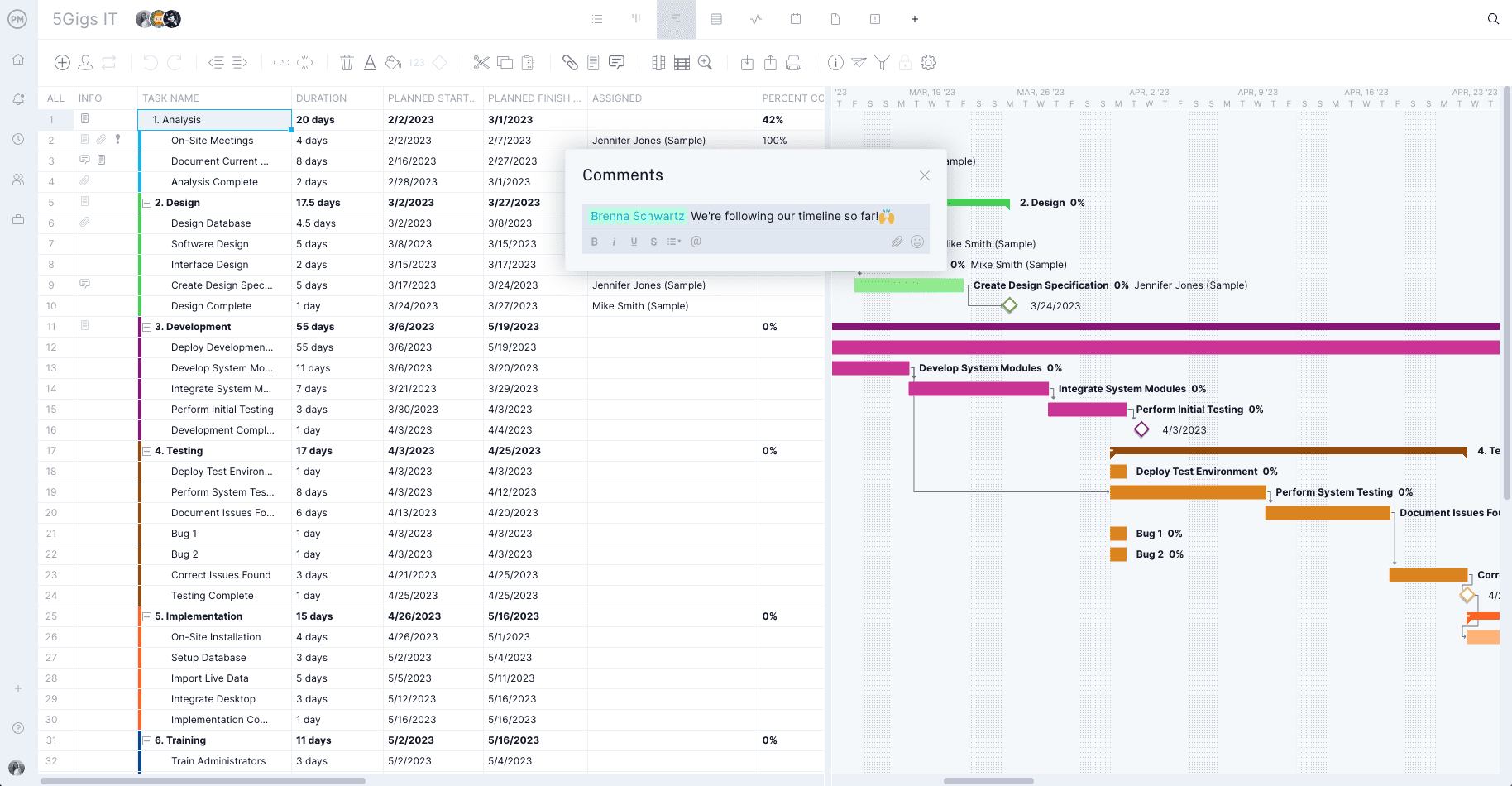
Views like the Gantt chart enable real-time collaboration. Use the Gantt chart to improve document control by linking documents to scheduled activities and milestones. This ensures drawings, specifications and contracts align with timelines and dependencies, reducing errors caused by outdated information.
Organize Documents by Phase
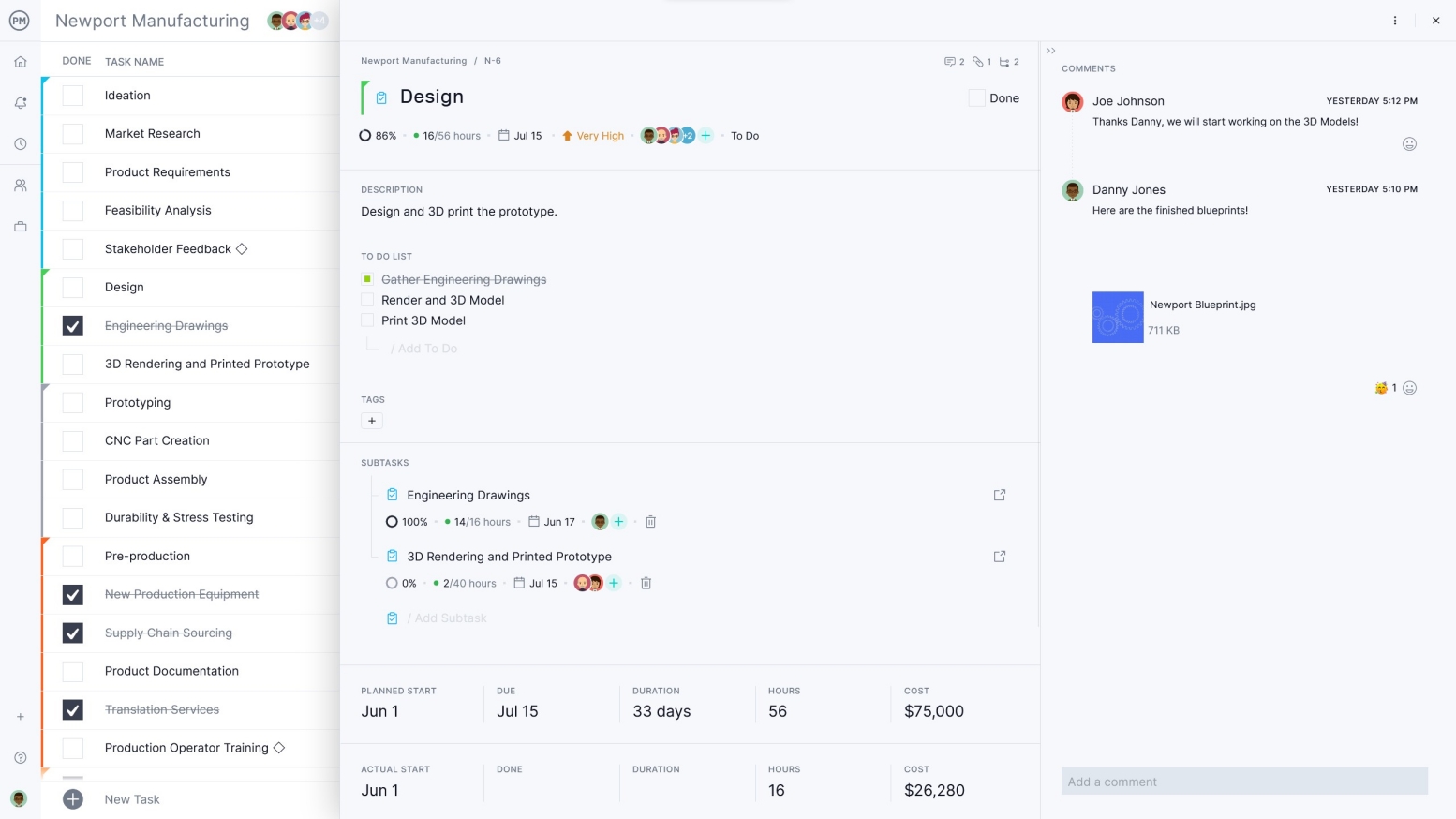
The kanban board makes it easy to organize and sort your construction document management approach. Build custom workflows and ensure that they align with stages, such as draft, submitted, under review, approved or issued. Drawings, RFIs, change orders and contracts can be attached directly to kanban cards, keeping files tied to the work they support.
Related Project Management Content
- 8 Free Construction Forms for Excel and Word
- 14 Types of Construction Contracts: Pros, Cons & Best Practices
- How to Manage a Construction Project Step by Step
- 10 Types of Construction Projects with Examples
- The Construction Process Explained Step-by-Step
ProjectManager is online construction project management software that connects teams, whether they’re in the office or on the job site. They can share files, comment at the task level and stay updated with email and in-app notifications. Construction document control has never been easier. Get started with ProjectManager today for free.
