



Microsoft Project is used by 35,000+ companies around the globe, but that doesn’t mean it’s the best tool for every team. High costs, a steep learning curve and poor collaboration features push many project managers to look for a better option. We tested 19 of the best Microsoft Project alternatives so you can find the right fit without the guesswork.
Why People Look for Microsoft Project Alternatives
Microsoft Project can handle a lot of what project managers need, but it comes with real trade-offs. Here are the most common reasons teams go looking for alternatives.
- Steep learning curve: Microsoft Project is not for beginners. It’s technical, not user-friendly and requires significant training before most teams can use it effectively.
- No mobile app: It’s hard to imagine project management software in 2026 without a mobile app, but Microsoft Project doesn’t have one. Teams in the field are left without a way to update tasks.
- Poor team communication: Microsoft Project has no built-in messaging. You have to jump to Teams, Outlook or Skype just to talk to your team — that’s friction most teams don’t need.
- Limited external integrations: MS Project works reasonably well within the Microsoft ecosystem but struggles to connect with tools outside it. Salesforce, Slack and other common tools require workarounds.
- Expensive and confusing pricing: Project Standard 2024 and Project Professional 2024 are sold as one-time purchases for $679.99 and $1,129.99 respectively, with separate licenses per user. It adds up fast.
- Poor data sharing: Working with Mac users or non-Microsoft tools means converting files back and forth. A cottage industry of MPP conversion tools exists just to solve this problem.
What Should You Consider When Comparing Microsoft Project Alternatives?
Before settling on an alternative, our team evaluated each tool on how it performs in real project environments. Here are the criteria we used.
- Price: Look beyond the subscription cost and evaluate what features are included at each tier.
- Ease of adoption: Tools should be intuitive enough to start using without heavy training.
- Project scheduling: Gantt charts, dependencies and milestones are the foundation of any serious MS Project alternative.
- Resource management: Balance workloads, track availability and avoid over-allocation.
- Reporting: Dashboards and reports should give clear visibility into project performance and health.
- Cost management: Track budgets and compare planned vs. actual project costs.
- Integrations: Connect with the tools your team already uses.
19 Best Microsoft Project Alternatives of 2026
1. ProjectManager

ProjectManager is award-winning online project and portfolio management software that tops our list for its rich feature set, competitive pricing and full Mac compatibility. It helps you plan and schedule projects while delivering real-time updates through live dashboards and powerful reporting. There’s also a free 30-day trial so you can try it risk-free.
Award-winning Gantt Charts for Precise Project Schedules
ProjectManager’s Gantt chart software is unmatched: no other Microsoft Project alternative offers four types of dependencies, baseline tracking, real-time workload data and critical path filtering together. Not everyone works the same way, which is why you also get five project views — Gantt, kanban, task list, spreadsheet and calendar — all updating together in real time. Even updates from the mobile app flow through instantly.
Full Mac Compatibility and Intuitive Resource Management
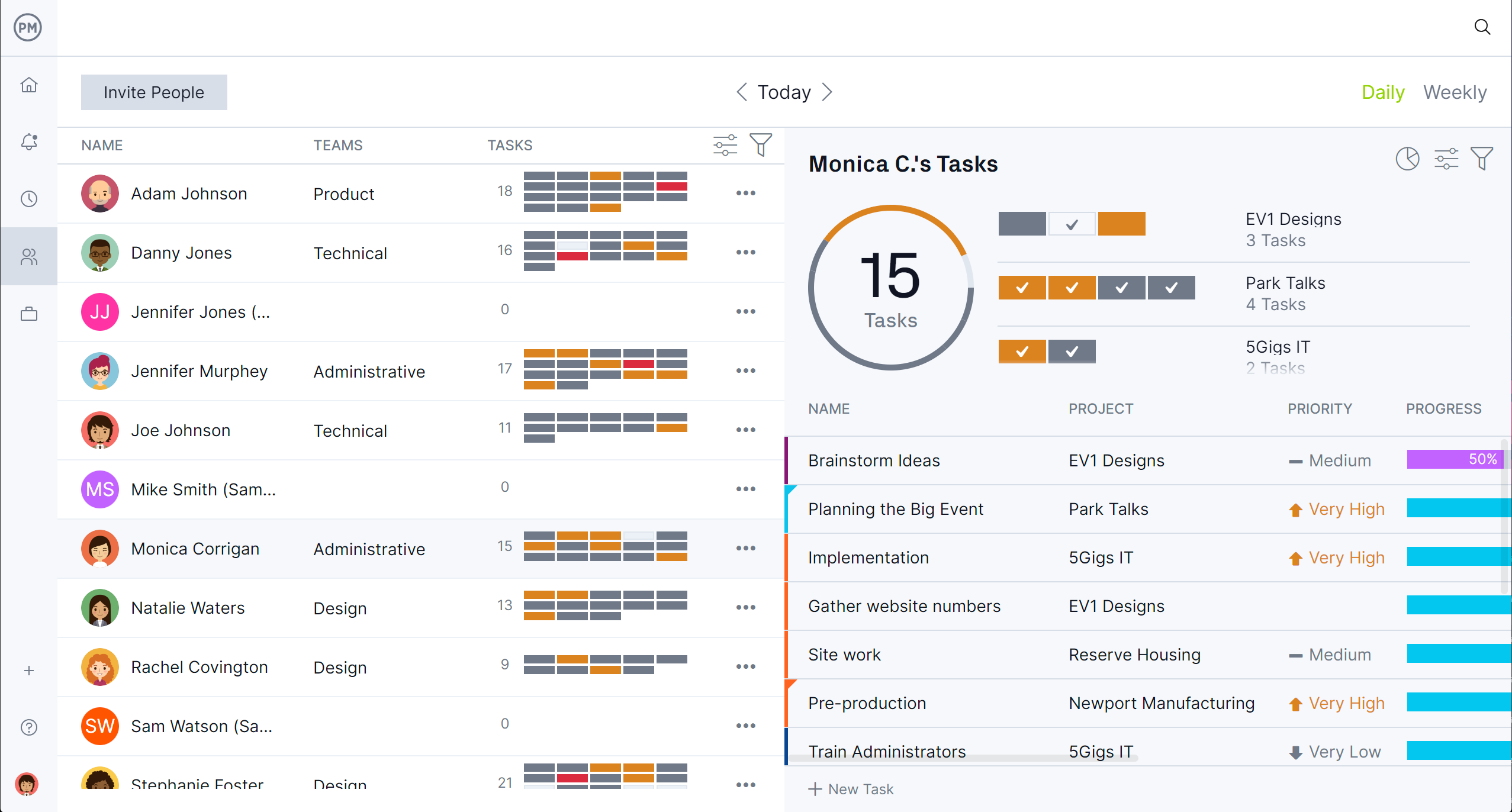
ProjectManager works on all Mac products and does nearly everything MS Project does — faster, easier and at a lower price. Real-time resource availability appears when scheduling tasks so the workload stays balanced. The team page shows all tasks across all team members in one place. Filter by project, date range or team type, then click any task to reallocate work instantly.
Real-Time Dashboards and Seamless MPP Import
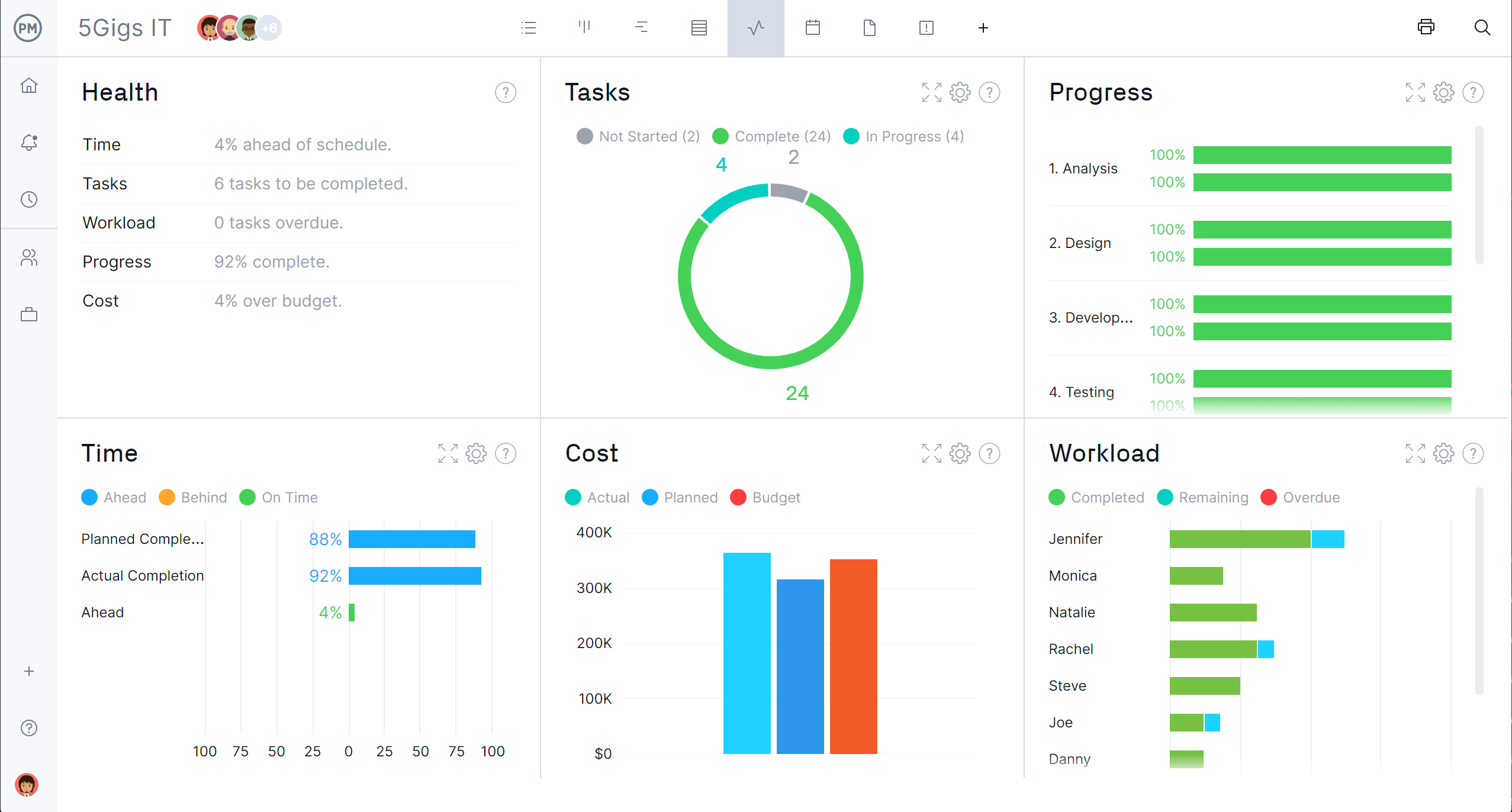
ProjectManager’s real-time dashboards require no setup and give an instant overview of time, cost and progress. Reporting features offer deeper data that can be filtered to show only what you need. As a bonus, ProjectManager offers seamless import and export of MPP files — if some team members still use Microsoft Project, collaboration is easy. Get started free for 30 days.
ProjectManager Pros & Key Features
- Gantt charts, kanban boards, task lists, spreadsheet and calendar views
- Four task dependency types, critical path filtering and baseline tracking
- Resource management with workload charts and real-time availability
- Real-time dashboards and robust reporting tools
- Import and export Microsoft Project MPP files
- Mobile apps for Android and iOS
- 30-day free trial
ProjectManager Cons & Limitations
- Report customization can feel restrictive for highly specific needs
- Mobile app doesn’t offer the full desktop feature set
- Fewer integrations than some alternatives on this list
- No free plan (though a 30-day free trial is available)
ProjectManager Pricing
- Team: $15.00/user/month, billed annually
- Business: $28.00/user/month, billed annually
- Enterprise: contact sales for a custom quote
ProjectManager Reviews
- G2 review: 4.4/5
- Capterra review: 4.1/5
- GetApp review: 4.1/5
Highlighted User Reviews
- “ProjectManager works very well with both large and small-scale projects.” Peter W – from Capterra
- “We used to manage our projects, resources, and reporting in different systems. Enter ProjectManager. We have consolidated systems and work more efficiently.” Jeffrey M – from Capterra
- “Having the full scope of activities and who is responsible to do it, plus the time tracking is excellent.” Flavio M – from G2
ProjectManager – Verdict: Best Microsoft Project Alternative for Project Management
2. Celoxis

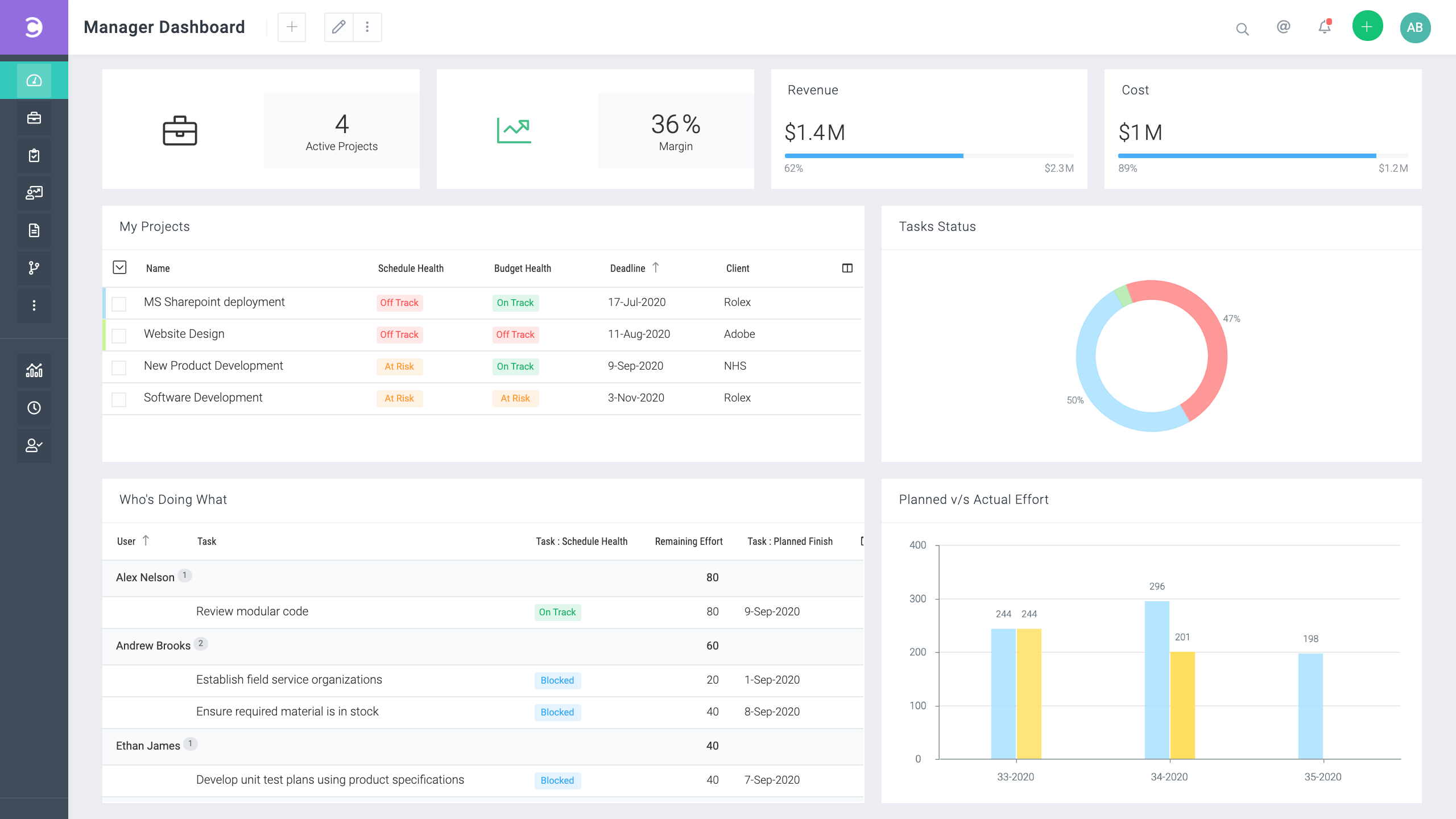
Celoxis is an enterprise project and portfolio management platform built specifically for teams that need to replace Microsoft Project without losing any of its power. Trusted by organizations including NASA, Deloitte and Rolex, it covers the full spectrum of PM features: Gantt charts with all four dependency types, critical path analysis, baseline tracking, resource leveling, portfolio dashboards and advanced financial tracking. It’s one of the closest feature-for-feature MS Project alternatives available.
Where Celoxis stands out is in its balance of depth and usability. It handles multi-project and portfolio management natively, with custom dashboards, time tracking, budget vs. actual reporting and workload management — all without requiring a dedicated IT team to set it up. It’s a strong choice for PMOs and project managers who need MS Project-level rigor in a modern, cloud-based platform.
The trade-off is pricing — Celoxis is not cheap, and smaller teams may find the feature depth overwhelming. But for organizations that have outgrown simpler tools and need serious PM capability, it delivers.
Celoxis Pros & Key Features
- Full Gantt charts with all four dependency types and critical path
- Baseline tracking and planned vs. actual reporting
- Portfolio management and cross-project visibility
- Advanced resource leveling and workload management
- Built-in financial tracking: budgets, costs and revenue
- Custom dashboards and real-time reporting
- Mobile app for Android and iOS
Celoxis Cons & Limitations
- Higher price point than many alternatives on this list
- Feature depth can be overwhelming for smaller or simpler projects
- Interface takes time to learn for new users
- Fewer third-party integrations than tools like ClickUp or monday.com
- No free plan
Celoxis Pricing
- Cloud: starts at $25/user/month, billed annually
- On-premise: one-time license fee, contact sales
- Enterprise: contact sales for a custom quote
Celoxis Reviews
- G2 review: 4.4/5
- Capterra review: 4.5/5
Highlighted User Reviews
- “Celoxis has been an excellent replacement for Microsoft Project. The Gantt charts and resource management features are on par with what we had before, but it’s cloud-based and much easier to collaborate.” – from Capterra
- “The portfolio dashboard gives our PMO exactly the cross-project visibility we need. We can see budget health, resource utilization and schedule status all in one place.” – from G2
Celoxis – Verdict: Best Microsoft Project Alternative for Enterprise PMOs
3. monday.com

Monday.com is a Microsoft Project alternative that’s fun to use — nearly the polar opposite of MS Project. It doesn’t feel like traditional project management software. Workflow customization is easy, automation keeps teams aligned on due dates and agile users will love the kanban boards and custom dashboards. It’s one of the most widely adopted work management platforms in the world.
Related: Best Monday.com Alternatives: Free & Paid Options Ranked
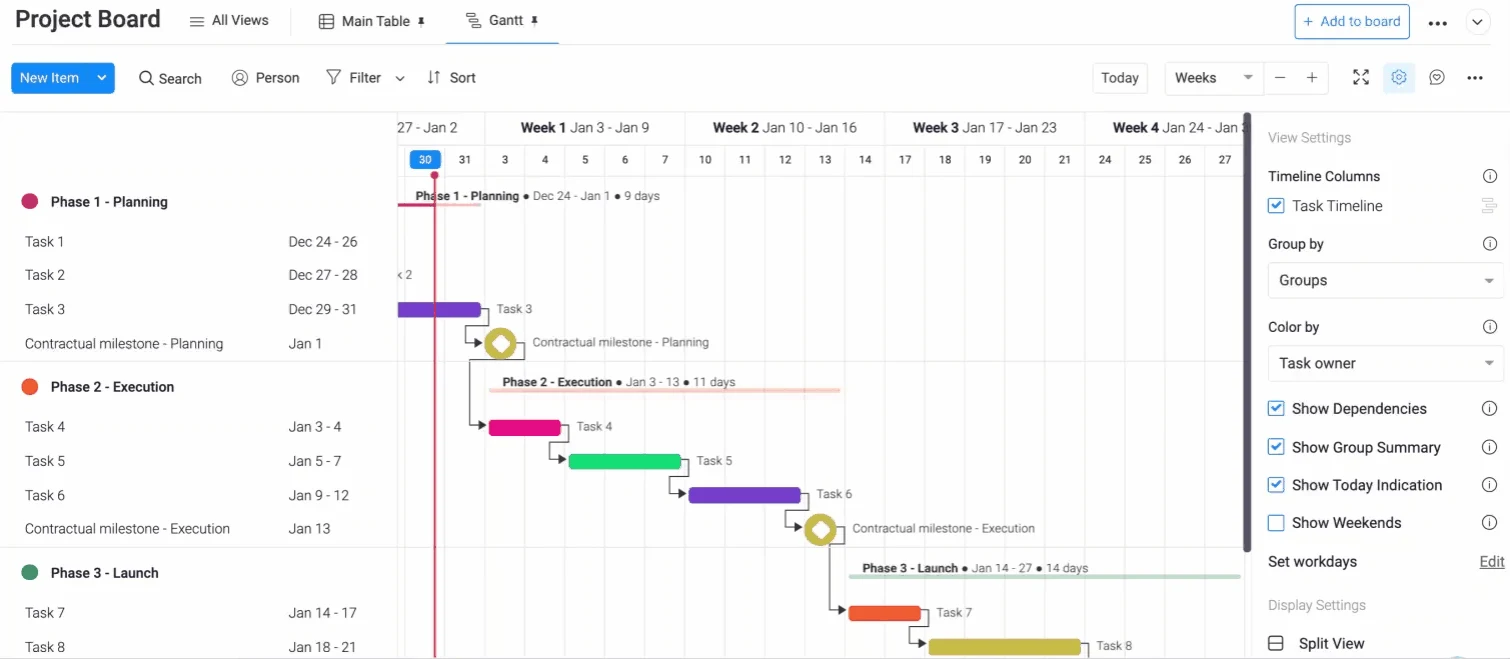
That said, monday.com is more of a collection of customizable boards than a traditional project management tool. The timeline feature is a lightweight attempt at Gantt functionality — there are no task dependencies by default, and cost tracking requires integrations. For teams that want simple, visual project tracking, it’s excellent. For complex projects with critical path analysis and resource management, it’ll fall short.
monday.com Pros & Key Features
- Clean, visual interface that’s easy for cross-functional teams to adopt
- Strong automation and 200+ integrations
- Timeline view with drag-and-drop scheduling
- Customizable boards, dashboards and workflows
- Free plan (up to 2 users) and free trial available
- Mobile apps for Android and iOS
monday.com Cons & Limitations
- Not ideal for complex project, program or portfolio management
- Reporting lacks depth and customization of true MS Project alternatives
- No built-in critical path, cost tracking or resource scheduling without integrations
- Key automations and integrations locked behind higher-tier plans
- Pricing scales quickly with seat minimums and feature tiers
monday.com Pricing
- Free: $0/user/month (up to 2 seats)
- Basic: $9/user/month, billed annually
- Standard: $12/user/month, billed annually
- Pro: $19/user/month, billed annually
- Enterprise: contact sales for a custom quote
monday.com Reviews
- G2 review: 4.7/5
- Capterra review: 4.6/5
- GetApp review: 4.6/5
Highlighted User Reviews
- “We used to have a mess of excel sheets and emails but now everything’s in one place.” Laura A – from G2
- “It has a user-friendly interface. And it’s also great for collaboration, like assigning tasks and file sharing.” Andreas C – from GetApp
monday.com – Verdict: Best Microsoft Project Alternative for Ease of Use
4. Asana

Asana is a widely used Microsoft Project alternative that organizes work across teams and keeps everyone productive. It’s highly collaborative, excels at task and workflow tracking and has some of the best communication tools on this list. Multiple project views — including kanban boards, lists, timelines and calendars — give teams flexibility in how they work.
Related: Asana vs. Microsoft Project: In-Depth Comparison
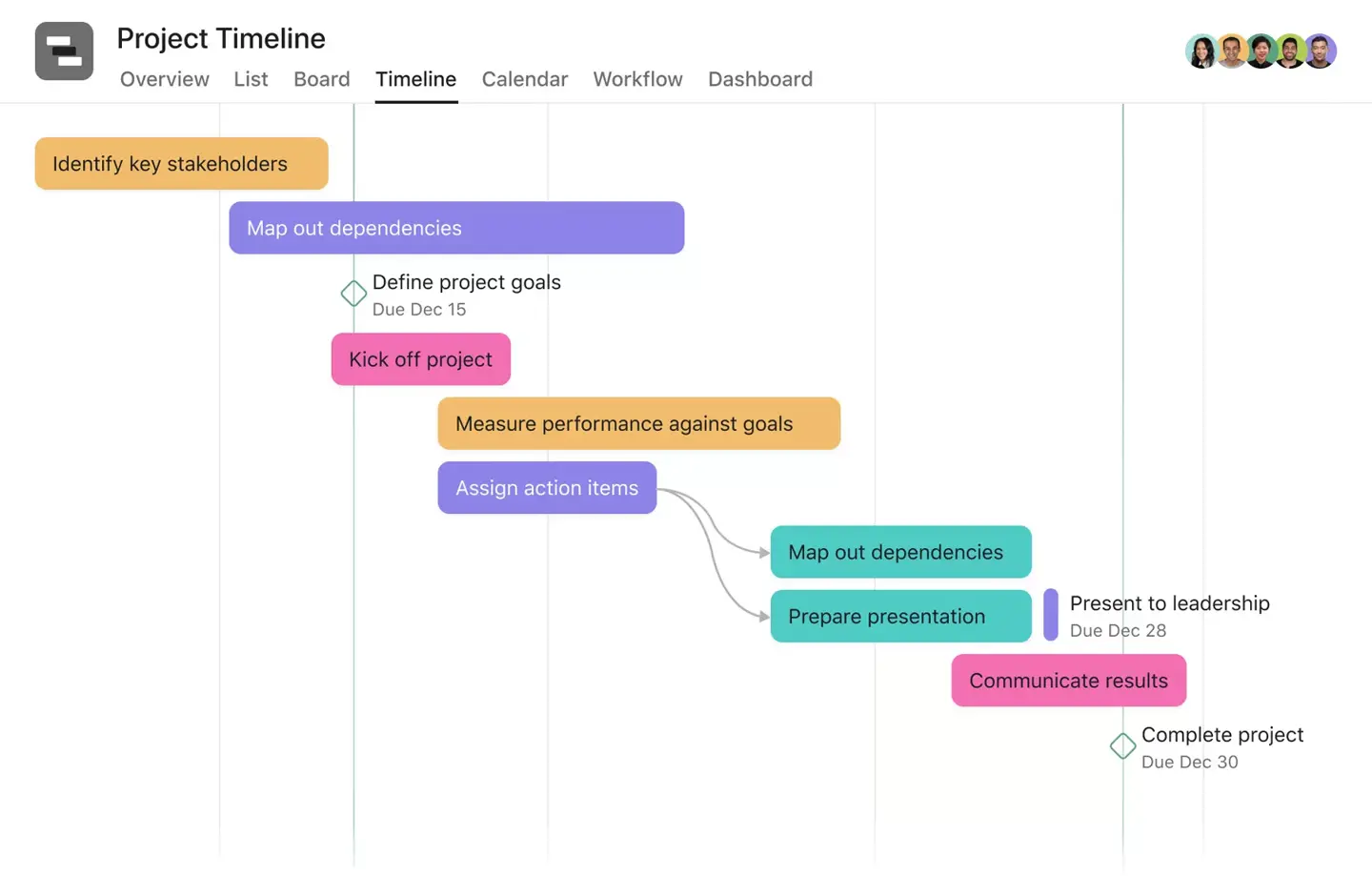
Where Asana falls short as an MS Project alternative is in resource management, budgeting and cost tracking — none of which are built in. Projects heavy on design or visual work will also miss markup and proofing tools. But for teams that prioritize collaboration and task tracking over deep scheduling, Asana is one of the best options at this price point.
Asana Pros & Key Features
- Simple, intuitive interface easy to adopt compared to Microsoft Project
- Strong collaboration with shared tasks, comments and real-time updates
- Integrates with Microsoft Teams, Outlook and hundreds of other tools
- Free plan with core tools for small teams
- Mobile apps for Android and iOS
Asana Cons & Limitations
- Timeline view lacks cost management, capacity planning and resource allocation
- Missing baselines, earned value and multi-project tracking
- No built-in time tracking — requires integrations
- Limited reporting and analytics compared to MS Project
- Better for team collaboration than enterprise PM or portfolio management
Asana Pricing
- Personal: $0/user/month
- Starter: $10.99/user/month, billed annually
- Advanced: $24.99/user/month, billed annually
- Enterprise: contact sales for a custom quote
Asana Reviews
- G2 review: 4.4/5
- Capterra review: 4.5/5
- GetApp review: 4.5/5
Highlighted User Reviews
- “Asana is very easy to use, intuitive for my team members who don’t have tech backgrounds but need to start and contribute right away.” Sara G – from G2
- “I love how easy it is to share projects there, and one of my favorite features is having a template which can be applied to any project.” Yolandi E – from GetApp
Asana – Verdict: Best Microsoft Project Alternative for Task Management
5. ClickUp

ClickUp is an all-in-one project management platform used by teams across marketing, product, engineering and more. It offers Gantt charts, kanban boards, task lists and dashboards — plus document editing, instant messaging and email management in the same platform. One of ClickUp’s biggest advantages is its range of third-party integrations, which let teams tailor the tool to their specific workflows.
Related: Best ClickUp Alternatives: Free & Paid Options Ranked

ClickUp wasn’t built exclusively for project management, and it shows in some areas. Its Gantt charts don’t track project costs or all four dependency types, and the feature-heavy interface can overwhelm new users. But for teams that want a versatile, affordable platform that covers most of what MS Project does, ClickUp is hard to beat at its price point.
ClickUp Pros & Key Features
- Highly customizable for different teams, industries and methodologies
- Multiple views: Gantt, kanban, list, calendar, spreadsheet and more
- Advanced task management with priorities, dependencies and automations
- Built-in team communication and document editing
- Generous free plan and affordable paid tiers
- Mobile apps for Android and iOS
ClickUp Cons & Limitations
- Feature-heavy interface can feel overwhelming and hard to learn
- Gantt charts lack cost tracking and full dependency types
- Limited resource planning depth for enterprise use
- Reporting lacks detail for portfolio-level insights
- Exports limited to PDF
ClickUp Pricing
- Free: $0/user/month
- Unlimited: $7/user/month, billed annually
- Business: $12/user/month, billed annually
- Enterprise: contact sales for a custom quote
ClickUp Reviews
- G2 review: 4.7/5
- Capterra review: 4.6/5
ClickUp – Verdict: Best Microsoft Project Alternative for Team Productivity
6. Wrike

Wrike is an MS Project alternative that makes our list because it’s easier to use than Microsoft when planning, tracking and analyzing projects, and far more collaborative. You can invite freelancers, contractors, clients and teams from other departments into the tool at no extra cost, which is a genuine advantage over MS Project’s licensing model.
Related: Best Wrike Alternatives: Free & Paid Options Ranked
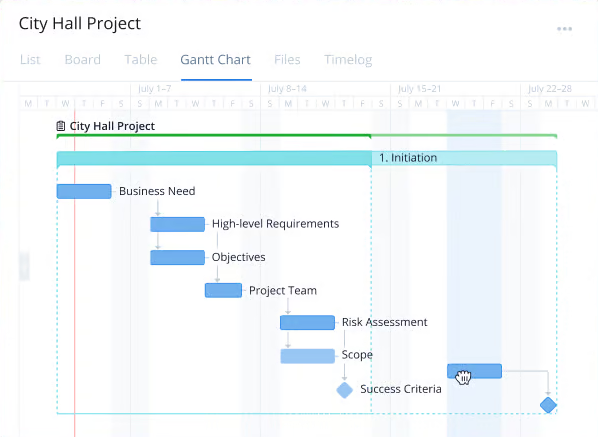
Wrike takes time to get comfortable with, and its multiple pricing tiers plus industry-specific versions add to the confusion. User minimums make it expensive for smaller teams. But for mid-to-large organizations that need collaboration, workflow management and solid Gantt functionality in one tool, it’s a strong contender.
Wrike Pros & Key Features
- Non-licensed users can view and interact with projects — easy stakeholder access
- Gantt charts, calendars and kanban boards for flexible workflow management
- Strong request forms and workflow approvals
- Free plan available with basic tools
- Mobile apps for Android and iOS
Wrike Cons & Limitations
- Feels more like a work management tool than a true MS Project alternative for complex scheduling
- Gantt charts lack cost tracking, resource planning and workload balancing
- Pricing requires user minimums, which can be expensive for small teams
- Interface can feel cluttered and takes time to learn
- Limited reporting and analytics compared to more advanced tools
Wrike Pricing
- Free: $0/user/month
- Team: $10/user/month
- Business: $25/user/month
- Pinnacle: contact sales for a custom quote
- Apex: contact sales for a custom quote
Wrike Reviews
- G2 review: 4.2/5
- Capterra review: 4.4/5
- GetApp review: 4.4/5
Highlighted User Reviews
- “Wrike has become essential in my day and keeps me organized and on top of my tasks.” Paige T – from G2
- “It’s a much simpler system compared to the likes of JIRA. It’s great for smaller teams and much quicker to load.” Mohammed M – from GetApp
Wrike – Verdict: Best Microsoft Project Alternative for Collaboration & Planning
7. Jira

Jira is a Microsoft Project alternative used for project management and issue tracking, primarily in software development — though it can work in other industries. It has similar capabilities to MS Project in some areas: task tracking, workflow management and project planning. It’s highly customizable, integrates with a massive ecosystem of tools and is especially strong for agile teams running sprints.

That said, Jira is not an apples-to-apples MS Project replacement. There are no native Gantt charts, making it a poor fit for waterfall project management. The interface is complex and the learning curve is steep for non-technical teams. If your projects follow traditional PM methodologies, look elsewhere on this list. If your team is software-focused and agile, Jira is hard to beat.
Jira Pros & Key Features
- Great for tracking bugs, issues and tasks with highly customizable workflows
- Massive Atlassian Marketplace with plugins for complex project requirements
- Built-in scrum and kanban boards for managing sprints
- Reporting tools offer insights into performance and issue tracking
- Mobile apps for Android and iOS
Jira Cons & Limitations
- No native Gantt chart — timeline planning is harder than with other MS Project alternatives
- Steep learning curve for non-technical or non-agile teams
- Customization can become complex and hard to manage without admins
- Limited resource and cost tracking without add-ons
- Reporting is powerful but not user-friendly to configure
Jira Pricing
- Free: $0/user/month (up to 10 users)
- Standard: $7.53/user/month
- Premium: $13.53/user/month
- Enterprise: contact sales for a custom quote
Jira Reviews
- G2 review: 4.3/5
- Capterra review: 4.4/5
- GetApp review: 4.4/5
Highlighted User Reviews
- “In my office we use Jira for task management and time management, which helps us for team projects with multiple moving parts.” Saili K – from G2
- “Once we got past the learning phase, Jira significantly improved our project efficiency and collaboration.” Abu R – from Capterra
Jira – Verdict: Best Microsoft Project Alternative for Software Development
8. Smartsheet

Smartsheet is an online MS Project alternative that functions like a spreadsheet but adds collaborative features that connect teams. Its scheduling and task management are more lightweight than MS Project, but it makes up for that with flexibility, automation and strong integration support — including with Procore, DocuSign and Microsoft 365. Teams moving off Excel will feel at home immediately.
Related: Best Smartsheet Alternatives: Free & Paid Options Ranked

Where Smartsheet falls short is in advanced scheduling features — there’s no critical path analysis, earned value tracking or real-time updates, and the autosave can be slow. Getting extra features like time tracking and resource management requires paid add-ons. If you need true MS Project depth, you’ll need to look elsewhere. But for teams that want structured, spreadsheet-driven project tracking with good automation, Smartsheet is solid.
Smartsheet Pros & Key Features
- Familiar spreadsheet-style interface with built-in project management features
- Strong workflow automation and integrations (Procore, DocuSign, Microsoft 365)
- Gantt charts with task dependencies and milestones
- Works on Mac — solid Microsoft Project alternative for Apple users
- Free trial available; mobile apps for Android and iOS
Smartsheet Cons & Limitations
- Missing critical path analysis, earned value and full scheduling logic
- No real-time updates; autosave can be slow
- Time tracking, budgeting and resource management require paid add-ons
- Relies on spreadsheet formulas that take time to learn
- No permanent free plan after the trial ends
Smartsheet Pricing
- Pro: $9/user/month, billed annually
- Business: $19/user/month, billed annually
- Enterprise: contact sales for a custom quote
- Advanced Work Management: contact sales for a custom quote
Smartsheet Reviews
- G2 review: 4.4/5
- Capterra review: 4.5/5
- GetApp review: 4.5/5
Highlighted User Reviews
- “Smartsheet has allowed me to take my to-do list and run with it in a way that I didn’t think would be possible.” Victoria W – from G2
- “SmartSheet is my go-to for project tracking and timelines. It’s like Excel but way smarter.” Michael J – from GetApp
Smartsheet – Verdict: Best Microsoft Project Alternative for Spreadsheet-Based Scheduling
9. Primavera P6
Primavera P6 is project management software developed by Oracle for enterprise portfolio management, widely used in construction, engineering and manufacturing. It’s a Microsoft Project alternative built for large-scale, complex projects with advanced scheduling, resource management and detailed reporting needs — including Gantt charts, critical path analysis and resource leveling.
Related: What Is Oracle Primavera P6? Uses, Features & Pricing
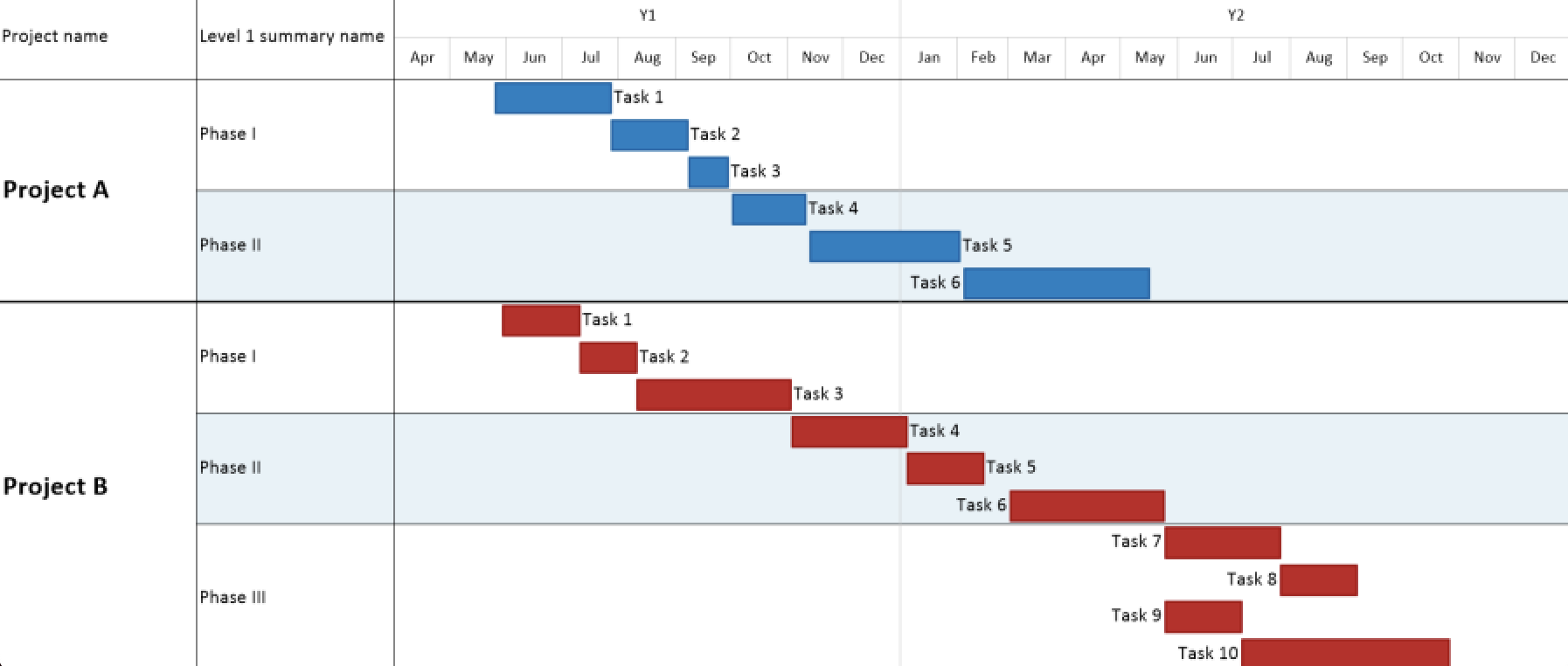
The trouble with this Microsoft Project alternative is its steep learning curve and high cost. Expect significant training time before teams can do productive work. It’s also resource-intensive — substantial computing infrastructure is required for on-premise deployments. For most project teams, it’s overkill. For large infrastructure, oil and gas or capital projects, it’s the gold standard.
Primavera P6 Pros & Key Features
- Advanced CPM scheduling for large, complex projects in construction and engineering
- Available as on-premise (P6) or cloud (Oracle Primavera Cloud)
- Portfolio management and capital planning tools
- Strong baselines, variance tracking and multi-project coordination
- Mobile apps for Android and iOS
Primavera P6 Cons & Limitations
- Steep learning curve — significant training required before teams are productive
- Expensive with high implementation and maintenance costs
- Interface feels outdated compared to modern alternatives
- Resource-intensive for on-premise deployments
- Support relies on tickets and documentation rather than fast direct help
- Limited integrations compared to modern cloud tools
Primavera P6 Pricing
- Primavera P6 Enterprise: approx. $2,750/license plus $605/year for support
- Primavera P6 Professional: approx. $2,500/license plus $550/year for support
- Primavera P6 Progress Reporter: approx. $950/license plus $209/year for support
Primavera P6 Reviews
- G2 review: 4.4/5
- Capterra review: 4.4/5
- GetApp review: 4.4/5
Highlighted User Reviews
- “The ability to build huge and complex schedules. P6 has been the construction scheduling standard for a while now.” Blake B – from GetApp
- “Accurate calculation and output data is perfect.” Sameh H – from Capterra
Primavera P6 – Verdict: Best Microsoft Project Alternative for Complex Enterprise Projects
10. Trello

Trello is one of the most recognizable names in project management — an Atlassian product built around visual kanban boards that make task management simple and intuitive. For teams that want a lightweight, easy-to-learn Microsoft Project alternative without the overhead of a full PM suite, Trello is a natural starting point. It’s free for small teams and widely adopted across industries.
Related: Best Trello Alternatives: Free & Paid Options Ranked
Trello is not a serious MS Project alternative for complex projects. It has a timeline view (Power-Up) that functions as a basic Gantt, but there are no task dependencies, no resource management, no critical path and no real cost tracking. It’s best suited for teams that need simple task boards, not project schedules. Use it for lightweight work management; look elsewhere for anything resembling what MS Project does.
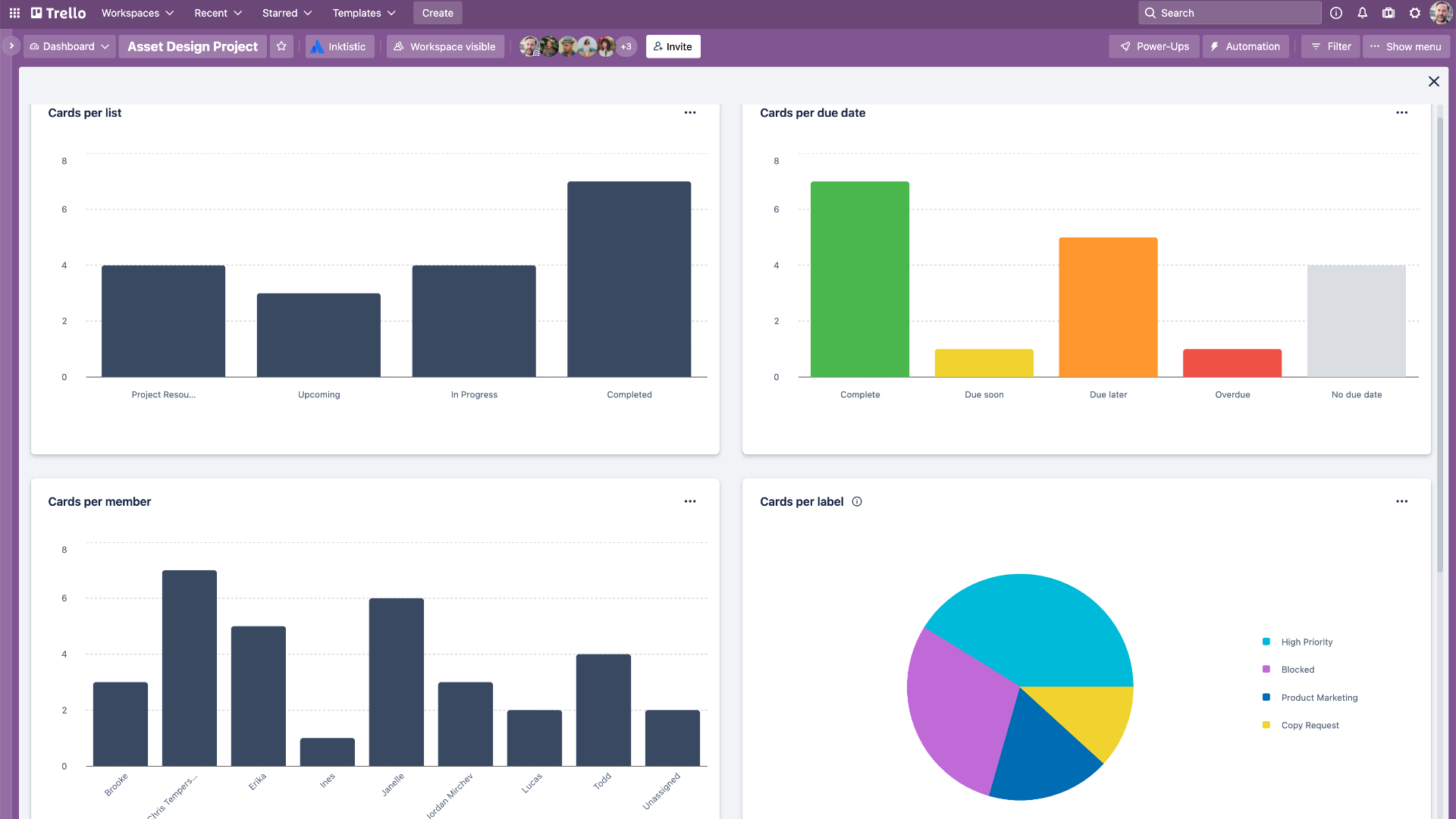
Trello Pros & Key Features
- Extremely simple, visual kanban interface — fast to learn and adopt
- Generous free plan for small teams
- Hundreds of Power-Ups for extending functionality
- Integrates with Jira, Slack, Google Drive and more
- Mobile apps for Android and iOS
Trello Cons & Limitations
- No native Gantt chart, task dependencies or critical path
- Very limited for complex project scheduling or resource management
- No built-in time tracking or budget management
- Reporting is minimal — not suited for PMO-level insights
- Not designed for multi-project or portfolio management
Trello Pricing
- Free: $0/user/month
- Standard: $5/user/month, billed annually
- Premium: $10/user/month, billed annually
- Enterprise: starts at $17.50/user/month, billed annually
Trello Reviews
- G2 review: 4.4/5
- Capterra review: 4.5/5
Trello – Verdict: Best Microsoft Project Alternative for Simple Task Boards
11. Teamwork

Teamwork is project management software built for client-facing teams — agencies, consultancies and professional services firms. It combines task management, time tracking, billing and client collaboration in one platform, making it a strong Microsoft Project alternative for teams that bill by the hour and need to track project profitability alongside project progress.
Teamwork has Gantt charts, task dependencies, milestones, time tracking and workload management. It’s not as deep as MS Project on the scheduling side — no critical path analysis and limited portfolio views — but for agencies juggling multiple client projects, its combination of PM and billing tools is hard to match. The free plan supports a limited number of users, and paid plans are reasonably priced for the feature set.
Teamwork Pros & Key Features
- Strong combination of project management and client billing
- Built-in time tracking and invoicing tools
- Gantt charts with task dependencies and milestones
- Workload management and resource planning
- Client portal for sharing project updates
- Mobile apps for Android and iOS
Teamwork Cons & Limitations
- No critical path analysis or advanced scheduling logic
- Portfolio management is limited compared to MS Project
- Interface can feel dated compared to newer tools
- Some features locked behind higher-tier plans
- Not ideal for non-client-facing or internal project teams
Teamwork Pricing
- Free: $0/user/month (up to 5 users)
- Starter: $5.99/user/month, billed annually
- Deliver: $9.99/user/month, billed annually
- Grow: $19.99/user/month, billed annually
- Scale: contact sales for a custom quote
Teamwork Reviews
- G2 review: 4.4/5
- Capterra review: 4.5/5
Teamwork – Verdict: Best Microsoft Project Alternative for Agencies and Client Work
12. Basecamp

Basecamp is a long-established team project management tool known for its simplicity, flat-rate pricing and opinionated approach to how teams should communicate and work. Rather than overwhelming users with features, Basecamp focuses on the essentials: message boards, to-do lists, file sharing, group chat and a simple schedule. It’s a Microsoft Project alternative for teams that find most PM software overcomplicated.
Basecamp is not for everyone. There are no Gantt charts, no task dependencies, no time tracking and no resource management. If you need any of those, look elsewhere. But for small teams and agencies that mainly need a central hub for communication and task tracking — without the complexity or per-seat pricing of MS Project — Basecamp’s flat rate of $299/month for unlimited users is hard to argue with.
Basecamp Pros & Key Features
- Flat-rate pricing ($299/month) for unlimited users — no per-seat fees
- Simple, opinionated interface that reduces feature bloat
- Message boards, to-do lists, file storage and group chat in one place
- Client access included at no extra cost
- Mobile apps for Android and iOS
Basecamp Cons & Limitations
- No Gantt charts, task dependencies or critical path
- No time tracking, resource management or budget tools
- Very limited for complex project scheduling
- Flat-rate pricing is expensive for small teams (under ~10 people)
- Reporting is minimal
Basecamp Pricing
- Basecamp: $299/month flat rate (unlimited users)
- Basecamp for Freelancers: $15/month (1 user, up to 3 clients)
Basecamp Reviews
- G2 review: 4.1/5
- Capterra review: 4.3/5
Basecamp – Verdict: Best Microsoft Project Alternative for Simple Team Collaboration
13. Zoho Projects

Zoho Projects is a Microsoft Project alternative with kanban boards, a social feed for task updates, forums for discussions and a timesheet feature. It offers issue tracking, a Gantt project view and connects teams through its broader Zoho ecosystem — including Zoho CRM, Zoho Books and Zoho Analytics. For teams already in the Zoho world, it’s a natural fit.

What Zoho Projects lacks as an MS Project alternative are resource management tools and robust reporting. There’s also no way to manage more than one project at a time in a portfolio view. But at $4/user/month for the Premium plan, it’s one of the most affordable true project management tools on this list.
Zoho Projects Pros & Key Features
- Solid project planning with tasks, milestones and Gantt timelines
- Built-in time tracking, issue tracking and workflow automation
- Integrates with the Zoho ecosystem, Google Workspace, Slack and Teams
- Free plan (up to 5 users) and 10-day trial available
- Mobile apps for Android and iOS
Zoho Projects Cons & Limitations
- Gantt charts lack critical path and baseline tracking
- Limited resource planning and workload management
- No portfolio or multi-project management view
- Interface is less polished than competitors
- Lacks advanced reporting for PMO-level insights
Zoho Projects Pricing
- Free: $0/user/month (up to 5 users)
- Premium: $4/user/month, billed annually
- Enterprise: $9/user/month, billed annually
Zoho Projects Reviews
- G2 review: 4.3/5
- Capterra review: 4.5/5
- GetApp review: 4.5/5
Highlighted User Reviews
- “What I like most is how it integrates perfectly with the entire Zoho ecosystem.” Emy L – from G2
- “Zoho Projects helps you track your projects efficiently.” Shria G – from Capterra
Zoho Projects – Verdict: Best Low-Cost Microsoft Project Alternative
14. GanttPRO

GanttPRO is a Gantt chart-focused Microsoft Project alternative designed specifically for teams that want professional-grade Gantt scheduling without the complexity of MS Project. It supports task dependencies, milestones, baselines, resource management and time tracking in a clean, intuitive interface. If the Gantt chart is the main reason your team used Microsoft Project, GanttPRO is one of the most direct replacements available.
GanttPRO is not as feature-rich as full PM suites — portfolio management and advanced reporting are limited — but for project planning and scheduling specifically, it punches above its weight. Teams moving off MS Project for simpler Gantt functionality will feel right at home. It also offers MPP file import, making migration straightforward.
GanttPRO Pros & Key Features
- Professional Gantt charts with task dependencies, milestones and baselines
- Resource management and workload tracking
- Built-in time tracking and time log reports
- Imports Microsoft Project MPP files
- Clean, intuitive interface with a short learning curve
- Mobile apps for Android and iOS
GanttPRO Cons & Limitations
- Limited portfolio management for multi-project oversight
- Reporting is functional but not deep
- No free plan — only a free trial
- Fewer integrations than broader PM tools
- Not ideal for agile or kanban-heavy workflows
GanttPRO Pricing
- Basic: $7.99/user/month, billed annually
- Pro: $12.99/user/month, billed annually
- Business: $19.99/user/month, billed annually
- Enterprise: contact sales for a custom quote
GanttPRO Reviews
- G2 review: 4.8/5
- Capterra review: 4.8/5
GanttPRO – Verdict: Best Microsoft Project Alternative for Gantt Chart Scheduling
15. TeamGantt
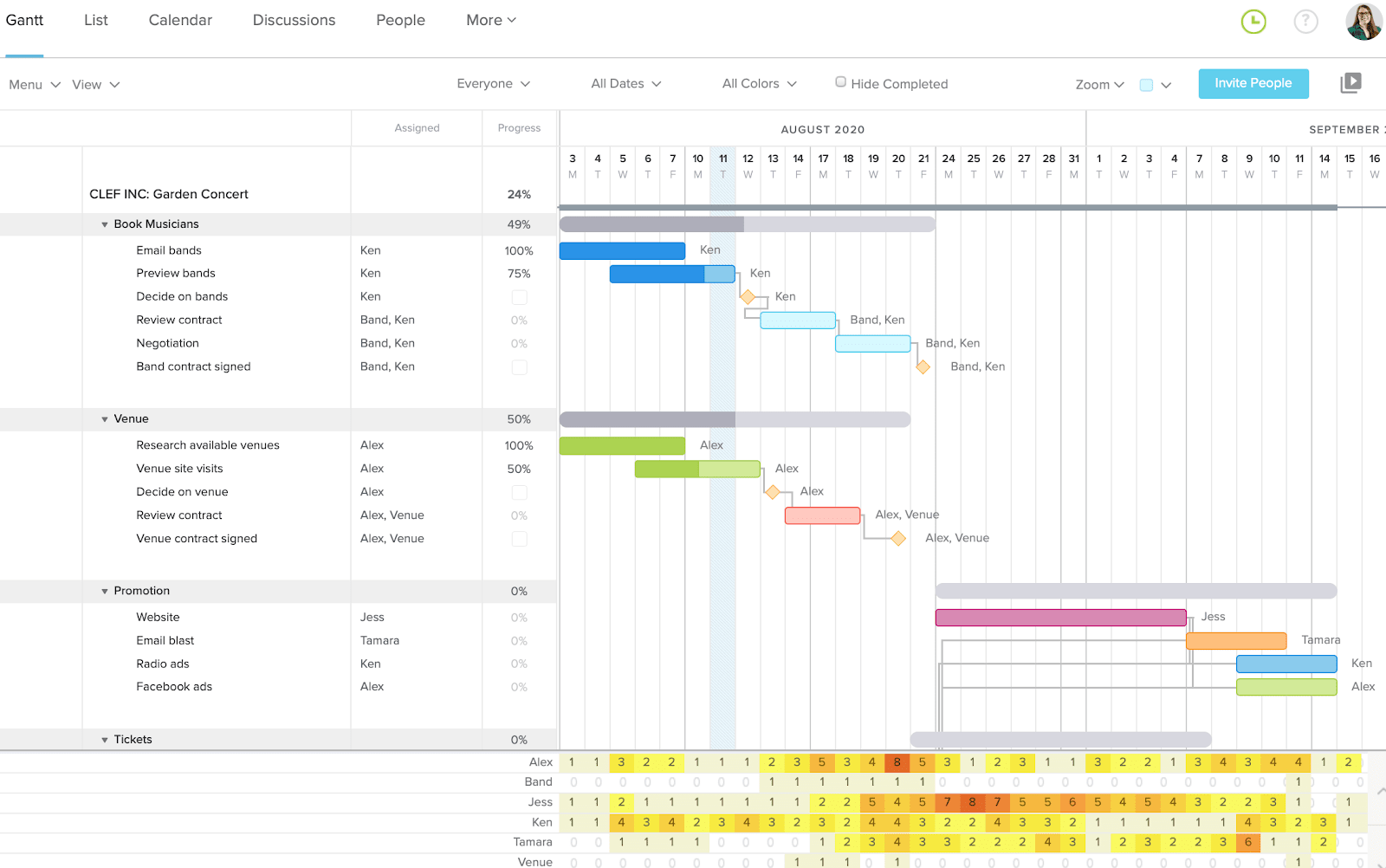
TeamGantt is a Gantt-first project management tool built for teams that want MS Project-style scheduling without the complexity or cost. It’s one of the most intuitive Gantt chart tools available — drag-and-drop scheduling, task dependencies, workload management and time tracking are all built in, and the interface is clean enough that teams rarely need training to get started.
TeamGantt also supports project templates, baseline tracking and multiple project views including Gantt, list and calendar. It integrates with Trello, Basecamp, Slack and other common tools via Zapier. For smaller teams or those specifically replacing MS Project’s scheduling function, TeamGantt is one of the easiest transitions on this list.
TeamGantt Pros & Key Features
- Intuitive Gantt chart builder with drag-and-drop scheduling
- Task dependencies, milestones and baseline tracking
- Workload management to avoid over-allocating team members
- Built-in time tracking and project reporting
- Project templates to speed up planning
- Free plan available (1 project, up to 3 users)
- Mobile apps for Android and iOS
TeamGantt Cons & Limitations
- Limited portfolio management for multi-project oversight
- No built-in budget or cost tracking
- Fewer integrations than broader PM platforms
- Reporting is basic compared to enterprise tools
- Not ideal for agile or sprint-based workflows
TeamGantt Pricing
- Free: $0/month (1 project, up to 3 users)
- Standard: $19/manager/month, billed annually (unlimited collaborators)
- Advanced: $29/manager/month, billed annually
TeamGantt Reviews
- G2 review: 4.8/5
- Capterra review: 4.6/5
TeamGantt – Verdict: Best Microsoft Project Alternative for Intuitive Gantt Scheduling
16. Paymo

Paymo is comprehensive project management software with built-in time tracking and invoicing — making it a strong Microsoft Project alternative for small businesses and agencies that need to track project success alongside billing. Its automatic time tracker is one of the best on this list.
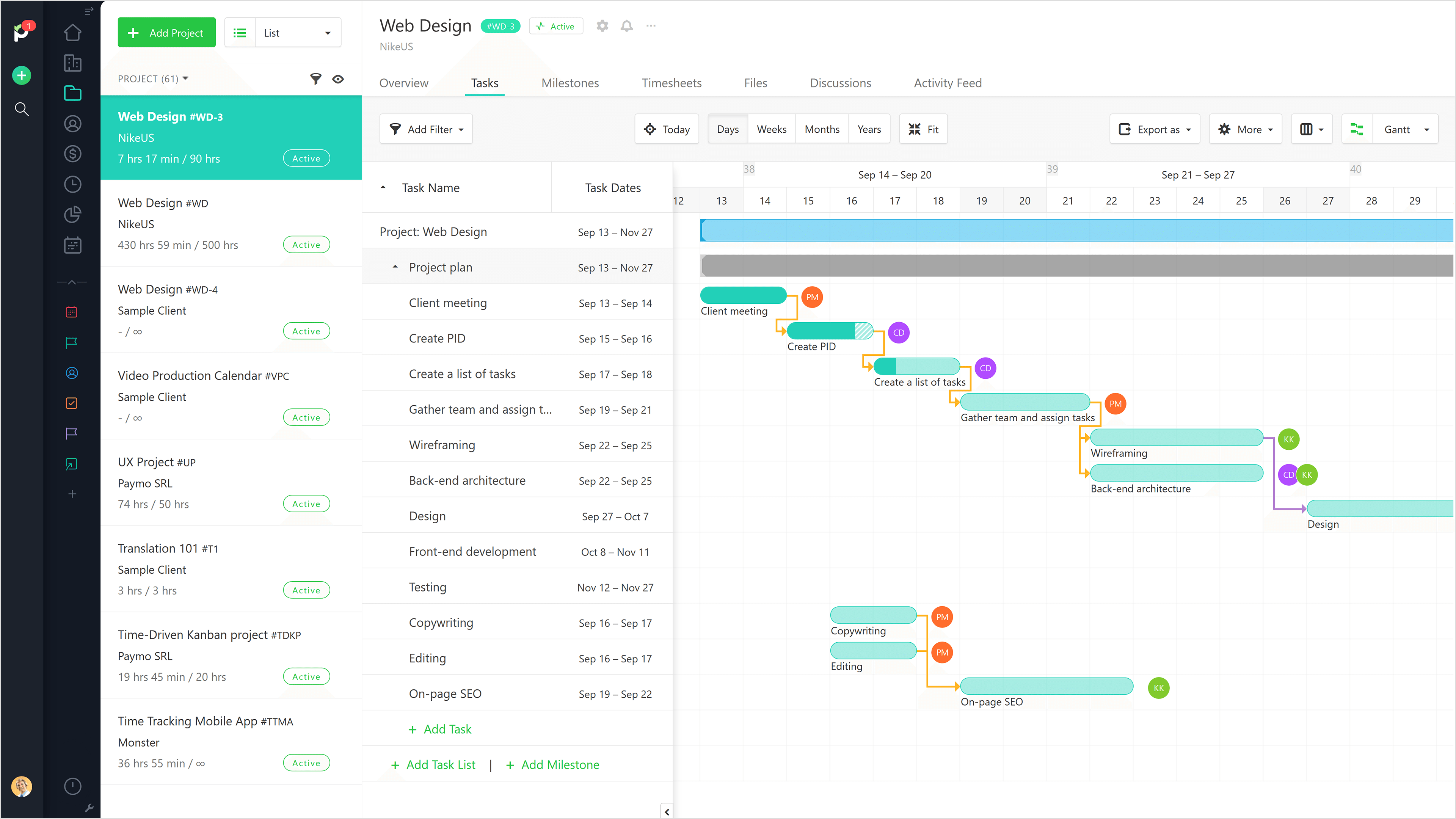
Task management is straightforward with multiple assignees, priorities, customizable statuses and views including list, table, kanban, calendar and Gantt. There’s also a meta-kanban view for a bird’s-eye view of your team’s tasks across projects. Where Paymo falls short is in integrations and enterprise-level features — larger teams will eventually outgrow it.
Paymo Pros & Key Features
- Built-in invoicing, billing and payment processing
- Strong automatic time tracking for billable hours
- Multiple project views including Gantt, kanban, list, calendar and table
- Collaboration tools including file sharing and team messaging
- Free plan available; mobile apps for Android and iOS
Paymo Cons & Limitations
- Limited resource planning for complex or large team workloads
- Fewer native integrations with enterprise tools
- Basic reporting compared to advanced PM platforms
- Interface can feel cluttered for new users
- Mobile app lacks some desktop features
Paymo Pricing
- Free: $0/user/month
- Starter: $5.90/user/month, billed annually
- Small Office: $10.90/user/month, billed annually
- Business: $16.90/user/month, billed annually
Paymo Reviews
- G2 review: 4.6/5
- Capterra review: 4.7/5
- GetApp review: 4.7/5
Highlighted User Reviews
- “Paymo has all the capabilities that allow me to save time by automating project and task management procedures.” Larry K – from G2
- “All the basics are well integrated from a simple task list to complex product road maps with the invoicing system we can sync with our accounting software.” Adami T – from GetApp
Paymo – Verdict: Best Microsoft Project Alternative for Project and Time Tracking
17. Microsoft Planner

If Microsoft Project feels like too much, Microsoft Planner is the stripped-down alternative already built into Microsoft 365. It’s a lightweight task management tool built around kanban boards and task lists with email notifications and calendar integration. For teams already in the Microsoft ecosystem that just need to track tasks — not manage complex schedules — it’s a natural first stop.
Related: Best Microsoft Planner Alternatives: Free & Paid Options Ranked
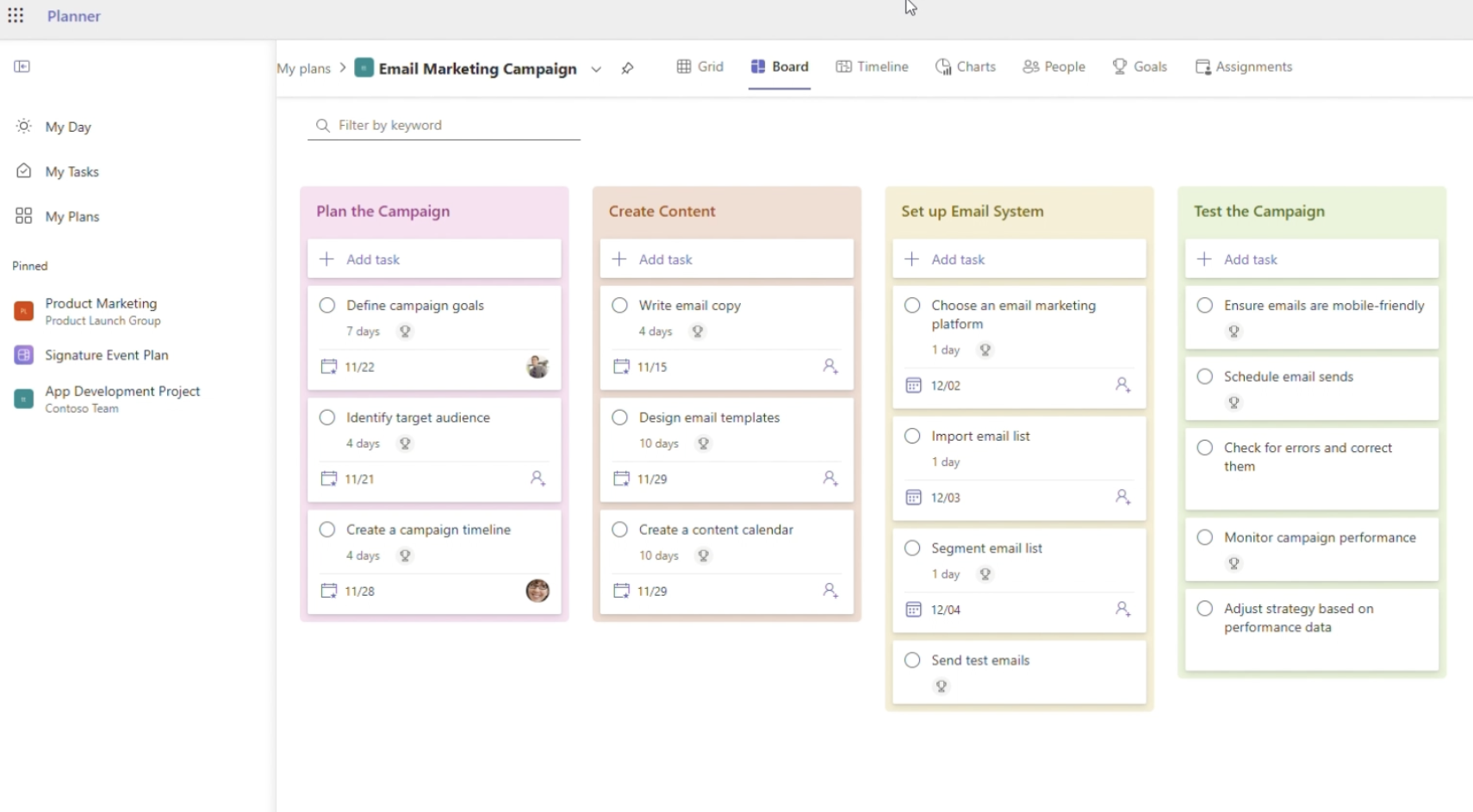
Planner is not going to replace Microsoft Project — it lacks Gantt charts, resource management, portfolio management and most of what makes MS Project powerful. But if you’re already paying for Microsoft 365, it’s already included. Use it for lightweight task management; use something else if you need real project scheduling.
Microsoft Planner Pros & Key Features
- Simple kanban interface that teams can pick up quickly without training
- Seamlessly integrates with Teams, Outlook and OneDrive
- Basic task management with assignments, due dates and progress tracking
- Included with most Microsoft 365 subscriptions — no extra cost
- Mobile apps for Android and iOS
Microsoft Planner Cons & Limitations
- No Gantt charts or advanced scheduling for managing timelines and dependencies
- No resource management, cost tracking or portfolio management
- No built-in time tracking or automation without third-party tools
- Limited customization and reporting
- Only works well within the Microsoft 365 ecosystem
Microsoft Planner Pricing
Planner Basic is included in most Microsoft 365 subscriptions:
- Microsoft 365 Business Basic: $6.00/user/month, billed annually
- Microsoft 365 Business Standard: $12.50/user/month, billed annually
- Microsoft 365 Business Premium: $22.00/user/month, billed annually
Planner Premium (standalone):
- Planner Plan 1: $10/user/month, billed annually
- Planner and Project Plan 3: $30/user/month, billed annually
- Planner and Project Plan 5: $55/user/month, billed annually
Microsoft Planner Reviews
- G2 review: 4.2/5
- Capterra review: 4.3/5
- GetApp review: 4.3/5
Highlighted User Reviews
- “Microsoft Planner is great because it’s part of the Microsoft 365 family. It works really well with other Microsoft apps like Teams and Outlook.” Anand G – from G2
Microsoft Planner – Verdict: Best Microsoft Project Alternative for Microsoft 365 Users
18. GanttProject

GanttProject is a free, open-source desktop Gantt chart application that covers the essentials: task scheduling, dependencies, milestones, resource management and basic reporting. It can export to PDF, HTML and CSV and imports from Microsoft Project MPP files — making it a viable option for small teams or individuals who need basic Gantt functionality without any subscription cost.
GanttProject is not a cloud-based tool. It runs on your desktop (Windows, Mac, Linux) and doesn’t support real-time collaboration. It’s best suited for solo project managers or very small teams who need a simple, free Gantt chart tool and don’t need to collaborate in real time. As a free, offline Microsoft Project alternative, it’s one of the most capable options available.
GanttProject Pros & Key Features
- Completely free with no subscription or licensing cost
- Cross-platform: works on Windows, Mac and Linux
- Gantt charts with task dependencies and milestones
- Basic resource management and assignment tracking
- Imports Microsoft Project MPP files
- Exports to PDF, HTML and CSV
GanttProject Cons & Limitations
- Desktop-only — no cloud access or real-time collaboration
- Interface is dated and not intuitive by modern standards
- No time tracking, budgeting or reporting beyond basics
- Community support only — no dedicated customer service
- Not suitable for teams of more than a few people
GanttProject Pricing
- Free and open-source
GanttProject Reviews
- G2 review: 4.1/5
- Capterra review: 4.3/5
GanttProject – Verdict: Best Free Open-Source Microsoft Project Alternative
19. ProjectLibre

ProjectLibre is the most direct free alternative to Microsoft Project on this list. It was built specifically to replicate MS Project’s interface and functionality — including Gantt charts, WBS, earned value analysis, resource management and all four task dependency types. It opens and saves MPP files natively, which makes it the easiest migration path for teams moving off MS Project on a budget.
ProjectLibre is a desktop application (Windows, Mac, Linux) with no cloud sync or collaboration features. The interface mirrors MS Project’s older design, so it won’t win any usability awards — but for a free tool that does what MS Project does, it’s remarkable. If budget is the only reason you’re looking for an MS Project alternative, ProjectLibre is the answer.
ProjectLibre Pros & Key Features
- Completely free and open-source
- Directly mirrors Microsoft Project’s interface and functionality
- Opens and saves MPP files natively
- Full Gantt charts with all four dependency types
- Earned value analysis, WBS and resource management
- Cross-platform: Windows, Mac and Linux
ProjectLibre Cons & Limitations
- Desktop-only — no cloud access or real-time collaboration
- Interface is dated and mirrors MS Project’s older UI
- No customer support — community forums only
- Not suitable for team-based collaboration
- Limited integrations with modern tools
ProjectLibre Pricing
- Free and open-source (desktop)
- ProjectLibre Cloud: contact sales for pricing
ProjectLibre Reviews
- G2 review: 4.2/5
- Capterra review: 4.3/5
ProjectLibre – Verdict: Best Free Microsoft Project Alternative
The Best Microsoft Project Alternative Is Clear
You’ve just read through 19 Microsoft Project alternatives, and while all have their strengths, ProjectManager stands out as the most complete replacement. It matches MS Project’s planning and scheduling depth, adds real-time collaboration, resource management and live dashboards — all at a lower price and with a far shorter learning curve. For teams that need enterprise power without the enterprise complexity, the choice is clear. Try ProjectManager free for 30 days.
What Types of Microsoft Project Alternatives Are There?
Not all MS Project alternatives are trying to do the same thing. Here’s a quick breakdown of the main categories to help narrow your search.
- Free alternatives: Tools like GanttProject and ProjectLibre cover the basics at no cost. Good for individuals or very small teams, but limited on collaboration and advanced features.
- Cloud-based alternatives: Most tools on this list — ProjectManager, monday.com, Asana, ClickUp and others — are cloud-based, meaning real-time access from anywhere and no installation required. This is now the standard.
- Mac-compatible alternatives: Microsoft Project is Windows-first and awkward on Mac. Cloud-based tools like ProjectManager work identically on any device or OS.
- Open-source alternatives: ProjectLibre and GanttProject give you access to the underlying code for customization, useful if you have technical resources and want to avoid vendor lock-in.
Related Content
- Best Asana Alternatives (Free + Paid)
- Best Smartsheet Alternatives (Free + Paid)
- Best ClickUp Alternatives (Free + Paid)
- Best Monday.com Alternatives (Free + Paid)
- Best Trello Alternatives (Free + Paid)
- Best Wrike Alternatives (Free + Paid)
ProjectManager is the best Microsoft Project alternative for teams that need real project management power without the complexity. Plan, schedule, track and report in real time — on any device, from anywhere. Get started free for 30 days.
