



Microsoft Project is one of the most commonly used project management software, but its popularity has decreased over the years due to its many drawbacks such as not working on Mac. Luckily there’s project management software for Mac that offers the same robust task management, resource management and time tracking features Microsoft Project does.
Key Features to Look for in Project Management Software for Mac
When evaluating project management software for Mac, the most important thing is to choose a solution that helps you manage as many aspects of your project as possible. In other words, you should choose the software that offers the best mix of project planning, scheduling, tracking and reporting tools. Here’s a quick overview of some of them.
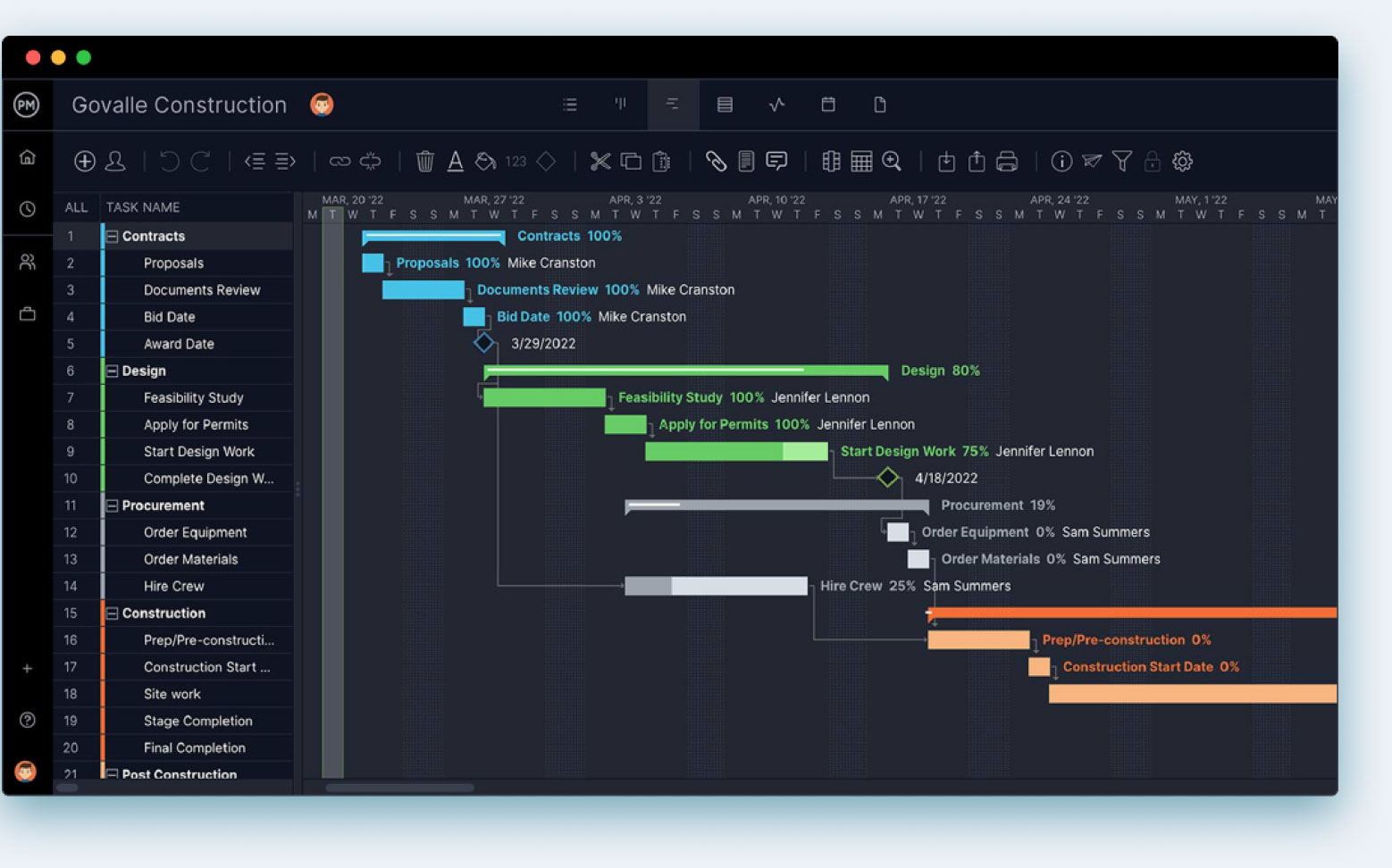
- Gantt Charts: A Gantt chart turns your task list into a visual timeline—task details and dates on one side, a bar chart schedule on the other. It’s still the backbone of traditional, waterfall-style planning, and for good reason: nothing beats it for seeing how tasks connect and where your critical path runs.
- Kanban Boards: Kanban boards visualize workflow as cards moving across columns—usually to do, doing and done, though you can customize as needed. Each card carries the task details: priority, due date, assignee. It’s the go-to view for agile teams that want at-a-glance visibility into what’s moving and what’s stuck.
- Calendar View: A calendar view gives you the daily, weekly or monthly lay of the land—what’s due and when. The better implementations go beyond a static grid, letting you assign owners and add task details right from the calendar instead of just marking dates.
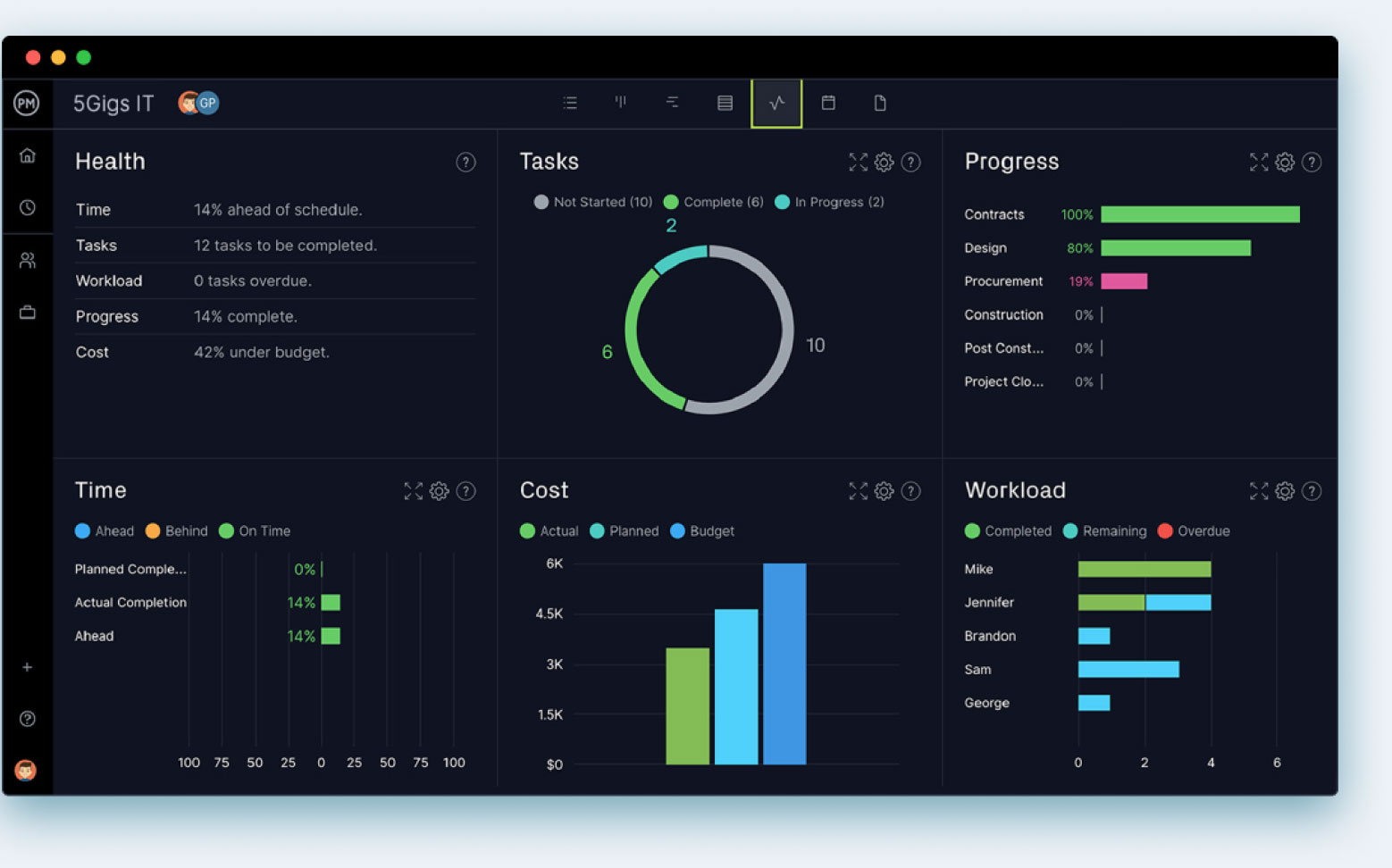
- Project Dashboards: A project dashboard rolls up time, cost and workload into one view so you can gauge project health at a glance. The real differentiator is automation: some tools make you build and populate the dashboard yourself, while the better ones populate it in real time from your project data.
- Team Collaboration: Chat and file-sharing keep managers and team members connected regardless of location or schedule. The bar to clear here is accessibility—collaboration tools only work if they’re easy for every role to use, not just the tech-savvy folks on your team.
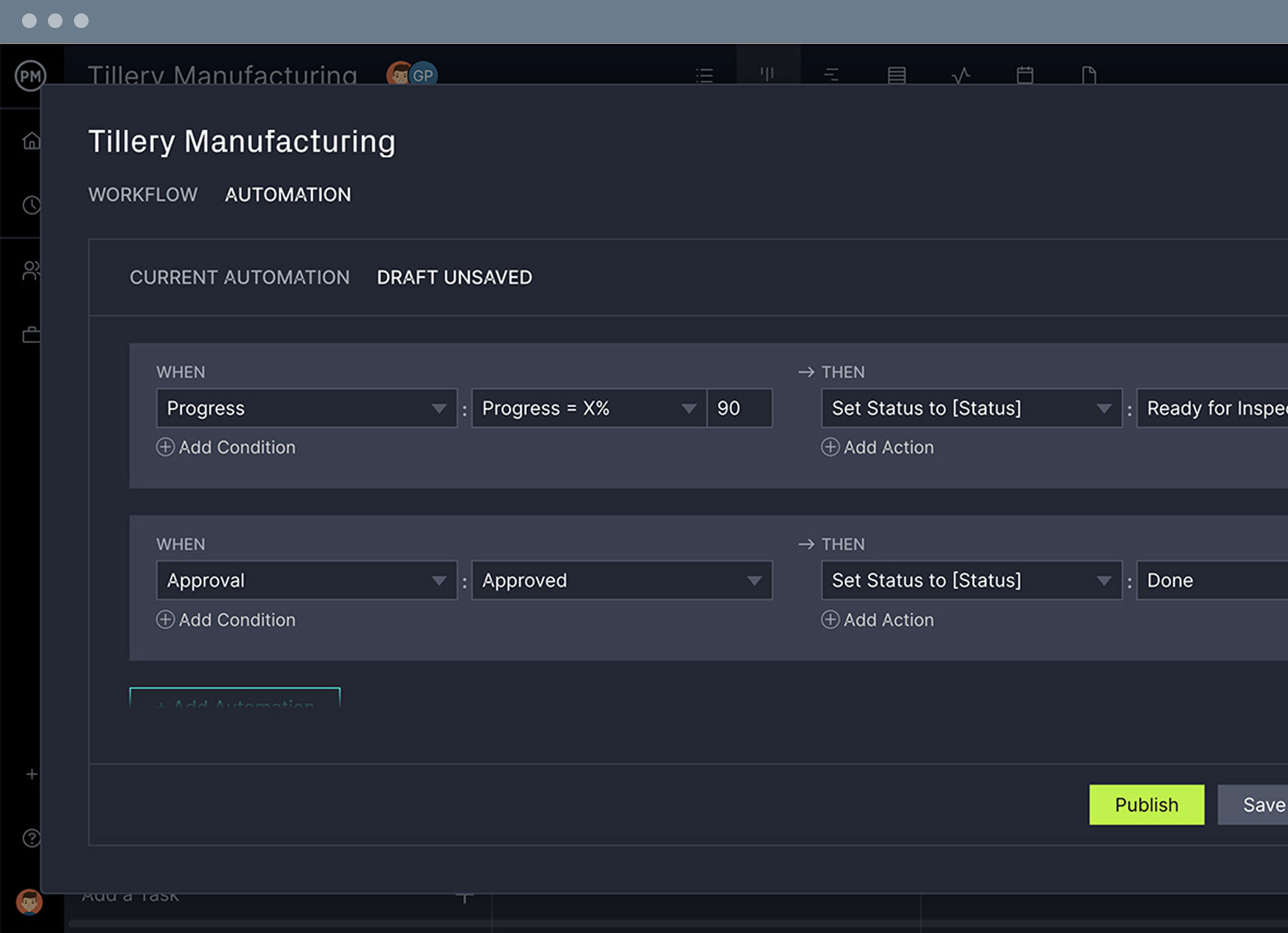
- Task Automation: Task automation uses triggers to handle repetitive busywork, from single-step actions to multi-step sequences, freeing your team to focus on actual project work instead of admin.
All of these features are important to managing and executing a project. If you’re working on a Mac and software such as MS Project doesn’t work on your platform then nothing gets done. While not everyone works on a Mac, most organizations have people who work on both. They all need to be able to do their jobs. This is something Microsoft fails to understand.
Best Project Management Software for Mac Rankings (2026)
Let’s look at project management software for Mac computers that has all the features you need to deliver project success.
1. ProjectManager
 ProjectManager is a powerful alternative to MSP. Our award-winning software is fully online (unlike MS Project) and is available at a price point that’s affordable for teams. It also has features that not only make collaboration simple but also plan, manage and track projects in real time.
Mac users also love the easy-to-use interface and collaboration tools that allow teams anywhere in the world to work together. Plus, our iOS app for mobile phones and tablets supports on-site visits with clients, field updates or even working on your tasks in your pajamas.
Cloud-Based Software for Mac
ProjectManager is a cloud-based project management software that exists entirely online. Manage your projects on any computer with any web browser, including Safari. As long as you have access to an internet connection, you have access to your projects.
You can store all of your files in the cloud with our online file storage, so you can download, upload or view project files whenever you need to. You’ll never have to drag your work computer to the coffee shop again!
Get Multiple Project Views
Not everyone in an organization works the same, but they have to work together. That’s why we have multiple project views so every department can collaborate, whether they’re on a PC or a Mac. People who plan and work more linearly can use the Gantt chart or sheet view. Their schedules are updated on the task list, calendar and kanban view. Kanban boards are perfect for your agile teams, who are more self-directed. Everyone is working from a single source of truth without having to use tools they’re uncomfortable with.
Automate Workflows and Tasks Approvals
Neither PC nor Mac users want to get bogged down with busywork. Our custom workflows keep teams free to work on what matters. You can add as many triggers as you like and then set off actions to streamline simple tasks and add greater efficiency. Watch our task automation features to boost your team’s productivity. Managers can still control the status of work with task approvals.
All this and more is why ProjectManager tops our list of project management tools for Mac. There are also powerful resource and risk management tools that help manage resources, identify and track risks and much more. Get started with ProjectManager today for free.
Verdict: Best Project Management Software for Mac for Planning, Scheduling and Tracking
If you’re a PM who’s had to babysit a desktop-only tool for a decade, ProjectManager is the closest thing on this list to “MS Project, but it actually works.” It won’t out-muscle Celoxis on portfolio-level financials, but for a team that needs Gantt, kanban, calendar and dashboards all pulling from the same data without a consultant to set it up, it’s the most complete, least painful option here.
ProjectManager Pros & Key Features
- Dashboards work right out of the box and update in real time
- Time tracking and resource management features are included at a low price
- Project portfolio management features are easy to use
- Mobile project management app for Android and iOS
- Free trial 30-day trial
ProjectManager Cons & Limitations
- Limited native integrations
- Poor mobile experience unless you have the mobile app
- Defaults to dark mode
ProjectManager Pricing
For updated pricing information, visit ProjectManager’s pricing page by clicking here.
ProjectManager Reviews
- G2 review: 4.4/5
- Capterra review: 4.1/5
2. Celoxis

Celoxis is another project management software for Mac that gives teams everything they need to plan projects, manage resources, track budgets, and monitor progress from a single platform. Mac users can create project schedules, assign work, collaborate with distributed teams, and generate real-time reports while keeping multiple projects organized in one place.
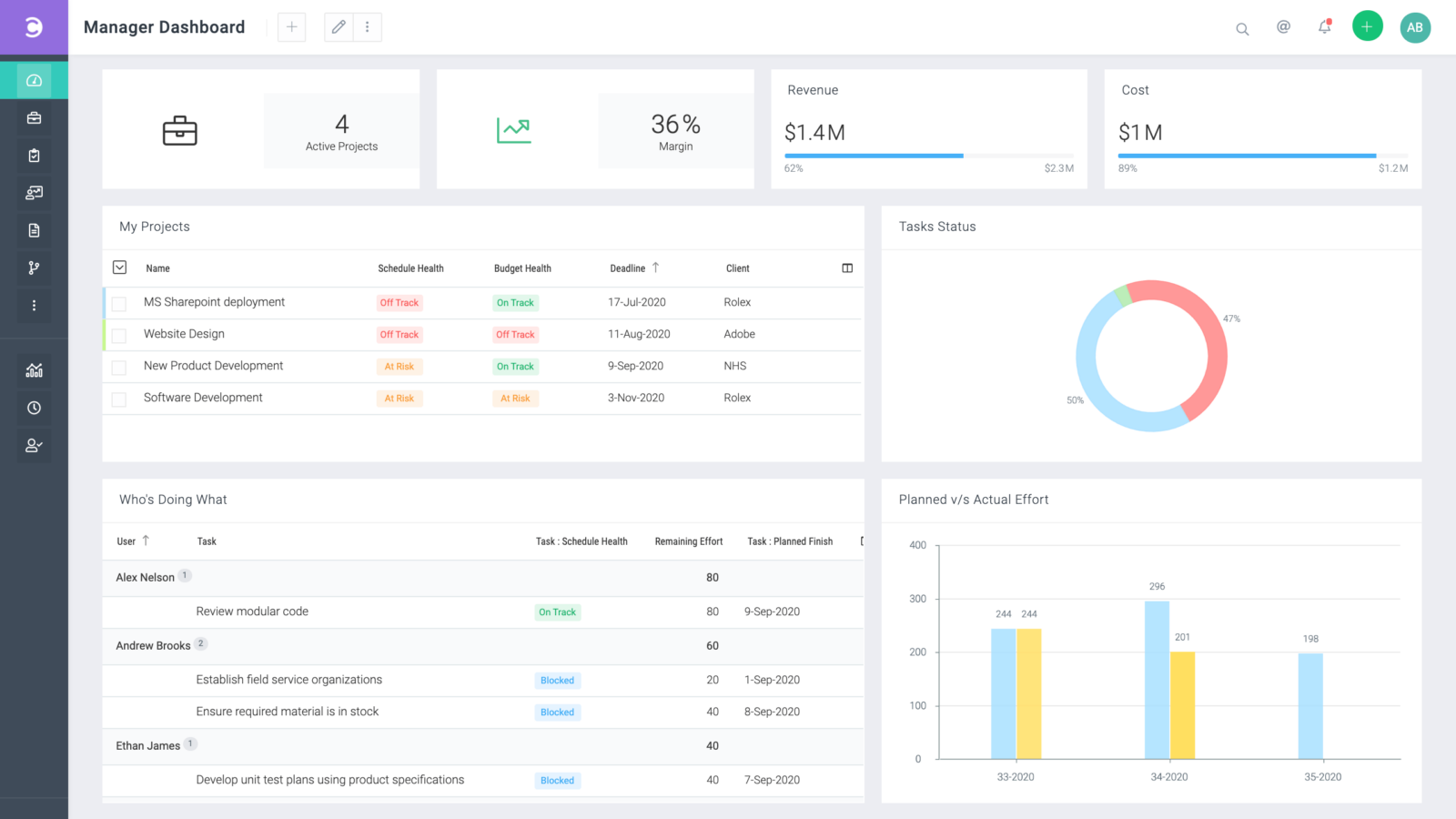
However, Celoxis goes beyond basic task management by combining project scheduling, resource planning, portfolio reporting, and financial tracking in one solution. Celoxis AI LEX adds AI-powered project insights and reporting, making it a practical choice for teams managing multiple projects, shared resources, and budgets from a single platform.
Verdict: Best Project Management Software for Mac for Resource Planning and Portfolio Management
Celoxis is what I hand to a PMO director managing 40 projects across three departments, not a solo freelancer. The resource and budget tooling is genuinely enterprise-grade, but that depth comes with a setup curve — this isn’t a tool you open and start using in an afternoon, it’s one you configure once and lean on for years.
Celoxis Pros & Key Features
- Advanced Gantt charts with dependencies and critical path
- Resource planning, workload management, and capacity forecasting
- Portfolio dashboards with budget tracking and reporting
- Celoxis AI LEX for AI-powered project insights
Celoxis Cons & Limitations
- No permanent free plan
- Some advanced features require higher-tier plans
- Less suitable for simple personal task management
Celoxis Pricing
For updated pricing information, visit Celoxis’s pricing page by clicking here.
Celoxis Reviews
3. Merlin Project

Merlin Project is a native Mac, iPad and iPhone project management app built by ProjectWizards, a German developer that’s been refining the tool for close to two decades. It’s aimed squarely at Apple users who want a full-featured planning tool rather than a stripped-down task list, combining Gantt charts, kanban boards, mind maps and resource management in one app.
Merlin Project lets you build task flows with dependencies, set fixed milestones and switch between Gantt, kanban and mind map views of the same project. It also includes resource pools, cost and budget tracking, dynamic help, and comments and annotations so teams can discuss activities and attachments in context. Import and export support for Microsoft Project, Excel, MindManager, XML and OPML files makes it easier to move data in from other tools.
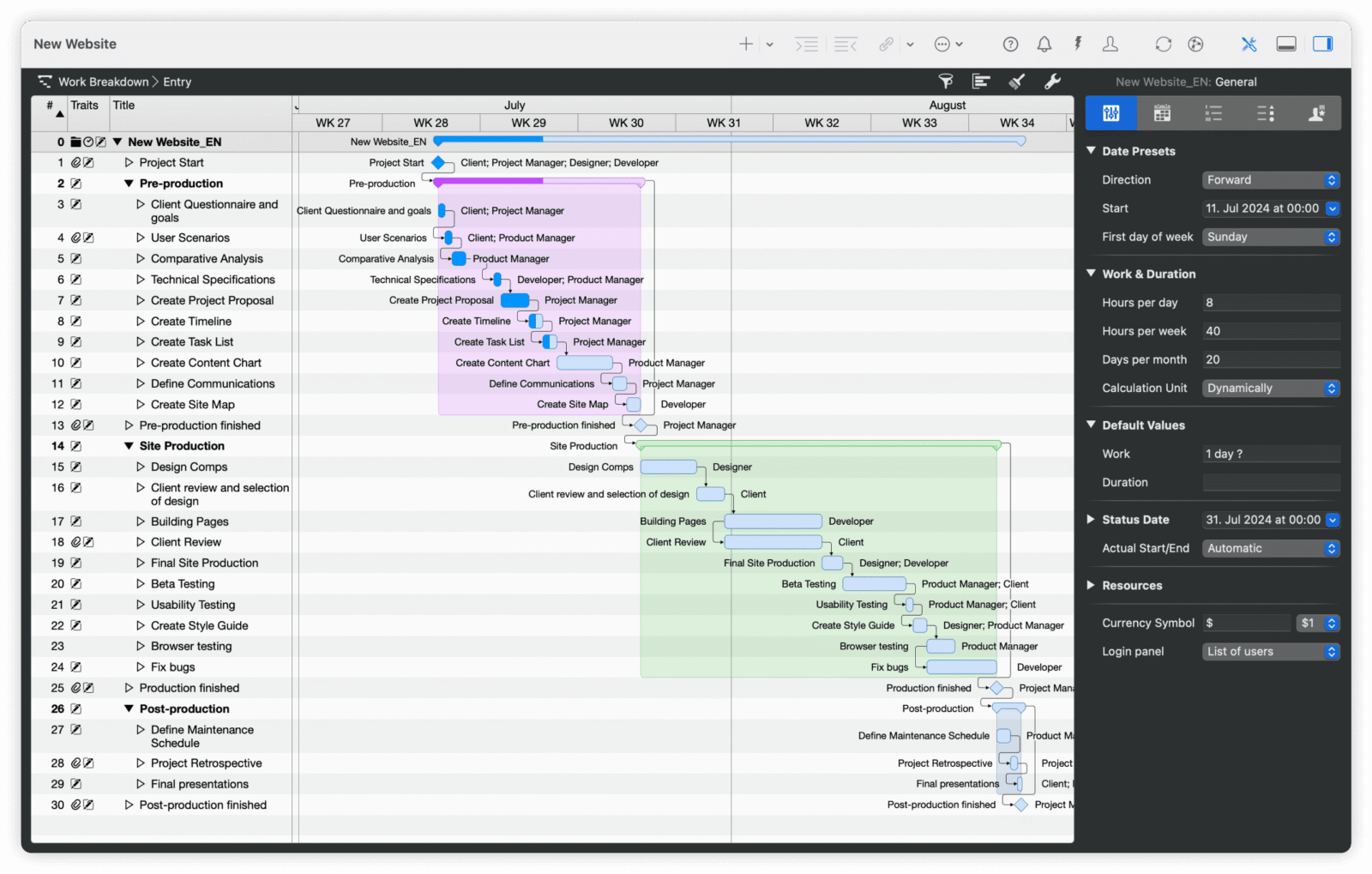
However, Merlin Project is a Mac and iOS-only app, so it’s not an option for mixed PC/Mac teams unless everyone works from Apple hardware. It also has a steeper learning curve than task-first tools like Asana or Trello, and it lacks built-in chat or messaging, so teams still need a separate tool for day-to-day conversation.
Verdict: Best Project Management Software for Mac for Native Gantt and Kanban Planning
Merlin Project is the one I recommend to Mac loyalists who got burned trying to run Microsoft Project through Parallels and swore never again. It’s a legitimately native, well-built planning app — but “native Mac and iOS only” is a hard ceiling the second your team has a single Windows user, so know your audience before you buy in.
Merlin Project Pros & Key Features
- True native Mac and iPad app, not a cross-platform wrapper
- Gantt, kanban and mind map views of the same project
- Resource pools, budget tracking and risk oversight
- Supports both agile and waterfall methodologies
- Free 30-day trial
Merlin Project Cons & Limitations
- Mac, iPad and iPhone only — no Windows version
- No built-in team chat or messaging
- Takes time to learn the full feature set
- Pricing can add up if you need both the Mac and iPad apps
Merlin Project Pricing
For updated pricing information, visit Merlin Project’s pricing page by clicking here.
Merlin Project Reviews
- Capterra review: 4.7/5
- Software Advice review: aggregated rating pulled from Crozdesk and other review sites
4. OmniPlan
OmniPlan, made by The Omni Group, is a Mac and iPad project planning tool built around Gantt charts, task dependencies and resource scheduling. It’s a one-time purchase rather than a subscription, which appeals to project managers who want a native planning tool without an ongoing monthly bill.
OmniPlan automatically calculates the critical path as you build out tasks and dependencies, and its Monte Carlo simulation feature lets you model best-case, worst-case and likely-case schedules based on task-duration uncertainty. It also includes automatic resource leveling, cost-to-completion tracking and the ability to publish schedule updates to collaborators over the network.
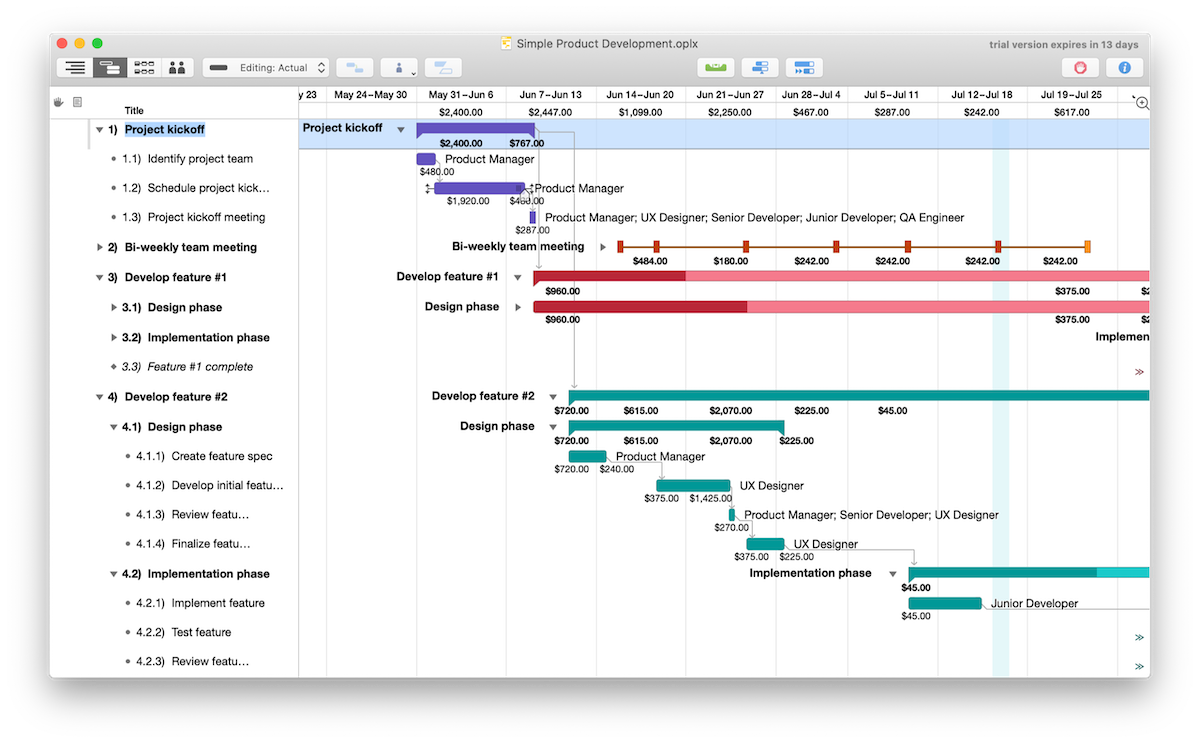
That said, OmniPlan is built for individual planners more than distributed teams: there’s no real-time multi-user editing, task management integrations are limited, and it’s Mac/iPad only with no server or Windows version. The $199 one-time price for the base license is also a bigger up-front commitment than a monthly subscription tool.
Verdict: Best Project Management Software for Mac for One-Time-Purchase Gantt Planning
OmniPlan is for the planner who wants to own their software, not rent it — pay once, keep the Gantt chart and critical path math forever. Just don’t mistake it for a team collaboration platform: it’s built for one person driving the schedule, not five people editing it together in real time.
OmniPlan Pros & Key Features
- One-time purchase — no recurring subscription
- Automatic critical path calculation and resource leveling
- Monte Carlo simulation for schedule-risk analysis
- Imports and exports Microsoft Project files
OmniPlan Cons & Limitations
- Mac and iPad only, no Windows or web version
- Limited real-time collaboration compared to cloud PM tools
- $199 upfront cost for the base license
- Fewer task-management integrations than full PM suites
OmniPlan Pricing
For updated pricing information, visit OmniPlan’s pricing page by clicking here.
OmniPlan Reviews
- G2 review: 4.5/5
- Capterra review: 4.3/5
5. Things 3

Things 3, from German developer Cultured Code, is a personal task manager rather than a full project management suite, but it’s popular enough among Mac users that it’s worth including for individuals and small teams who need something simpler than a Gantt-driven tool.
Things 3 organizes work into Areas (like Work, Personal or Family) and Projects within those areas, with a Today view that surfaces what’s due right now. Its Magic Plus button and natural-language quick entry make capturing tasks fast, and it supports tags, headings, deadlines, recurring to-dos and two-way syncing with Apple Calendar.
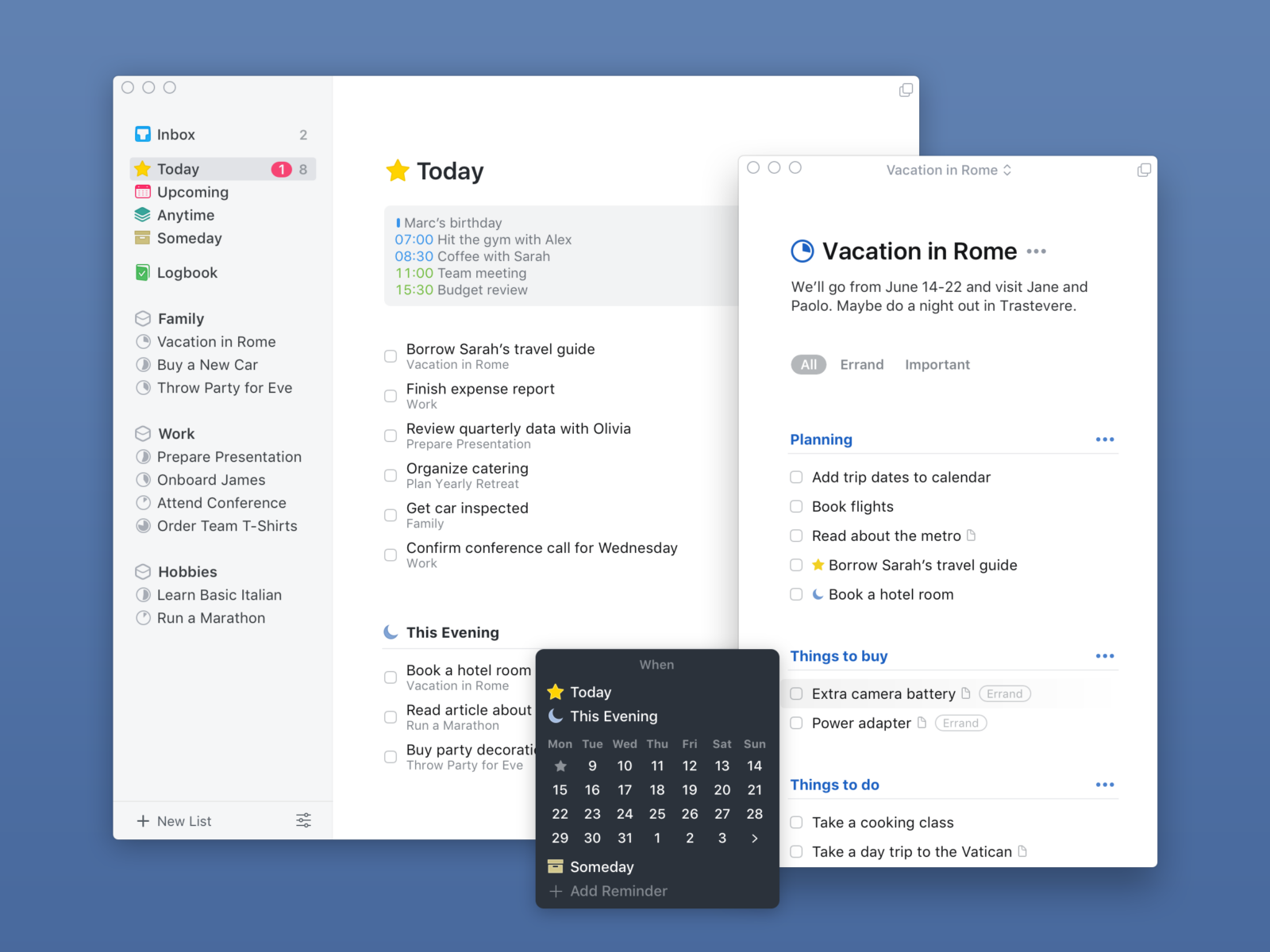
The tradeoff is that Things 3 has no collaboration features at all — no shared projects, no comments, no assignees — which makes it a non-starter for teams that need to coordinate work across multiple people. It’s also Apple-only, with no Windows, Android or web app, and getting the full set of apps means buying the Mac, iPhone/Watch and iPad versions separately.
Verdict: Best Project Management Software for Mac for Individual Task Management
Let’s be honest: Things 3 doesn’t belong in the same conversation as Celoxis or ProjectManager, and it’s not trying to. It’s the best-designed personal task manager on macOS, full stop — but the moment you need to assign work to someone else or see what your team is doing, you’ve outgrown it.
Things 3 Pros & Key Features
- Clean, fast interface with natural-language task entry
- Areas, projects, headings and tags for flexible organization
- Two-way sync with Apple Calendar
- One-time purchase, no subscription
Things 3 Cons & Limitations
- No collaboration, sharing or assignee features
- Apple devices only — no Windows, Android or web version
- Mac, iPhone/Watch and iPad apps are sold separately (roughly $80 for the full set)
- Not built for resource management, budgeting or Gantt-style planning
Things 3 Pricing
For updated pricing information, visit Things 3’s pricing page by clicking here.
Things 3 Reviews
- G2 review: 4.4/5
- GetApp review: 4.8/5
6. Wrike

Wrike is another Mac alternative and users will find that the software gives them real-time project updates, allows them to assign tasks to other users, change and update tasks, view calendars and great integrations. Using Wrike on a Mac gives you the features you need and more control to view projects and tasks.
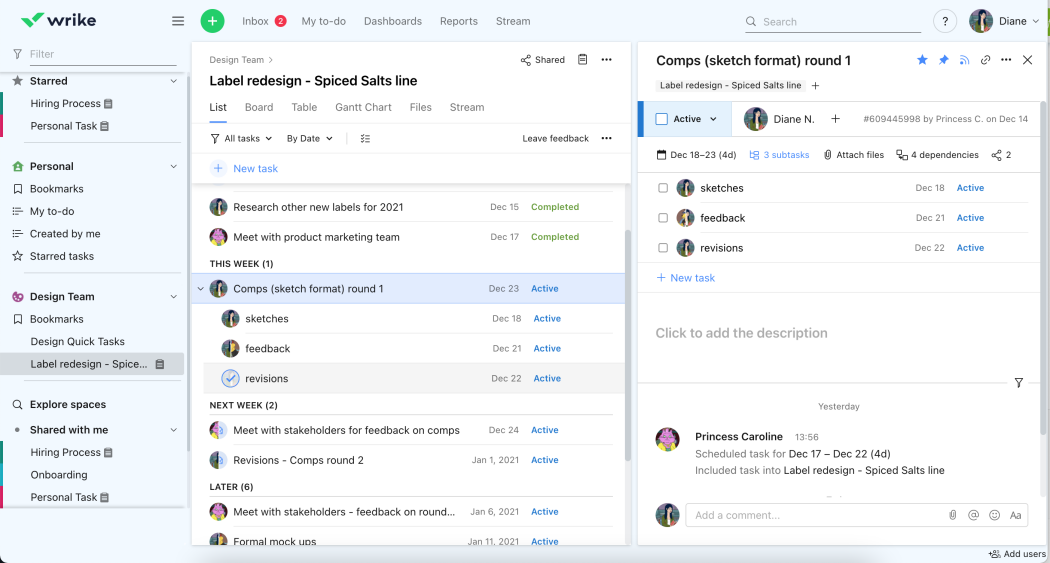
However, there are some shortcomings. For example, you’ll likely get frustrated with its Gantt, which has limited capabilities. There are no project management reports, which will have some users looking for another Mac alternative, as well as its limited tracking features.
Verdict: Best Project Management Software for Mac for Integrations
Wrike’s real selling point is how well it plays with other tools, which matters if your stack is already built and you just need something to sit in the middle of it. As a planning tool on its own merits, though, it’s thinner than it looks — the Gantt chart is more decorative than functional, and I wouldn’t run a complex project on it without leaning hard on integrations to fill the gaps.
Wrike Pros & Key Features
- Designed for basic task and workflow management
- Ideal for project management beginners
- Mobile project management app for Android and iOS
Wrike Cons & Limitations
- The Gantt chart functionality is limited
- Lacks project management reports
- Limited cost and budget tracking features
- The user interface is hard to navigate
Wrike Pricing
For updated pricing information, visit Wrike’s pricing page by clicking here.
Wrike Reviews
- G2 review: 4.2/5
- Capterra review: 4.4/5
7. Monday.com

Monday.com powers teams to run processes, projects and even everyday work in which real-time updates keep everyone in the loop. This project management software for Mac will track time and progress, automate repetitive tasks and customize workflows. There are kanban boards, timelines.
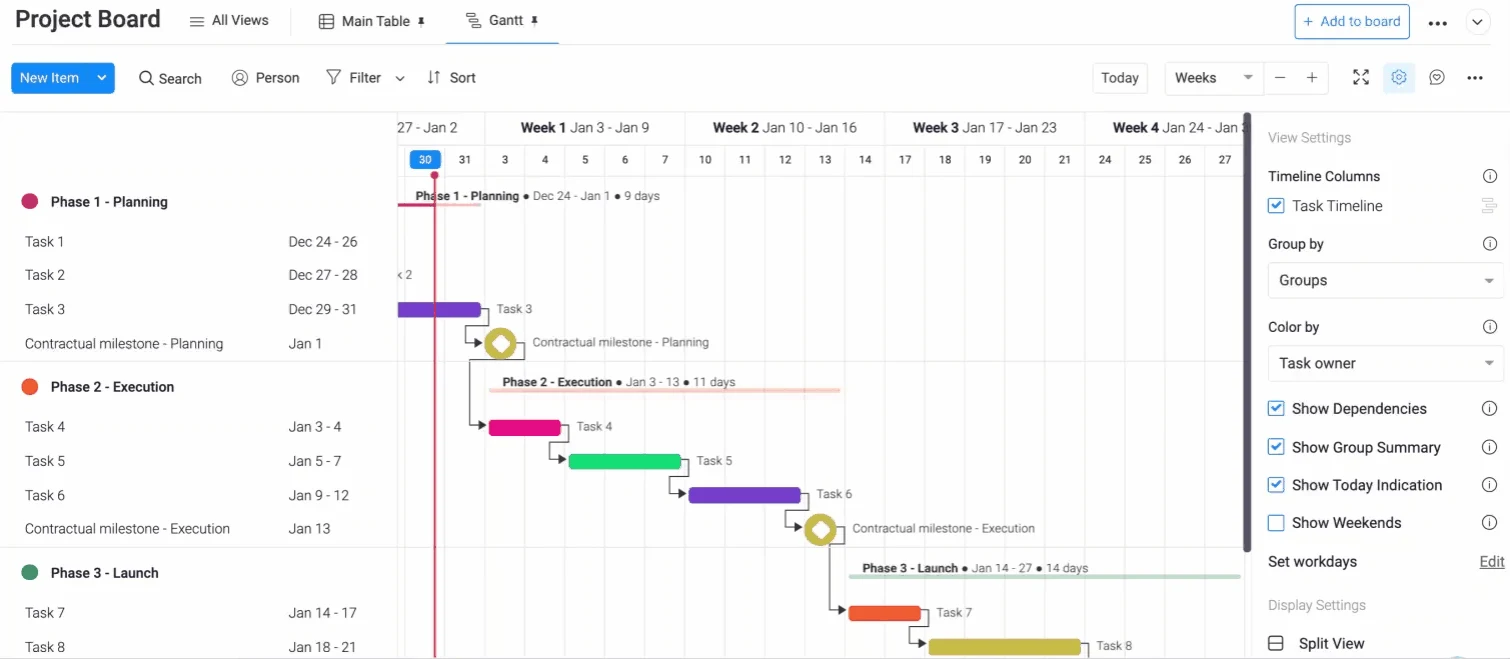
Yes, there are features like kanban boards, but they are limited in their functionality. There are better kanban software alternatives to choose from. This is also true of its Gantt chart, one of the pillars of project management. As a project management software for Mac, Monday.com is more for task management. Project managers will want to look elsewhere.
Verdict: Best Project Management Software for Mac for Marketing and Creative Teams
Monday.com wins on vibes — colorful, approachable, easy to get a creative team to actually adopt. But if you’re the one accountable for the schedule, don’t expect it to hold up as a real project management tool; it’s task tracking with a nice coat of paint, not Gantt-driven planning.
Monday.com Pros & Key Features
- Friendly user interface and easy-to-use task management tools
- Task management dashboards to track progress, resources and costs
- Free trial
- Mobile app available for Android and iOS
Monday.com Cons & Limitations
- Limited kanban board functionality
- Gantt charts lack important project planning and scheduling features
- Like Trello is a task management tool with a limited project management feature set
Monday.com Pricing
For updated pricing information, visit Monday.com’s pricing page here.
Monday.com Reviews
- G2 review: 4.7/5
- Capterra review: 4.6/5
8. Asana

Asana is project management software for Mac that helps organize your daily tasks and allows you to communicate with your team, wherever you are or they are. The user-friendly interface is a plus as well as its many integrations with third-party apps. It has an iOS mobile app and you can get a free trial or plan to test it out.
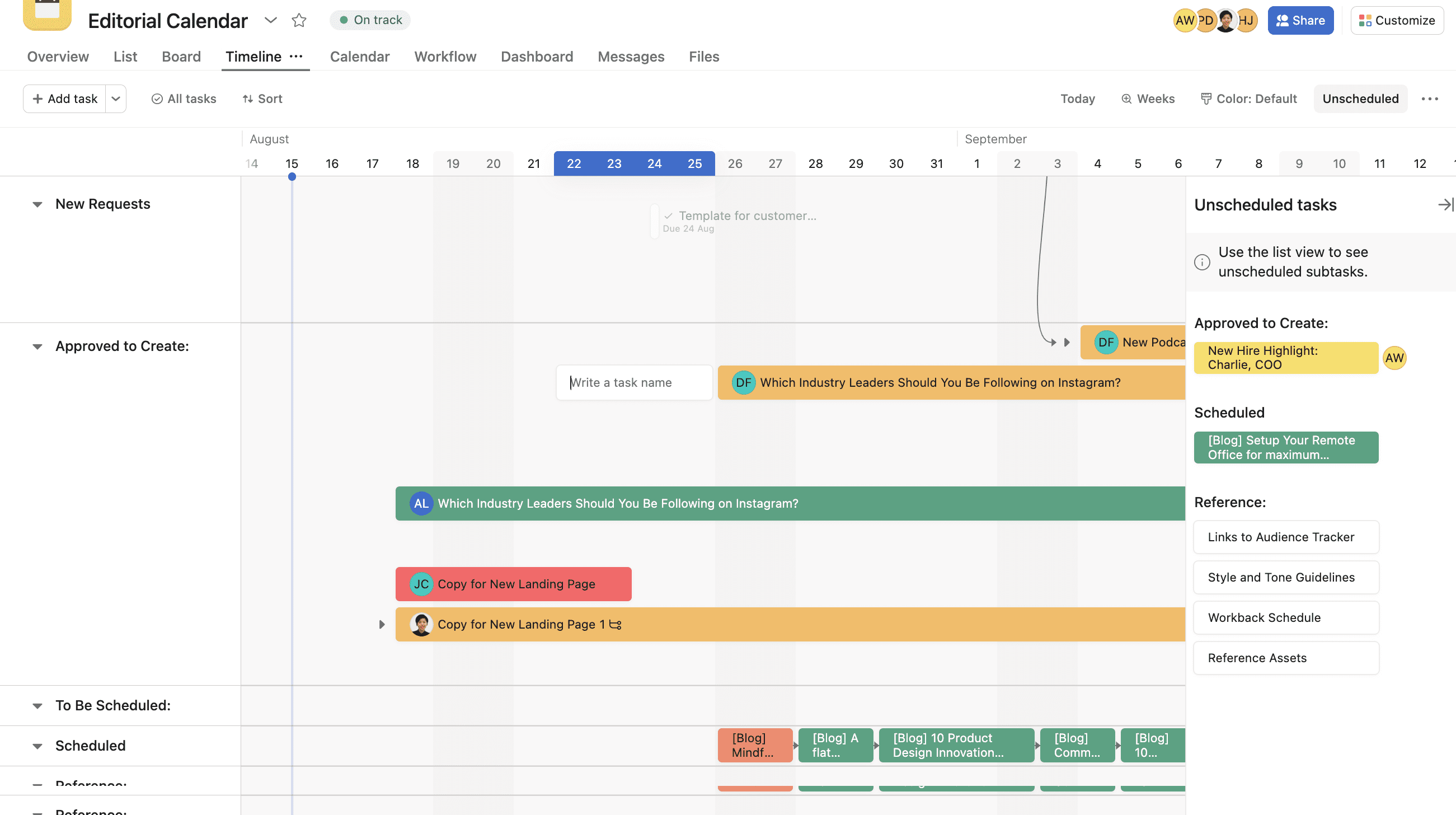
This project management software for Mac is not suited for managing multiple projects. It’s more of a task management tool and suffers a lack of project management features. For example, its Gantt chart doesn’t have cost-tracking, which is an essential piece of any Gantt chart software to help you stay on budget.
Verdict: Best Project Management Software for Mac for Team Management
Asana is what happens when a task manager scales up but never quite becomes a project management tool. Teams love it for the day-to-day — assignments, comments, deadlines — but ask it to manage a multi-project portfolio with real cost tracking and it starts showing its limits fast.
Asana Pros & Key Features
- User-friendly interface
- Integrations with third-party apps such as Google Drive, Microsoft Teams and Slack
- Mobile project management app for Android and iOS
- Free plan
- Free trial
Asana Cons & Limitations
- Not ideal for managing multiple projects, programs or portfolios
- Limited project management features
- Gantt chart lacks advanced features such as cost tracking
- Workload management tools are easy to use but can be limited for some users
Asana Pricing
For updated pricing information, visit Asana’s pricing page here.
Asana Reviews
- G2 review: 4.4/5
- Capterra review: 4.5/5
9. Smartsheet

Smartsheet is a project management software for Mac that helps you plan, capture, manage and report on work. It’s great for remote teams, allowing them to collaborate, while tracking key metrics with real-time visibility. It has essential project management features, such as a dashboard and automated workflows.
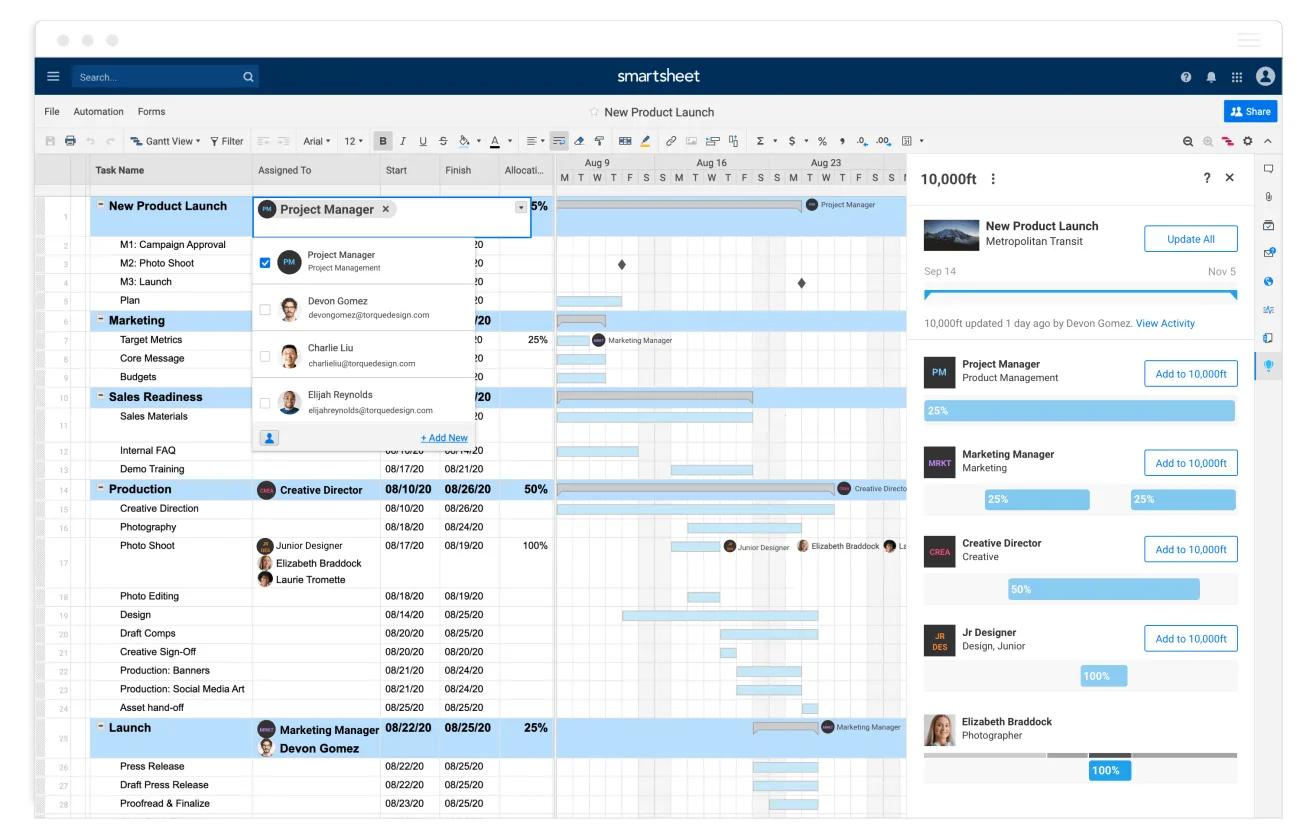
If you love Excel, then this is the project management software for Mac you’ll want. But if you’re looking for more than glorified spreadsheets, you’ll need to look elsewhere. While it has Gantt charts and kanban boards, they’re not as advanced as others on this list. You also have to use complicated formulas to get the most out of the tool and even then there are limited resource management features.
Verdict: Best Project Management Software for Mac for Project Spreadsheets
Smartsheet is the right call for one specific person: the PM who thinks in rows and columns and doesn’t want to leave Excel logic behind. Everyone else should be cautious — the Gantt and kanban views are bolted onto a spreadsheet, not built for it, and you’ll spend real time wrestling formulas just to get basic reporting.
Smartsheet Pros & Key Features
- Good for users transitioning from Excel to project management software
- Work management and reporting tools
- Workflow automation features
- Free trial
- Mobile project management app for Android and iOS
Smartsheet Cons & Limitations
- Most of its tools are spreadsheet-based
- Gantt charts, spreadsheets and kanban cards lack some advanced project management features
- The software requires the use of complicated formulas
- Limited resource management tools
- Project reports have an outdated look and feel compared to other Monday.com alternatives
Smartsheet Pricing
For updated pricing information, visit Smartsheet’s pricing page here.
Smartsheet Reviews
- G2 review: 4.4/5
- Capterra review: 4.5/5
10. Notion

Notion is a strong project management software for Mac users due to its all-in-one workspace approach, combining task management, notetaking, wikis and databases in a clean, customizable interface. It runs smoothly on macOS and offers seamless syncing across Apple devices, which is ideal for users integrated into the Apple ecosystem. Teams can use Notion to build personalized project dashboards, create kanban boards, timelines and task lists, and collaborate in real time using shared pages and comments—all in one highly flexible platform.
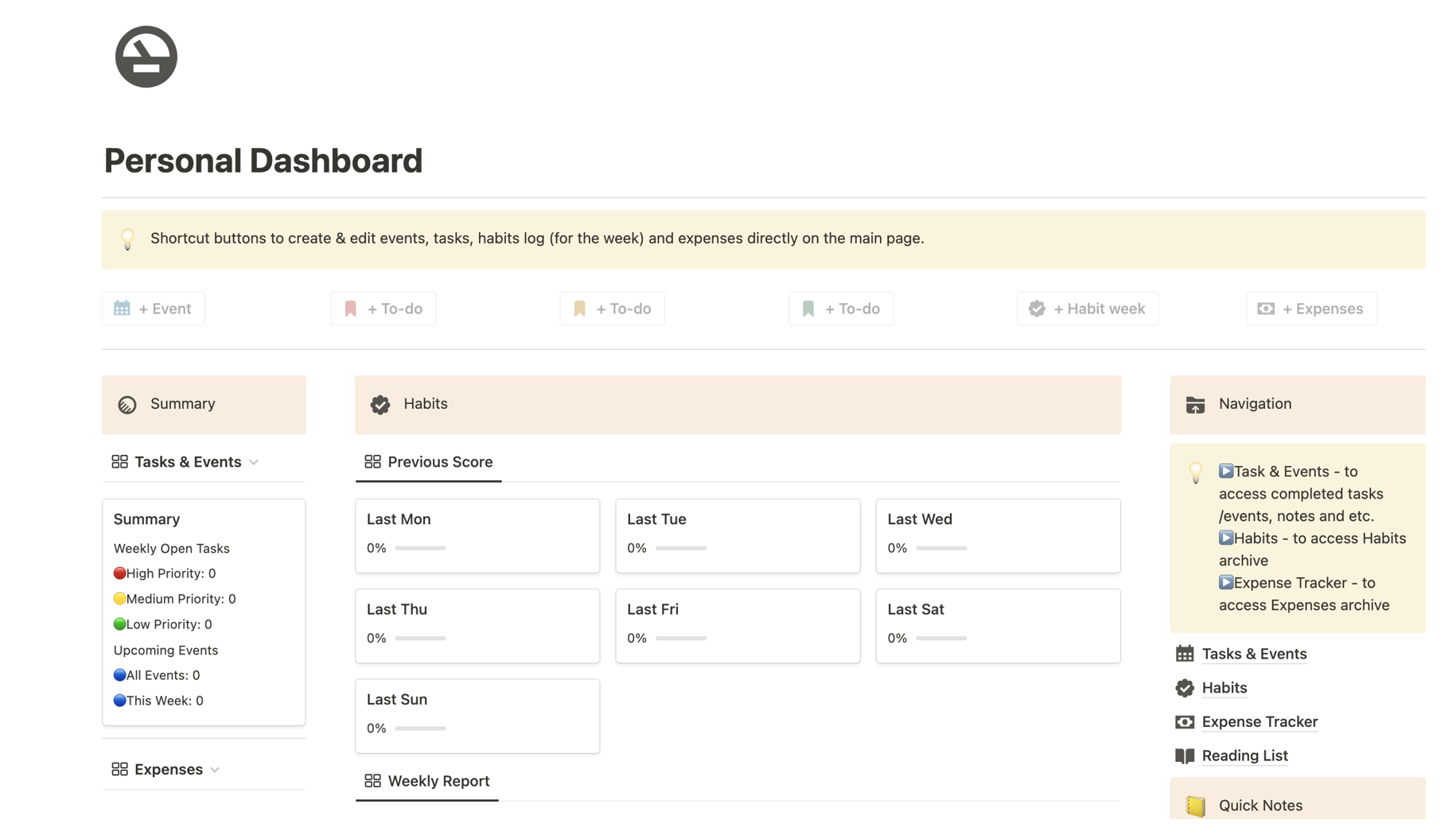
But that doesn’t mean it’s perfect. Notion also has drawbacks that can hinder project management, especially for complex or large-scale initiatives. While it’s versatile, it lacks built-in Gantt charts, advanced resource management tools and native time tracking, which are essential for more structured project workflows. Users must often rely on templates or third-party integrations to fill these gaps. Additionally, because everything is so customizable, it can take significant time and effort to set up an effective project management system from scratch. Teams needing robust automation, dependency tracking, or detailed reporting might find Notion too lightweight for their needs.
Verdict: Best Project Management Software for Mac for Notetaking
Notion is fantastic if your “project management” is really documentation, wikis and loosely organized to-dos — and plenty of small teams genuinely run that way. But call it what it is: a flexible workspace, not a project management system. No native Gantt chart and no real resource management means it falls apart the moment your projects get any real structure.
Notion Pros & Key Features
- All-in-one workspace
- Notetaking
- User-friendly interface
- Free plan
Notion Cons & Limitations
- Lacks Gantt chart
- Poor resource management
- Customization leads to significant time and effort to get started
Notion Pricing
For updated pricing information, visit Notion’s pricing page here.
Notion Reviews
- G2 review: 4.7 / 5
- Capterra review: 4.7 / 5
Project Management Software for Mac Is Better Than Microsoft Project
Most project managers have endured Microsoft Project. For years, it was an industry-standard tool, even though it was (and is) difficult to use. Whether using MS Project for desktop, MS Project Server, or MS Project Online, the problems of the tools are legendary.
The calculations are confusing and overly complex. Sharing files requires add-on tools like Sharepoint. It’s non-collaborative, meaning only PM Pros can use it. And it’s costly. You’ll need a monthly subscription for each user. There are three plans to choose from $10, $30 or $55 a month. For Mac users, MS Project is a non-starter. It simply doesn’t work, leaving many looking for an alternative solution. Luckily, there’s ProjectManager.
Related Content
Choosing the best project management software for your team is very important. Here’s some content to help Mac users make an informed decision.
- Best Construction Software for Mac
- Best Project Management Software: Rankings, Reviews & Comparisons
- How to Open Microsoft Project Files on Mac
- Best Planner Apps for Mac
- How to Make a Gantt Chart on Mac
- 6 Mejores software de gestión de proyectos para Mac: gratis y de pago (2025)
- 6 meilleurs logiciels de gestion de projet pour Mac (2025)
Our tools are used by teams globally to manage all kinds of projects, from complex engineering projects to simple event planning projects. ProjectManager is award-winning work and project management software that connects hybrid teams no matter where they work or how they work. Our tool works with Mac computers and PCs.
For more information on how our project management tools have helped kick off over 2 million projects, visit our software tour page. Or, see for yourself and sign up now for our free 30-day trial!
