



Work doesn’t manage itself. Whether you are tracking hours on a client project, logging daily progress on a construction site, recording what a service technician completed or keeping a running record of every change made to a system, the work only becomes useful information when someone writes it down in a consistent, structured way. A log template does exactly that: it gives you a repeatable format that captures the right details every time without requiring anyone to start from a blank page.
The problem with informal logging is that the record is only as useful as the person who created it. Different people capture different levels of detail. Information gets omitted. Formats change between weeks. When you need to look back at what happened during a project or justify a billing amount to a client, the gaps in an informal log are exactly where the problems hide. A template removes that variability by defining what gets recorded and how, so the log is consistent whether it is filled out by the same person every day or by a rotating team across shifts.
We put together eight free work log templates for Excel and Word covering the most common logging needs in project management, field work and professional services. Each one is free to download and ready to adapt for your team or project.
1. Work Log Template for Excel
A work log is the foundational record of what was done, by whom and when. On projects with multiple team members, contractors or concurrent workstreams, a work log is how the project manager keeps a traceable account of activity without having to chase individual updates. It is also the document that protects everyone when questions arise later about what was completed, in what sequence and at what time.
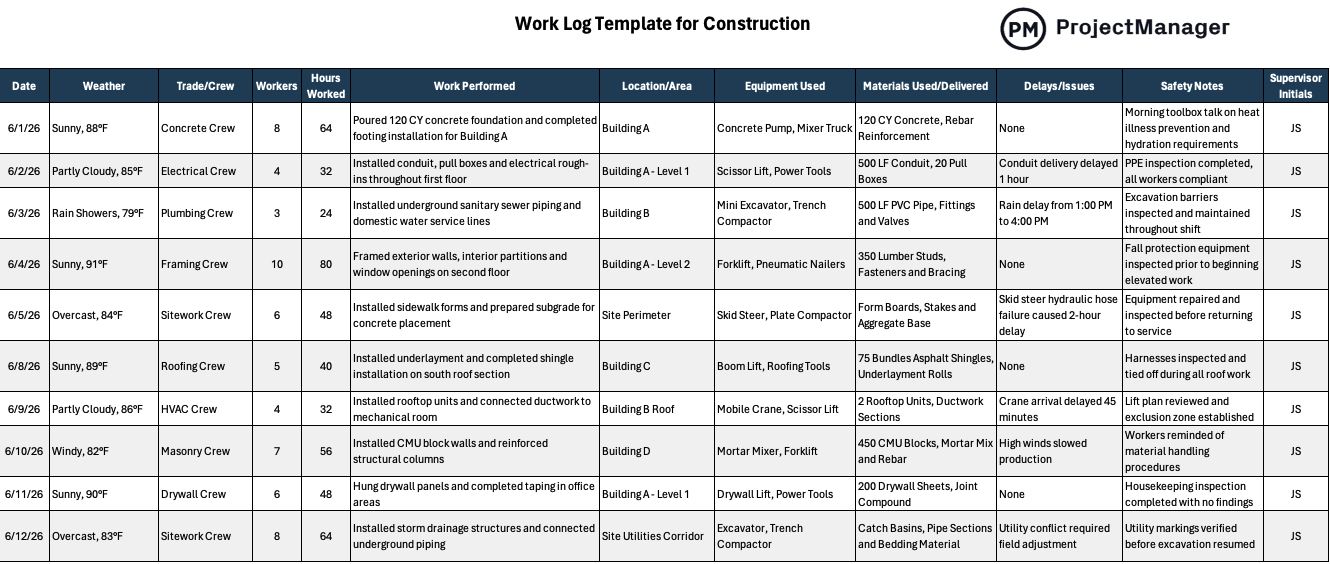
This Excel template logs work entries with columns for date, task or activity description, assigned team member, hours worked, status and notes. The running log gives the project manager a complete timeline of work activity that can be filtered by person, date or task type to answer any question about what happened during a project without relying on memory or scattered email threads.
The right tool for project managers, team leads and operations supervisors who need a structured, searchable record of work activity across a project or ongoing operation, particularly useful when multiple people are contributing to the same body of work and accountability needs to be clear.
2. Timesheet Template
Time is the most common unit of billing and the hardest to recapture accurately once a project is over. A timesheet turns daily work activity into a precise, verifiable record of hours that can be used for client billing, payroll processing or internal capacity planning. Without a consistent timesheet format, hour estimates drift, billing disputes become impossible to resolve and the organization loses the data it needs to price future work accurately.
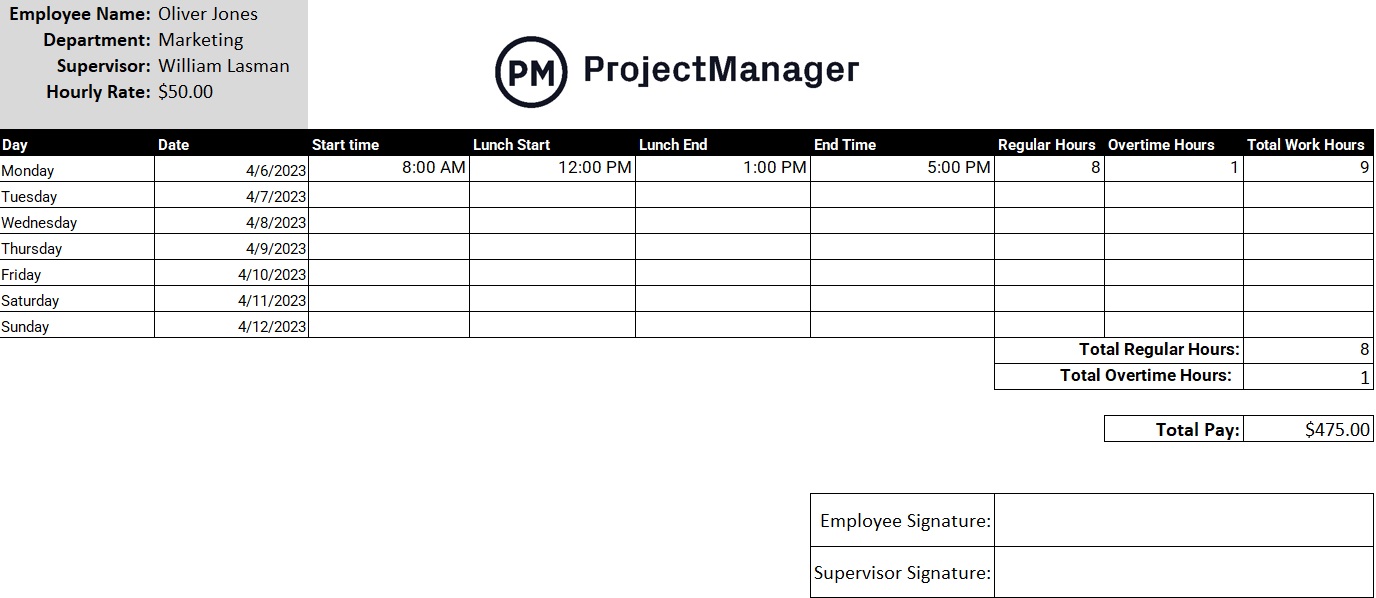
This timesheet template records hours worked by day and task across a standard work week, with space for employee name, project or client name, task descriptions and manager approval. The totals calculate automatically so billing and payroll processing start from accurate numbers rather than approximations. The approval section creates an auditable record that the hours were reviewed before being submitted.
Most useful for consultants, agencies, contractors and any team that bills clients by the hour or needs to track labor costs against project budgets with enough detail to defend the numbers if questioned.
Log Work in Real Time With ProjectManager
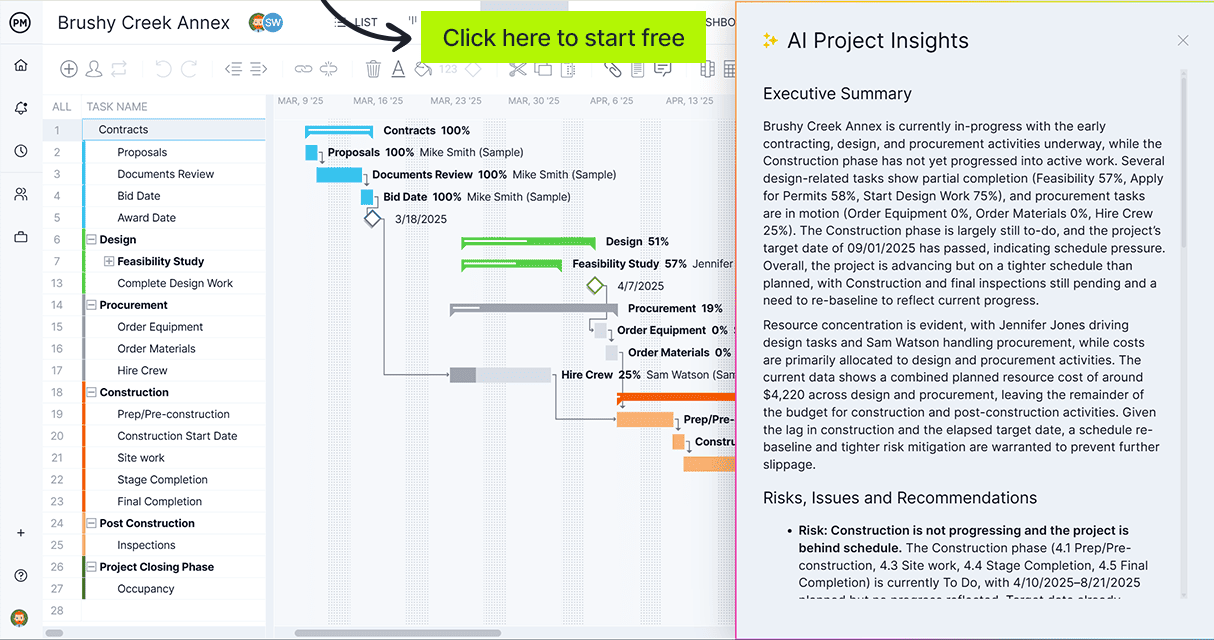
ProjectManager replaces static log templates with a live system where tasks update as your team works, hours log directly against projects and reports generate without manual data entry. Try it free for 30 days.
3. Daily Report Template
A daily report turns the end of each workday into a structured checkpoint. Instead of relying on team members to remember what happened last Tuesday or reconstructing a project timeline from email threads after the fact, a daily report creates a running record that captures progress, blockers, decisions and next steps at the moment they are relevant. Over the course of a project, the stack of daily reports becomes a complete operational history.
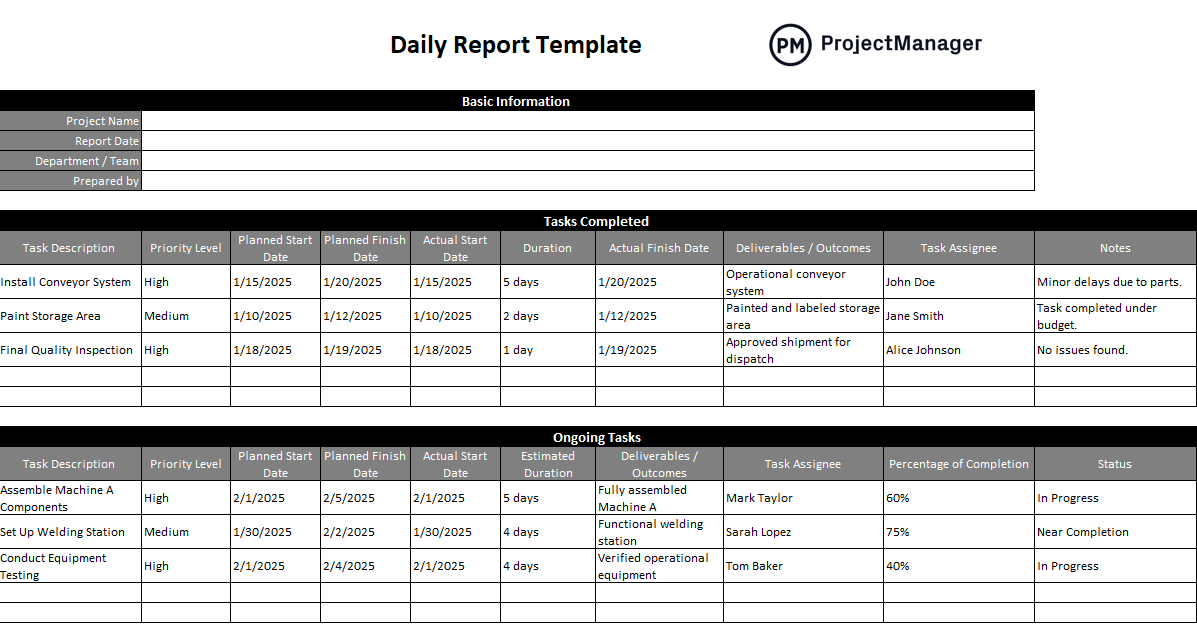
This template covers the standard daily report structure: date, team or individual reporting, work completed, work in progress, issues or blockers encountered, decisions made and planned work for the following day. The consistent format means reports can be compared across days to track whether the project is progressing as planned or whether issues are accumulating faster than they are being resolved.
Particularly useful for project managers running construction projects, software development sprints or any work environment where daily accountability to a schedule matters and stakeholders need a regular, reliable update on progress.
4. Job Sheet Template
A job sheet is the field-level record of a specific piece of work. Where a work log captures everything happening across a project, a job sheet focuses on a single job or task: what was requested, what was done, what materials or time were used and whether the work was completed to specification. It is the document a technician fills out on site and a manager reviews to confirm the work was done correctly before closing out the job.
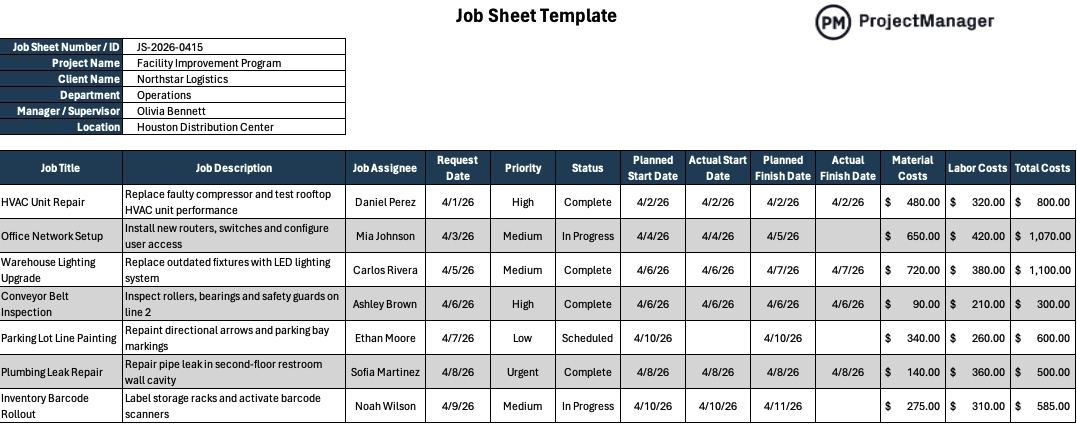
This Excel template covers the core job sheet fields: job number, client or site details, description of work requested, work carried out, materials used, time on site, technician name and signature and a completion sign-off section. The structured format ensures nothing gets omitted between the job being assigned and the record being filed, which protects both the service provider and the client if questions arise about what was done.
Best used by maintenance teams, field service companies, contractors and facilities managers who need a consistent record of every job completed across multiple sites, technicians or work types.
5. Job Card Template
A job card is the authorization document that sits at the start of a job rather than the end. It defines what needs to be done before work begins: the task description, the assigned person, the estimated time, the materials required and any safety or compliance requirements that apply. A job card turns a verbal instruction or a ticket into a written, traceable directive that the worker carries through to completion.
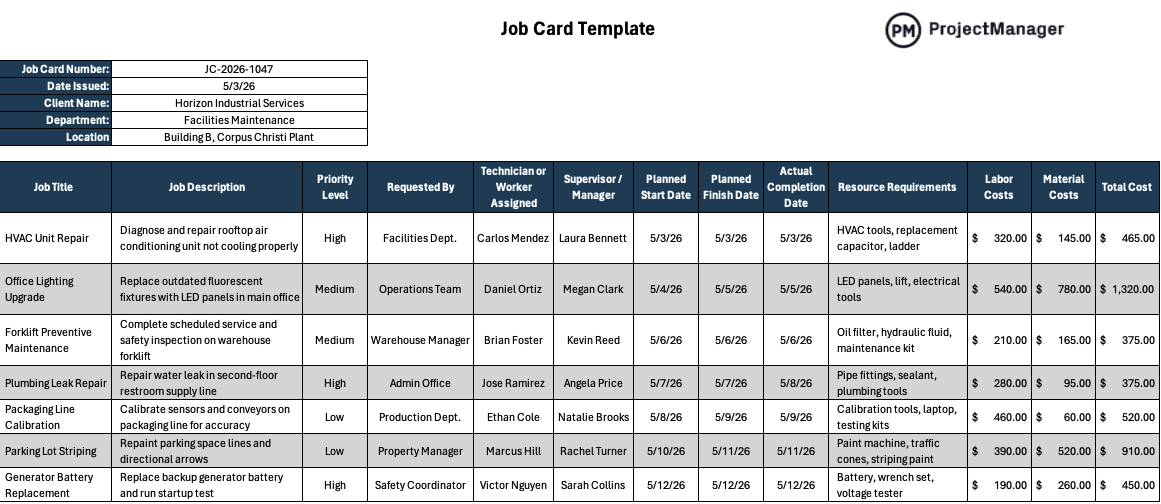
This Excel template includes fields for job number, issue date, requested by, assigned to, priority, work description, estimated hours, actual hours, parts or materials needed and a completion status. The before-and-after structure captures both what was planned and what actually happened, which is exactly the data a supervisor needs to manage workload, track technician productivity and identify where job estimates consistently differ from actual time.
Most useful for maintenance departments, manufacturing operations, facilities teams and service businesses where work is issued as discrete jobs and each job needs a paper trail from authorization through to sign-off.
6. Service Report Template
A service report is the formal record of a service visit. It documents what the technician found on arrival, what was done to address it, what parts were used, how long the visit took and whether the issue was fully resolved or requires a follow-up. For service businesses, it is both a record of work delivered and a document the client signs to confirm the work was completed, which makes it a critical part of the billing and warranty process.

This template covers the complete service visit record: service date, client details, equipment or system serviced, fault description, work performed, parts replaced, labor hours, technician name and a client sign-off section. The sign-off is particularly important for service businesses that bill on completion. It creates a confirmed record that the client acknowledged the work before the invoice is issued.
The right tool for HVAC, IT support, equipment maintenance, medical device servicing and any field service operation where a signed record of each visit is required for billing, warranty compliance or regulatory purposes.
7. Construction Daily Report Template
Construction projects move quickly and involve multiple trades, subcontractors and deliveries happening simultaneously. A daily report captures the site picture at the end of each day: who was on site, what work was completed by each crew, what materials arrived, what equipment was used and whether anything happened that could affect the schedule or budget. That daily record is how the project manager stays on top of a fast-moving site and how disputes about delays or additional costs get resolved later.
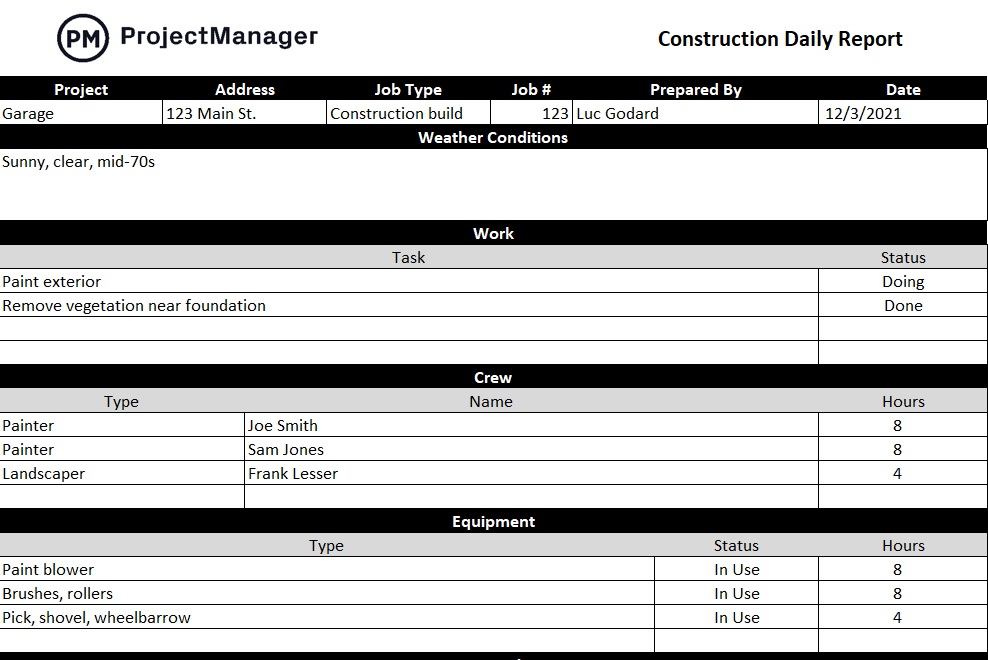
This template covers the construction-specific daily report structure: date and weather conditions, crew list by trade with hours worked, work completed by area or phase, materials received, equipment on site, safety incidents, inspections passed and a notes section for anything that could affect upcoming work. The weather and crew fields are particularly important for construction – they document the conditions that explain why work did or did not happen on a given day, which is essential when schedule disputes arise.
Best used by general contractors, site managers and construction project managers tracking daily activity across multi-trade projects where a consistent site record is required by the owner, lender or contract terms.
8. Change Log Template
Every project changes. Scope adjustments, requirement updates, design revisions, timeline shifts. Changes happen whether they are formally managed or not. The difference between a project that absorbs change cleanly and one that loses track of what was agreed is whether every change was documented at the time it was made. A change log is that documentation: a running record of every modification to the original plan, who approved it and what impact it had.
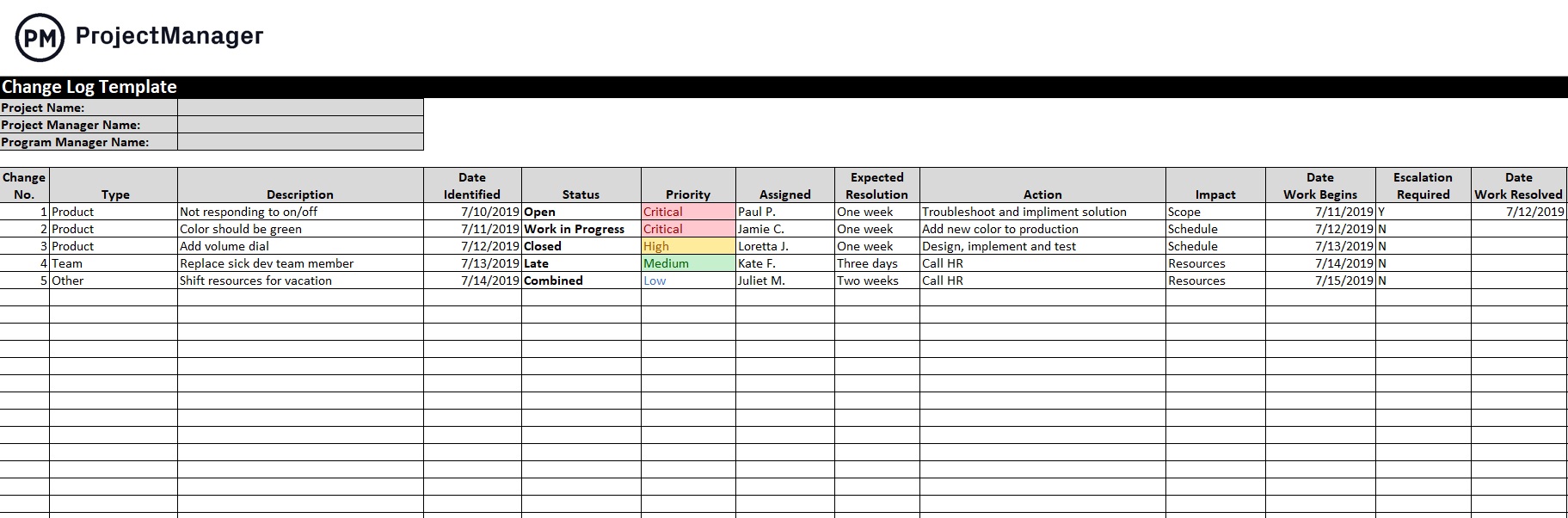
This template records each change with fields for change number, date, description, reason for the change, impact on scope, timeline and budget, who requested it and who approved it. The numbered sequence creates a traceable history of every modification from project start to finish. When a stakeholder asks why the project cost more than planned or finished later than originally scheduled, the change log is the document that provides a defensible, factual answer.
Particularly useful for project managers on contracts where scope changes need formal approval before work proceeds, or on any project where the gap between the original plan and the final outcome needs to be documented and explained.
Track and Log Work With ProjectManager
Log templates capture what happened. Acting on that information, assigning work, tracking progress, managing budgets and keeping the team accountable, requires a system that updates in real time as the work is done. ProjectManager gives project managers and their teams a live platform where task status, hours and costs update automatically as work is recorded, so the picture is always current without anyone having to compile a manual report.
Plan and Assign Work on a Gantt Chart
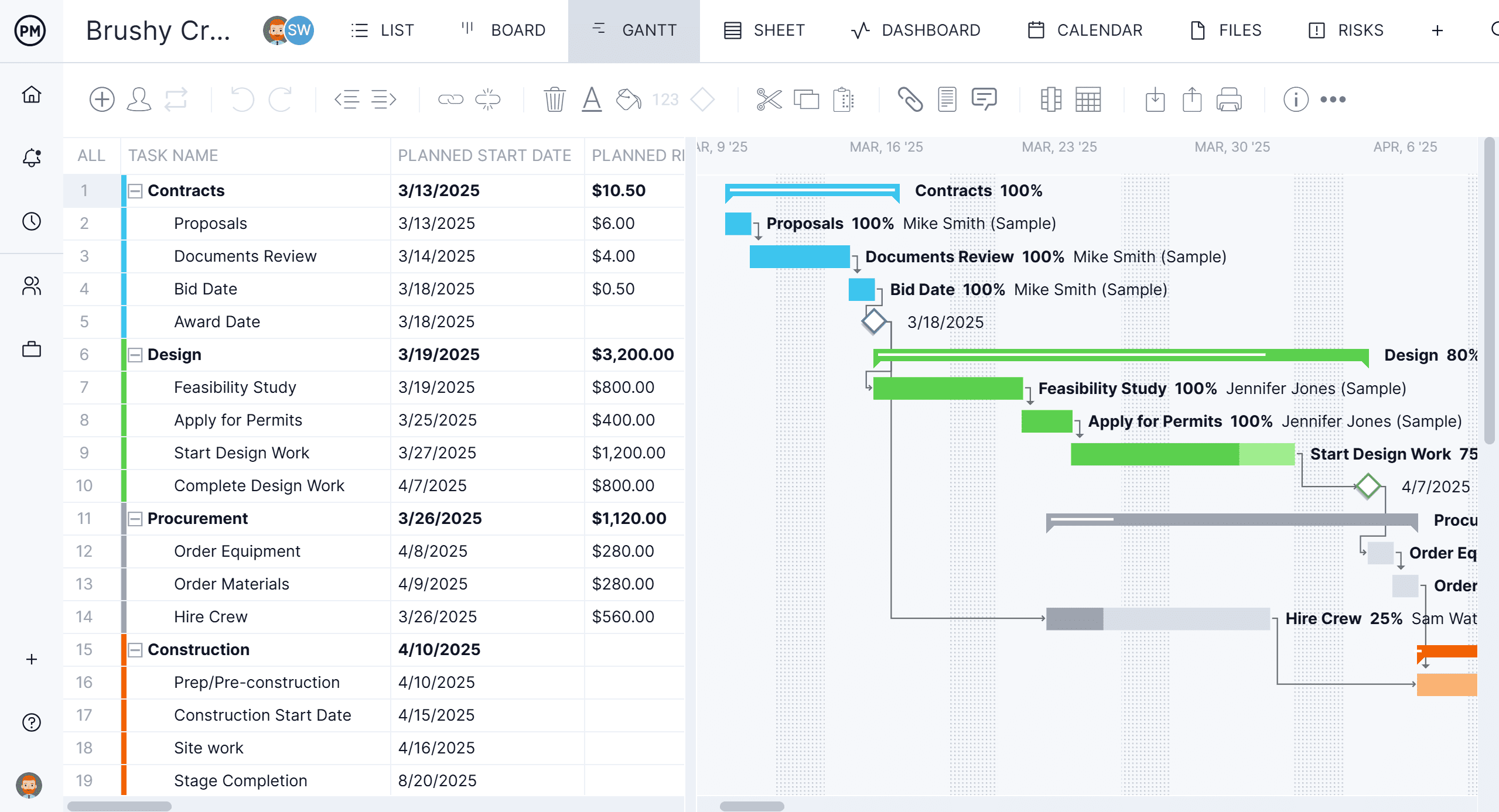
ProjectManager’s Gantt chart turns your work plan into a live timeline. Assign tasks to team members, set durations and dependencies, mark milestones and track progress against the baseline as work is completed. When something slips, the downstream impact is visible immediately so you can resequence before the delay becomes a problem. The Gantt updates in real time as your team logs hours, giving you the same picture a stack of daily reports would provide without waiting until the end of the day to compile them.
Track Every Task in a Live List View
For teams that prefer a structured task list over a timeline, ProjectManager’s list view shows every task across the project with owner, due date, priority, status and completion percentage in a single sortable view. Filter by assignee to see what each team member is working on, sort by due date to identify what is coming up and use the status column to spot blocked or overdue items before they affect the schedule. The list updates as work is logged so it reflects the actual state of the project, not last week’s plan.

