



Software teams rarely struggle because they lack ideas. Delays, budget overruns and changing requirements usually happen because risks emerge after development has already moved forward. The spiral model often enters the conversation when projects involve uncertainty, expensive decisions or evolving customer expectations.
What Is the Spiral Model?
The spiral model is a software development model used to build systems through repeated cycles of planning, risk analysis, development and testing. It is commonly used in large or high-risk software projects to identify problems early and adjust requirements before major investments are made. Each cycle moves the project forward while revisiting decisions and validating assumptions. Instead of progressing through a fixed sequence once, teams repeatedly refine the product as new information becomes available.
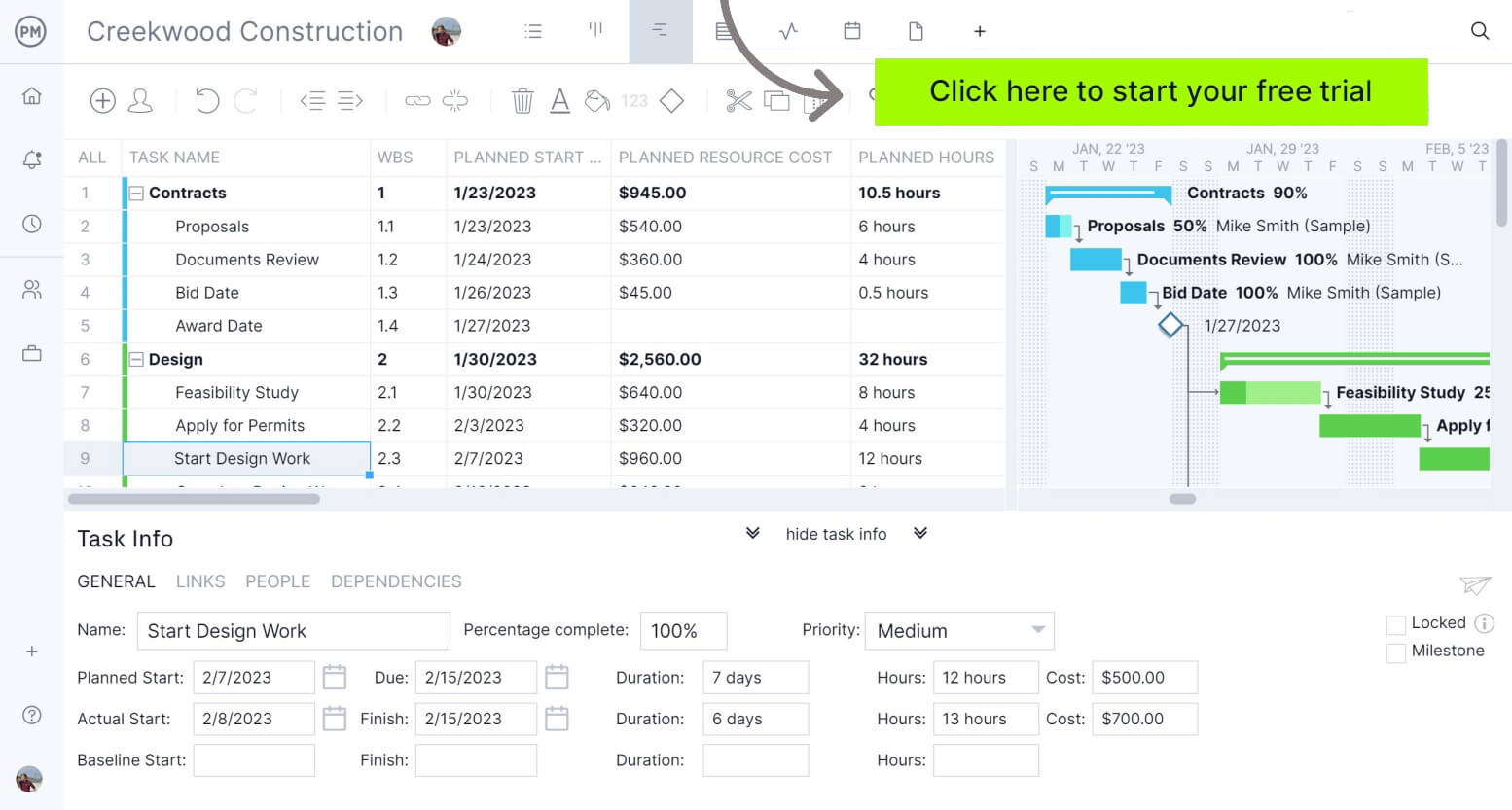
ProjectManager is award-winning project management software that gives teams across industries the tools they need to ensure projects are completed on time, within budget and within scope. It allows project managers to create detailed project schedules, estimate costs, allocate resources, set budgets, track progress and compare estimated versus actual project outcomes using real-time dashboards and reports to identify delays or cost overruns quickly. Get started with ProjectManager for free today.
What Is a Spiral Model Diagram?
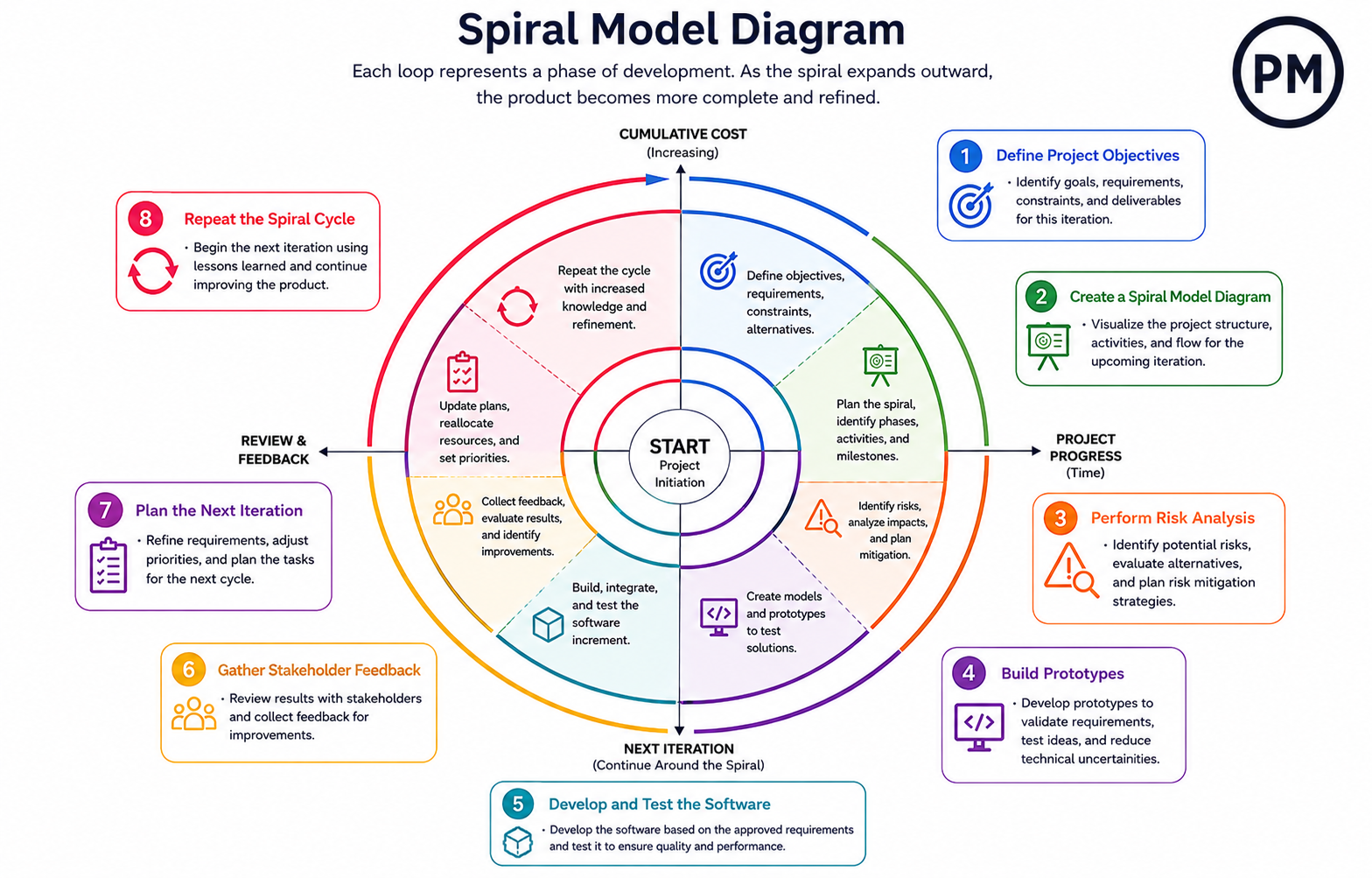
A spiral model diagram is a visual representation used to map iterative development cycles in the spiral model. It is commonly used in software engineering to show how planning, risk analysis, prototyping, development and feedback activities repeat as a project expands. Each loop represents a development cycle, while the outward progression reflects increasing functionality, cost and project maturity over time.
Spiral Model Origins
Back in 1986, software engineer Barry Boehm introduced the spiral model while working to solve limitations found in traditional software development approaches. Earlier methods often moved through rigid phases and struggled when requirements changed or risks appeared late in development. Boehm designed the model to combine structured planning with iterative development and continuous risk evaluation. His goal was to create an approach that allowed teams to revisit decisions, reduce uncertainty and improve outcomes for large, expensive and technically complex software projects.
Spiral Model Process
Unlike software approaches that follow a fixed sequence from beginning to end, the spiral model moves through repeating cycles that continuously refine the product. Each phase builds on information gathered during previous work, allowing teams to reduce uncertainty, test ideas and adjust decisions before progressing further into development.
1. Define Project Objectives
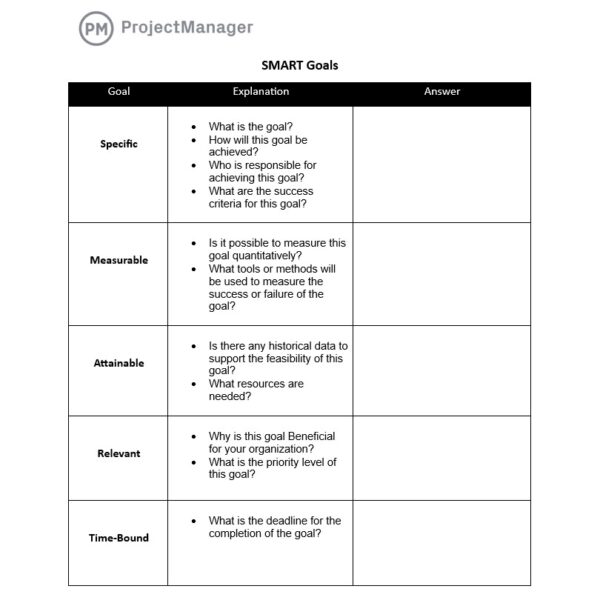
Every cycle begins by establishing what the team expects to accomplish before development work starts. Requirements, performance expectations, budget limitations and technical constraints are reviewed to create a clear direction. Setting objectives early prevents teams from solving the wrong problems and gives developers a baseline for measuring whether each cycle delivers meaningful progress toward the overall software goals.
2. Create a Spiral Model Diagram
A spiral model diagram is a visual framework used to map development cycles, activities and progression throughout a spiral model project. It is commonly used in software engineering to organize iterations and show how development expands as risks are evaluated and requirements evolve.
After objectives are defined, teams create a visual representation of the development process to establish how work will move across iterations. The diagram outlines planned cycles, major activities and expected deliverables for each loop. Building this structure early helps teams understand project flow, communicate expectations and maintain visibility as software complexity increases during future development activities.
3. Perform Risk Analysis
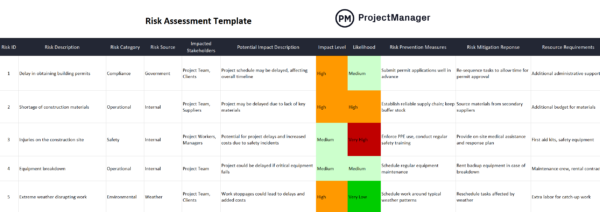
Once the project structure has been established, attention shifts toward identifying risks that could disrupt progress or increase costs. Technical limitations, integration challenges, security concerns and requirement uncertainties are examined before significant development effort begins. Detecting risks at this stage allows teams to explore alternatives and reduce the likelihood of expensive changes later in the software lifecycle.
4. Build Prototypes
Before investing heavily in full implementation, development teams create early versions of features, interfaces or system components. These prototypes allow assumptions to be tested in a controlled environment and reveal usability or technical concerns that may not appear during planning. Feedback collected from prototype testing helps teams validate ideas and make adjustments before larger development efforts begin.
5. Develop and Test the Software
With requirements refined and major risks evaluated, developers begin transforming approved concepts into working software. Coding, integration and quality testing activities occur together to confirm that features operate correctly and meet stakeholder expectations. Running tests during development helps identify defects early, reducing the possibility of larger problems appearing after additional functionality has already been built.

6. Gather Stakeholder Feedback
Once functional work has been completed, project stakeholders review results and evaluate whether the software aligns with business and user needs. Customers, managers and end users may identify missing features, performance concerns or improvement opportunities. Collecting input at this stage allows teams to refine priorities and avoid continuing development based on inaccurate assumptions.
7. Plan the Next Iteration
Information collected throughout the previous cycle becomes the basis for upcoming work. Development teams review completed tasks, unresolved issues and feedback findings to determine what should happen next. Decisions made during this stage influence schedules, resource allocation and feature priorities, creating a more informed plan for the next round of software development activities.
8. Repeat the Spiral Cycle
Instead of ending after one development round, the process returns to the beginning and starts another cycle using updated information. New requirements, risks and technical insights shape future work as the software continues to expand. Repeating the spiral cycle gradually improves the product while allowing teams to adapt to changing conditions throughout the project lifecycle.
Who Participates In the Spiral Model Process
Successful use of the spiral model depends on more than developers writing code. Since decisions are repeatedly reviewed throughout multiple cycles, different roles contribute technical expertise, business input and project oversight. Collaboration between these participants helps teams evaluate risks, validate requirements and ensure the software continues moving toward the intended outcome.
- Project managers: Project managers coordinate schedules, allocate resources and monitor progress to keep development cycles aligned with project goals and deadlines.
- Software developers: Software developers build system functionality, create prototypes and transform approved requirements into working software components.
- Business analysts: Business analysts gather requirements, clarify business needs and help translate stakeholder expectations into actionable development tasks.
- Quality assurance testers: Quality assurance testers evaluate software functionality and identify defects before issues affect later development cycles.
- System architects: System architects design technical structures and evaluate whether software components can support performance and scalability requirements.
- Stakeholders and customers: Stakeholders and customers provide feedback, review progress and confirm that software features support business objectives.
- Risk management specialists: Risk management specialists identify potential technical and operational threats that could affect cost, timelines or implementation success.
When to Use the Spiral Model
Projects with unclear requirements, high technical uncertainty or significant business risk tend to benefit most from the spiral model. Development teams often use it when mistakes would be costly and continuous feedback is necessary. It works particularly well when software requirements are expected to evolve throughout the project lifecycle.
- Enterprise resource planning software
- Air traffic control systems
- Banking and financial transaction platforms
- Defense and military software systems
- Healthcare management and patient record systems
Spiral Model Example
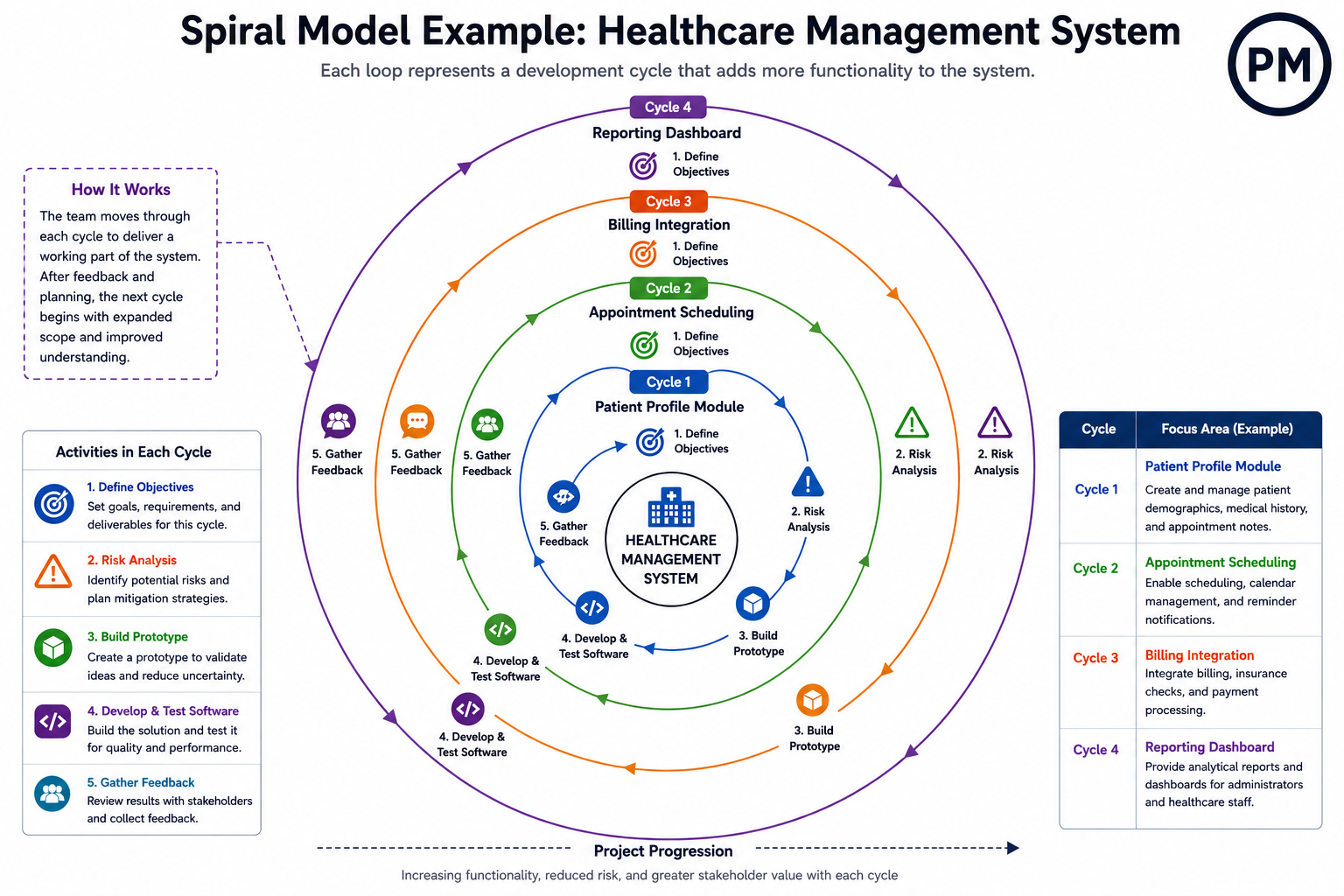
A healthcare software company might use the spiral model to build a patient records system because the project involves privacy rules, complex integrations and changing user requirements. In the first cycle, the team defines the goal: create a secure patient profile module that stores demographics, medical history and appointment notes. Before coding, they map the cycle in a spiral model diagram so everyone understands how planning, risk review, prototyping, development and feedback connect.
| Spiral Cycle | Main Objective | Risk Focus | Output |
| Cycle 1 | Patient profile module | Data privacy and access control | Secure patient record prototype |
| Cycle 2 | Appointment scheduling | Calendar conflicts and user errors | Tested scheduling feature |
| Cycle 3 | Billing integration | Payment accuracy and system compatibility | Integrated billing workflow |
| Cycle 4 | Reporting dashboard | Data accuracy and performance | Usable analytics dashboard |
During risk analysis, the team identifies possible security weaknesses, role-based access problems and compliance concerns. Instead of building the entire records platform immediately, developers create a prototype of the patient profile screen and test how doctors, nurses and administrators would access different information. Stakeholders review the prototype and point out missing fields, confusing navigation and permissions that need improvement.
After those changes are understood, developers build and test the first working module. Quality assurance testers check login rules, data entry behavior and error messages. Once the patient profile module is stable, the team plans the next cycle for appointment scheduling. Each new loop expands the product while reducing uncertainty, making the spiral model useful for software where mistakes can create operational, financial or legal problems. Here’s a spiral model diagram to better understand this example.
Spiral Model Pros
Projects with uncertainty often become expensive when problems appear late in development. The spiral model addresses this challenge by encouraging continuous evaluation and adjustment throughout the project lifecycle. Teams can test assumptions, reduce technical risks and gather feedback before making larger investments. This approach provides greater visibility into project direction and helps improve decision-making as software requirements evolve.
- Early risk identification: Teams evaluate technical and business risks before major development work begins, reducing the likelihood of expensive project failures.
- Flexible requirements management: Requirements can evolve across development cycles without forcing teams to redesign the entire software system.
- Continuous stakeholder involvement: Frequent reviews allow customers and users to provide feedback before issues become embedded in later stages.
- Improved software quality: Repeated testing and refinement cycles help identify defects and performance issues earlier in development.
- Better visibility into project progress: Incremental development provides teams with clearer insight into deliverables, milestones and project direction.
Spiral Model Cons
Not every software project benefits from repeated cycles of analysis and refinement. The spiral model can introduce additional planning effort, documentation requirements and management complexity that smaller projects may not need. Teams with limited experience can also struggle to evaluate risks effectively, making the process slower and potentially increasing costs without delivering proportional value.
- Higher project costs: Continuous planning, risk analysis and iteration activities can increase overall development expenses.
- Requires strong risk expertise: Poor risk assessments may lead teams toward ineffective decisions and inaccurate project assumptions.
- More difficult project management: Multiple cycles and repeated evaluations can create additional coordination and tracking challenges.
- Longer planning effort: Teams may spend substantial time analyzing requirements and risks before development activities progress.
- Less suitable for small projects: Simple software applications may not justify the overhead introduced by the spiral model process.
Free Software Engineering Templates
Software engineering projects need clear documentation before teams can plan work, manage defects or confirm that requirements were delivered. These free software development templates help developers, testers and project managers organize key project information without starting from scratch.
Software Development Plan Template
Use this software development plan template to define scope, architecture, milestones, resources and delivery activities so the team has a structured roadmap before coding begins.
Bug Report Template
Use this bug report template to document defects, reproduction steps, screenshots, severity, expected behavior and actual results so developers can diagnose and resolve issues faster.
Requirements Traceability Matrix Template
Use this requirements traceability matrix template to connect requirements with test cases, deliverables and approvals, helping teams verify that each requirement is addressed.
ProjectManager Is Award-Winning Project Management Software
ProjectManager provides a complete set of planning, scheduling and tracking tools, including Gantt charts, kanban boards, task lists and project and portfolio roadmaps. Teams can build detailed schedules, assign resources and monitor progress, costs, workload and timelines through real-time dashboards, timesheets, workload charts and performance reports.
Built as a cloud-based platform, ProjectManager allows teams to update schedules, manage tasks and generate reports in real time from any location. It also delivers AI-powered project insights to support better decision-making and connects with over 100 tools like Jira, Power BI and Azure DevOps. With its open API and wide range of integrations, organizations can seamlessly link ProjectManager to their existing systems. Watch the video below to learn more!
ProjectManager is online project and portfolio management software that connects teams, whether they’re in the office or out in the field. They can share files, comment at the task level and stay updated with email and in-app notifications. Get started with ProjectManager today for free.
