



Last updated: November 2, 2026
Asta Powerproject is a planner’s tool: a Windows desktop scheduler built for detailed construction programs, 4D BIM and formal progress reporting. ProjectManager is a cloud tool the whole job team uses, from the office scheduler to the superintendent updating tasks on a phone. If your contract or client demands a Powerproject program, keep Powerproject. If you need crews, subs and the field working from the same live schedule, ProjectManager is the easier, cheaper fit.
This guide compares the two for general contractors, subcontractors and builders. Want to see what ProjectManager can do for yourself? Get started with ProjectManager today for free.
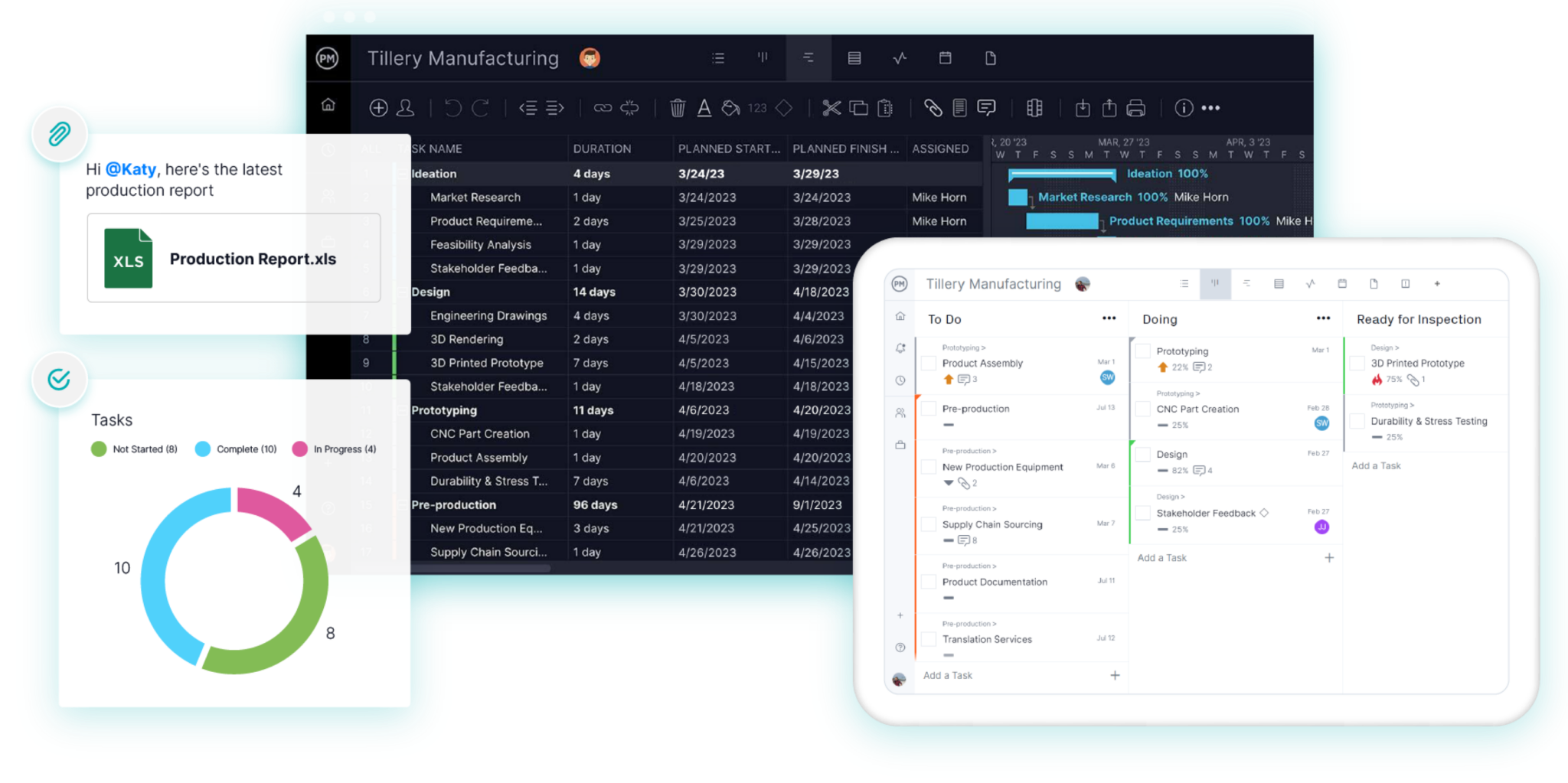
ProjectManager vs. Asta Powerproject for Construction at a Glance
Powerproject goes deeper on planning detail, BIM and program analysis. ProjectManager is quicker to learn, runs in any browser and costs a fraction as much per seat.
| ProjectManager | Asta Powerproject | |
|---|---|---|
| Best for | Job teams that need the office and field on one live schedule | Dedicated planners building detailed programs |
| Platform | Cloud, any browser, plus iOS and Android apps | Windows desktop; SaaS option for Mac and Windows Home |
| Critical path | Yes, with a critical path filter on the Gantt | Yes, with float analysis |
| Dependencies and lag | All four dependency types, lag and lead | All four dependency types, lag and lead |
| Baselines and variance | Baselines and variance reports | Multiple baselines, progress comparison, schedule quality checks (DCMA, CIOB) |
| Primavera P6 files | Imports MPP, XML, Excel and CSV; no XER | Imports and exports XER and XML |
| 4D BIM | No | Yes, with Asta Powerproject BIM / 4D |
| Field updates | Built in: mobile app, timesheets, comments | Separate Asta Siteprogress app, licensed separately |
| Crews and equipment across jobs | Workload view across all projects | Resource loading per program; Asta Enterprise for shared plans |
| Learning curve | Low; superintendents can use it day one | Steep; usually run by a trained planner |
| Pricing (list) | $28 per user per month on Business ($336 a year) | About $1,320–$1,675 per user per year; concurrent licenses cost more |
Prices are list prices as of November 2026 and vary by region, reseller and discount.
How Each Tool Fits a Construction Company
In most companies, Powerproject lives on one planner’s Windows machine. That planner builds the program, runs the updates and sends PDFs or free-viewer files to the site team, the client and subcontractors. Site staff can report progress through Asta Siteprogress, but that is a separate app with its own license.
ProjectManager is built for the whole job team. The project manager builds the schedule on a Gantt chart, and superintendents, foremen and subs update percent complete, log hours and comment from the jobsite. Everyone sees the same schedule in real time, so there is no file to send around.
ProjectManager vs. Asta Powerproject in Common Construction Situations
Client and Contract Program Requirements
If the contract names Asta Powerproject, or the client’s planning team reviews native .pp files, Powerproject is the safe choice. This is common on UK and Commonwealth projects, where Powerproject is a standard program format. If the client wants a Primavera XER file, Powerproject can export one, though some data such as baselines and certain task types is simplified on export. Many private contracts only ask for a readable CPM schedule as a PDF, which ProjectManager produces easily.
Building the CPM Schedule
Both tools support finish-to-start, start-to-start, finish-to-finish and start-to-finish dependencies, with lag and lead. Powerproject adds more planning depth: multiple calendars and shift patterns, work rates, what-if scenarios and its own bar-chart views that group trades or sub-projects on one line.
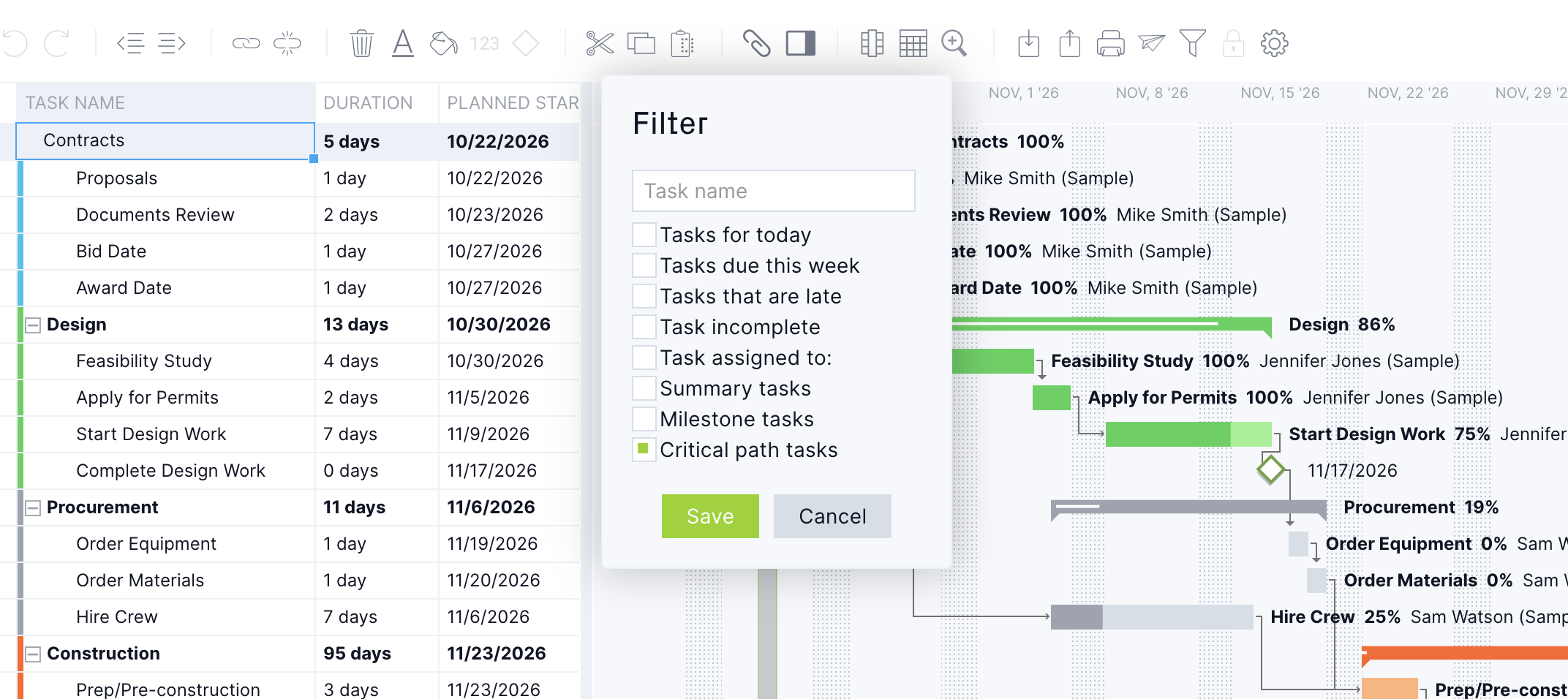
In ProjectManager, you can build a sequence like excavation, footings, foundation pour, cure and inspection in minutes. Link the tasks, set durations and turn on the critical path filter to see which tasks have no float. Learn more about the critical path method in construction.
Weather and Other Delays
Both tools move linked tasks when a delay is entered. The difference is speed to the field. In ProjectManager, a superintendent can push a pour two days and the whole team sees the new dates right away. In Powerproject, the planner usually reschedules and reissues the program. Powerproject is stronger when you need to model the delay formally and compare scenarios.
Delay Documentation and Claims
Powerproject is the better tool for formal delay analysis. Multiple baselines, progress comparison and built-in schedule quality checks based on DCMA and CIOB metrics support extension of time claims. ProjectManager’s baselines and variance reports are good for tracking slippage and showing it to the owner. They are not a substitute for a forensic delay analysis.
Field Updates
ProjectManager is the clear winner here. Superintendents and foremen update tasks, attach photos, log time on timesheets and comment from the mobile app, and that data lands in the live schedule. Powerproject needs Asta Siteprogress for field updates, which is licensed and configured separately, and the planner still syncs those updates back into the program.
Crews, Equipment and Subcontractors Across Jobs
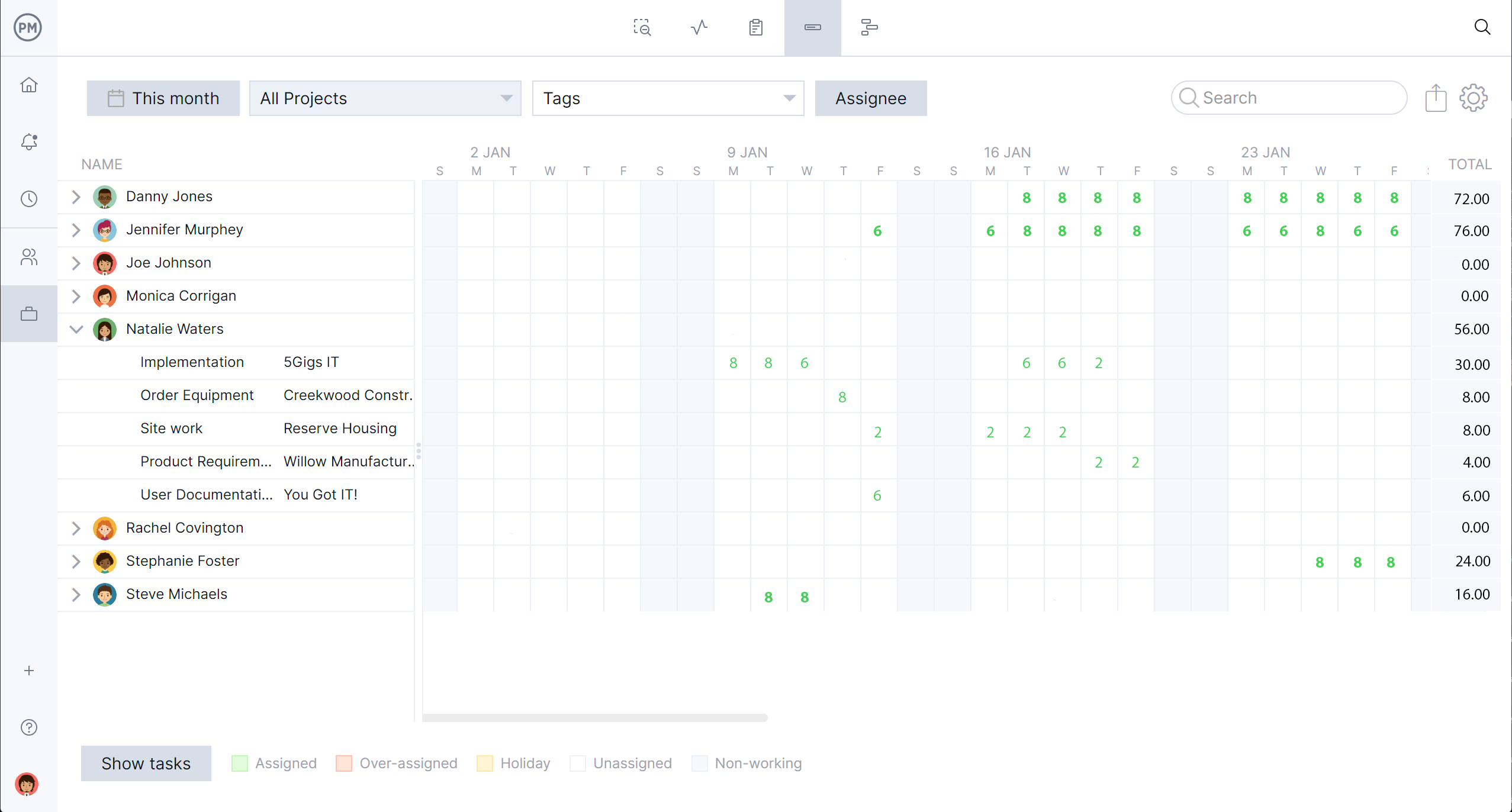
ProjectManager’s workload view shows crew and equipment hours across every project and flags who is overbooked, so you can reassign before it costs you. Powerproject has detailed resource loading, skills and overtime rates within a programs. Sharing resources across many programs usually means adding Asta Enterprise. See how ProjectManager handles subcontractor management in construction.
Lookahead Schedules
In ProjectManager, superintendents filter the schedule to the next two, three or six weeks and keep their own lookahead up to date. In Powerproject, the planner typically builds the lookahead from the master program and sends it out.
Cost
For 10 users, Powerproject subscriptions run about $13,200 to $16,750 a year at list price, before Siteprogress, training or concurrent licenses. Eleco’s UK SaaS list price is £1,113 a year per user, and its two-day intro course is £950 per person. ProjectManager’s Business plan costs about $3,360 a year for 10 users, with the mobile app and timesheets included.
Which Should Your Construction Company Choose?
Choose Powerproject when the program itself is a contract deliverable. Choose ProjectManager when the schedule has to run the work in the field.
| Company type | Best fit | Why |
|---|---|---|
| Tier 1 GC or infrastructure contractor (especially UK) | Asta Powerproject | Clients expect native programs, 4D BIM and formal delay analysis |
| Planning consultant or owner’s rep | Asta Powerproject | Deep program review, quality checks and XER exchange |
| Mid-size commercial GC | Either, or both | Powerproject for the contract program, ProjectManager for the job team |
| Specialty subcontractor | ProjectManager | Crews and equipment scheduled across many jobs at once |
| Residential or design-build builder | ProjectManager | Fast to set up, easy for site staff, low cost per seat |
Using Asta Powerproject and ProjectManager Together
Many contractors run both. The planner keeps the contract program in Powerproject and issues it to the client. The job team runs lookaheads, crew schedules, timesheets and daily field updates in ProjectManager, rolling them up to a master schedule.
The two tools don’t sync automatically. To move a program across, export it from Powerproject to Microsoft Project (MPP or XML), Excel or CSV and import it into ProjectManager. Plan a regular hand-off, such as weekly, so progress from the field gets back to the planner.
Ready to get your field team on a live schedule? Try ProjectManager free.
ProjectManager vs. Asta Powerproject for Construction FAQ
Can a general contractor use ProjectManager instead of Asta Powerproject?
Yes, when the contract doesn’t require a Powerproject program or a Primavera XER file. ProjectManager handles CPM scheduling, baselines, resources and field updates for most commercial and residential work.
Do construction clients require Asta Powerproject?
Some do, mainly larger UK and Commonwealth clients and public bodies with established planning teams. Many private contracts only ask for a readable CPM program.
Does Asta Powerproject run on a Mac?
Not natively. The desktop version needs 64-bit Windows 10 or 11 Pro or Enterprise. Mac users need the Powerproject SaaS subscription. ProjectManager runs in any browser.
Can ProjectManager open Asta Powerproject files?
Not directly. Export the program from Powerproject to MPP, XML, Excel or CSV, then import it into ProjectManager.
Can superintendents update a Powerproject program from site?
Yes, with the separately licensed Asta Siteprogress app. The planner then brings those updates into the program. In ProjectManager, field updates go straight into the live schedule.
Which is better for subcontractors?
ProjectManager. Its workload view schedules crews and equipment across every job at a much lower cost per user.
Is Asta Powerproject better for delay claims?
Yes. Multiple baselines, progress comparison and schedule quality checks make it the stronger tool for extension of time and delay claims.
