



Production reports are how manufacturing teams turn floor activity into decisions. Without a consistent format, reporting becomes inconsistent, problems surface too late and supervisors spend more time assembling data than acting on it. The right templates give production managers a structured way to track output, flag quality issues, document corrective actions and keep operations running efficiently.
In this guide, you’ll find free production report templates for Excel and Word that cover every stage of production reporting, from daily output tracking to formal corrective action processes. Download any of them and adapt them to your operation.
Daily Production Report Template
A daily production report is the baseline of any manufacturing reporting process. It captures what actually happened on the floor each shift, giving supervisors and operations managers a factual record of output, downtime, quality issues and labor hours. Without it, variances go unnoticed until they compound into missed targets.
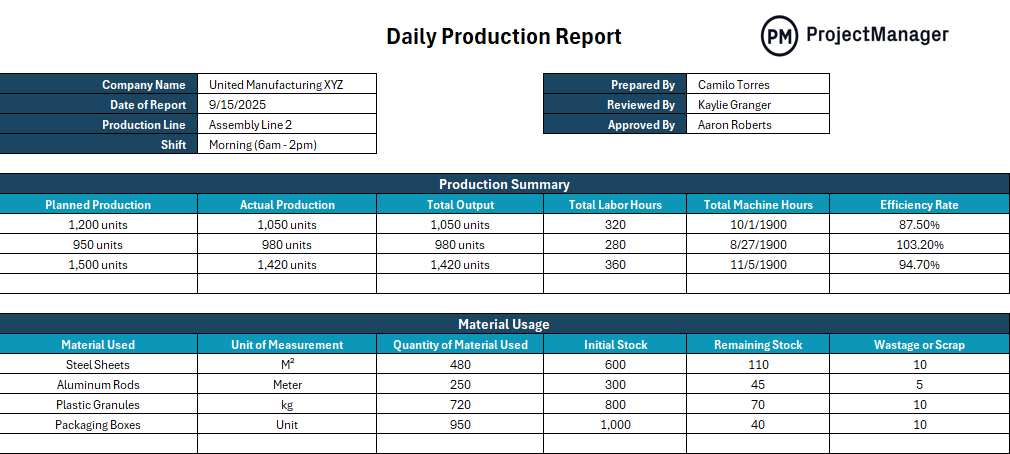
This daily production report template gives production teams a structured format for logging units produced, downtime causes, quality rejections, hours worked and shift performance against targets. Fill it in at the end of each shift and you have an accurate, timestamped record that feeds into weekly and monthly production analysis.
It’s the right starting point for any operation that needs to move from informal tracking to a consistent reporting cadence that management can rely on.
Non-Conformance Report Template
When a product or process fails to meet specifications, the response needs to be documented, not improvised. A non-conformance report creates a formal record of what went wrong, where it happened, what was affected and what steps were taken. Without that record, the same issues repeat and the root cause never gets addressed properly.
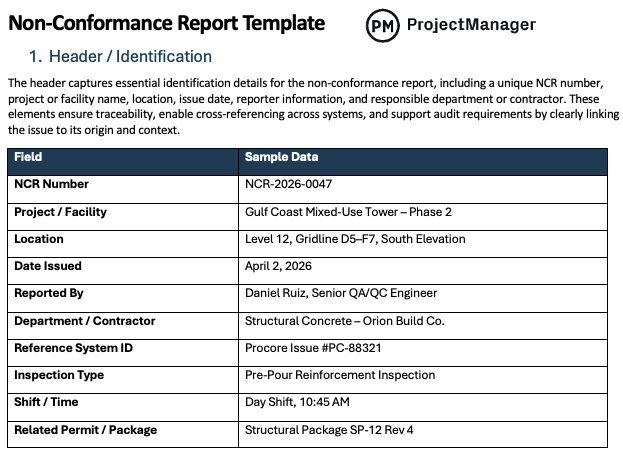
This non-conformance report template gives quality and production teams a consistent format for documenting defects, deviations and process failures. Capture the nature of the nonconformance, the affected product or batch, containment actions taken and disposition decisions, all in one structured document that supports root cause investigation and audits.
It’s particularly useful in regulated industries where documented evidence of quality control is a compliance requirement, not just a best practice.
8D Report Template for Word
The 8D methodology gives production and quality teams a structured eight-step process for solving serious recurring problems. It goes deeper than a standard corrective action because it requires teams to define the problem precisely, identify root causes, implement verified fixes and put controls in place to prevent recurrence. For manufacturing operations dealing with chronic quality failures, it’s one of the most effective problem-solving frameworks available.
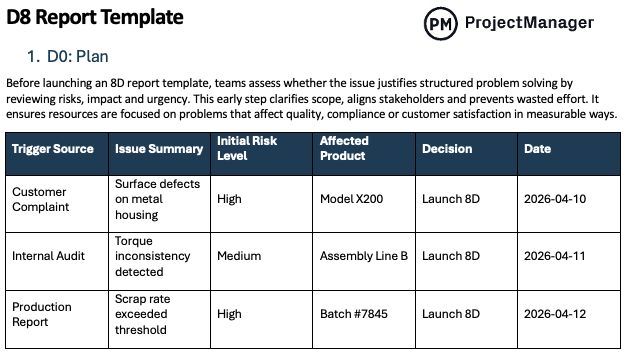
This 8D report template for Word guides teams through all eight disciplines, from forming the cross-functional team and describing the problem to implementing permanent corrective actions and recognizing the team’s contribution. It gives everyone involved a shared framework and creates a documented audit trail that satisfies customer and regulatory requirements.
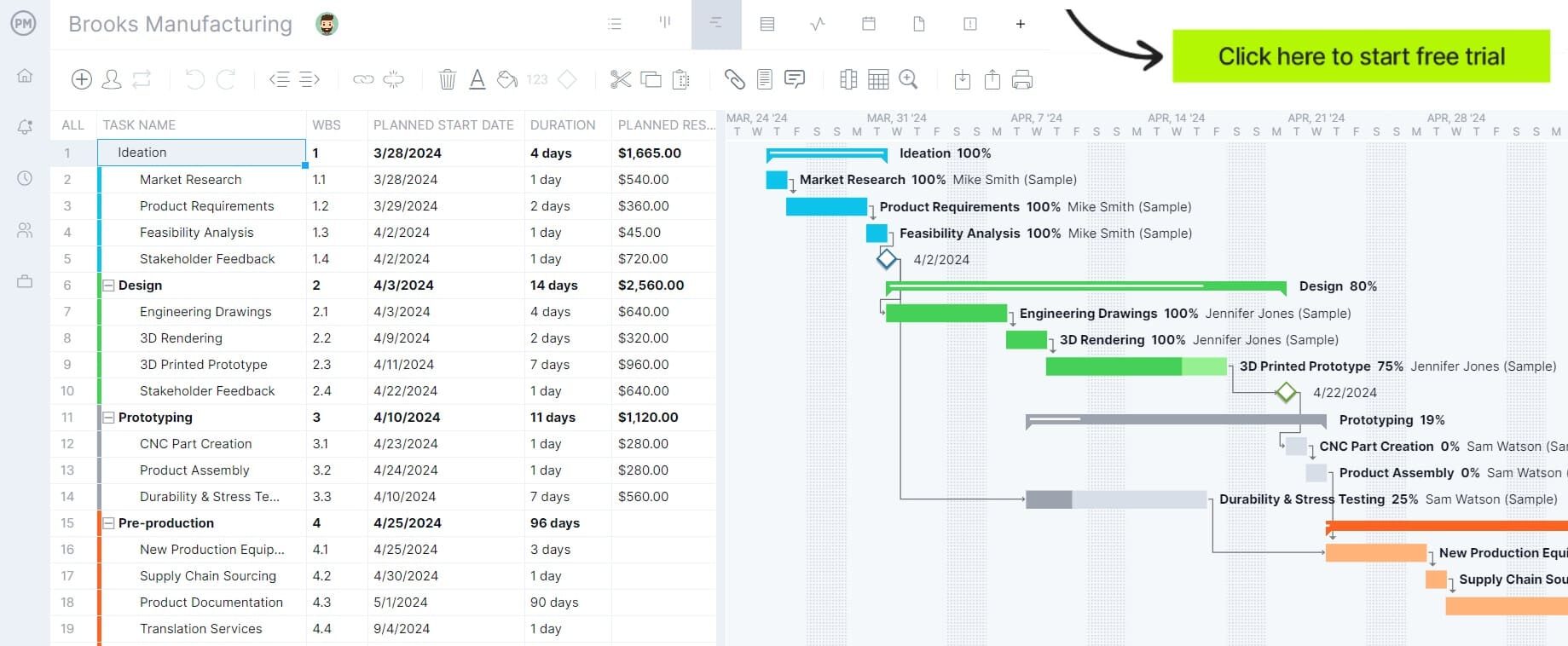
Stop rebuilding production reports from scratch every shift. Try ProjectManager free for 30 days and track production output, flag issues and generate reports automatically from live project data.
A3 Report Template
The A3 report is a lean management tool that forces teams to fit the entire problem-solving process onto a single page. Named after the A3 paper size it was originally written on, it’s designed to create clarity and alignment by requiring concise thinking at every step. For manufacturing operations that value lean principles, the A3 is both a problem-solving tool and a communication document that anyone on the team can read at a glance.
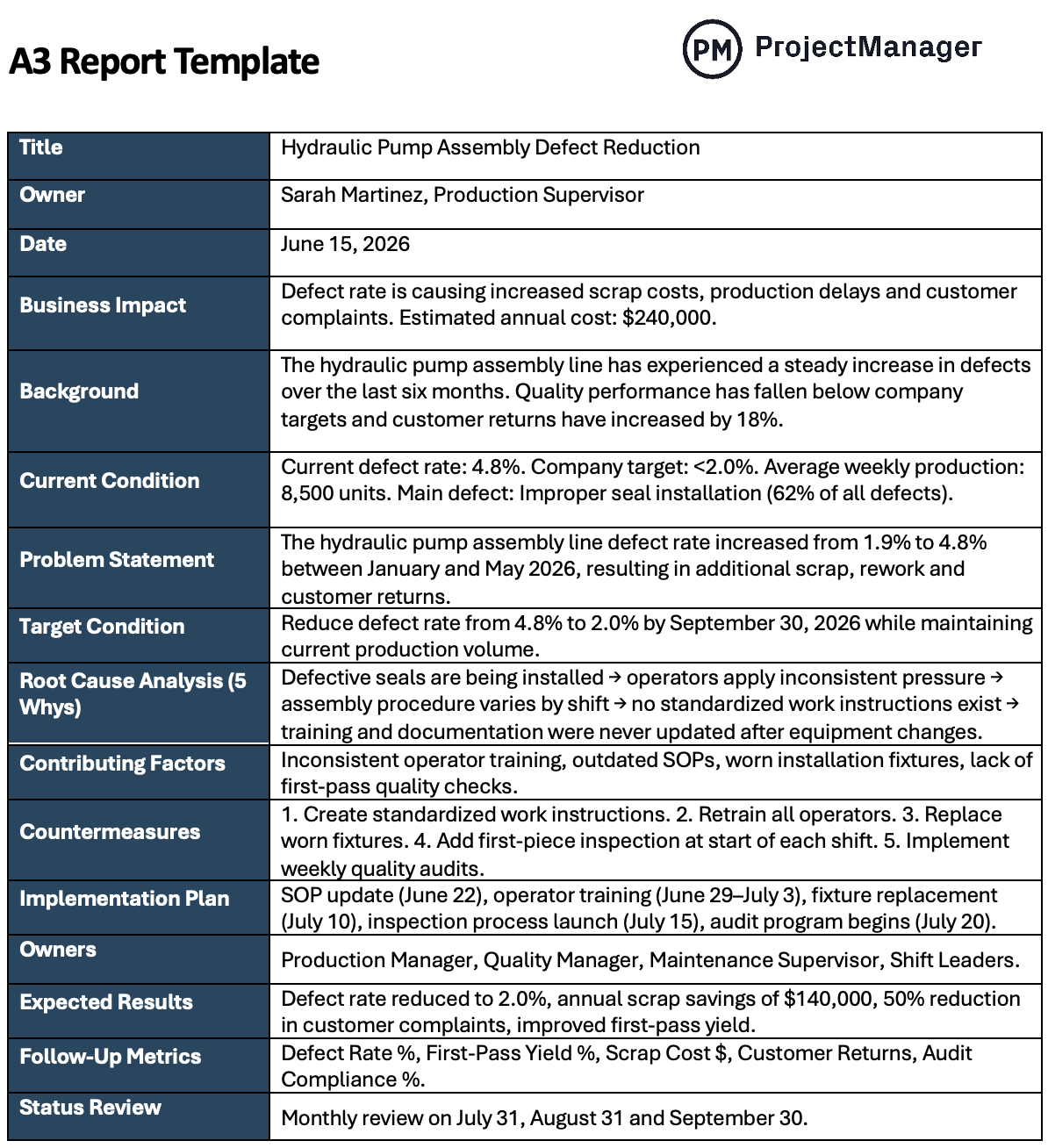
This A3 report template gives production and operations teams a structured one-page format for documenting the current situation, root cause analysis, proposed countermeasures, implementation plan and follow-up checks. It’s concise by design, which makes it faster to complete and easier for leadership to review than a full corrective action report.
CAPA Report Template
Corrective and preventive action reports are the backbone of quality management in manufacturing. A CAPA documents not just what went wrong, but what was done to fix it and what was put in place to make sure it doesn’t happen again. In regulated environments, a well-documented CAPA process is often the difference between passing and failing an audit.
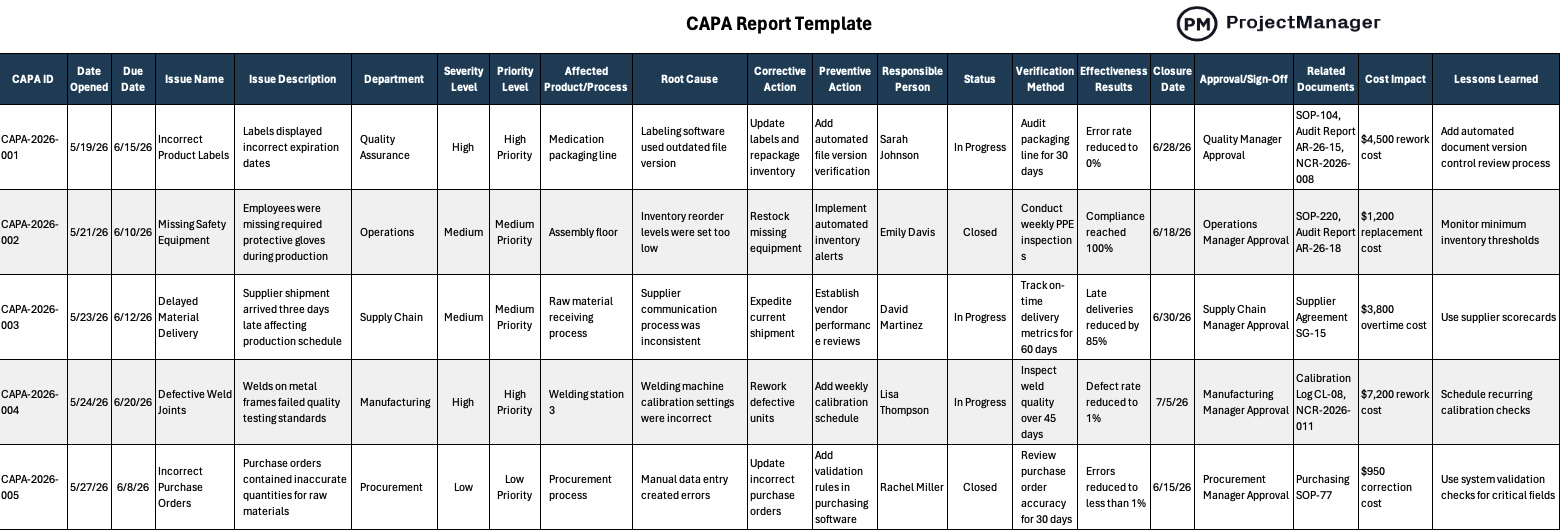
This CAPA report template helps quality and production teams document the full corrective and preventive action cycle, from problem identification and root cause analysis through action planning, implementation and effectiveness verification. It creates the documentation trail that regulators, customers and internal auditors expect to see when quality events occur.
Maintenance Report Template
Unplanned downtime is one of the most direct threats to production output. A maintenance report connects maintenance activity to production performance, giving operations managers visibility into what equipment was serviced, what was found and how long the repair took. Over time, that data reveals patterns, which machines fail most often, which failures correlate with output drops and where preventive maintenance investment pays off most.
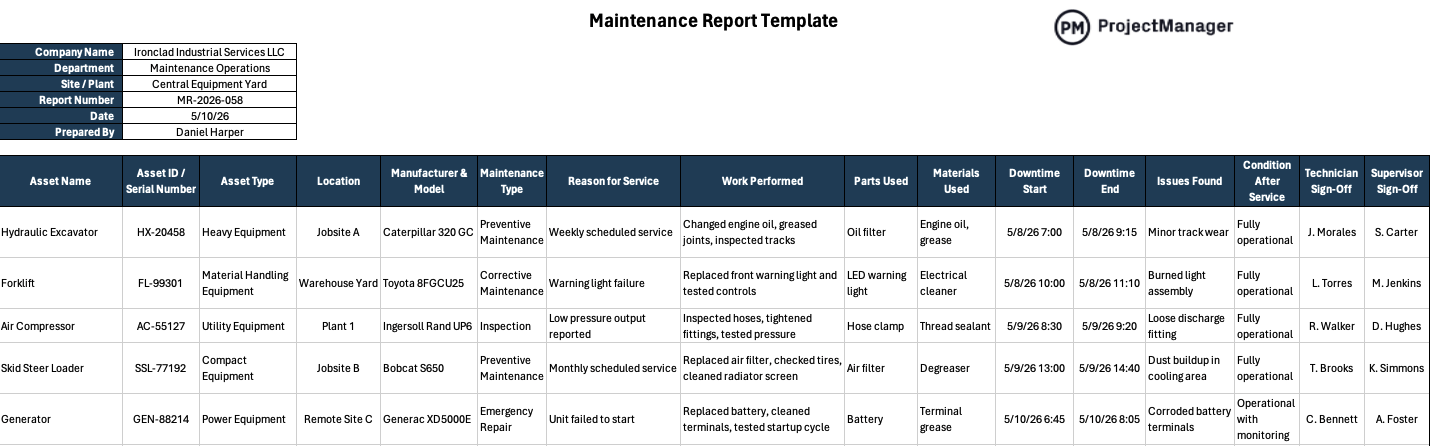
This maintenance report template gives maintenance teams a structured format for documenting work performed, parts used, labor hours, equipment status and any follow-up actions required. Use it alongside your daily production report to build a complete picture of how equipment reliability is affecting output.
Job Sheet Template
A job sheet translates a production order into specific instructions for the floor. It specifies the task, the materials required, the assigned operator, the expected completion time and the quality standard that needs to be met. When every job runs from a documented job sheet, supervisors have a clear audit trail and operators have no ambiguity about what’s expected of them.
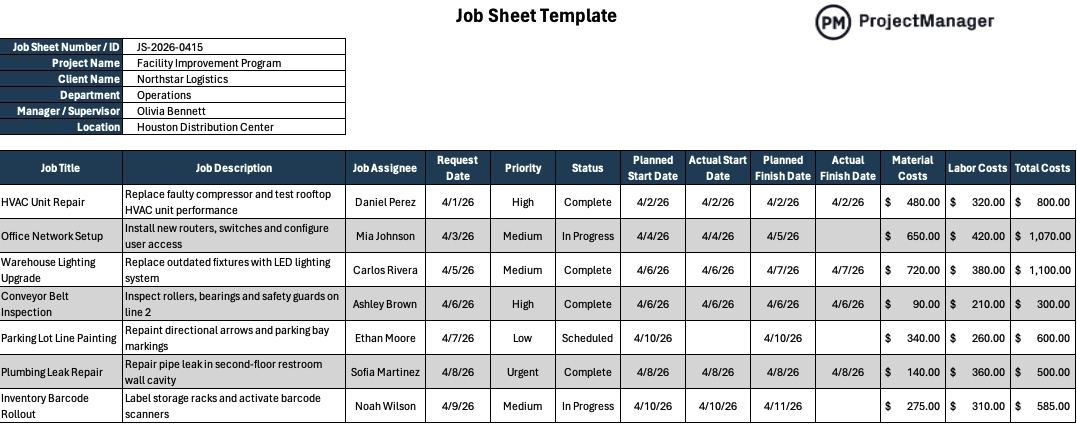
This job sheet template gives production teams a consistent format for documenting job requirements, tracking progress and recording completion status. It bridges the gap between the production schedule and the individual work instruction, keeping floor activity aligned with the plan and giving supervisors a simple way to monitor job status without walking the floor constantly.
Gemba Walk Template
A gemba walk is a structured observation of the production floor, designed to surface problems that don’t show up in reports. By going to where the work actually happens and observing processes directly, operations managers can identify waste, unsafe conditions, quality risks and workflow inefficiencies that reporting data alone would never reveal. Without a consistent format, gemba walks become informal conversations that rarely drive follow-through.
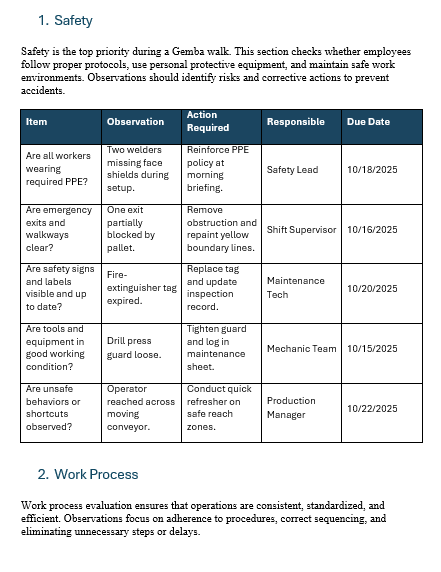
This gemba walk template gives operations managers and supervisors a structured checklist for documenting observations, identifying issues and recording action items during floor walks. It turns an informal observation into a trackable improvement process, with a clear record of what was found, who is responsible and what the follow-up timeline looks like.
ProjectManager Is Better Than Production Report Templates
Production report templates give you a consistent format, but they still require manual data collection, shift-by-shift updates and hours of consolidation before leadership has a picture of what’s happening on the floor. For operations teams managing multiple production lines, shifts and locations, that lag creates risk.
ProjectManager gives production teams a live reporting environment where data updates in real time, making it easy to track output, flag issues and share status with leadership without rebuilding a report from scratch every day.
Up-to-date Reports That Replace the Daily Report
ProjectManager’s reports pull task completion, resource utilization and schedule performance into a single view that updates automatically as the team logs progress. Production supervisors can see exactly where each job stands without waiting for end-of-shift reports, and operations managers get a consolidated view across all active production runs in one place. Share a live link with leadership and they can check production status any time without scheduling a status call.

AI Project Insights for Production Teams
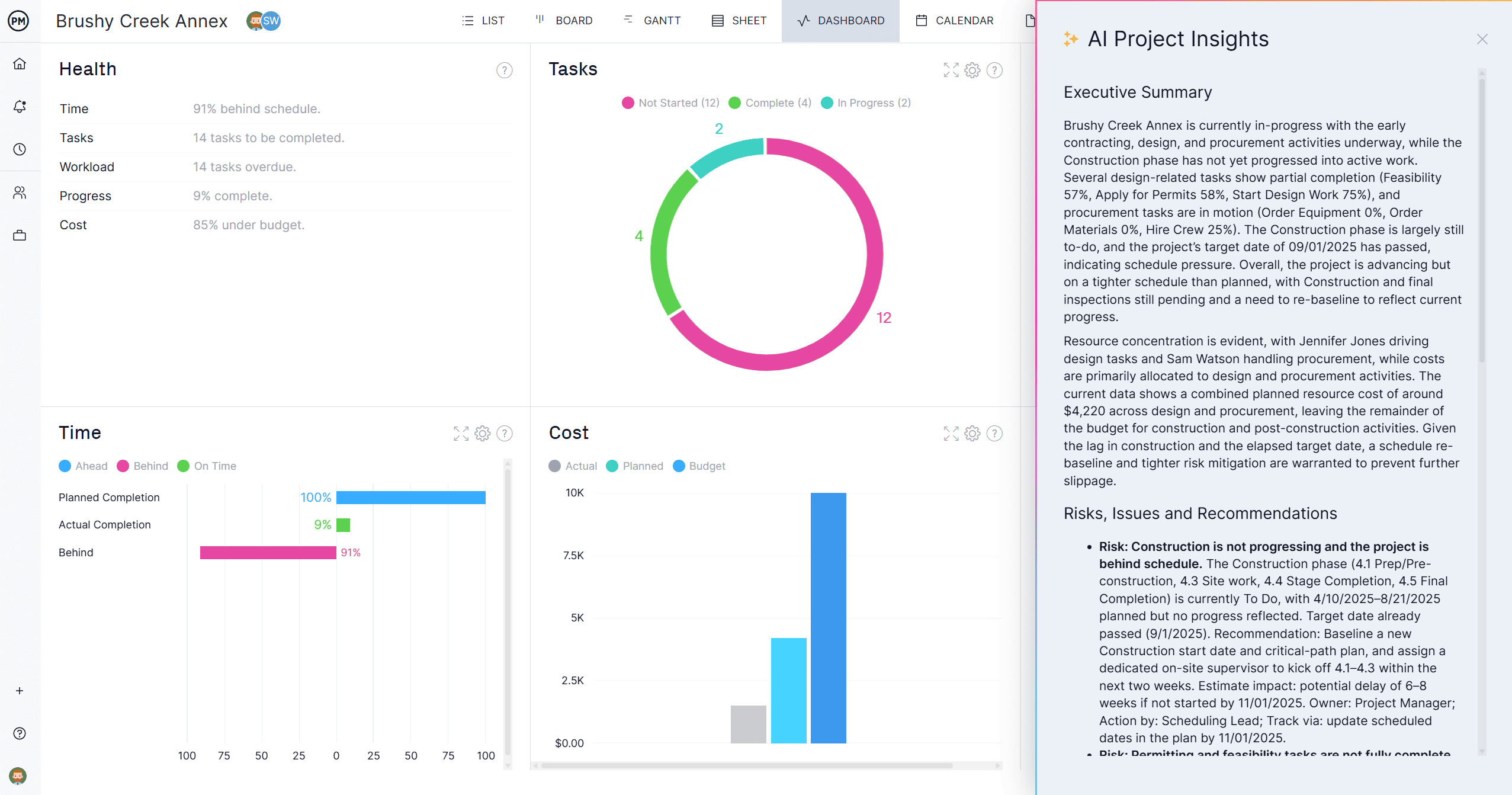
Production managers need fast answers when something changes on the floor. ProjectManager’s AI Project Insights analyzes your schedule, resource data and progress in one click, flagging jobs at risk of falling behind, identifying bottlenecks before they affect output and surfacing patterns across your production history. It gives operations managers the intelligence to make decisions before problems escalate, without spending hours digging through shift logs and spreadsheets.
Related Production Management Content
- What Is Production Scheduling? Process, Types & Techniques
- Production Planning: Process, Types & Best Practices
- Manufacturing Project Management: Process, Tips & Tools
- What Is Quality Management? Process, Systems & Tools
- Capacity Planning: How to Plan Production Capacity
- Free Production Scheduling Templates for Excel
