


Every new initiative carries financial uncertainty, especially when revenue depends on volume, pricing and cost control. A break even analysis template helps decision-makers explore viability before committing resources. By visualizing when costs are covered and profits begin, teams can compare scenarios, reduce guesswork and approach pricing, forecasting and investment conversations with greater confidence from the very start of any project.
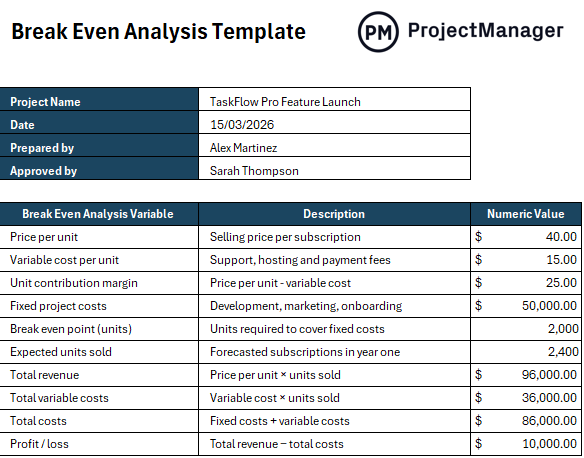
An excerpt of our free break even analysis template for Excel
Why You Need a Break Even Analysis Template
Rather than building calculations from scratch, an Excel-based break even analysis template streamlines the entire process. Built-in formulas automatically calculate contribution margins, fixed cost recovery and break-even points once users enter prices, costs and volumes.
This reduces manual errors and saves time, allowing faster scenario testing. Instead of wrestling with spreadsheets, users focus on interpreting results, adjusting assumptions and making informed financial decisions with clarity across different business models and growth strategies without complex financial expertise or advanced spreadsheet skills.
While Excel templates are powerful, there’s no replacement for dynamic project management software. ProjectManager has tools like built-in timesheets, resource management tools and Gantt charts that allow you to better map out budget and expense tracking. Enter your planned expenses on the Gantt and update them with acutals to see how close you are to your expected break even point. Then, in a few clicks, generate reports to build into your break even analysis and share them with stakeholders.

When to Use a Break Even Analysis Template
Break even analysis applies far beyond startup planning, supporting decisions across pricing, expansion, product launches and operational changes. Whenever costs shift, volumes fluctuate or investments loom, organizations use it to evaluate risk, compare alternatives and understand financial thresholds before committing capital or resources during strategic, financial and operational planning cycles.
- Launching a new product or service and determining required sales volume to recover development, marketing and operational costs accurately early.
- Evaluating pricing changes to understand how discounts, increases or promotions affect profitability, margins and minimum viable sales targets over time.
- Assessing expansion into new markets by estimating fixed investments and determining revenue levels needed to justify growth decisions financially sustainable.
- Comparing alternative business models to identify which cost structures and pricing strategies reach break even fastest under current assumptions.
- Planning capital investments, such as equipment or technology purchases, by calculating how long revenue takes to offset upfront costs fully.
- Testing cost reduction initiatives to see whether savings meaningfully lower break even points and improve financial resilience across economic cycles.
- Forecasting operational changes like staffing increases or supplier shifts to understand how altered expenses impact required sales volumes over time.
Who Should Use this Free Break Even Analysis Template?
Responsibility for a break even analysis template centers less on financial theory and more on how shared inputs are structured, validated and maintained. While the calculations are automated, the template depends on cross-functional ownership to ensure assumptions, data and scenarios reflect operational reality and strategic intent throughout planning and decision-making.
- Executive leadership: Reviews outputs generated by the template to confirm profitability thresholds align with business objectives, risk tolerance and investment priorities.
- Finance managers: Own the financial inputs entered into the template, validating cost structures, pricing assumptions and formula logic for accuracy.
- Strategic planning teams: Use the template to model alternative scenarios, adjusting volumes and margins to compare strategic options consistently.
- Sales leadership: Supplies realistic sales volume assumptions that populate the template, ensuring automated results reflect market conditions.
- Project managers: Integrate template outputs into budgets and plans, aligning delivery expectations with calculated break-even thresholds.
- Cost estimators: Update unit cost inputs within the template as scope, labor or material assumptions evolve.
- Program or portfolio managers: Apply standardized templates across initiatives to compare break-even outcomes and support prioritization decisions.
- Operations managers: Validate that capacity and process assumptions entered into the template support required volumes without inflating costs.
How to Use ProjectManager’s Break Even Analysis Template for Excel
Using the template is straightforward, even for non-financial users. By entering a few key inputs, the spreadsheet automatically calculates break even metrics and profitability outcomes.
1. Enter the Price per Unit and Variable Cost per Unit
Start by filling in the selling price per unit and the variable cost per unit in the highlighted rows. These inputs drive all downstream calculations, allowing the template to automatically determine contribution margin, revenue and cost behavior as volumes change.
2. Review the Automatically Calculated Contribution Margin
Once pricing and variable costs are entered, the template calculates the unit contribution margin for you. This value indicates the proportion of each unit that contributes toward covering fixed costs, thereby eliminating the need for manual formulas and reducing the risk of calculation errors.
3. Add Total Fixed Project Costs
Input all fixed project costs such as development, marketing and onboarding expenses. The template uses this figure to calculate the break even point, ensuring fixed costs are fully accounted for before profitability is projected.
4. Enter Expected Units Sold
Provide a realistic estimate of expected units sold for the selected period. The template uses this figure to calculate total revenue, total variable costs and overall profitability without requiring any additional manual calculations.
5. Analyze Break Even Results and Profit or Loss
Review the automatically generated break even point, total costs and profit or loss figures. These outputs help you quickly assess financial viability, test assumptions and adjust inputs to explore alternative scenarios with confidence.
How ProjectManager Helps Estimate the Profitability of a Project
By providing accurate, real-time cost and resource data, ProjectManager gives teams the knowledge and data to understand which projects are profitable and which aren’t. Our built-in tools are designed to track projects at every phase, giving stakeholders a well-rounded view of how profitable projects will be.
Improve Cost Accuracy at the Planning Stage
Start gathering important information before the project even begins. You can assign labor rates, material costs and fixed expenses to tasks. The Gantt chart and task list allow you to estimate costs directly, adding comments and making adjustments in real time. You can also use the workload chart to reassign tasks in real time. When you have a clear project budget tied to the scope and schedule, it forms a strong foundation for reliable profitability projections.

Timesheets Improve Actual Cost Tracking
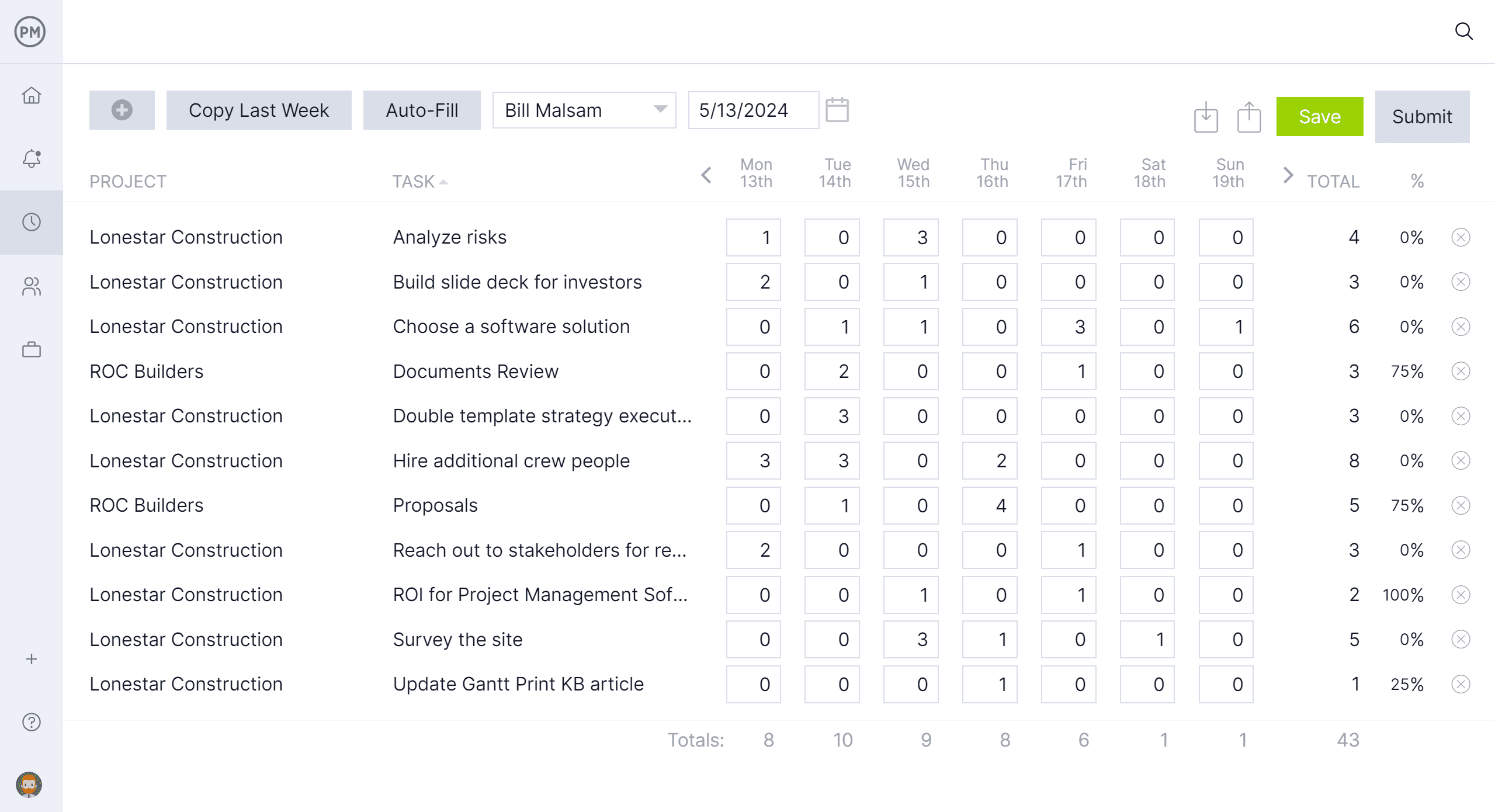
Built-in timesheets capture how much time people are spending on tasks, and you can set a timesheet approver to ensure key project stakeholders are aware of how things are progressing. This data feeds labor costs directly back into the project. After all, profitability depends on actuals, not estimates. Timesheets prevent hidden labor overruns from going unnoticed.
Other Project Management Templates to Help With Break Even Analysis
We’ve created over 100 free business and project management templates for Excel, Word and Google Sheets. Here are some that can help when conducting a break even analysis.
Cost-Benefit Analysis Template
Designed to support early-stage evaluation, this template structures projected gains and expenses side by side, allowing teams to assess return potential, compare alternatives and justify investments using clear, data-driven reasoning.
Feasibility Study Template
This template guides teams through evaluating whether an initiative is practical from technical, financial and operational perspectives, helping identify constraints, risks and alignment issues before detailed planning begins.
Cost Breakdown Template
By itemizing expenses across labor, materials, overhead and other categories, this template clarifies where money is allocated, supports more reliable forecasting and enables tighter cost control as work progresses.
Related Content
- Project Cost Estimation: How to Estimate Project Cost
- Cost-Benefit Analysis: A Quick Guide with Examples
- What Is a Cost Baseline in Project Management?
- What Is a Feasibility Study? How to Conduct One
- Feasibility Report in Project Management
ProjectManager is online project management software that provides real-time data to help you manage and track your project profitability. Take it for a test spin and see how it can help you with this 30-day free trial.