



Last updated: November 20, 2026
Construction teams look beyond Procore for scheduling when they mainly need a schedule rather than a full construction platform, or when their scheduler wants to build and update the timeline in a dedicated tool and share it in Procore. Seven tools stand out: ProjectManager for general contractors and subs who need all four dependency types, critical path, baselines and crew workload across jobs at a published per-user price; Primavera P6 for large programs and owners who require XER files; Microsoft Project for teams already scheduling in it; TeamGantt for builders who want lookaheads and a Procore sync at a flat price; Contractor Foreman for smaller contractors who want scheduling inside an all-in-one tool; Smartsheet for spreadsheet-style schedules; and GanttPRO for a low-cost Gantt chart.
This guide is for teams whose main question about Procore is scheduling. It covers what Procore Scheduling does well, when to replace Procore and when to run a scheduling tool alongside it, and how seven tools compare on dependencies, critical path, baselines, crew workload and MPP and XER files. If you’re comparing full construction management platforms with document, RFI and financial tools, see the best Procore alternatives instead.
ProjectManager is online project management software for construction scheduling. Link tasks with all four dependency types and lag, filter for the critical path, see each crew’s hours across every job and export the schedule to MPP for sharing in Procore. Get started with ProjectManager today for free.

What Procore Scheduling Does Well and Where Some Teams Want More
Procore is a full construction management platform for documents, RFIs, submittals, budgets, quality and safety, and Procore Scheduling, generally available since February 2026, adds schedule building to it. You can build and edit schedules on a Gantt chart with all four dependency types and lag, see the critical path, create lookaheads and keep automatic schedule version snapshots that you can compare with the current schedule. Pricing is by quote, based on the products you choose and your annual construction volume, with unlimited users, so adding subs and field staff doesn’t add seat costs. For a general contractor already running the project record in Procore, keeping the schedule in the same place makes sense.
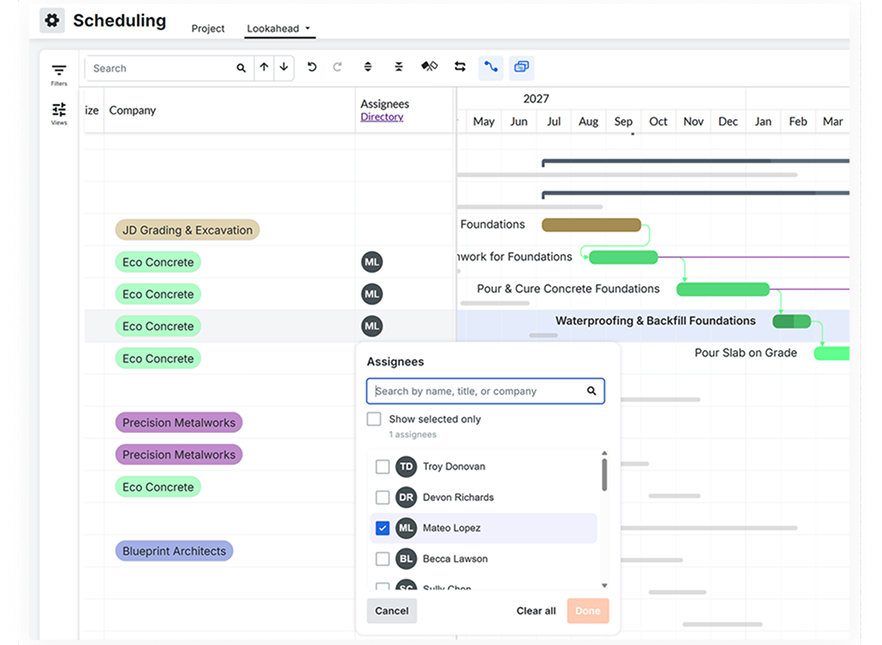
These are the points where some teams want more:
- Imported schedules are read-only. Procore imports Primavera P6 XER and Microsoft Project MPP files as read-only schedules, and an imported schedule doesn’t become editable in Procore Scheduling. If your scheduler builds the timeline in P6 or Microsoft Project, updates still happen in that tool.
- Field edits. Procore’s user guide lists Scheduling actions as web-only, though its 2026 iOS release notes show quick percent-complete edits.
- A platform price for a scheduling need. Procore’s pricing covers a platform and scales with construction volume. A subcontractor or smaller contractor that mainly needs scheduling and doesn’t use Procore’s document, RFI and financial tools may be paying for more than it uses.
If your team already works in Procore every day and its scheduling covers your jobs, staying with Procore Scheduling is a reasonable choice. The tools below are for teams that want a dedicated scheduling tool, either instead of Procore or next to it.
Replace Procore or Use a Scheduling Tool Alongside It?
There are two honest paths, and which one fits depends on how much of Procore your team uses outside the schedule.
Replace Procore
Teams that mainly need scheduling, and don’t rely on Procore’s document management, RFIs, submittals or financial tools, may not need a full platform. A dedicated scheduling tool with per-user or flat pricing can cover the schedule, crew workload and progress tracking for less. Before you switch, list what you’d lose: most scheduling tools, including ProjectManager, have no RFI, submittal or drawing management.
Use a scheduling tool alongside Procore
Some general contractors keep Procore as the project record and build and update the schedule in a dedicated tool. The scheduler works in that tool, then shares the schedule in Procore as a read-only master schedule, since Procore imports MPP and XER files. ProjectManager exports MPP, so it fits this workflow, as do Microsoft Project (MPP) and Primavera P6 (XER). TeamGantt’s Builder Edition lists a Procore sync. Decide which tool owns the dates so subs and owners don’t work from two timelines, and check Procore’s help center for its current import steps.
What to Look for in a Construction Scheduling Tool
A good construction scheduling tool keeps the logic of the job intact when dates move, shows which tasks drive the finish date and works with the files your owners and Procore expect. Check for these features.
A Gantt chart that handles construction dependencies and lag
The Gantt chart should support all four dependency types, finish-to-start, start-to-start, finish-to-finish and start-to-finish, with lag. When framing slips three days, drywall, electrical and the inspection should move with it automatically. Lag is how you model an inspection hold between rough-in and insulation or cure time after a pour. Learn more about Gantt chart software.
Critical path and baselines
A critical path view shows which tasks set the completion date, so you know which delays push the timeline. Baselines save the original schedule so you can compare it with actual progress and document delays. Read more about the critical path method in construction.
Lookaheads
A lookahead pulls the next two to six weeks out of the master schedule so superintendents can plan crews, deliveries and inspections. A subcontractor who needs to see next week’s lookahead should be able to get it without a paid seat. Some tools have a dedicated lookahead feature; others rely on date filters.
Crew and subcontractor workload across jobs
You should be able to see each crew’s and sub’s assignments across every job, not one schedule at a time. That’s how you catch a crew booked on two jobs on the same day before it becomes a delay.
Mobile field updates
Superintendents and foremen should be able to update progress from a phone. Check what the mobile app can actually edit, and whether field users need a paid license.
MPP and XER compatibility
Procore imports MPP and XER files, so a tool that writes one of them fits the alongside workflow. If an owner requires XER schedule submittals, you need a tool that writes XER natively. If owners and consultants send Microsoft Project files, check that the tool imports MPP with dependencies intact.
Pricing
Compare per-user pricing, flat company pricing and volume-based quotes, and count everyone who needs to edit the schedule rather than view it.
Procore Alternatives for Construction Scheduling Compared
Which Scheduling Tools Work With Procore?
Procore imports MPP and XER schedules as read-only files, so the tools below differ mainly in what they export and whether they replace Procore or work alongside it.
| Tool | Best for | MPP and XER | Works alongside Procore | Starting price |
|---|---|---|---|---|
| ProjectManager | GCs and subs who need critical path, baselines and crew workload across jobs | Imports and exports MPP, lossless for schedule data; no XER | Yes, export MPP and share it in Procore as a read-only schedule | $15/user/month (Team), billed annually |
| Primavera P6 | Large programs and owners who require XER | Native XER and XML; reads Microsoft Project XML, not MPP | Yes, Procore imports XER as a read-only schedule | By quote |
| Microsoft Project | Teams already scheduling in Microsoft Project | Native MPP | Yes, Procore imports MPP as a read-only schedule | $679.99 one-time (Standard 2024) or $30/user/month (Plan 3) |
| TeamGantt | Builders who want lookaheads and a Procore sync at a flat price | Imports MPP; exports to “Microsoft Project format”; no XER | Procore sync listed on Builder Edition | $59/month flat (Base); Builder Edition $199/month |
| Contractor Foreman | Smaller contractors replacing Procore with an all-in-one tool | Microsoft Project import and export (XML-based); no XER | Mainly a replacement; it overlaps with Procore’s tools | Gantt scheduling from $166/month (Plus), billed annually |
| Smartsheet | Teams that want a spreadsheet-style schedule | Imports MPP; exports Microsoft Project XML, not MPP; no XER | Limited; check that Procore accepts the XML file | Pro $9/member/month, billed annually |
| GanttPRO | Small teams that want a low-cost Gantt chart | Imports Microsoft Project files; exports XML, not MPP; no XER | Not a direct fit; no MPP export | Core $8/user/month, billed annually |
Critical Path, Baselines and Workload Compared
Here’s how each tool handles the scheduling features construction teams rely on most.
| Tool | Dependency types and lag | Critical path | Baselines | Cross-job workload | Mobile field updates |
|---|---|---|---|---|---|
| ProjectManager | All four, with lag | Yes, critical path filter | Yes, with variance reports | Workload page with hours across all projects (Business) | iOS and Android apps |
| Primavera P6 | All four, with lag | Yes, by total float or longest path | Yes | Not covered in this guide | Mobile apps for updating assigned activities and time |
| Microsoft Project | All four, with lead and lag (desktop and Plan 3) | Yes (desktop and Plan 3) | Yes (desktop and Plan 3) | Resource management in Professional 2024 and Plan 3 | Project desktop is Windows-only |
| TeamGantt | All four, with lag and lead (Business and above) | Yes, all paid plans | Unlimited (Business and Builder Edition) | Workload management (Business and above) | iOS and Android apps; iOS shows a list view only |
| Contractor Foreman | All four, with lead and lag (Plus and above) | Yes (CPM) | Yes, per task | Crew schedule (Plus and above) | iPhone, iPad and Android apps |
| Smartsheet | All four, with lag | Yes (Pro and above) | One per sheet (Business and above) | Paid resource planning add-on | iOS and Android apps; Gantt view only in reports |
| GanttPRO | All four, with lag and lead | Yes, all plans | Yes, all plans | Workload across projects (Business) | iOS and Android apps |
Prices are list prices as of November 2026 and change often. Check each vendor’s site before buying.
7 Best Procore Alternatives for Construction Scheduling
1. ProjectManager
ProjectManager ranks first because it covers the scheduling needs of most general contractors and subcontractors at a published per-user price, and it fits both paths: replacing Procore or running alongside it. Each job’s schedule sits on a Gantt chart with all four dependency types and lag. When framing slips three days, drywall, electrical and the inspection move with it automatically, and lag holds the inspection where it belongs. A critical path filter shows which tasks set the completion date, and baselines with variance reports show how far the timeline has drifted.
On the Business plan, the workload page shows each person’s assigned hours across all projects, with over-assigned days in red, so a crew booked on two jobs on the same day shows up before it becomes a delay. Subcontractors and equipment can be added as resources with no license cost, and unlimited free guests on the Team and Business plans get read-only access, so a sub can see next week’s work without a paid seat. ProjectManager has no dedicated lookahead feature, so filter the Gantt by date or use the workload page for the next few weeks. Field teams can use the iOS and Android apps.
For the alongside path, ProjectManager imports MPP and Microsoft Project XML files and exports MPP, and its MPP import and export is lossless for schedule data: tasks, durations, dates, dependencies and WBS structure stay intact. Build and update the schedule in ProjectManager, export it to MPP and share it in Procore as a read-only master schedule. ProjectManager doesn’t read or write XER, so if an owner requires XER submittals, Primavera P6 is a better fit. The ChatGPT plugin and Claude connector are included on every plan, including the free trial, and only see the projects and tasks each user can already access.
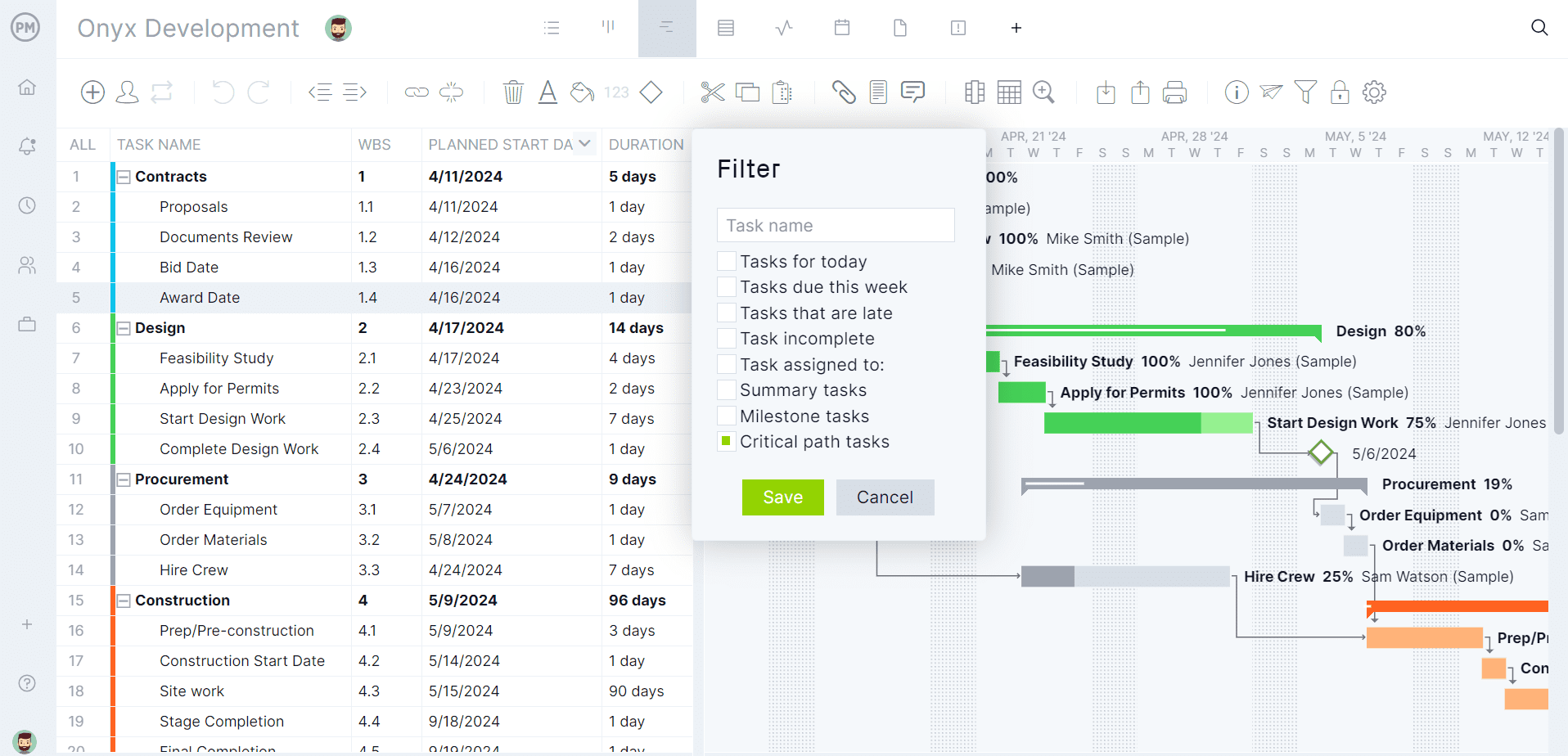
Best for: General contractors and subcontractors who need all four dependency types, critical path, baselines and crew workload across jobs, whether they replace Procore or run the schedule alongside it.
Scheduling features
- Gantt chart with finish-to-start, start-to-start, finish-to-finish and start-to-finish dependencies, plus lag
- Critical path filter, baselines and variance reports
- Workload page with hours across all projects (Business plan and above)
- Subcontractors and equipment as resources with no license cost, and free read-only guests on Team and Business
- Import of MPP, Microsoft Project XML, Excel and CSV files, and export to MPP, XML, Excel and CSV
- Sheet, Gantt, board, list and calendar views, plus timesheets and dashboards
- Browser access on any operating system, plus iOS and Android apps
- ChatGPT plugin and Claude connector on every plan
Pros
- All four dependency types, critical path, baselines and crew hours across jobs in one tool
- Lossless MPP import and export for schedule data, which matches Procore’s MPP import
- Published prices and a 30-day free trial
Cons
- No RFI, submittal or drawing management, so it doesn’t replace Procore’s document tools
- No XER import or export
- No offline mode or native desktop app
- The Team plan is limited to 10 users and 20 projects, and the Business plan to 100 projects; the workload page needs Business
- No dedicated lookahead view, and guests are read-only, so a sub who updates progress needs a paid seat
Pricing: Team $15/user/month, Business $28/user/month (billed annually), Enterprise by quote. 30-day free trial.
2. Primavera P6
Primavera P6 is Oracle’s scheduling software for large, complex programs. P6 Professional is a Windows desktop application, and P6 EPPM is web-based. It calculates the critical path by total float or longest path, supports all four relationship types with lag and baselines, and handles schedules with tens of thousands of activities.
P6 shares schedules as XER or XML files, and Procore imports XER as a read-only schedule, so a P6 schedule can be shared in Procore directly. If an owner’s contract requires XER schedule submittals, P6 writes that format natively. The trade-offs are cost and reach: pricing is by quote through Oracle or resellers, and P6’s mobile apps let team members update assigned activities and enter time rather than view or edit the full schedule. For other options, see the best Primavera P6 alternatives.
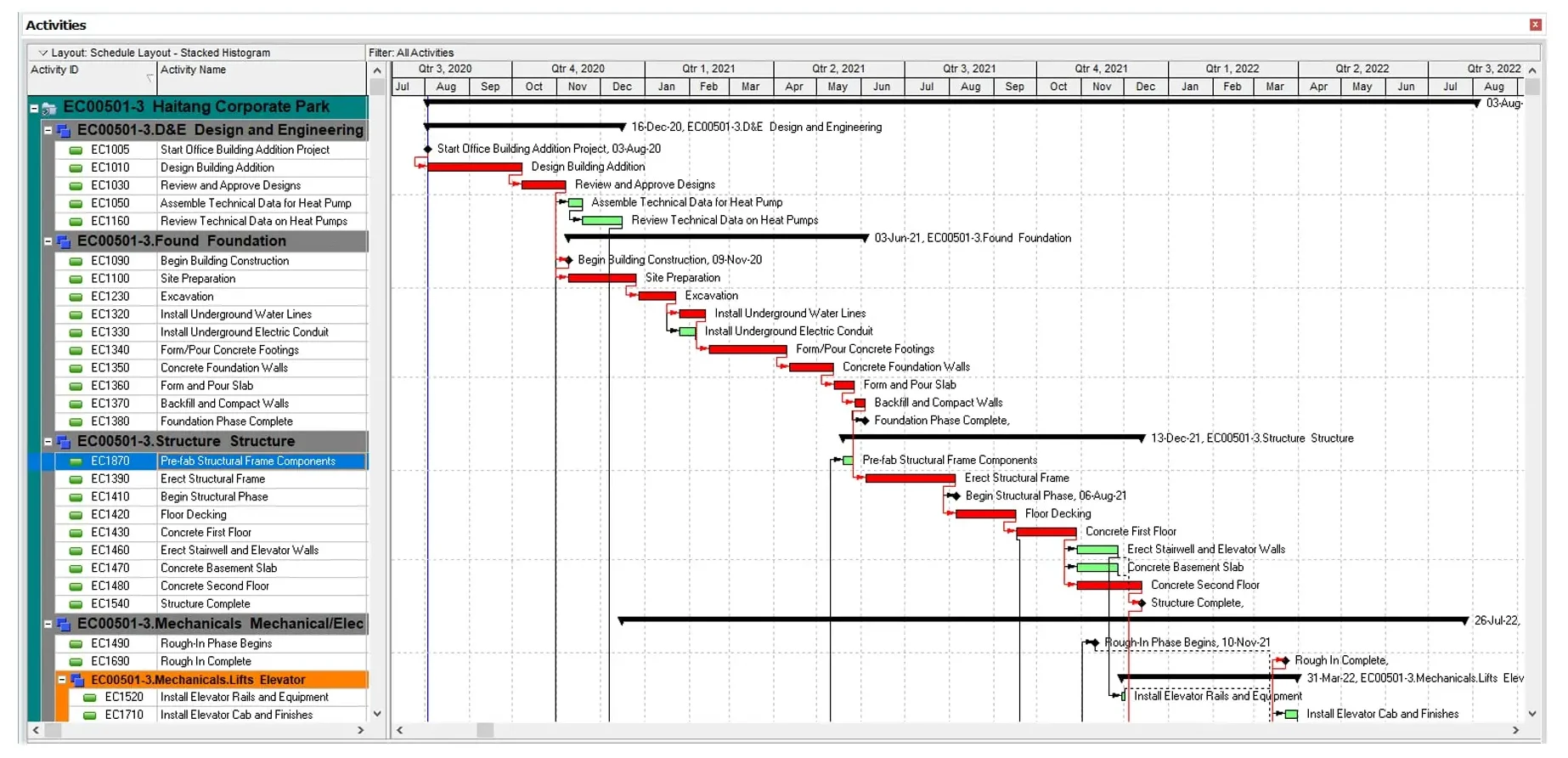
Best for: Professional schedulers on large, complex programs and contractors whose owners require XER schedule submittals.
Scheduling features
- All four relationship types with lag
- Critical path by total float or longest path, and baselines
- Schedules with tens of thousands of activities
- XER and XML exchange; reads Microsoft Project XML
- Mobile apps for updating assigned activities and entering time
Pros
- Scheduling depth for large programs
- Native XER, which Procore imports
- Desktop (P6 Professional) and web (P6 EPPM) options
Cons
- Pricing by quote through Oracle or resellers
- P6 Professional runs on Windows, with no macOS version
- Reads Microsoft Project XML but not MPP files
- Built for professional schedulers, so it can be more than a smaller team needs
Pricing: By quote through Oracle or resellers.
3. Microsoft Project
Microsoft Project is desktop CPM scheduling software that saves schedules as MPP files. You can buy it two ways. Project Standard 2024 ($679.99) and Project Professional 2024 ($1,129.99) are one-time purchases of the Windows desktop app, with Professional adding resource management, timesheets and a connection to Project Server. Planner and Project Plan 3 ($30/user/month, paid yearly) is a subscription that includes the Project desktop client plus Planner. Project Online was retired on September 30, 2026.
Project desktop and Plan 3 support all four dependency types with lead and lag, the critical path and baselines. Because Microsoft Project saves MPP natively, and Procore imports MPP as a read-only schedule, it works alongside Procore. The gaps for construction teams are the field and the platform: Project desktop runs only on Windows, so superintendents can’t update the schedule from a phone in Project itself, and Planner Plan 1 has finish-to-start dependencies only and no critical path. For more, see the best Microsoft Project alternatives for construction.

Best for: Teams already scheduling in Microsoft Project, or on Microsoft 365, who want native MPP files to share in Procore.
Scheduling features
- All four dependency types with lead and lag
- Critical path, baselines and milestones
- Gantt Chart, Network Diagram, Calendar and Task Sheet views, with resource leveling
- Resource management and timesheets in Project Professional 2024 and Plan 3
- Native MPP files
Pros
- Native MPP, which Procore imports
- One-time purchase or subscription
- Detailed CPM scheduling in the desktop app
Cons
- Project desktop runs only on Windows
- Critical path and advanced dependencies need Project desktop or Plan 3, not Plan 1
- Planner can’t open MPP files directly
- No construction-specific features such as sub confirmations
Pricing: Project Standard 2024 $679.99 and Project Professional 2024 $1,129.99, one-time purchases. Planner and Project Plan 3 $30/user/month, paid yearly.
4. TeamGantt
TeamGantt is Gantt chart software with a construction plan, Builder Edition, that adds lookahead schedules, schedule change confirmations, material delay prevention, a client portal and a Procore sync. Its Gantt chart supports all four dependency types with lag and lead on the Business plan and above, highlights the critical path on every paid plan and stores unlimited baselines on Business and Builder Edition.
The Procore sync makes TeamGantt one of the few tools here built to sit next to Procore, though its pricing page doesn’t say what the sync covers, so check with TeamGantt before relying on it. It imports MPP files with task names, dependencies, dates and percent complete, but not resources or assignments. Builder Edition is a flat monthly price with unlimited users, starting with 10 projects. For a head-to-head comparison, see ProjectManager vs. TeamGantt.
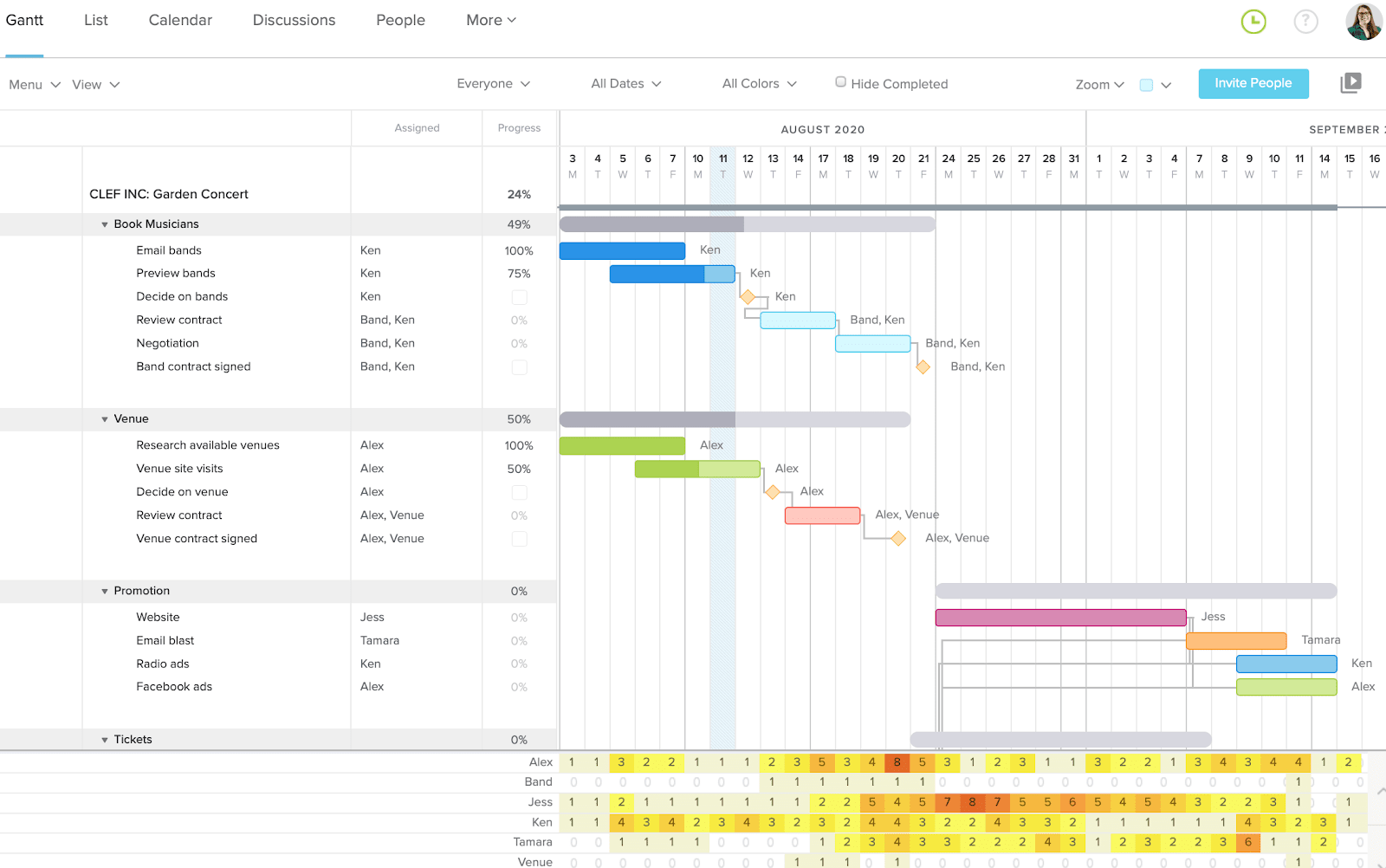
Best for: Builders and specialty contractors who want lookaheads, schedule change confirmations and a Procore sync on a simple Gantt chart at a flat monthly price.
Scheduling features
- All four dependency types with lag and lead (Business and above)
- Critical path on all paid plans
- Unlimited baselines (Business and Builder Edition)
- Workload management (Business and above)
- Lookahead schedule, schedule change confirmations and Procore sync (Builder Edition)
- MPP import, and export to CSV, PDF or Microsoft Project format
Pros
- Lookaheads and a Procore sync built for construction
- Flat monthly price with unlimited users on Builder Edition
- 14-day free trial
Cons
- The iOS app shows a list view only, with no Gantt chart
- Builder Edition starts with 10 projects, which a contractor with many jobs can outgrow
- Imported MPP files don’t bring resources or assignments, and there’s no XER support
- The free trial requires a credit card
Pricing: Free Personal plan (1 user, 1 project); Base $59/month; Business from $120/month; Builder Edition from $199/month with unlimited users and 10 projects. Save 20% with yearly billing. 14-day free trial.
5. Contractor Foreman
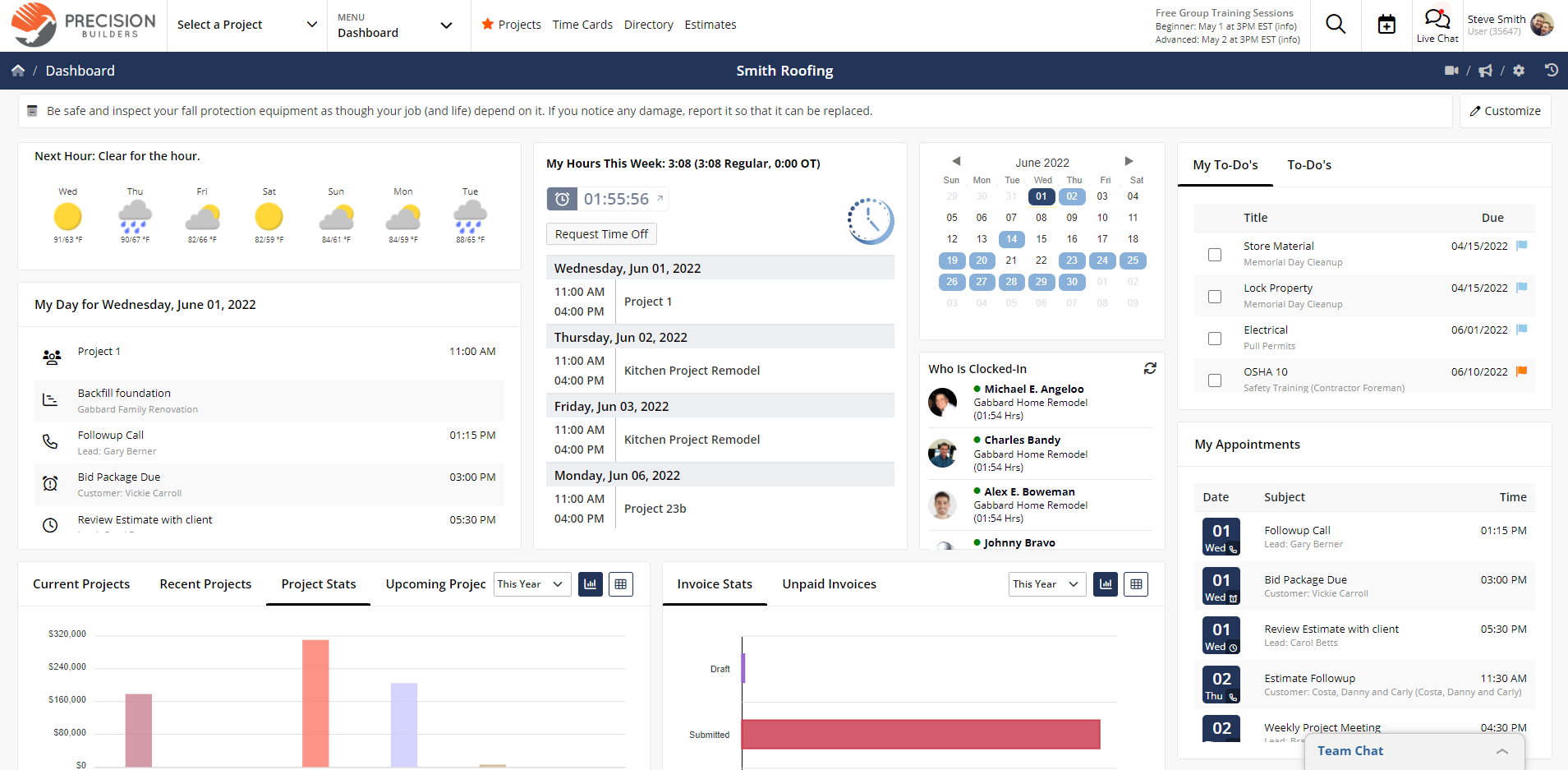
Contractor Foreman is an all-in-one construction management tool priced per company, with scheduling that goes further than most tools in its price range. The Gantt scheduler supports all four dependency types with lead and lag, tracks the critical path, shows baselines per task and lets you link tasks across projects.
Because it covers many of the same areas as Procore, Contractor Foreman is mainly an option for smaller contractors replacing Procore rather than running next to it. Two settings matter: linked tasks only move when Auto Scheduling is on, and Gantt scheduling and the crew schedule start on the Plus plan. Microsoft Project import and export are XML-based. For more all-in-one options, see the best Procore alternatives.
Best for: Smaller contractors replacing Procore who want Gantt scheduling with all four dependency types inside an all-in-one tool at a published company price.
Scheduling features
- Gantt, calendar and list views (Plus and above)
- All four dependency types with lead and lag, and task links across projects
- Critical path and per-task baselines
- Crew schedule (Plus and above)
- Microsoft Project import and export
- iPhone, iPad and Android apps
Pros
- Scheduling depth close to dedicated scheduling tools
- Flat company pricing within each plan’s user limit
- 30-day free trial
Cons
- Basic and Standard plans have no Gantt scheduling, so scheduling-focused teams start at Plus
- Dependencies don’t move dates unless Auto Scheduling is on, and Contractor Foreman acknowledges its baseline labels are confusing
- No documented lookahead view or double-booking warnings, and no XER support
Pricing: Basic $49/month (1 user), Standard $105/month (up to 3 users), Plus $166/month (up to 8 users), Pro $221/month (up to 15 users) and Unlimited $332/month, all billed annually. 30-day free trial.
6. Smartsheet
Smartsheet is a spreadsheet-style work management tool with a Gantt view. It supports all four dependency types with lag, shows the critical path on the Pro plan and above and keeps one baseline per sheet on the Business plan and above. It imports MPP files directly, though constraints don’t carry over.
For a Procore workflow, the catch is the file going back: Smartsheet exports to Microsoft Project as XML, not MPP, so check that Procore accepts the file before you rely on it. Resource planning across projects is a paid add-on, and the mobile app shows the Gantt view only in reports. For a closer look, see the best Smartsheet alternatives for construction.

Best for: Teams that want a spreadsheet-style schedule with dependencies and critical path, and don’t need crew workload across jobs.
Scheduling features
- Gantt view with all four dependency types and lag
- Critical path (Pro and above) and one baseline per sheet (Business and above)
- MPP import; export to Microsoft Project XML, Excel and PDF
- Resource planning add-on for workload across projects
Pros
- Familiar spreadsheet layout
- Free Contributors on all paid plans can view and comment
- 30-day free trial
Cons
- Exports Microsoft Project XML rather than MPP, and has no XER support
- Crew workload across jobs needs a paid add-on
- The mobile app shows the Gantt view only in reports
- No construction-specific scheduling features such as lookaheads
Pricing: Pro $9/member/month billed annually ($12 monthly), Business $19/member/month billed annually ($24 monthly), Enterprise by quote. 30-day free trial.
7. GanttPRO
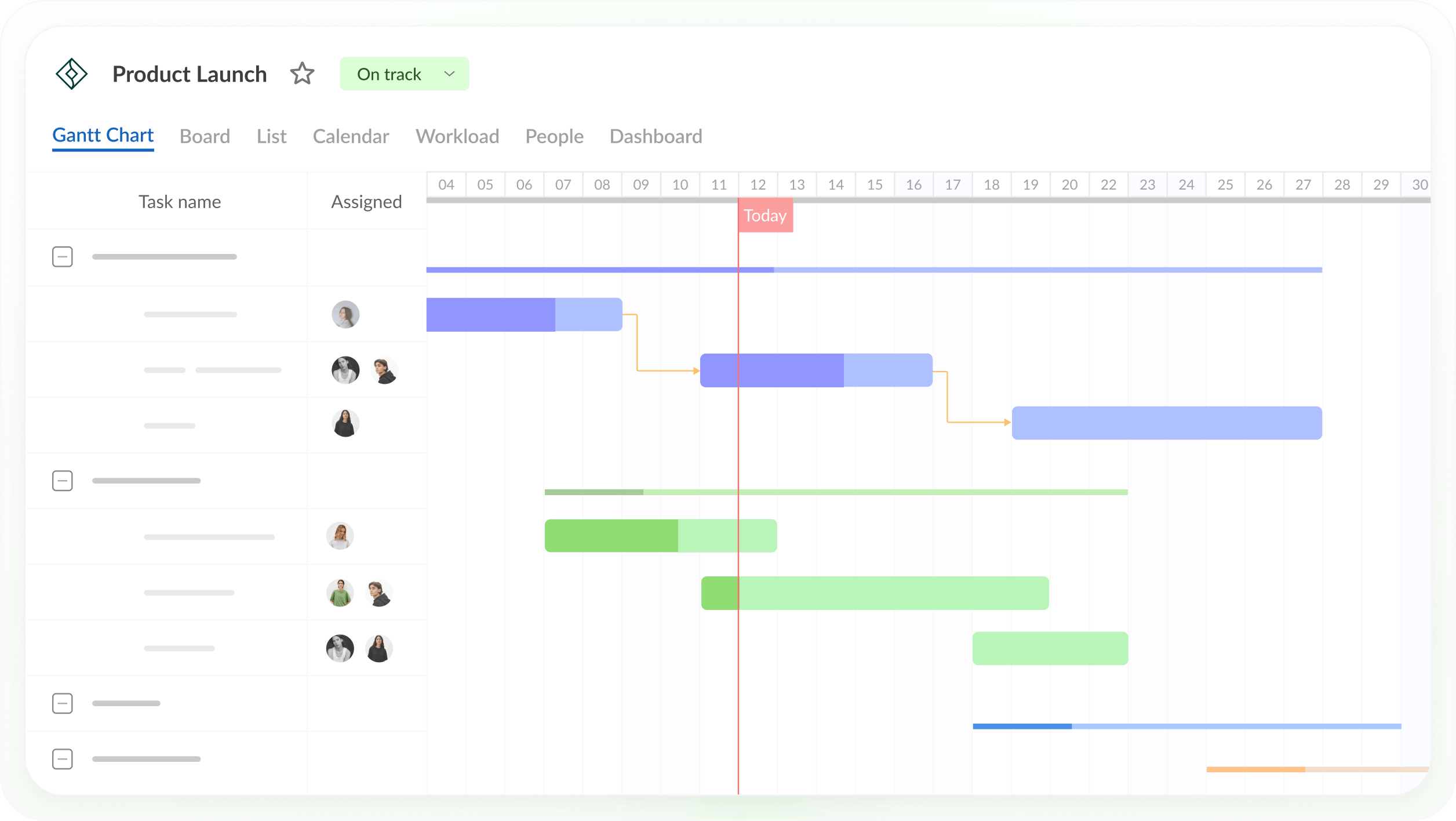
GanttPRO is low-cost Gantt chart software with scheduling features on every plan: all four dependency types with lag and lead, automatic rescheduling of linked tasks, critical path and baselines. On the Business plan, its workload view covers the current project or all active projects, and it adds time tracking and budget planning.
GanttPRO isn’t built for construction and doesn’t fit the alongside path well. It imports Microsoft Project files but exports XML rather than MPP, so you can’t hand Procore an MPP file from it. It suits a small team that wants a simple, inexpensive schedule and doesn’t need to share it in Procore. It also has an AI Gantt chart maker. For a head-to-head comparison, see ProjectManager vs. GanttPRO.
Best for: Small teams that want a low-cost Gantt chart with all four dependency types, critical path and baselines on every plan, and don’t need to share the schedule in Procore.
Scheduling features
- All four dependency types with lag and lead, and automatic rescheduling
- Critical path and baselines on all plans
- Workload across projects, time tracking and budget planning (Business and above)
- Import from Excel, Microsoft Project and Jira Cloud; export to PNG, PDF, XML and Excel
- iOS and Android apps on all plans
Pros
- Low published prices
- Critical path and baselines on every plan
- 14-day free trial, no credit card
Cons
- No MPP export and no XER support, so it doesn’t fit the Procore alongside path
- No construction-specific features such as lookaheads
- Workload view needs the Business plan
Pricing: For teams of 1 to 15 members, billed annually: Core $8, Advanced $12 and Business $19 per user/month (lower rates for 20+ members). Enterprise $25/user/month billed annually. 14-day free trial.
How to Move a Schedule Into ProjectManager
To move a schedule into ProjectManager, start from the source file, set working days first, import with “All data,” then check dependencies, lag and the critical path and set a baseline. ProjectManager imports MPP, Microsoft Project XML, Excel and CSV files.
- Get the source file. If your schedule was built in Microsoft Project and imported into Procore, use the original MPP file, since Procore’s copy is read-only. ProjectManager doesn’t import XER, and its XML import is for XML exported from Microsoft Project, so for a P6 schedule ask your scheduler for an MPP or Microsoft Project XML version, or an Excel or CSV export of the activities. If the schedule was built in Procore Scheduling, check Procore’s help center for the export formats it offers.
- Set working days first. Create the project and set its working days to match the job, such as a five-day or six-day work week. Working days are hard to change once the project exists, and global holidays can’t be added to existing projects.
- Import the file. Choose Import File when creating the project, or click the import icon on the Gantt ribbon of an existing project. In an existing project, choose Keep and append with the imported data or Replace with the imported data. Replace removes everything already in the project.
- Choose “All data.” For MPP and Microsoft Project XML files, choose All data rather than Task list only. That brings in tasks, assignees, dependencies and planned dates and durations, and the most recent baseline if the file has one. Attachments and comments don’t import, and imported actual hours don’t map to timesheets automatically. For Excel or CSV files, map each column to the matching Gantt column.
- Check dependencies and lag. Compare the schedule with the original and confirm that links and lag came through, such as an inspection hold between rough-in and insulation.
- Filter for the critical path. Turn on the critical path filter and check that it shows the tasks that drive the completion date. If it doesn’t, look for missing links or lag.
- Set a baseline. Once the schedule is right, set a baseline so you can track variance from the start of the job.
- Add crews and subs. Add crews as team members, and subcontractors and equipment as resources with no license cost, then check the workload page for anyone booked on two jobs at once (Business and above).
Exporting back to Procore. To share the schedule in Procore, export it from the Gantt or sheet view to MPP, then import that file into Procore, where it becomes a read-only schedule. Check Procore’s help center for its current import steps, and repeat the export when the schedule changes so the Procore copy stays current.
Want to run the schedule in a dedicated tool? Start a free 30-day trial, import an MPP file and see crew workload across every job. Get started with ProjectManager today for free.
Procore Alternatives for Construction Scheduling FAQ
Does Procore have scheduling?
Yes. Procore Scheduling has been generally available since February 2026. It lets you build and edit schedules with all four dependency types and lag, see the critical path, create lookaheads and compare automatic schedule versions with the current schedule. Procore also imports MPP and XER files, but imported schedules are read-only.
Does Procore have critical path?
Yes. Procore Scheduling shows the critical path for schedules built in it. Schedules imported from Microsoft Project or Primavera P6 stay read-only in Procore, so critical path changes on those happen in the source tool.
Can I use a different scheduling tool with Procore?
Yes. Some teams build and update the schedule in a dedicated tool and share it in Procore as a read-only master schedule, since Procore imports MPP and XER files. Decide which tool owns the dates so subs and owners don’t work from two timelines.
What scheduling software works with Procore?
Tools that write MPP or XER files work with Procore’s schedule import. ProjectManager and Microsoft Project export MPP, and Primavera P6 writes XER. TeamGantt’s Builder Edition lists a Procore sync. Smartsheet and GanttPRO export XML rather than MPP, so check that Procore accepts the file first.
Which Procore alternative is best for scheduling?
For most general contractors and subcontractors whose main need is scheduling, ProjectManager covers all four dependency types, critical path, baselines and crew workload across jobs at a published per-user price, and exports MPP for sharing in Procore. Primavera P6 suits large programs and owners who require XER, and Microsoft Project suits teams already working in it. For a longer list, see the best construction scheduling software.
Is Procore worth it if I only need scheduling?
It depends on what else you use. Procore is priced as a platform, by quote and based on annual construction volume, and its value comes from documents, RFIs, submittals and financials alongside the schedule. If your team only needs scheduling, a dedicated scheduling tool with per-user or flat pricing may cost less. If you rely on Procore’s other tools, keeping Procore and adding a scheduling tool alongside it is often the better split.
Related Content
- 11 Best Procore Alternatives of 2026 (Free + Paid)
- 9 Best Construction Scheduling Software for 2026 (Free & Paid)
- 5 Best Primavera P6 Alternatives for Construction Projects (2026)
- Best Microsoft Project Alternatives for Construction (2026)
- Best Buildertrend Alternatives for Scheduling with Gantt Charts (2026)
- Best Smartsheet Alternatives for Construction (2026)
- Best Construction Gantt Chart Software (2026)
- Critical Path Method (CPM) in Construction: A Quick Guide
