



Every project carries risk. Equipment fails, suppliers miss deadlines, key people leave mid-project, systems go down at the worst possible moment. The question is never whether something will go wrong — it is whether your team has a plan ready when it does. Organizations that respond quickly to disruptions are the ones that have done the work in advance: identified the risks, assessed the potential damage and mapped out exactly what to do if a trigger event occurs.
A contingency plan template gives you a consistent framework for that preparation. Rather than building a response from scratch under pressure, you fill in the structure before anything happens: what the risk is, what conditions activate the plan, who is responsible and what steps to take in sequence. The same discipline applies across your broader risk management process, from the initial assessment through to tracking open issues and documenting incidents after the fact.
We put together nine free contingency plan templates for Excel and Word covering the full risk lifecycle, from identifying and registering risks to responding to active incidents and recovering from major disruptions. Each one is free to download and ready to adapt for your team or your organization.
1. Contingency Plan Template for Excel
A contingency plan defines in advance what your team will do if a specific risk materializes. The goal is to reduce response time when things go wrong by removing the need to make decisions under pressure. Without a contingency plan, teams improvise, and improvised responses are slower, less coordinated and more likely to cause secondary problems than planned ones.
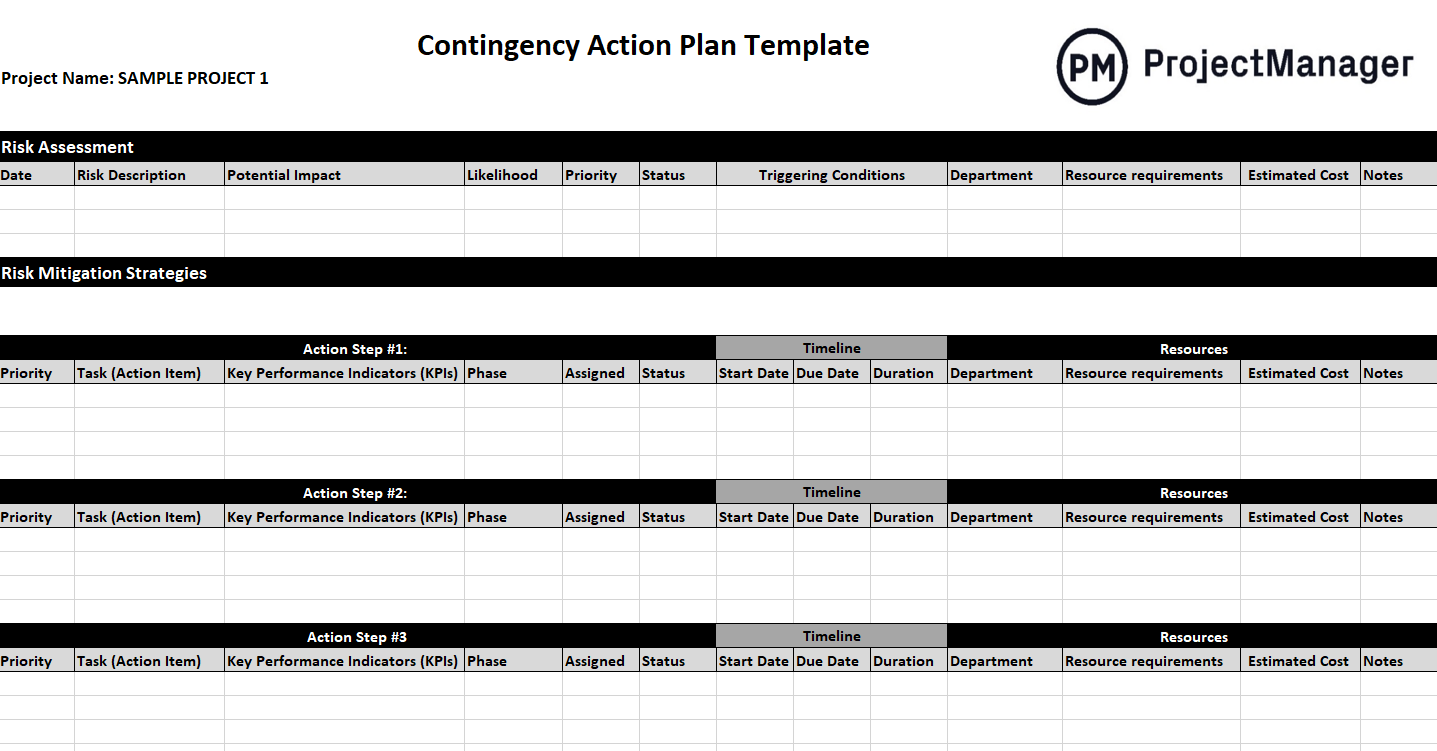
This Excel template includes a risk assessment section where you document each potential risk, its likelihood, potential impact and the conditions that would trigger a response. For each risk, you define the mitigation steps, who owns the response and what resources are required to execute it. The structure forces you to think through the response logic before you need it, which is the entire point of contingency planning.
The right starting point for any project manager who needs a documented contingency plan that stakeholders and team members can follow without additional explanation when a trigger event occurs.
2. Risk Assessment Template for Excel
Before you can plan for risks, you need to identify and evaluate them. A risk assessment is the process of systematically examining what could go wrong, how likely each scenario is and how much damage it could cause if it does occur. Without this step, contingency planning is guesswork — you may be planning for the wrong risks while leaving the real ones unaddressed.

This Excel template walks you through each risk with fields for the risk description, category, likelihood score, impact score and a combined risk rating that helps you prioritize where to focus your planning effort. It includes space for the risk owner and the initial mitigation approach so the assessment feeds directly into your broader risk management process rather than sitting as a standalone document.
Most useful at the start of a project when the team needs to surface and evaluate risks systematically before planning begins, or at any major milestone when the risk landscape may have shifted.
3. Risk Register Template for Excel
A risk register is the living record of every identified risk on a project. Where a risk assessment is a snapshot taken at a point in time, the risk register is updated throughout the project as new risks emerge, existing risks change in likelihood or severity and mitigations are put in place. It gives the project team and stakeholders a single source of truth for the project’s risk status at any moment.
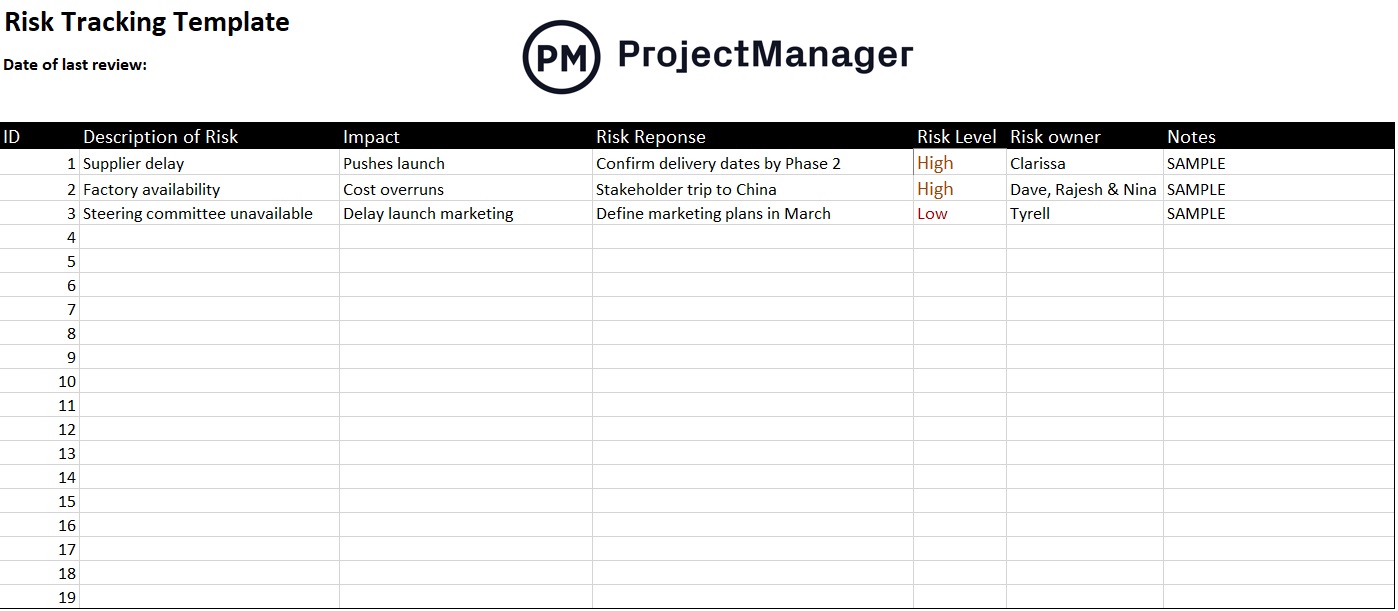
This Excel template logs each risk with columns for the risk ID, description, category, probability, impact, risk score, mitigation strategy, risk owner and current status. It is designed to be maintained throughout the project life cycle rather than completed once and filed away, with the status field tracking whether each risk is open, mitigated, closed or has materialized into an active issue.
Useful for project managers who need a structured way to track multiple risks across a project and give stakeholders visibility into what is being monitored and what actions are in place.
Track Risks and Issues in Real Time With ProjectManager
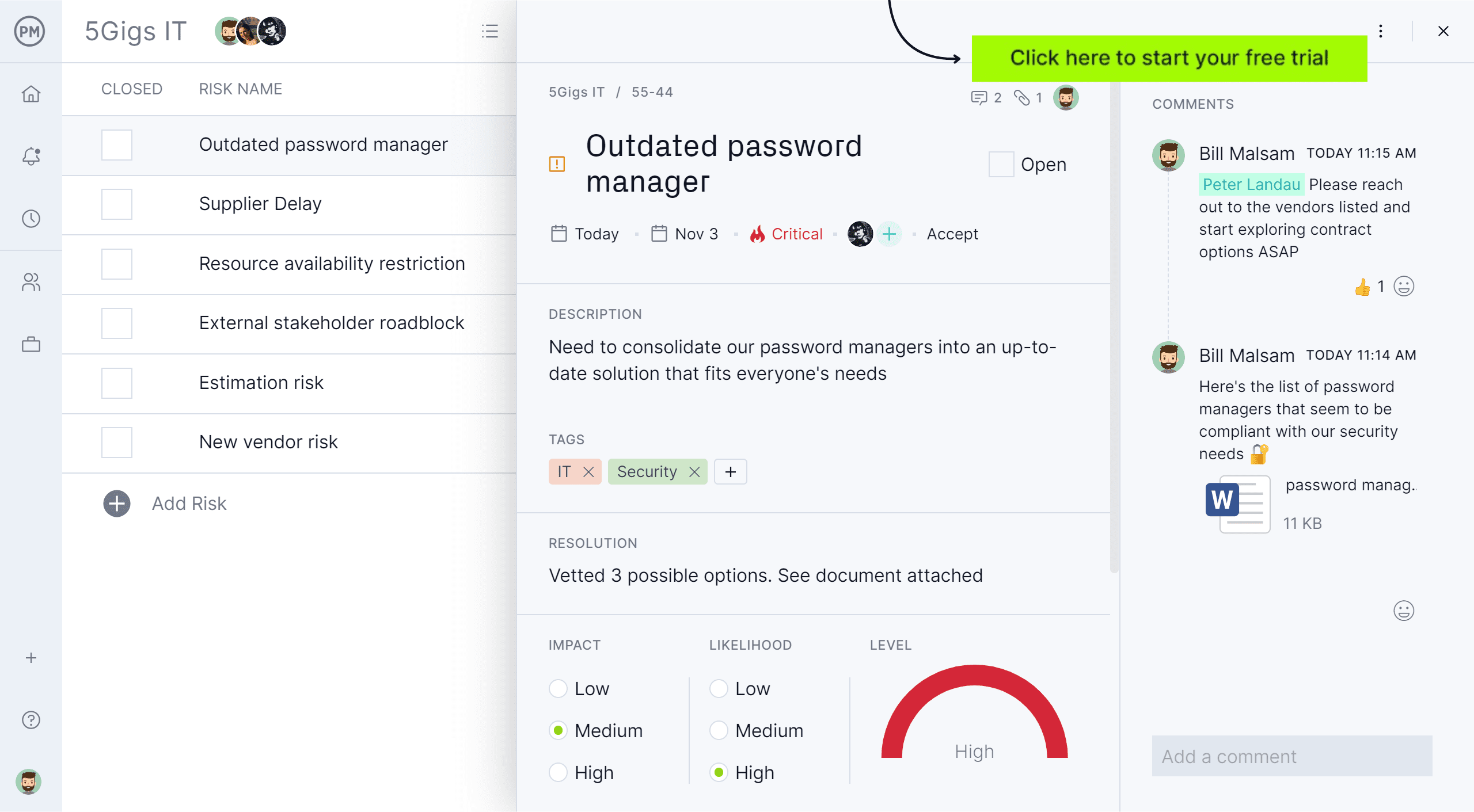
Templates capture your risk data. ProjectManager keeps it live. Log risks, assign owners, set priority levels and track mitigation progress directly alongside your project plan. When a risk becomes an issue, it is already in the system. Try it free for 30 days.
4. Risk Management Plan Template for Word
A risk management plan documents the overall approach your project or organization will take to identifying, assessing and responding to risk. It is not a list of specific risks — that is the risk register’s job. The plan establishes the process: who is responsible for risk management, how risks will be identified and assessed, what the response strategy will be and how the register will be maintained and reported on throughout the project.
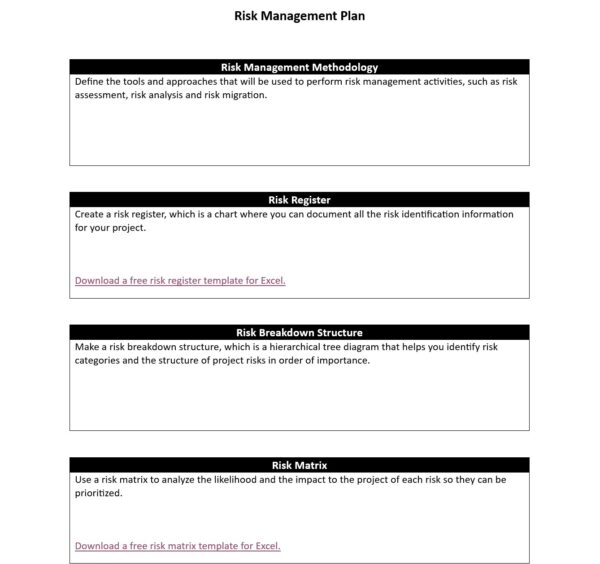
This Word template covers the key components of a risk management plan: scope and objectives, roles and responsibilities, risk categories, the assessment methodology, response strategies (avoid, mitigate, transfer, accept) and the process for monitoring and reviewing risks over time. It is structured as a formal document suitable for project plans, stakeholder reviews or organizational governance requirements.
Best used at the start of a large or complex project where stakeholders expect documented risk governance, or in organizations where the risk management process needs to be consistent and repeatable across multiple projects.
5. Business Impact Analysis Template for Excel
A business impact analysis determines what happens to the organization if a specific process, system or resource is disrupted and how long the disruption can be tolerated before it causes serious damage. It is the analytical foundation for contingency and recovery planning: before you can build a meaningful response to a disruption, you need to know which functions are most critical, how quickly they need to be restored and what the cost of downtime is for each.

This Excel template guides you through each business function or process with fields for the function description, the systems and resources it depends on, the maximum tolerable downtime, the financial and operational impact of disruption and the recovery time objective. The output gives leadership a prioritized view of which functions need the most robust contingency coverage and which can tolerate longer recovery windows.
Particularly useful for business continuity planning, IT disaster recovery scoping or any organizational risk exercise where leadership needs to make informed decisions about where to invest in resilience.
6. Issue Tracking Template for Excel
An issue is a risk that has already materialized. When something goes wrong on a project — a dependency fails, a deliverable is blocked, a stakeholder dispute stalls decision-making — it becomes an issue that needs to be tracked, assigned and resolved. Without a structured process for managing active issues, they pile up informally, accountability gets lost and problems that could have been resolved quickly drag on until they affect the timeline or budget.

This Excel template logs each issue with columns for the issue ID, description, date identified, priority, assigned owner, target resolution date and current status. It gives the project manager a running view of all open issues and their resolution progress, and makes it easy to report on outstanding items in stakeholder updates without having to reconstruct the picture from scattered notes or email threads.
The right tool for any project team that needs a shared, structured record of active issues so nothing gets dropped and everyone knows who is responsible for resolving what by when.
7. Incident Report Template for Word
An incident report documents what happened when something went wrong: the facts, the timeline, who was involved and what the immediate response was. It is distinct from an issue log, which tracks ongoing problems. An incident report is a formal record of a discrete event, written as close to the moment as possible while the details are fresh. It creates the paper trail that supports investigation, corrective action and compliance requirements.
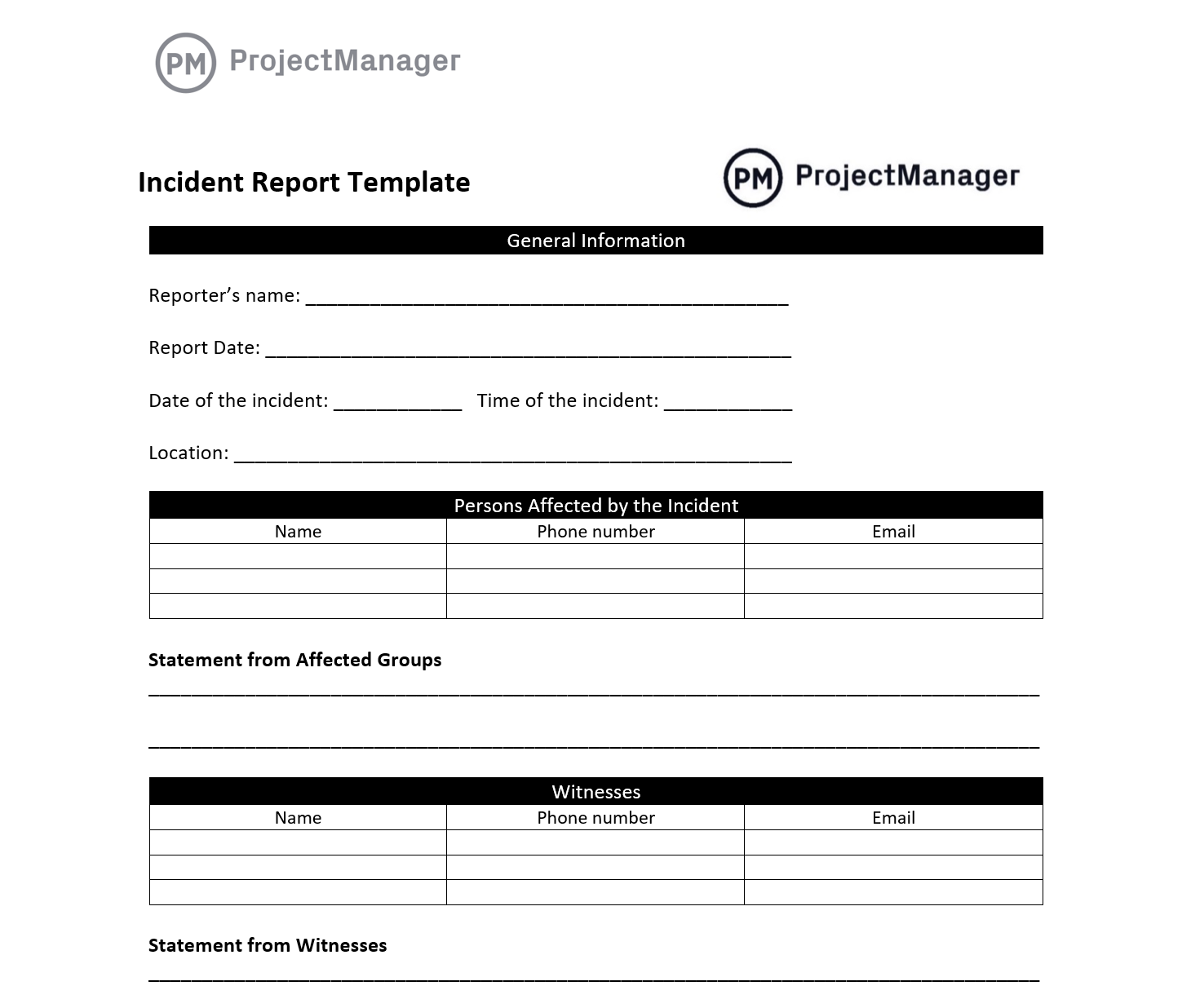
This Word template covers the standard incident report structure: incident date and time, location, description of what occurred, people involved, immediate actions taken and a section for root cause analysis and recommended corrective actions. It is formatted as a formal document suitable for internal review, HR processes or regulatory reporting, and structured to capture the information that investigation and prevention work depends on.
Essential for teams in construction, manufacturing, IT operations or any environment where workplace safety, compliance or post-incident review is a formal requirement.
8. Escalation Matrix Template for Excel
When an issue exceeds what the current decision-maker can resolve or authorize, it needs to be escalated. The problem is that escalation paths are rarely documented in advance, which means that when a critical issue surfaces, teams waste time figuring out who to involve rather than resolving the problem. An escalation matrix defines in advance who should be contacted at each level of severity, under what conditions and within what timeframe.
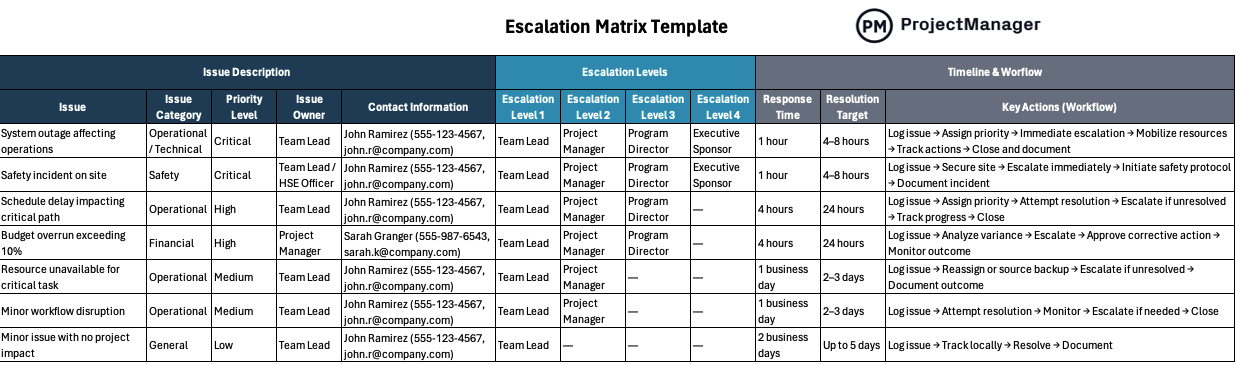
This Excel template maps issue severity levels to the appropriate escalation contacts, response time expectations and resolution authorities. It includes fields for the type of issue, the triggering conditions for each escalation level, the primary and secondary contacts at each tier and the expected response window. Filled in before the project starts, it removes ambiguity from a moment that is already stressful.
Most useful for large projects with multiple stakeholders, projects operating across organizational boundaries or any team where knowing who to call and when is a recurring source of confusion during incidents.
9. IT Disaster Recovery Plan Template for Excel
An IT disaster recovery plan defines how an organization will restore its critical technology systems and data after a major disruption — whether that is a cyberattack, a hardware failure, a natural disaster or a cloud outage. For organizations that depend on technology to operate, the plan is not a nice-to-have: it is the difference between a contained incident and an extended outage that damages client relationships, revenue and regulatory standing.
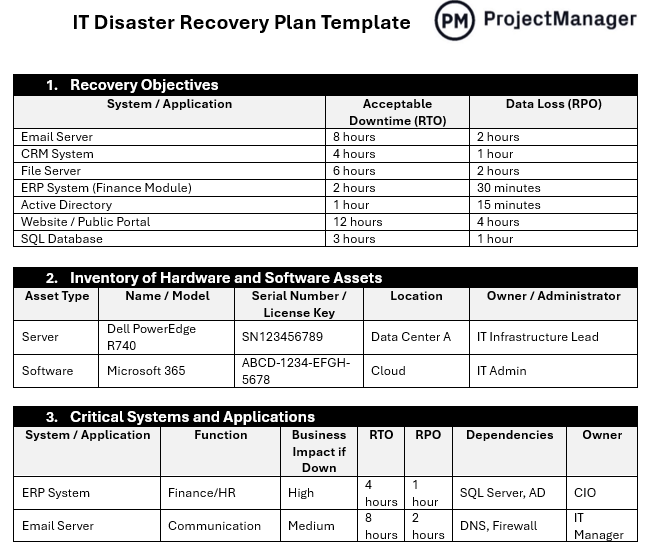
This template covers the full recovery planning structure: critical system inventory, recovery time objectives, recovery point objectives, backup procedures, the step-by-step recovery sequence, roles and responsibilities and testing schedules. It gives IT teams and leadership a shared reference document that has been reviewed and approved before a crisis occurs, so recovery can begin immediately rather than after a planning discussion.
Designed for IT managers, operations teams and business continuity planners who need a structured, reviewable recovery plan that can be tested and updated as systems and infrastructure change over time.
Manage Risk and Contingency Planning With ProjectManager
Templates document the plan. The challenge is executing it when something actually goes wrong, which means having the project data, communication tools and task management in the same place as your risk and issue records. ProjectManager connects your risk tracking to the live project so you can see the impact of an emerging issue on your schedule, assign response tasks immediately and keep stakeholders informed without switching between systems.
From risk registers to incident response, ProjectManager gives teams the tools to manage risk proactively and respond to disruptions without losing visibility into the broader project.
Log and Track Risks Directly in Your Project
ProjectManager lets you log risks against a project, assign them an owner, set a probability and impact score, and link mitigation tasks directly to the risk record. As the project progresses, risk status updates in real time alongside task completion and budget tracking, so the project manager always has a current picture of the risk landscape without maintaining a separate document. When a risk escalates to an active issue, it moves through the same system rather than into a spreadsheet.
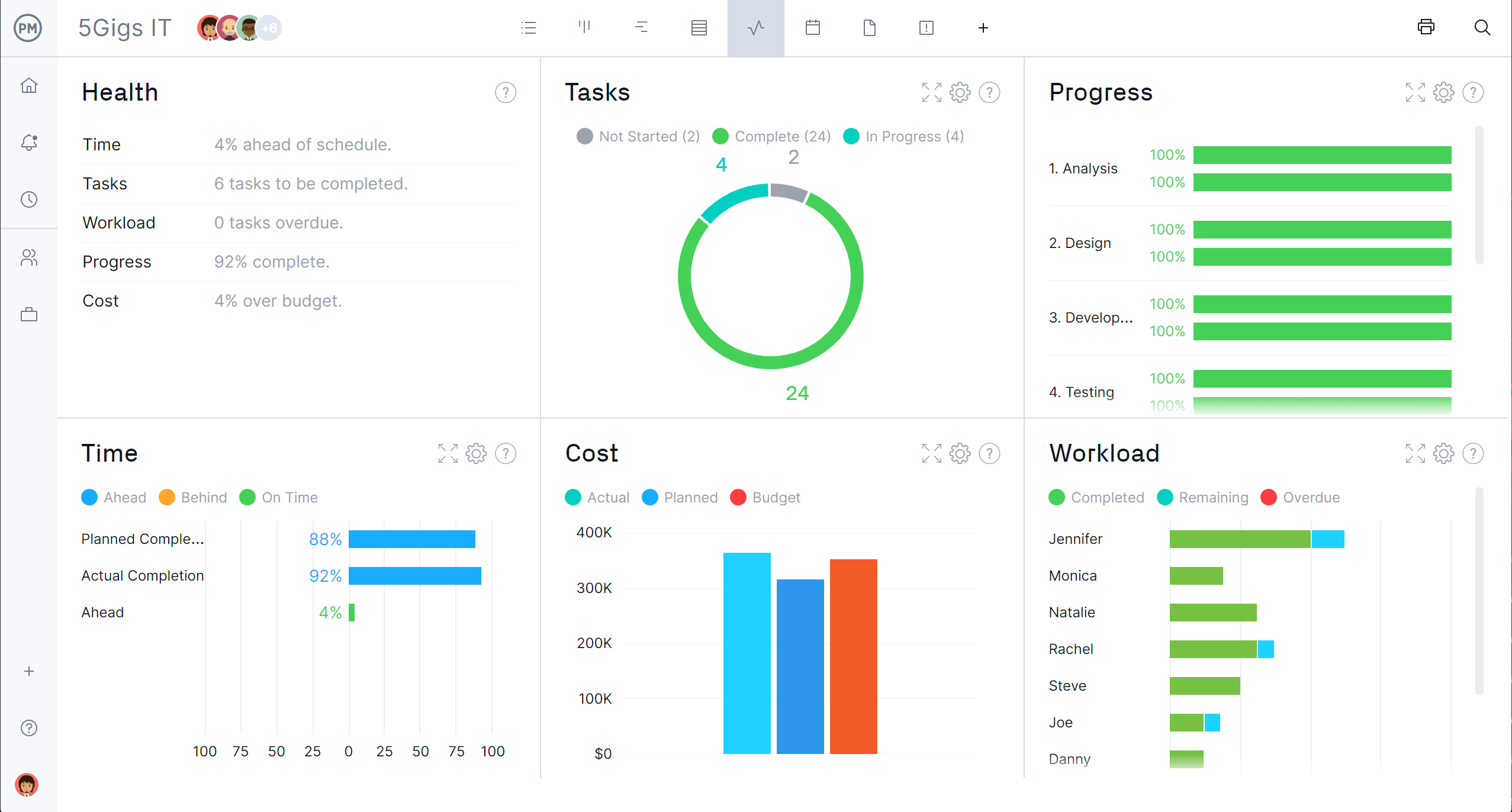
Give Stakeholders Real-Time Visibility Into Project Health
One of the hardest parts of contingency planning is communicating status to stakeholders during an active incident. ProjectManager’s real-time dashboards pull live data from tasks, timelines and budgets so stakeholders can see project health at a glance without waiting for a status report. When a contingency plan is activated, leadership can monitor progress against the response plan in the same place they track the project, which keeps everyone aligned and reduces the back-and-forth that slows recovery down.

