


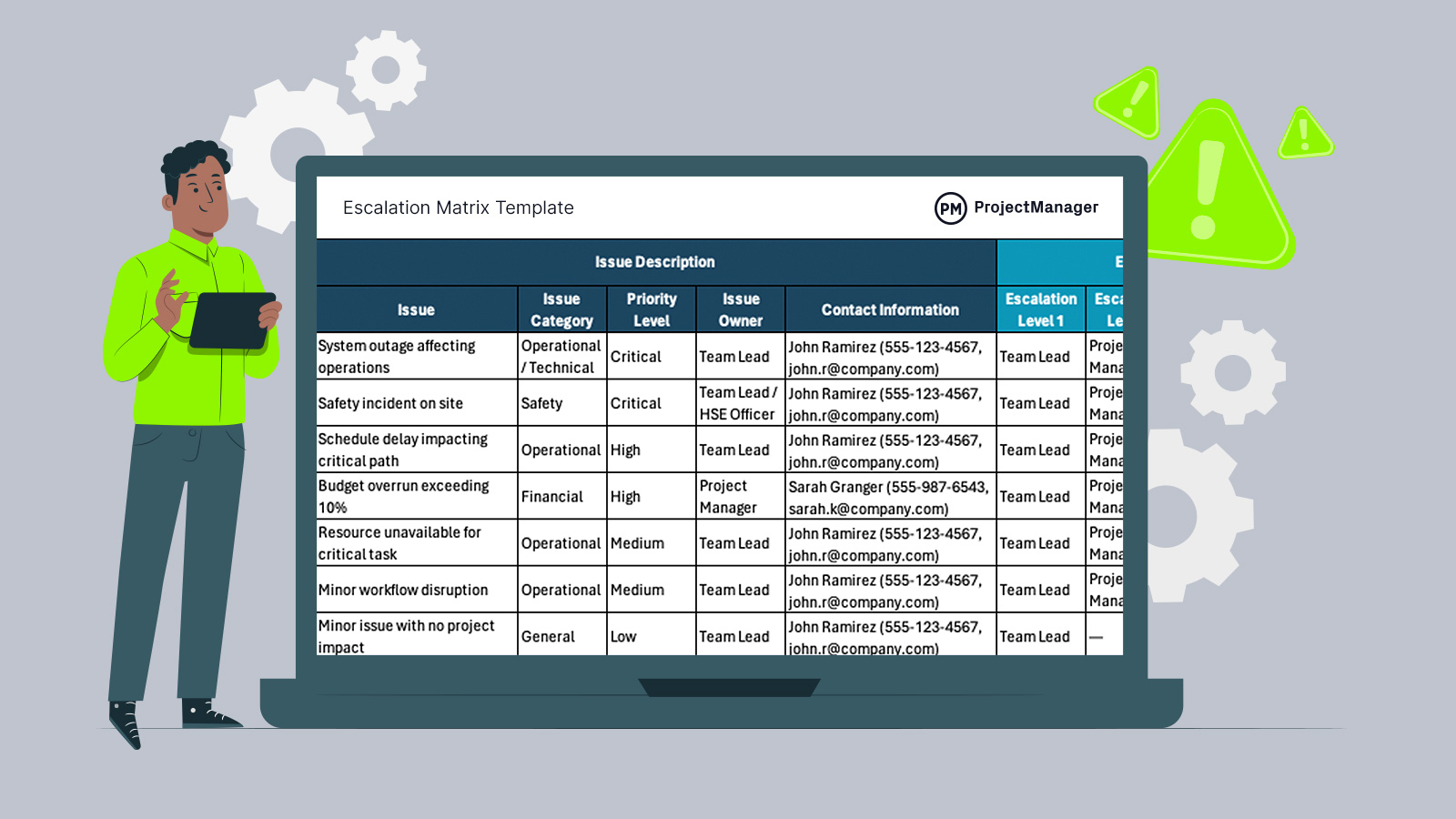
When issues stall progress and decisions get delayed, having an escalation matrix template ensures problems move to the right people quickly, keeping projects aligned, responsive and under control.
Why You Need a Escalation Matrix Template
Projects rarely fail because of a single issue—they fail when problems go unresolved or escalate too late. An escalation matrix provides a clear path for raising issues based on severity, ownership and response expectations. Using an escalation matrix template in Excel makes this process easier to implement, allowing teams to standardize roles, define escalation levels and update workflows quickly without building structures from scratch.
When To Use a Escalation Matrix Template
Knowing when to use an escalation matrix template comes down to recognizing moments when normal issue resolution is no longer enough to keep work moving. As projects progress, delays, risks or unresolved blockers can begin to affect timelines, budgets or team coordination. Applying escalation at the right time ensures the right people step in quickly, preventing small issues from turning into major disruptions.
Whenever you’re ready to start managing projects, give ProjectManager a try. ProjectManager is an award-winning project management software designed to plan, schedule and track projects from start to finish. Build detailed project schedules, allocate resources, monitor costs and compare estimates against actual performance using a complete set of powerful project management tools. Get started for free today.
Here are some of the most common scenarios when project management teams use an escalation matrix template:
- When critical project deadlines are at risk due to unresolved issues or delays in decision-making across teams or stakeholders.
- During cross-functional projects where responsibilities are shared and escalation paths are needed to avoid confusion or accountability gaps.
- When recurring issues require consistent handling procedures to ensure they are escalated properly and resolved faster over time.
- In high-risk environments where safety, compliance or financial impact demands immediate escalation to senior management or specialized roles.
- When managing client-facing projects where unresolved problems could affect deliverables, relationships or contractual obligations if not escalated quickly.
Who Should Use this Free Escalation Matrix Template?
Across organizations, escalation matrix templates are used by teams responsible for delivering outcomes under time, cost and quality constraints. Project managers, operations teams and functional leaders rely on them to maintain control when issues arise, especially in environments where multiple stakeholders, dependencies and deadlines must be coordinated without delays or confusion.
- Project managers: Use an escalation matrix template to define clear escalation paths, ensuring issues are raised quickly and handled before they impact timelines, budgets or deliverables.
- Operations managers: Rely on escalation structures to manage ongoing workflows, resolve bottlenecks and maintain service levels across departments with minimal disruption.
- Team leads: Apply escalation guidelines to determine when problems exceed their authority, allowing them to involve senior roles without delaying resolution.
- Executives and senior stakeholders: Use escalation matrices to gain visibility into critical issues that require strategic decisions or resource reallocation.
- Client-facing roles: Depend on escalation frameworks to address customer issues efficiently, protecting relationships and ensuring contractual commitments are met on time.
How to Use ProjectManager’s Escalation Matrix Template for Excel
Getting value from an escalation matrix template comes down to how well each section is completed and maintained, since every field directly supports faster decisions, clearer ownership and structured issue resolution.
Document Control Information
Start by completing the document control section to establish ownership, version tracking and accountability. Enter the document title, version, dates and responsible parties so everyone knows who maintains the escalation matrix and which version is current. Keeping this section updated ensures consistency, avoids confusion and supports proper governance when escalation procedures change over time.
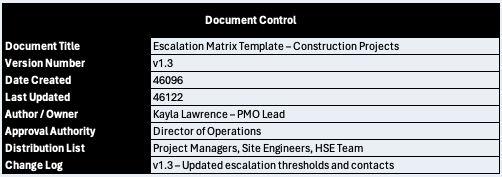
- Document Title: Identifies the purpose and context of the escalation matrix for the project or organization.
- Version Number: Tracks updates and revisions to ensure teams are using the most current version.
- Date Created: Records when the escalation matrix was initially developed for reference and auditing purposes.
- Last Updated: Indicates the most recent modification to reflect current escalation rules and contacts.
- Author / Owner: Specifies the individual responsible for maintaining and updating the document.
- Approval Authority: Identifies the role or person who approves changes to escalation procedures.
- Distribution List: Lists the teams or roles who should use or reference the escalation matrix.
- Change Log: Summarizes updates made between versions to maintain transparency and traceability.
Issue Description
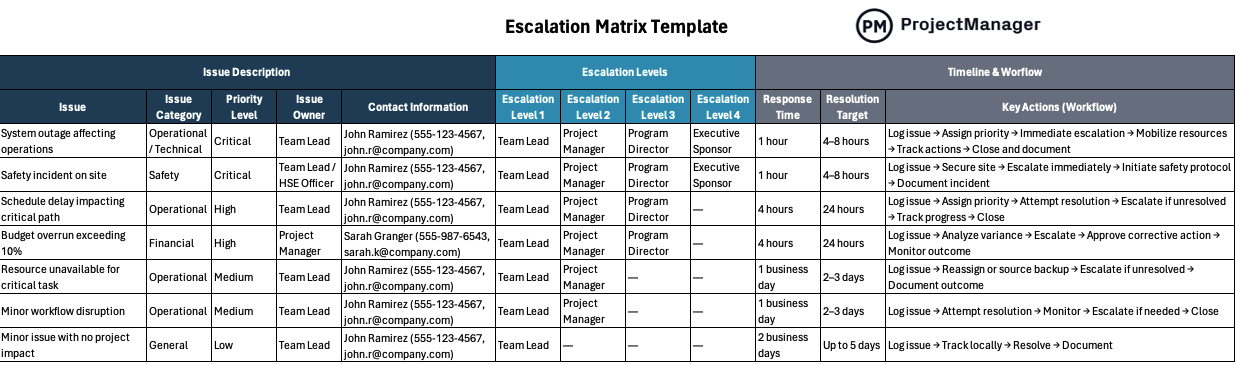
Define the types of issues your team may encounter by filling out this section row by row. Describe each issue clearly, assign categories and priorities and identify ownership so there is no ambiguity when problems occur. This step ensures that issues are recognized quickly and handled consistently based on their severity and operational impact.
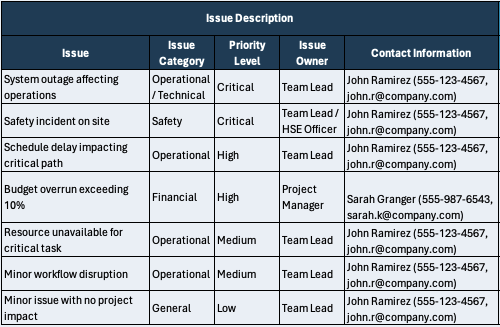
- Issue: Describes the specific problem or situation that may require escalation.
- Issue Category: Classifies the issue type, such as operational, safety, financial or technical.
- Priority Level: Indicates the urgency and severity, typically ranging from low to critical.
- Issue Owner: Assigns responsibility for managing and initiating the escalation process.
- Contact Information: Provides direct contact details for the responsible person or role.
Escalation Levels
Map out how issues move through the organization by assigning escalation levels from frontline roles to executive oversight. Each level should reflect increasing authority and decision-making power. By structuring escalation paths in advance, teams avoid delays and know exactly who to involve when issues cannot be resolved at the current level.
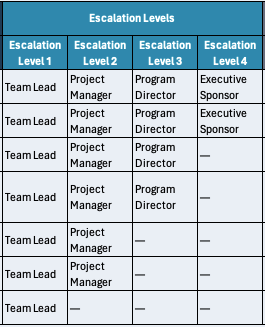
- Escalation Level 1: First point of escalation, typically the immediate supervisor or team lead.
- Escalation Level 2: Secondary escalation to project managers or mid-level leadership.
- Escalation Level 3: Higher-level escalation to program directors or senior management.
- Escalation Level 4: Final escalation to executive sponsors or top-level decision-makers.
Timeline & Workflow
Establish clear expectations for response and resolution by defining timeframes and step-by-step action items. Enter how quickly issues must be acknowledged and resolved, then outline the workflow teams should follow. This structure reduces uncertainty, keeps escalation consistent and ensures that issues are tracked, acted on and closed efficiently.
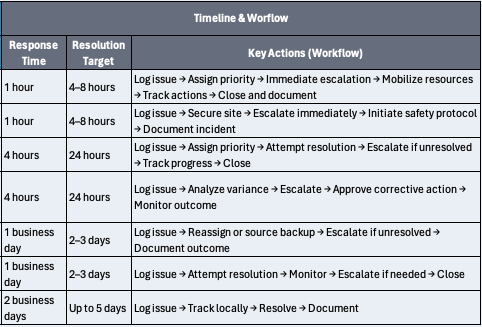
- Response Time: Specifies how quickly the issue must be acknowledged after being reported.
- Resolution Target: Defines the expected timeline for resolving the issue completely.
- Key Actions (Workflow): Lists the sequence of steps required to manage, escalate and resolve the issue.
ProjectManager Is an Award-Winning Project Management Software
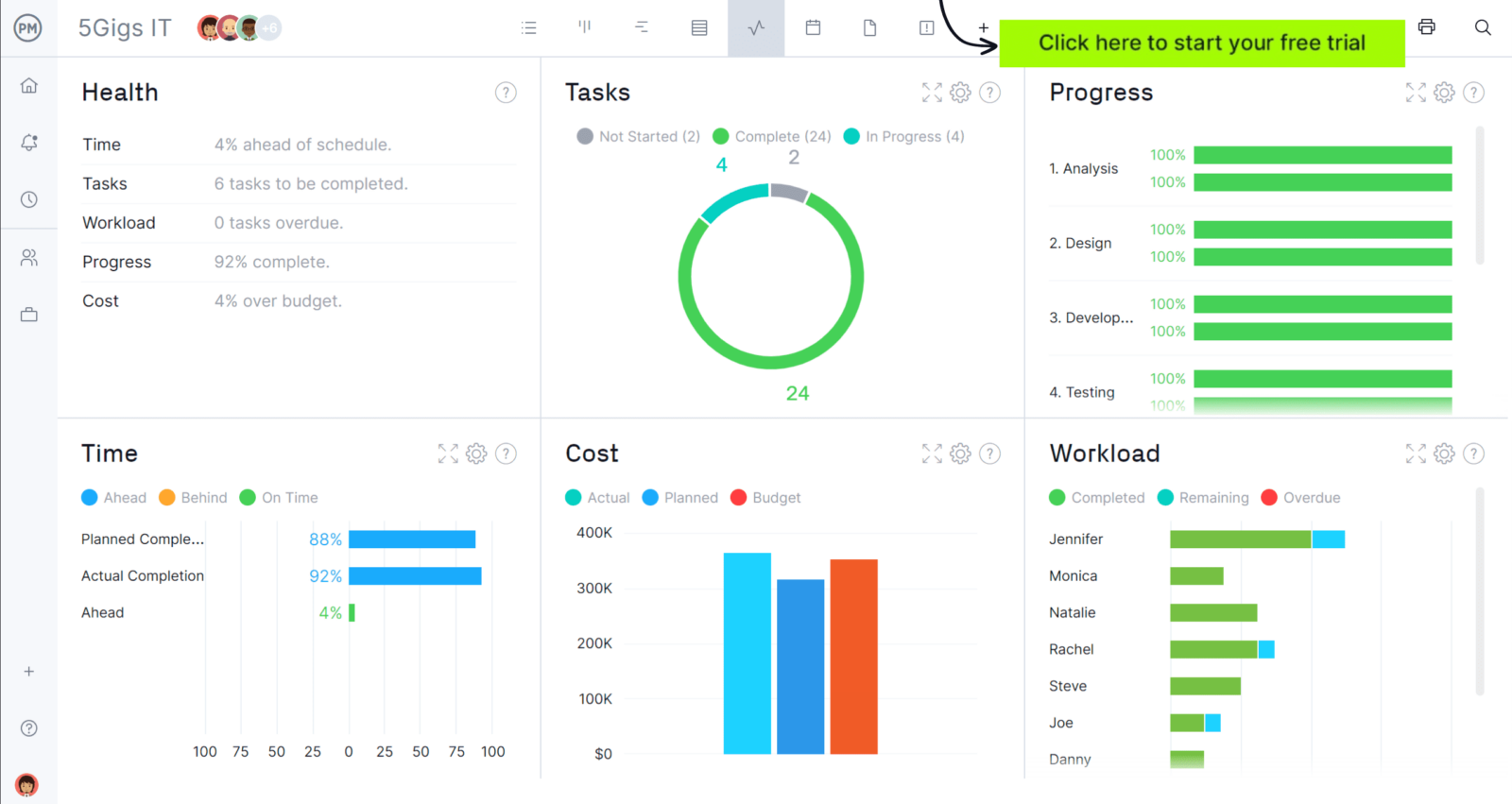
ProjectManager offers robust project management features such as Gantt charts, task lists, workload management charts, timesheets and real-time dashboards and reports. In addition to that, it’s also equipped with AI project insights, online team collaboration features and unlimited file storage that further help project managers ensure nothing falls through the cracks. Watch the video to learn more!
What Other Free Project Management Templates Can Help with Issue Management?
We’ve created over 100 free project management templates for Excel, Word and Google Sheets. Here are some that can be used in conjunction with an escalation matrix template to solve issues.
Issue Tracking Template
Use an issue tracking template to log, prioritize and assign issues, capturing impact, ownership and status so nothing gets lost, enabling teams to resolve problems efficiently and maintain project control.
RAID Log Template
A RAID log template helps teams document risks, assumptions, issues and decisions in one place, allowing proactive planning, better visibility and informed responses that protect project scope, timeline and budget.
RACI Matrix Template
A RACI matrix template clarifies roles across project tasks by assigning responsibility, accountability, consultation and communication, ensuring everyone understands their involvement and reducing confusion during execution.
If you need a tool to help you manage projects, then signup for our software now at ProjectManager. Our online software helps teams across industries plan, track and oversee projects as they unfold. Sign up for a free 30-day trial today!