



Last updated: November 20, 2026
Six Procore alternatives stand out for construction teams replacing Procore as their construction management platform: Autodesk Construction Cloud for general contractors who want a platform with similar breadth, CMiC for larger firms that want project management and construction ERP in one system, and Contractor Foreman for smaller contractors who want RFIs, submittals and financials at a published price. Fieldwire suits field teams that work from drawings, Buildertrend suits home builders, remodelers and commercial buildouts, and JobTread suits residential and small commercial contractors who want an all-in-one tool with published pricing.
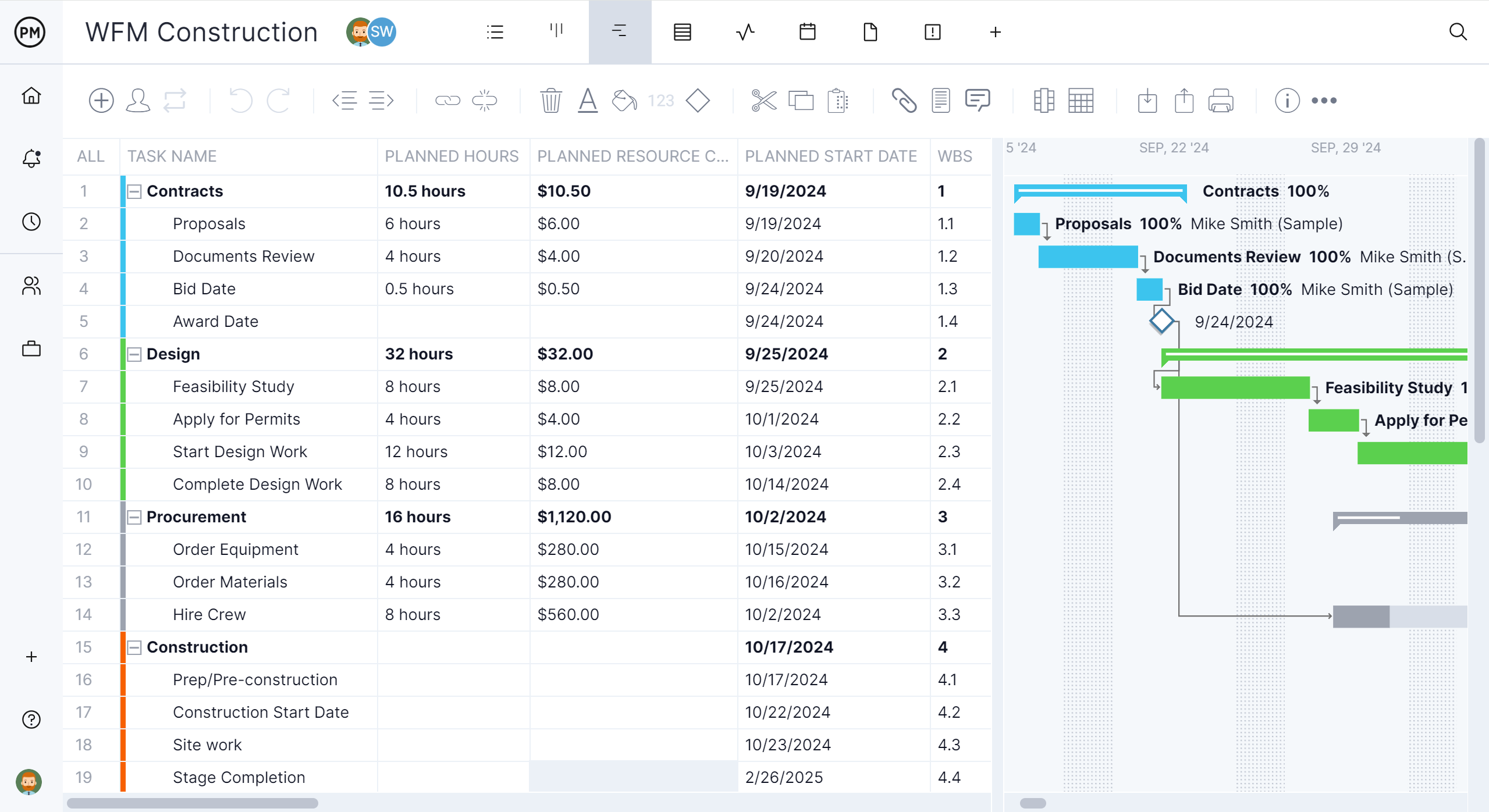
Just need better scheduling on top of your Procore setup? ProjectManager gives construction teams Gantt charts with critical path and baselines, crew workload across jobs (Business plan), and dashboards and variance reports, and exports MPP files you can share in Procore as a read-only schedule. Try ProjectManager free for 30 days.

What Procore Does Well and Why Teams Look for Procore Alternatives
Procore is a full construction management platform. It covers documents, RFIs, submittals, budgets, quality and safety, and Procore Scheduling, generally available since February 2026, adds schedule building with all four dependency types and lag, critical path and lookaheads. Procore doesn’t charge per user, so owners, subs and field staff can all work in the same system. For a general contractor that runs every part of the project record in one place, that breadth is the main reason to stay.
Teams look for Procore alternatives for a few common reasons:
- Pricing based on construction volume. Procore is priced by quote, based on the products you choose and your annual construction volume. As volume grows, so does the bill, and smaller contractors can find it hard to justify.
- More platform than some teams need. A contractor that mainly needs drawings, daily logs and a schedule may not use most of what it pays for.
- Complexity. A platform with this many tools takes time to set up and learn, especially for smaller teams without a dedicated administrator.
- Scheduling limits. Schedules imported from Primavera P6 or Microsoft Project stay read-only in Procore, and Procore’s user guide lists Scheduling actions as web-only.
If your team only wants better scheduling, you may not need to replace Procore at all. See Procore alternatives for construction scheduling for tools that work alongside it.
What to Look for in a Procore Alternative
A Procore alternative should cover the parts of the project record your team actually uses, at a price that fits your volume. Check for these features.
Document and drawing management
Look for current drawing sets in the field, markups, version control and a single place for specifications, photos and contracts.
RFIs and submittals
General contractors replacing Procore usually need RFI and submittal workflows with logs, due dates and responses. Check which plan includes them, since some tools reserve them for top tiers.
Scheduling
Check whether the tool supports dependencies with lag, critical path and baselines, or only a calendar. If scheduling is a weak spot, you can pair the platform with dedicated construction scheduling software.
Budgets and cost tracking
Look for budgets, change orders, commitments, invoicing and a link to your accounting system, or a full construction ERP if you want to replace accounting too.
Field and mobile tools
Superintendents need daily logs, punch lists, inspections, photos and drawings on a phone or tablet. Check what works in the mobile app and whether field users need a paid license.
Users and pricing model
Compare per-user, per-company and volume-based pricing, and count everyone who needs access, including subs and owners. Free portal or field users can change the math.
Integrations
Check the accounting, payroll and estimating tools your team already uses, such as QuickBooks, so you don’t have to enter data twice.
Procore Alternatives Compared
Which Procore Alternatives Cover Documents, RFIs and Budgets?
Autodesk Construction Cloud, CMiC and Contractor Foreman come closest to Procore’s full project record, while Fieldwire keeps RFIs and submittals on its top plan and Buildertrend’s and JobTread’s pages checked for this guide don’t list them.
| Tool | Best for | Documents and drawings | RFIs and submittals | Budgets and financials | Field tools |
|---|---|---|---|---|---|
| Autodesk Construction Cloud | GCs who want a platform with Procore’s breadth plus preconstruction and model tools | Document management and design collaboration | Automatic submittal log | Cost management; estimating and takeoff products | Mobile access; quality, safety and issue management |
| CMiC | Larger firms that want project management and construction ERP on one database | Drawing and construction document management | Not named on its homepage | Construction accounting, project controls, payroll and HCM | Quality and safety; office-to-field communication |
| Contractor Foreman | Smaller contractors who want RFIs, submittals and financials at a published company price | Documents with drawing and PDF markup | RFIs and notices; submittals | Estimates, change orders, POs, invoices, AIA billing, QuickBooks | Daily logs, punch lists, inspections, time cards |
| Fieldwire | Field teams that work from drawings | Plan viewing on all plans; sheet compare on Pro and above | Business Plus plan | Change orders on Business Plus | Tasks and punch lists tied to drawings; forms on Business and above |
| Buildertrend | Home builders, remodelers and commercial buildouts | File storage with annotation; plans and specifications | Not listed on its pricing page | Estimates, job costing budget, POs, invoices, QuickBooks and Xero | Daily logs, time clock, sub portal |
| JobTread | Residential and small to mid-sized commercial contractors | Not covered in this guide | Not documented in the pages checked | Budgets; all features in one plan | Free field users for photos, daily notes and schedules |
What Do Procore Alternatives Cost, and How Do They Schedule?
Contractor Foreman, Fieldwire and JobTread publish their prices, while Autodesk, CMiC and Buildertrend quote like Procore does, and Contractor Foreman, Buildertrend and JobTread include critical path scheduling.
| Tool | Scheduling | Pricing model | Starting price | Free trial or plan |
|---|---|---|---|---|
| Autodesk Construction Cloud | Not described on its pricing page | Bundles with user, project or account-based pricing | By quote | Money-back guarantee |
| CMiC | Not described on its homepage | Quote | By quote | Demo |
| Contractor Foreman | Gantt with all four dependency types, lag and critical path (Plus and above) | Per company, with a user limit per plan | $49/month (1 user), billed annually | 30-day free trial |
| Fieldwire | Gantt view with related tasks; no documented critical path or baselines | Per user | Pro $39/user/month, billed annually | Free Basic plan (up to 5 users, 3 projects) |
| Buildertrend | Gantt with finish-to-start and start-to-start links, critical path and baselines | Custom quote with unlimited users and projects | By quote | Demo |
| JobTread | Gantt with dependencies and lag, critical path and baselines | Base fee plus tiered per-user fee | $199/month including 1 user | No free trial; 30-day money-back guarantee on monthly plans |
Prices are list prices as of November 2026 and change often. Check each vendor’s site before buying.
6 Best Procore Alternatives
1. Autodesk Construction Cloud
Autodesk Construction Cloud, now sold under the Autodesk Forma name, ranks first because it comes closest to Procore’s breadth. Forma Build covers project management, an automatic submittal log, cost management, quality and safety, and project closeout, with document management, issue management, reporting and mobile access across the platform. It goes further than Procore in design and preconstruction, with model coordination, clash detection, 4D and 5D simulation, and bidding and estimating products such as BuildingConnected Pro, Bid Board Pro, TradeTapp, Forma Takeoff and Forma Estimate.
The trade-offs are pricing and assembly. Autodesk sells bundles for model management, preconstruction and construction operations, all by quote, with user, project or account-based pricing, so you’ll need to decide which products you need. Its pricing page doesn’t describe scheduling features such as dependency types, critical path or baselines, so check those in a demo if scheduling matters to you.
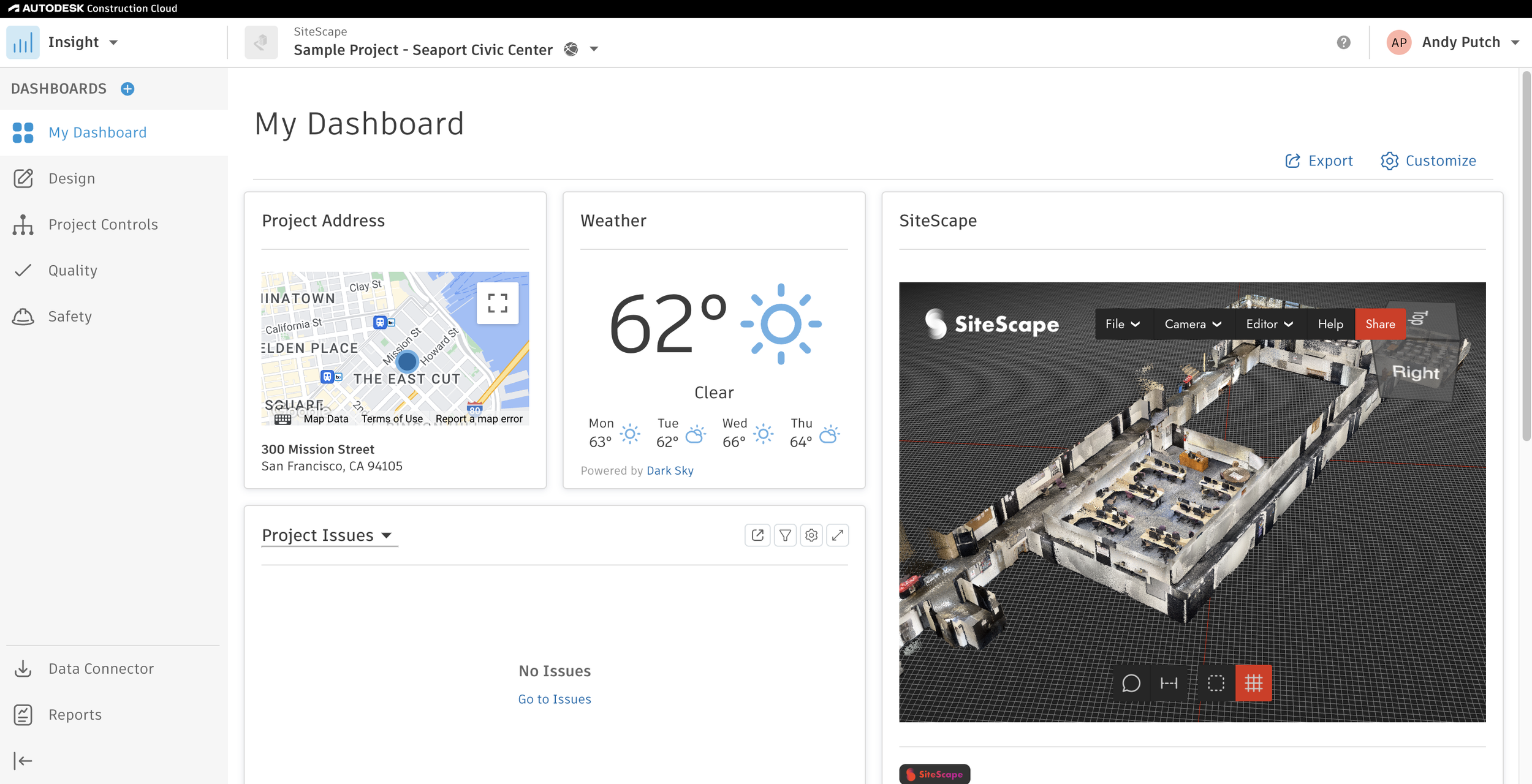
Best for: General contractors who want a platform with Procore’s breadth plus preconstruction, model coordination and design collaboration from one vendor.
Key features
- Forma Build: project management, automatic submittal log, cost, quality and safety management, and project closeout
- Document management, issue management, reporting and mobile access
- Model coordination, design collaboration, clash detection and 4D and 5D simulation
- Preconstruction products: BuildingConnected Pro, Bid Board Pro, TradeTapp, Forma Takeoff, Forma Estimate and ProEst
Pros
- Breadth close to Procore, with stronger design and preconstruction tools
- Money-back guarantee and free short training videos
- Support 24 hours a day, Monday to Friday
Cons
- All bundles are priced by quote
- Many separate products, so choosing the right bundle takes work
- Scheduling features aren’t described on its pricing page
Pricing: By quote. Bundles for model management, preconstruction and construction operations, with user, project or account-based pricing.
2. CMiC
CMiC is construction ERP and project management software built on a single database, for general contractors, subcontractors, heavy-highway firms and mechanical contractors. Its project management product covers project controls, drawing and construction documents, prequalification and procurement, and quality and safety, and its financials product covers construction accounting, project controls, equipment and inventory, and construction payroll and HCM. It also lists document management, drawing management, change order management and forecasting.
CMiC ranks second because it replaces more than Procore: it also replaces your accounting and payroll systems. That suits larger firms that want the project record and the financials in one system, but it’s a bigger change than a team replacing only Procore may want. CMiC’s homepage doesn’t name RFIs, submittals or scheduling features, so confirm those in a demo. CMiC describes itself as an AI-powered construction ERP.
Best for: Larger general contractors and subcontractors that want project management, document control and construction accounting on one database.
Key features
- Project management: project controls, drawing and construction documents, prequalification and procurement, quality and safety
- Financials: construction accounting, project controls, equipment and inventory, payroll and HCM
- Document, drawing and change order management, and forecasting
- Integrations built by CMiC and by partners
Pros
- Project management and ERP on a single database
- Built for general contractors, subcontractors, heavy-highway and mechanical contractors
- Replaces accounting and payroll as well as the project record
Cons
- Pricing by quote only
- An ERP switch is a larger project than replacing Procore alone
- RFIs, submittals and scheduling features aren’t described on its homepage
Pricing: By quote.
3. Contractor Foreman
Contractor Foreman is an all-in-one construction management tool priced per company, and it covers more of Procore’s project record than most tools at its price. It includes RFIs and notices, submittals, documents with drawing and PDF markup, daily logs, punch lists, permits and inspections, change orders, purchase orders, subcontracts, invoices with AIA billing and retainage, and a client portal. It also has estimating with an AI Estimator and takeoffs, bid management, time cards, safety meetings and integrations with QuickBooks Online and Gusto.
Scheduling is stronger than in many all-in-one tools. The Gantt scheduler supports all four dependency types with lead and lag, tracks the critical path and can link tasks across projects, though linked tasks only move when Auto Scheduling is on. Gantt scheduling and the crew schedule start on the Plus plan, and the client portal starts on Pro. For more all-in-one options, see these Buildertrend alternatives for home builders.
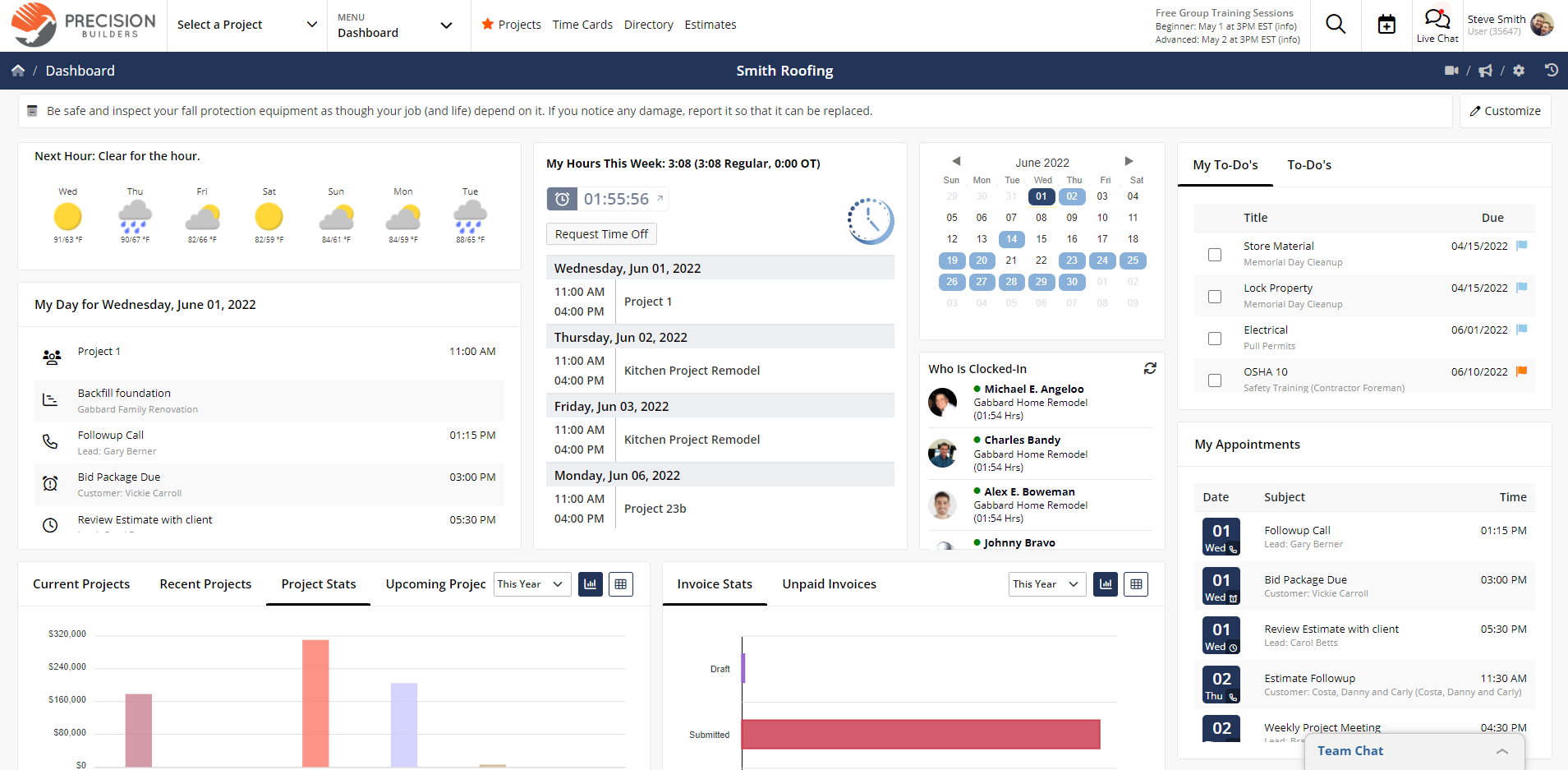
Best for: Smaller general contractors and specialty contractors who want RFIs, submittals, financials and Gantt scheduling at a published company price.
Key features
- RFIs and notices, submittals, documents with drawing and PDF markup
- Daily logs, punch lists, permits, inspections, safety meetings and time cards
- Estimates, takeoffs, bid management, change orders, POs, subcontracts and invoices with AIA billing
- Gantt scheduling with all four dependency types, lag and critical path (Plus and above)
- QuickBooks Online and Gusto integrations; iPhone, iPad and Android apps
Pros
- Broad coverage of the project record at a low, published price
- Scheduling depth close to dedicated scheduling tools
- 30-day free trial
Cons
- User limits per plan, with unlimited users only on the top plan
- Gantt scheduling starts on Plus, and the plans page doesn’t say which plan includes RFIs and submittals
- Dependencies don’t move dates unless Auto Scheduling is on
Pricing: Basic $49/month (1 user), Standard $105/month (up to 3 users), Plus $166/month (up to 8 users), Pro $221/month (up to 15 users) and Unlimited $332/month, all billed annually. 30-day free trial.
4. Fieldwire
Fieldwire is field management software built around drawings. Every plan includes plan viewing, and tasks and punch lists are tied to locations on the drawings, in the browser and on iPhone, iPad and Android apps. Sheet compare starts on Pro, custom forms on Business, and RFIs, submittals and change orders on Business Plus.
Fieldwire ranks fourth because it covers the field well but less of the office side: the pages checked for this guide don’t describe budgets or accounting, and its Gantt view links “related tasks” rather than dependencies, so changing a task’s dates doesn’t move related tasks. It has no documented baselines or calculated critical path. Its free Basic plan makes it easy to try. For more, see what is Fieldwire.
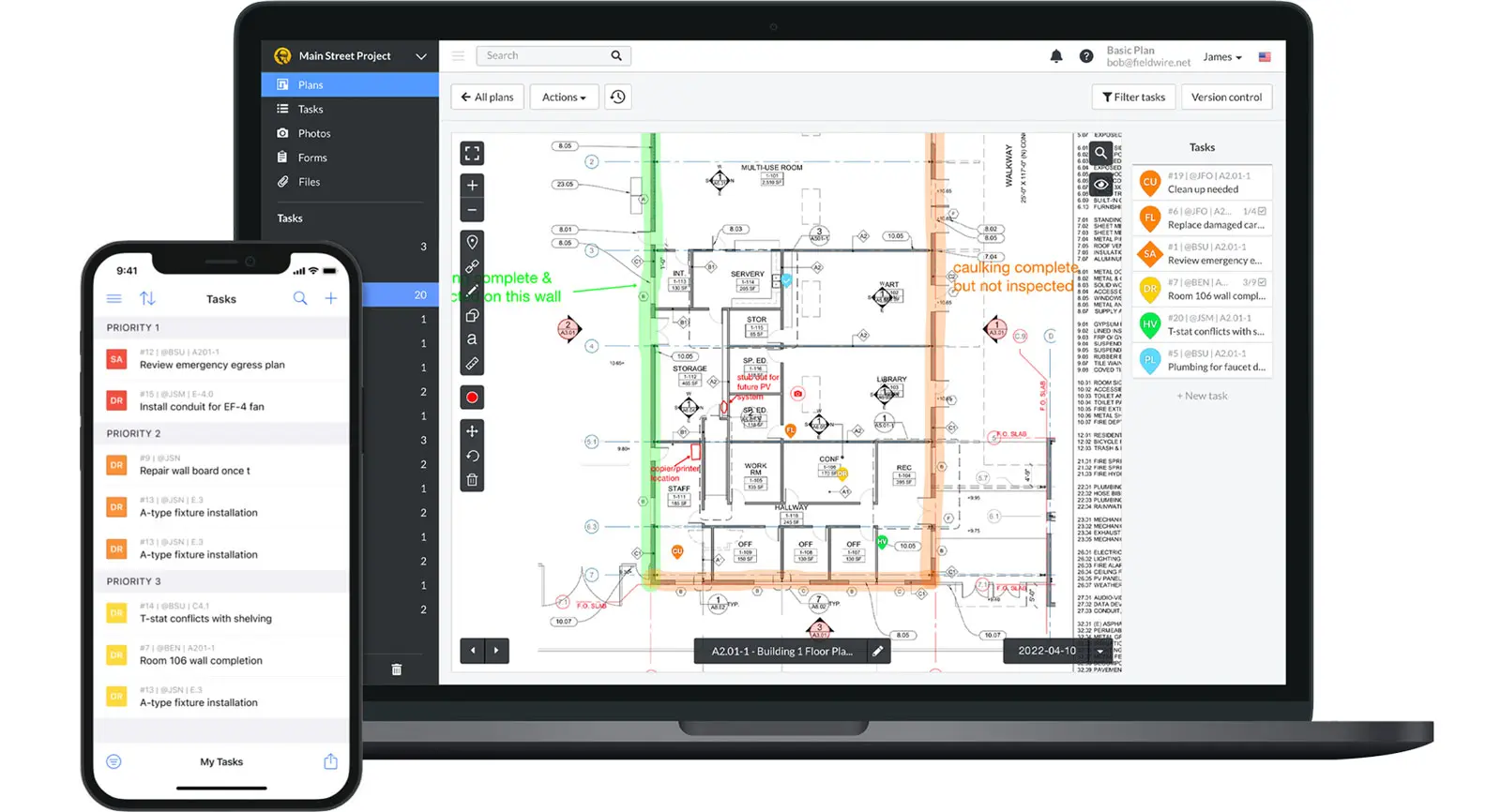
Best for: Field teams and specialty contractors who work from drawings and want published per-user pricing.
Key features
- Plan viewing on all plans, with sheet compare on Pro and above
- Tasks and punch lists tied to drawings
- Custom forms (Business and above)
- RFIs, submittals and change orders (Business Plus)
- Gantt view of tasks with a manpower graph
Pros
- Free plan for up to 5 users and 3 projects
- Same project in the browser and on iPhone, iPad and Android
- Published per-user prices
Cons
- RFIs, submittals and change orders need the top Business Plus plan
- Related tasks don’t move when dates change, and there’s no documented critical path or baselines
- Per-user pricing adds up for large teams, unlike Procore’s unlimited users
Pricing: Basic free (up to 5 users, 3 projects). Pro $39, Business $64 and Business Plus $89 per user/month, billed annually.
5. Buildertrend
Buildertrend is construction management software for home builders, remodelers, specialty contractors and commercial contractors doing restaurant, office and retail buildouts. It covers sales (CRM, proposals and a client portal), project management (schedule, change orders, plans and specifications, daily logs, tasks, time clock, selections and warranties) and financials (bids, estimates, takeoff, job costing budget, bills and purchase orders, invoices and payments), with QuickBooks, Xero and Gusto integrations.
Like Procore, Buildertrend prices by custom quote with unlimited users and unlimited projects. Its schedule has a Gantt view with finish-to-start and start-to-start links with lag, a critical path toggle and baselines. It ranks fifth for this buyer because it’s built mainly for residential and light commercial work, and its pricing page doesn’t list RFIs or submittals. For more options, see these Buildertrend alternatives for home builders.
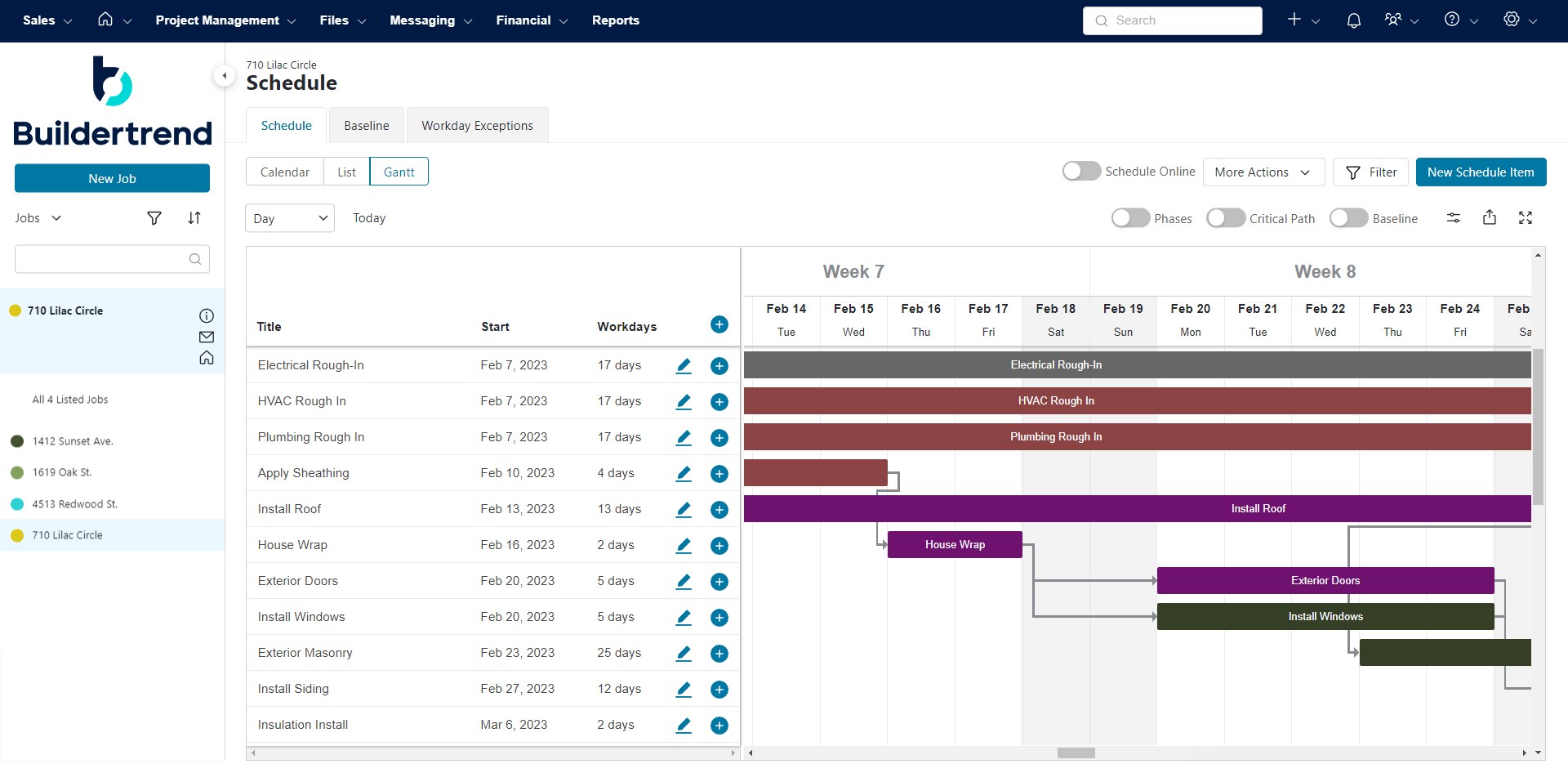
Best for: Home builders, remodelers and contractors doing commercial buildouts who want sales, client and financial tools in one platform with unlimited users.
Key features
- Client portal, CRM and proposals
- Schedule with Gantt view, critical path toggle and baselines
- Change orders, plans and specifications, daily logs, selections and warranties
- Estimates, takeoff, job costing budget, bills, purchase orders, invoices and payments
- Sub portal and file storage with annotation
Pros
- Unlimited users and projects
- Strong client-facing tools for residential work
- QuickBooks, Xero and Gusto integrations
Cons
- Pricing by quote only
- RFIs and submittals aren’t listed on its pricing page
- Schedule links are finish-to-start and start-to-start only
Pricing: Custom quote with unlimited users and projects; 10% off when you pay annually upfront.
6. JobTread
JobTread is construction management software for home builders, remodelers, specialty contractors and small to mid-sized commercial projects, sold as one plan with all features included. Its schedule has Gantt, calendar and list views, dependencies with lag, a critical path and baselines, and an availability view across the organization. Vendor, subcontractor and customer portal users are free and unlimited, and field crew who only upload photos, log daily notes, view their schedule or check off tasks can be added as free users.
JobTread ranks sixth because the pages checked for this guide don’t document RFIs or submittals, which most general contractors replacing Procore need. It also has no free trial, though monthly subscriptions come with a 30-day money-back guarantee and every client gets a customer success manager.
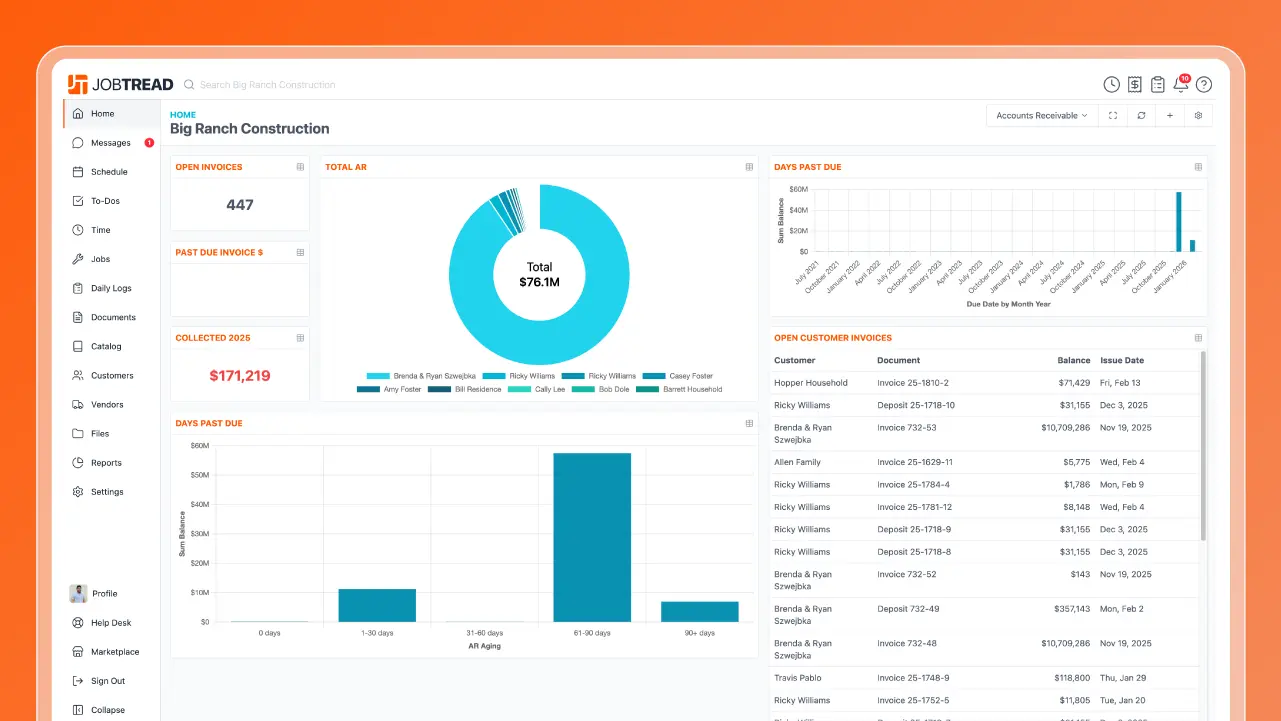
Best for: Residential and small to mid-sized commercial contractors who want an all-in-one tool with published pricing and free field and portal users.
Key features
- Gantt, calendar and list schedule views with dependencies, lag, critical path and baselines
- Organization-wide availability view for team members and vendors
- Free, unlimited vendor, subcontractor and customer portal users
- Free field users for photos, daily notes and schedules
- Apps for Apple and Android devices, and calendar sync with iCal, Google Calendar and Outlook
Pros
- Published pricing with all features in one plan
- Free portal and field users
- A customer success manager for every client
Cons
- RFIs and submittals aren’t documented in the pages checked
- No free trial
- No Microsoft Project or Excel schedule import documented
Pricing: $199/month including one internal user, plus $20/month for each additional user (2–10 users), with lower per-user rates above 10 users. Save 20% with annual billing.
Honorable Mention: ProjectManager for Scheduling Alongside Procore
ProjectManager isn’t a construction management platform, so it isn’t ranked above. It’s for teams that keep Procore for documents and RFIs but want a dedicated scheduling tool, and for teams that mainly need scheduling and don’t need a full platform. Its Gantt chart links tasks with all four dependency types and lag, with a critical path filter, baselines and variance reports. On the Business plan, the workload page shows each person’s hours across all projects. Subs can follow along as free read-only guests on the Team and Business plans, and ProjectManager exports MPP files you can share in Procore as a read-only schedule.
Its limits: no RFIs, submittals or drawing management, and no XER import or export. Pricing starts at $15/user/month (Team, billed annually), with a 30-day free trial. For the full comparison, see Procore alternatives for construction scheduling.
Procore Alternatives FAQ
Which Procore alternative is best for general contractors?
For general contractors who want a full platform, Autodesk Construction Cloud comes closest to Procore’s breadth and adds preconstruction and model coordination. Larger firms that also want to replace accounting can look at CMiC, and smaller contractors can look at Contractor Foreman for RFIs, submittals and financials at a published price.
Is there a cheaper alternative to Procore?
Yes. Contractor Foreman starts at $49/month for the company (billed annually), Fieldwire has a free plan for up to 5 users and 3 projects, and JobTread starts at $199/month. Procore is priced by quote based on annual construction volume, so compare the total cost for your team and volume rather than list prices alone.
What’s a Procore alternative for small contractors?
Contractor Foreman suits small contractors who want RFIs, submittals, financials and scheduling in one tool at a published price. Fieldwire suits small field teams that work from drawings, and JobTread and Buildertrend suit residential and light commercial contractors.
Can I use a separate scheduling tool with Procore?
Yes. Procore imports Microsoft Project MPP and Primavera P6 XER files as read-only schedules, so some teams build and update the schedule in a dedicated tool and share it in Procore. ProjectManager exports MPP for this. See Procore alternatives for construction scheduling and Procore vs. ProjectManager.
Does Procore have scheduling?
Yes. Procore Scheduling has been generally available since February 2026. It supports all four dependency types with lag, critical path, lookaheads and automatic schedule version snapshots. Schedules imported from Microsoft Project or Primavera P6 stay read-only.
Does Procore charge per user?
No. Procore includes unlimited users and prices by quote, based on the products you choose and your annual construction volume.
Related Content
- Best Procore Alternatives for Construction Scheduling (2026)
- 9 Best Construction Scheduling Software for 2026 (Free & Paid)
- Best Buildertrend Alternatives for Home Builders (2026)
- 10 Best Construction Project Management Software: 2026 Buyer’s Guide
- Best Smartsheet Alternatives for Construction (2026)
- Best monday.com Alternatives for Construction (2026)
- 5 Best Primavera P6 Alternatives for Construction Projects (2026)
- 8 Best Construction Software for Mac (2026)
