


A stock register format is a structured record used to track the movement of goods, materials and supplies within a business. It helps monitor the quantity, value and flow of stock from purchase to consumption. Businesses use a consistent stock register format to record details such as date, item name, batch number, quantity received, quantity issued and balance on hand. This simple yet vital document ensures stock accuracy and smooth inventory management across departments.
The stock register format also provides transparency and control, preventing issues like overstocking, shortages and discrepancies. Whether maintained manually or digitally, it helps businesses forecast demand, optimize procurement and reduce waste. While traditional stock books or spreadsheets can work for smaller operations, modern companies increasingly need faster, more accurate methods for managing stock records efficiently across multiple locations.
Although maintaining a stock register format in Excel offers flexibility, it has limitations in scalability and automation. Manual data entry can introduce errors, slow updates and make collaboration difficult. Tracking large inventories across teams or sites becomes time-consuming and reconciling data manually often results in delayed insights. For real-time visibility and better decision-making, businesses are moving beyond static spreadsheets toward dynamic tools that update automatically.
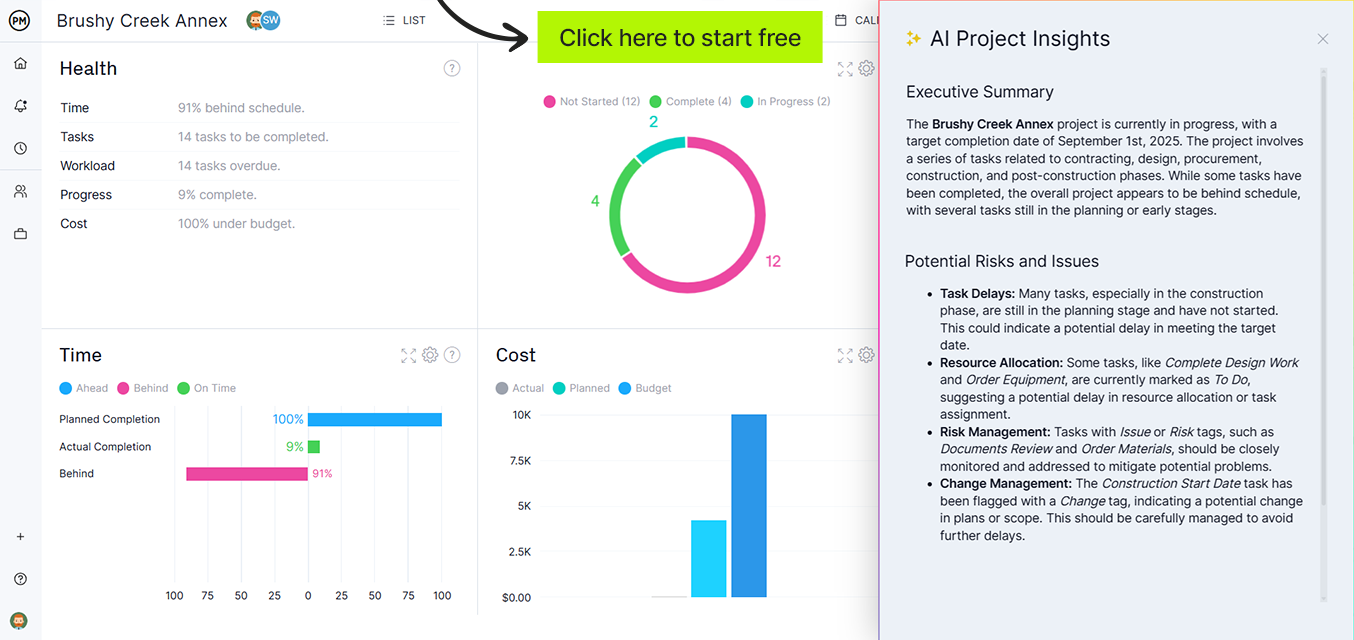
That’s where ProjectManager excels. It’s the best solution for managing inventory, tracking materials and visualizing supply movements in real time. Our software integrates task management, reporting and stock tracking into one platform. Users can create digital equivalents of a stock register format, automate data updates and share insights instantly across teams. With AI-powered dashboards and live reporting, our software eliminates guesswork, reduces errors and helps businesses maintain control over stock with unmatched efficiency. Get started with ProjectManager today for free.
Why You Need a Stock Register Format
A stock register format is essential for maintaining clear, accurate and accessible inventory records. It creates accountability by showing exactly how and when stock moves in and out of storage. This level of organization helps businesses manage reorder points, assess stock valuation and ensure consistent availability of raw materials or finished goods. Without a structured record, tracking stock manually or from memory leads to mismanagement and costly mistakes.
Using a standardized stock register format also improves auditing and compliance. It provides a chronological record of every stock transaction, which supports transparency during financial reviews or internal audits. Moreover, when companies adopt a stock register format in Excel or software platforms like ProjectManager, they gain real-time control and accuracy that manual systems can’t match. Proper documentation of stock flow not only ensures operational efficiency but also enhances decision-making and long-term profitability.

When to Use a Stock Register Format
A stock register format should be used whenever a business needs to record and monitor the inflow and outflow of materials or finished goods. It’s especially valuable in environments with frequent stock movement, such as warehouses, production facilities and retail operations. By maintaining this record, teams can prevent shortages, detect overstocking and ensure the accuracy of financial reporting. Consistent use also helps identify patterns in material usage and forecast future inventory requirements.
Companies should use a stock register format during inventory audits, procurement cycles or production runs where material tracking is critical. It’s equally useful for monitoring goods issued to specific departments or projects. Whether managed in a stock register format in Excel or through automated project management software like ProjectManager, maintaining updated records ensures every transaction is traceable and verified. This consistency leads to better planning, reduced waste and improved operational performance.
Who Should Use This Free Stock Register Format?
The free stock register format is ideal for business owners, warehouse supervisors, accountants and operations managers who oversee stock movement and inventory control. It provides a ready-to-use structure for logging items received, issued and remaining in balance. Startups, small manufacturers and trading companies benefit most because it simplifies inventory management without the need for complex systems. The format keeps records transparent and helps small teams stay organized.
Larger organizations or project-driven businesses can also use this free stock register format to track raw materials, components or project-specific supplies. It’s suitable for construction, manufacturing, retail and professional service industries that handle multiple inventory sources. When paired with project management software like ProjectManager, it scales effortlessly, automating data entry and creating a live digital record that updates instantly. This adaptability makes it a valuable tool across industries of all sizes.
How to Use This Stock Register Format for Excel
This Excel template is built to help you efficiently manage your inventory and monitor stock movements without needing advanced Excel skills. It automatically performs calculations for stock values and totals, saving time and reducing manual errors. Follow these step-by-step instructions to get the most accurate results.
1. Enter Header Information
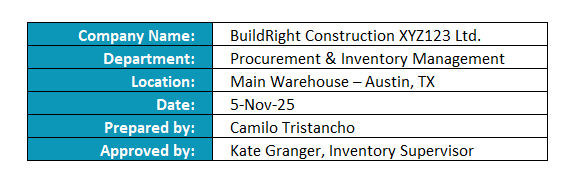
At the top of the sheet, fill in the Company Name, Department, Location, Date, Prepared by and Approved by fields. These identify your document and provide important context for internal tracking and audits.
Make sure this information matches your company’s reporting format so each record is traceable. If you’re preparing a new monthly or weekly register, update the date and the responsible personnel. The header is essential for documentation consistency and accountability, especially when printed or shared with supervisors or auditors reviewing stock movement trends.
2. Update the Item Descriptions Table
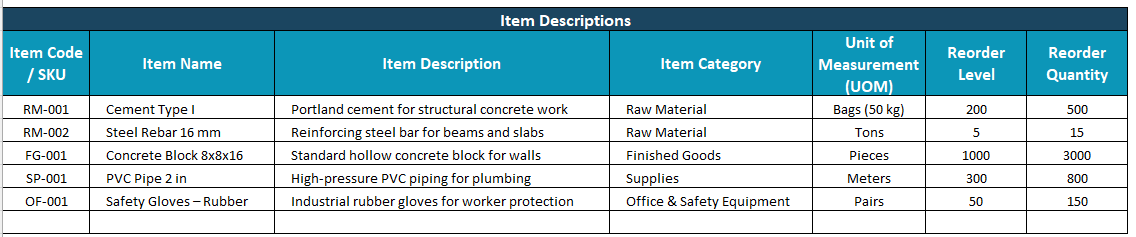
The Item Descriptions section is your master inventory list. Add or modify information only when introducing new materials or products. Include all details such as Item Code, Name, Description, Category, Unit of Measurement (UOM), Reorder Level and Reorder Quantity.
These fields ensure each item is uniquely identifiable across departments and transactions. Keep this section updated to maintain accuracy in stock reports and to make future data entry easier. Consistency in item naming and codes will help you avoid duplicate records and confusion during audits or restocking. Think of this as your permanent catalog of materials.
3. Record Transactions in the Transactional Data Table
For each transaction (purchase, issue, or return), add a new row in the Transactional Data table.
Enter only the editable fields: Opening Stock Quantity, Quantity In, Quantity Out and Unit Cost. The rest of the values are calculated automatically.
If you’re entering a purchase, fill out the “Quantity In” and “Unit Cost.” For an issue, enter the “Quantity Out.” The “Opening Stock Quantity” should reflect what was available before the movement. Entering data carefully is crucial because these values directly determine your running totals and stock valuation, which affect overall financial accuracy.

4. Auto-Calculated Fields
Columns such as Opening Stock Value, Closing Stock Value, Total Purchase Value and Running Total After Transaction are all automated. These use Excel formulas to update whenever you modify the quantities or costs instantly. Avoid typing over these cells to preserve the built-in calculations. This stock register format has the following formulas.
- Opening Stock Value → based on Opening Stock Quantity × Unit Cost
- Closing Stock Value → based on Running Total × Unit Cost
- Total Purchase Value → based on Quantity In × Unit Cost
- Running Total After Transaction → updates automatically to reflect current stock on hand
The formulas are designed to mimic standard accounting logic; for example, multiplying quantity by cost or summing balances after each entry. This means you can rely on the results for inventory valuation reports, monthly reconciliations or audits. If you’re new to Excel, don’t worry; just enter your numbers and the sheet handles the math for you.
5. Review & Analysis
Once your data is entered, review the results to ensure accuracy. Use filters to isolate specific items or transaction types, such as purchases or issues. Conditional formatting can highlight low-stock items, helping you identify when to reorder.
You can also sort the data by date or category to see movement trends. The Closing Stock Value column gives you a snapshot of what’s left in inventory at the end of each period. This helps plan procurement schedules, budget materials and maintain a healthy stock balance. Regular review keeps your system reliable and audit-ready.
6. Save and Report
After verifying all entries, save your file under a new name; for example, “Stock Register – November 2025.” This keeps your records organized chronologically. You can print or export the sheet to PDF for internal reviews, management reports or audits.
Make it a routine to back up your data, especially if multiple users handle the register. This ensures version control and prevents accidental data loss. Over time, your saved registers will form a valuable historical record of stock performance, supplier trends and seasonal material demand. These insights can guide purchasing decisions and future inventory planning.
What Other Templates Can Help with Inventory Management?
Alongside a stock register format, several other templates can simplify inventory tracking and control. These tools ensure that data remains organized across departments and processes. They also help teams manage stock movement, material sourcing and supplier relationships more efficiently. Using these templates with a stock register format in Excel or digital software gives businesses full visibility into how materials move through their operations and where improvements can be made.
Below are three essential templates that complement a stock register format. Each one serves a specific purpose in the broader inventory management process—from maintaining records of stock levels to mapping workflows and detailing material requirements. Together, they form a complete toolkit that helps managers standardize operations, improve forecasting accuracy and minimize waste. When used in ProjectManager, these templates become powerful digital tools that update in real time for better decision-making and accountability.
Inventory Template
Download this free inventory template to track stock quantities, reorder levels and item locations in one place. It’s perfect for keeping daily operations organized and avoiding shortages or overstock. Businesses can use it to be alerted for low inventory, compare consumption trends and streamline restocking.
SIPOC Template
Use this free SIPOC template to outline the Suppliers, Inputs, Processes, Outputs and Customers involved in an inventory or production workflow. It helps managers visualize how materials enter and exit the system, making it easier to identify inefficiencies or bottlenecks. By mapping these relationships, teams can enhance coordination between supply chain stages and improve overall quality control.
Bill of Materials Template
This free bill of materials template lists every raw material, component or part required to produce a finished product. It ensures precise cost estimation and helps manufacturers maintain consistent quality standards. Teams use it to plan purchasing, monitor usage and calculate production timelines.
How to Manage Projects With ProjectManager
ProjectManager is an all-in-one project management software that helps teams plan, track and deliver projects efficiently. Whether you manage production schedules, inventory, or client deliverables, it provides real-time visibility into tasks and progress. Its flexible design lets users create detailed plans, assign responsibilities and monitor outcomes within one connected platform. Teams can collaborate from anywhere and always stay aligned on deadlines and resources.
Use Multiple Project Views
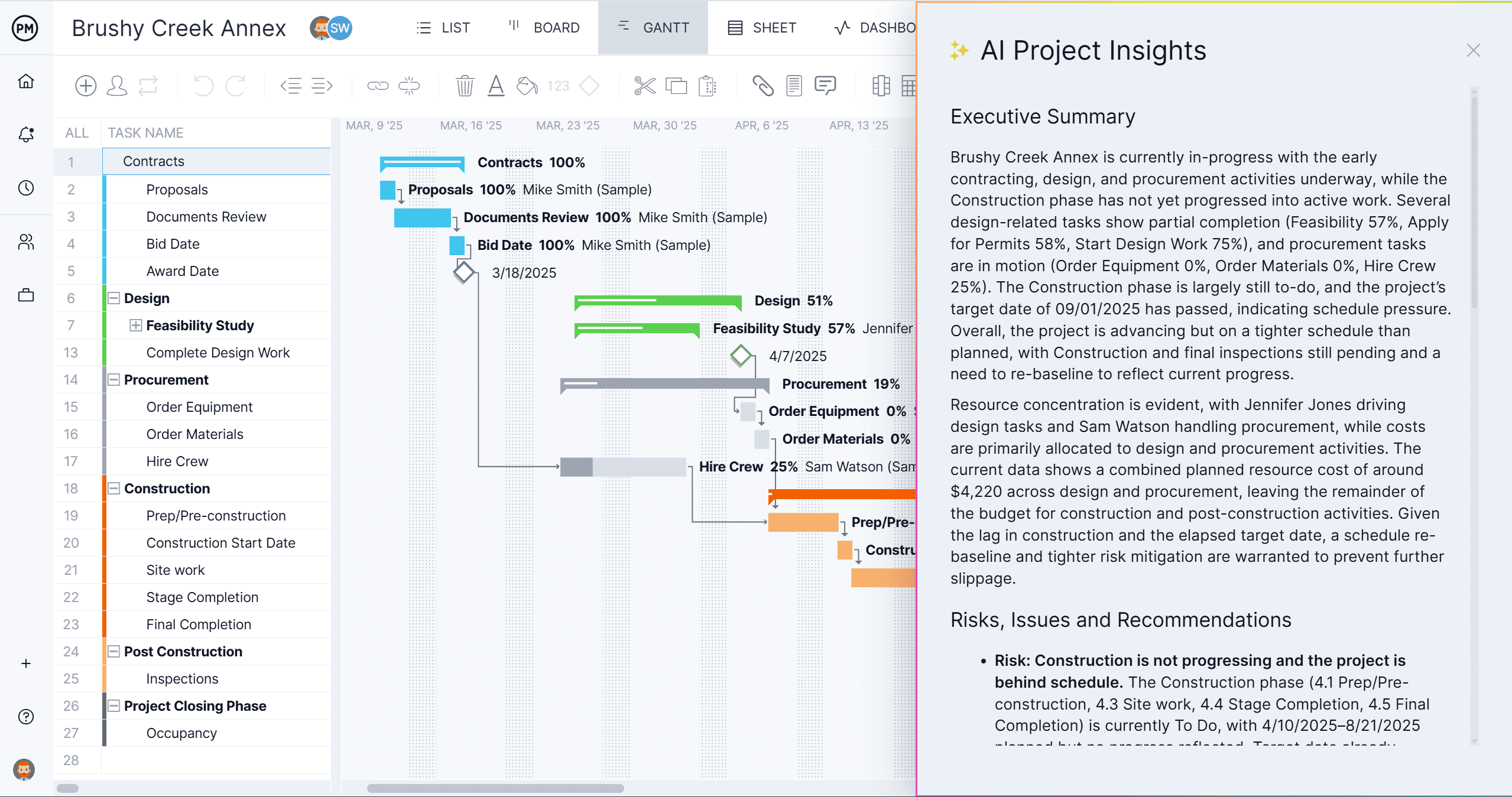
ProjectManager offers multiple project views, including Gantt charts, kanban boards and task lists that adapt to every workflow. Managers can visualize schedules in timelines, switch to boards for agile tracking, or use task lists for simple to-do organization. This flexibility allows different departments to work in the view that fits their process best while keeping all data synced in real time.
Everyone can see dependencies, priorities and due dates instantly. Plus, built-in AI Project Insights provides instant summaries and recommendations.
Track Progress and Manage Resources
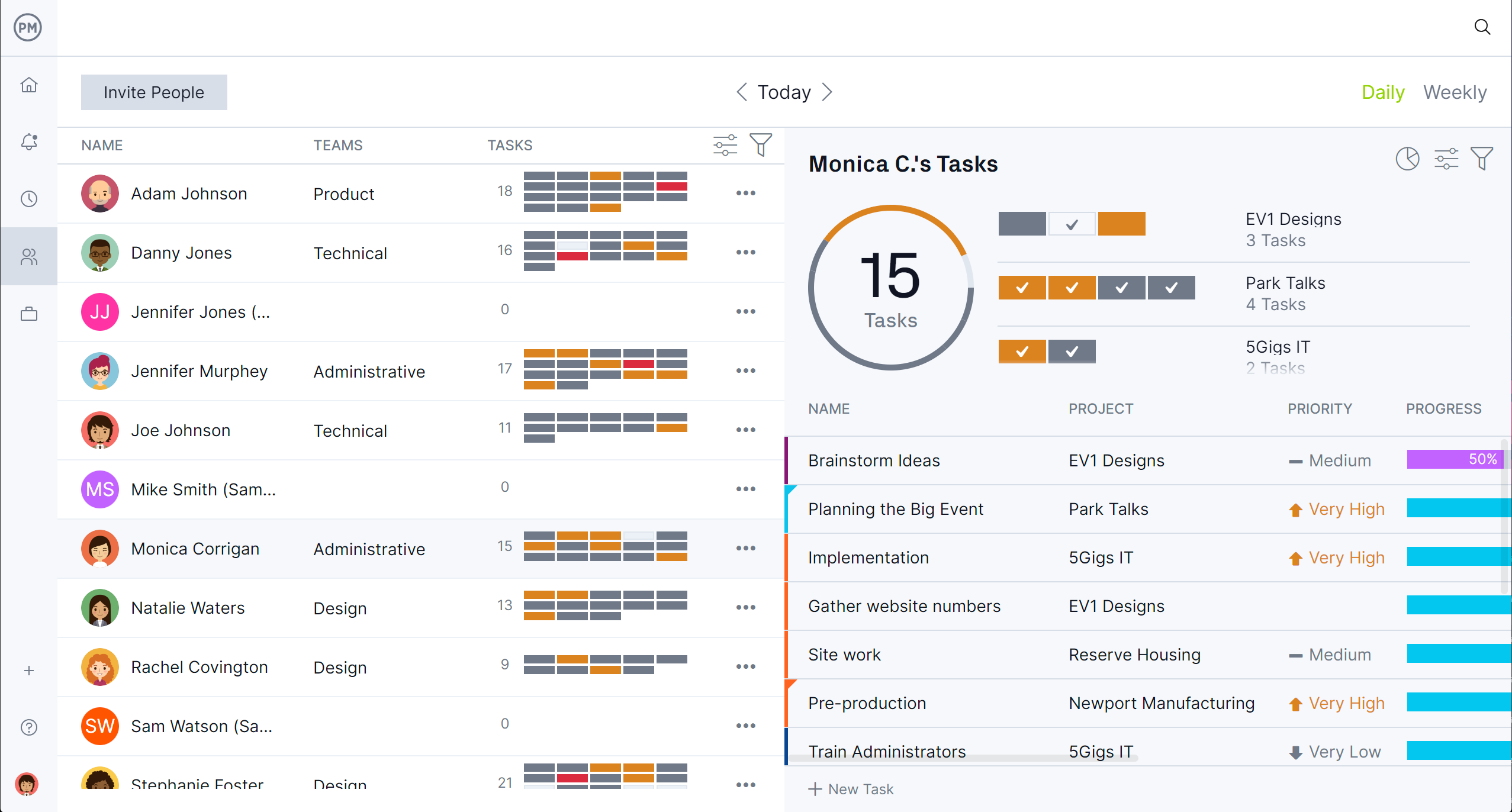
ProjectManager makes it easy to track progress, manage resources and maintain control over costs. Its dashboards show live updates on task completion, workload balance and team performance. Resource management tools help allocate labor efficiently, prevent burnout and ensure the right people are in the right jobs. Secure timesheets record hours automatically while budget-tracking features keep projects within financial limits. Everything updates in real time for better decision-making.
Related Inventory Management Content
A stock register format is part of the larger inventory management process. For readers who want to explore this topic further, check out the links below. They lead to articles with templates, descriptions of construction inventory management and much more.
- 7 Free Inventory Templates: Spreadsheets, Lists & More
- Construction Inventory Management
- What Is a Stock Sheet? Common Use Cases (Template Included)
- 18 Free Manufacturing Excel Templates (Download Now)
- Modèle de registre des stocks pour Excel (gratuit)
- Plantilla de registro de existencias para Excel (descarga gratis)
ProjectManager is online project and portfolio management software that connects teams, whether they’re in the office or out in the field. They can share files, comment at the task level and stay updated with email and in-app notifications. Get started with ProjectManager today for free.