


Materials drive cost, timing and execution on almost every project, yet they are often tracked in scattered spreadsheets, email threads or handwritten notes. A material list template brings structure to that mess by centralizing quantities, costs, suppliers and logistics in one place, whether you are coordinating site deliveries or managing production inputs.
With everything recorded in one place, a material list template makes it easier to order the right materials in the correct quantities, cut down on waste and delays and keep cost estimates on target. It also supports smoother coordination with suppliers and stronger budget control throughout the life of the project, so you are planning around real numbers instead of guesswork.

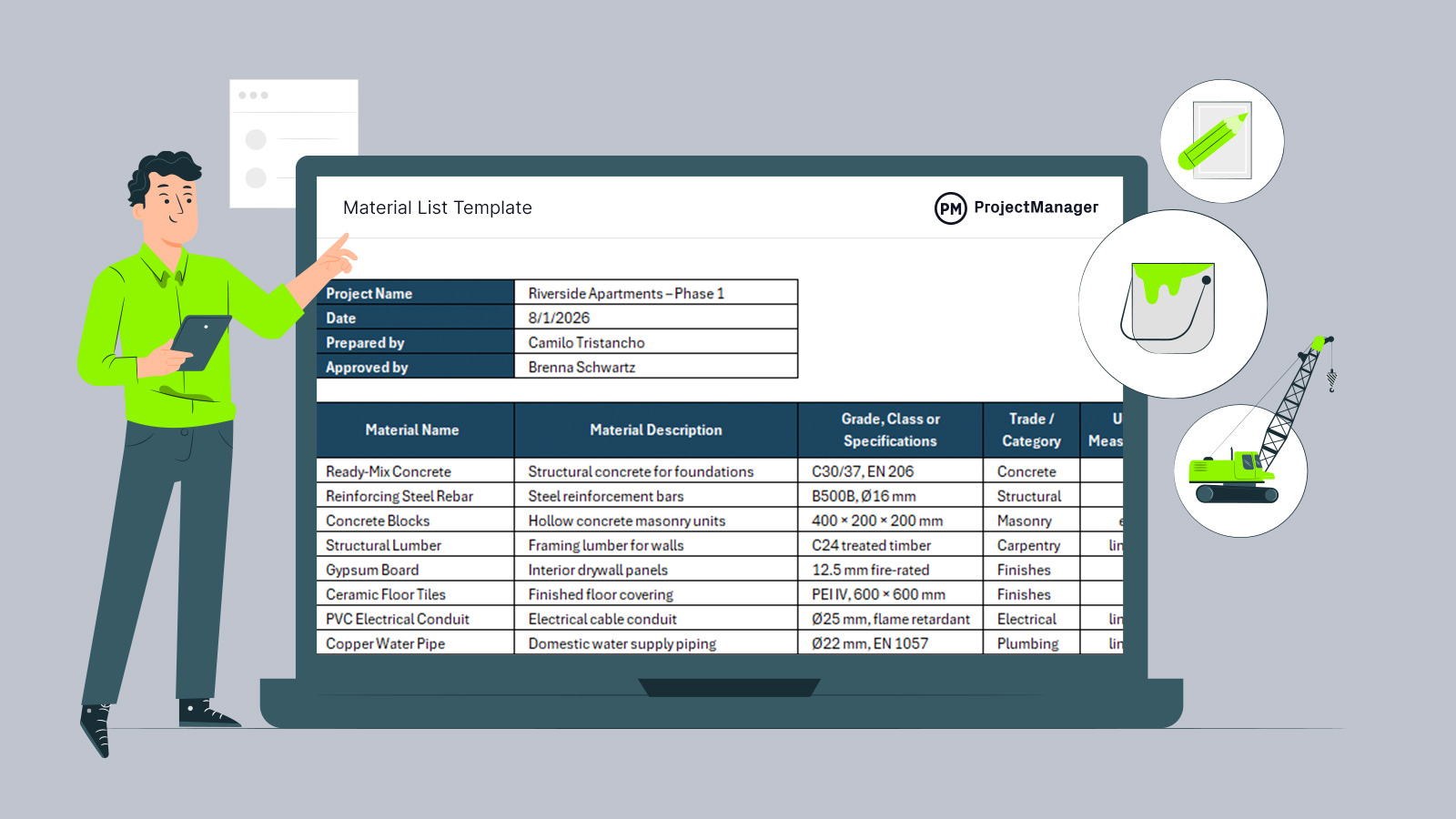
An excerpt of our material list template for Excel
Why You Need a Material List Template
Tracking materials involves more than listing items; it requires aligning specifications, quantities, costs and delivery details. An Excel-based material list template simplifies this by consolidating everything into a single, structured view. Teams can monitor required quantities, calculate total costs automatically and coordinate suppliers, delivery dates and storage needs. This reduces shortages, prevents overordering and improves visibility across construction, manufacturing or any material-intensive project without relying on disconnected spreadsheets or manual calculations.
ProjectManager supports material tracking by tying materials to tasks, costs, schedules and accountability. As materials are a major part of project costs, ProjectManager helps you include material costs in your project budget, track actual vs. planned material spend on the Gantt chart and monitor cost variances as materials are used. Get started today with a free 30-day trial.
When to Use a Material List Template
Projects involving physical goods depend on timing, quantities and space. A material list template is most valuable during planning, when teams estimate what must be sourced and when. It remains essential during execution, helping track deliveries, confirm storage conditions and adjust orders as conditions change, keeping work moving without shortages, congestion or costly last-minute purchases across manufacturing floors and active construction sites with multiple suppliers involved and tight schedules daily.
Who Should Use This Free Material List Template?
Managing materials requires coordination across roles, not just procurement. This template supports anyone responsible for specifying, ordering, receiving or storing materials, giving teams a shared reference point to align quantities, costs, schedules and on-site logistics throughout project execution and planning.
- Project managers: Use the template to align material requirements with schedules, sequencing work and avoiding delays caused by missing or late deliveries.
- Construction site managers: Track incoming materials, delivery locations and storage requirements to keep sites organized and safe.
- Manufacturing supervisors: Monitor material availability to support uninterrupted production and coordinate replenishment with operational demand.
- Procurement specialists: Manage suppliers, unit costs and order quantities using a centralized, up-to-date materials record.
- Cost estimators: Reference quantities and unit costs to develop accurate budgets and forecast material-driven expenses.
- Warehouse or storage managers: Plan space, handling methods and storage conditions based on delivery schedules and material specifications.
- Engineers and designers: Specify grades, standards and material requirements clearly to ensure compliance and performance.
- Operations managers: Oversee material flow across projects or production lines to reduce waste and improve coordination.
How to Use ProjectManager’s Material List Template for Excel
This template provides a practical framework for organizing costs, tracking spending and adjusting assumptions, helping teams maintain financial control while responding to changes throughout planning and execution across complex projects.
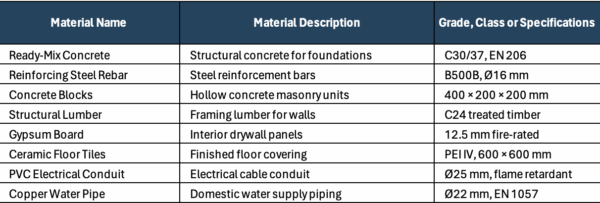
1. Define Materials and Technical Specifications
Begin by listing each required material along with a clear description and technical specifications. Including grades, standards and dimensions ensures accuracy, supports compliance and prevents mismatches between what is ordered, delivered and ultimately installed or used during production.
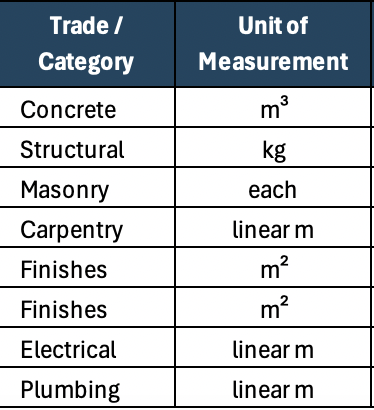
2. Assign Trade Categories and Units of Measurement
Next, categorize materials by trade or discipline and confirm the correct unit of measurement. This structure helps standardize quantities, simplifies coordination across teams and avoids confusion when aggregating materials sourced from different suppliers or work areas.
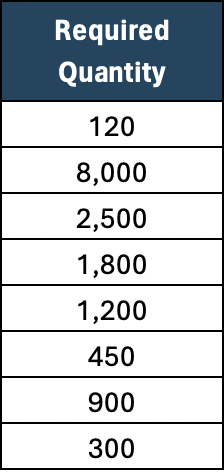
3. Estimate Required Quantities Carefully
Populate the required quantity column using drawings, bills of materials or production forecasts. Accurate quantity estimates reduce waste, limit emergency purchases and provide a reliable foundation for cost calculations and procurement planning across the project lifecycle.
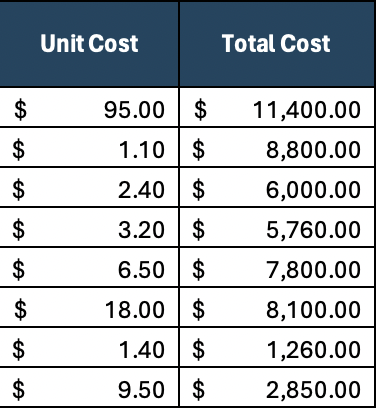
4. Enter Unit Costs to Calculate Total Material Costs
Input unit costs for each material to automatically calculate total costs. This step transforms the template into a budgeting tool, allowing teams to understand cost drivers and assess the financial impact of quantity or specification changes.
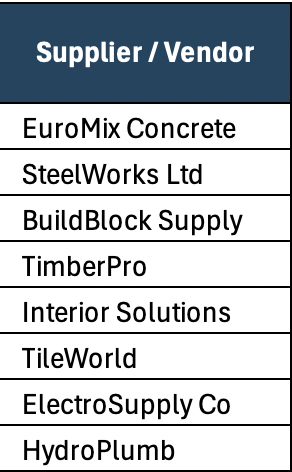
5. Add Supplier and Vendor Information
Record supplier or vendor details for each item to centralize procurement information. This makes it easier to coordinate orders, compare pricing, manage relationships and quickly identify points of contact when issues arise.
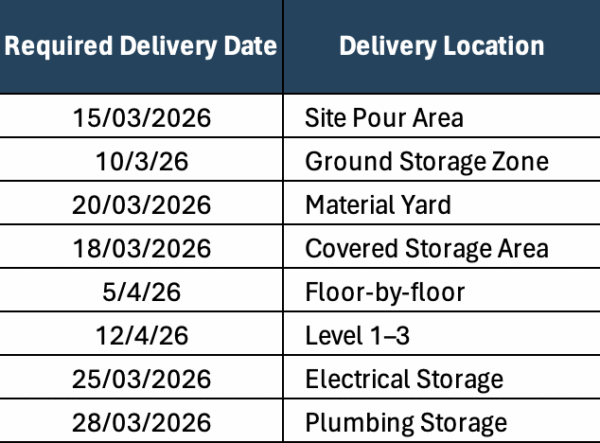
6. Schedule Delivery Dates and Locations
Specify required delivery dates and delivery locations to align materials with construction sequencing or production schedules. Proper timing minimizes site congestion, reduces storage strain and helps prevent delays caused by late or early deliveries.
7. Document Storage and Handling Requirements
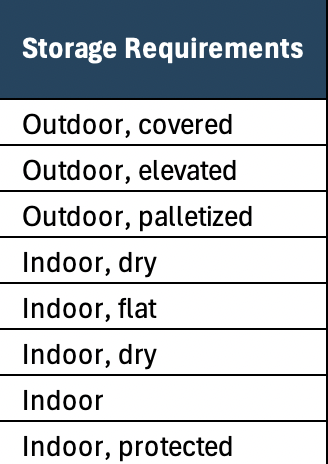
Finally, note storage requirements such as indoor, outdoor or protected conditions. Planning for storage upfront supports material quality, improves site organization and reduces damage, rehandling and safety risks during execution.
How to Manage Project Materials with ProjectManager
ProjectManager bridges planning and execution for your materials. Include materials in your plan through task assignments as costs. Then, track performance, manage disruptions and communicate clearly to ensure your materials are properly managed at every project phase.
Log Material Shortages in the RAID Log
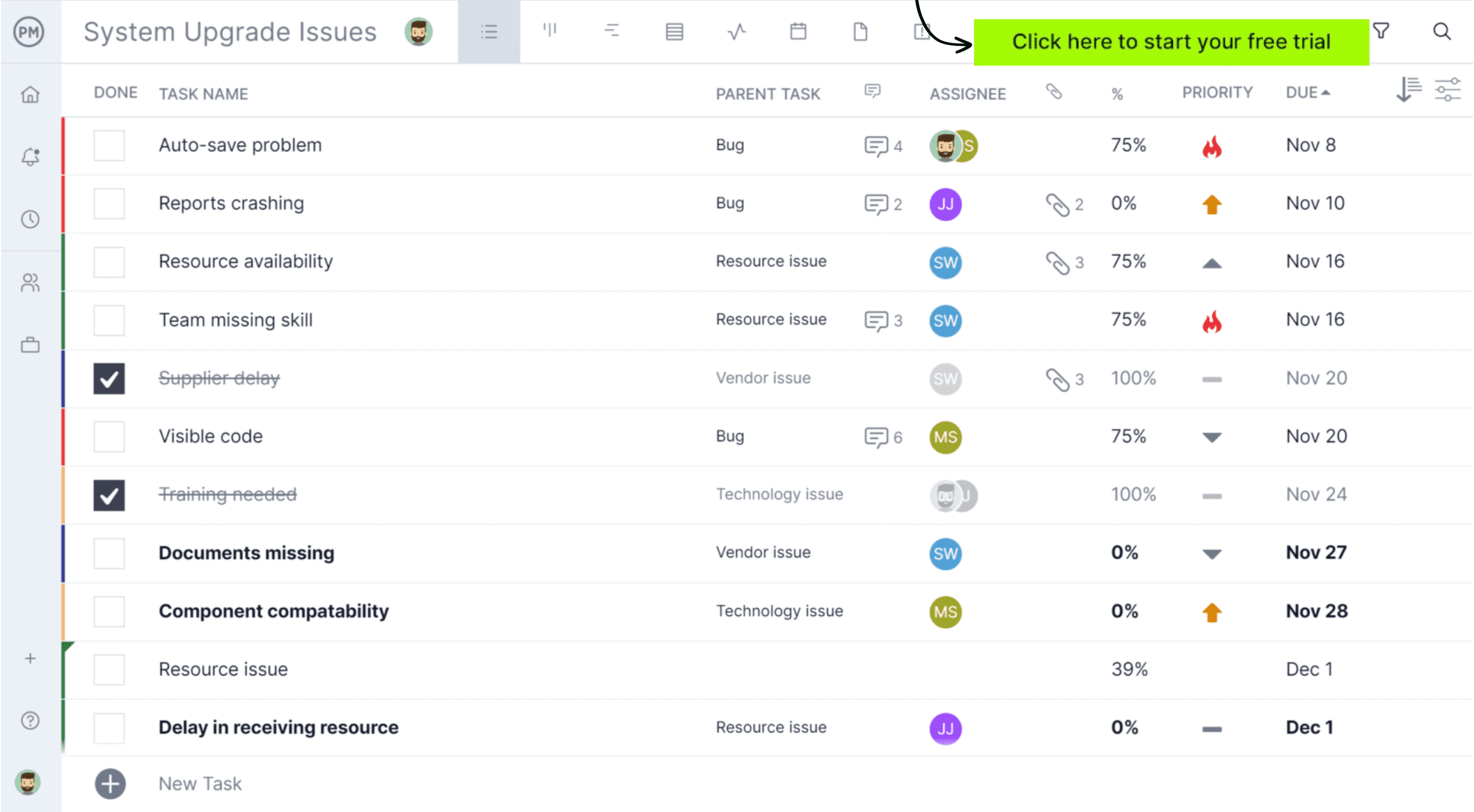
No projects go exactly as planned. If there are material shortages, delivery delays or quality issues, you can log them directly in ProjectManager as risks or issues. Use the risk card to assign owners, set priorities and establish a mitigation plan. You can also track resolution and downstream impacts.

Real-time Dashboards to Visualize Material Performance
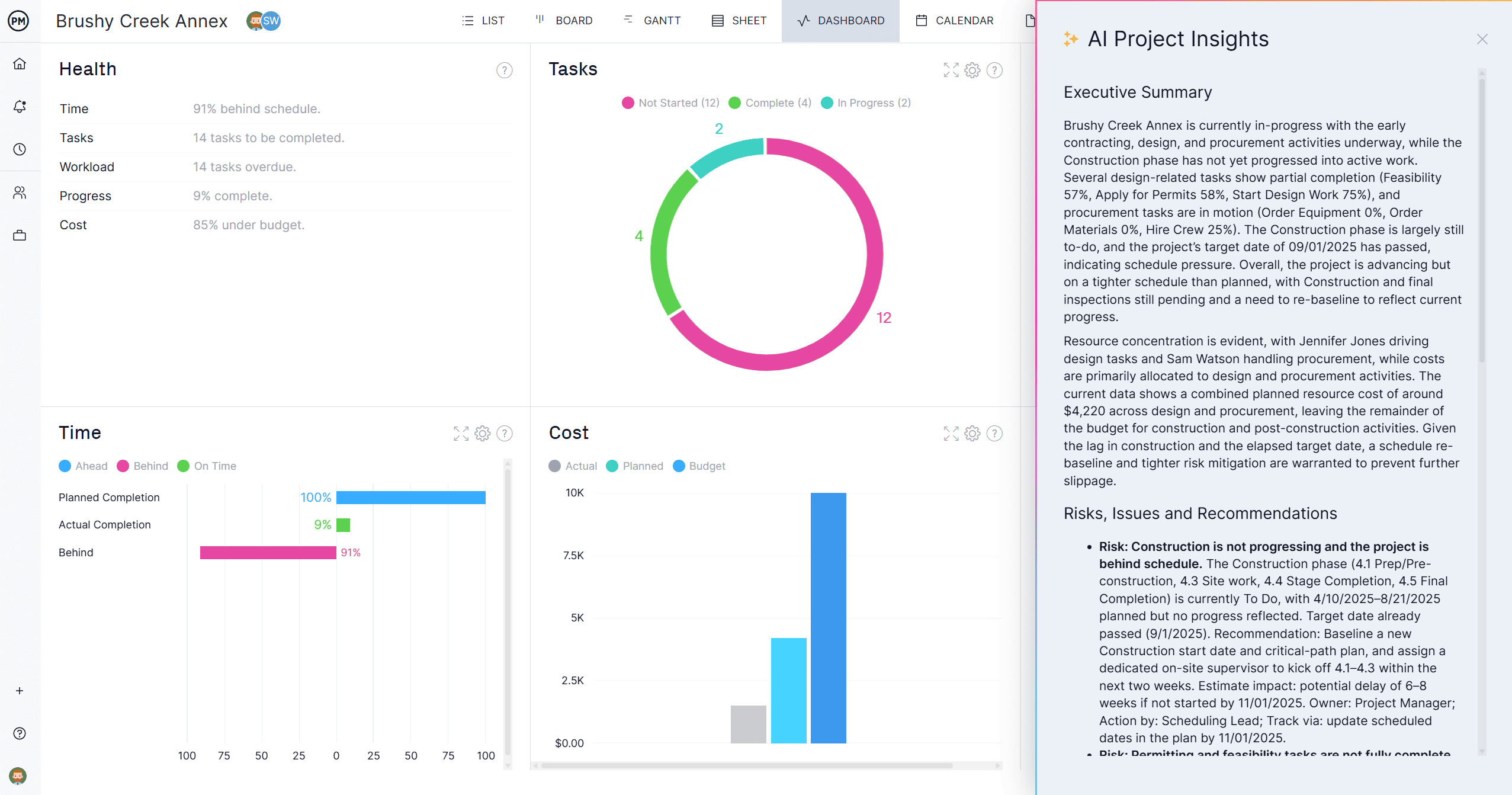
Key metrics are easier to track when they’re visual. ProjectManager’s dashboards on a project and portfolio level allow you to track six key project metrics visually, providing insights on budget health, progress, trends and more. These visuals, especially when paired with AI Project Insights, help you understand material performance at a glance.
What Other Project Management Templates Can Assist with Material Management?
We’ve created over 100 free project management templates for Excel, Word and Google Sheets. Here are some that can be used in conjunction with this material list template.
Material Requisition Form
This form formalizes material requests by documenting quantities, specifications and approvals, helping teams control ordering, reduce miscommunication and ensure materials are requested on time and aligned with project needs.
Equipment Inventory Template
Designed to track tools and machinery, this template provides visibility into availability, condition and location, supporting maintenance planning, loss prevention and efficient allocation across sites or production areas.
Construction Budget Template
This template organizes project costs into clear categories, enabling accurate budgeting, cost tracking and financial control while helping teams monitor spending against planned allocations throughout construction execution.
Related Content
- 23 Free Manufacturing Excel Templates
- 25 Free Excel Construction Templates
- How to Make a Material Schedule for Construction
- Material Takeoff (MTO) in Construction: A Quick How-to Guide
- Time and Materials Contract (T&M): When to Use One
ProjectManager is online software that helps teams organize their work no matter where they are or how they work. Get real-time data for better decision-making while connecting teams and fostering collaboration. Deliver products on time, within your budget and with the level of quality that your customers expect. Try ProjectManager for free today!