



Any successful business requires thoughtful planning and well-structured documentation to stay focused and achieve growth. With the right business planning templates, organizations can capture goals, strategies and financial plans clearly, ensuring every stakeholder has consistent, accurate information to guide decision-making.
Below, you’ll find our top 12 business planning templates for Microsoft Excel and Word. These resources help streamline strategic planning, improve analysis and support better communication across teams. Use them individually or as a complete toolkit to build a comprehensive business plan that investors, leaders and employees can trust.
1. Business Plan Template
A business plan is a strategic document that explains how a company will create value, reach its market and operate successfully. It guides decisions by outlining goals, opportunities, risks and resource needs. Investors and internal stakeholders rely on business plans to understand financial viability and expected growth. By organizing market research, marketing strategy and operational planning, a business plan helps turn an idea into a structured initiative with clear direction.
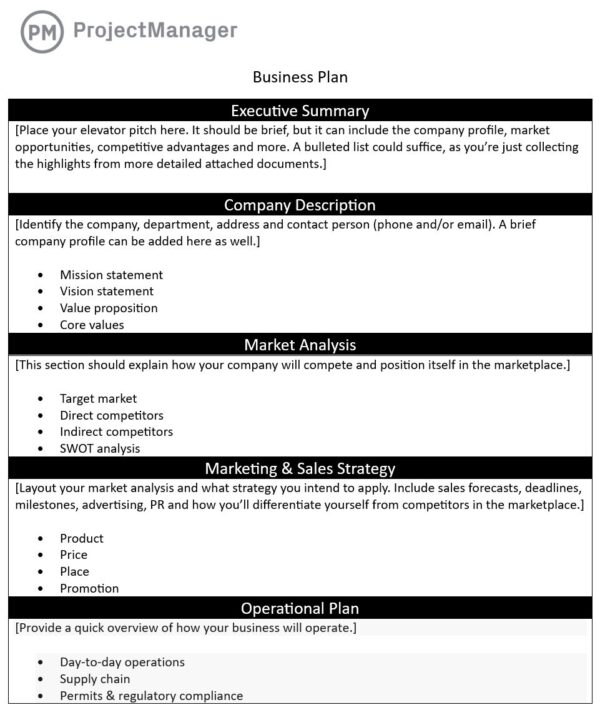
This free business plan template for Word provides a practical framework to organize your strategy and make a strong case to stakeholders. It includes guided sections for your company description, target customers, competitive landscape, marketing approach, operations, financial projections and organizational design. The layout supports clarity, structure and professionalism when presenting your business opportunity to investors or lenders. By prompting focused details, the template saves time and encourages better planning, alignment, accountability and confidence in execution and growth for every team.
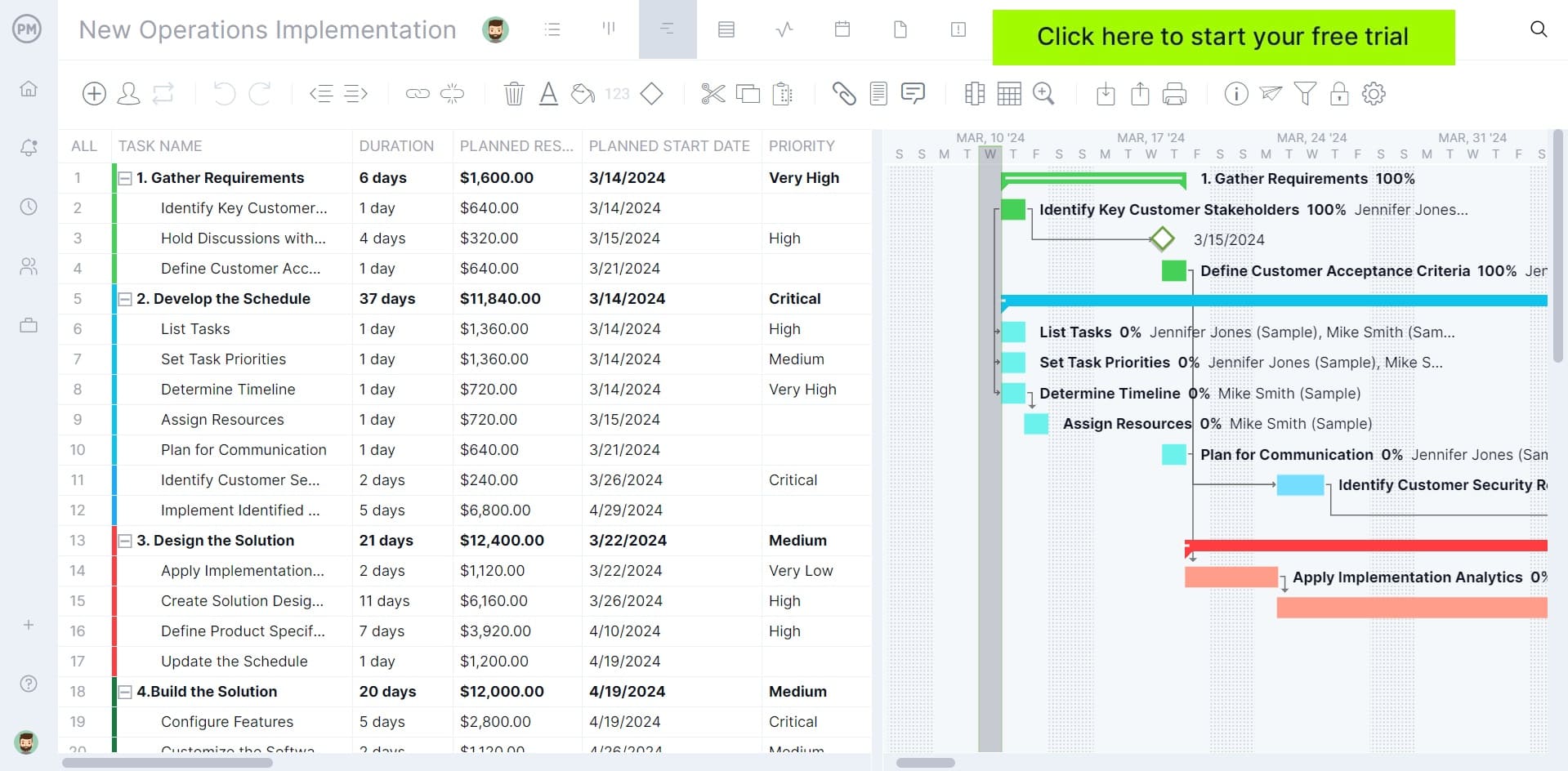
To take your planning one step further, consider ProjectManager. Our award-winning software has Gantt charts that make it easy to stay in sync with your team. Use it to turn complex initiatives into a clear timeline that shows tasks, deadlines, dependencies and milestones. This helps organizations understand how work fits together, allocate resources effectively, anticipate risks, and run “what-if” scenarios when plans change. Get started with ProjectManager today for free.
2. Strategic Plan Template
When organizations look beyond the day-to-day and aim for sustainable growth, they rely on a strategic plan to map the way forward. Strategic plans are meant to outline the business objectives that will guide the direction of a company for usually 1-3 years. Rather than simply listing goals, it prioritizes what will drive competitiveness and allocates resources where they can have the biggest impact. The result is a shared direction that supports smarter decisions, prepares for market shifts and ensures long-term initiatives stay aligned with the company’s mission and vision.
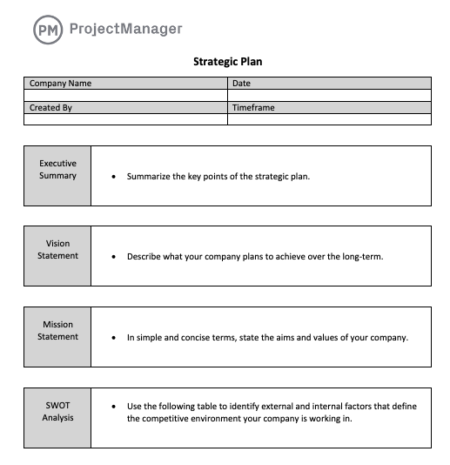
Our free strategic plan template for Word helps leadership structure long-range planning with clarity and accountability. Each section prompts thoughtful analysis— from defining your vision and mission to conducting a SWOT assessment and establishing SMART business goals. It also incorporates marketing alignment, operational planning and financial projections to support informed budgeting and resource needs. The template brings teams together around shared priorities, creating a unified path to execution and long-term impact while ensuring every step is trackable and purpose-driven.
3. Vision Statement Template
Imagining the ideal future of the business comes first, and a vision statement puts that picture into words. It serves as a motivational beacon—something bold, inspiring and built on core values. Instead of describing how the work gets done today, the vision concentrates on where the organization is heading and why it matters, guiding innovation and lifting teams toward a destination everyone can believe in.
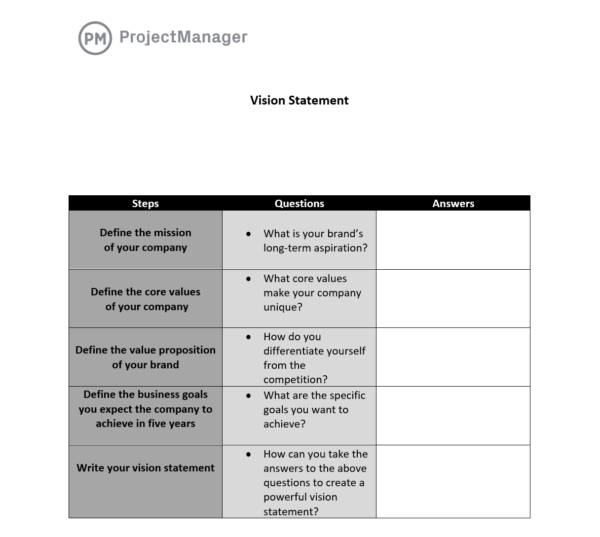
This free vision statement template for Word provides a simple guided framework to help businesses articulate where they’re headed. It walks users through defining mission, core values, differentiation and five-year goals before turning those insights into a compelling statement. Breaking the process into reflective questions prompts deeper thinking and more authentic messaging. It’s a practical tool for leadership alignment, branding workshops or new business planning where a clear sense of direction is essential.
Related: 38 Free Excel Templates for Business (Plus 10 Word Templates)
4. SWOT Analysis Template
Before committing to new strategies, companies need a clear understanding of what’s helping or hindering them. That’s where a SWOT analysis provides immediate insight. By separating strengths and weaknesses inside the business from external opportunities and threats, teams can better position themselves for success. This structured view encourages practical planning, risk awareness and smarter choices when charting the next move.
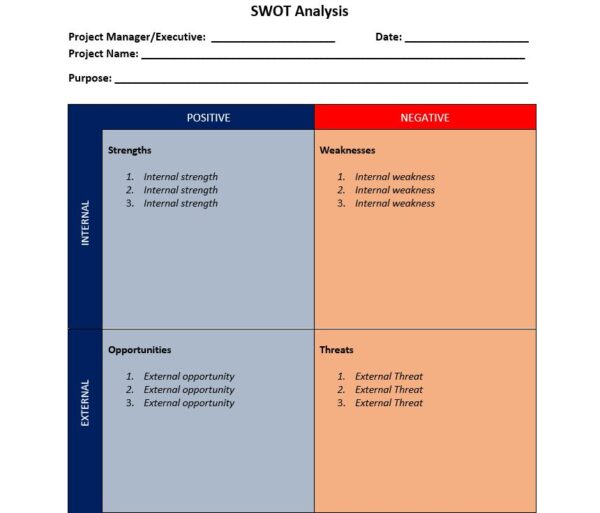
Our free SWOT analysis template for Word provides a clean, structured layout to capture and compare internal and external factors side by side. It prompts teams to list strengths that can be leveraged, weaknesses that need improvement, opportunities worth pursuing and threats that require mitigation. The format is easy to complete during workshops or planning sessions and encourages strategic discussions that lead to actionable insights. With everything visible at a glance, stakeholders can quickly align on priorities and next steps.
5. Strategic Roadmap Template
A strategic roadmap visualizes how major initiatives will unfold over time to advance business goals. Instead of focusing on day-to-day activities, it highlights priority programs, milestones and dependencies that move the organization toward its long-term vision. Leaders use roadmaps to coordinate efforts across teams, align timing with strategic priorities and communicate progress clearly. By showing direction and sequence at a glance, a strategic roadmap keeps everyone focused on what must happen and when to reach future targets.
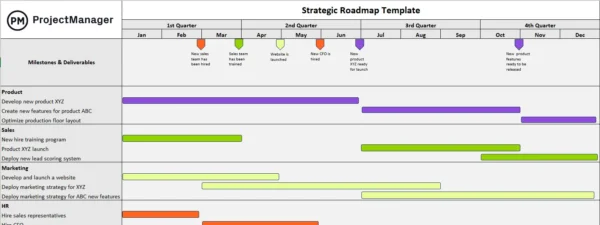
This free strategic roadmap template for Excel uses a Gantt chart layout to bring structure and transparency to your long-term initiatives. It organizes key activities by department and spreads milestones across quarterly timelines, making it easier to track progress and adjust priorities as plans evolve. The format supports collaboration by revealing scheduling gaps, interdependencies and upcoming workload peaks. It’s a practical tool for leadership reviews, stakeholder communication and maintaining momentum behind critical business transformations.
6. 5-Year Plan Template
Looking five years ahead requires more than ambition—it demands structure. A 5-year plan breaks long-range goals into manageable milestones, helping leaders respond to shifting markets while still moving toward a bold destination. Each phase builds on the last, backed by measurable outcomes that track advancement. With everyone aligned on what progress looks like, the business gains a clearer path to growth and the confidence to invest in initiatives that shape its future.
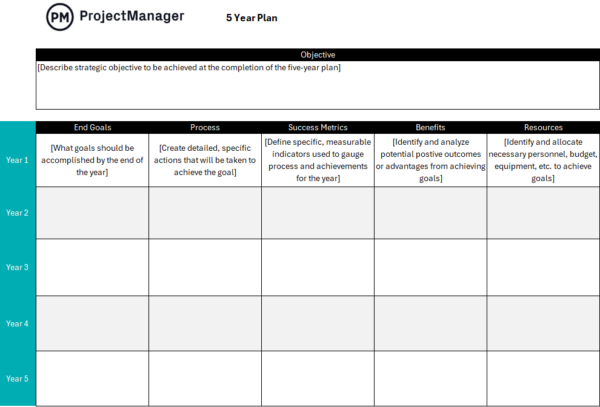
Our free 5-year plan template for Excel structures planning into annual milestones that support one overarching objective. Each year includes dedicated fields for measurable goals, action steps, success indicators, anticipated benefits and required resources. The format encourages thoughtful sequencing while still allowing flexibility as conditions evolve. By visualizing progress across multiple years, the template helps companies communicate expectations, track accountability and ensure that strategic initiatives remain realistic, supported and continuously moving forward toward a defined future state.
7. Annual Work Plan Template
When strategy needs to be put into motion, an annual work plan becomes the guide for what must happen right now. It translates high-level goals into prioritized initiatives, assigning ownership and defining the timing for each deliverable. Organizing resources and performance measures in one place supports efficient execution and helps teams stay accountable. Throughout the year, this plan becomes the reference that keeps efforts coordinated and momentum strong.
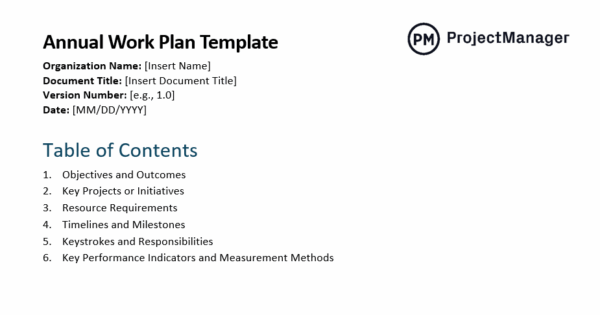
This free annual work plan template for Word provides a structured format to align goals with the activities required to accomplish them. It organizes objectives, key initiatives, resource needs, schedules and role assignments into one cohesive document that keeps teams coordinated and on track. Performance metrics are built into the layout to support ongoing evaluation and data-informed decisions. The result is a practical planning tool that clarifies expectations, enhances transparency and strengthens organizational focus throughout the year.
8. Business Action Plan Template
Turning ideas into results doesn’t happen by accident—action plans make execution tangible. They outline the specific tasks and dependencies required to reach defined objectives, ensuring that no critical steps are overlooked. Managers can see who’s responsible, what tools are needed and when outcomes should be achieved. This clarity reduces uncertainty, strengthens coordination and keeps the entire organization advancing toward measurable success.
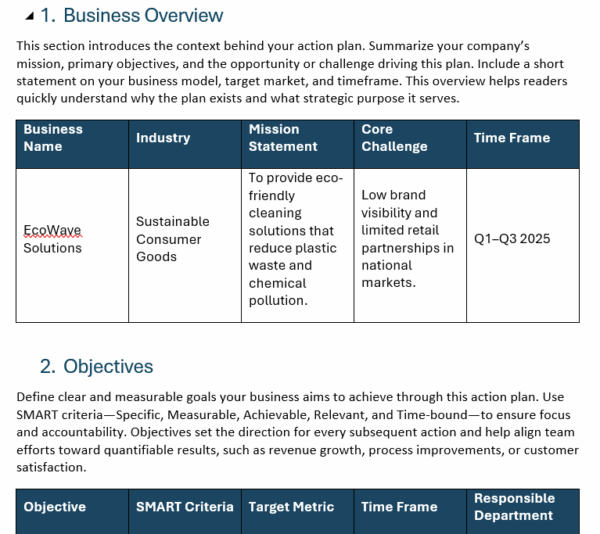
Our free business action plan template for Word organizes execution into a clear, step-by-step framework that supports real progress. It includes sections for defining objectives, tactics, resource needs, budget allocation, milestones and role assignments, ensuring nothing slips through the cracks. Built-in KPIs and review processes help teams evaluate performance and adapt quickly when challenges arise. Whether tackling growth initiatives or operational improvements, the template keeps everyone aligned and committed to delivering measurable results.
9. Marketing Plan Template
A marketing plan defines how a business will attract customers, build demand and strengthen its competitive position. It connects market research with strategies for pricing, promotion and distribution so growth efforts are purposeful and impactful. Companies rely on marketing plans to align messaging, allocate budgets and coordinate campaigns across channels. By outlining measurable objectives and performance indicators, the plan helps track results, refine tactics and ensure every activity supports revenue goals and brand development.
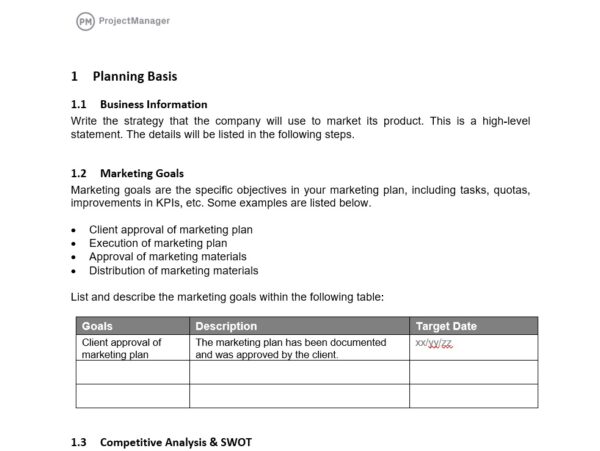
This free marketing plan template for Word brings order and clarity to campaign planning, guiding teams from competitive research through execution and evaluation. It includes space to document marketing goals, define target audiences, map the buyer journey and craft a differentiated value proposition. Sections for branding, channels, SEO and KPIs ensure that the strategy is both creative and measurable. By detailing timelines, assumptions and constraints, the template helps organizations deliver marketing initiatives that are coordinated, accountable and driven by results.
10. Operational Plan Template
An operational plan explains how a business will run efficiently to achieve its short-term goals. It focuses on the activities, resources and workflows that turn strategy into daily execution. Managers use operational plans to outline responsibilities, schedule work, control costs and maintain quality standards. Clear processes and performance indicators allow teams to measure productivity and identify improvements. By aligning routine operations with business objectives, an operational plan helps organizations work smarter and deliver consistent results.
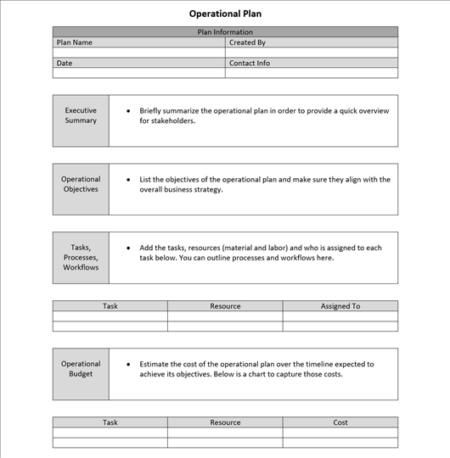
Our free operational plan template for Word structures key execution details into a single, organized document. It prompts teams to define operational objectives, assign tasks, estimate costs, build timelines and document resource needs. Dedicated sections help plan for staffing requirements, compliance measures and quality assurance, while KPIs provide checkpoints to evaluate performance. Designed to improve clarity and oversight, the template enables leaders to manage operations proactively and respond quickly when challenges or changes arise.
11. Go to Market Strategy Template
Bringing a new product to market requires a plan that goes far beyond the launch date. A go-to-market strategy syncs up positioning, pricing, promotion and sales execution so the offering reaches the right customers with the right message. It sharpens understanding of the target buyer, highlights why the solution stands out and lays out how demand will be generated. With marketing and sales working in lockstep, businesses can accelerate adoption, reduce risk and build momentum from day one.
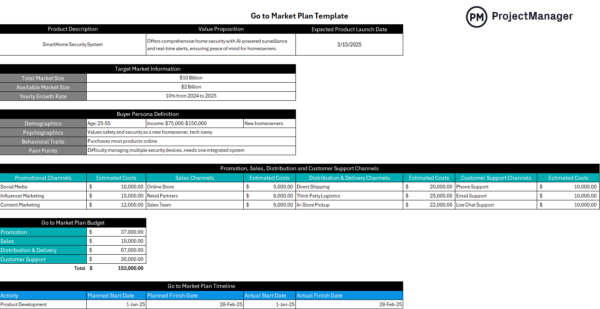
This free go-to-market strategy template for Excel provides a structured way to organize the elements required for a successful product launch. It prompts clear articulation of the value proposition, target market characteristics, buyer personas and channel selection. Budget tables and timeline tracking help teams align resources and coordinate execution across marketing, sales, distribution and support. By mapping every step from development to post-launch optimization, the template keeps launch activities synchronized and focused on revenue growth from day one.
12. Scenario Planning Template
Scenario planning helps organizations prepare for an uncertain future by exploring multiple plausible outcomes. Instead of predicting a single result, teams examine how different forces—such as market shifts, regulatory changes or economic trends—may interact over time. This approach supports stronger decision-making by revealing risks, opportunities and strategic options before changes occur. By visualizing alternative paths, scenario planning strengthens resilience, encourages creativity and ensures leaders can adapt quickly if conditions evolve unexpectedly.
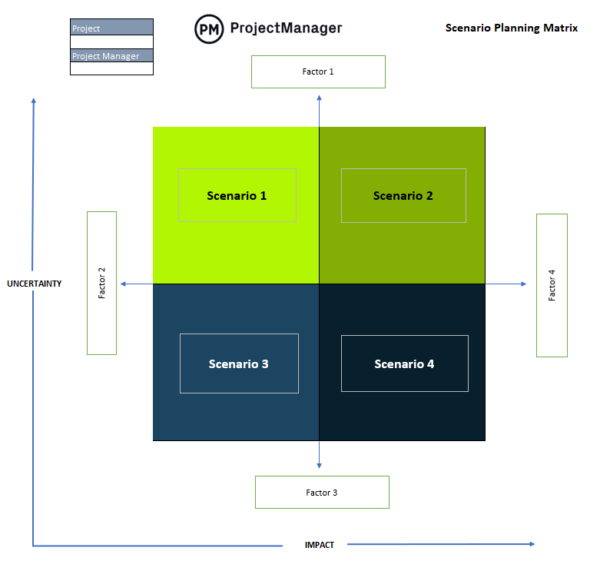
Our free scenario planning template for Excel uses a four-quadrant matrix to map strategies across varying levels of impact and uncertainty. Each quadrant becomes a distinct scenario shaped by key drivers or external factors. The visual layout encourages collaborative discussion about assumptions, strategic responses and potential consequences. It’s a practical framework for workshops, planning sessions or leadership reviews, helping teams stress-test plans and stay prepared no matter how the future unfolds.
How ProjectManager Helps Businesses
Templates have their time and place in helping your business achieve success, but they shouldn’t be your only means of organization. ProjectManager’s dynamic project management software is designed to help ensure teams can finish projects on time and on budget. With various project views including the Gantt, calendar, kanban board, list and sheet, it’s seamless for teams to stay in sync.
Plan for Success on the Gantt Chart
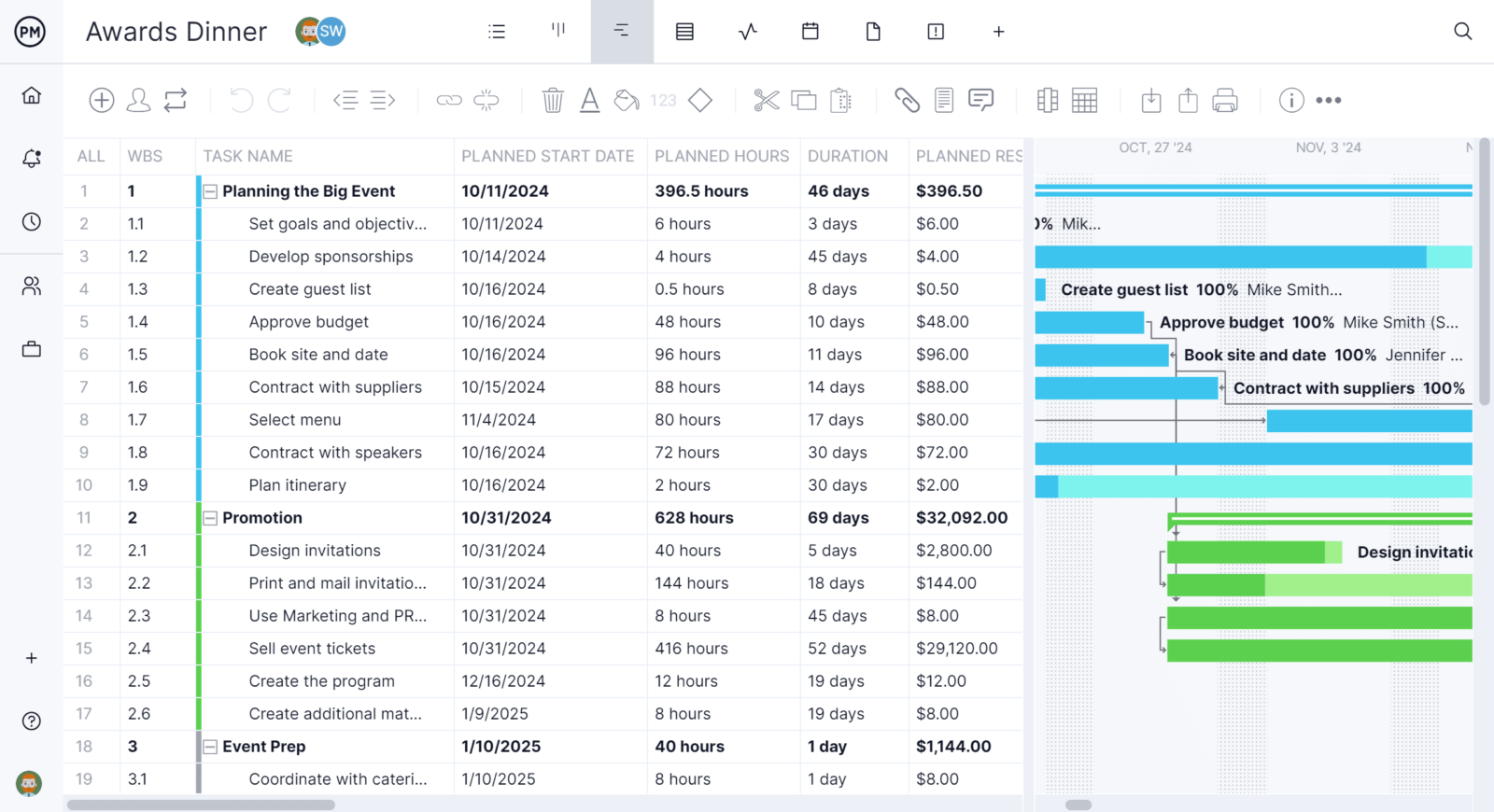
Use the award-winning Gantt chart to plan even your most complicated projects. The Gantt chart allows you to set a project baseline, track all four types of dependencies, filter for the critical path and so much more. Add comments and make adjustments in real time, alerting your team of changes on the go.
Generate Reports in a Few Clicks
As the business plan is executed, executives and stakeholders want to understand how the project is progressing. View our real-time dashboards that update with live data on six key areas of projects and portfolios. Then, leverage our reporting features powered by AI Project Insights to keep everyone in the loop.

Related Business Planning Content
- Budget Templates for Business & Project Budgeting
- Strategic Planning in Business
- Creating a Tactical Plan for Your Business
- What Is a Business Budget? Business Budgeting Basics
- How to Write a Business Plan
- What Is Business Impact Analysis? How to Conduct One
- Aligning Your Project to Business Strategy
Get all the features of these Word and Excel project management templates and more when you sign up for ProjectManager. The robust planning features in our award-winning project management software will help you plan, track and report on your project, making project success that much more likely. See what it can do for you by signing up for free today.
