


Keeping billing consistent becomes much easier when every client invoice follows the same professional format. This free freelance invoice template helps you organize project details, itemize products or services, calculate totals automatically and provide clear payment instructions, making it faster to invoice clients accurately regardless of the work you do.
Why You Need a Freelance Invoice Template
Whether you work with one client or dozens, sending accurate invoices is essential for maintaining healthy cash flow. This freelance invoice template provides a thorough yet customizable format that captures freelancer details, client information, project data, line items, payment instructions and terms in one place. Built-in formulas automatically calculate totals, helping reduce manual errors while standardizing invoices across different projects, clients and services to save valuable administrative time.
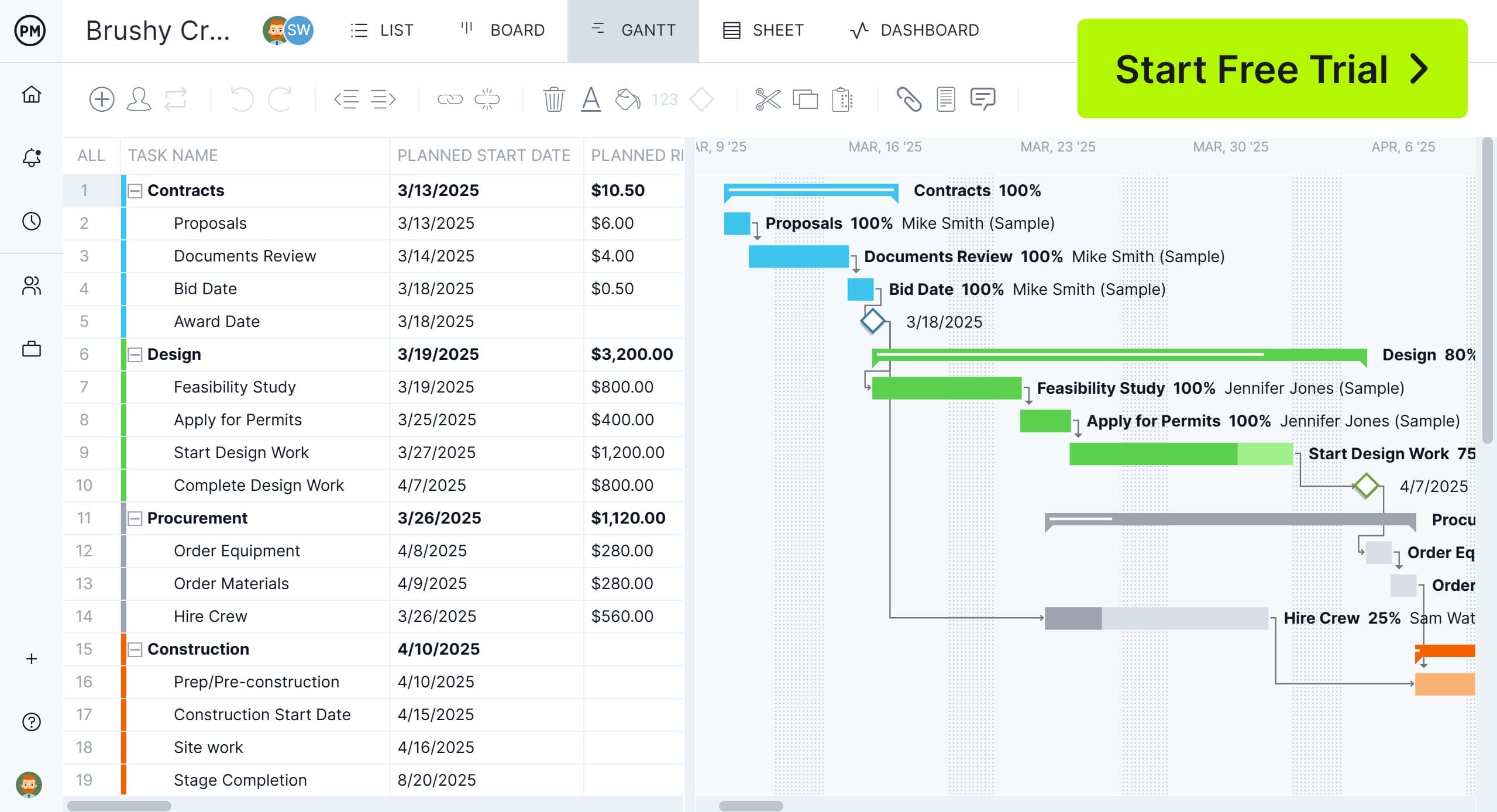
If you’re looking for project management software to plan, schedule and track your professional projects, try ProjectManager. ProjectManager is a cloud-based project management software, equipped with Gantt charts to make project schedules, kanban boards for managing tasks and workflows, project portfolio roadmaps to manage multiple projects simultaneously and real-time dashboards to monitor progress and costs. These and many other project management tools and features can help you manage personal, professional or business projects, no matter their size or complexity. Try ProjectManager today for free.
When To Use a Freelance Invoice Template
Once a product has been delivered or a service has been completed, this freelance invoice template provides a professional way to request payment from clients in virtually any industry. It also works well before work begins by serving as a quote or estimate, allowing freelancers to outline services, pricing and payment terms before a project is approved.
Who Should Use this Free Freelance Invoice Template?
Designed to adapt to different pricing models and services, this template gives independent professionals a consistent way to bill clients while presenting a polished, organized and professional image.
- Freelance writers and copywriters can invoice blog articles, website copy, editing services, content strategy work and hourly revisions using detailed line items.
- Graphic designers and illustrators can bill logo design, branding packages, marketing materials, digital artwork and revision rounds while clearly documenting project deliverables.
- Web developers and software freelancers can track development hours, feature implementation, maintenance work, bug fixes and consulting services for multiple clients.
- Marketing consultants and SEO specialists can invoice audits, campaign management, keyword research, content optimization and monthly retainers with clear payment terms.
- Photographers, videographers and other creative professionals can document shoot dates, editing services, licensing fees, travel expenses and final project costs in one organized invoice.
How to Use ProjectManager’s Freelance Invoice Template for Excel
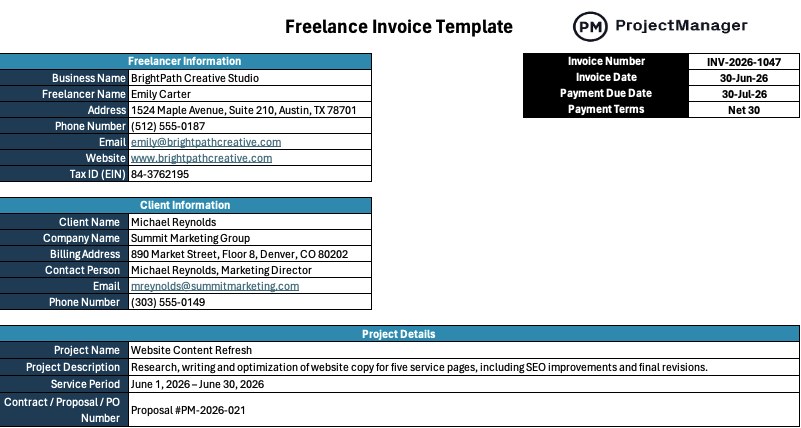
Completing your invoice takes just a few minutes once the work is finished. Follow the sections in order to record your business information, document the services provided, calculate the total automatically and give your client everything they need to submit payment on time.
Freelancer Information
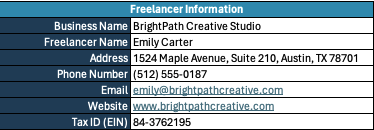
Start by replacing the sample information with your own business details. Enter your business or freelance name, mailing address, phone number, email, website or portfolio and tax identification number, if applicable. Completing this section makes it easy for clients to identify who issued the invoice and contact you with billing questions.
Client Information
Next, enter your client’s billing information, including their name, company, billing address, primary contact, email address and phone number. Taking the time to verify these details helps ensure the invoice reaches the correct recipient and reduces delays caused by incorrect or incomplete billing information.

Invoice ID & Due Dates
Assign a unique invoice number so you can easily track payments and reference past invoices. Then enter the invoice date, payment due date and payment terms, such as Net 15, Net 30 or Due Upon Receipt, so both parties clearly understand when payment is expected.
Project Details
Describe the work performed by entering the project name, a brief summary of the services or products delivered, the billing or service period and any related contract, proposal or purchase order number. These details provide valuable context and make it easier for clients to match the invoice to the completed work.

Line-item Table
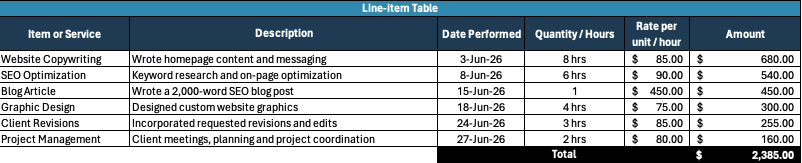
Record each product or service on its own row. Add a short description, the date the work was completed, the quantity or hours worked and your rate. The template automatically calculates each line amount and totals the invoice using built-in Excel formulas, helping minimize manual calculations and billing errors.
Payment Instructions
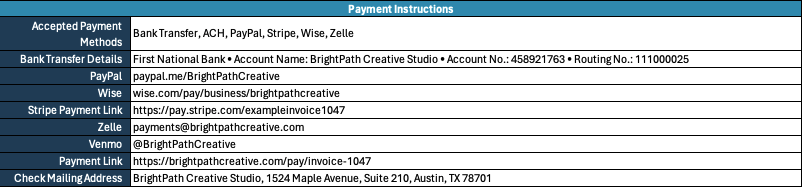
Finish the invoice by listing the payment methods you accept along with any necessary account details or payment links. You can also include your late payment policy, ownership terms, revision policy and a brief thank-you message to provide clear expectations while maintaining a professional client experience.
Terms and Notes
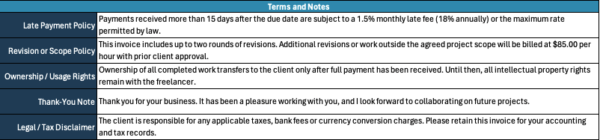
Complete the final section by adding any payment policies or project conditions your client should know before paying the invoice. Include late payment fees, revision limits, ownership or usage rights, legal or tax disclaimers and a brief thank-you message. Clear terms help establish expectations, reduce misunderstandings and create a more professional billing experience.
Free Related Templates
ProjectManager offers a library of more than 100 free project management templates for Excel and Word that help professionals organize work, manage finances and standardize business processes. The templates below complement this freelance invoice template by helping freelancers estimate costs, schedule payments and document completed work from start to finish.
Job Estimate Template
Create accurate project estimates before work begins by outlining services, labor, materials and pricing. Sharing professional estimates helps freelancers set client expectations and establish project costs before sending an invoice.
Payment Schedule Template
Plan milestone payments, deposits and final balances with a structured payment schedule. Freelancers can clearly communicate when payments are due, improving cash flow and reducing billing disputes throughout longer engagements.
Work Log Template
Track hours worked, completed tasks and daily activities in one organized spreadsheet. Maintaining detailed work logs gives freelancers accurate records to support invoices and justify billable hours for every project.
Free Invoice Templates for Excel and Word
Browse six free invoice templates for Excel and Word covering freelance invoices, service invoices, construction invoices, quotes and payment tracking tools.
8 Free Freelance Invoice Templates for Excel and Word
Browse eight free freelance invoice templates for Excel and Word covering freelance billing, service invoices, quotes, payment schedules and more.
How to Make a Project Budget with ProjectManager
If you’re interested in managing your freelance projects, use ProjectManager. ProjectManager is designed to create detailed project schedules and budgets. Simply make a list of project tasks using the list, sheet or Gantt chart view, create a project schedule and allocate resources such as people, materials or equipment. Then, estimate the cost of those resources and establish a budget amount.
Once the project starts, enter actual project costs and ProjectManager will automatically calculate the difference between estimated costs and actual costs and will display this information in real-time dashboards and reports so you can check whether the project costs are exceeding the budget at a glance.
ProjectManager also includes AI-powered project insights, workflow automation and live performance tracking that help teams identify delays, manage risks and improve decision-making. The platform also supports an open API and more than 1,000 integrations with tools like Acumatica, QuickBooks, Microsoft Project, Slack and Google Workspace. Watch the video to learn more!
ProjectManager is online project management software that empowers individuals and teams to plan, manage and track their projects in real time. Get started with ProjectManager today for free.