



Primavera P6 scheduling helps teams plan complex projects with precision, while a well-built P6 schedule organizes tasks, timelines, resources and dependencies to ensure accurate forecasting and control.
What Is Primavera P6?
Primavera P6 is project management software developed by Oracle that’s designed for planning, scheduling and controlling large, complex projects. It’s widely used in construction, engineering, oil and gas and infrastructure industries to manage timelines, resources and costs across multiple teams, ensuring projects stay on track and aligned with strategic goals.
What Is a P6 Schedule?
A P6 schedule is a detailed project timeline created using Primavera P6 that defines activities, durations, dependencies and resource assignments. It’s used to sequence work, calculate the critical path and forecast project completion dates. This type of schedule helps project managers monitor progress, control delays and maintain alignment with project scope, time and cost objectives.
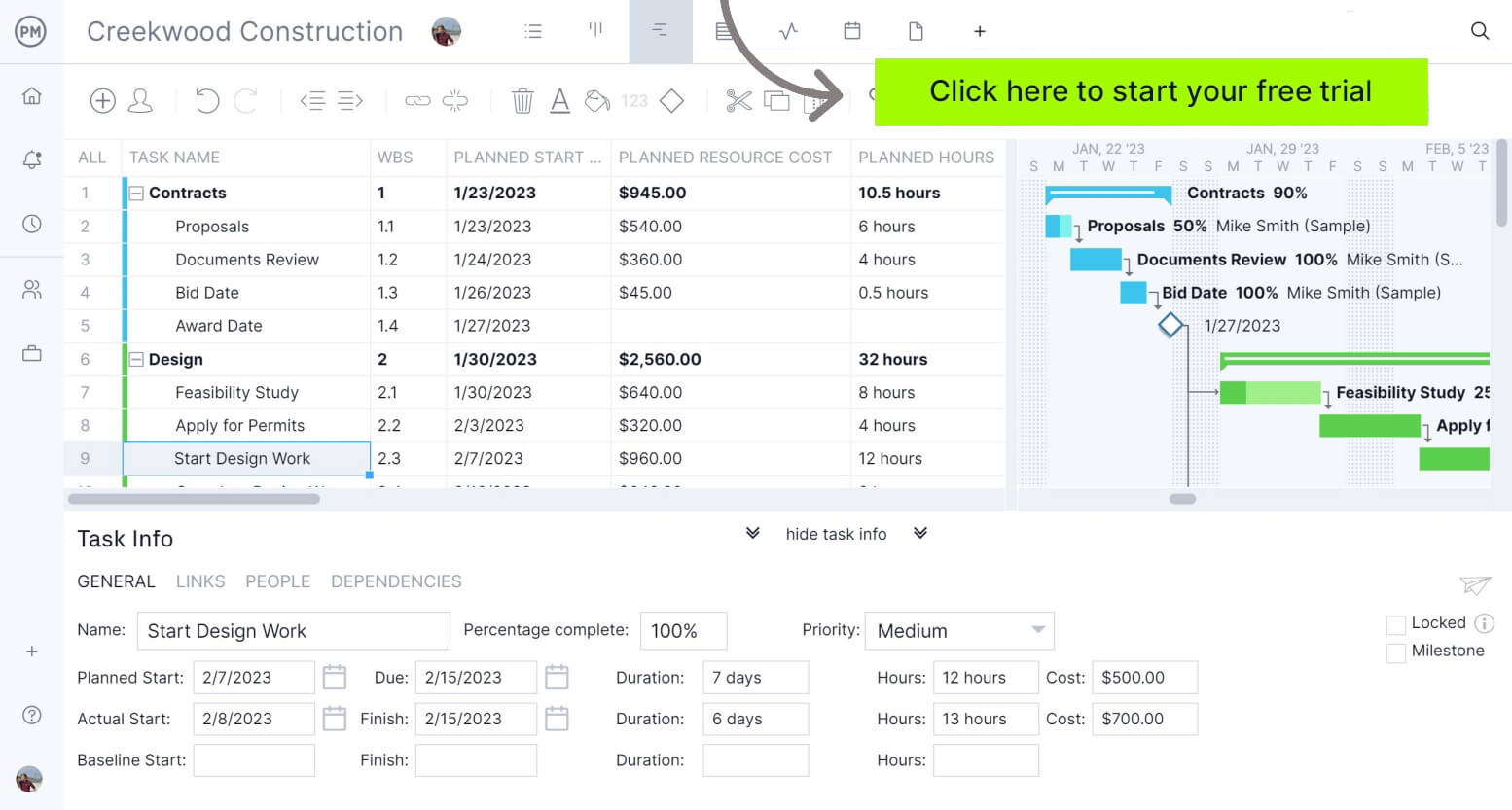
ProjectManager is an award-winning project scheduling software that delivers the same powerful project scheduling features as Primavera P6, including critical path analysis, task dependencies and detailed timelines, but at a much lower cost. With its modern interface and real-time collaboration tools, teams can plan, track and optimize schedules more efficiently without the complexity or high price of enterprise solutions.
Why Make a Primavera P6 Schedule
A Primavera P6 schedule can be created for a variety of purposes, from planning complex projects to tracking execution and forecasting outcomes. It’s widely used across industries to improve visibility, coordination and control over timelines, resources and deliverables.
- Plan large-scale construction projects: Organize thousands of activities, subcontractors and milestones to create a structured, logic-driven timeline for complex construction builds.
- Manage engineering and infrastructure programs: Coordinate interdependent tasks across disciplines such as civil, mechanical and electrical engineering within large infrastructure initiatives.
- Control project timelines during execution: Track real-time progress, update activity statuses and identify delays early to keep projects aligned with planned schedules.
- Perform critical path and delay analysis: Identify the sequence of activities driving project completion and analyze how delays impact overall timelines.
- Support oil and gas project scheduling: Plan and monitor drilling, maintenance and shutdown operations where timing, safety and resource coordination are critical.
- Allocate and optimize resource usage: Assign labor, equipment and materials efficiently while avoiding overallocation across multiple projects.
- Forecast completion dates and project outcomes: Use updated schedule data to predict finish dates, evaluate risks and support better decision-making.
Primavera P6 Scheduling Features
Primavera P6 provides advanced scheduling capabilities built around the critical path method, allowing users to define activities, relationships and constraints while automatically calculating project timelines. It supports dynamic schedule recalculation, multi-project scheduling and detailed control over data dates, enabling teams to analyze progress, forecast outcomes and maintain accurate, logic-driven schedules across complex project environments.
- Critical path method scheduling: Uses CPM logic to calculate project schedules based on activity durations and relationships.
- Dynamic schedule recalculation: Automatically recalculates schedule dates when changes affect activity durations or relationships.
- Manual schedule execution command: Allows users to run schedule calculations on demand using the scheduling tool.
- Scheduling options configuration: Provides configurable scheduling parameters through the Schedule Options dialog for customized calculations.
- Data date control: Enables setting and modifying the data date to reflect project status during scheduling.
- Forecast-based scheduling: Supports scheduling using forecast start dates instead of current data dates when configured.
- Multi-project scheduling capability: Allows scheduling multiple projects simultaneously using individual or shared data dates.
- Activity relationship scheduling logic: Uses defined dependencies between activities to determine sequencing and schedule calculations.
- Float path calculation: Calculates multiple float paths to analyze alternative critical or near-critical activity sequences.
- Critical path visualization: Identifies and displays critical activities that directly impact overall project completion dates.
- Resource-constrained scheduling support: Optimizes schedules by considering shared and limited resource availability across projects.
How to Make a Primavera P6 Schedule
Creating a Primavera P6 schedule involves defining project structure, adding activities, establishing logic and running schedule calculations. While the process can handle complex projects, it follows a structured sequence of steps that ensures accurate, logic-driven timelines.
1. Create a New Project and Define Basic Settings
Start by creating a new project in Primavera P6 and configuring key settings such as project ID, name, start date and default calendars. These foundational inputs establish how the schedule will behave and ensure all activities are aligned with the correct timeframe, working conditions and organizational structure.
2. Build the Work Breakdown Structure (WBS)
Define a hierarchical work breakdown structure to organize the project into manageable sections. The WBS helps group related activities, improve visibility and ensure all scope elements are accounted for. This structure becomes the backbone of your schedule and supports reporting, tracking and control throughout execution.
3. Add Activities and Define Durations
Enter all project activities within the WBS and assign durations based on realistic estimates. Each activity should represent a specific task required to complete the project. Accurate durations are critical because they directly impact schedule calculations, sequencing and the overall reliability of the project timeline.
4. Define Activity Relationships and Logic
Link activities using logical relationships such as finish-to-start, start-to-start or finish-to-finish. These dependencies determine the order in which tasks are executed. Establishing correct logic ensures the schedule reflects real project workflows and allows Primavera P6 to calculate accurate start and finish dates.
5. Assign Resources and Calendars
Allocate labor, equipment and material resources to activities and assign appropriate calendars. This step ensures the schedule reflects actual working conditions, availability and constraints. Proper resource assignment improves planning accuracy and helps identify potential conflicts or overallocations before execution begins.
6. Run the Schedule and Analyze Results
Use the scheduling function to calculate the project timeline based on defined logic, durations and constraints. Review the critical path, float values and overall project duration. This analysis helps validate the schedule, identify risks and ensure the plan is realistic before moving forward.
7. Update and Maintain the Schedule
Once execution begins, regularly update activity progress, adjust durations and revise logic as needed. Maintaining the schedule ensures it reflects current project conditions. Continuous updates allow teams to track performance, manage delays and keep the project aligned with its original objectives.
Pros of P6 Scheduling
Primavera P6 is highly effective for managing complex projects that require detailed planning and control. Its advanced scheduling engine, resource management capabilities and analytical tools allow teams to build accurate timelines, monitor performance and make informed decisions, making it a preferred solution for industries that handle large-scale, high-risk projects.
- Handles highly complex projects: Capable of managing thousands of activities, relationships and constraints without losing scheduling accuracy.
- Advanced critical path analysis: Provides precise identification of critical activities that directly impact project completion timelines.
- Strong multi-project management: Allows users to manage multiple projects simultaneously while coordinating shared resources efficiently.
- Robust scheduling logic control: Supports detailed activity relationships and constraints to accurately model real-world project workflows.
- Reliable forecasting capabilities: Helps predict completion dates and identify potential delays using updated schedule data.
Cons of P6 Scheduling
Primavera P6 can be difficult to use for teams unfamiliar with its interface and concepts. Its complexity, steep learning curve and high implementation effort make it less suitable for smaller projects or organizations that don’t require advanced scheduling capabilities, especially when simpler tools can achieve similar results with less overhead.
- Steep learning curve for new users: Requires significant training to understand scheduling logic, configurations and advanced features.
- Overkill for small projects: Provides more functionality than needed for simple projects, adding unnecessary complexity.
- Time-consuming setup process: Building a fully detailed schedule requires extensive upfront planning and data entry effort.
- Less intuitive user interface: Interface can feel outdated and harder to navigate compared to more modern project management tools.
- Higher cost compared to alternatives: Licensing and implementation costs can be significant for smaller teams or organizations.
ProjectManager Is Better than P6 for Scheduling Projects
While Primavera P6 is a powerful scheduling tool for large-scale projects, it’s expensive and complicated, often requiring extensive training. ProjectManager on the other hand, is an award-winning project scheduling software that’s easier to implement for organizations and offers an equally robust set of features in a more modern, user-friendly and cost-effective solution.
Like P6, ProjectManager supports scheduling tools and features such as Gantt charts, critical path analysis, work breakdown structures, resource scheduling, cost tracking and milestone and task dependency mapping, which are essential for building logic-driven schedules in industries like construction, manufacturing, IT and more.
It also provides live data tracking, automated reporting and seamless collaboration features, allowing teams to update schedules and make decisions faster. For organizations that want strong scheduling functionality without the complexity and overhead of Oracle’s enterprise systems, ProjectManager delivers comparable capabilities with greater efficiency and usability. Watch the video below to learn more!
Related Primavera P6 Content
- What Is Oracle Primavera P6? Uses, Features & Pricing
- What Is Oracle Primavera Cloud? Uses, Features & Pricing
- Primavera P6 vs. Microsoft Project: In-Depth Software Comparison
- 6 Top Oracle PPM Software, Apps & Tools
- 20 Best Construction Scheduling Software for 2026 (Free & Paid)
- 7 Best Project Scheduling Tools: Pros, Cons & Real User Reviews (2025)
- 20 Best Project Scheduling Templates for Excel
ProjectManager is online project and portfolio management software that allows to create detailed project schedules and connect teams, whether they’re in the office or out in the field. They can share files, comment at the task level and stay updated with email and in-app notifications. Get started with ProjectManager today for free.
