


Managing a project with multiple tasks, dependencies and deadlines can quickly become overwhelming without a clear structure in place. A visual roadmap not only simplifies complexity but also brings clarity to task sequencing, making it easier to track progress and allocate resources effectively. For teams juggling shifting priorities or tight schedules, having a straightforward way to map out workflows is essential.
This is where a project network diagram template for Excel proves especially useful. Designed to streamline project planning, it offers a practical, visual approach to organizing tasks and identifying relationships between them. Whether you’re coordinating a construction build, launching a new product, or managing internal operations, downloading this template helps align your team and keep the project moving forward efficiently.
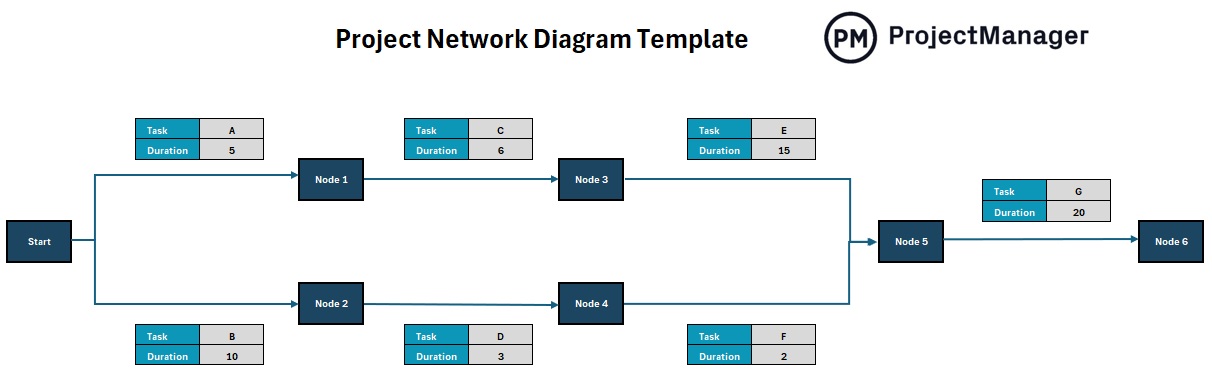
ProjectManager’s free network diagram template for Excel
Why Use a Project Network Diagram Template?
A project network diagram is a valuable tool for visualizing the flow of tasks and understanding how different activities within a project are connected. It helps project managers identify dependencies, determine the critical path and foresee potential bottlenecks that could delay progress. By mapping out each step and its relationship to others, teams can make more informed decisions about scheduling, resource allocation and risk management.
Using a project network diagram also supports more strategic planning by clarifying the sequence of operations. It enables teams to pinpoint where delays in one task could cascade into others and provides a basis for more realistic time estimates. This proactive visibility is particularly important in complex projects, where even small oversights can derail timelines.
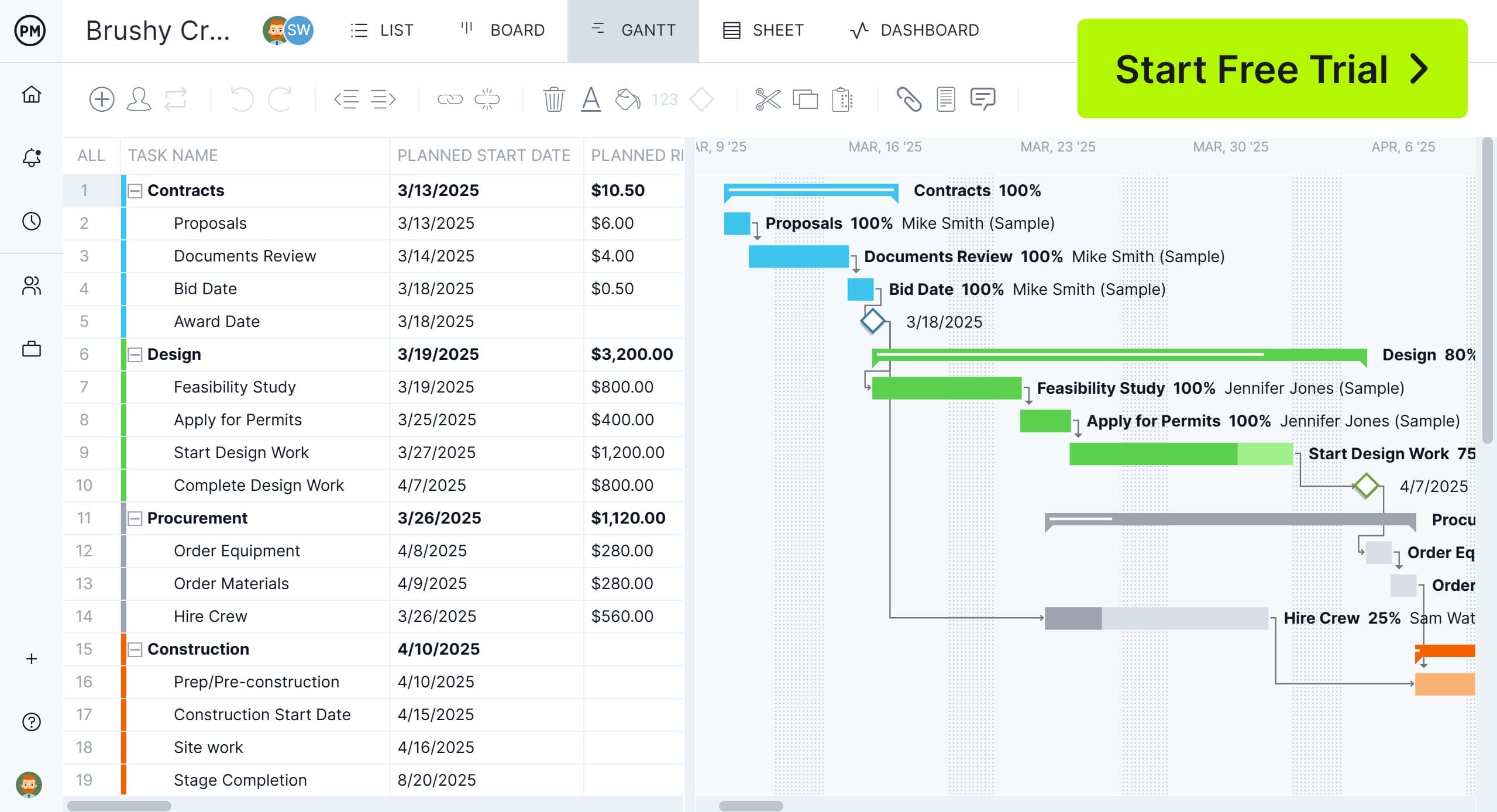
However, while project network diagrams are excellent for outlining dependencies, Gantt charts are often better for managing the day-to-day execution of a project. A Gantt chart provides a clear, time-based view of the project schedule, showing when tasks begin and end, how long they will take and who is responsible. It offers a more accessible and dynamic format for tracking progress and updating plans as conditions change, making it ideal for keeping teams aligned and on target.
ProjectManager is award-winning project and portfolio management software with a Gantt chart that goes a step further by combining visual clarity with real-time functionality. Unlike static Excel templates, it updates automatically as team members complete tasks and integrates with resource planning, timesheets and customizable reports. This ensures you’re not only mapping out dependencies but actively managing them—giving your team the tools to stay on track and adjust on the fly with confidence. It can also link all four types of task dependencies, filter for the critical path and set a baseline to track progress in real time. Get started with ProjectManager today for free.
When to Use a Project Network Diagram Template
A project network diagram template is most useful during the early stages of project planning, especially when you need to identify task sequences and visualize dependencies. It’s ideal for complex projects with interrelated tasks, where understanding the critical path is key to estimating timelines accurately and avoiding delays. If your project includes multiple workstreams, phases or team handoffs, the diagram helps ensure everything is aligned from the start.
You should also use a project network diagram template when conducting risk analysis or building contingency plans. It allows you to spot which tasks are most vulnerable to setbacks and how delays in one area might affect others. This makes it a valuable tool for project managers who need to anticipate issues before they arise and build a more resilient, efficient workflow.
Who Should Use a Project Network Diagram Template?
A project network diagram template is especially valuable for project managers, planners and team leads responsible for coordinating multiple tasks and resources. These roles often require a clear understanding of task dependencies, scheduling constraints and the critical path—making the diagram an essential tool for building structured, realistic plans. It’s also useful for PMO professionals who need to standardize planning practices across teams or departments.
Beyond project leadership, stakeholders such as engineers, contractors, product developers and operations managers can benefit from using a network diagram template. It provides a high-level overview that helps everyone involved understand how their work fits into the bigger picture. For teams managing complex or cross-functional projects, this shared visibility supports better collaboration, reduces miscommunication and aligns efforts around key milestones.
How to Use This Project Network Diagram Template for Excel
Download our project network diagram template in Excel for a practical way to organize and visualize project tasks, especially when multiple activities are connected through dependencies. It helps project managers and teams see the sequence of work, understand how delays may impact other tasks and identify the critical path to keep everything on schedule. This level of visibility is crucial for maintaining control and adapting to changes as the project unfolds.
The steps below guide you through how to use the template effectively. From selecting the right type of diagram to identifying dependencies and estimating durations, each phase helps structure your plan so you can execute it with greater confidence and precision.
How to Use a Project Network Diagram Template for Excel
1. Choose the Type of Project Network Diagram
There are four sheets on our free project network diagram template, which allow users to create the type of diagram they want. The choices are explained below.

- ADM Project Network Diagram: Also known as Activity-on-Arrow, this format uses arrows to represent tasks and nodes to show events or milestones.
- PDM Project Network Diagram: Activity-on-Node is the most commonly used format, placing tasks inside boxes (nodes) and connecting them with arrows to indicate dependencies.
- PERT Chart: Ideal for projects with uncertain timelines, PERT uses optimistic, pessimistic and most likely estimates to calculate expected task durations.
- Critical Path Chart: Focuses on identifying the longest sequence of dependent tasks to determine the shortest possible project duration.
2. List Project Tasks
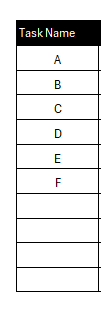
Start by gathering all project tasks and entering them into the template. Each task should be clearly defined with a unique identifier or label.
3. Identify Task Dependencies
Task dependencies are tasks that cannot start or finish until another task has started or finished. Therefore, identifying these tasks is important to avoid costly delays.

- Finish to Start (FS): A task must finish before the next one starts
- Start to Start (SS): Two tasks begin at the same time
- Finish to Finish (FF): Two tasks must end at the same time
- Start to Finish (SF): A rare case where a task must start before another can finish
4. Draw Nodes or Arrows for Each Activity

Represent each task with a node or an arrow, depending on the diagram type. Use consistent formatting for clarity and maintain a logical flow.
5. Link Task Dependencies on the Project Network Diagram

Connect tasks according to their dependency type. Use arrows to indicate direction and sequence, ensuring each path flows logically from start to finish.
6. Estimate the Duration of Tasks
Input estimated durations for each task. These values are essential for calculating timelines, slack and identifying the critical path.
7. Use Built-in Formulas (If Using CPM and PERT Diagrams)
Leverage Excel formulas to automatically calculate early start, late start, float and other key project metrics. This is particularly useful for critical path method and PERT diagrams.
Related Project Management Templates
The project network diagram template is only one of over 100 free project management templates that can be used to manage projects. Below are just a few that can help with project management.
Gantt Chart Template
Download this free Gantt chart template to outline tasks along a timeline, showing when each task starts and ends and how long it will take. It includes horizontal bars for each activity, allowing teams to see task progress and deadlines at a glance. Ideal for tracking schedules and keeping projects on time, a Gantt chart template helps simplify complex workflows and improve team coordination.
Swimlane Diagram Template
This free swimlane diagram template is a visual tool used to map out processes or workflows by dividing activities into lanes based on roles, departments or functions. Each lane represents a different participant or team, making it easy to see who is responsible for what at each stage. The layout helps clarify handoffs, identify bottlenecks and improve accountability across complex or cross-functional processes.
Flowchart Template
This free flowchart template is a structured diagram used to map out the steps in a process, system or decision. It uses standardized shapes like rectangles for tasks, diamonds for decisions and arrows to show the flow of actions. This type of template helps teams visualize processes clearly, making it easier to understand workflows, identify inefficiencies and improve decision-making.
ProjectManager Is Better Than a Project Network Diagram for Excel
While a project network diagram in Excel is helpful for basic planning, it quickly falls short when managing active projects in real time. ProjectManager offers a more dynamic, scalable solution by combining planning, collaboration and execution in one platform. Unlike static Excel files, ProjectManager’s cloud-based tools provide live updates, real-time collaboration and automatic syncing, which are essential for fast-moving teams and complex projects. With multiple project views—including Gantt charts, kanban boards, task lists and calendars—teams can work the way that suits them best while staying connected to the same data. Whether you’re visualizing dependencies, tracking milestones or managing workflows, each view is instantly shareable and customizable, making it easier to keep teams aligned and stakeholders informed.
Manage Resources and Keep Workloads Balanced
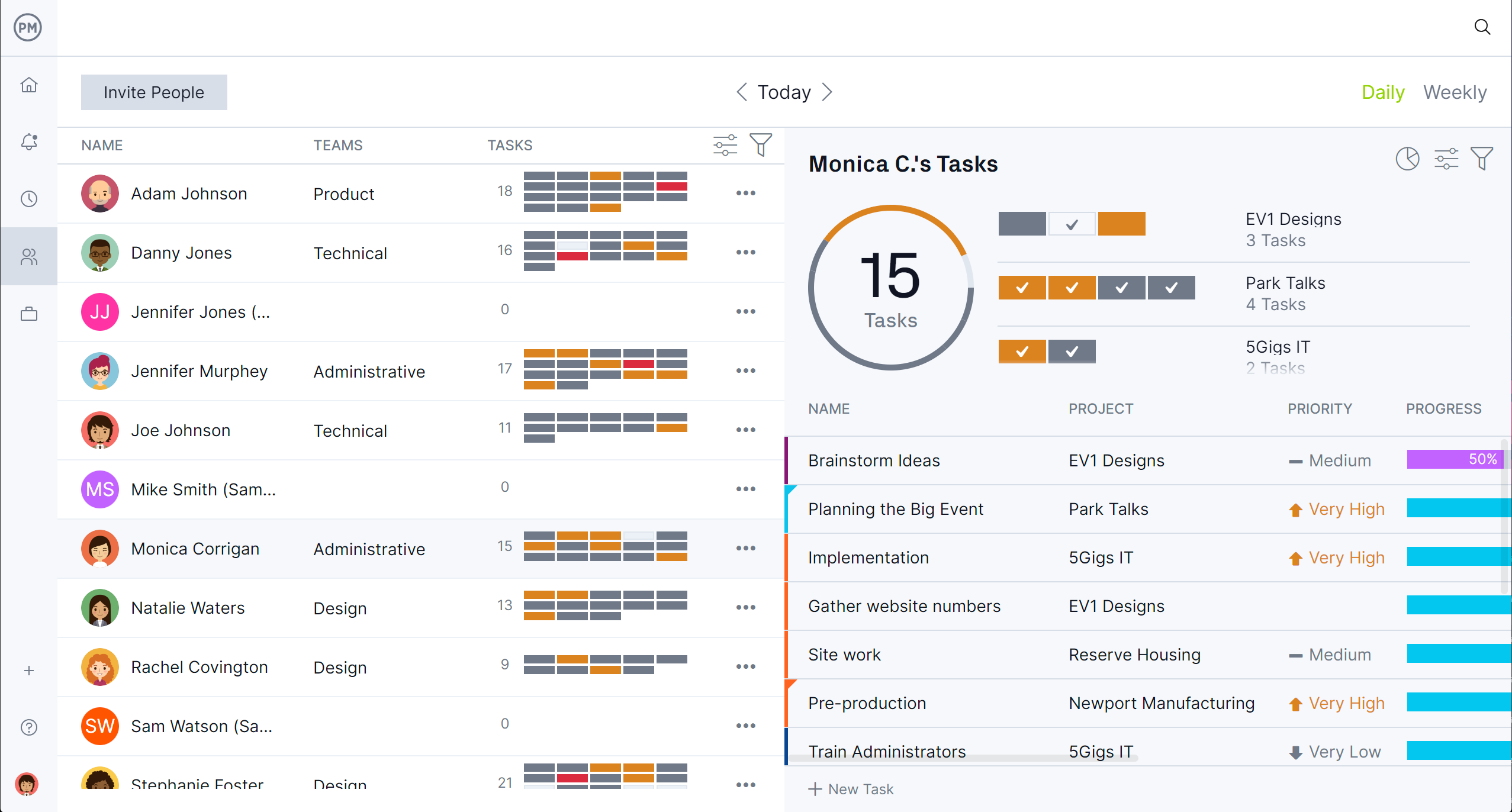
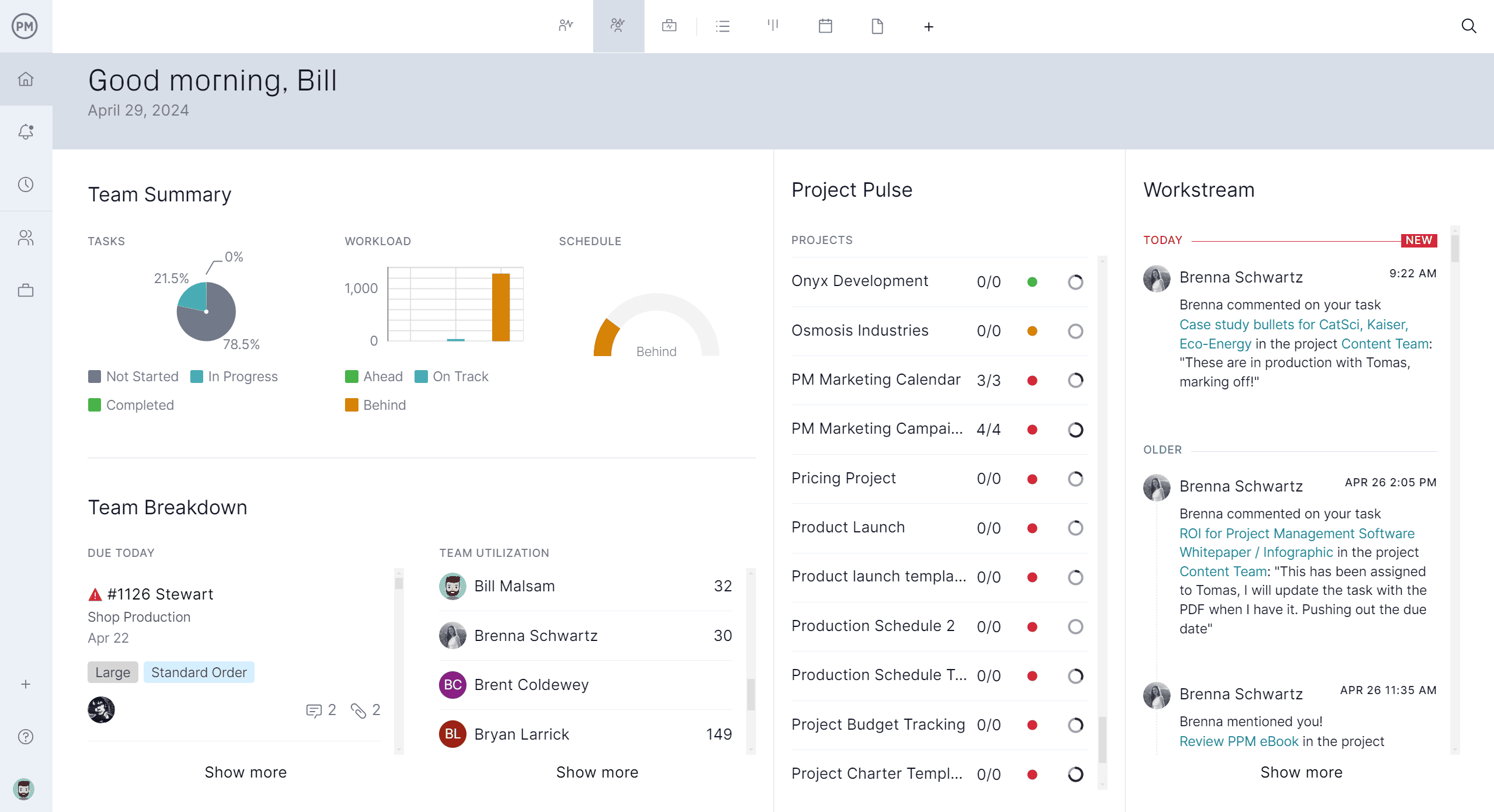
Our software also excels at resource management. It allows you to assign tasks based on team availability, workload or skill set and instantly see who’s overallocated or underused with our color-coded workload chart. Built-in workload balancing tools help prevent burnout and keep projects running efficiently, all without the manual updates required in Excel. A team page gives project managers a daily or weekly overview of their team’s work, which can be filtered by progress or priority and tasks can be updated without leaving the page.
Track Project Metrics in Real Time
When it comes to tracking, our software provides real-time dashboards, progress bars and timesheets that update automatically as work gets done. You can monitor project health, costs and timelines without having to sort through multiple spreadsheets or recalculate formulas. This kind of visibility ensures you stay proactive, spot issues early and keep your project moving forward with confidence. There are also customizable reports that can be filtered to show details that project managers and their teams need or a more general update to share with stakeholders.
Related Project Management Content
Project management is more than just a project network diagram template. For those who are curious about the subject and want to read more. Here are some links that go into other charts for project planning, how to create a workflow diagram and much more..
- 17 Best Project Management Charts for Project Planning
- How to Create a Workflow Diagram: Examples & Free Templates
- What Is SIPOC? How to Make a SIPOC Diagram
- Arrow Diagrams for Projects: Activity on Node vs. Activity on Arrow
- How to Make a Project Network Diagram: Free Tools
- How to Create a Workflow Diagram: Examples & Free Templates
ProjectManager is online project and portfolio management software that connects teams whether they’re in the office or out in the field. They can share files, comment at the task level and stay updated with email and in-app notifications. Join teams at Avis, Nestle and Siemens who use our software to deliver successful projects. Get started with ProjectManager today for free.