


Ask most managers where their team’s training history lives and you will get a mix of answers: a shared drive, a stack of certificates in a filing cabinet or, honestly, someone’s memory. A training record template puts an end to that guesswork. It gives you one place to log every course, certification and completion date for each employee, so training history is not something you have to reconstruct when an audit or a promotion decision comes up.
Beyond compliance, a training record template pays off in ways that are easy to overlook. It turns training into data you can actually use, showing you at a glance who is certified for what, whose credentials are about to expire and where skill gaps are quietly building across the team. For safety training, licenses and professional development alike, having that history documented and current means you can staff a task with confidence, breeze through an audit and plan next quarter’s training budget around what your people genuinely need rather than guesswork.

Why You Need This Training Record Template
A training record template helps organizations ensure all employees meet training requirements efficiently. It provides a consistent method for tracking progress, verifying completion and maintaining compliance with safety or regulatory standards. Using a template reduces administrative workload and provides clarity for management, employees and auditors alike.
When to Use a Training Record Template
This template should be used whenever employees undergo new training, refresher courses, certifications or professional development programs. It’s particularly valuable during onboarding, mandatory safety courses, compliance training or skill development initiatives. Recording training consistently ensures accountability and maintains organizational knowledge.
Project management software can enhance the process of managing a training record template by centralizing all training information in one platform. Managers can assign training, track progress and generate reports in real time. Automated notifications and reminders help ensure employees complete their courses on time, and digital records reduce errors and eliminate lost paperwork.
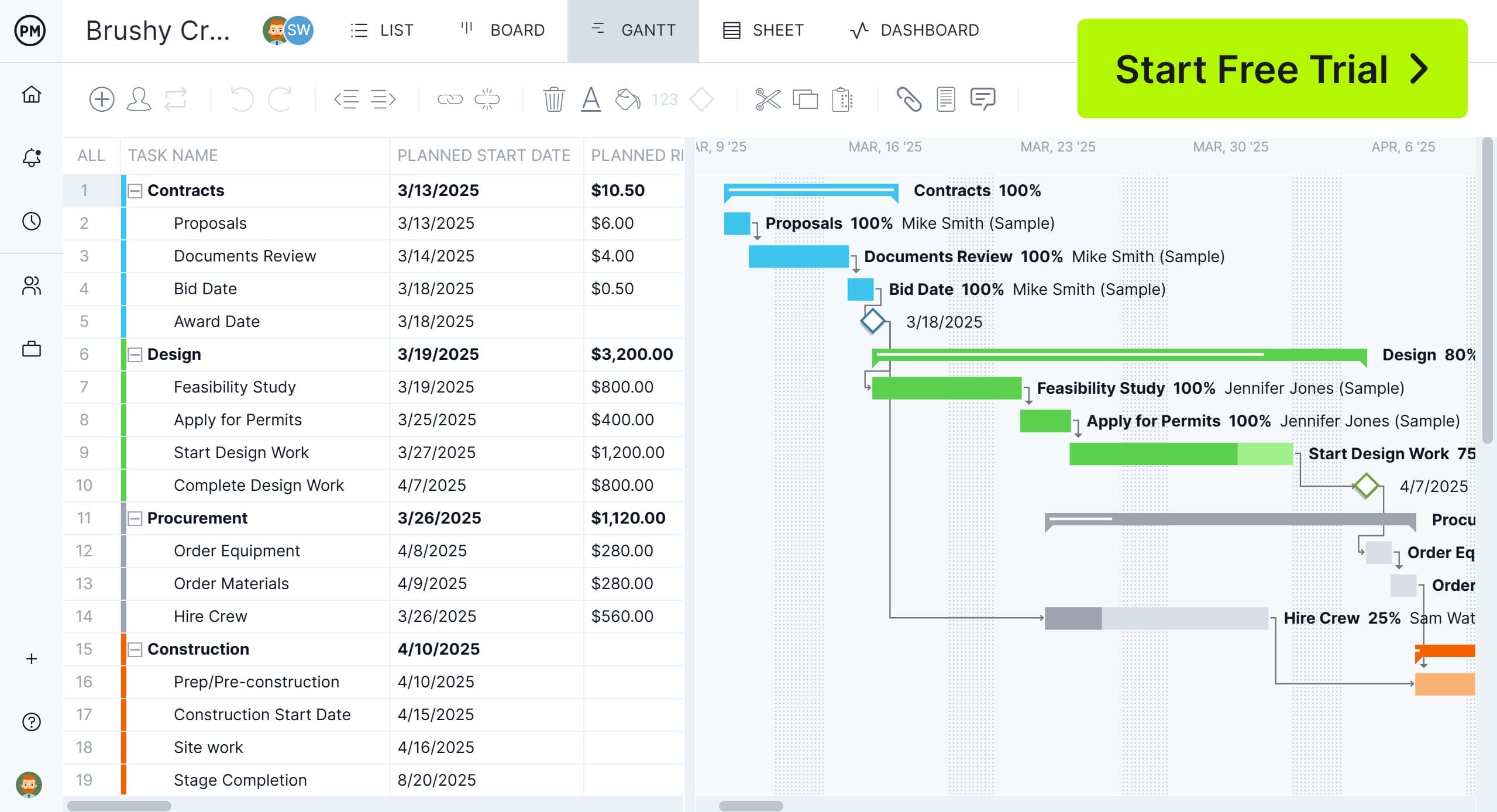
ProjectManager is the best tool to use for maintaining a training record template because it combines task management, dashboards and reporting in a single platform. Users can create custom fields for training dates, certifications and employee roles on robust Gantt charts that link dependent tasks and can set a baseline to track progress in real time. Automated alerts, file attachments and AI-powered audit-ready reports make tracking employee training effortless. Its collaboration features also allow HR and supervisors to update and review records together, streamlining compliance and improving workforce readiness. Get started with ProjectManager today for free.
Who Should Use This Training Record Template?
HR managers, supervisors and team leads responsible for employee development and compliance should use this training record template. Employees can also reference it to track their progress and ensure all required training is completed. It’s suitable for organizations of all sizes seeking an organized and reliable method to manage workforce training.
How to Use a Free Training Record Template for Excel
A training record template for Excel is a must-have tool for any HR, operations or project management team seeking to maintain accurate employee development records. This practical resource organizes training activities, tracks completion status and enables reporting across the organization. The training record template makes it easy to schedule, monitor and review staff advancement for compliance, safety and upskilling purposes. Whether managing a small office or a large construction team like our GreenBuild Construction XYZ LLC example below, using a training record template streamlines documentation and provides transparency for management and external auditors.
General Setup: Company, Department and Authors
To get started, fill out the section at the top with the company name and the date the training record template was last revised. Specify which department or business unit the template applies to, and record the names of those who prepared, reviewed and approved the record, such as a department manager or compliance lead. This gives each training record template context and accountability. Next, include information about the intended department, so entries are grouped and search functionality remains precise.

Employee Profile Information
For each training session logged in the training record template, enter the employee’s name, business unit or department and their job title. This enables management to filter training data for audit purposes, assess skills per team or identify candidates for further development. Recording up-to-date titles and department designations also links training to team roles, making gap analysis and workforce planning much easier.

Training Details: Program, Type and Provider
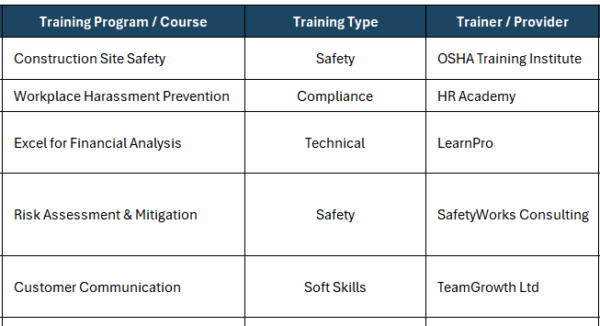
The training record template includes fields for the name of the training program or specific course completed, the type of training—such as safety, compliance, technical or soft skills—and the trainer or institution that delivered it. This ensures records reflect the breadth of employee learning opportunities and credentials, whether OSHA safety training or a workplace harassment prevention course. For external certifications, the service provider noted in the template offers a direct point of contact for compliance and verification.
Timeline: Started, Completed, Status
Tracking timeframes in the training record template means entering the start date and, if applicable, the completion date for each training. The status field is especially useful for real-time management, noting whether a session is completed, in progress or overdue. This alerts managers to upcoming deadlines, ensures renewals are scheduled and supports continuous improvement. For example, if an employee is midway through a customer communication course, it’s easy to filter by “in progress” to send reminders or allocate study resources.

Certification Renewal and Expiry Dates
Many training sessions lead to certificates that have an expiry date—especially those concerning compliance and safety. The training record template’s expiry date column flags when recertification is required, preventing costly lapses or noncompliance. This field can also automate prompts for mandatory refresher courses, as with safety management or workplace ethics updates. By maintaining ongoing visibility into these dates, teams avoid last-minute renewals or overlooked qualification gaps.

Comments, Notes and Course Outcomes
The comments and notes section in the training record template is crucial for documenting additional details that don’t fit standard columns. Managers can record unique outcomes, feedback from trainers, planned upgrades to skill sets or reminders for future training. This narrative field supports continuous review by management, adapts tracking to changing needs and helps teams personalize development plans. Examples include noting improved reporting accuracy or marking a reminder for advanced risk management courses in future cycles.

How to Maintain and Update the Training Record Template
Keeping the training record template current is a collaborative effort. Set a routine for department managers or HR leads to check entries, review certification dates and update status after each session. Consistency in organization makes it easier to retrieve relevant records during compliance checks, annual reviews or audits. Use versioning and strong naming conventions, recording revision dates and authorizing updates for accountability.
Filter, Sort and Export Capabilities
Excel enables filtering and sorting data in the training record template for faster reporting and analysis. Use column headers such as department, training completed or certificate expiry to produce custom views, pivot tables or summaries for managers. Regularly export the template for storage, backup or sharing with organizational stakeholders, making workforce development visible across teams, regions or projects.
More Templates
For a rounded approach to team performance and workforce scheduling, consider these templates alongside your training record template. These resources integrate seamlessly with human resources data and streamline performance and planning tasks.
30-60-90 Day Plan Template
Download this free template to provide a structure for onboarding or role transitions, outlining objectives, checkpoints and goals for each stage of the first three months. When integrated with a training record template, managers can align onboarding activities with skill development and compliance training, creating a unified record for new hires.
Employee Schedule Template
Use this free employee schedule template to map work hours and shift assignments, supporting workforce allocation and attendance tracking. Coupled with a training record template, this makes it simple to coordinate training sessions around work demands, maximize learning outcomes and ensure coverage for mandatory training requirements.
Performance Review Template
This free performance review template gives structure to employee evaluations by listing criteria for assessment, feedback and goals. Combining this template with a training record template enables managers to connect training achievements with personal development, reward compliance and uncover future learning opportunities in reviews.
How ProjectManager Improves the Training Record Template Process
ProjectManager enhances the training record template process by offering multiple project views that give managers complete oversight of employee training. The Gantt chart view allows scheduling of courses and deadlines, while the kanban board visualizes progress across teams. List and calendar views provide quick access to training sessions and completion dates. These multiple views ensure training is organized, visible and easy to manage at every level.
Optimize Resource Management
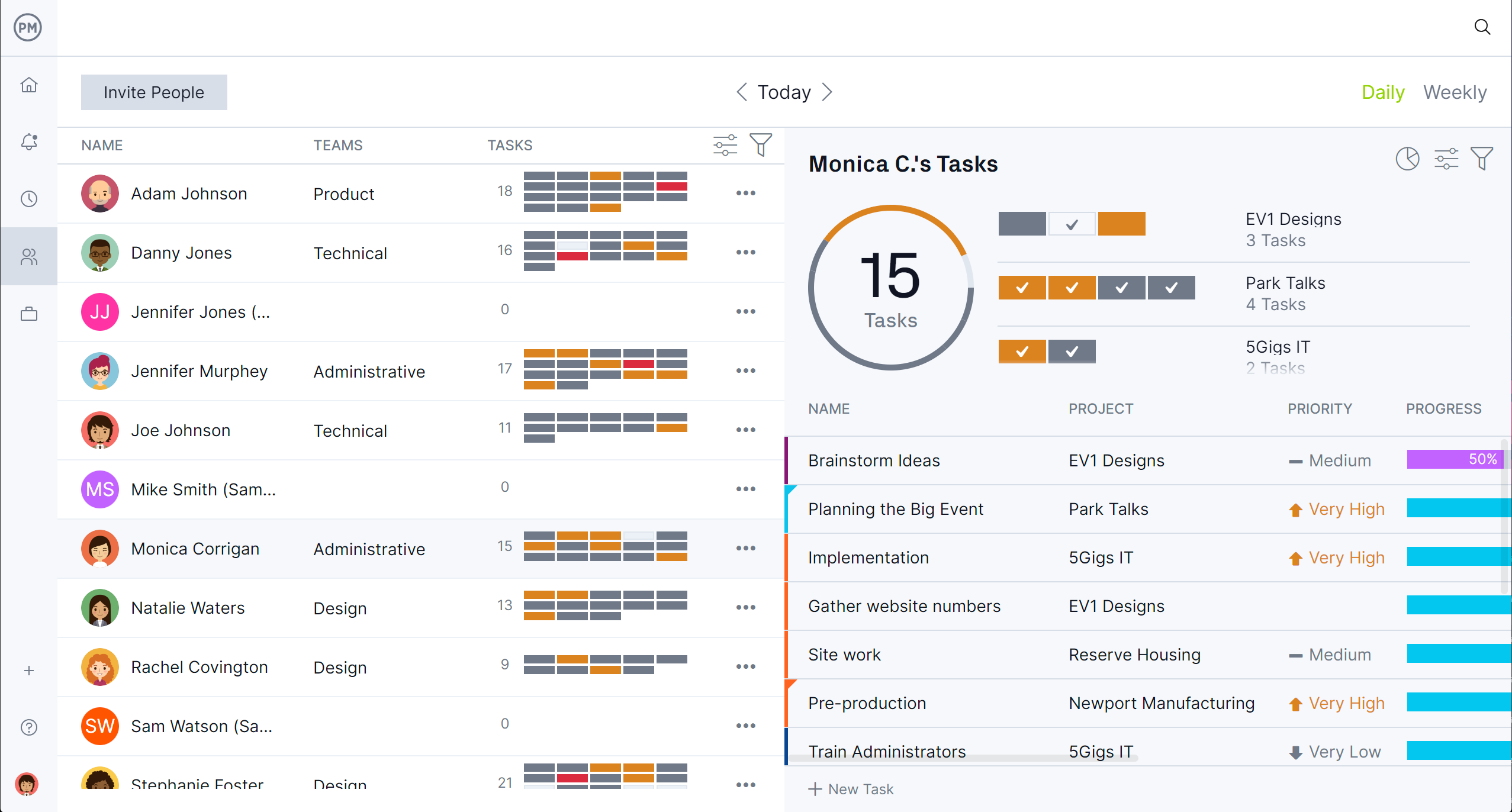
ProjectManager helps optimize resource management by assigning training tasks to specific employees and tracking their availability. Managers can see which employees are scheduled for training, who are behind and who have completed their courses by going to the team page. Custom fields allow tracking of certifications and training requirements per role. Automated reminders and alerts ensure employees complete their sessions on time, reducing administrative overhead and maintaining compliance.
Streamline Tracking and Reporting
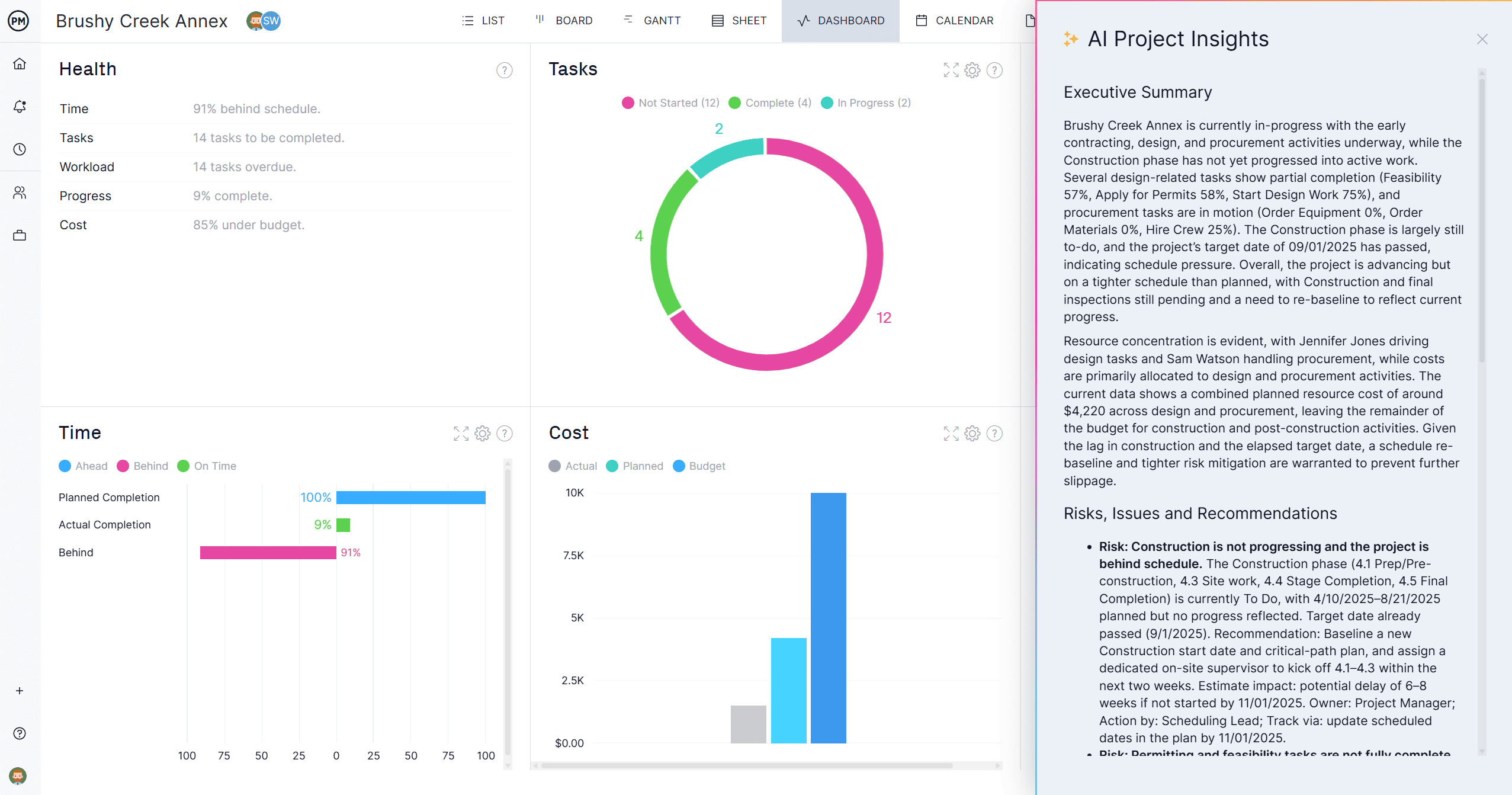
Tracking progress is simplified with ProjectManager’s dashboards, AI-powered reports and timesheets. Managers can monitor course completion rates, identify skill gaps and generate detailed reports for compliance audits. Timesheets capture time spent on training and link it to employee records for payroll or performance evaluation. Real-time data ensures managers and HR can act immediately if training falls behind or requires rescheduling, keeping the workforce up to date and compliant.
Related Content
Readers who want to expand their knowledge of team development and staff management with resources designed to complement your training record template should check out the links below. They list project management skills, management styles and more.
- 40 Project Management Skills: Soft, Hard & Technical Skills
- The 15 Best Performance Review Questions (with Examples)
- Top-Down vs. Bottom-Up Management: What’s the Difference?
- Staffing Plan Template for Excel (Free Download)
- Modèle de registre de formation pour Excel (gratuit)
- Plantilla de Registro de Capacitación para Excel (Gratis)
- Modelo de Registro de Treinamento para Excel (Gratuito)
ProjectManager is online project and portfolio management software that connects teams wherever they work. They can share files, comment at the task level and stay updated with email and in-app notifications. Get started with ProjectManager today for free.