


In many organizations, project managers turn to an executive project status report template to convey progress in a clear, strategic format. Instead of listing every task, the framework highlights only the details that matter at the leadership level—overall performance, major risks and the current priorities shaping the project’s direction.
Why You Need an Executive Project Status Report Template
For executives with limited time, a well-structured report becomes an indispensable tool that condenses complex project activity into a concise, easy-to-scan layout. By organizing updates on progress, costs, budget performance, issues and decisions, the template streamlines oversight. With essential information clearly displayed, leadership can identify trends quickly, respond to changes and remain aligned with project teams without lengthy briefings.
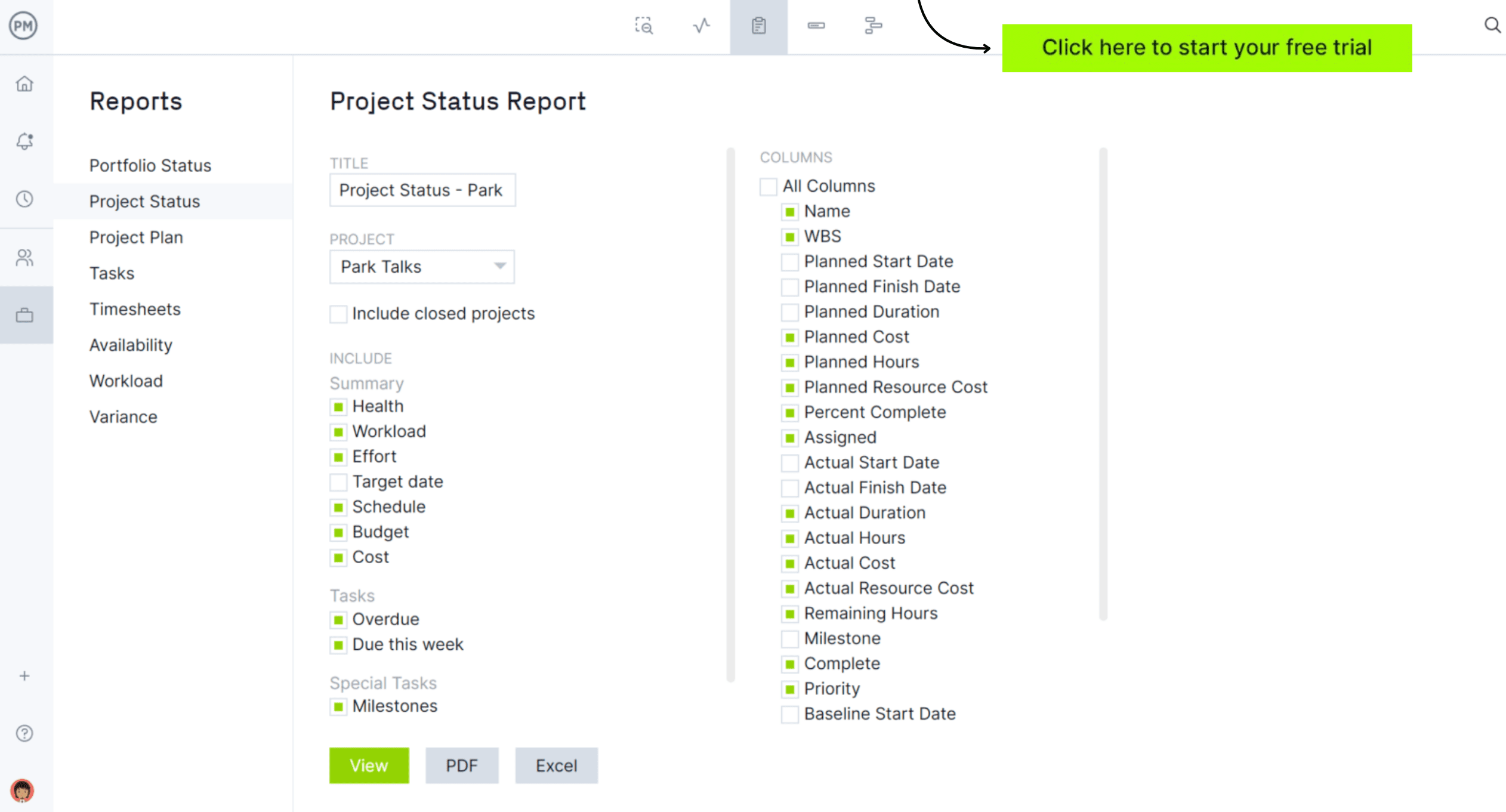
This template is a great starting point, providing a familiar and simple format for executives or stakeholders who want a high-level format. However, it comes with drawbacks. ProjectManager transforms what you might do manually in a template and makes it automated, dynamic, integrated and scalable. Real-time dashboards capture data on project progress, tasks, health, time, cost and workload. Then, in a few clicks, generate a customized project status report that focuses on the most important data. Get started today by taking a free 30-day trial, no credit card required.
When to Use an Executive Project Status Report Template
Across industries, executive-level status reports are most often produced for projects involving significant budgets, multiple teams or organizationally critical outcomes. They see heavy use in construction, IT, engineering, healthcare and manufacturing, where risks and timelines call for close monitoring. These summaries are especially valuable during milestone checkpoints, accelerated project phases or any moment requiring swift, informed executive awareness.
How Often Should You Use an Executive Project Status Report Template?
The frequency of an executive project status report depends on project complexity and pace. Most organizations issue these reports weekly, especially when leadership oversight and quick decision-making are critical.
Bi-weekly reports are typical for projects with moderate activity, balancing visibility with efficiency. For long-term or portfolio-level initiatives, monthly summaries are sufficient to track strategic progress and budget trends.
Because of that, users can easily adjust this template so it can be utilized as a monthly, bi-weekly or weekly executive project status report template. The key is maintaining a rhythm that keeps executives informed without overwhelming them, ensuring meaningful insights rather than repetitive updates.
Who Should Use This Executive Project Status Report Template?
In many organizations, senior project managers, program managers and PMO leaders rely on this type of template to deliver high-level updates to executives. It’s especially valuable for professionals overseeing complex initiatives that involve multiple teams, significant budgets or cross-departmental coordination.
Stakeholders such as directors, department heads and sponsors also use these summaries to stay aware of progress and risks without reviewing detailed task data. Whether the work takes place in construction, technology, healthcare, finance or large-scale operations, this template supports clear communication at the leadership level.
How to Use ProjectManager’s Executive Project Status Report Template
This template is designed to help teams translate project activity into clear, executive-ready insights. It guides the user through summarizing progress, highlighting risks and presenting key decisions in a structured, easily digestible format.
Here are the steps you should follow to use it.
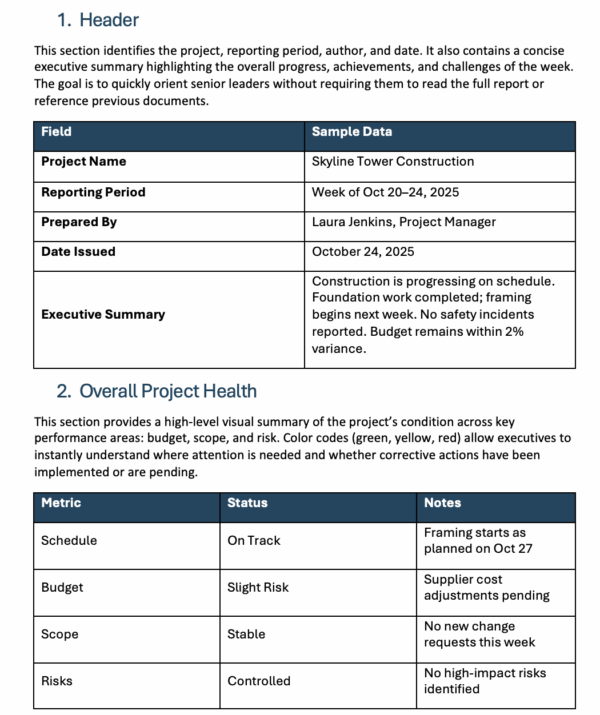
1. Header
Begin by outlining the essential project identifiers, noting the reporting period, author and date. This step also includes a brief executive summary that captures overall progress, key achievements and notable challenges for the week. Its purpose is to orient senior leaders immediately so they can grasp the project’s status without reviewing previous reports.

2. Overall Project Health
Next, present a visual snapshot of the project status across major performance areas such as budget, scope and risk. Color indicators—green, yellow and red—help executives spot areas requiring attention and determine whether corrective measures have already begun or still need approval.

3. Key Highlights This Week
Record the major events and accomplishments from the current reporting period. This typically includes completed milestones, received approvals and resolved issues. The step keeps executives aware of meaningful progress and reinforces accountability for deliverables completed during the week.

4. Upcoming Priorities
Outline the objectives planned for the upcoming week, emphasizing what outcomes are expected by the next report. This step keeps leadership aligned with short-term goals and may also call attention to dependencies, coordination needs or anticipated approvals required to stay on schedule.

5. Critical Issues & Risks
Identify the risks or issues that pose the greatest threat to project success. Each entry should describe the concern, its potential impact, the responsible owner and the planned mitigation. Executives rely on this step to determine where intervention or rapid decision-making may be necessary.

6. Financial Snapshot
Provide a financial overview by comparing the approved budget with actual expenditures and forecasts. This step highlights any variances or cost concerns and may include pending change requests that could influence the total project budget moving forward.

7. Summary of Dependencies / Decisions Needed
Conclude by listing dependencies or actions required from leadership or external parties. This step ensures executives understand which decisions, approvals or cross-team contributions are needed to prevent delays and keep the project advancing as planned.

Create an Executive Project Status Report with ProjectManager
If you’re looking for all of the insights from this template and more, consider ProjectManager. Our award-winning software makes it easy for teams to work in the view of their choice, including Gantt chart, list, sheet, kanban and calendar, making it easy to see changes in real time. This way, not everyone is forced into a single report format, and they see the information that’s relevant to them.
Real-Time Dashboards for Live Data
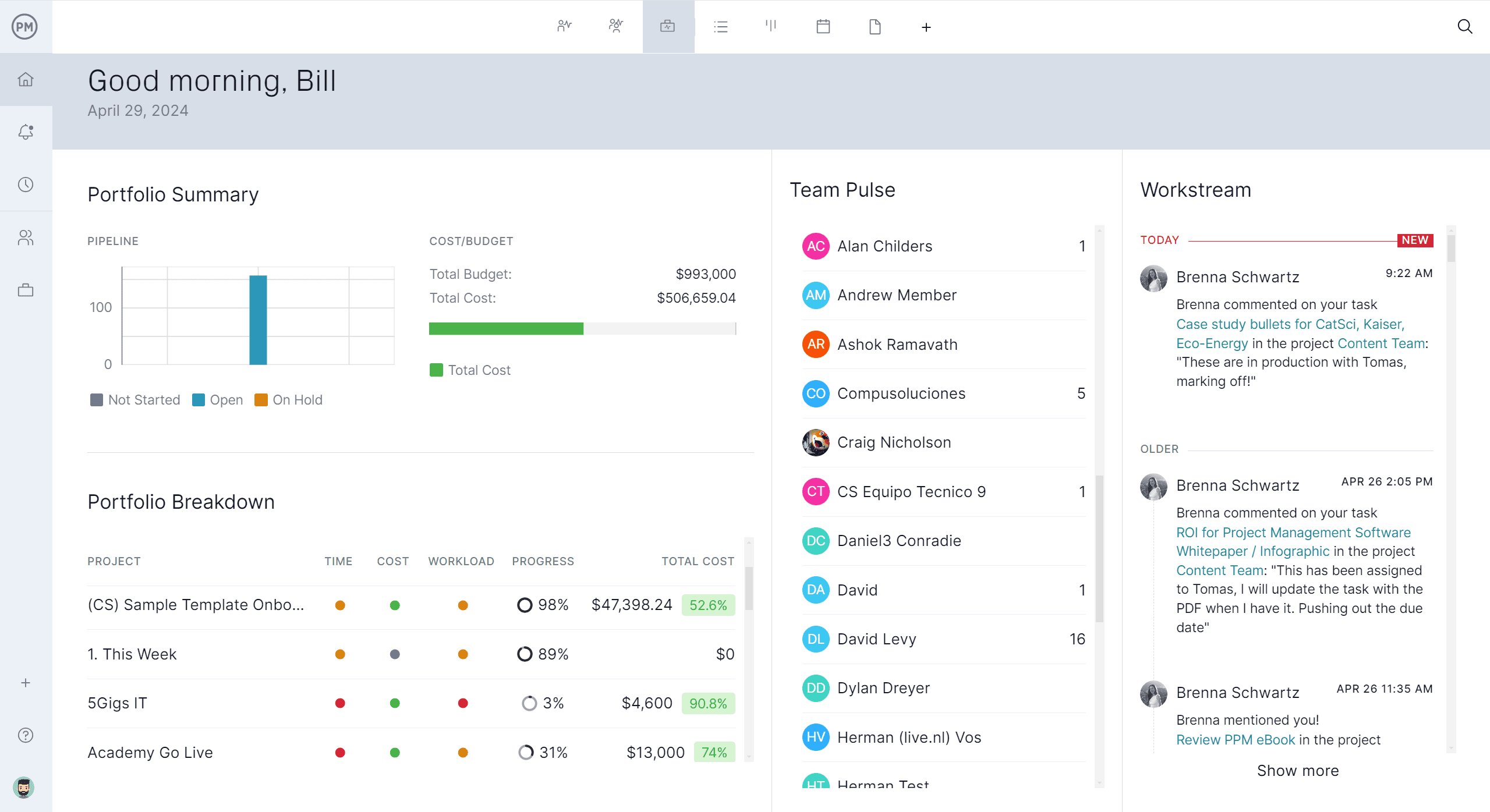
The dashboards in ProjectManager are robust, and there are multiple kinds available. Use our project or portfolio dashboards to track six different metrics in real time. They update instantly when anything changes in the project or portfolio, giving stakeholders a current view rather than a stale, outdated snapshot.
Integrated Risk Tracking
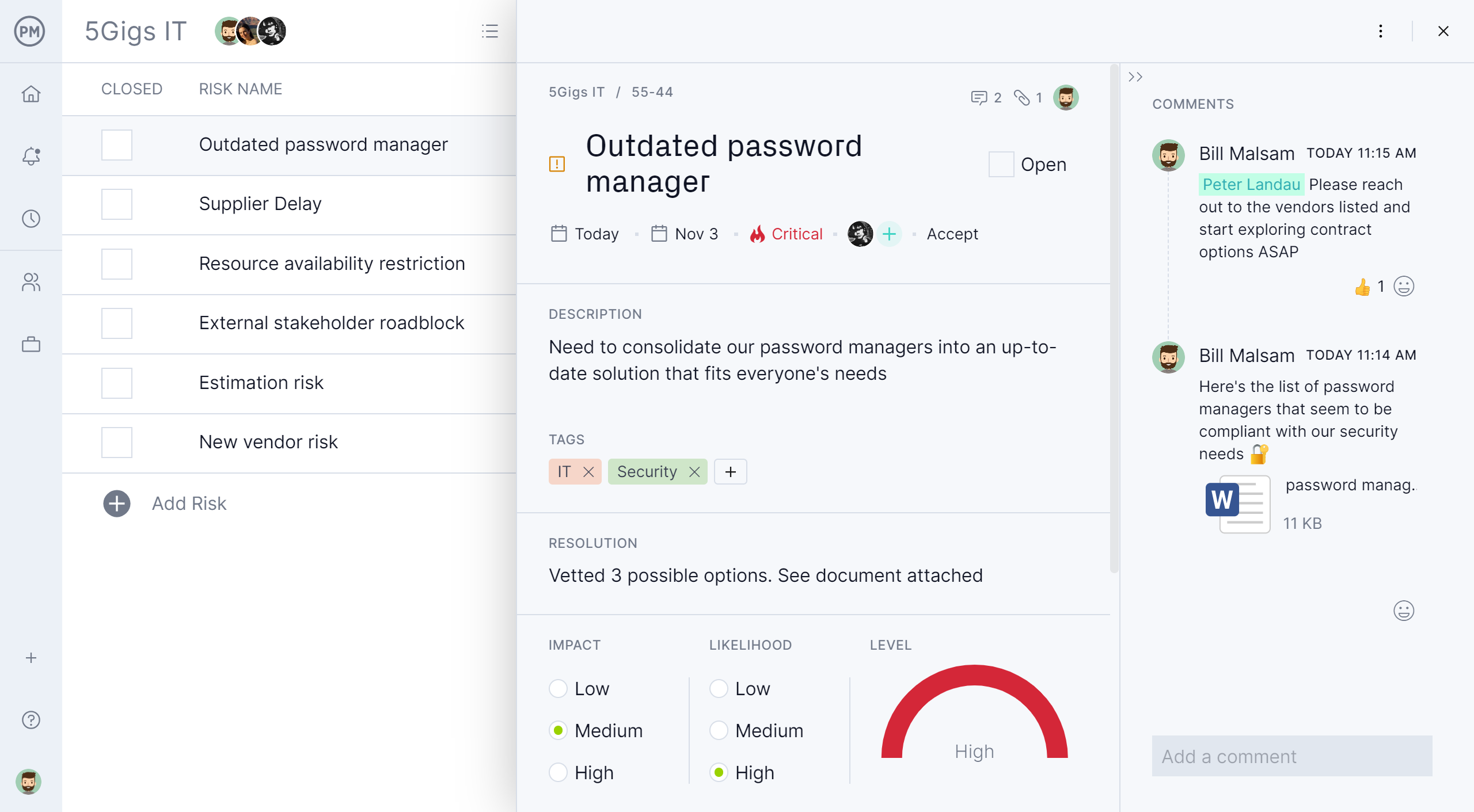
Stakeholders want to be looped in on any project risks. With built-in RAID logs and risk management features, ProjectManager makes it easy to spot risks early and take action to mitigate them. Set a due date, priority level, assignee, description and more. Then, note the impact and likelihood, and our software automatically shows the risk level. Add comments to keep stakeholders informed as risks evolve.
What Other Project Management Templates Can Help with Project Status Reporting?
ProjectManager offers a library of over 100 project management templates for Excel, Word and Google Sheets to help plan, schedule, monitor and close projects. Here are some of them.
Project Overview Template
A project overview becomes clearer when foundational elements are gathered in one place. This template brings together the business case, defined goals and objectives, scope boundaries and success criteria to present a structured snapshot of the initiative. By consolidating these components, it helps teams and stakeholders understand the project’s purpose, direction and expectations from the very beginning.
Project Summary Template
Capturing the essential details of a project is easier with a format built for fast review. This template highlights the project schedule, assigned budget, resource plan and a concise risk overview. Each section contributes to a streamlined summary that supports informed discussions, status updates and decision-making without requiring a deep dive into detailed documentation.
RAID Log Template
Managing project uncertainties becomes more manageable with a RAID log that organizes critical information into clear categories. This template includes fields for recording risks, assumptions, issues and decisions, along with their impact, response strategy, priority level and assigned owner. Its structure ensures teams maintain visibility over emerging challenges and the actions required to address them.
In this video, project management expert David Deen shares some tips and secrets to make project status reports that meet the expectations of executives in an organization.
Related Content
- What Is an Executive Sponsor? Key Responsibilities
- What Is a Project Executive? Role, Responsibilities and Salary
- How to Write an Executive Summary (Example & Template Included)
- Free Executive Summary Template for Word
ProjectManager is online project and portfolio management software that connects teams, whether they’re in the office or out in the field. They can share files, comment at the task level and stay updated with email and in-app notifications. Get started with ProjectManager today for free.