



Organizations that manage large capital improvement programs need more than basic project management tools to control budgets, approvals, documents and project delivery workflows. e-Builder has long been a popular choice for owners managing construction portfolios, government programs, educational facilities and infrastructure projects.
What Is e-Builder?
e-Builder is a cloud-based construction program management software platform used to plan, manage and deliver capital improvement projects. It is commonly used by facility owners, government agencies, educational institutions and program management firms to control project costs, schedules, documents and business processes. The platform supports project delivery from planning and design through procurement, construction and asset handover using digital workflows, reporting tools and centralized project data.
Founded in 1995, e-Builder operated as an independent construction program management software company until Trimble acquired the business in February 2018. In recent years, Trimble has been consolidating its construction technology portfolio, and e-Builder is now being rebranded as Trimble Unity Construct. According to Trimble, the transition preserves the platform’s existing functionality while introducing deeper integrations and a more unified product experience across the Trimble ecosystem.
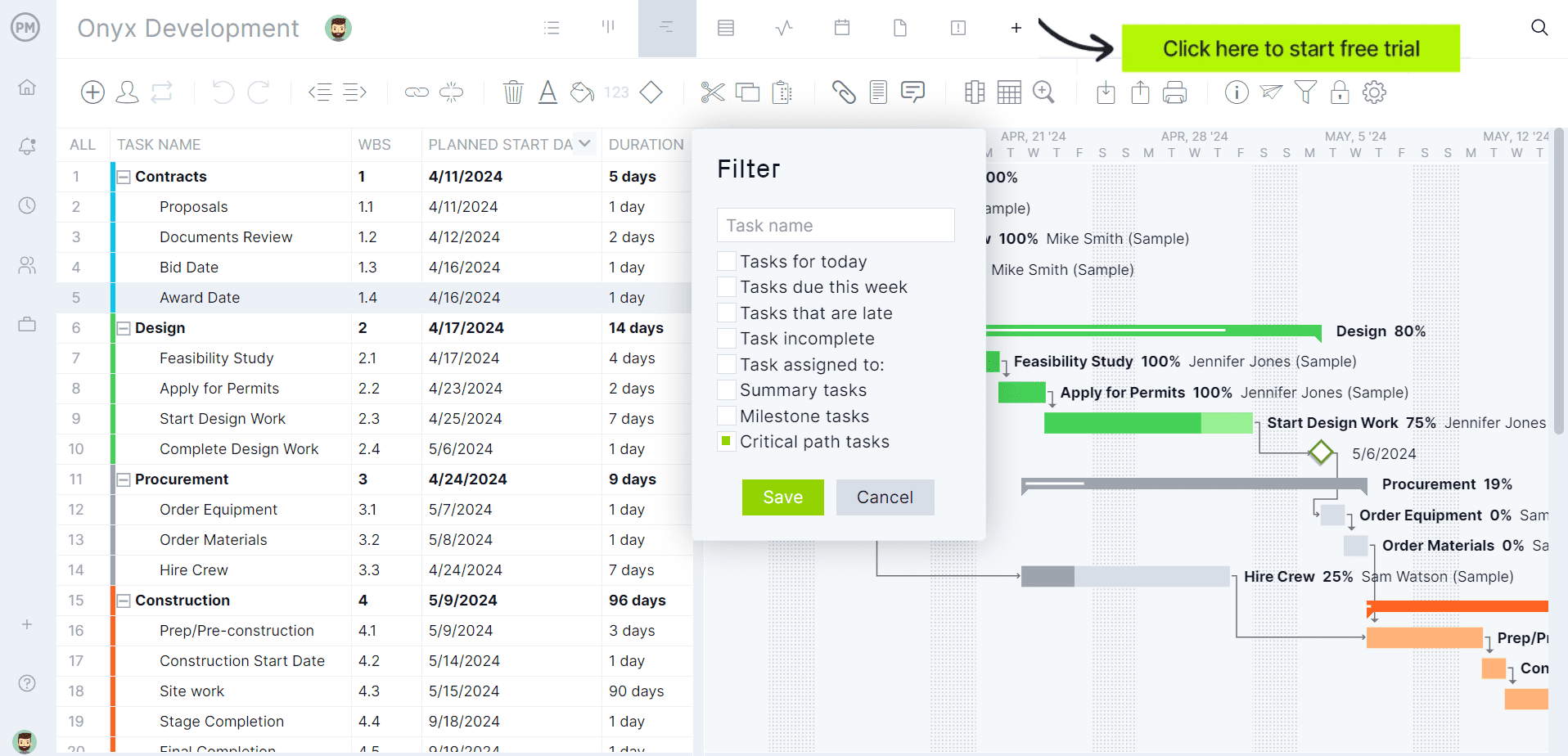
If you’re looking for software to plan, schedule and track construction projects from start to finish, try ProjectManager instead. ProjectManager is award-winning construction project management software that gives construction companies tools to ensure projects are completed on time, within budget and within scope. It allows project managers to create detailed construction schedules, estimate costs, allocate resources, set budgets, track progress and compare estimated versus actual project outcomes using real-time dashboards and reports to quickly identify delays or cost overruns. Get started with ProjectManager for free today.
e-Builder Plans & Pricing
Unlike many construction management platforms, e-Builder does not publish standard pricing tiers on its website. Organizations must contact Trimble directly to receive a customized quote based on factors such as the number of users, project volume, deployment requirements and selected modules.
| Pricing Plan | Pricing | What’s Included |
| Custom Enterprise Plan | Contact Trimble for pricing | Access to e-Builder capabilities such as capital planning, funding allocation, bidding, business process automation, schedule management, document management, project management, cost management, dashboards and reporting. |
Note: Trimble does not publicly disclose e-Builder subscription pricing, implementation costs or licensing packages. Buyers must request a sales consultation to obtain current pricing information.
e-Builder Views
Unlike many construction management platforms that focus on task boards or simple project lists, e-Builder primarily organizes information through specialized project, financial and reporting interfaces. These views allow different stakeholders to analyze schedules, costs, documents and portfolio performance from the perspective most relevant to their role.
- Schedule View: Displays project activities, dependencies, milestones and critical path schedules in a timeline format, allowing project managers to monitor progress, forecast completion dates and identify scheduling risks before they affect project delivery.
- Dashboard View: Presents key project and program performance indicators through configurable dashboards that help owners and executives monitor budgets, schedules, workflows and overall capital program health from a centralized location.
- Reporting View: Provides access to embedded reporting and business intelligence tools that transform project, financial and operational data into actionable reports for project oversight, executive reviews and compliance monitoring.
- Cost Summary View: Organizes approved budgets, commitments, invoices and financial data into configurable layouts that help teams analyze project costs, evaluate budget status and anticipate future expenditures.
- Portfolio View: Aggregates information across multiple capital projects, giving program managers visibility into funding allocations, project performance and portfolio-level metrics from a single environment.
- Document View: Centralizes project files, drawings, contracts and supporting documentation within a searchable repository, helping stakeholders access current project information without relying on disconnected storage systems.
e-Builder Features
e-Builder focuses on capital program management rather than general-purpose project management. Its feature set is designed to help owners control funding, automate workflows, manage procurement activities and maintain visibility throughout the entire construction project lifecycle.
- Capital Planning: Helps organizations evaluate project proposals, prioritize investments and align capital improvement initiatives with available resources before projects enter execution.
- Cost & Funding Management: Enables teams to manage budgets, funding sources, commitments and expenditures while maintaining visibility into project financial performance throughout delivery.
- Process Management: Automates project workflows and approval processes, helping organizations standardize procedures, reduce manual effort and improve governance across capital programs.
- Bid Management: Supports procurement activities by helping owners distribute bid packages, collect contractor responses and manage competitive bidding processes digitally.
- Submittals Management: Tracks submittals and review workflows throughout the project lifecycle, helping stakeholders maintain accountability and documentation for construction approvals.
- Document Management: Maintains a centralized repository for project records, contracts, drawings and correspondence, making information easier to locate and control across project teams.
- Reporting & Dashboards: Delivers built-in reporting and business intelligence tools that help stakeholders analyze project performance, monitor trends and support data-driven decisions.
- Time Tracking: Allows organizations to capture and monitor project-related labor time as part of broader project controls and program management activities.
- Building Information Modeling (BIM): Supports BIM-related project workflows, helping stakeholders coordinate design and construction information within the broader project management environment.
Pros and Cons of e-Builder
e-Builder is designed for owners managing capital programs, facilities portfolios and large construction initiatives. Its strengths are centered on financial controls, workflow automation and program oversight, while its limitations are most noticeable for teams seeking lightweight project management or highly collaborative planning tools.
Pros
When managing large capital improvement programs, e-Builder performs best as a centralized system for controlling budgets, approvals, documents and project processes. The platform’s greatest advantage is providing owners with consistent governance, visibility and reporting across multiple projects and stakeholders.
- Strong Financial Controls: Helps organizations manage budgets, funding allocations, commitments and expenditures from a centralized environment.
- Workflow Automation: Standardizes approval processes and project procedures, reducing manual administration and improving governance compliance.
- Portfolio Visibility: Gives executives and program managers visibility across multiple projects through reporting and dashboard capabilities.
- Centralized Documentation: Stores project records, drawings and contracts in a single repository accessible by stakeholders.
- Construction-Focused Functionality: Includes dedicated modules for bidding, submittals, scheduling and capital program management.
Cons
Compared with modern project management platforms, e-Builder is less focused on team collaboration, agile planning and everyday task management. The software prioritizes governance and program controls, which can create a steeper learning curve and heavier administrative experience for some users.
- Designed Primarily for Owners: The platform focuses on capital program management rather than broad cross-industry project management use cases.
- Limited Scheduling Flexibility: e-Builder’s scheduling functionality centers on CPM scheduling and milestones, but lacks the variety of planning views and advanced scheduling tools commonly found in dedicated project management platforms.
- Resource Management Requires Additional Functionality: Resource allocation is not included in the base scheduling capabilities and requires optional resource management features to assign and manage project resources.
- Less Emphasis on Team-Level Task Management: The platform is designed around project controls, approvals and program oversight rather than collaborative task assignment, work management and day-to-day team execution.
- Cost Tracking Prioritizes Governance Over Simplicity: Financial management capabilities are comprehensive, but the focus on approvals, funding controls and formal processes can create additional administrative overhead for smaller projects.
- Project Planning Is Geared Toward Capital Programs: Organizations managing construction portfolios benefit from the platform’s structure, but teams seeking lightweight project planning may find the system more complex than necessary for routine project management needs.
ProjectManager Is the Best e-Builder Alternative for Construction Project Management
Although e-Builder performs well for construction-specific processes like RFIs, submittals, inspections and drawing management, its construction planning and scheduling functionality is more limited than what dedicated project management software such as ProjectManager.
ProjectManager offers a more comprehensive construction project management solution with advanced Gantt charts, critical path tracking, workload management, resource scheduling, portfolio roadmaps, real-time dashboards, kanban boards, timesheets and automated reports in a single platform.
In addition to traditional construction scheduling capabilities, ProjectManager includes AI-powered project insights, workflow automation and live performance tracking that help teams identify delays, manage risks and improve decision-making. The platform also supports an open API and more than 1,000 integrations with tools like Acumatica, QuickBooks, Microsoft Project, Slack and Google Workspace, allowing construction companies to connect operational and project data across their existing systems.
Watch the video below to learn more!
e-Builder FAQ
Below are answers to some of the most common questions construction owners, program managers and project teams ask when researching e-Builder, its relationship with Trimble and the ongoing transition to Trimble Unity Construct.
Is e-Builder Discontinued?
e-Builder is not discontinued, but Trimble is actively transitioning the product into a broader platform called Trimble Unity Construct. Existing e-Builder functionality continues to be supported, while Trimble is rebranding and integrating the software with other solutions in its construction and asset lifecycle management portfolio. According to Trimble, the goal is to provide a more connected experience without disrupting the capabilities organizations currently use.
What Is the Difference Between e-Builder and Trimble?
e-Builder is a software product, while Trimble is the technology company that owns and develops it. e-Builder operated as an independent construction program management software company until Trimble acquired the business in 2018. Today, Trimble offers a broad portfolio of construction, geospatial, transportation and asset management solutions, with e-Builder serving as one of the software platforms within that ecosystem.
What Is Trimble Unity Construct?
Trimble Unity Construct is the new name and strategic direction for the e-Builder platform. It combines e-Builder’s construction program management capabilities with additional Trimble technologies designed to support capital planning, project delivery, asset handover and lifecycle management. The platform is intended to create a unified environment where owners can manage projects, facilities and infrastructure assets using connected data and workflows.
ProjectManager is online construction project management software that empowers teams to plan, manage and track their projects in real time. We connect architects and engineers in the office with your work crew on the job site so they can share files and comments to foster better collaboration. Get started with ProjectManager today for free.
