


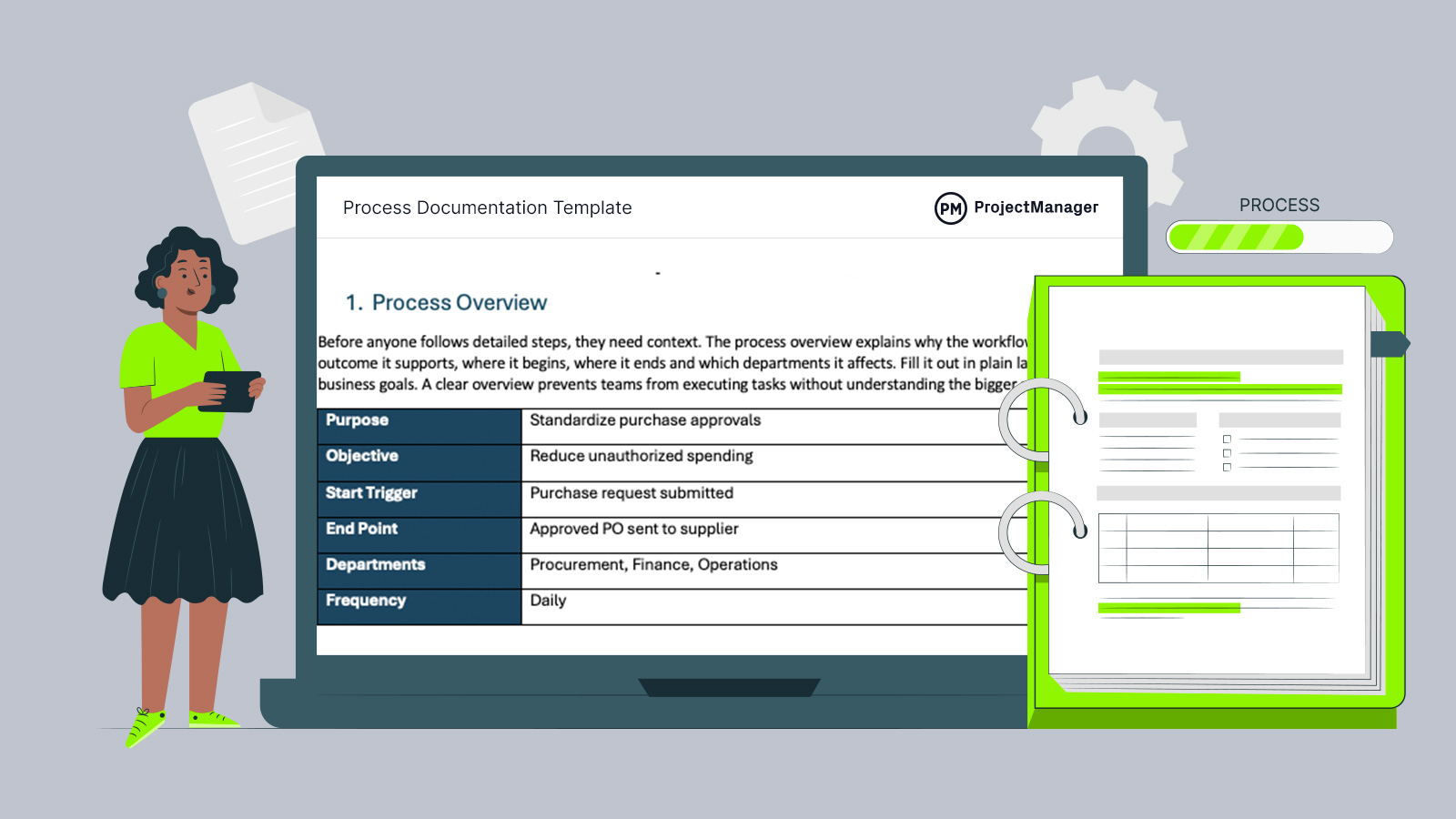
Keeping daily operations consistent gets harder as teams grow, systems change and handoffs multiply. Our process documentation template helps organize workflows, reduce confusion and give every department a clear format for recording how work should be completed from start to finish.
Why You Need a Process Documentation Template
As organizations expand, tasks often become inconsistent across departments, locations and managers. A process documentation template provides teams with a structured format for recording procedures, responsibilities, controls and required tools. That consistency improves training, speeds onboarding and reduces costly errors caused by guesswork. It also helps leaders review workflows, remove bottlenecks and maintain compliance standards. When everyone follows documented steps, operations run smoother, handoffs improve and performance becomes easier to measure.
When to Use a Process Documentation Template
Opportunities to use a process documentation template exist in nearly every organization because all businesses rely on repeatable workflows. Whenever work passes between people, systems or departments, documenting the process improves consistency, accountability, training speed and operational control while reducing avoidable delays and confusion.
- Manufacturing: Production teams use it to standardize assembly steps, inspections, maintenance routines and inventory movements across shifts.
- Construction: Contractors apply it to procurement, safety reporting, change orders, inspections and subcontractor coordination on active jobsites.
- Healthcare: Hospitals and clinics document patient intake, billing, scheduling, records handling and regulatory compliance procedures carefully.
- Finance: Accounting departments rely on it for approvals, reconciliations, month-end close activities and expense control workflows.
- Information Technology: IT teams use it for help desk tickets, user access requests, backups and incident response.
When you’re ready to take control of your projects, try ProjectManager. This award-winning project management software helps teams plan, schedule and track work from start to finish. Create detailed schedules, manage resources, monitor costs and compare planned versus actual performance with a full suite of powerful tools. Get started for free today.
Who Should Use This Free Process Documentation Template?
Anyone responsible for leading people, managing workflows or improving department performance can benefit from this template. If a role oversees repeatable tasks, approvals, handoffs or service delivery, documenting those processes creates better control, clearer accountability and smoother day-to-day operations across the business.
- Operations Manager: Oversees workflow efficiency, removes bottlenecks, balances resources and enforces operating standards across daily activities.
- Department Head: Sets procedures, approves key decisions, assigns responsibilities and drives stronger departmental performance over time.
- Project Manager: Coordinates timelines, controls handoffs, resolves issues and keeps cross-functional work moving on schedule.
1. Document Control
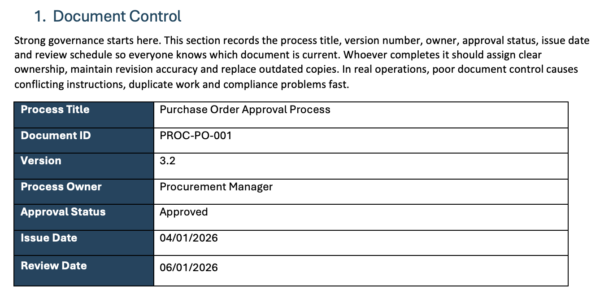
Strong governance starts here. This section records the process title, version number, owner, approval status, issue date and review schedule so everyone knows which document is current. Whoever completes it should assign clear ownership, maintain revision accuracy and replace outdated copies. In real operations, poor document control causes conflicting instructions, duplicate work and compliance problems fast.
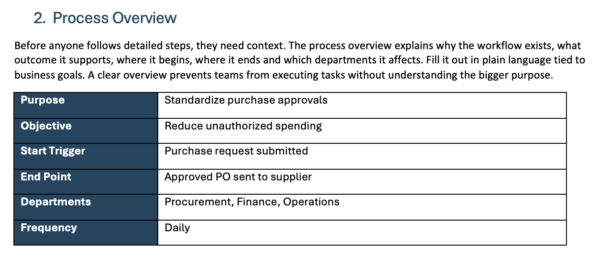
2. Process Overview
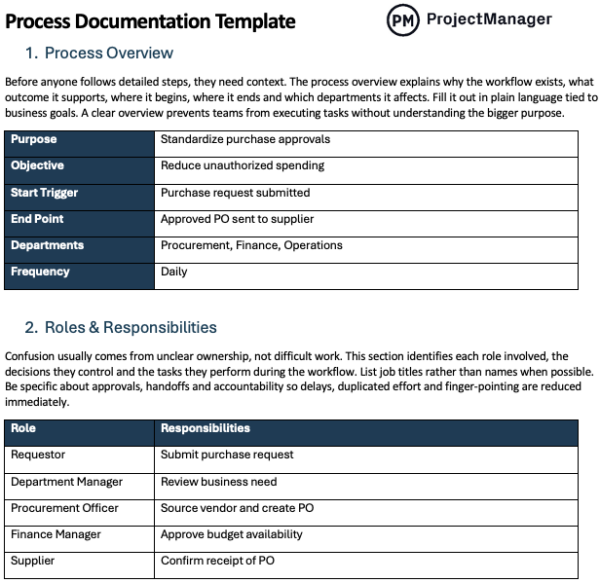
Before anyone follows detailed steps, they need context. The process overview explains why the workflow exists, what outcome it supports, where it begins, where it ends and which departments it affects. Fill it out in plain language tied to business goals. A clear overview prevents teams from executing tasks without understanding the bigger purpose.
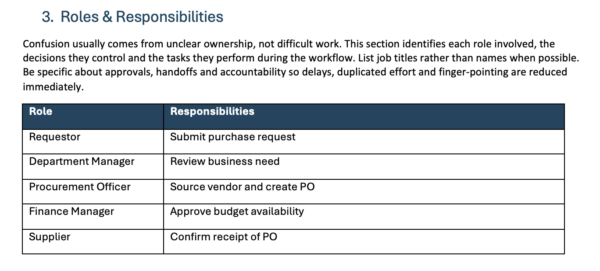
3. Roles & Responsibilities
Confusion usually comes from unclear ownership, not difficult work. This section identifies each role involved, the decisions they control and the tasks they perform during the workflow. List job titles rather than names when possible. Be specific about approvals, handoffs and accountability so delays, duplicated effort and finger-pointing are reduced immediately.
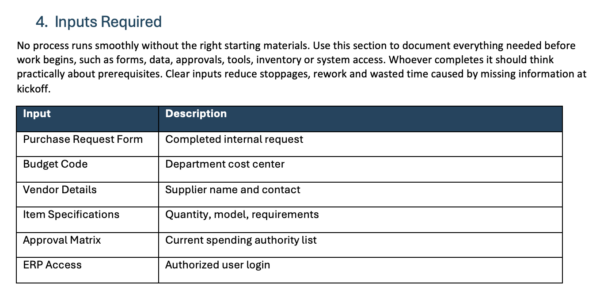
4. Inputs Required
No process runs smoothly without the right starting materials. Use this section to document everything needed before work begins, such as forms, data, approvals, tools, inventory or system access. Whoever completes it should think practically about prerequisites. Clear inputs reduce stoppages, rework and wasted time caused by missing information at kickoff.
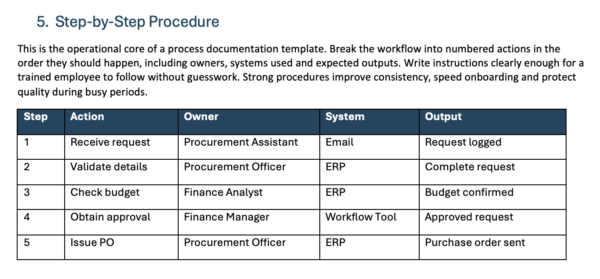
5. Step-by-Step Procedure
This is the operational core of a process documentation template. Break the workflow into numbered actions in the order they should happen, including owners, systems used and expected outputs. Write instructions clearly enough for a trained employee to follow without guesswork. Strong procedures improve consistency, speed onboarding and protect quality during busy periods.
6. Decision Points
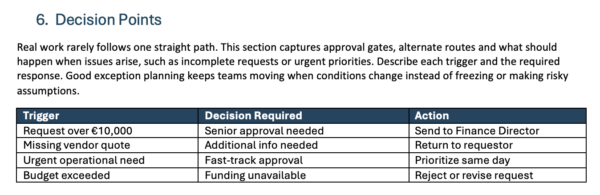
Real work rarely follows one straight path. This section captures approval gates, alternate routes and what should happen when issues arise, such as incomplete requests or urgent priorities. Describe each trigger and the required response. Good exception planning keeps teams moving when conditions change instead of freezing or making risky assumptions.
7. Tools & Systems
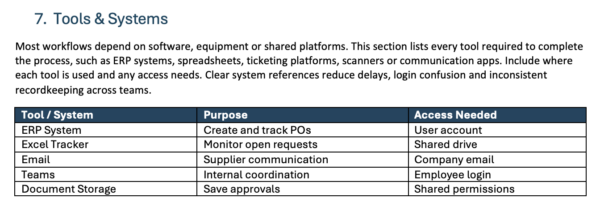
Most workflows depend on software, equipment or shared platforms. This section lists every tool required to complete the process, such as ERP systems, spreadsheets, ticketing platforms, scanners or communication apps. Include where each tool is used and any access needs. Clear system references reduce delays, login confusion and inconsistent recordkeeping across teams.
8. Quality Control Checks
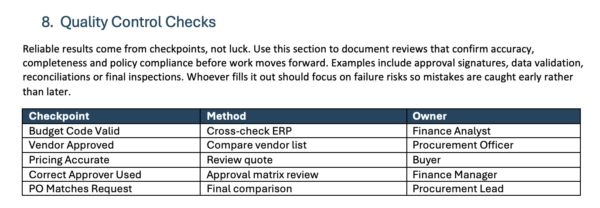
Reliable results come from checkpoints, not luck. Use this section to document reviews that confirm accuracy, completeness and policy compliance before work moves forward. Examples include approval signatures, data validation, reconciliations or final inspections. Whoever fills it out should focus on failure risks so mistakes are caught early rather than later.
9. Common Risks
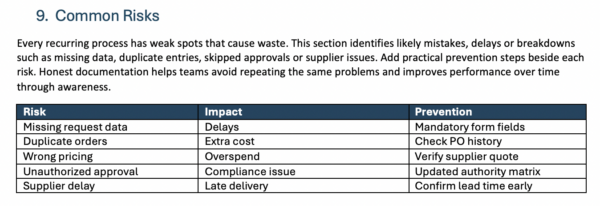
Every recurring process has weak spots that cause waste. This section identifies likely mistakes, delays or breakdowns such as missing data, duplicate entries, skipped approvals or supplier issues. Add practical prevention steps beside each risk. Honest documentation helps teams avoid repeating the same problems and improves performance over time through awareness.
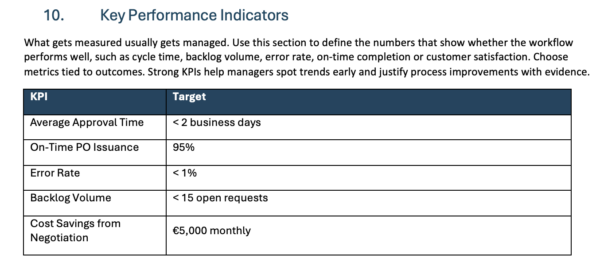
10. Key Performance Indicators
What gets measured usually gets managed. Use this section to define the numbers that show whether the workflow performs well, such as cycle time, backlog volume, error rate, on-time completion or customer satisfaction. Choose metrics tied to outcomes. Strong KPIs help managers spot trends early and justify process improvements with evidence.
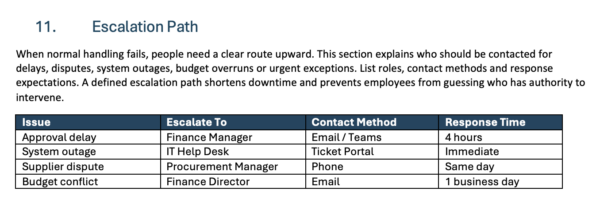
11. Escalation Path
When normal handling fails, people need a clear route upward. This section explains who should be contacted for delays, disputes, system outages, budget overruns or urgent exceptions. List roles, contact methods and response expectations. A defined escalation path shortens downtime and prevents employees from guessing who has the authority to intervene.
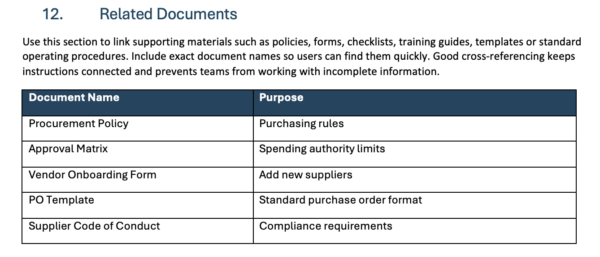
12. Related Documents
Use this section to link supporting materials such as policies, forms, checklists, training guides, templates or standard operating procedures. Include exact document names so users can find them quickly. Good cross-referencing keeps instructions connected and prevents teams from working with incomplete information.
How to Manage Processes with ProjectManager
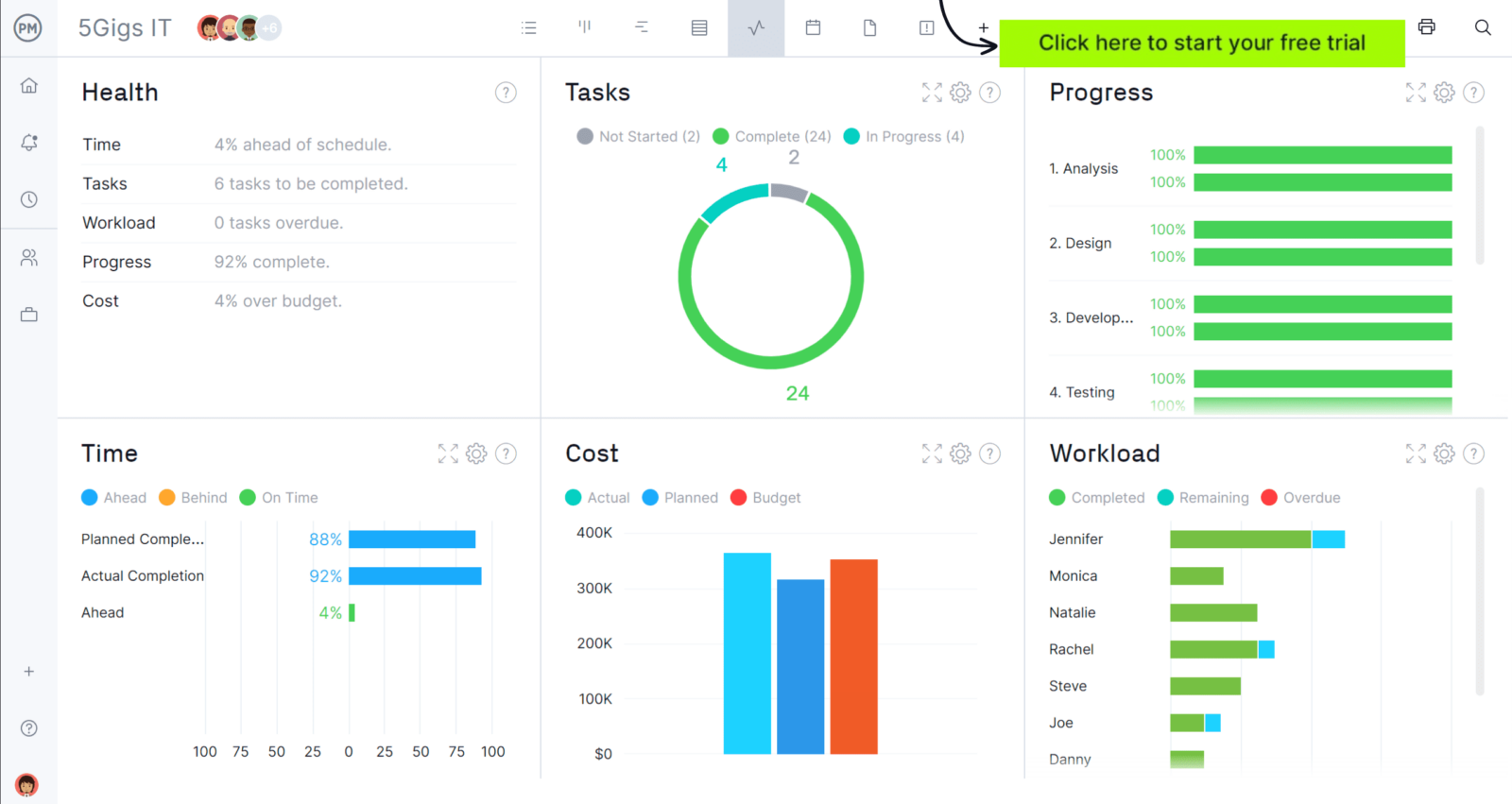
ProjectManager is an online project management solution that provides a complete set of work planning, scheduling and tracking tools, including Gantt charts, kanban boards, task lists and real-time dashboards and reports. With these features, teams across industries can build detailed schedules, assign resources and monitor progress, costs and timelines.
ProjectManager also delivers AI-powered project insights to support better decision-making and connects with over 100 tools like Microsoft Project, Acumatica and Power BI. With its open API and wide range of integrations, organizations can seamlessly link ProjectManager to their existing systems. Watch the video below to learn more!
Free Related Templates
We’ve created dozens of free process management templates for Excel, Word, Google Sheets and more. Here are some that organizations can use alongside a process documentation template.
Process Map Template
Visualize each step, decision point and handoff in a workflow to improve clarity, identify delays and streamline how work moves through your organization efficiently.
Standard Operating Procedure (SOP) Template
Document detailed instructions for recurring tasks so employees perform work consistently, meet quality standards and reduce errors during everyday operations.
Policies and Procedures Template
Establish workplace rules and supporting procedures that guide decisions, ensure compliance and create consistent expectations across departments and teams.
If you need a tool to help you manage projects, then sign up for our software now at ProjectManager. Our online software helps teams across industries plan, track and oversee projects as they unfold. Sign up for a free 30-day trial today!