


Why You Need an Asset Management Dashboard
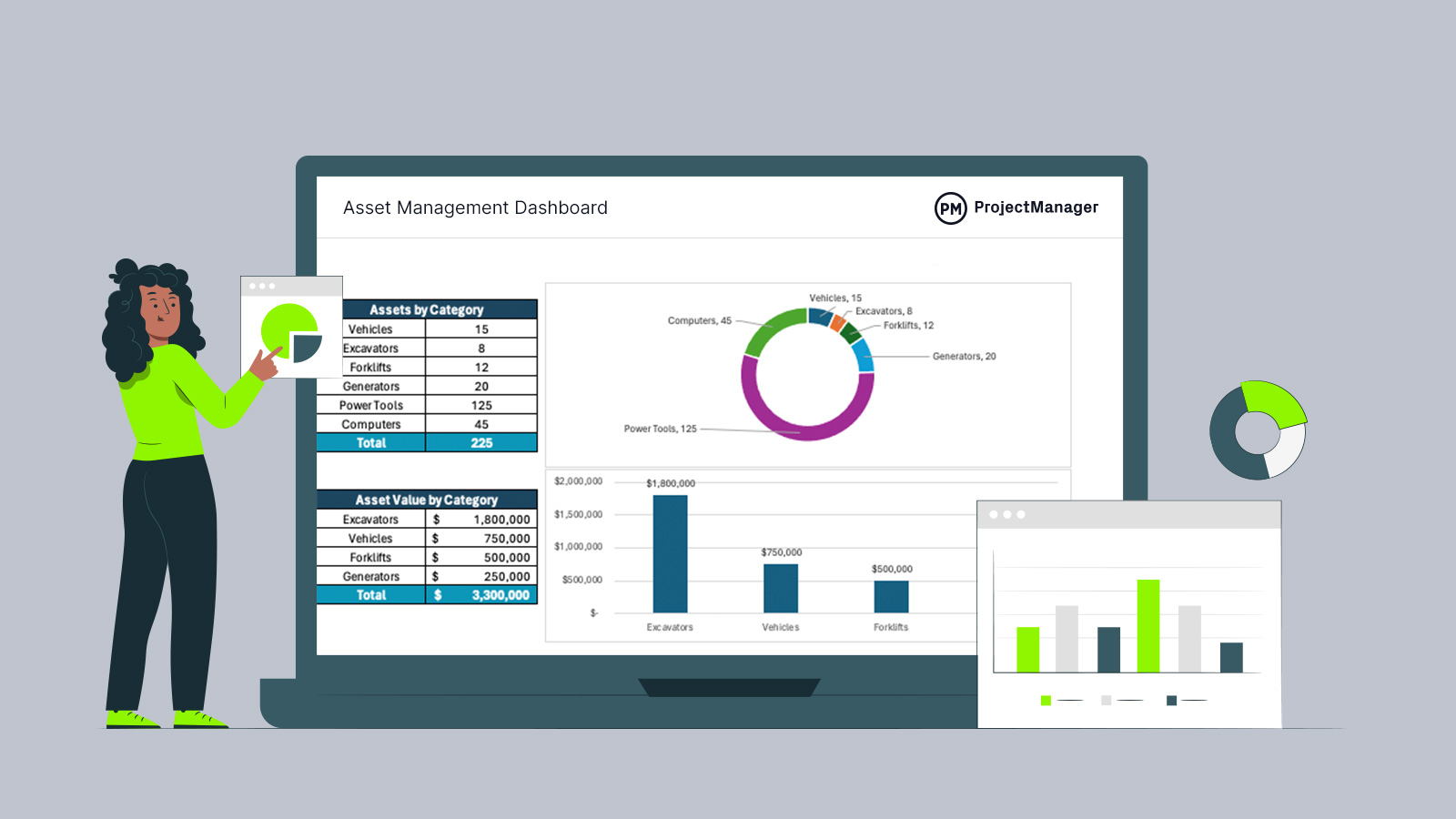
Keeping track of equipment across multiple facilities, job sites and departments becomes increasingly difficult as an organization grows. This free asset management dashboard for Excel provides a centralized view of asset inventory, status, location, maintenance activity and asset value. Automated calculations and visual charts transform raw asset data into actionable insights, making it easier to monitor equipment, identify issues, plan maintenance work and support asset-related decisions without manually reviewing large asset registers.
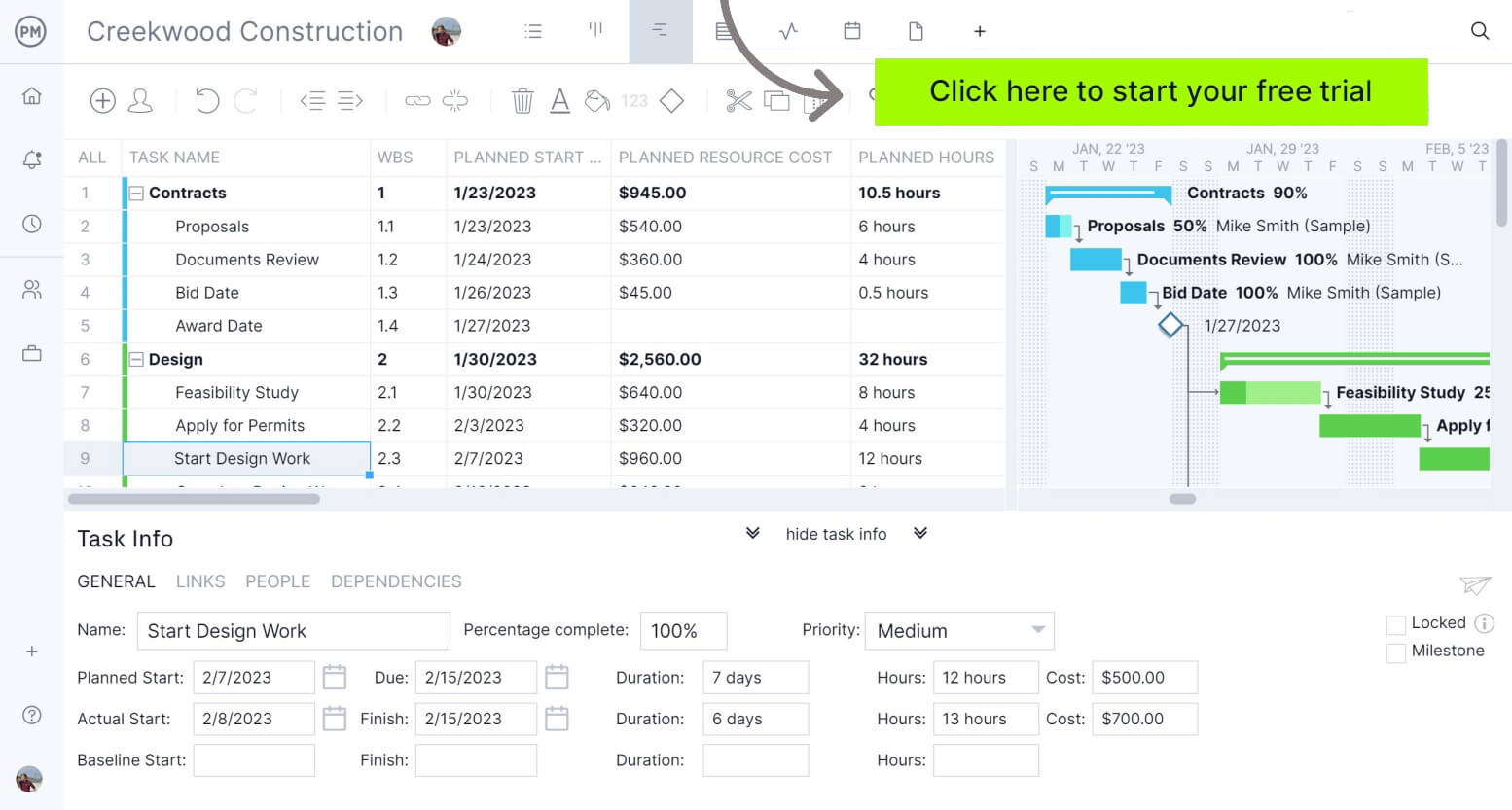
ProjectManager is award-winning project management software that gives businesses across industries the tools they need to ensure projects are completed on time, within budget and within scope. It allows project managers to make detailed project schedules, estimate costs, allocate resources, set budgets, track progress and compare planned versus actual project outcomes using real-time dashboards and reports to identify delays or cost overruns quickly. Get started with ProjectManager for free today.
When To Use this Asset Management Dashboard
The best time to implement this free asset management dashboard is immediately after creating or updating an asset register. Once asset records have been entered, the dashboard can provide ongoing visibility into equipment performance and distribution.
Asset-heavy organizations such as construction companies and manufacturing firms should review the dashboard weekly, monthly and before major operational or budgeting decisions.
- After purchasing new equipment and updating the asset register with recently acquired assets.
- When preparing preventive maintenance schedules and identifying assets requiring immediate service attention.
- Before allocating equipment across multiple job sites, facilities or production locations.
- During budgeting cycles to evaluate asset value, replacement needs and maintenance spending trends.
- When conducting internal audits to verify asset status, location assignments and inventory accuracy.
Who Should Use this Free Asset Management Dashboard?
Designed for organizations that depend on physical equipment, this free asset management dashboard for Excel is particularly useful for construction firms, manufacturers, warehouses and industrial operations.
Related: 30 Free Manufacturing Templates for Excel and Word
By consolidating asset data into a single reporting interface, it helps teams monitor equipment availability, maintenance requirements, asset distribution and replacement needs while supporting day-to-day operational planning and long-term asset management strategies.
- Construction equipment managers responsible for tracking heavy machinery utilization, availability and maintenance across multiple job sites.
- Manufacturing plant managers overseeing production equipment performance, maintenance schedules and asset allocation throughout facilities.
- Maintenance supervisors coordinating preventive maintenance activities, repair schedules and equipment service priorities across operations.
- Operations managers monitoring asset deployment, equipment availability and resource planning to support project execution.
- Asset management specialists maintaining asset registers, analyzing asset performance and supporting replacement planning decisions.
How to Use ProjectManager’s Asset Management Dashboard for Excel
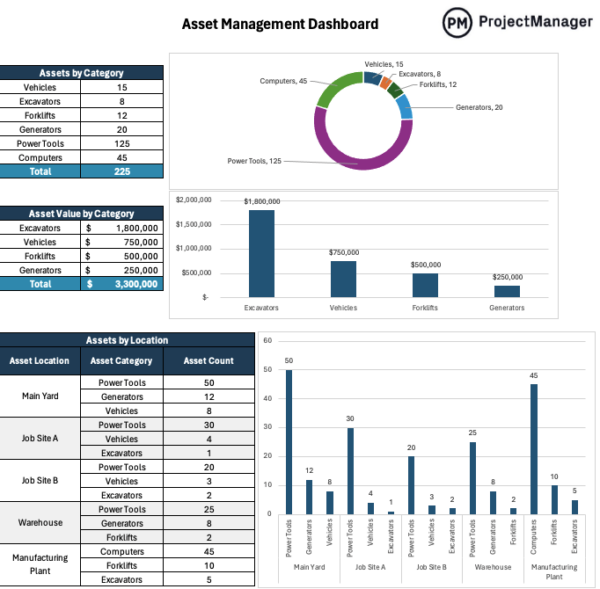
Start by replacing the sample data with your own asset information, then let the workbook summarize that data through built-in tables and charts. The dashboard is designed to show asset counts, value, location, status, maintenance needs and age ranges so teams can review equipment conditions without sorting through the full asset register manually.
1. Enter Asset Categories and Counts
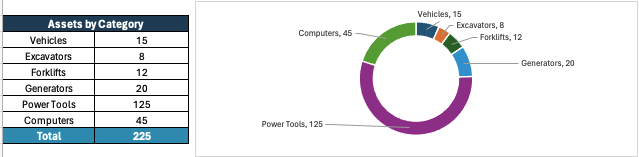
Begin with the assets by category table, where each asset type is listed with its total count. Add the main equipment groups your organization tracks, such as vehicles, excavators, forklifts, generators, power tools and computers. Once these numbers are entered, the dashboard chart updates to show which asset categories make up the largest share of your inventory.
2. Add Asset Values by Category
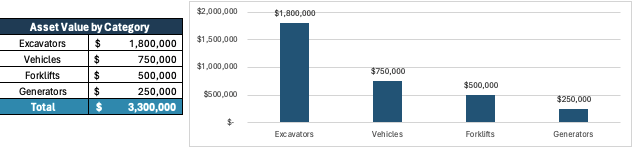
Next, complete the asset value by category table using the current value or estimated book value of each major asset group. This gives managers a quick financial view of where the company’s equipment investment is concentrated. For example, excavators may represent fewer assets than power tools, but they often account for a much larger share of total asset value.
3. Organize Assets by Location
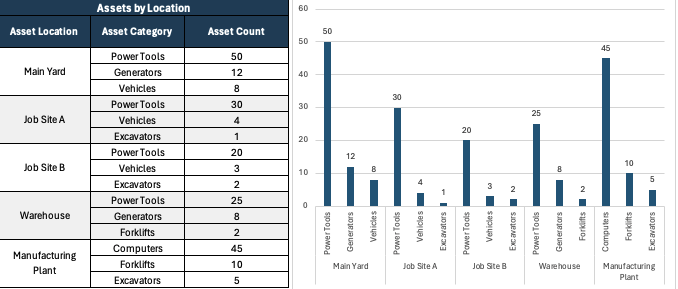
Use the assets by location table to show where each asset category is assigned. Locations can include a main yard, warehouse, manufacturing plant or active job sites. Breaking asset counts down by both location and category helps teams see whether equipment is properly distributed or whether one site has too many or too few assets available.
4. Update the Asset Status Breakdown
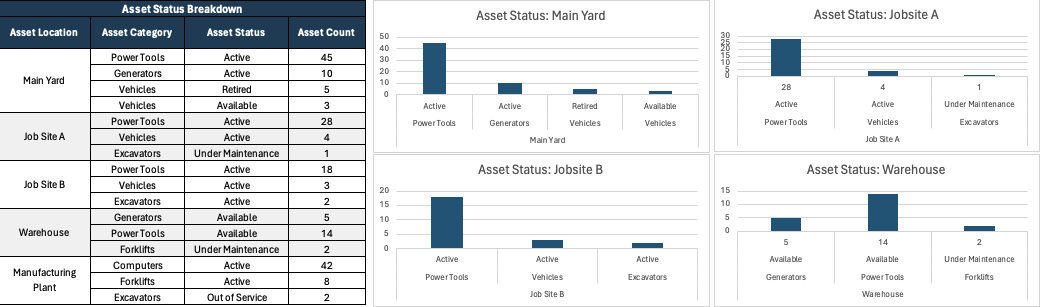
After locations are entered, fill in the asset status breakdown with categories such as active, available, under maintenance, out of service or retired. This section helps managers understand whether equipment is ready to use, waiting for repair or no longer part of daily operations. The related charts make it easier to compare asset conditions by location.
5. Track Maintenance Activity
Move to the maintenance dashboard and enter upcoming maintenance, overdue maintenance, completed maintenance and year-to-date maintenance costs for each asset category and location. Reviewing these fields regularly helps maintenance teams prioritize urgent repairs, plan preventive service and identify asset groups that are becoming expensive to keep operational.
6. Review Asset Age by Location
Complete the asset age analysis by grouping assets into age ranges such as less than one year, one to three years, four to seven years, eight to ten years and over ten years. Looking at asset age by location helps operations teams spot aging equipment before it causes downtime, especially when older assets are concentrated at busy job sites or production facilities.
7. Use the Dashboard Charts to Make Decisions
Once the tables are updated, review the charts to identify trends, risks and planning needs. A location with many assets under maintenance may need backup equipment, while a category with high asset value and old equipment may require replacement planning. The goal is to use the asset management dashboard as a practical review tool, not just a static report.
ProjectManager Is an Award-Winning Project Management Software
ProjectManager is an online project management software that provides a robust feature set of project planning, scheduling and tracking tools, including Gantt charts, kanban boards, task lists and real-time dashboards and reports. With these tools, teams across industries can build detailed schedules, assign resources and monitor progress, costs and timelines.
ProjectManager also delivers AI-powered project insights to support better decision-making and connects with over 100 tools like Microsoft Project, Acumatica and Jira. With its open API and wide range of integrations, organizations can seamlessly link ProjectManager to their existing systems.
Watch the video below to learn more!
Free Related Templates
We’ve created over 100 free templates for Excel, Word and Google Sheets, many of which can help with construction or manufacturing projects. Here are some that can be used along with this asset management dashboard for Excel.
Asset Register Template
This asset register template provides a centralized inventory of equipment, capturing identification details, ownership information, locations, custodians and financial data. It combines operational and accounting records in one place, making it easier to track asset value, depreciation and asset status.
Maintenance Schedule Template
Built for preventive maintenance planning, this template tracks equipment condition, service frequencies, maintenance activities, assigned personnel and upcoming service dates. Color-coded condition indicators help maintenance teams quickly identify assets that require immediate attention or additional monitoring.
Maintenance Checklist Template
This maintenance checklist template standardizes equipment inspections by documenting maintenance tasks, due dates, pass-fail results and issues discovered during reviews. It provides a clear audit trail for maintenance work while helping technicians identify problems before they become costly repairs.
If you need a tool to help you manage projects, then sign up for our software now at ProjectManager. Our online software helps teams across industries plan, track and oversee projects as they unfold. Sign up for a free 30-day trial today!