


Keeping equipment reliable is easier when inspections, service tasks and follow-up actions are tracked consistently. This free maintenance checklist template helps teams organize recurring maintenance work in Excel, reduce missed steps and create cleaner records for audits, planning and repairs.
Why You Need a Maintenance Checklist Template
Equipment-heavy operations run better when maintenance tasks follow a clear system instead of memory or scattered notes. This free maintenance checklist template for Excel is ideal for organizations in manufacturing, construction and similar industries that depend on asset uptime. Teams can standardize inspections, assign recurring service items and record completed work in one place. Better visibility helps supervisors catch delays early, improve planning decisions and reduce avoidable breakdowns that disrupt schedules or production output.
When To Use a Maintenance Checklist Template
Whenever an organization wants consistent maintenance planning, clearer records and better accountability, this free maintenance checklist template can be introduced. It works for new programs, growing teams, multi-site operations or any process that needs standardized maintenance reporting.
- Use it during routine preventive maintenance cycles for monthly, quarterly or annual equipment servicing.
- Apply it after corrective repairs to confirm failed components were fixed and tested.
- Use it when managing maintenance work orders that require task tracking and sign-off.
- Apply it before compliance inspections to verify required checks were completed properly.
- Use it when onboarding new technicians who need standardized maintenance procedures and records.
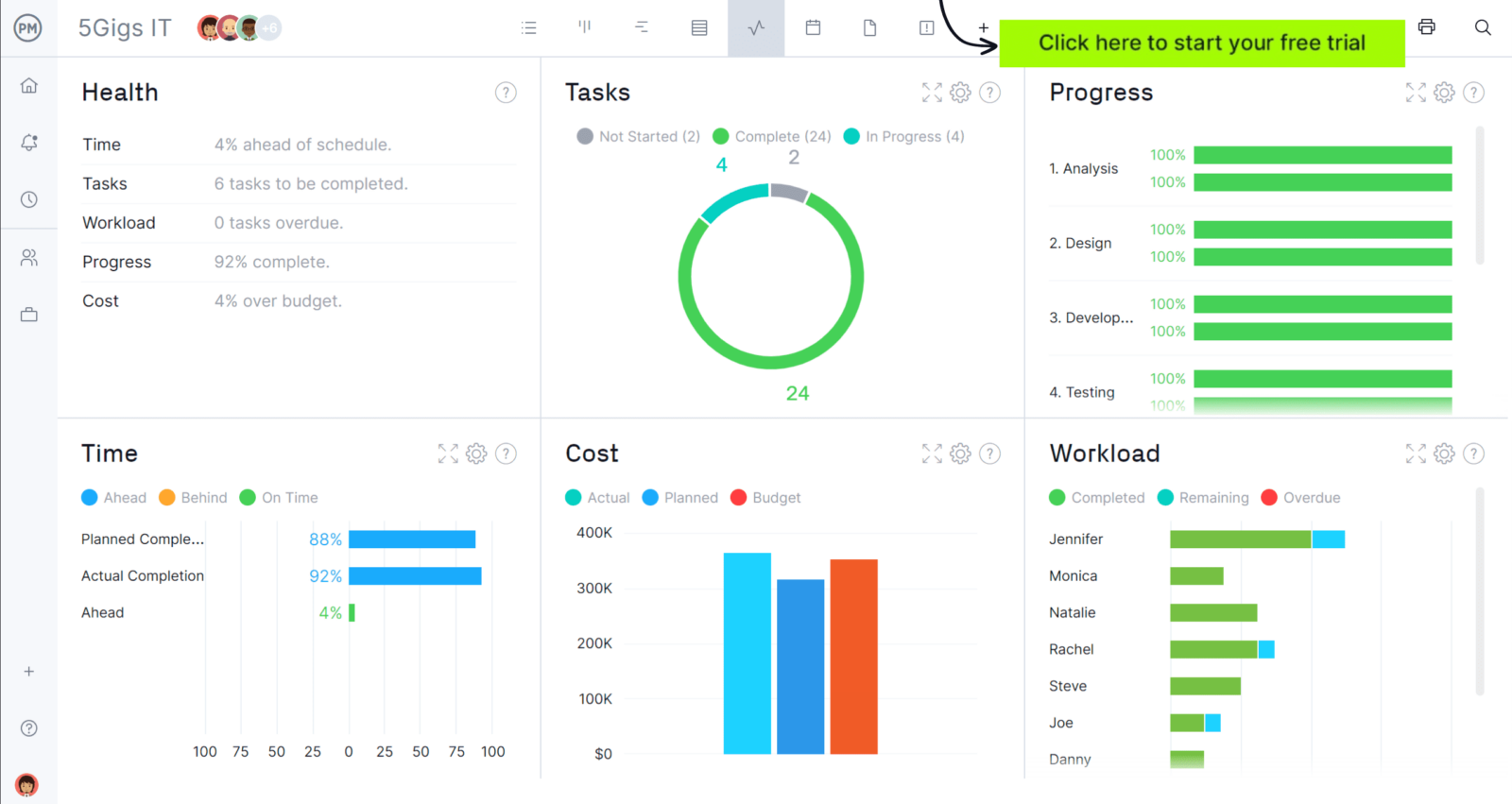
When you’re ready to take control of your projects, try ProjectManager. This award-winning project management software helps teams plan, schedule and track work from start to finish. Create detailed schedules, manage resources, monitor costs and compare planned versus actual performance with a full suite of powerful tools. Get started for free today.
Who Should Use this Free Maintenance Checklist Template?
We’ve established that this template is well suited for equipment-heavy organizations such as construction and manufacturing. Looking closer, several day-to-day roles depend on accurate checklist records to schedule service, verify work quality and keep assets operating safely.
- Maintenance managers coordinating preventive schedules, labor capacity and service priorities.
- Technicians performing inspections, repairs and documenting completed checklist tasks.
- Site supervisors confirming equipment readiness for field or plant operations.
- Fleet or equipment coordinators tracking machine condition across locations.
- Operations leaders reviewing failures, downtime trends and maintenance performance.
How to Use ProjectManager’s Maintenance Checklist Template for Excel
The worksheet is organized so users can enter header information first, then track maintenance activity by asset. Completing each column consistently creates cleaner records, stronger accountability and easier planning for upcoming service work.
1. Enter General Information
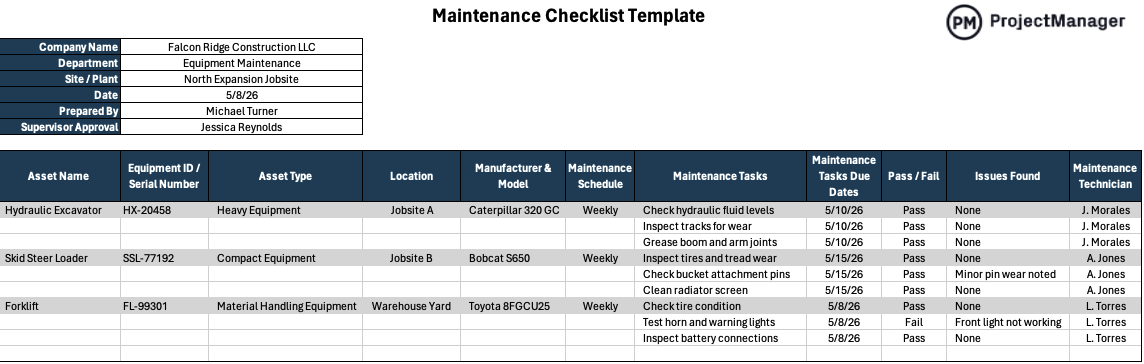
Begin with the table in the upper-left corner of the template. Fill in company name, department, site or plant, date, prepared by and supervisor approval. In the example shown, these fields identify the construction business, equipment maintenance team, site location and responsible personnel. This section provides document control and clear ownership.
2. Enter Asset Details
Move to the main grid and identify each asset being serviced. Enter the asset name, equipment ID or serial number, asset type, operating location and manufacturer with model. Examples shown include excavators, skid steer loaders and forklifts. Precise asset data avoids servicing the wrong machine and improves maintenance history tracking.
3. Establish a Maintenance Schedule
Next, assign the maintenance schedule for each asset. The template includes cadence entries such as weekly, while teams can also use bi-weekly, monthly, quarterly or custom intervals. Enter maintenance task due dates beside each activity so upcoming service work is visible and easier to plan.
4. Describe the Maintenance Work
Use the maintenance tasks column to list each action completed, such as checking fluid levels, inspecting tracks, cleaning radiators or testing warning lights. Then mark pass or fail results, note any issues found and record the maintenance technician responsible for the completed work.
How to Manage Work with ProjectManager
ProjectManager is an online project management solution that provides a complete set of work planning, scheduling and tracking tools, including Gantt charts, kanban boards, task lists and real-time dashboards and reports. With these features, teams across industries can build detailed schedules, assign resources and monitor progress, costs and timelines.
ProjectManager also delivers AI-powered project insights to support better decision-making and connects with over 100 tools like Microsoft Project, Acumatica and Power BI. With its open API and wide range of integrations, organizations can seamlessly link ProjectManager to their existing systems. Watch the video below to learn more!
What Other Project Management Templates Can Keep My Project on Budget?
We’ve created free maintenance templates to help construction and manufacturing organizations. Here are some of them.
Maintenance Schedule Template
This maintenance schedule template helps organizations organize recurring service by asset, deadline and assigned technician. Use it to plan labor, secure needed parts, monitor upcoming tasks and prevent breakdowns that cause surprise repair expenses or operational delays.
Maintenance Request Form Template
This maintenance request form template provides a structured way to submit repair needs. Teams can record issue descriptions, priority level, location and requester details, making it easier to rank jobs, respond quickly and prevent costly communication problems.
Maintenance Report Template
This maintenance report template helps businesses record repairs, downtime, parts used, service history and equipment condition while keeping maintenance records organized and consistent.
Related Maintenance Planning Content
- How to Make a Maintenance Schedule
- Equipment Maintenance Log: How-to Guide, Example & Free Template
- Maintenance Planning in Manufacturing and Other Industries
- Total Productive Maintenance Essentials: 8 Things You Need to Know About TPM
If you need a tool to help you manage projects, then signup for our software now at ProjectManager. Our online software helps teams across industries plan, track and oversee projects as they unfold. Sign up for a free 30-day trial today!