


Maintaining organized, efficient workspaces on the shop floor requires consistent evaluation, not guesswork. A well-structured 5S template helps teams assess conditions, identify gaps and take corrective action quickly. Instead of relying on memory or inconsistent criteria, this tool brings clarity and repeatability to every audit cycle.
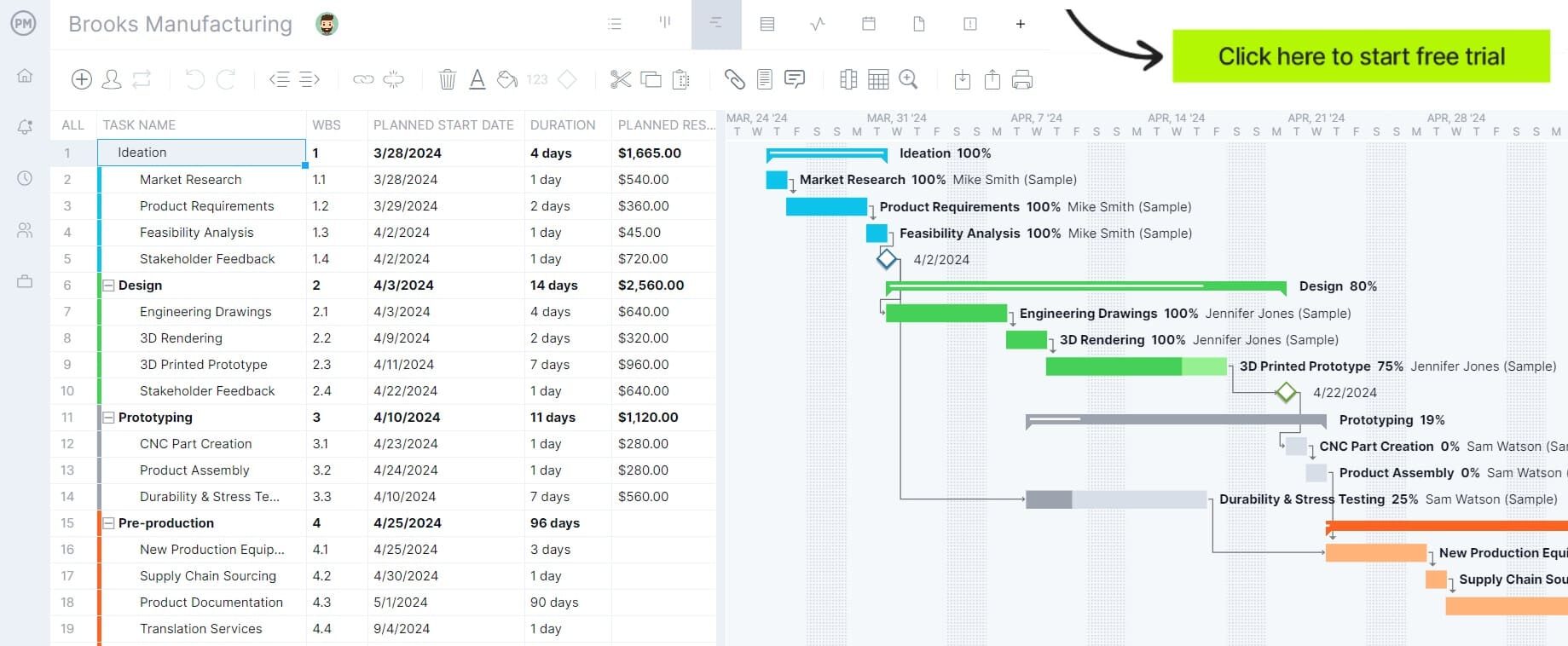
ProjectManager is an award-winning project management software that is equipped with tools that allow manufacturers to plan, schedule and monitor their projects from start to finish. Use Gantt charts to make production roadmaps, manage workflows with kanban boards, allocate resources with workload charts, track costs with timesheets and monitor your projects with real-time dashboards and reports. Get started for free today.
Why You Need a 5S Audit Checklist Template
Because 5S audits are performed regularly to sustain workplace organization and continuous improvement, using a standardized 5S template becomes essential. It ensures every audit follows the same criteria, reducing subjectivity and missed issues.
Over time, this consistency improves accountability, simplifies training and makes it easier to compare results across departments. Rather than reinventing the process each time, teams can focus on identifying inefficiencies, correcting deviations and maintaining long-term operational discipline.
When To Use a 5S Audit Checklist Template
Whenever a manufacturing operation schedules a 5S audit, having a reliable 5S template ensures the evaluation stays structured and consistent. These audits are not one-size-fits-all, though, as organizations apply them at different intervals depending on goals, maturity and operational demands.
- Daily 5S audits: Conducted at the start or end of shifts to quickly verify cleanliness, organization and adherence to basic standards in high-traffic work areas.
- Weekly 5S audits: Used by supervisors to review trends, reinforce expectations and identify recurring issues that daily checks might overlook.
- Monthly 5S audits: Performed by management to evaluate overall compliance, compare departments and ensure continuous improvement initiatives are progressing effectively.
- Quarterly 5S audits: Focused on deeper assessments, including process improvement and standardization, visual controls and alignment with broader operational goals.
- Ad hoc or event-driven audits: Triggered after incidents, process changes or new implementations to confirm standards are properly applied and sustained.
How to Use ProjectManager’s 5S Audit Checklist Template for Excel
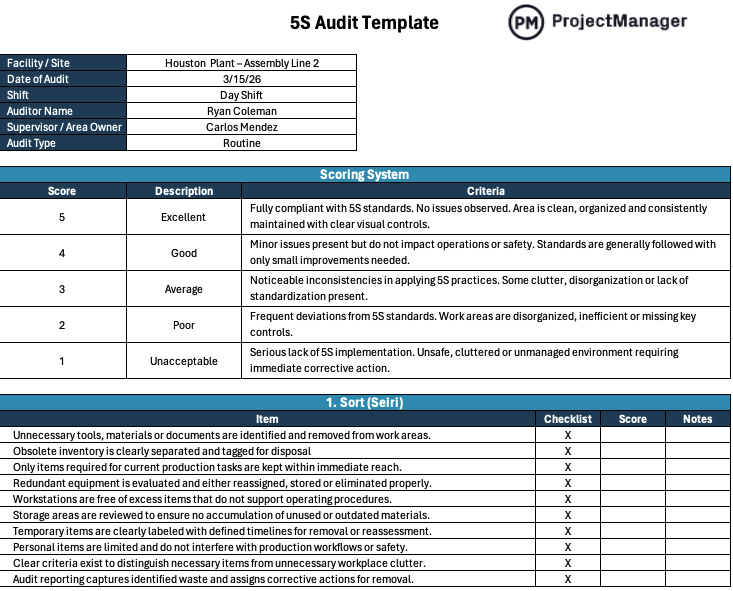
Getting started with this 5S template begins by entering basic audit details such as location, date, shift, auditor name and responsible supervisor. From there, reviewers can follow the built-in scoring criteria or adjust the scale to match internal standards. Each section of the template is organized around the five “S” principles from lean manufacturing, with 10 specific checklist items per category. Auditors review each item, assign a score and document observations. This structured layout keeps evaluations consistent while making it easier to identify problem areas and track improvement over time.
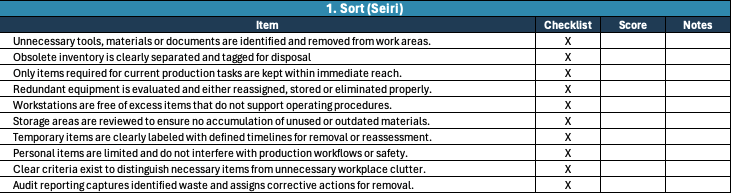
1. Sort (Seiri)
Start by reviewing whether unnecessary items are present in the work area and if they are properly removed or tagged. This section of the template helps auditors confirm that only essential tools, materials and equipment remain, reducing clutter and making it easier for teams to focus on productive tasks.
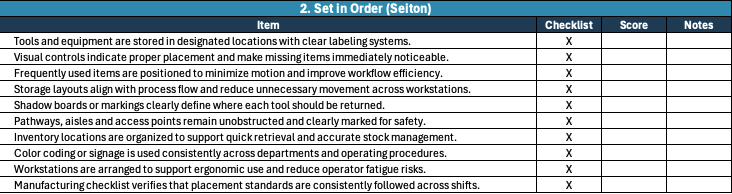
2. Set in Order (Seiton)
Move on to evaluating how tools, materials and equipment are arranged for efficient access and use. This manufacturing template guides auditors to check labeling, storage locations and visual controls, ensuring that everything has a defined place and can be quickly retrieved without disrupting workflow or causing delays.
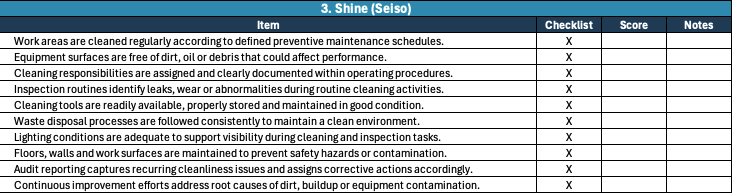
3. Shine (Seiso)
Assess the cleanliness of the workspace, including floors, equipment and workstations. This part of the template focuses on whether cleaning routines are followed consistently and if any sources of dirt or contamination are addressed, helping maintain a safe and productive working environment.
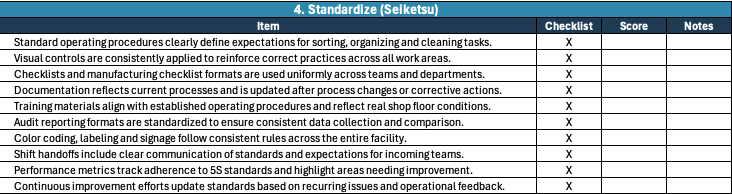
4. Standardize (Seiketsu)
Evaluate whether procedures, visual standards and guidelines are clearly defined and consistently applied. The template prompts auditors to verify that best practices for sorting, organizing and cleaning are documented and understood, allowing teams to maintain uniform conditions across shifts and departments.
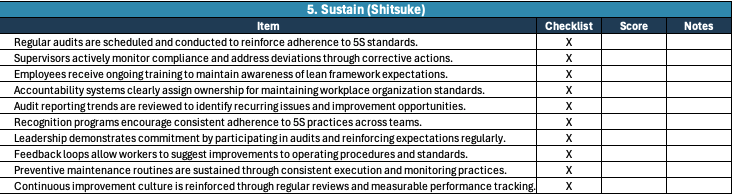
5. Sustain (Shitsuke)
Finish by reviewing how well teams maintain established 5S practices over time. This section of the template helps auditors determine whether training, discipline and accountability systems are in place, ensuring that improvements are not temporary but embedded into daily operations and organizational culture.
How ProjectManager Helps Manufacturing Businesses
Keeping production timelines on track while balancing resources, costs and shifting priorities demands more than spreadsheets or disconnected systems. ProjectManager combines production scheduling, resource planning and performance tracking so teams stay aligned and make quicker decisions on the shop floor.
Using interactive Gantt charts, manufacturing teams can create detailed schedules, link task dependencies, define milestones and update timelines as conditions evolve. Resource management tools help allocate labor, equipment and materials effectively, while tracking resource availability to prevent bottlenecks. Real-time timesheets, dashboards and reports offer immediate insight into progress, costs and workload, enabling teams to catch issues early and maintain control over operations.
With these tools and features, ProjectManager helps manufacturing businesses boost efficiency, minimize delays and deliver more consistent outcomes. Watch the video below to learn more!
Free Lean Manufacturing Templates
We’ve developed a wide range of free manufacturing templates for Excel, Word and Google Sheets. Below are a few examples.
Gemba Walk Template
This template organizes shop floor observations across safety, work processes, quality, flow, 5S and teamwork, allowing teams to document issues, assign corrective actions and reinforce continuous improvement through regular follow-ups.
Standard Operating Procedure Template
This template structures standard operating procedures with sections for process overview, step-by-step activities, required resources, frequency and approvals, supporting consistent execution, clear accountability and accurate documentation across operations.
SIPOC Template
This template outlines suppliers, inputs, process steps, outputs and customers, offering a high-level view of workflows while helping teams define scope, identify dependencies and improve overall process understanding within a lean environment.
ProjectManager is award-winning software for managing any project. Our collaborative platform connects your teams and gives you access to the manufacturing floor no matter where you are or what time it is. Get started with ProjectManager today for free.