



Last updated: November 16, 2026
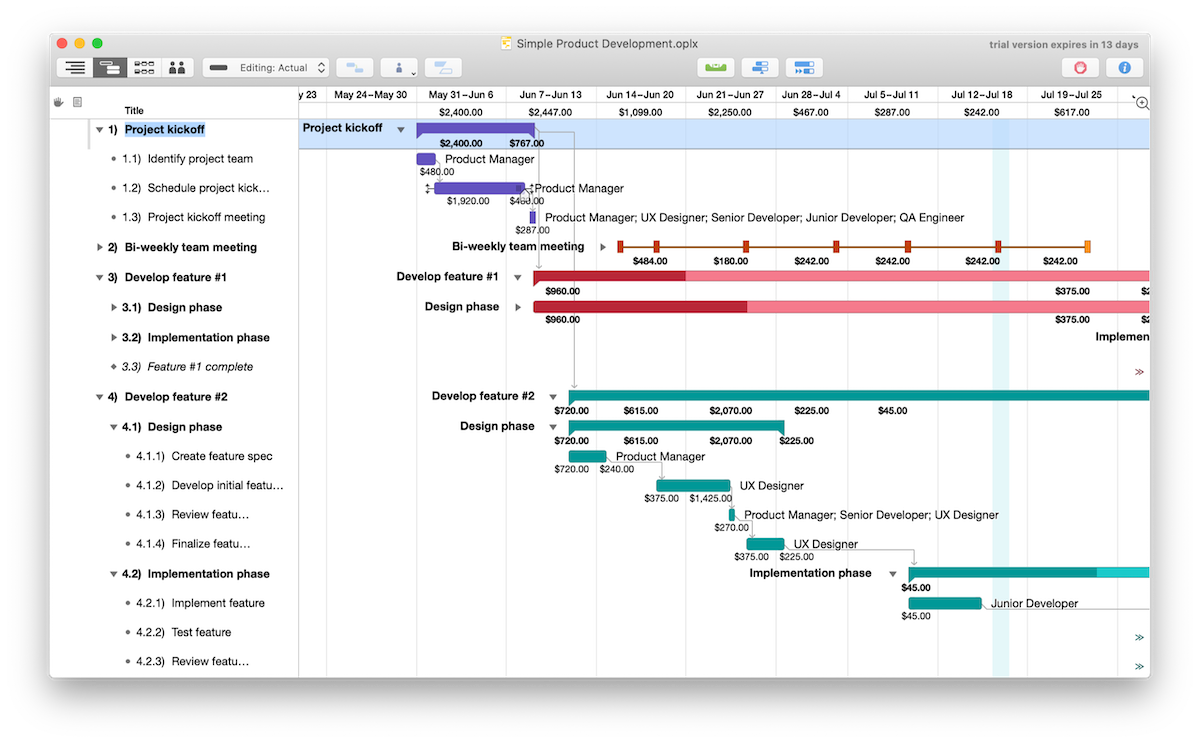
OmniPlan is project planning and scheduling software from The Omni Group that runs only on Apple devices: Mac, iPad, iPhone and Apple Vision Pro. It builds schedules on Gantt charts with dependencies, the critical path, multiple baselines and automatic resource leveling, and it works offline. OmniPlan suits individual schedulers and small teams that work entirely on Apple devices and want a native desktop scheduler.
This guide explains what OmniPlan is used for, its features in the Standard and Pro editions, platforms, pricing, pros and cons, and the alternatives to consider if your team also uses Windows PCs or Android phones.
What Is OmniPlan?
OmniPlan is a native project management app made by The Omni Group, the company behind OmniFocus and OmniGraffle. The current version is OmniPlan 4, and one purchase or subscription covers OmniPlan on your Mac, iPad, iPhone and Apple Vision Pro. There’s no Windows, Android or browser version.
OmniPlan is a traditional scheduling tool in the same family as Microsoft Project. You enter tasks, durations, dependencies, date constraints and resources, and OmniPlan calculates the schedule, highlights the critical path and levels resources so nobody is booked for more than 100% of their time. For example, a scheduler can plan a product launch on a MacBook during a flight, with no internet connection, then open the same project on an iPad in a meeting to check progress and mark tasks complete.
ProjectManager Works for Teams on Mac and Windows
OmniPlan is built for Apple devices, which makes it a good fit for a planner working alone on a Mac and an iPad. Many teams don’t work that way, though. They have a mix of Macs and Windows PCs, people in the field with Android phones, and clients who need to see the schedule. In OmniPlan, everyone who opens the project needs OmniPlan on an Apple device, and working together means syncing the file and accepting each other’s changes.
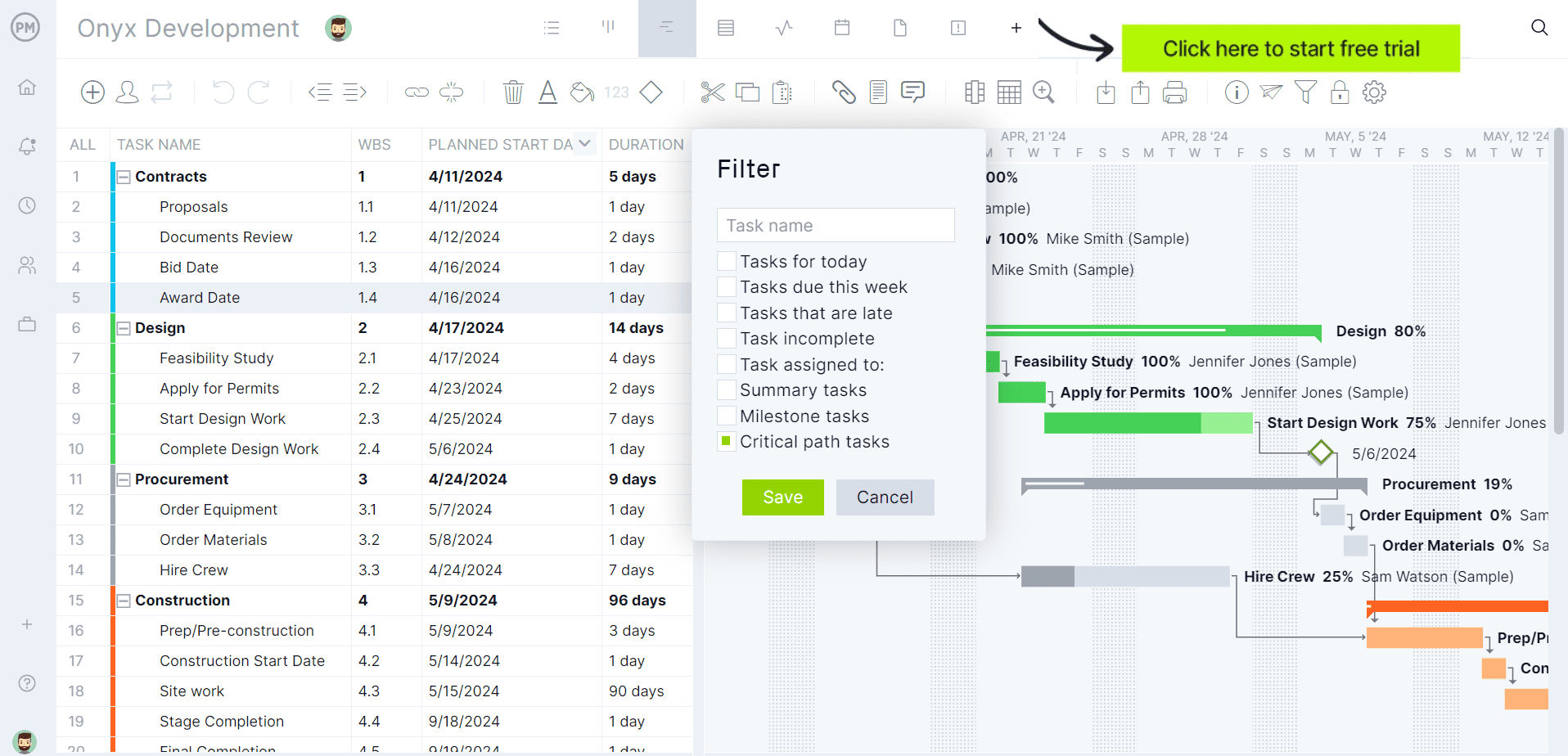
ProjectManager is online project management software that runs in any browser on macOS, Windows and Linux, with iPhone and Android apps, so the whole team updates the same live schedule. Its Gantt chart links tasks with all four dependency types and lag, filters for the critical path and sets baselines. The workload page shows each person’s hours across all projects (Business plan and above), timesheets track actual hours, and clients can view the plan as free read-only guests. ProjectManager also imports and exports MPP files, lossless for schedule data, so you can bring in a Microsoft Project file exported from OmniPlan Pro. Get started with ProjectManager today for free.
What Is OmniPlan Used For?
OmniPlan is used to plan, schedule and track projects that need a detailed timeline. Common uses include:
- Building project schedules: Create a work breakdown in the outline view, link tasks with dependencies and let OmniPlan schedule the project forward from a start date or backward from a deadline.
- Finding the critical path: Highlight the tasks that directly drive the finish date of the project or of a milestone.
- Balancing resources: Assign staff, equipment and material resources, then level them so people aren’t overbooked.
- Tracking progress against a plan: Save multiple baselines and compare them with the current schedule as the project moves.
- Analyzing schedule risk: In the Pro edition, run Monte Carlo simulations to forecast milestone dates, and use earned value analysis to forecast completion date and cost.
- Exchanging files with Microsoft Project users: In the Pro edition, open MPP and Microsoft Project XML files and export back to those formats.
OmniPlan Features
OmniPlan comes in two editions. Standard covers scheduling, tracking and resources for one planner, and Pro adds collaboration, analysis, reporting and Microsoft Project support.
Standard Features
- Views: Interactive Gantt chart, network diagram and project outline, plus a resource view on the Mac
- Automatic scheduling: Schedule forward from a fixed start date or backward from a fixed end date, in days, hours or minutes, with a new project assistant and custom templates
- Dependencies and constraints: Task dependencies as simple or complex as the project needs, date constraints, manual task scheduling, recurring tasks, milestones, split tasks and hammock tasks
- Resource leveling: Automatic leveling so resources are never scheduled above 100% of their available units, with staff, equipment and material resource types
- Violation resolution: OmniPlan flags logical problems in the schedule, such as a double-booked resource, and suggests fixes
- Tracking: Critical path highlighting, multiple baselines, cost calculation, interval cost and effort tracking, change tracking and catch up and reschedule tools
- Sync across your own devices: Sync projects through iCloud Drive or services such as Box, or host your own files through Git or WebDAV
Pro Features
- Collaboration: Work on a project with other OmniPlan users by syncing through Omni’s servers with a free Omni Account or your own WebDAV server, and accept or reject collaborators’ changes
- Multi-project dashboard: Review several projects at a glance and see how busy each team member is across them
- Resource load sharing: Take a shared resource’s tasks on other published projects into account when leveling
- Earned value analysis and Monte Carlo simulation: Forecast completion date and cost, and milestone dates at different confidence levels
- Reporting and publishing: One-click HTML reports and automatic publishing actions, such as syncing the schedule to a calendar
- Microsoft Project support: Open MPP and Microsoft Project XML files and export to both formats. The Omni Group documents some losses in both directions, such as custom columns, resource efficiency and some constraints
- Automation: Omni Automation (JavaScript) scripts and plug-ins across Mac, iPhone and iPad, and AppleScript on the Mac
OmniPlan Platforms and System Requirements
OmniPlan is a native app for Apple devices only. The current version, 4.11, runs on:
- Mac: macOS 12 or later
- iPad and iPhone: iOS and iPadOS 16 or later
- Apple Vision Pro: visionOS 2 or later
Because it’s a native app, OmniPlan works without an internet connection, and project files stay on your devices or in the sync service you choose. Colleagues on Windows PCs or Android phones can’t open an OmniPlan project in OmniPlan. For more Mac options, see the best project management software for Mac and the best Gantt chart software for Mac.
OmniPlan Pricing
OmniPlan 4 is sold as a one-time purchase or as a subscription, and every option covers Mac, iPhone, iPad and Apple Vision Pro:
- Standard license: $199.99 one-time purchase, including all 4.x updates
- Pro license: $399.99 one-time purchase, including all 4.x updates
- Subscription: $199.99 per year, with access to the latest Pro version and no major upgrade costs
With a one-time license, future major versions are available at a discount. There’s a 14-day free trial. Prices are list prices as of November 2026 and change often.
Pros and Cons of OmniPlan
Pros
- Native apps for Mac, iPad, iPhone and Apple Vision Pro that work offline
- Deep scheduling: automatic resource leveling, violation resolution, critical path and multiple baselines
- One purchase or subscription covers all of your Apple devices, with a one-time license option
- Monte Carlo simulation and earned value analysis in the Pro edition
Cons
- No Windows, Android or browser version
- Collaboration, Microsoft Project files, earned value analysis and Monte Carlo simulation need the Pro edition or the subscription
- Collaboration works by syncing and accepting changes, not live editing in a shared schedule
- Some data, such as custom columns and some constraints, is lost in Microsoft Project round trips
OmniPlan Alternatives
OmniPlan is a strong fit for planners who work alone or on an all-Apple team. If your team also uses Windows PCs or Android phones, or needs one live schedule everyone can update, these alternatives are worth a look:
- ProjectManager: Best for teams with a mix of Macs and Windows PCs that need one shared schedule in the browser, field updates on iPhone and Android, workload across projects and MPP import and export, lossless for schedule data. It has no native desktop app or offline mode. See ProjectManager vs. OmniPlan.
- Merlin Project: Best for teams that all use Apple devices and want a native planner with resource leveling that syncs through iCloud Drive or Dropbox, on a subscription.
- Microsoft Project: Best for Windows users who need native MPP files. The desktop app runs only on Windows, sold as Project Standard 2024 or Project Professional 2024 or included with Planner and Project Plan 3.
- GanttPRO: Best for small teams that want an online Gantt chart with critical path and baselines on every plan, at a low per-user price.
For more options, see the best Microsoft Project alternatives for Mac and this guide to ProjectLibre, a free desktop scheduler.
ProjectManager is online project management software that runs in any browser on Mac, Windows and Linux. Link tasks with all four dependency types and lag, filter for the critical path, set baselines and share the schedule with your whole team. Get started with ProjectManager today for free.
OmniPlan FAQ
Is OmniPlan free?
No. OmniPlan has a 14-day free trial, then costs $199.99 for a Standard license or $399.99 for a Pro license as one-time purchases, or $199.99 a year for a subscription that includes Pro features. Each option covers Mac, iPad, iPhone and Apple Vision Pro. ProjectManager, online project management software with Gantt charts, critical path, baselines and workload management across projects, has a 30-day free trial and costs $15 per user per month on the Team plan, billed annually.
Does OmniPlan work on Windows?
No. OmniPlan runs only on Apple devices: Mac (macOS 12 or later), iPad and iPhone (iOS and iPadOS 16 or later) and Apple Vision Pro. There’s no Windows, Android or browser version, so colleagues on PCs can’t open an OmniPlan project in OmniPlan. ProjectManager runs in any modern browser on Mac, Windows and Linux, with iPhone and Android apps, so a team with a mix of Macs and Windows PCs can work in one shared schedule.
Can OmniPlan open Microsoft Project files?
Yes, with the Pro edition or the subscription. OmniPlan Pro opens MPP and Microsoft Project XML files and exports to both formats, though The Omni Group documents some losses in both directions, such as custom columns, resource efficiency and some constraints. The Standard edition doesn’t include Microsoft Project support. ProjectManager imports and exports MPP files on every plan, lossless for schedule data, so tasks, dates and dependencies stay intact on a round trip.
What’s the difference between OmniPlan Standard and Pro?
Pro adds collaboration, analysis and Microsoft Project support to Standard’s scheduling. Standard includes Gantt charts, network diagrams, dependencies, resource leveling, the critical path, multiple baselines and sync across your own devices for $199.99. Pro, at $399.99, adds collaboration through Omni’s servers or WebDAV, a multi-project dashboard, earned value analysis, Monte Carlo simulation, HTML reports, MPP and XML import and export, and automation. The $199.99 yearly subscription includes Pro.
Is OmniPlan good for teams?
It works for small teams that all use Apple devices. With OmniPlan Pro, collaborators sync a project through Omni’s servers or their own WebDAV server, and the project owner can accept or reject their changes, but it isn’t live co-editing and there’s no Windows or Android version. Teams that need everyone in one live schedule from any device, with timesheets and workload across projects, usually choose a team tool such as ProjectManager.
Related Content
- ProjectManager vs OmniPlan (2026)
- 8 Best Project Management Software for Mac (2026)
- 7 Best Gantt Chart Software for Mac (2026)
- Best Microsoft Project Alternatives for Mac (2026)
- What Is ProjectLibre? Pros, Cons & Alternatives
- Primavera P6 for Mac: How to Run It and the Best Alternatives (2026)
- Best OmniPlan Alternatives (2026)
