


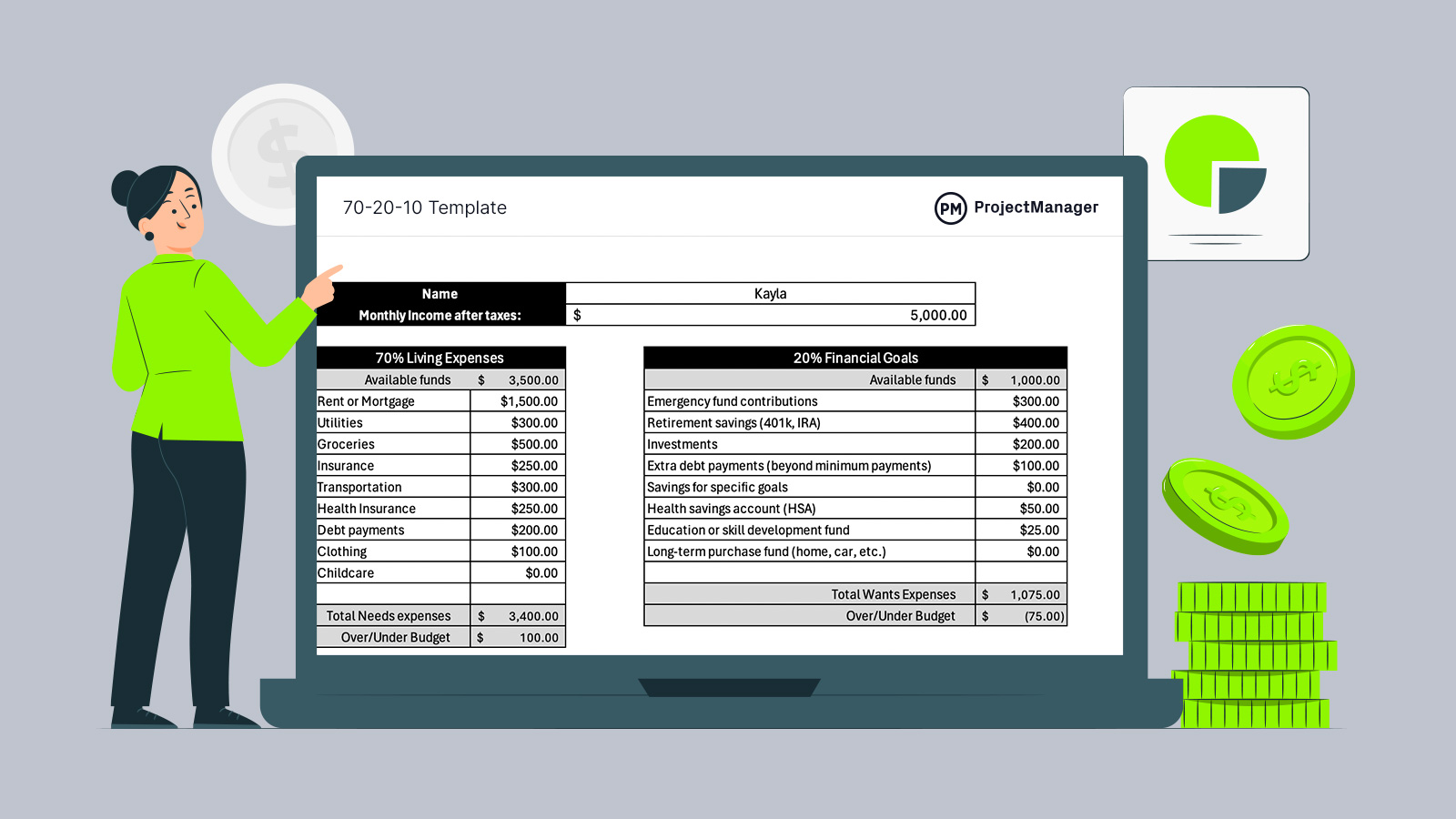
Managing money gets harder as expenses, goals and lifestyle choices compete for attention. A 70/20/10 budget offers structure without rigidity, and a 70/20/10 budget template helps translate that structure into action. Used in Excel, it turns abstract percentages into practical monthly decisions you can actually follow with confidence and clarity.
The 70/20/10 budget is a simple way to manage money by dividing income into three categories: 70 percent for essential living expenses, 20 percent for savings and financial goals and 10 percent for personal or discretionary spending. The largest portion covers necessities like housing, utilities, food and transportation, while the savings portion supports long-term security through emergency funds, retirement contributions and debt repayment. The final 10 percent allows for enjoyment and lifestyle spending without guilt.
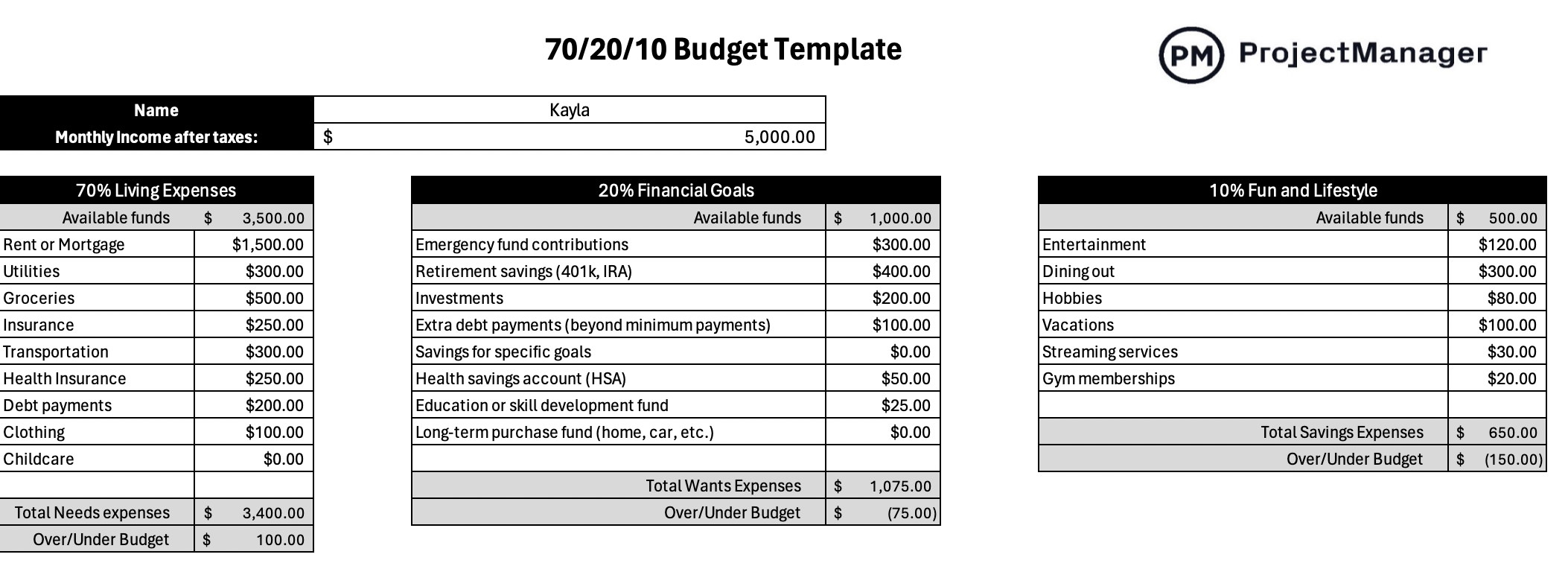
An excerpt of our 70-20-10 template for Excel
Why You Need a 70/20/10 Budget Template
Instead of building a budget from scratch, a 70/20/10 budget template streamlines the entire process. Categories are prebuilt, percentages are already allocated and the layout mirrors real financial behavior. That structure reduces setup time, minimizes errors and makes it easier to stay consistent month after month for most everyday users.
Beyond organization, this 70/20/10 budget template for Excel does the math automatically. Built-in formulas calculate each budget bucket, total every expense and subtract spending from available funds. Users simply enter numbers, and the worksheet instantly shows remaining balances, helping them spot overages or savings opportunities without manual calculations or guesswork.
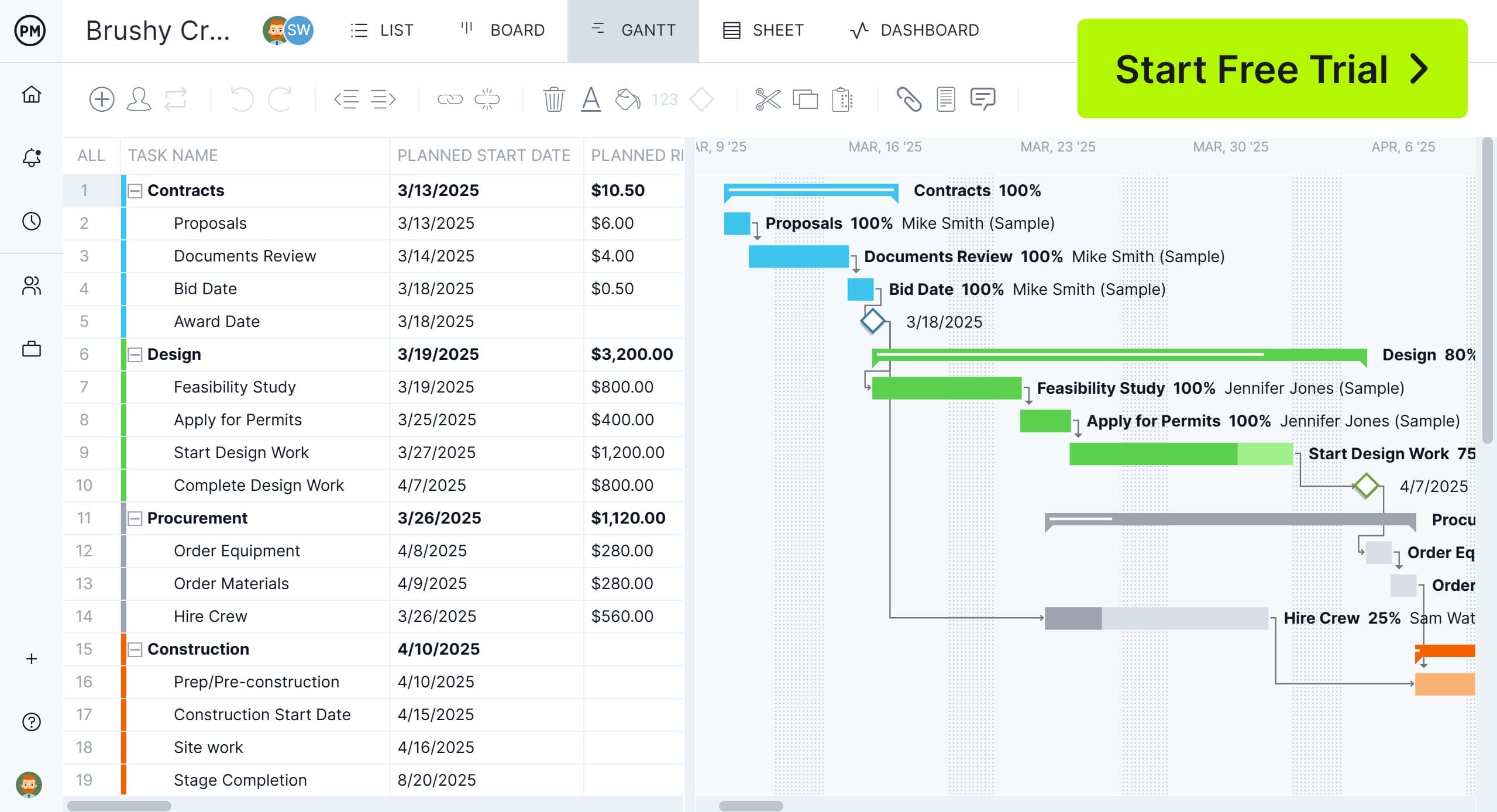
While templates can be a helpful way to manage costs, project management software like ProjectManager is the ideal way to create and maintain budgets. Our robust Gantt charts help you forecast and track budgets accurately in real time. Once tasks, resources and costs are scheduled, you can link dependencies to avoid cost overruns, filter for the critical path and set a baseline to track cost variance. Get started with ProjectManager with a free 30-day trial.
How to Use This 70/20/10 Budget Template
Now, let’s go over the steps users need to take to use this 70/20/10 budget template for Excel.
1. Establish the Monthly, Quarterly or Yearly Income
Everything begins with defining how much money is coming in over a chosen period. Within a 70/20/10 budget template, users enter their income on a monthly, quarterly or yearly basis, and the worksheet immediately allocates that total across living expenses, financial goals and lifestyle spending according to the 70/20/10 structure. This creates an instant, proportionate breakdown.
2. Identify Your Living Expenses
Daily obligations form the foundation of the 70 percent portion of this budget. Living expenses include costs required to maintain basic stability, such as housing, utilities, groceries, transportation, insurance and minimum debt payments. These items are generally non-negotiable and recurring, making this category essential for understanding how much income is committed before allocating money elsewhere. Living expenses may include the following.
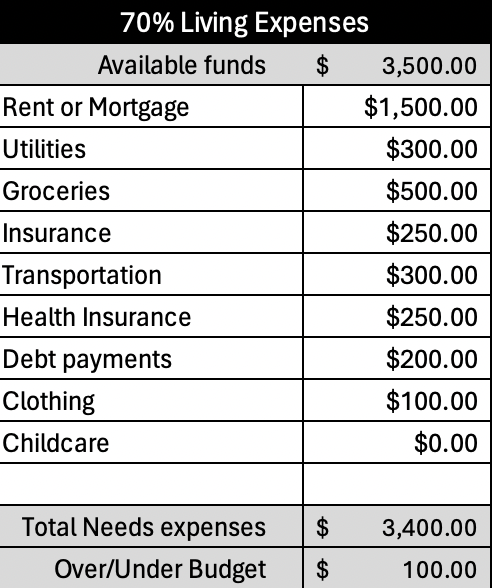
- Rent or Mortgage: Monthly cost for housing, including rent or home loan payments
- Utilities: Essential household services like electricity, water, gas and trash
- Groceries: Food and household essentials purchased for daily meals
- Insurance: Protection costs for health, auto, home or other coverage
- Transportation: Expenses related to commuting, fuel, public transit or vehicle upkeep
- Health Insurance: Monthly premiums for medical coverage and healthcare access
- Debt payments: Required minimum payments toward loans or credit balances
- Clothing: Basic apparel purchases needed for work and daily life
- Childcare: Costs for daycare, babysitting or child supervision services
3. Describe Your Financial Goals
Focused on long-term stability and progress, the 20 percent financial goals category captures how money is intentionally set aside for the future. This bucket typically includes savings contributions, retirement accounts, investments, emergency funds and extra debt payments. Allocating income here supports wealth building, risk reduction and future flexibility without sacrificing essential living needs. Financial goals expenses may include the following.
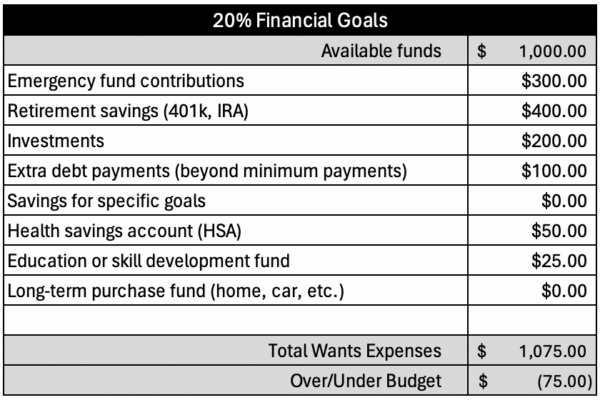
- Emergency fund contributions: Money set aside for unexpected expenses or financial emergencies
- Retirement savings: Contributions toward long-term income after leaving the workforce
- Investments: Funds allocated to assets intended to grow over time
- Extra debt payments: Additional payments made beyond the required minimum loan amounts
- Savings for specific goals: Money reserved for planned purchases or future milestones
- Health savings account (HSA): Tax-advantaged savings for qualified medical expenses
- Education or skill development fund: Savings dedicated to courses, training or professional growth
- Long-term purchase fund: Money saved for major future purchases like a home or car
4. Identify Fun and Lifestyle Activities
Reserved for enjoyment and personal fulfillment, the 10 percent fun and lifestyle category covers discretionary spending. Examples include dining out, entertainment, hobbies, travel, subscriptions and fitness memberships. These expenses are optional, allowing users to enjoy their income responsibly while keeping lifestyle spending controlled and aligned with overall financial priorities. Fun and lifestyle activities expenses include the following.

- Entertainment: Spending on movies, events, games or recreational activities
- Dining out: Money spent eating at restaurants or ordering takeout
- Hobbies: Costs related to personal interests, crafts or leisure activities
- Vacations: Travel expenses for trips, lodging and leisure experiences
- Streaming services: Subscriptions for digital entertainment platforms and content
- Gym memberships: Fees for fitness facilities, classes or training programs
Related Project Management Templates
A 70/20/10 budget template is one practical tool within a broader collection of free project management templates designed for Excel and Word. These resources support financial planning, cost tracking and spending control across many industries. The templates below focus specifically on organizing, monitoring and analyzing costs in a clear, structured way.
Budget Dashboard Template
Designed to provide high-level financial visibility, this free budget dashboard template for Excel consolidates income, expenses and performance indicators into a single view. Visual elements such as charts and summaries make it easier to spot trends, evaluate spending patterns and compare planned budgets against actual results over time.
Project Budget Template
Built for detailed cost planning, this free project budget template for Excel helps users estimate expenses, allocate funds and monitor financial progress throughout a project. Its structured layout supports ongoing comparisons between projected costs and real spending, improving control and accountability during execution.
Expense Report Template
Tracking day-to-day spending becomes simpler with this free expense report template for Excel. It allows teams and individuals to log costs related to travel, materials, meals and other project-related purchases, creating a clear record that supports reimbursement, cost analysis and financial transparency.
How to Make Budgets With ProjectManager
While templates are useful starting points, they fall short when it comes to managing budgets effectively. Static files lack capabilities like real-time tracking, automation and team collaboration. After creating a budget in a template, it still needs to be transferred into project management software to plan, control and monitor performance. ProjectManager is award-winning project and portfolio management software that uses Gantt charts to estimate and build budgets, while multiple project views let teams work in the tools they prefer and track costs as they happen.
Robust Resource Management Helps Manage Costs
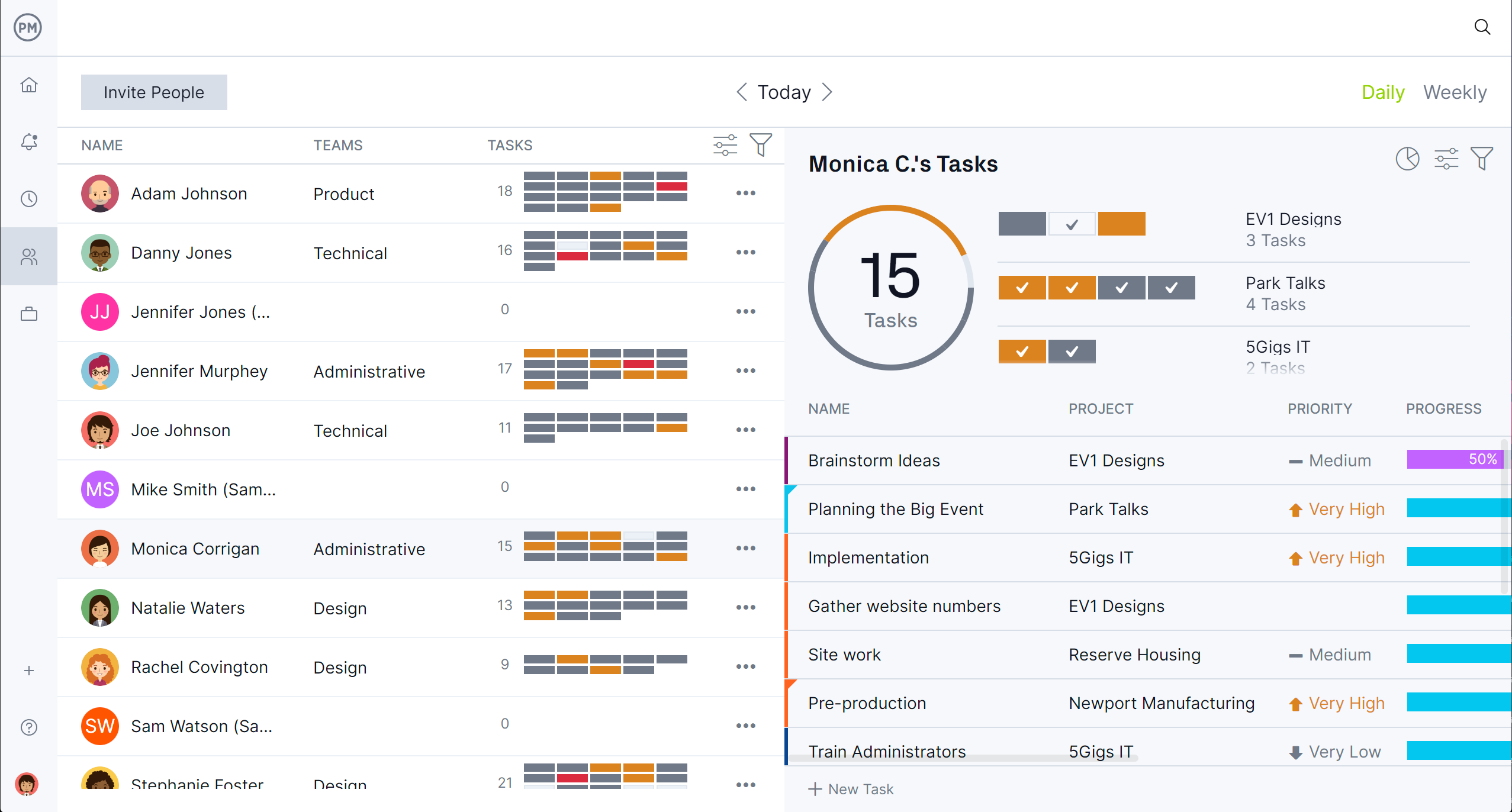
ProjectManager’s resource management tools are designed to control costs by improving how resources are planned and used. Real-time tracking shows availability and workload, helping prevent overspending before it happens. A color-coded workload chart balances assignments across the team, reducing excess labor costs and avoiding burnout. Expense forecasting and visibility into usage also help uncover savings opportunities. In addition, a dedicated team page provides a centralized view of assignments and progress, allowing updates without navigating away.
Track Costs and More With Real-time Dashboards and Reports
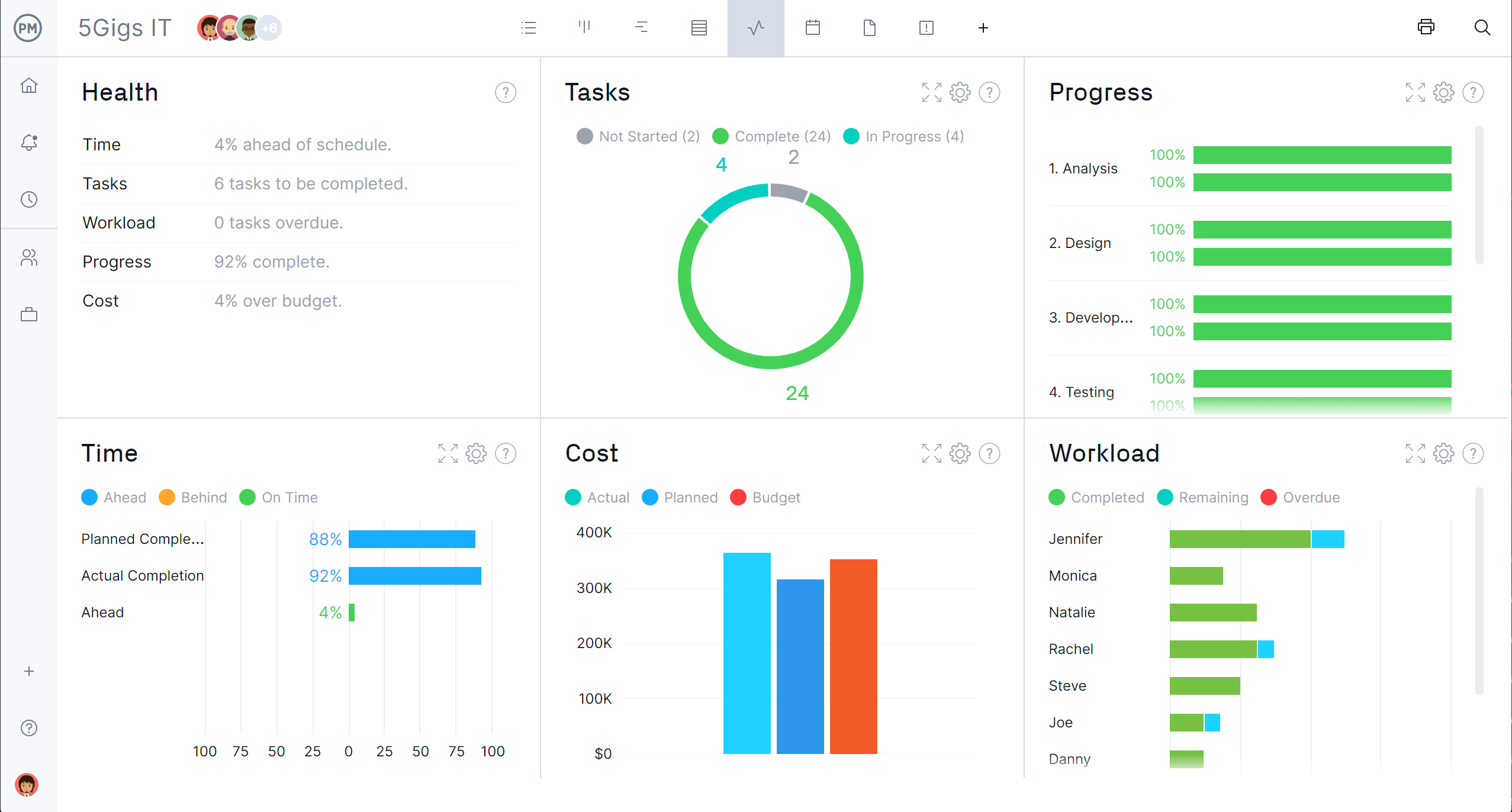
Real-time dashboards give immediate insight into project and portfolio finances by continuously tracking costs and performance. Key indicators such as planned versus actual spending, resource usage and overall budget status are displayed at a glance. Customizable reports provide deeper analysis of expenses, time tracking and spending trends, supporting informed decision-making.
Related Personal Budgeting Content
For those looking to read more about managing their time, creating budgets for businesses and projects and more, check out the links below to recently published blogs on our site.