


Taking control of your money starts with knowing exactly where it’s going before the month begins. A zero-based budget template gives you a structured way to assign every dollar a purpose so nothing slips through the cracks. Instead of guessing at the end of the month, you plan deliberately from the start and stay in control.
Why You Need a Zero-Based Budget Template
A zero-based budget is a budgeting method where you start from zero at the beginning of each month and assign every dollar of income to a specific category. The goal isn’t to spend everything, but to make sure income minus expenses equals zero. That structure forces intentional decisions, prevents leftover cash from drifting and makes your financial priorities visible and measurable.
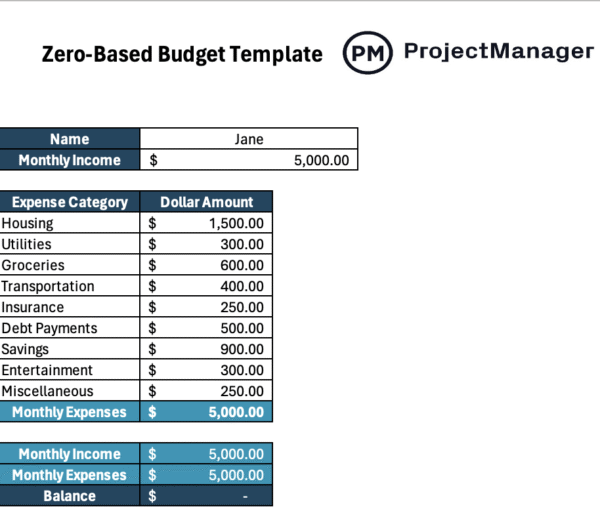
Built in Excel, this zero-based budget template simplifies the process with preconfigured formulas that total expenses and calculate the balance automatically. Users only enter income and planned amounts, and the sheet instantly shows whether the budget reaches zero or needs adjustment.
This zero-based budget template for Excel is ideal for personal budgeting, but if you need to make a budget for a personal or professional project, you should use ProjectManager instead. ProjectManager is an award-winning project management software equipped with robust resource planning, budgeting and cost tracking features such as task lists, project sheets, workload charts, timesheets and real-time dashboards, ideal for creating and monitoring project budgets.
When to Use a Zero-Based Budget Template for Excel
Although this zero-based budget template for Excel is designed primarily for personal monthly budgeting, it can be adapted to fit many planning scenarios. By simply modifying the expense categories to match your situation, the underlying formulas continue to total amounts and calculate the balance automatically, making it flexible for different financial planning needs without rebuilding the structure.
- Household budgeting: Track combined family income and shared expenses in one organized sheet.
- Small business budgeting: Replace personal categories with operating costs such as rent, payroll and marketing.
- Event planning budgets: Allocate funds for venues, catering, equipment and vendors while keeping totals aligned.
How to Use This Zero-Based Budget Template for Excel
This template is designed to automatically calculate your total monthly expenses and remaining balance. You only need to enter your income and expected expenses — all totals are calculated for you.
Step 1: Enter Your Name
Type your name in the name field at the top of the sheet.
Step 2: Enter Your Monthly Income
In the monthly income cell, enter your total take-home income for the month. Include all income sources such as salary, freelance work, rental income or side hustles.
Step 3: Enter Your Expected Monthly Expenses
Under expense category, enter the amount you plan to spend in each category:
- Housing
- Utilities
- Groceries
- Transportation
- Insurance
- Debt Payments
- Savings
- Entertainment
- Miscellaneous
You can adjust the categories if needed, but do not modify the total rows unless you understand the formulas.
Step 4: Review Automatic Calculations
The template will automatically:
- Add up all expense categories to calculate monthly expenses
- Compare monthly income to monthly expenses
- Display the balance
Step 5: Ensure Your Balance Equals Zero
For a true zero-based budget:
- The balance should equal $0
- If the balance is positive, assign the extra money to savings, investments or debt
- If the balance is negative, reduce expenses or adjust allocations until it reaches zero
How to Make a Project Budget with ProjectManager
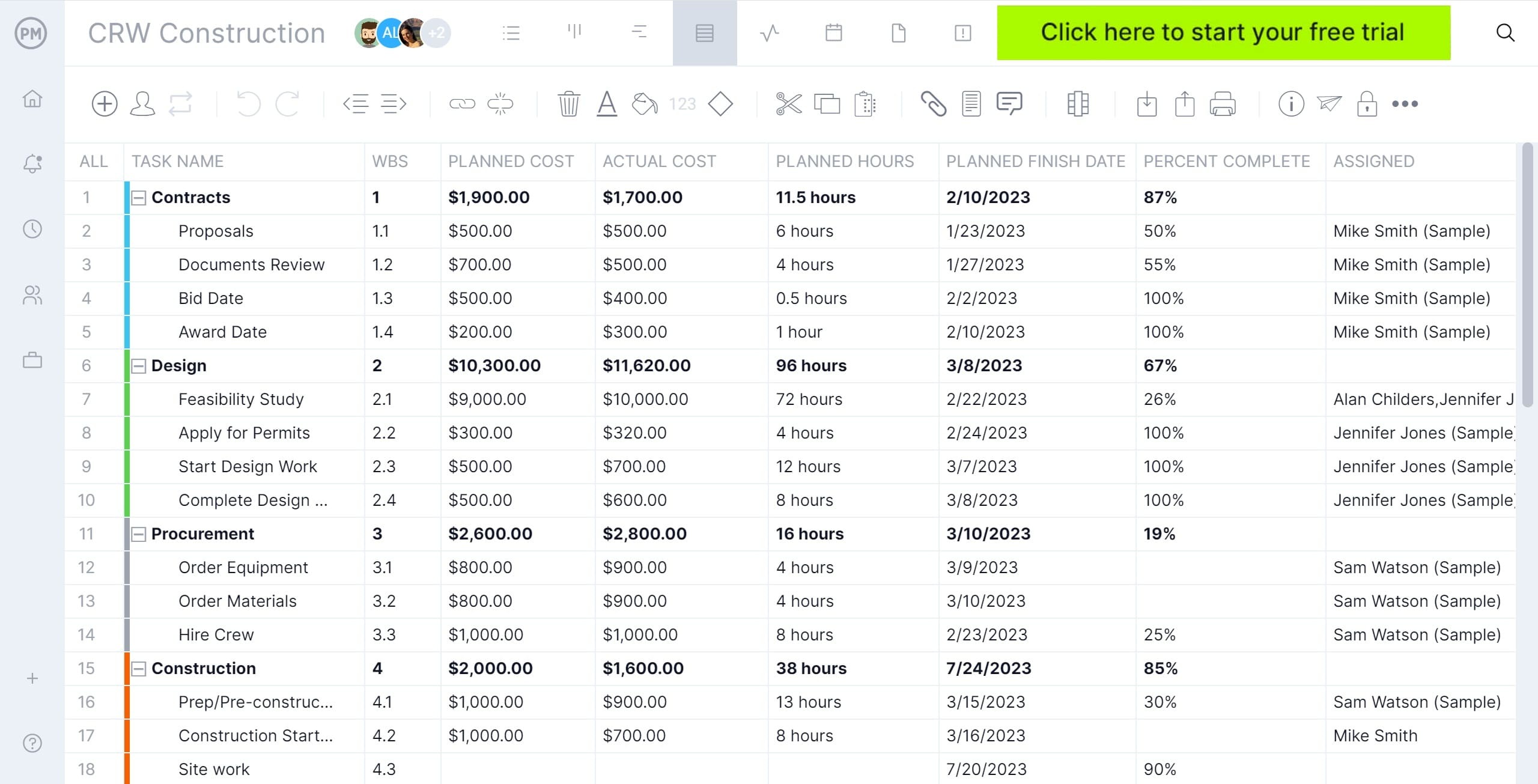
ProjectManager is designed to create detailed project budgets. Simply make a list of project tasks using the list, sheet or Gantt chart view, allocate resources such as people, materials or equipment and estimate their costs. Then, establish a budget amount.
Once the project starts, enter actual project costs and ProjectManager will automatically calculate the difference between estimated costs and actual costs and will display this information in real-time dashboards and reports so you can check whether the project costs are exceeding the budget at a glance. Watch the video to learn more!
What Other Free Templates Can Help with Personal Budgeting
We’ve created over 100 free project management templates for Excel, Word and Google Sheets and also some that can help with personal budgeting. Here are some of them.
Weekly Budget Template
Plan and control short-term spending with this weekly budget template. Track income, fixed bills and day-to-day expenses in smaller increments so you can adjust quickly and prevent overspending before the month gets away from you.
50/30/20 Budget Template
Use this 50/30/20 budget template to divide your income into needs, wants and savings. It provides a balanced structure for managing essentials while still prioritizing long-term financial stability and lifestyle flexibility.
70/20/10 Budget Template
This 70/20/10 budget template allocates income toward living expenses, savings and debt or investing. It offers a practical framework for aggressive financial progress while maintaining control over everyday spending decisions.