


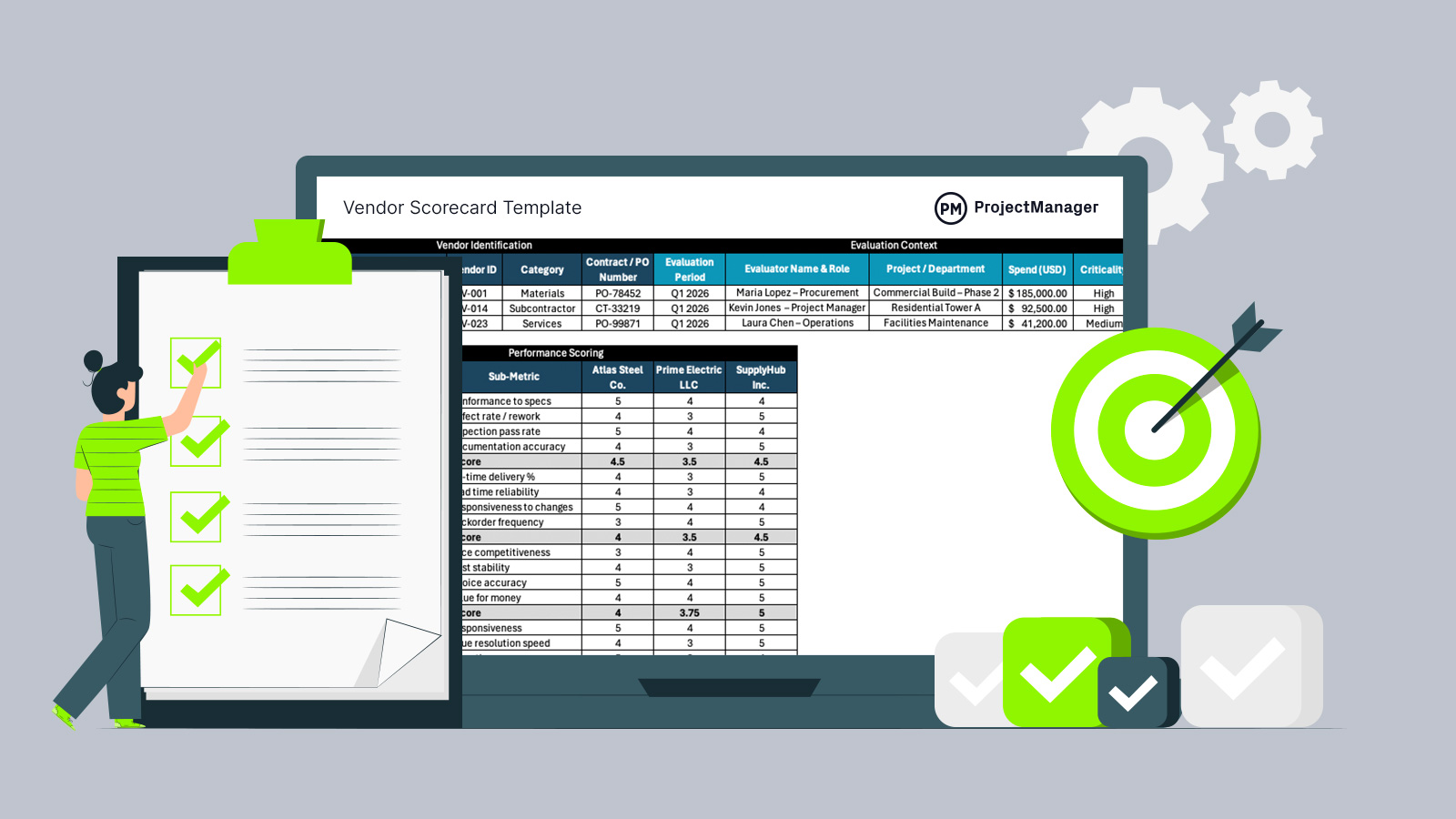
Vendors can strengthen operations or quietly create delays, cost overruns and quality issues. This vendor scorecard template helps businesses across industries evaluate supplier performance consistently, compare results over time and support smarter decisions.
What Is a Vendor Scorecard?
A vendor scorecard is a performance management tool that measures and tracks supplier performance against defined criteria, using standardized metrics, weighted scoring and recurring evaluations to assess quality, delivery, cost and compliance, resulting in more informed vendor management decisions. Teams use it continuously to monitor results, identify issues early and maintain consistent, data-driven supplier evaluations over time.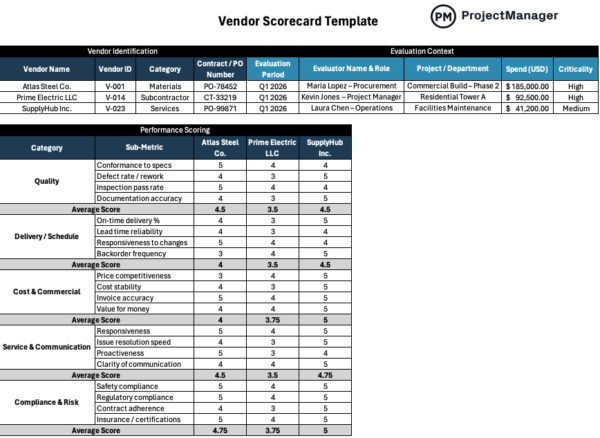
Why You Need a Vendor Scorecard Template
In construction, manufacturing and other operations-heavy industries, vendor performance directly affects project schedules, budgets, quality and risk. Materials can arrive late, service providers can miss requirements and product defects can disrupt downstream work. Because this review process never disappears, a vendor scorecard template matters. It creates a repeatable method for tracking results, comparing vendors across periods and fixing issues before escalation.
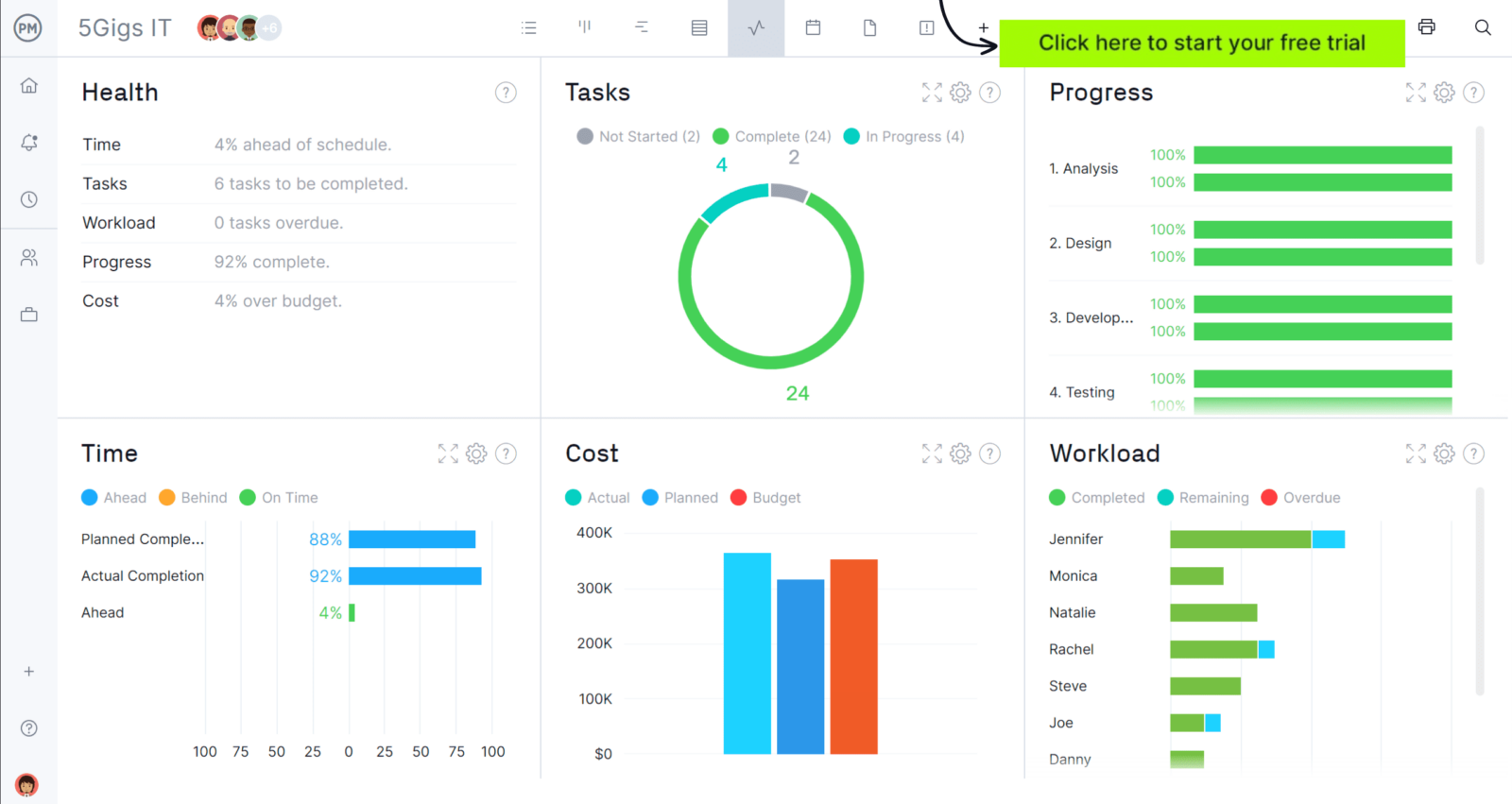
Whenever you’re ready to start managing projects, give ProjectManager a try. ProjectManager is an award-winning project management software designed to plan, schedule and track projects from start to finish. Build detailed project schedules, allocate resources, monitor costs and compare estimates against actual performance using a complete set of powerful project management tools. Get started for free today.
When To Use a Vendor Scorecard Template
At this point, the value of using a vendor scorecard template is already clear. The next step is knowing exactly when businesses across industries put it to work, what situations trigger an evaluation and why structured scoring becomes necessary.
- Use it during quarterly or monthly vendor reviews to measure ongoing performance trends.
- Apply it after repeated late deliveries start affecting production schedules or project milestones.
- Bring it in when quality problems, defects or rework begin increasing costs.
- Use it before contract renewals to support negotiations with documented performance evidence.
- Start one when a new supplier becomes critical to operations and risk.
Who Should Use This Free Vendor Scorecard Template for Excel?
Not every business depends on vendors in the same way. Some industries rely heavily on external suppliers for materials, services or finished goods, making a vendor scorecard template especially valuable for maintaining performance and reducing operational risk.
Construction
On construction projects, multiple vendors supply materials, equipment and specialized labor that directly impact timelines and budgets. Delays, quality issues or safety failures can quickly cascade across phases. Construction businesses can use this vendor scorecard template to track supplier reliability, compare subcontractor performance and ensure vendors consistently meet project requirements without introducing costly disruptions.
Manufacturing
In manufacturing environments, production depends on a steady flow of raw materials, components and outsourced services. Any inconsistency in quality or delivery can halt manufacturing operations or increase defect rates. This vendor scorecard template helps manufacturers monitor supplier performance, maintain production stability and identify vendors that support efficiency, cost control and consistent product output.
Retail
Retail businesses rely on vendors to keep shelves stocked, pricing competitive and customers satisfied. Late shipments, inaccurate orders or poor-quality products can directly affect sales and brand perception. Using this vendor scorecard template allows retailers to evaluate supplier reliability, track fulfillment performance and ensure vendors align with demand fluctuations and inventory strategies.
How to Use This Vendor Scorecard Template
Filling out this vendor scorecard template follows a simple sequence. Each section builds on the previous one, starting with vendor identification and ending with performance scoring, so every supplier evaluation stays structured and comparable.
1. Vendor Identification
Start by entering the basic vendor details exactly as shown in the table. This step ensures every evaluation is tied to the correct supplier, contract and category, allowing consistent tracking and accurate comparisons across different vendors and reporting periods.
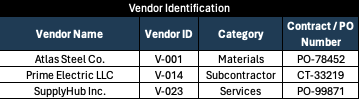
- Vendor ID: A unique internal code assigned to each vendor to differentiate and track them across projects and evaluations.
- Category: Defines the type of vendor, such as materials supplier, subcontractor or service provider, helping segment performance analysis.
- Contract / PO Number: The purchase order or contract reference tied to the vendor’s work, ensuring the evaluation links to a specific agreement.
2. Evaluation Context
Next, capture the context surrounding the evaluation. Enter who is responsible, where the vendor is being used and how important they are to operations. This information adds business relevance to the scorecard and helps prioritize vendor management decisions.

- Evaluator Name & Role: Identifies the person completing the evaluation and their position, ensuring accountability and clarity in how the vendor is being assessed.
- Project / Department: Specifies where the vendor is being used, linking performance to a specific project, site or operational function.
- Spend (USD): Shows how much is being spent on the vendor during the evaluation period, helping assess financial impact and importance.
- Criticality: Indicates how essential the vendor is to operations, typically categorized as high, medium or low based on risk and dependency.
3. Performance Scoring
Now move into scoring vendor performance across each category. Enter a score for every sub-metric based on actual results. This vendor scorecard template automatically calculates the average score for each category using built-in formulas, so you can quickly compare vendors without manual calculations.
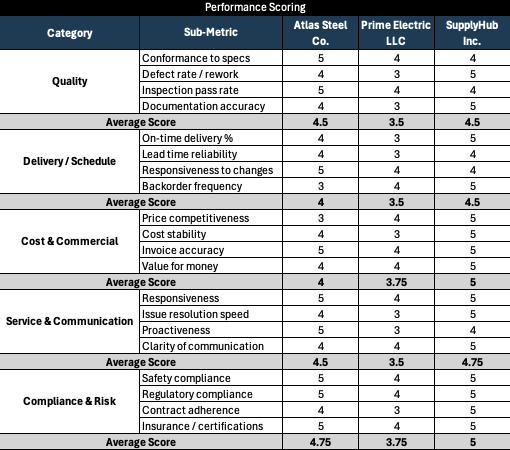
- Quality: Rate how well each vendor meets specifications, minimizes defects, passes inspections and maintains accurate documentation.
- Delivery / Schedule: Score performance based on on-time delivery, reliability of lead times, flexibility to schedule changes and frequency of backorders.
- Cost & Commercial: Evaluate pricing competitiveness, cost stability over time, invoice accuracy and overall value for money.
- Service & Communication: Assess responsiveness, how quickly issues are resolved, level of proactiveness and clarity of communication.
- Compliance & Risk: Measure adherence to safety standards, regulatory requirements, contract terms and validity of certifications or insurance.
- Average Score: Calculated automatically for each category, giving a clear summary of vendor performance without requiring manual input.
4. Weighted Scoring & Final Results
This section is entirely automated. This vendor scorecard template pulls the average scores from each category above, applies the predefined weight percentages and calculates weighted values for every supplier. It then combines those results to produce a final score, showing overall performance on both a 1–5 scale and a 1–100 scale for easy comparison.
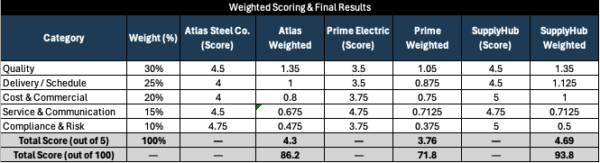
- Category Weights (%): Each performance area (quality, delivery, cost, service and compliance) is assigned a percentage that reflects its importance in the evaluation.
- Score (per category): Automatically pulled from the average scores calculated in the performance scoring section above.
- Weighted Score: Calculated by multiplying each category score by its assigned weight, showing the true impact of that category.
- Total Score (out of 5): The sum of all weighted scores, providing an overall vendor performance rating on a 5-point scale.
- Total Score (out of 100): A converted version of the total score, making it easier to interpret and compare vendors using a percentage-based scale.
ProjectManager Is an Award-Winning Project Management Software
ProjectManager offers robust project management features such as Gantt charts, task lists, workload management charts, timesheets and real-time dashboards and reports. In addition to that, it’s also equipped with AI project insights, online team collaboration features and unlimited file storage that further help project managers ensure nothing falls through the cracks. Watch the video to learn more!
Free Related Templates for Manufacturing and Construction
We’ve created dozens of free project management templates for construction and manufacturing. Here are some of them.
Vendor List Template
This vendor list template centralizes supplier details including contact information, contract data, payment terms and performance indicators, helping businesses maintain organized vendor records, streamline procurement processes and improve supplier relationship management across projects.
Material List Template
This material list template organizes required materials, quantities, specifications, costs and delivery details, allowing project managers to plan procurement accurately, control budgets, coordinate suppliers and ensure materials are available when needed for execution.
Material Requisition Form
This material requisition form standardizes how materials are requested, approved and tracked, capturing item details, quantities, delivery locations and priorities, ensuring clear communication, proper authorization and timely procurement across construction or operational workflows.
Related Content
- What Is Supplier Relationship Management (SRM)?
- Supplier Evaluation Form
- Vendor Management: A Quick Guide
- 8 Procurement Documents (With Free Templates)
- An Introduction to Supply Chain Management (SCM)
If you need a tool to help you manage projects, then signup for our software now at ProjectManager. Our online software helps teams across industries plan, track and oversee projects as they unfold. Sign up for a free 30-day trial today!