


Communicating project ideas clearly often determines whether they gain approval, funding or momentum. A well-structured project presentation template helps transform complex plans into clear, persuasive visuals. By organizing key information consistently, teams can present objectives, timelines and value with confidence while keeping stakeholders focused on what matters most.
A project presentation template helps you focus on the message rather than the formatting. By using a standardized structure, you reduce the risk of missing key details such as timelines, risks, budgets or next steps. This makes presentations easier to update, improves decision-making and ensures executives and stakeholders quickly understand the project’s status and priorities.
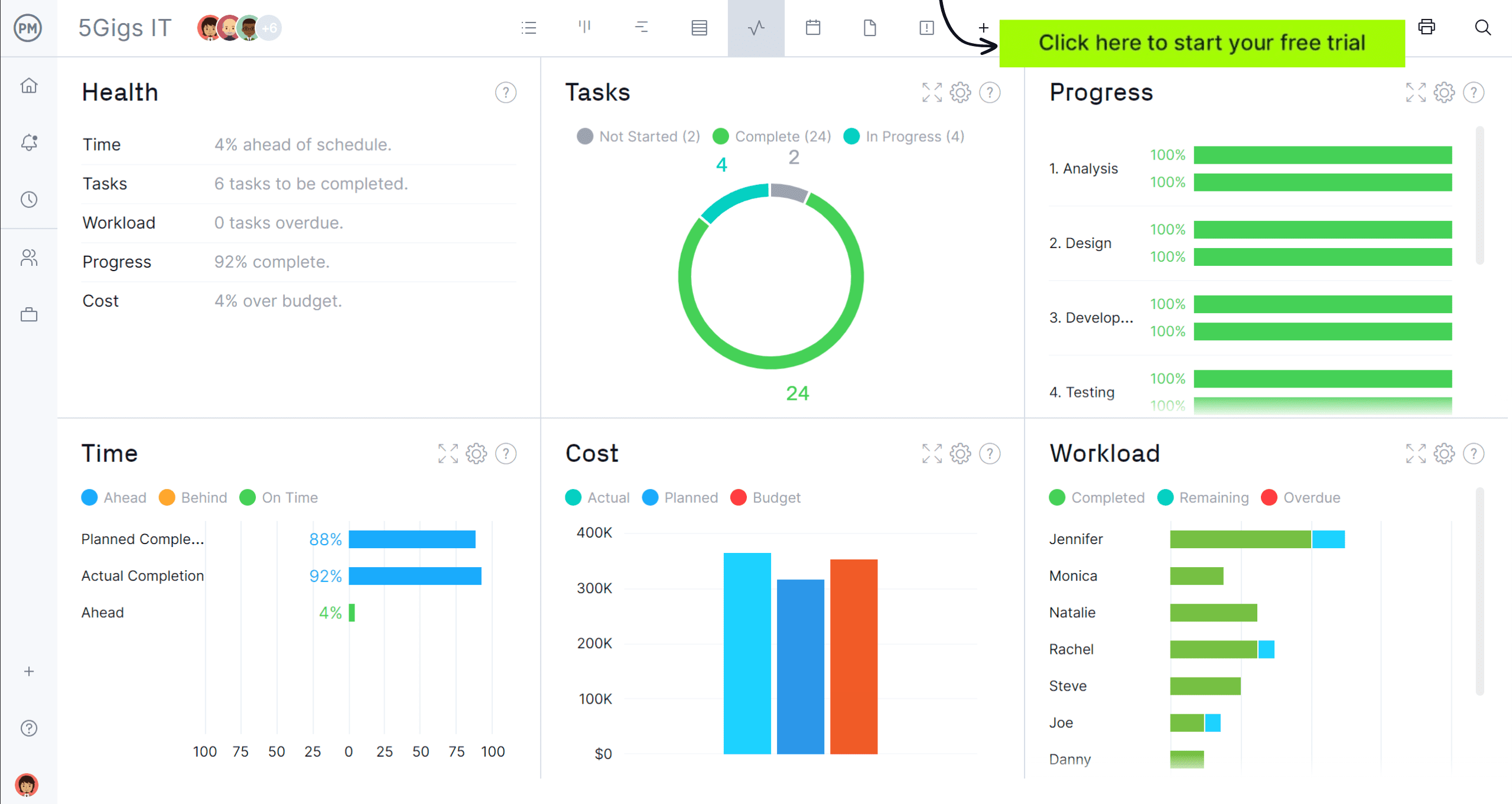
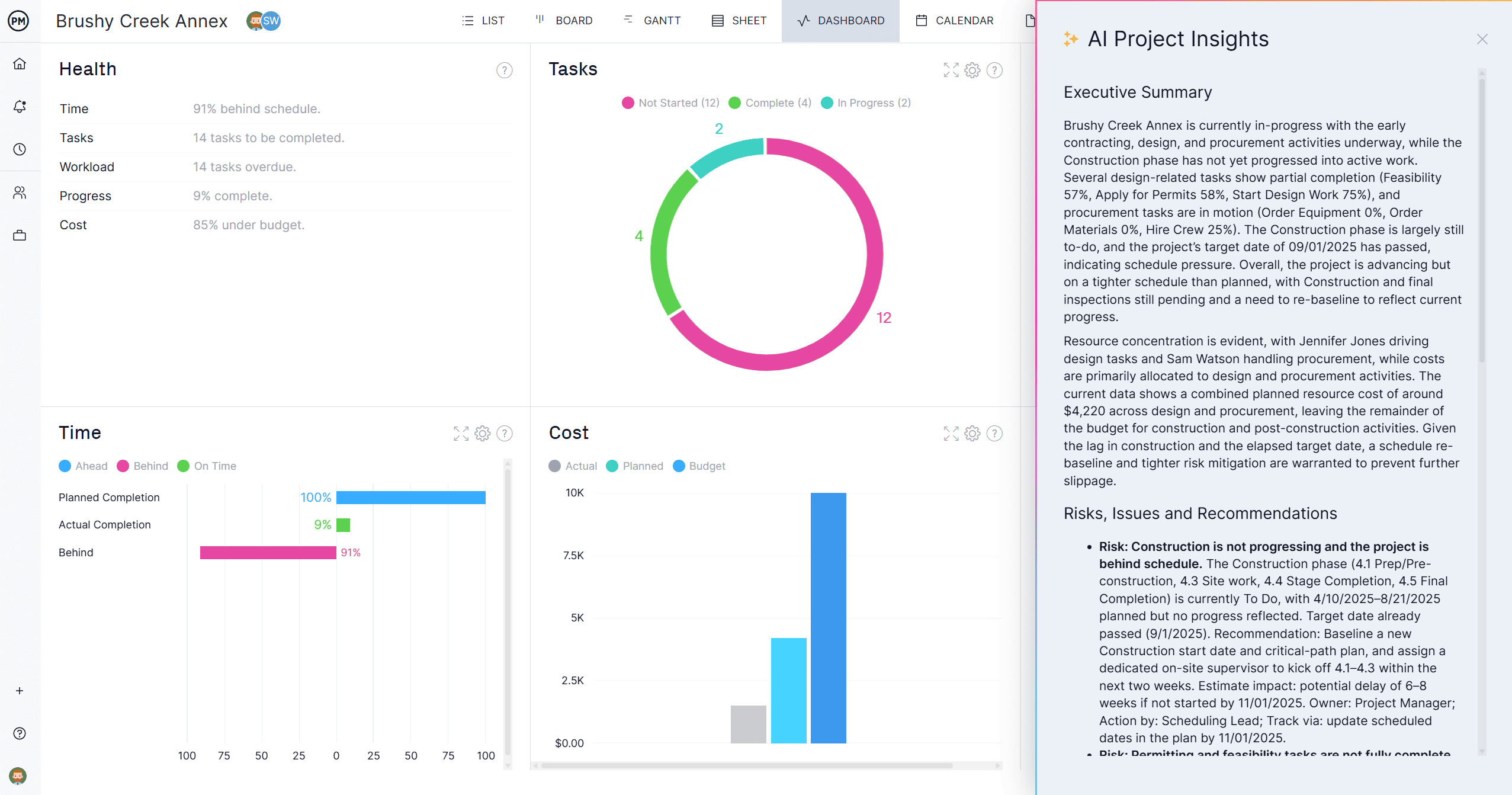
ProjectManager has several built-in features designed to make creating, organizing and delivering strong project presentations easier. Project dashboards, for example, provide real-time summaries of project status, tasks, costs and more. It provides live charts and graphs that you can screenshot or embed directly in your project presentation. These visual aids are ideal for executive presentations where visuals are more powerful than walls of text. Get started with a free 30-day trial.
Why You Need a Project Presentation Template
Rather than building slides from scratch each time, a project presentation template for PowerPoint provides a reliable framework for consistency and clarity. It saves time, enforces logical flow and ensures critical project information is presented professionally, making it easier for audiences to understand scope, risks, progress and expected outcomes.
Not only does it save time and ensure consistency, but it also improves clarity by organizing complex project data into a straightforward format. As a result, it supports faster decision-making and helps project teams deliver more professional and effective updates.

When to Use a Project Presentation Template
Projects move through multiple decision points, and each one may require a different type of presentation. A project presentation template can be adapted to various scenarios where structured communication is essential.
- When pitching a new project to executives or investors and you need to clearly communicate objectives, value proposition, timeline and financial expectations.
- During project kickoff meetings to align stakeholders on scope, roles, milestones and success criteria before execution begins.
- For regular status updates that summarize progress, risks, budget performance and next steps without overwhelming the audience.
- When requesting approval for scope changes, additional funding or schedule adjustments, supported by clear visuals and documented impacts.
- At project closeout to present outcomes, lessons learned and performance results in a structured, easy-to-follow format.
Who Should Use This Free Project Presentation Template?
Project communication is not limited to a single role. A project presentation template supports anyone responsible for explaining plans, progress or outcomes to stakeholders who need clear, concise and well-organized project information.
- Project managers who need to present objectives, timelines, risks and progress updates clearly while keeping teams and stakeholders aligned throughout the project lifecycle.
- Project sponsors responsible for communicating project value, strategic alignment and funding needs to executives or external decision-makers.
- Business analysts translating requirements, assumptions and expected outcomes into structured presentations that support informed decision-making.
- Consultants and advisors presenting project proposals, assessments or recommendations to clients in a professional, easy-to-follow format.
- Team leads or department heads sharing project impacts, dependencies and deliverables with cross-functional stakeholders.
How to Use This Project Presentation Template for PowerPoint
Using a project presentation template effectively requires more than filling in slides. Each section should guide the audience through context, responsibilities and expectations, helping stakeholders understand the project story from origin to execution.
1. Describe the Project Background
Begin by setting the stage for the project. Explain why the project exists, what problem it addresses or what opportunity it supports and also what the key project goals are, giving the audience enough context to understand its purpose without overwhelming them with details.
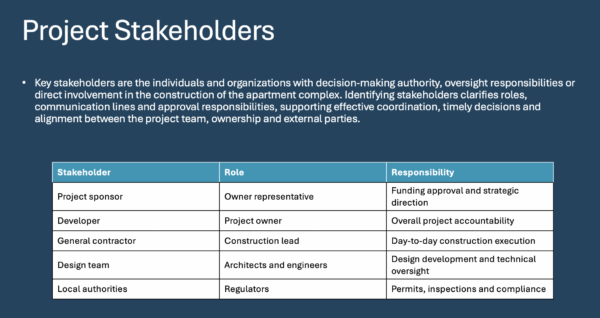
2. Identify Project Stakeholders
Next, clarify who is involved and impacted. Identifying key stakeholders helps the audience understand decision authority, responsibilities and communication channels, reinforcing transparency and setting expectations around collaboration and accountability.
3. Define the Project Scope
Scope definition establishes boundaries for what the project will deliver. In the project scope slide, outline the included work, exclusions, and major deliverables to ensure everyone understands what is being committed to and what falls outside the project.
If you’re having trouble defining the scope of a project, a work breakdown structure is the perfect tool to better understand what the project deliverables are and the work required to make them.

4. Outline the Project Timeline
Finally, present how the project will unfold over time. Highlight major phases, milestones and dependencies to show sequencing and feasibility, helping stakeholders visualize progress and assess whether timelines align with expectations.
It’s essential to note that this is a high-level view of the project timeline, intended for project stakeholders such as investors or executives, rather than a project schedule, which is a much more detailed document designed for the project management team.
If you’d like to make a project schedule or a project roadmap, you can use our Gantt chart templates, or even better, try ProjectManager’s award-winning Gantt chart with a free trial.

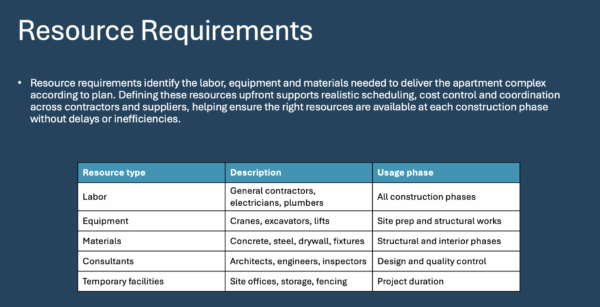
5. Estimate Resource Requirements
After timelines are established, explain the people, skills and tools required to deliver the project. Estimating resources helps stakeholders understand workload implications, capacity constraints and whether existing teams can realistically support execution.
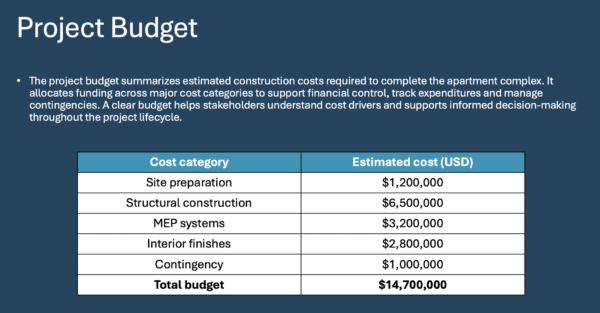
6. Define a Project Budget
Present the financial view of the project by summarizing expected costs and funding needs. Defining the project budget allows stakeholders to assess affordability, evaluate trade-offs and understand how resources translate into financial commitments.
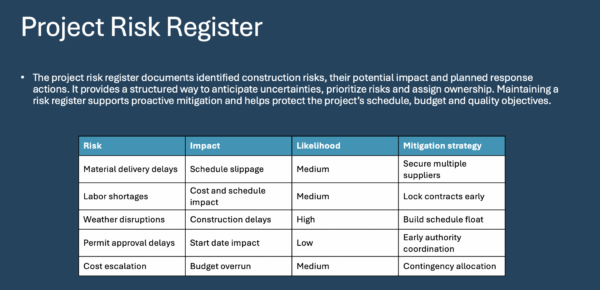
7. Log Project Risks in a Risk Register
Conclude by addressing uncertainty. Logging project risks demonstrates foresight by identifying potential issues, their impact and mitigation strategies, helping stakeholders evaluate preparedness and confidence in the project plan.
How to Manage Projects Effectively with ProjectManager
You can’t have a strong project presentation without a strong project foundation. ProjectManager has tools like a Gantt chart, task list, kanban board, calendar and sheet view to help plan and track projects at every stage. Whether you’re a seasoned project manager putting together a project presentation or you’re just getting started in the field of project management, you can benefit from our suite of dynamic tools.
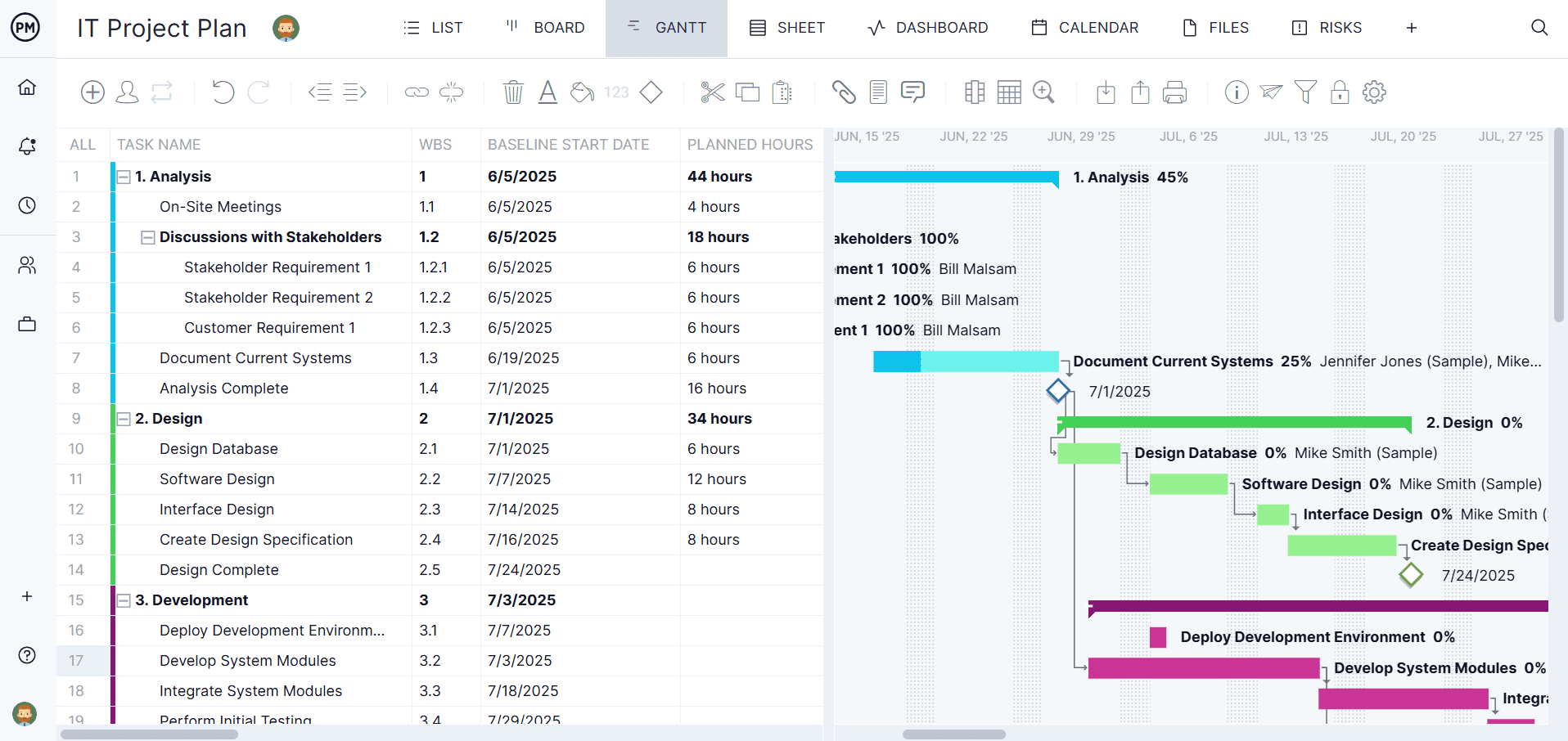
Build Project Plans on the Gantt Chart
The Gantt chart is one of the quintessential project management tools that can help bring your project timeline to life. Our Gantt chart allows you to set a baseline, set milestones, track all four types of dependencies and more. Use it to manage resources, make schedule changes and define the critical path.
Leverage AI Project Insights to Inform Reports
In just one click, AI Project Insights combs through your project data to make informed recommendations. These instant project summaries can help you generate more in-depth reports to share with stakeholders during your project presentation. Use the information to mitigate risks, adjust timelines and ensure resources are allocated effectively.
What Other Templates Can Help with a Project Presentation?
We’ve created over 100 project management templates for Excel, Word and Google Sheets that you can download and use for free.
Project Overview Template
This project overview template summarizes key project details, business justification, objectives, scope boundaries and success criteria, giving stakeholders a concise snapshot of purpose, value and expectations before planning or execution begins.
Project Status Report Template
This project status report template consolidates progress updates, deliverables, milestones, budget, schedule, risks and changes into a single document, giving stakeholders clear visibility into performance, health and next actions.
Related Project Management Content
- Project Presentations: How to Prepare and Deliver a Project Presentation
- Project Documentation: 25 Essential Project Documents
- How to Write a Stakeholder Communication Plan
- Communication Management Techniques Every Project Manager Should Know
ProjectManager is online software that helps teams organize their work no matter where they are or how they work. Get real-time data for better decision-making while connecting teams and fostering collaboration. Deliver products on time, within your budget and with the level of quality that your customers expect. Try ProjectManager for free today!