



Your construction project has gone over budget. Now what? Every decision from this point forward affects profitability, client relationships and the final delivery date. Reacting too slowly can allow costs to escalate even further, while making rushed decisions without understanding the root cause can create new problems elsewhere on the jobsite.
This guide explores the practical steps construction project managers can take to regain control after a project exceeds its budget. We’ll examine the most common reasons construction costs spiral, how to identify the underlying issues, which corrective actions produce the biggest impact and when to adjust schedules, resources or scope. The goal isn’t simply to reduce spending, but to complete the project with the least possible financial and operational impact.
What Makes a Construction Project Go Over Budget?
Construction projects can exceed their budgets for many different reasons, and the cause is rarely a single event. Estimating mistakes, unexpected site conditions, design revisions, poor planning, productivity losses and external market changes can all increase project costs. Identifying the primary driver behind the overrun is the first step toward choosing the right recovery strategy.
There are many reasons why a construction project might go over budget. Here are the 10 most common scenarios:
- Material prices increase unexpectedly after procurement planning, forcing the project to purchase steel, concrete, lumber or other critical supplies at significantly higher market rates.
- Design revisions issued after construction begins require completed work to be demolished, rebuilt or modified, creating additional labor, material and equipment costs.
- Unexpected underground conditions such as rock formations, contaminated soil or hidden utilities require additional excavation, engineering work and specialized equipment.
- Weather events stop field operations for extended periods, reducing crew productivity while equipment rentals, supervision costs and overhead expenses continue accumulating.
- Subcontractors fail to meet production targets or staffing commitments, causing delays that ripple through dependent trades and increase overall project costs.
- Project estimates underestimate labor hours, equipment utilization or material quantities, leaving insufficient budget to complete planned construction activities.
- Poor scheduling creates idle crews, equipment downtime and inefficient sequencing, resulting in unnecessary labor costs and lower jobsite productivity.
- Change orders requested by the owner are approved without accurately accounting for their cumulative impact on labor, procurement and project overhead.
- Construction defects or quality issues require inspections, rework and replacement materials, increasing costs while delaying downstream project activities.
- Equipment breakdowns or late deliveries prevent critical work from progressing, forcing crews to wait or reschedule activities at additional expense.
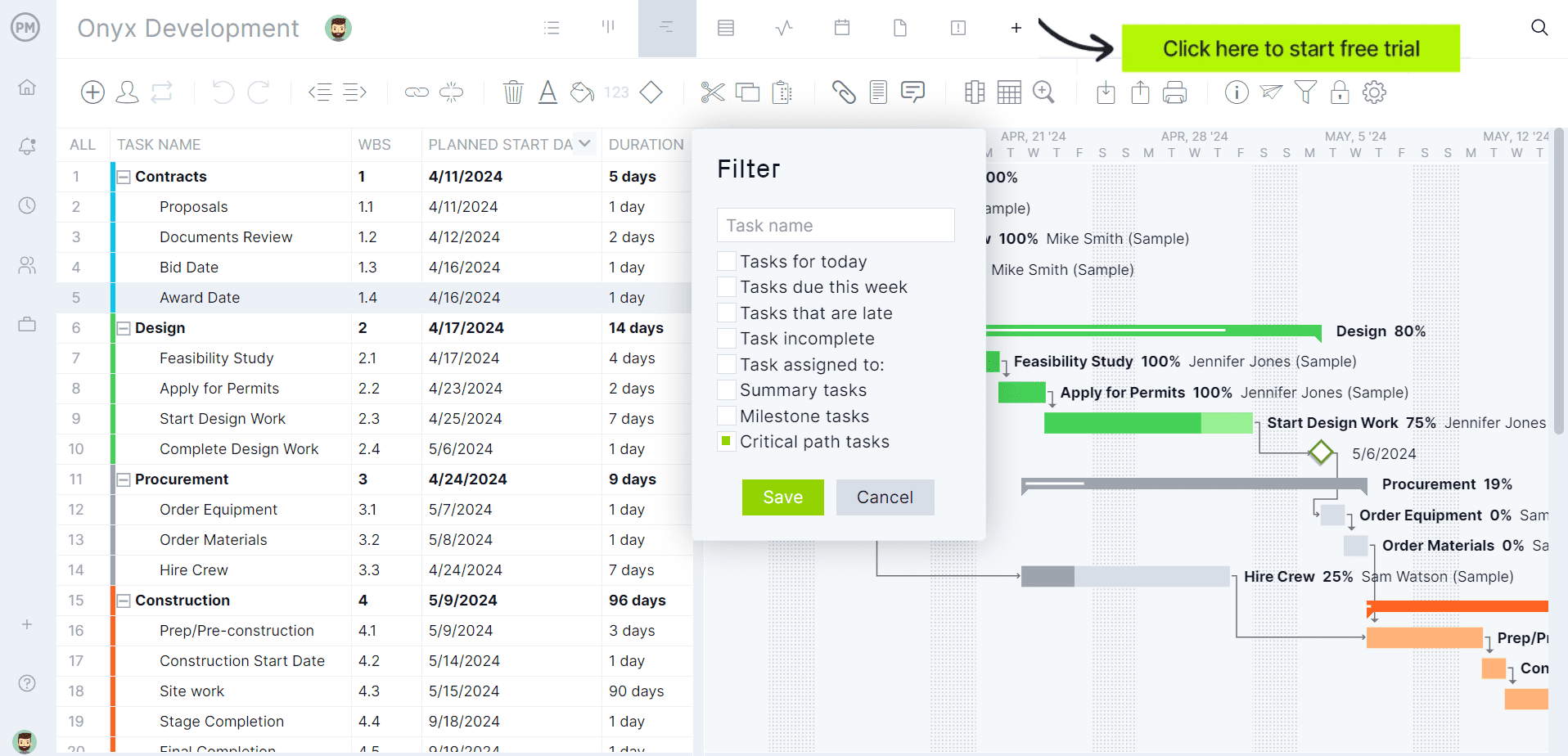
If you’re looking for software to plan, schedule and track construction projects from start to finish, try ProjectManager. ProjectManager is an award-winning project management solution that gives construction project managers the tools they need to ensure projects are completed on time, within budget and within scope. Create detailed construction schedules, estimate costs, allocate resources, set budgets, track progress and compare estimated versus actual project outcomes using real-time dashboards and reports to quickly identify delays or cost overruns. Get started with ProjectManager for free today.
Who Should Get the Project Back on Budget?
Getting a construction project back on budget isn’t one person’s job. Every project involves several stakeholders with different responsibilities and levels of authority. The best results come when each party focuses on solving the problems they control instead of working in isolation.
- Project Manager: Leads the recovery effort by identifying the causes of the budget overrun, updating cost forecasts, prioritizing corrective actions, negotiating change orders and coordinating every stakeholder involved in the project.
- Superintendent: Focuses on improving field productivity by resequencing work, reducing downtime, coordinating crews, minimizing rework and making sure daily operations stay as efficient as possible.
- General Contractor: Reviews overall project performance, reallocates resources between trades, negotiates with subcontractors and suppliers and approves recovery strategies that protect both schedule and profitability.
- Subcontractors: Help recover costs by improving crew productivity, adjusting work plans, avoiding additional delays, communicating field issues early and completing their scope with as little waste as possible.
- Owner: Reviews proposed budget recovery plans, approves necessary funding or scope changes, makes timely decisions and avoids unnecessary revisions that could increase project costs even further.
- Architects and Engineers: Support the recovery by simplifying designs where appropriate, responding quickly to requests for information, reviewing substitutions and reducing unnecessary redesign or construction rework.
Get your free
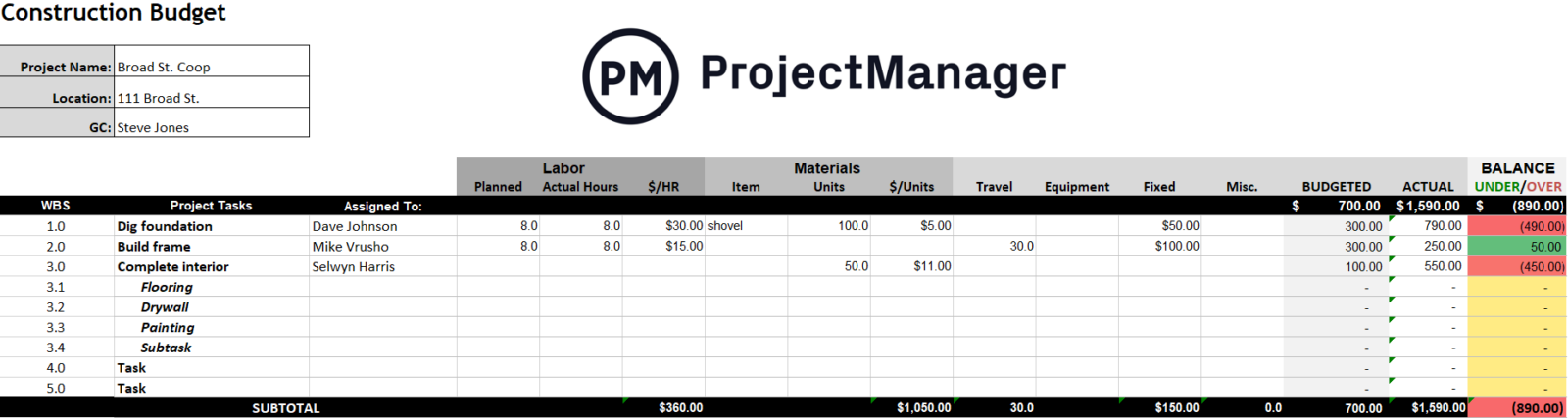
Construction Budget Template
Use this free Construction Budget Template for Excel to manage your projects better.
Step-by-Step Process to Get Your Project Back on Track
Once you know the project is over budget, avoid making quick decisions just to reduce spending. Start by understanding the problem, measuring its financial impact and reviewing the resources already available to recover the project. These first steps will help you build a realistic recovery plan instead of guessing your way through the budget overrun.
1. Identify the Causes for the Cost Overrun
Before cutting costs or changing the schedule, figure out exactly why the project went over budget. Review cost reports, daily logs, change orders and field updates to identify the root cause. Once you’ve pinpointed the problem, you can evaluate practical mitigation strategies instead of treating symptoms that won’t actually solve the budget overrun.
2. Review the Project Cost Baseline
Next, compare current project costs against the cost baseline established during planning. This shows how much the project has exceeded its approved budget and which cost categories have been affected the most. Knowing the size and location of the overrun makes it much easier to prioritize the right corrective actions.
3. Identify and Quantify the Contingency Fund
Most construction projects include a contingency fund that was established during the planning phase to cover unexpected costs. Determine how much contingency remains and compare it with the current budget overrun. If the available contingency covers the difference, recovery becomes much simpler. If not, additional cost-saving measures or funding will likely be necessary.
4. Communicate with Stakeholders
Once you’ve determined whether the contingency fund covers the budget overrun, communicate the findings to the project stakeholders. If the contingency is enough, explain what caused the additional costs and how those funds will bring the project back on budget. If it isn’t enough, everyone needs to understand the situation before deciding on the best path forward.
- Reduce the project scope: Work with the owner to postpone or eliminate non-essential features, finishes or optional work that doesn’t affect the building’s core functionality or contractual requirements.
- Negotiate additional funding: If the overrun resulted from owner-requested changes, unforeseen site conditions or other legitimate circumstances, present supporting documentation and request additional project funding.
- Renegotiate supplier and subcontractor agreements: Meet with vendors and trade partners to explore better pricing, revised payment schedules, bulk purchasing opportunities or other cost-saving arrangements that benefit both parties.
- Improve field productivity: Adjust crew sizes, resequence work, eliminate bottlenecks and reduce idle time so remaining activities are completed more efficiently without sacrificing quality or safety.
- Strengthen cost controls: Increase the frequency of cost tracking, require approval for discretionary spending, closely monitor labor productivity and address small budget variances before they become much larger problems.
- Consider schedule adjustments: If the contract allows it, extending certain activities may reduce overtime, equipment standby costs and labor premiums, resulting in lower overall project costs than attempting to recover the schedule at any price.
Construction Cost Management Techniques to Get Your Project Back on Track
Getting a project back on budget often requires more than simply cutting costs. Construction managers use proven planning and cost control techniques to understand where the project stands, forecast future performance and identify opportunities to recover lost time or money. The methods below are among the most effective for making informed recovery decisions.
Value Engineering
Value engineering helps reduce project costs without sacrificing quality, safety or functionality. Value engineering consists in having the construction project team review materials, construction methods and design details to find more cost-effective alternatives that deliver the same or at least a very similar result. It’s one of the most common ways to recover from a budget overrun while still meeting the project’s original objectives. In most cases, value engineering is the only viable and realistic way to bring a construction project back on budget when the contingency fund can’t cover the project’s cost overrun.
Cost-to-Complete Analysis
A cost-to-complete analysis estimates how much money is still needed to finish the remaining work. By comparing forecasted costs with the available budget, project managers can determine the size of the financial gap and decide whether cost reductions, additional funding or scope changes are needed to complete the project successfully.
Earned Value Management
Earned value management compares the work completed against the project’s planned budget and schedule. Instead of looking only at how much money has been spent, it measures whether the project is getting enough value from that spending. This helps managers identify performance problems early and make better recovery decisions before costs increase further.
How ProjectManager Helps You Get a Construction Project Back on Budget
ProjectManager is project management software that helps construction teams plan, schedule and control project costs from start to finish. Once a project goes over budget, it gives managers the tools to understand what happened, measure the financial impact and take corrective action before costs continue increasing.
With Gantt charts, resource management, real-time dashboards and cost tracking features, construction teams can monitor performance, reallocate resources, compare planned versus actual progress and make better decisions throughout the recovery process.
Gantt Charts
ProjectManager’s Gantt charts make it easier to understand where a project started drifting off budget. Set a project baseline to compare planned dates, costs and progress against actual performance as work moves forward.
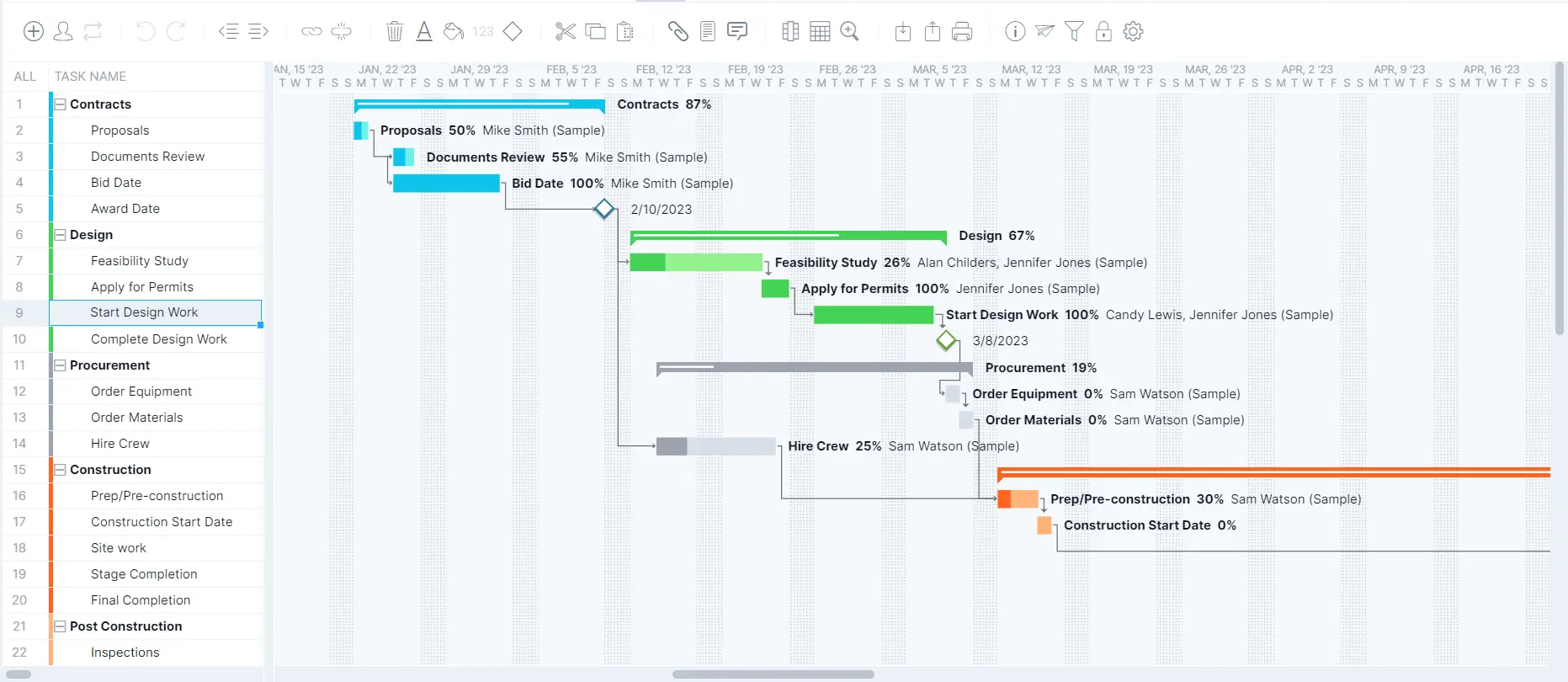
Critical path analysis helps identify the activities that directly affect the completion date, while task dependencies keep work properly sequenced. Managers can also assign labor and equipment at the task level, making it easier to shift resources where they’ll have the greatest impact and recover from budget overruns.
Real-Time Project Dashboards
ProjectManager’s real-time dashboards provide an instant snapshot of project performance without waiting for manual reports. Managers can monitor RAG status indicators for schedule, cost and overall project health while tracking planned versus actual progress across key metrics.
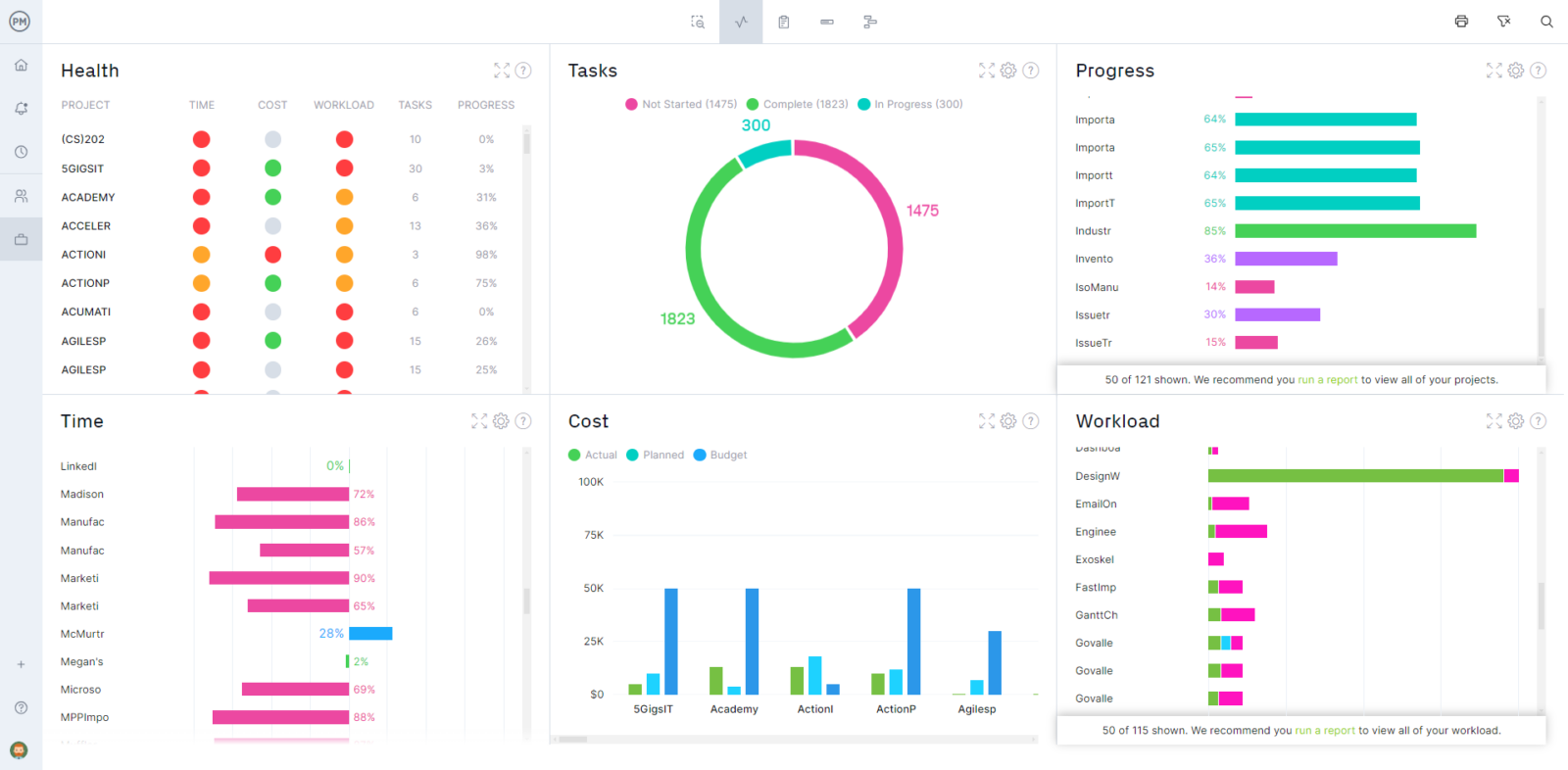
For construction firms managing multiple jobs, portfolio dashboards provide visibility across every project, making it easier to identify budget issues early, prioritize corrective actions and focus attention where financial risks are greatest.
Integrations
Getting a construction project back on budget requires accurate financial data as much as effective project management. ProjectManager integrates with leading accounting, ERP and business management platforms, allowing project managers to compare project performance with real-time financial information. Having both operational and cost data in one place makes it easier to identify budget issues, evaluate recovery strategies and make informed financial decisions.
Acumatica
The Acumatica integration connects ProjectManager with construction ERP data such as job costs, budgets and financial performance. This gives project managers better visibility into where money is being spent, helping them identify the causes of cost overruns and evaluate whether proposed recovery actions will keep the project financially viable.
MYOB
integrating with MYOB brings accounting information such as expenses, invoices and payroll into the project management workflow. With current financial data readily available, construction teams can monitor spending more closely, identify unnecessary costs and make faster decisions to bring the project back under budget.
QuickBooks
The QuickBooks integration combines project performance with accounting data, giving managers a clearer view of labor costs, expenses and overall budget performance. As corrective actions are implemented, teams can monitor their financial impact in real time and verify whether those decisions are successfully bringing the construction project back on budget.
ProjectManager is online construction project management software that empowers teams to plan, manage and track their projects in real time. It connects architects, engineers, project managers and field crews through a single platform where they can collaborate, share updates and monitor progress from anywhere. Get started with ProjectManager today for free.
