



Businesses eventually reach a point where manual bookkeeping, disconnected spreadsheets and separate payroll or invoicing tools slow down day-to-day operations. MYOB is one of the best-known accounting platforms in Australia and New Zealand, making it a common choice for organizations evaluating software that can centralize financial management, payroll, tax compliance and business reporting.
Choosing accounting software affects much more than bookkeeping. The right platform influences cash flow visibility, payroll accuracy, compliance, budgeting and the quality of financial decisions. This guide explores MYOB’s pricing, features, advantages, limitations, frequently asked questions and alternatives to help you determine whether it fits your business.
What Is MYOB?
MYOB is an accounting and business management software platform used to manage financial operations, payroll, invoicing, reporting and tax compliance. It is commonly used by small and medium-sized businesses, accountants and bookkeepers in Australia and New Zealand to record transactions, monitor cash flow and meet local compliance requirements.
Rather than relying on separate systems for bookkeeping, payroll, banking, invoicing and financial reporting, organizations can manage these activities within a connected platform. Depending on the product and subscription plan, MYOB also offers inventory management, project tracking, business insights, employee management, integrations and cloud-based collaboration with accountants and advisors.
If you need a project management tool that integrates with MYOB Acumatica, try ProjectManager. ProjectManager is award-winning project management software that gives businesses across industries the tools they need to ensure projects are completed on time, within budget and within scope. It allows project managers to make detailed project schedules, estimate costs, allocate resources, set budgets, track progress and compare planned versus actual project outcomes using real-time dashboards and reports to identify delays or cost overruns quickly. Get started with ProjectManager for free today.
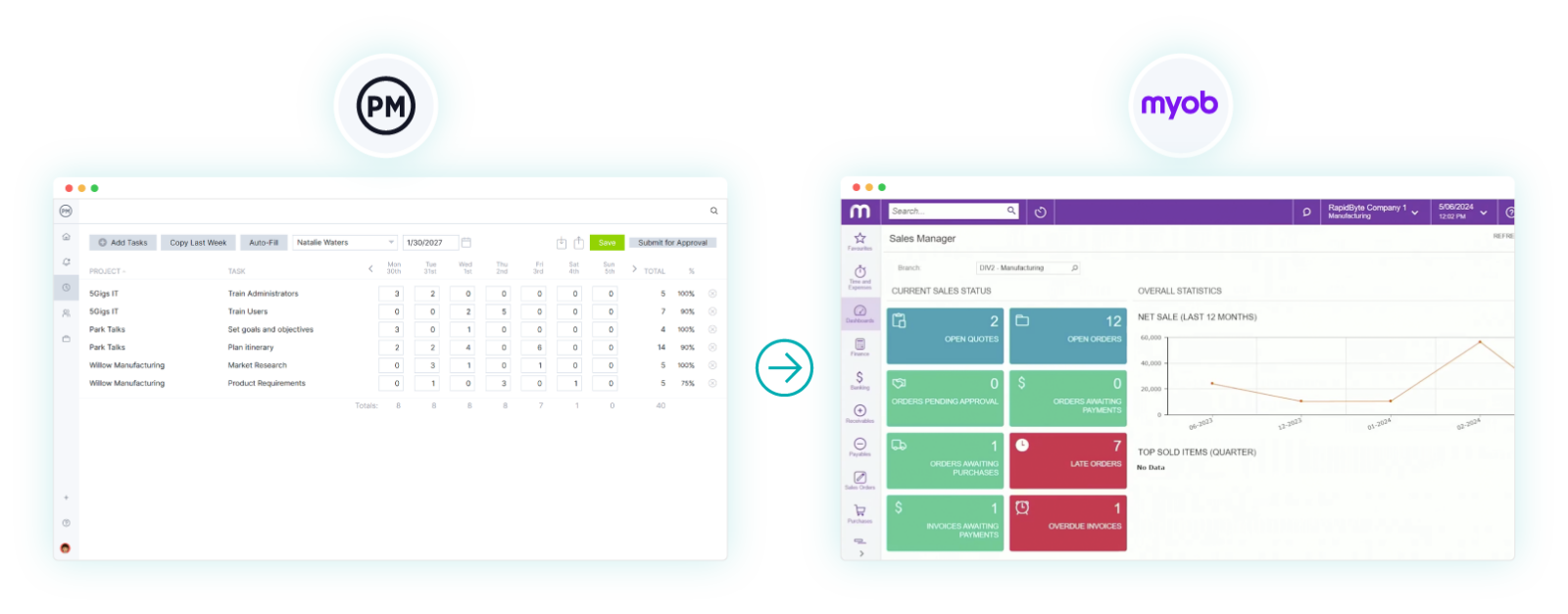
MYOB Views
Unlike project management software that revolves around Gantt charts or kanban boards, MYOB organizes work through financial records, business dashboards and job tracking screens. These views help business owners, accountants and finance teams monitor transactions, analyze profitability and manage day-to-day accounting activities without switching between multiple systems.
- Business Dashboard: Provides an overview of key financial metrics such as cash flow, account balances, outstanding invoices, bills and business performance, allowing users to quickly assess the company’s financial position.
- Jobs View: Tracks income, expenses and profitability for individual jobs, projects, departments or locations. Users can assign transactions to specific jobs, compare actual costs against budgets and generate reports to evaluate financial performance.
- Bank Transactions View: Displays imported bank transactions for reconciliation, helping users categorize income and expenses, match payments with invoices and maintain accurate financial records.
- Reports View: Organizes financial statements and business reports, including profit and loss statements, balance sheets, cash flow reports, GST reporting and job profitability reports for better financial analysis and compliance.
MYOB Key Features
MYOB combines accounting, payroll and business management capabilities within a single platform. While feature availability varies by product and subscription, the software is designed to help businesses manage their finances, maintain compliance and gain better visibility into day-to-day operations.
- Invoicing: Creates and sends professional invoices, tracks payment status and allows businesses to accept online payments to improve cash flow and reduce manual follow-up.
- Expense Management: Records business expenses, captures receipts digitally and categorizes transactions to simplify bookkeeping and maintain accurate financial records.
- Bank Feeds: Imports transactions directly from supported financial institutions, making it easier to reconcile accounts and reduce manual data entry.
- Payroll: Processes employee payroll while supporting payroll tax calculations, superannuation, leave management and Single Touch Payroll (STP) reporting for eligible Australian businesses.
- Inventory Management: Tracks inventory quantities, monitors stock movements and manages product information to help businesses maintain accurate inventory records.
- Job Tracking: Assigns income and expenses to individual jobs or projects, enabling businesses to monitor profitability, compare costs and evaluate financial performance by job.
- Budget Management: Creates budgets and compares projected financial results against actual performance to identify variances and improve financial planning.
- Cash Flow Monitoring: Provides real-time visibility into receivables, payables, bank balances and upcoming obligations to help businesses manage liquidity.
- Tax and GST Management: Records GST transactions, prepares Business Activity Statement (BAS) information and maintains financial records that support tax compliance requirements.
- Project Time Billing: Records billable time and expenses against customer jobs so businesses can accurately invoice clients for labor and project-related costs.
MYOB Plans & Pricing
MYOB offers several subscription plans designed to support businesses at different stages of growth, from sole traders to established organizations with more advanced accounting and operational requirements. Available products include MYOB Solo, MYOB Business Lite, MYOB Business Pro, AccountRight Plus and AccountRight Premier. Features, promotional offers and pricing may change over time, so businesses should verify current information directly with MYOB before selecting a subscription.
| Pricing Plan | Starting Price* | What’s Included |
| MYOB Solo | Annual subscription | Mobile-first accounting for sole traders, including invoicing, expense tracking, receipt capture and basic business reporting. |
| MYOB Business Lite | Starting from published monthly pricing* | Cloud accounting with invoicing, bank feeds, expense management, GST and BAS tracking, reporting and optional payroll for small businesses. |
| MYOB Business Pro | Starting from published monthly pricing* | Adds advanced reporting, inventory capabilities, unlimited bank feeds, payroll options for growing businesses and expanded automation features. |
| AccountRight Plus | Starting from published monthly pricing* | Includes advanced inventory management, job tracking, time billing, integrated payroll and the flexibility to work online or offline. |
| AccountRight Premier | Starting from published monthly pricing* | Includes all AccountRight Plus features along with multi-currency support and functionality for businesses with more complex financial operations. |
*MYOB publishes standard pricing on its website and frequently offers promotional discounts for new customers. Because subscription pricing and promotional offers change periodically, always verify the latest pricing directly on MYOB’s official pricing page before making a purchasing decision.
Pros and Cons of MYOB
No accounting platform is the right fit for every business. MYOB delivers a comprehensive set of financial management tools that simplify bookkeeping, payroll and compliance, but its suitability depends on factors such as company size, operating region and the complexity of accounting requirements.
Pros
MYOB’s greatest strength is its ability to centralize core financial processes within a single platform. Businesses can manage accounting, payroll, invoicing, reporting and tax obligations together, reducing manual work and improving visibility into their financial performance.
- Combines accounting, invoicing, payroll and financial reporting in one integrated business management platform.
- Supports Australian and New Zealand tax requirements, including GST, BAS reporting and Single Touch Payroll (STP) for eligible Australian businesses.
- Offers job tracking and inventory management capabilities that help businesses monitor costs and profitability.
- Connects directly with supported banks through bank feeds, reducing manual transaction entry and simplifying account reconciliation.
- Allows business owners and accountants to collaborate using shared financial data stored in the cloud.
Cons
Although MYOB provides strong accounting functionality, organizations with sophisticated project planning or enterprise resource management requirements may need additional software. Some advanced capabilities are also limited to higher-tier products or specific subscription plans.
- Many features are designed specifically for businesses operating in Australia and New Zealand, making the platform less suitable for companies in other regions.
- Advanced capabilities such as multi-currency support, expanded inventory management and certain payroll features are only available in selected products or plans.
- Project management functionality focuses primarily on job costing and financial tracking rather than task scheduling, resource planning or project execution.
- Organizations requiring advanced manufacturing, supply chain or enterprise resource planning workflows may need a dedicated ERP solution.
- Businesses with complex project portfolios may require separate project management software for Gantt charts, resource allocation, workload balancing and portfolio reporting.
- Financial reporting emphasizes accounting performance and compliance instead of earned value management, project forecasting or operational performance metrics.
ProjectManager Integration with MYOB
ProjectManager and MYOB complement each other by connecting project execution with financial management. ProjectManager helps project-based organizations plan schedules, assign resources, balance workloads, track time, monitor budgets and oversee projects from initiation through completion. Through its integration with MYOB Acumatica, project data such as tasks, timesheets, resources and costs can sync with accounting records, reducing duplicate data entry and improving collaboration between operations and finance teams.
While ProjectManager gives project managers real-time visibility into schedules, resource utilization and project performance, MYOB handles accounting, financial reporting, payroll, invoicing and ERP processes. Together, the two platforms provide a connected environment where operational and financial data stay aligned, helping organizations improve reporting accuracy, control project costs and make better business decisions.
ProjectManager Helps Manage Projects Across Industries
MYOB excels at managing accounting, payroll and financial compliance, but it is not designed to manage complex projects from planning through delivery. Businesses that need to coordinate schedules, assign resources, monitor workloads and track project execution often pair their accounting software with dedicated project management software such as ProjectManager.
ProjectManager is work and project management software that helps teams plan, execute and monitor projects in real time. Users can build detailed project schedules with Gantt charts, assign work, balance team workloads, track time, manage costs and monitor progress through live dashboards and automated reports. This gives project managers operational visibility while allowing finance teams to continue using MYOB for accounting and payroll.
ProjectManager supports the entire project lifecycle. Teams can manage task dependencies, identify the critical path, allocate resources, compare planned versus actual progress and oversee multiple projects from portfolio roadmaps. AI-powered insights, workflow automation and more than 1,000 integrations help organizations connect project execution with the rest of their business systems.
Watch the video below to learn more!
MYOB FAQ
The questions below cover common topics business owners, accountants and finance teams review when evaluating MYOB. These answers are based on MYOB’s official product pages, pricing information and support documentation.
Does MYOB Offer a Free Trial?
Yes, MYOB offers free trials for selected products. MYOB Business Pro and AccountRight Premier currently advertise a 14-day free trial on their official product pages, while MYOB support documentation also explains how users can access trial versions for AccountRight products.
Does MYOB Support Single Touch Payroll?
Yes, MYOB supports Single Touch Payroll reporting for eligible Australian payroll users. MYOB states that STP reporting lets businesses report employee payroll information to the Australian Taxation Office and helps keep payroll reporting compliant.
Does MYOB Support Multi-Currency Accounting?
Yes, MYOB supports multi-currency accounting in AccountRight Premier. Businesses that deal with overseas customers or suppliers can create transactions in foreign currencies, send quotes and invoices in more than 150 currencies and review cash flow across currencies.
Can Accountants and Bookkeepers Access MYOB?
Yes, MYOB allows users on Lite, Pro, AccountRight Plus and AccountRight Premier plans to share account access with an advisor, accountant, bookkeeper or business partner. Access permissions can be adjusted so each person only sees and does what their role requires.
MYOB Videos and Tutorials
If you’d like to see MYOB before choosing a subscription, the videos below provide a practical introduction to the platform. They demonstrate how businesses use MYOB to manage accounting, payroll, invoicing, reporting and other financial processes, making it easier to understand how the software fits into everyday operations.
MYOB Business Overview
This quick overview introduces MYOB Business and demonstrates its core accounting capabilities. On the MYOB youtube channel, viewers can see how the platform handles invoicing, expense tracking, bank reconciliation, payroll, reporting and other financial workflows that help small and medium-sized businesses manage their day-to-day accounting.
Learn What People Say About MYOB
Marketing materials explain what software is designed to do, but customer reviews often reveal how it performs in daily business operations. The resources below summarize recurring feedback from review platforms and community discussions so you can better understand MYOB’s strengths and potential limitations before making a decision.
MYOB Software Reviews from Real Users
Review websites highlight common themes that appear across thousands of user experiences. While individual opinions vary, these summaries focus on recurring feedback rather than isolated comments.
MYOB Reviews from G2
G2 reviewers frequently praise MYOB for its accounting capabilities, payroll tools, bank reconciliation features and ease of managing day-to-day bookkeeping. Common criticisms mention the learning curve for new users, occasional performance issues and the complexity of some advanced accounting workflows.
MYOB Reviews from Capterra
Capterra users appreciate MYOB’s financial reporting, invoicing, payroll processing and tax compliance features. Less favorable reviews often reference subscription costs, customer support experiences and the time required to learn the platform’s more advanced functionality.
MYOB Reviews from TrustRadius
TrustRadius reviewers describe MYOB as a reliable accounting solution for small and medium-sized businesses, particularly in Australia and New Zealand. Reported advantages include comprehensive bookkeeping features and payroll management, while drawbacks typically involve implementation complexity and customization limitations.
MYOB Discussion Forums from Real Users
Community discussions provide additional perspective by showing how business owners, accountants and finance professionals evaluate MYOB in real-world situations. These conversations often compare MYOB with competing accounting software and discuss implementation experiences.
MYOB Discussions on Reddit
Reddit users commonly compare MYOB with accounting platforms such as Xero and QuickBooks. Discussions frequently cover migration experiences, payroll functionality, ease of use, pricing and the advantages of each platform for different business sizes.
MYOB Community Forum
The official MYOB Community allows customers to ask product questions, troubleshoot issues and share best practices. Topics range from payroll and tax reporting to bank feeds, inventory management and software updates, providing insight into the questions most MYOB users encounter.
If you need a tool to help you manage projects, then sign up for our software now at ProjectManager. Our online software helps teams across industries plan, track and oversee projects as they unfold. Sign up for a free 30-day trial today!
